# PrimeReact # Configuration Application wide configuration for PrimeReact. ## Provider Wrap your app with `PrimeReactProvider` in your main file (like `main.tsx` or `App.tsx`). This enables PrimeReact features everywhere in your app: ```tsx showLineNumbers {10, 12} import { StrictMode } from 'react' import { createRoot } from 'react-dom/client' import App from './App.tsx' import { PrimeReactProvider } from "@primereact/core"; ... createRoot(document.getElementById('root')!).render( , ) ``` ## Theme Style mode offers theming based on a design token based architecture. See the [styled mode](/docs/theming/styled) documentation for details such as building your own theme. ```tsx full showLineNumbers {2,5-12,16} ... import Aura from '@primeuix/themes/aura'; import { PrimeReactProvider } from '@primereact/core'; const theme = { preset: Aura, options: { prefix: 'p', darkModeSelector: 'system', cssLayer: false } }; ReactDOM.createRoot(document.getElementById('root')).render( ); ``` ## Unstyled Unstyled mode instructs the components not to add any built-in style classes so that they can be styled using custom css or libraries like Tailwind and Bootstrap. Visit Unstyled mode documentation for more information. ```tsx showLineNumbers {6} import { PrimeReactProvider } from '@primereact/core'; ... ReactDOM.createRoot(document.getElementById('root')).render( ); ``` ## PassThrough Defines the shared pass through properties per component type. Visit the [Pass Through Props](/docs/passthrough) documentation for more information. ```tsx showLineNumbers {4-8,12} import { PrimeReactProvider } from '@primereact/core'; ... const pt = { slider: { handle: { className: 'bg-primary text-primary-contrast' } } }; ReactDOM.createRoot(document.getElementById('root')).render( ); ``` ## PassThrough Options Used to configure the `ptOptions` properties of components. The `mergeSections` defines whether the sections from the main configuration gets added and the `mergeProps` controls whether to override or merge the defined props. Defaults are `true` for `mergeSections` and `false` for `mergeProps`. ```tsx showLineNumbers {4-7,11} import { PrimeReactProvider } from '@primereact/core'; ... const ptOptions = { mergeSections: true, mergeProps: false }; ReactDOM.createRoot(document.getElementById('root')).render( ); ``` ## InputVariant Input fields come in two styles, default is `outlined` with borders around the field whereas `filled` alternative adds a background color to the field. Applying `p-variant-filled` to an ancestor of an input enables the filled style. If you prefer to use filled inputs in the entire application, use a global container such as the document body or the application element to apply the style class. Note that in case you add it to the application element, components that are teleported to the document body such as Dialog will not be able to display filled inputs as they are not a descendant of the application root element in the DOM tree, to resolve this case set inputVariant to `filled` at PrimeReactProvider as well. ```tsx showLineNumbers {6} import { PrimeReactProvider } from '@primereact/core'; ... ReactDOM.createRoot(document.getElementById('root')).render( ); ``` # LLMs.txt LLMs.txt is a file that contains the LLMs for the PrimeReact documentation. ## /llms.txt The [llms.txt](https://llmstxt.org/) file is an industry standard that helps AI models better understand and navigate the PrimeReact documentation. It lists key pages in a structured format, making it easier for LLMs to retrieve relevant information.   ## /llms-full.txt The `llms-full.txt` file is a complete list of all the pages in the PrimeReact documentation. It is used to help AI models understand the entire documentation set.   ## .md extension Add a `.md` to a page’s URL to display a Markdown version of that page. # Pass Through The Pass Through attributes is an API to access the internal DOM Structure of the components. ## Introduction In traditional 3rd party UI libraries, users are limited to the API provided by component author. This API commonly consists of props, events and slots. Whenever a requirement emerges for a new customization option in the API, the component author needs to develop and publish it with a new release. Vision of PrimeTek is _Your components, not ours_. The pass through feature is a key element to implement this vision by exposing the component internals in order to apply arbitrary attributes and listeners to the DOM elements. The primary advantage of this approach is that it frees you from being restricted by the main component API. We recommend considering the pass-through feature whenever you need to tailor a component that lacks a built-in feature for your specific requirement. ## Basic Each component has a special `pt` property to define an object with keys corresponding to the available DOM elements. Each value can either be a string, an object or a function that returns a string or an object to define the arbitrary properties to apply to the element such as styling, aria, data-\* or custom attributes. If the value is a string or a function that returns a string, it is considered as a className definition and added to the className attribute of the element. Every component documentation has a dedicated section to document the available section names exposed via PT. Most common usage of `pt` is styling and customization. Example below styles an unstyled Panel component with Tailwind CSS library. ```tsx 'use client'; import { Panel } from 'primereact/panel'; export default function BasicDemo() { return (
Header

Lorem ipsum dolor sit amet, consectetur adipiscing elit, sed do eiusmod tempor incididunt ut labore et dolore magna aliqua. Ut enim ad minim veniam, quis nostrud exercitation ullamco laboris nisi ut aliquip ex ea commodo consequat. Duis aute irure dolor in reprehenderit in voluptate velit esse cillum dolore eu fugiat nulla pariatur. Excepteur sint occaecat cupidatat non proident, sunt in culpa qui officia deserunt mollit anim id est laborum.

); } ``` ## Global Defines the shared pass through properties per component type. For example, with the configuration below all panel headers have the `bg-primary` style class and the all autocomplete components have a fixed width. These settings can be overriden by a particular component as components `pt` property has higher precedence over global `pt`. ```tsx pt: { panel: { header: { className: 'bg-primary text-primary-contrast' } }, autocomplete: { input: { root: 'w-64' // OR { class: 'w-64' } } } } ``` ## Custom CSS The `global` property has a `css` option to define custom css that belongs to a global `pt` configuration. Common use case of this feature is defining global styles and animations related to the pass through configuration. ```tsx pt: { global: { css: \` .my-button { border-width: 2px; } \` }, button: { root: 'my-button' } } ``` # Tailwind CSS Integration between PrimeReact and Tailwind CSS both in styled and unstyled modes. ## Overview Tailwind CSS is a popular CSS framework based on a utility-first design. The core provides flexible CSS classes with predefined CSS rules to build your own UI elements. For example, instead of an opinionated `btn` className as in Bootstrap, Tailwind offers primitive classes like `bg-blue-500`, `rounded` and `p-4` to apply a button. Tailwind is an outstanding CSS library, however it lacks a true comprehensive UI suite when combined with Vue.js, this is where PrimeReact comes in by providing a wide range of highly accessible and feature rich UI component library. The core of PrimeReact does not depend on Tailwind CSS, instead we provide the necessary integration points such as the primeui tailwind plugin and the Tailwind version for the unstyled mode. Tailwind CSS and PrimeReact can be used together via two main approaches. Simple approach is using Tailwind CSS _around_ PrimeReact components for layout purposes as demonstrated in the samples section below, the advanced approach takes the integration a step further by allowing Tailwind CSS _within_ the component internals to style the entire UI suite in unstyled mode. ## Tailwind Theme PrimeTek offers the Tailwind CSS version of the entire PrimeReact UI suite in unstyled mode based on the `@apply` directive with IntelliSense support. Visit the [Tailwind version of PrimeReact](https://tailwind.primereact.org) for the documentation, demos and additional resources. Tailwind version of PrimeReact instead of the default styled mode is not tested with Tailwind v4. For the next-gen version of this project, we are building a new UI Component library based on the code ownership model where components are located inside your project source instead of imported from npm. This new library is powered by Unstyled PrimeReact Core and Tailwind v4. ## Plugin The [tailwindcss-primeui](https://www.npmjs.com/package/tailwindcss-primeui) is an official plugin by PrimeTek to provide first className integration between a Prime UI library like PrimeReact and Tailwind CSS. It is designed to work both in styled and unstyled modes. In styled mode, for instance the semantic colors such as primary and surfaces are provided as Tailwind utilities e.g. `bg-primary`, `text-surface-500`, `text-muted-color`. If you haven't already done so, start by integrating Tailwind into your project. Detailed steps for this process can be found in the Tailwind [documentation](https://tailwindcss.com/). After successfully installing Tailwind, proceed with the installation of the PrimeUI plugin. This single npm package comes with two libraries: the CSS version is compatible with Tailwind v4, while the JS version is designed for Tailwind v3. ```bash npm i tailwindcss-primeui ``` ### Tailwind v4 In the CSS file that contains the tailwindcss import, add the `tailwindcss-primeui` import as well. ```css @import 'tailwindcss'; @import 'tailwindcss-primeui'; ``` ### Tailwind v3 Use the plugins option in your Tailwind config file to configure the plugin. ```tsx // tailwind.config.js import PrimeUI from 'tailwindcss-primeui'; export default { // ... plugins: [PrimeUI] }; ``` ## Extensions The plugin extends the default configuration with a new set of utilities whose values are derived from the PrimeReact theme in use. All variants and breakpoints are supported e.g. `dark:sm:hover:bg-primary`. | Class | Property | | --------------------------- | ----------------------------------------- | | `primary-[50-950]` | Primary color palette. | | `surface-[0-950]` | Surface color palette. | | `primary` | Default primary color. | | `primary-contrast` | Default primary contrast color. | | `primary-emphasis` | Default primary emphasis color. | | `border-surface` | Default primary emphasis color. | | `bg-emphasis` | Emphasis background e.g. hovered element. | | `bg-highlight` | Highlight background. | | `bg-highlight-emphasis` | Highlight background with emphasis. | | `rounded-border` | Border radius. | | `text-color` | Text color with emphasis. | | `text-color-emphasis` | Default primary emphasis color. | | `text-muted-color` | Secondary text color. | | `text-muted-color-emphasis` | Secondary text color with emphasis. | ## Dark Mode In styled mode, PrimeReact uses the `system` as the default `darkModeSelector` in theme configuration. If you have a dark mode switch in your application, ensure that `darkModeSelector` is aligned with the Tailwind dark variant for seamless integration. Note that, this particular configuration isn't required if you're utilizing the default system color scheme. Suppose that, the darkModeSelector is set as `my-app-dark` in PrimeReact. ```tsx showLineNumbers import { StrictMode } from 'react'; import { createRoot } from 'react-dom/client'; import App from './App.tsx'; import { PrimeReactProvider } from '@primereact/core'; import Aura from '@primeuix/themes/aura'; const primereact = { theme: { preset: Aura, options: { darkModeSelector: '.my-app-dark' } } }; createRoot(document.getElementById('root')!).render( ); ``` ### Tailwind v4 Add a custom variant for dark with a custom selector. ```css @import "tailwindcss"; @import "tailwindcss-primeui"; @custom-variant dark (&:where(.my-app-dark, .my-app-dark *)); //dark mode configuration ``` ### Tailwind v3 Use the plugins option in your Tailwind config file to configure the plugin. ```tsx // tailwind.config.js import PrimeUI from 'tailwindcss-primeui'; export default { darkMode: ['selector', '[className~="my-app-dark"]'], //dark mode configuration plugins: [PrimeUI] }; ``` ## Override Tailwind utilities may not be able to override the default styling of components due to css specificity, there are two possible solutions; Important and CSS Layer. ### Important Use the `!` as a prefix to enforce the styling. This is not the recommend approach, and should be used as last resort to avoid adding unnecessary style classes to your bundle. ##### Tailwind v4 ```tsx ``` ##### Tailwind v3 ```tsx ``` ### CSS Layer CSS Layer provides control over the css specificity so that Tailwind utilities can safely override components. ##### Tailwind v4 Ensure `primereact` layer is after `theme` and `base`, but before the other Tailwind layers such as `utilities`. ```tsx showLineNumbers import { StrictMode } from 'react'; import { createRoot } from 'react-dom/client'; import App from './App.tsx'; import { PrimeReactProvider } from '@primereact/core'; import Aura from '@primeuix/themes/aura'; const primereact = { theme: { preset: Aura, options: { cssLayer: { name: 'primereact', order: 'theme, base, primereact' } } } }; createRoot(document.getElementById('root')!).render( ); ``` No change in the CSS configuration is required. ```css @import 'tailwindcss'; @import 'tailwindcss-primeui'; ``` ##### Tailwind v3 The `primereact` layer should be between base and utilities. ```tsx showLineNumbers import { StrictMode } from 'react'; import { createRoot } from 'react-dom/client'; import App from './App.tsx'; import { PrimeReactProvider } from '@primereact/core'; import Aura from '@primeuix/themes/aura'; const primereact = { theme: { preset: Aura, options: { cssLayer: { name: 'primereact', order: 'tailwind-base, primereact, tailwind-utilities' } } } }; createRoot(document.getElementById('root')!).render( ); ``` Tailwind v3 does not use native `layer` so needs to be defined with CSS. ```css @layer tailwind-base, primereact, tailwind-utilities; @layer tailwind-base { @tailwind base; } @layer tailwind-utilities { @tailwind components; @tailwind utilities; } ``` ## Samples Example uses cases with PrimeReact and Tailwind CSS. ### Color Palette PrimeReact color palette as utility classes. ```tsx 'use client'; export default function ColorPaletteDemo() { const colors = ['primary', 'surface']; const shades = [0, 50, 100, 200, 300, 400, 500, 600, 700, 800, 900, 950]; return (
    {colors.map((color, i) => (
  • {color}
    {shades.map((shade) => (
    {shade}
    ))}
  • ))}
primary
highlight
box
); } ``` ```tsx
primary
highlight
box
``` ### Starter The Tailwind v4 and PrimeReact [starter example](https://github.com/primefaces/primereact-examples/tree/main/vite-quickstart-nextgen) is available to demonstrate the integration setup with an example dashboard. ## Animations The plugin also adds extended animation utilities that can be used with the styleclass and animateonscroll components. ### Animation Name | Class | Property | | ---------------------- | ----------------------------------------------------------------------------------------------------------------------------------------------------------------------------------------------------- | | `animate-enter` | animation-name: enter;
--p-enter-opacity: initial;
--p-enter-scale: initial;
--p-enter-rotate: initial;
--p-enter-translate-x: initial;
--p-enter-translate-y: initial; | | `animate-leave` | animation-name: leave;
--p-leave-opacity: initial;
--p-leave-scale: initial;
--p-leave-rotate: initial;
--p-leave-translate-x: initial;
--p-leave-translate-y: initial; | | `animate-leave` | fadein 0.15s linear | | `animate-fadein` | fadein 0.15s linear | | `animate-fadeout` | fadeout 0.15s linear | | `animate-slidedown` | slidedown 0.45s ease-in-out | | `animate-slideup` | slideup 0.45s cubic-bezier(0, 1, 0, 1) | | `animate-scalein` | scalein 0.15s linear | | `animate-fadeinleft` | fadeinleft 0.15s linear | | `animate-fadeoutleft` | fadeoutleft 0.15s linear | | `animate-fadeinright` | fadeinright 0.15s linear | | `animate-fadeoutright` | fadeoutright 0.15s linear | | `animate-fadeinup` | fadeinup 0.15s linear | | `animate-fadeoutup` | fadeoutup 0.15s linear | | `animate-fadeindown` | fadeindown 0.15s linear | | `animate-fadeoutup` | fadeoutup 0.15s linear | | `animate-width` | width 0.15s linear | | `animate-flip` | flip 0.15s linear | | `animate-flipup` | flipup 0.15s linear | | `animate-flipleft` | fadein 0.15s linear | | `animate-flipright` | flipright 0.15s linear | | `animate-zoomin` | zoomin 0.15s linear | | `animate-zoomindown` | zoomindown 0.15s linear | | `animate-zoominleft` | zoominleft 0.15s linear | | `animate-zoominright` | zoominright 0.15s linear | | `animate-zoominup` | zoominup 0.15s linear | ### Animation Duration | Class | Property | | -------------------------- | -------------------------- | | `animate-duration-0` | animation-duration: 0s | | `animate-duration-75` | animation-duration: 75ms | | `animate-duration-100` | animation-duration: 100ms | | `animate-duration-200` | animation-duration: 200ms | | `animate-duration-300` | animation-duration: 300ms | | `animate-duration-400` | animation-duration: 400ms | | `animate-duration-500` | animation-duration: 500ms | | `animate-duration-700` | animation-duration: 700ms | | `animate-duration-1000` | animation-duration: 1000ms | | `animate-duration-2000` | animation-duration: 2000ms | | `animate-duration-3000` | animation-duration: 300ms | | `animate-duration-[value]` | animation-duration: value | ### Animation Delay | Class | Property | | -------------------- | ----------------------- | | `animate-delay-none` | animation-duration: 0s | | `animate-delay-75` | animation-delay: 75ms | | `animate-delay-100` | animation-delay: 100ms | | `animate-delay-150` | animation-delay: 150ms | | `animate-delay-200` | animation-delay: 200ms | | `animate-delay-300` | animation-delay: 300ms | | `animate-delay-400` | animation-delay: 400ms | | `animate-delay-500` | animation-delay: 500ms | | `animate-delay-700` | animation-delay: 700ms | | `animate-delay-1000` | animation-delay: 1000ms | ### Iteration Count | Class | Property | | ------------------ | ----------------------------------- | | `animate-infinite` | animation-iteration-count: infinite | | `animate-once` | animation-iteration-count: 1 | | `animate-twice` | animation-iteration-count: 2 | ### Direction | Class | Property | | --------------------------- | -------------------------------------- | | `animate-normal` | animation-direction: normal | | `animate-reverse` | animation-direction: reverse | | `animate-alternate` | animation-direction: alternate | | `animate-alternate-reverse` | animation-direction: alternate-reverse | ### Timing Function | Class | Property | | --------------------- | ------------------------------------------------------- | | `animate-ease-linear` | animation-timing-function: linear | | `animate-ease-in` | animation-timing-function: cubic-bezier(0.4, 0, 1, 1) | | `animate-ease-out` | animation-timing-function: cubic-bezier(0, 0, 0.2, 1) | | `animate-ease-in-out` | animation-timing-function: cubic-bezier(0.4, 0, 0.2, 1) | ### Fill Mode | Class | Property | | ------------------------ | ------------------------------ | | `animate-fill-none` | animation-fill-mode: normal | | `animate-fill-forwards` | animation-fill-mode: forwards | | `animate-fill-backwards` | animation-fill-mode: backwards | | `animate-fill-both` | animation-fill-mode: both | ### Play State | Class | Property | | ----------------- | ----------------------------- | | `animate-running` | animation-play-state: running | | `animate-paused` | animation-play-state: paused | ### Backface Visibility State | Class | Property | | ------------------ | ---------------------------- | | `backface-visible` | backface-visibility: visible | | `backface-hidden` | backface-visibility: hidden | ### Fade In and Out Values are derived from the Tailwind CSS [opacity](https://tailwindcss.com/docs/opacity) e.g. _fade-in-50_ and _fade-out-20_. Arbitrary values such as _fade-in-[15]_ are also supported. | Class | Property | | ------------------ | ---------------------------- | | `fade-in-{value}` | --p-enter-opacity: \{value\} | | `fade-out-{value}` | --p-leave-opacity: \{value\} | ### Zoom In and Out Values are derived from the Tailwind CSS [scale](https://tailwindcss.com/docs/scale) e.g. _zoom-in-50_ and _zoom-out-75_. Arbitrary values such as _zoom-in-[0.8]_ are also supported. | Class | Property | | ------------------ | -------------------------- | | `zoom-in-{value}` | --p-enter-scale: \{value\} | | `zoom-out-{value}` | --p-leave-scale: \{value\} | ### Spin In and Out Values are derived from the Tailwind CSS [rotate](https://tailwindcss.com/docs/rotate) e.g. _spin-in-45_ and _spin-out-90_. Arbitrary values such as _spin-in-[60deg]_ are also supported. | Class | Property | | ------------------ | --------------------------- | | `spin-in-{value}` | --p-enter-rotate: \{value\} | | `spin-out-{value}` | --p-leave-rotate: \{value\} | ### Slide In and Out Values are derived from the Tailwind CSS [translate](https://tailwindcss.com/docs/translate) e.g. _slide-in-from-t-50_ and _slide-out-to-l-8_. Arbitrary values such as _slide-in-from-b-[8px]_ are also supported. | Class | Property | | ------------------------- | --------------------------------- | | `slide-in-from-t-{value}` | --p-enter-translate-y: -\{value\} | | `slide-in-from-b-{value}` | --p-enter-translate-y: \{value\} | | `slide-in-from-l-{value}` | --p-enter-translate-x: -\{value\} | | `slide-in-from-r-{value}` | --p-enter-translate-x: \{value\} | | `slide-out-to-t-{value}` | --p-leave-translate-y: -\{value\} | | `slide-out-to-b-{value}` | --p-leave-translate-y: \{value\} | | `slide-out-to-l-{value}` | --p-leave-translate-x: -\{value\} | | `slide-out-to-r-{value}` | --p-leave-translate-x: \{value\} | # Contribution Guide Welcome to the PrimeReact Contribution Guide and thank you for considering contributing. ## Introduction PrimeReact is a popular Vue UI library maintained by PrimeTek, a company renowned for its comprehensive set of UI components for various frameworks. PrimeTek is dedicated to providing high-quality, versatile, and accessible UI components that help developers build better applications faster. ### Development Setup To begin with, clone the PrimeReact repository from GitHub: ```bash git clone https://github.com/primefaces/primereact.git cd primereact ``` Then run the showcase in your local environment at `http://localhost:3000/`. ```bash pnpm run setup pnpm run dev ``` ### Project Structure PrimeReact utilizes a monorepo architecture, the libraries are located at `packages` folder and the website is at `apps/showcase`. ```bash - apps - showcase // website - packages - core // core api - headless // headless components - hooks // hooks for components - icons // primeicons - primereact // main package of components and directives - styles // styles for components - types // types for components ``` ## Help Needed PrimeReact is a community-driven project backed by the expertise and sponsorship of PrimeTek, and we appreciate any help you can provide. Here are some areas where you can contribute: ### Issue Triage Help us manage issues by; - Reproducing reported bugs - Clarifying issue descriptions - Tagging issues with appropriate labels ### Sending Pull Requests We encourage you to send pull requests, especially for issues tagged with the `help-needed` label. ### Community Support Assist other users by participating in the issue tracker, [GitHub discussions](https://github.com/orgs/primefaces/discussions/categories/primereact), and the [PrimeLand Discord](https://discord.gg/primefaces) server. Your expertise can help others solve problems and improve their experience with PrimeReact. ## Key Points PrimeReact has several add-ons such as UI Kit, Premium Templates, and Blocks that rely on design tokens and styling. Any core structural changes, such as adding new props, events, or updating design tokens, should be communicated with the core team to ensure consistency and compatibility. ## Communication Join the Contributors channel on the [PrimeLand Discord](https://discord.gg/primefaces) server to connect with PrimeReact staff and fellow contributors. In this channel, you can discuss the areas you want to contribute to and receive feedback. This channel is open to everyone who'd like to contribute. ## Pathway PrimeTek offers an organization structure involving contributors and the core team: ### Contributor Role After a certain period of frequent contributions, a community member is offered the Contributor role. On average, it may take about three months, but the exact duration can vary depending on the individual commitment. ### Committer Role If a contributor actively participates in the codebase and PRs, their role may be upgraded to a Committer level, providing direct commit access to the PrimeReact codebase. ### Employment PrimeTek prefers to hire team members from open source committers, so you may be offered a full-time position when a position becomes available. ## Benefits Contributing to PrimeReact comes with several benefits. Being part of an open-source project will enhance your career and open up exciting opportunities. Contributors and Committers will be listed on our [team page](/docs/team). You'll gain significant visibility in the developer community while improving yourself as a professional. You'll be invited to a private communication channel at Discord to get in touch with PrimeTek. In addition, contributors have access to all PrimeReact add-ons like Premium Templates, Blocks, and UI Kit free of charge. ## CLA When a community member is offered the Contributor role, they are expected to sign a Contributor License Agreement (CLA) for legal purposes. This helps protect both the contributor and PrimeTek. # Introduction Next-generation UI Component suite for React. ## Overview PrimeReact is a complete UI suite for React consisting of a rich set of UI components, icons, blocks, and application templates. The project's primary goal is to boost developer productivity by offering reusable solutions that are easy to tune and customize as an in-house library. The project has been created by [PrimeTek](https://www.primetek.com.tr) a world-renowned vendor of popular UI Component suites, including [PrimeFaces](https://primefaces.org), [PrimeNG](https://primeng.org), [PrimeReact](https://primereact.org), and [PrimeVue](https://primevue.org). All the members in [our team](/team) are full time employees of PrimeTek who share the same passion and vision for open source to create awesome UI libraries. Depending on a 3rd party library may introduce risks if the library maintainers decide not to work on the project, however, this is not the case with PrimeReact as the track record of PrimeTek shows. ## Theming PrimeReact can be styled in two modes; styled or unstyled. Styled mode is based on pre-skinned components with opinionated theme variants of PrimeOne design like Aura, Lara or Nora presets. Unstyled mode on the other hand, leaves the styling to you while implementing the functionality and accessibility. Unstyled mode provides full control over the styling with no boundaries by implementing a pluggable architecture to utilize CSS libraries like Tailwind CSS, Bootstrap, Bulma or your own custom CSS. This design is future proof as PrimeReact can be styled with any CSS library without actually depending on it in its core. ## Accessibility PrimeReact has WCAG 2.1 AA level compliance; each component has a dedicated accessibility section to document several aspects, including keyboard and screen reader support. Through communication channels such as GitHub or Discord, numerous accessibility experts worldwide continue to provide constant feedback to improve the accessibility features further. View the [accessibility guide](/guides/accessibility) to learn more. ## PassThrough PassThrough is an innovative API to provide access to the internal DOM elements to add arbitrary attributes. In general, traditional UI component libraries encapsulate UI and logic with limited APIs that makes the developers dependant on the library maintainer to extend this API by adding new props or events. With [Pass Through](/docs/passthrough) this limitation has been eliminated since, you'll be able to access the internal of the components to add events and attributes. Some common use-cases are adding test attributes, additional aria attributes, custom events and styling. ## AddOns PrimeReact does not require financial sponsorships from its community; instead, to be backed by a solid financial foundation, optional add-ons are offered. These include a Figma UI Kit, premium application templates, and reusable UI blocks called PrimeBlocks. The add-ons are optional and there is no paywall when using PrimeReact. # Setup Installation guides for popular development environments. ## Guides # Accessibility PrimeReact has WCAG 2.1 AA level compliance, refer to the accessibility documentation of each component for detailed information. ## Introduction According to the World Health Organization, 15% of the world population has a disability to some degree. As a result, accessibility features in any context such as a ramp for wheelchair users or a multimedia with captions are crucial to ensure content can be consumed by anyone. Types of disabilities are diverse so you need to know your audience well and how they interact with the content created. There four main categories; ### Visual Impairments Blindness, low-level vision or color blindness are the common types of visual impairments. Screen magnifiers and the color blind mode are usually built-in features of the browsers whereas for people who rely on screen readers, page developers are required to make sure content is readable by the readers. Popular readers are NVDA , JAWS and ChromeVox . ### Hearing Impairments Deafness or hearing loss refers to the inability to hear sounds totally or partially. People with hearing impairments use assistive devices however it may not be enough when interacting with a web page. Common implementation is providing textual alternatives, transcripts and captions for content with audio. ### Mobility Impairments People with mobility impairments have disabilities related to movement due to loss of a limb, paralysis or other varying reasons. Assistive technologies like a head pointer is a device to interact with a screen whereas keyboard or a trackpad remain as solutions for people who are not able to utilize a mouse. ### Cognitive Impairments Cognitive impairments have a wider range that includes people with learning disabilities, depression and dyslexia. A well designed content also leads to better user experience for people without disabilities so designing for cognitive impairments result in better design for any user. ## WCAG Correct page structure with the aid of assistive technologies are the core ingridients for an accessible web content. HTML is based on an accessible foundation, form controls can be used by keyboard by default and semantic HTML is easier to be processed by a screen reader. [WCAG](https://www.w3.org/WAI/standards-guidelines/wcag/) refers to **Web Content Accessibility Guideline**, a standard managed by the WAI (Web Accessibility Initiative) of W3C (World Wide Web Consortium). WCAG consists of recommendations for making the web content more accessible. PrimeReact components aim high level of WCAG compliancy in the near future. Various countries around the globe have governmental policies regarding web accessibility as well. Most well known of these are Section 508 in the US and [Web Accessibility Directive](https://digital-strategy.ec.europa.eu/en/policies/web-accessibility) of the European Union. ## Form Controls Native form elements should be preferred instead of elements that are meant for other purposes like presentation. As an example, button below is rendered as a form control by the browser, can receive focus via tabbing and can be used with space key as well to trigger. ```tsx ``` On the other hand, a fancy css based button using a div has no keyboard or screen reader support. ```tsx
onButtonClick(event)}> Click
``` `tabIndex` is required to make a div element accessible in addition to use a keydown to bring the keyboard support back. To avoid the overload and implementing functionality that is already provided by the browser, native form controls should be preferred. ```tsx
onClick(event)} onKeyDown={(event) => onKeyDown(event)} tabIndex="0"> Click
``` Form components must be related to another element that describes what the form element is used for. This is usually achieved with the `label` element. ```tsx ``` ## Semantic HTML HTML offers various element to organize content on a web page that screen readers are aware of. Preferring Semantic HTML for good semantics provide out of the box support for reader which is not possible when regular `div` elements with classes are used. Consider the following example that do not mean too much for readers. ```tsx
Header
``` Same layout can be achieved using the semantic elements with screen reader support built-in. ```tsx

Header

``` ## WAI ARIA ARIA refers to "Accessible Rich Internet Applications" is a suite to fill the gap where semantic HTML is inadequate. These cases are mainly related to rich UI components/widgets. Although browser support for rich UI components such as a datepicker or colorpicker has been improved over the past years many web developers still utilize UI components derived from standard HTML elements created by them or by other projects like PrimeReact. These types of components must provide keyboard and screen reader support, the latter case is where the WAI-ARIA is utilized. ARIA consists of roles, properties and attributes. **Roles** define what the element is mainly used for e.g. `checkbox`, `dialog`, `tablist` whereas **States** and **Properties** define the metadata of the element like `aria-checked`, `aria-disabled`. Consider the following case of a native checkbox. It has built-in keyboard and screen reader support. ```tsx ``` A fancy checkbox with css animations might look more appealing but accessibility might be lacking. Checkbox below may display a checked font icon with animations however it is not tabbable, cannot be checked with space key and cannot be read by a reader. ```tsx
{checked && }
``` One alternative is using ARIA roles for readers and use javascript for keyboard support. Notice the usage of `aria-labelledby` as a replacement of the `label` tag with `htmlFor`. ```tsx Remember Me
onKeyDown(event)}> {checked && }
``` However the best practice is combining semantic HTML for accessibility while keeping the design for UX. This approach involves hiding a native checkbox for accessibility and using javascript events to update its state. Notice the usage of `p-hidden-accessible` that hides the elements from the user but not from the screen reader. ```tsx
onKeyDown(event)} /> {checked && }
``` A working sample is the PrimeReact checkbox that is tabbable, keyboard accessible and is compliant with a screen reader. Instead of ARIA roles it relies on a hidden native checkbox. ```tsx 'use client'; import { Checkbox } from 'primereact/checkbox'; export default function AccessibilityCheckboxDemo() { return (
); } ``` ## Colors Colors on a web page should aim a contrast ratio of at least 4.5:1 and consider a selection of colors that do not cause vibration. ### Good Contrast Color contrast between the background and the foreground content should be sufficient enough to ensure readability. Example below displays two cases with good and bad samples.
GOOD
BAD
### Vibration Color vibration is leads to an illusion of motion due to choosing colors that have low visibility against each other. Color combinations need to be picked with caution to avoid vibration.
VIBRATE
### Dark Mode Highly saturated colors should be avoided when used within a dark design scheme as they cause eye strain. Instead desaturated colors should be preferred.
Indigo 500
Indigo 200
# RTL Support Right-to-left direction support of PrimeReact. ## Configuration The PrimeReact components natively support Right-to-Left (RTL) text direction through a modern CSS implementation utilizing FlexBox and classes like `*-inline-start` and `*-block-end`. Consequently, no JavaScript configuration is necessary; setting the document's text direction to RTL is sufficient to enable this feature. The RTL setting can either be set using the `dir` attribute or with the `direction` style property. ### With Markup ```html ``` ### With CSS ```css html { direction: rtl; } ``` ## Limitations RTL is widely supported by the UI suite except the Galleria and Carousel components. These components will be enhanced with a modern implementation in upcoming versions with built-in support for RTL. # Custom Icons PrimeReact components can be used with any icon library using the templating features. ## Material [Material icons](https://fonts.google.com/icons) is the official icon library based on Google Material Design. ```tsx ``` ## FontAwesome [Font Awesome](https://fontawesome.com/) is a popular icon library with a wide range of icons. ```tsx ``` ## SVG Inline SVGs are embedded inside the dom. ```tsx ``` ## Image Any type of image can be used as an icon. ```tsx ``` # Prime Icons PrimeIcons is the default icon library of PrimeReact with over 250 open source icons developed by PrimeTek. PrimeIcons library is optional as PrimeReact components can use any icon with templating. ## Download PrimeIcons is available at npm, run the following command to download it to your project. ```bash npm install primeicons ``` ## Import CSS file of the icon library needs to be imported in `styles.css` of your application. ```css @import 'primeicons/primeicons.css'; ``` ## Figma PrimeIcons library is now available on [Figma Community](https://www.figma.com/community/file/1354343849355792252/primeicons). By adding them as a library, you can easily use these icons in your designs. ## Basic PrimeIcons use the `pi pi-{icon}` syntax such as `pi pi-check`. A standalone icon can be displayed using an element such as `i` or `span`.
```tsx ``` ## Size Size of an icon is controlled with the font-size property of the element.
```tsx ``` ## Color Icon color is defined with the `color` property which is inherited from parent by default.
```tsx ``` ## Spin Special `pi-spin` className applies infinite rotation to an icon.
```tsx ``` ## List Here is the full list of PrimeIcons. More icons will be added periodically and you may also [request new icons](https://github.com/primefaces/primeicons/issues) at the issue tracker. ```tsx 'use client'; import { IconService } from '@/services/icon.service'; import { InputText } from 'primereact/inputtext'; import * as React from 'react'; interface IconItem { properties: { id: string; name: string; }; icon: { tags: string[]; }; } export default function ListDemo() { const [icons, setIcons] = React.useState(null); const [filteredIcons, setFilteredIcons] = React.useState(null); React.useEffect(() => { IconService.getIcons().then((data) => { const d_data = data; const d_icons = d_data.filter((value: IconItem) => { return value.icon.tags.indexOf('deprecate') === -1; }); d_icons.sort((icon1: IconItem, icon2: IconItem) => { if (icon1.properties.name < icon2.properties.name) return -1; else if (icon1.properties.name > icon2.properties.name) return 1; else return 0; }); setIcons(d_icons); setFilteredIcons(d_icons); }); }, []); const onFilter = (event: React.ChangeEvent) => { if (!icons) { setFilteredIcons([]); } if (!event.target.value) { setFilteredIcons(icons); } if (event.target.value && icons) { const sanitizedInput = event.target.value.replace(/[^\w\s]/gi, '').replace(/\s/g, ''); const newFilteredIcons = icons.filter((icon) => { return ( icon.icon.tags.some((tag) => tag .replace(/[^\w\s]/gi, '') .replace(/\s/g, '') .includes(sanitizedInput.toLowerCase()) ) || icon.properties.name .replace(/[^\w\s]/gi, '') .replace(/\s/g, '') .toLowerCase() .includes(sanitizedInput.toLowerCase()) ); }); setFilteredIcons(newFilteredIcons); } }; return (
{filteredIcons?.map((icon) => (
pi-{icon.properties.name}
))}
); } ``` # With Next.js Setting up PrimeReact in a Next.js project. ## Working Example Quickstart your project with our PrimeReact + Next.js template
Use this Next.js template pre-configured with PrimeReact to quickly start building your app with ready-to-use UI components and styles.
github.com/primefaces/primereact-examples
## Installation ### Install Packages Install PrimeReact and a theme package using your favorite package manager: ```bash npm install primereact@11.0.0-alpha.1 @primeuix/themes ``` ### PrimeReactProvider Create a `prime-ssr-provider.tsx` file in the root of your project and add the following code: ```tsx showLineNumbers 'use client'; import { PrimeReactProvider, PrimeReactStyleSheet } from '@primereact/core'; import { useServerInsertedHTML } from 'next/navigation'; import * as React from 'react'; import Aura from '@primeuix/themes/aura'; const styledStyleSheet = new PrimeReactStyleSheet(); export default function PrimeSSRProvider({ children }: Readonly<{ children?: React.ReactNode; }>) { useServerInsertedHTML(() => { const styleElements = styledStyleSheet.getAllElements(); styledStyleSheet.clear(); return <>{styleElements}; }); const primereact = { theme: { preset: Aura } }; return ( {children} ); } ``` ### Add SSRProvider Import the `PrimeSSRProvider` in your root `layout.tsx` file and wrap your app with it. ```tsx showLineNumbers {2,12} ... import PrimeSSRProvider from './prime-ssr-provider'; export default function RootLayout({ children }: Readonly<{ children: React.ReactNode; }>) { return ( {children} ); } ``` ### Verify To verify that PrimeReact is installed correctly, you can create a simple component such as Button and render it in your application. Each component can be imported and registered individually so that you only include what you use for bundle optimization. Import path is available in the documentation of the corresponding component. ```tsx 'use client'; import { Button } from 'primereact/button'; export default function VerifyDemo() { return (
); } ``` ```tsx showLineNumbers {1,6} import { Button } from 'primereact/button'; export default function VerifyInstallation() { return (
); } ```
## More Tips - You can import and use only the components you need for a smaller bundle size. - For icons, custom themes, and advanced setup, see the [PrimeReact documentation](https://v11.primereact.org/setup). ## Troubleshooting If you encounter issues during installation or setup, check the following: - Ensure that you have the latest version of Vite and Node.js installed. - Verify that your project structure is correct and that the `PrimeReactProvider` is properly wrapped around your application. - Check the browser console for any errors related to PrimeReact components or themes. - If you are using TypeScript, ensure that you have the necessary type definitions installed. - Refer to the [PrimeReact GitHub repository](https://github.com/primefaces/primereact) for more information and support. # With Vite Setting up PrimeReact in a Vite project. ## Working Example Quickstart your project with our PrimeReact + Vite template
Use this Vite template pre-configured with PrimeReact to quickly start building your app with ready-to-use UI components and styles.
github.com/primefaces/primereact-examples
## Installation ### Install Packages Install PrimeReact and a theme package using your favorite package manager: ```bash npm install primereact@11.0.0-alpha.1 @primeuix/themes ``` ### PrimeReactProvider Wrap your app with `PrimeReactProvider` in your main file (like `main.tsx` or `App.tsx`). This enables PrimeReact features everywhere in your app: ```tsx showLineNumbers {5,11-13} import { StrictMode } from 'react' import { createRoot } from 'react-dom/client' import './index.css' import App from './App.tsx' import { PrimeReactProvider } from "@primereact/core"; ... createRoot(document.getElementById('root')!).render( , ) ``` ### Theme PrimeReact supports many themes. To use the Aura theme, import it and pass it to the provider: ```tsx showLineNumbers {1,7-9,13} import Aura from '@primeuix/themes/aura'; import { PrimeReactProvider } from '@primereact/core'; import React from 'react'; import ReactDOM from 'react-dom/client'; import App from './App'; const theme = { preset: Aura }; ReactDOM.createRoot(document.getElementById('root')).render( ); ``` ### Verify To verify that PrimeReact is installed correctly, you can create a simple component such as [Button](/button) and render it in your application. Each component can be imported and registered individually so that you only include what you use for bundle optimization. Import path is available in the documentation of the corresponding component. ```tsx 'use client'; import { Button } from 'primereact/button'; export default function VerifyDemo() { return (
); } ``` ```tsx showLineNumbers {1,6} import { Button } from 'primereact/button'; export default function VerifyInstallation() { return (
); } ```
## More Tips - You can import and use only the components you need for a smaller bundle size. - For icons, custom themes, and advanced setup, see the [PrimeReact documentation](https://v11.primereact.org/setup). ## Troubleshooting If you encounter issues during installation or setup, check the following: - Ensure that you have the latest version of Vite and Node.js installed. - Verify that your project structure is correct and that the `PrimeReactProvider` is properly wrapped around your application. - Check the browser console for any errors related to PrimeReact components or themes. - If you are using TypeScript, ensure that you have the necessary type definitions installed. - Refer to the [PrimeReact GitHub repository](https://github.com/primefaces/primereact) for more information and support. # Styled Mode Choose from a variety of pre-styled themes or develop your own. ## Architecture PrimeReact is a design agnostic library so unlike some other UI libraries it does not enforce a certain styling such as material design. Styling is decoupled from the components using the themes instead. A theme consists of two parts; _base_ and _preset_. The base is the style rules with CSS variables as placeholders whereas the preset is a set of design tokens to feed a base by mapping the tokens to CSS variables. A base may be configured with different presets, currently Aura, Material, Lara and Nora are the available built-in options. ![Architecture](https://primefaces.org/cdn/primevue/images/primevue-v4-styled-architecture.png) The core of the styled mode architecture is based on a concept named _design token_, a preset defines the token configuration in 3 tiers; _primitive_, _semantic_ and _component_. ### Primitive Tokens Primitive tokens have no context, a color palette is a good example for a primitive token such as `blue-50` to `blue-900`. A token named `blue-500` may be used as the primary color, the background of a message however on its own, the name of the token does not indicate context. Usually they are utilized by the semantic tokens. ### Semantic Tokens Semantic tokens define content and their names indicate where they are utilized, a well known example of a semantic token is the `primary.color`. Semantic tokens map to primitive tokens or other semantic tokens. The `colorScheme` token group is a special variable to define tokens based on the color scheme active in the application, this allows defining different tokens based on the color scheme like dark mode. ### Component Tokens Component tokens are isolated tokens per component such as `inputtext.background` or `button.color` that map to the semantic tokens. As an example, `button.background` component token maps to the `primary.color` semantic token which maps to the `green.500` primitive token. ### Best Practices Use primitive tokens when defining the core color palette and semantic tokens to specify the common design elements such as focus ring, primary colors and surfaces. Components tokens should only be used when customizing a specific component. By defining your own design tokens as a custom preset, you'll be able to define your own style without touching CSS. Overriding the PrimeReact components using style classes is not a best practice and should be the last resort, design tokens are the suggested approach. ## Configuration API ### Theme The `theme` property is used to customize the initial theme. ### Options The `options` property defines the how the CSS would be generated from the design tokens of the preset. #### prefix The prefix of the CSS variables, defaults to `p`. For instance, the `primary.color` design token would be `var(--p-primary-color)`. ```tsx options: { prefix: 'my'; } ``` #### darkModeSelector The CSS rule to encapsulate the CSS variables of the dark mode, the default is the `system` to generate `@media (prefers-color-scheme: dark)`. If you need to make the dark mode toggleable based on the user selection define a class selector such as `.app-dark` and toggle this class at the document root. See the dark mode toggle section for an example. ```tsx options: { darkModeSelector: '.my-app-dark'; } ``` #### cssLayer Defines whether the styles should be defined inside a [CSS layer](https://developer.mozilla.org/en-US/docs/Web/CSS/@layer) by default or not. A CSS layer would be handy to declare a custom cascade layer for easier customization if necessary. The default is `false`. ```tsx options: { cssLayer: { name: 'primereact', order: 'app-styles, primereact, another-css-library' } } ``` ### Presets Aura, Material, Lara and Nora are the available built-in options, created to demonstrate the power of the design-agnostic theming. Aura is PrimeTek's own vision, Material follows Google Material Design v2, Lara is based on Bootstrap and Nora is inspired by enterprise applications. Visit the [source code](https://github.com/primefaces/primeuix/tree/main/packages/themes/src/presets) to learn more about the structure of presets. You may use them out of the box with modifications or utilize them as reference in case you need to build your own presets from scratch. ### Reserved Keys Following keys are reserved in the preset scheme and cannot be used as a token name; `primitive`, `semantic`, `components`, `directives`, `colorscheme`, `light`, `dark`, `common`, `root`, `states`, and `extend`. ### Colors Color palette of a preset is defined by the `primitive` design token group. You can access colors using CSS variables or the `$dt` utility. ```tsx // With CSS var(--p-blue-500) // With JS $dt('blue.500').value ``` ```tsx 'use client'; export default function ColorsListDemo() { const colors = [ 'emerald', 'green', 'lime', 'red', 'orange', 'amber', 'yellow', 'teal', 'cyan', 'sky', 'blue', 'indigo', 'violet', 'purple', 'fuchsia', 'pink', 'rose', 'slate', 'gray', 'zinc', 'neutral', 'stone' ]; const shades = [50, 100, 200, 300, 400, 500, 600, 700, 800, 900, 950]; return (
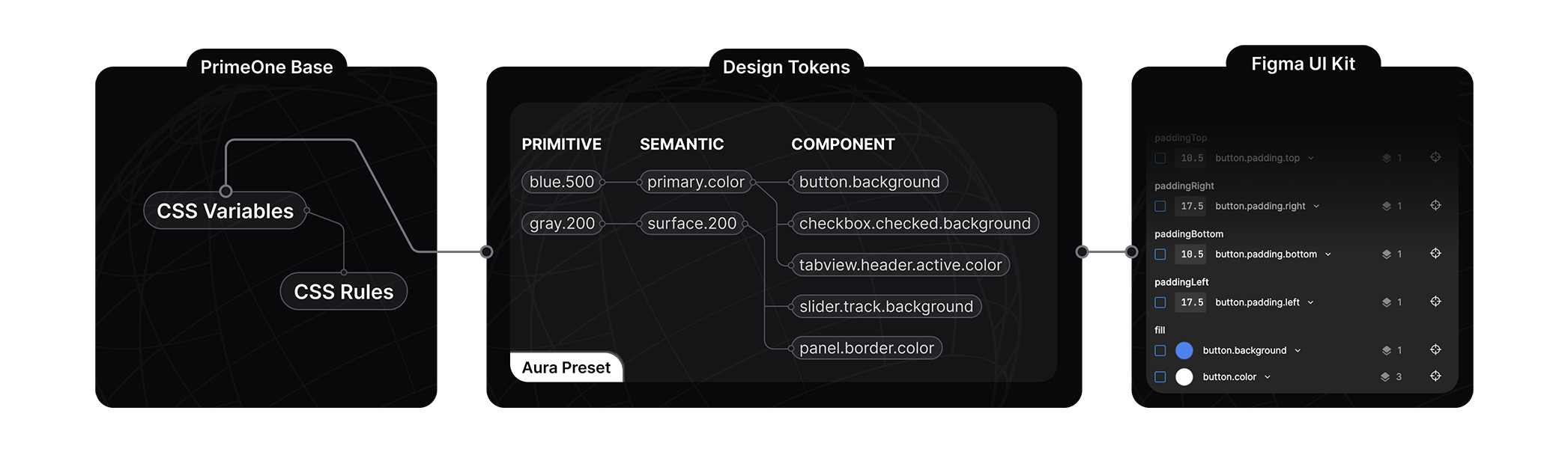
    {colors.map((color, i) => (
  • {color}
    {shades.map((shade, j) => (
    {shade}
    ))}
  • ))}
); } ``` ## Dark Mode PrimeReact uses the `system` as the default `darkModeSelector` in theme configuration. If you have a dark mode switch in your application, set the `darkModeSelector` to the selector you utilize such as `.my-app-dark` so that PrimeReact can fit in seamlessly with your color scheme. ```tsx import { StrictMode } from 'react'; import { createRoot } from 'react-dom/client'; import App from './App.tsx'; import { PrimeReactProvider } from '@primereact/core'; import Aura from '@primeuix/themes/aura'; const primereact = { theme: { preset: Aura, options: { darkModeSelector: '.my-app-dark' } } }; createRoot(document.getElementById('root')!).render( ); ``` Following is a very basic example implementation of a dark mode switch, you may extend it further by involving `prefers-color-scheme` to retrieve it from the system initially and use `localStorage` to make it stateful. See this [article](https://dev.to/abbeyperini/dark-mode-toggle-and-prefers-color-scheme-4f3m) for more information. ```tsx ); } ``` ## Example Here is a sample that styles a button component with Tailwind CSS using [passthrough](/docs/passthrough) attributes. Before beginning, head over to the the pass through section at [button](/docs/button) documentation to learn more about the components internals section. We'll be using the `root` element to add a custom style. ```tsx 'use client'; import { Button } from 'primereact/button'; export default function ButtonDemo() { return (
); } ``` ## Global A global configuration can be created at application level to avoid repetition via the global `pt` option so that the styles can be shared from a single location. A particular component can still override a global configuration with its own `pt` property. ```tsx showLineNumbers import { StrictMode } from 'react'; import { createRoot } from 'react-dom/client'; import App from './App.tsx'; import { PrimeReactProvider } from '@primereact/core'; const globalPT = { button: { root: "bg-teal-500 hover:bg-teal-700 active:bg-teal-900 cursor-pointer py-2 px-4 rounded-full border-0 flex gap-2 text-white text-lg font-bold" } panel: { header: 'bg-primary text-primary-contrast border-primary', content: 'border-primary text-lg text-primary-700', title: 'bg-primary text-primary-contrast text-xl' } }; createRoot(document.getElementById('root')!).render( ); ``` # Accordion API API documentation for Accordion component ## Accordion ### Props | Name | Type | Default | Description | |:------|:------|:------|:------| | ref | Ref | null | The reference to the component instance. | | pIf | boolean | true | Whether the component should be rendered. | | style | CSSProperties \\| ((instance?: AccordionInstance) => CSSProperties) | null | The style to apply to the component. | | className | string \\| ((instance?: AccordionInstance) => string) | null | The class name to apply to the component. | | as | string \\| number \\| bigint \\| boolean \\| ComponentClass \\| FunctionComponent \\| ReactElement> \\| Iterable \\| ReactPortal \\| Promise | null | The component type to render. | | asChild | boolean | false | Whether the component should be rendered as a child component. | | pt | SafeRecord | null | The pass-through props to pass to the component | | ptOptions | PassThroughOptions | null | The pass-through options to pass to the component | | unstyled | boolean | null | Whether the component should be rendered without classes. | | dt | unknown | null | The design token to use for the component. | | styles | StylesOptions | null | The styles to use for the component. | | children | ReactNode \\| ((instance: AccordionInstance) => ReactNode) | null | The children to render. | | lazy | boolean | false | When enabled, hidden tabs are not rendered at all. Defaults to false that hides tabs with css. | | tabIndex | number | 0 | Index of the element in tabbing order. | | defaultValue | string \\| number \\| (string \\| number)[] | null | Default value of the active panel or an array of values in multiple mode. | | value | string \\| number \\| (string \\| number)[] | null | Value of the active panel or an array of values in multiple mode. | | multiple | boolean | false | When enabled, multiple tabs can be activated at the same time. | | selectOnFocus | boolean | false | When enabled, the accordion will be selected on focus. | | onValueChange | (event: useAccordionChangeEvent) => void | null | Callback fired when the accordion's value changes. | | [key: string] | any | null | | | pt-{optionName}-* | - | null | Pass through attributes for customizing component. For more info, see Pass Through tab. | ### State | Name | Type | Default | Description | |:------|:------|:------|:------| | value | string \\| number \\| (string \\| number)[] | null | Value of the active panel or an array of values in multiple mode. | ### Exposes | Name | Type | Default | Description | |:------|:------|:------|:------| | state | useAccordionState | null | The state of the useAccordion. | | updateValue | (key: string \\| number) => void | null | The method to update the value of the active panel. | | isItemActive | (key: string \\| number) => boolean | null | The method to check if the panel is active. | | onHeaderClick | (event: MouseEvent, value: string \\| number) => void | null | The method to handle the click event of the accordion header. | | onHeaderFocus | (event: FocusEvent, value: string \\| number) => void | null | The method to handle the focus event of the accordion header. | | onHeaderKeyDown | (event: KeyboardEvent, value: string \\| number) => void | null | The method to handle the key down event of the accordion header. | ### Interfaces | Label | Description | Data | |:------|:------|:------| | PassThroughOptions | Defines passthrough(pt) options of Accordion component. | [object Object],[object Object],[object Object],[object Object],[object Object] | ### Types | Label | Description | Data | |:------|:------|:------| | Instance | Instance of Avatar component. | [object Object] | ## AccordionPanel ### Props | Name | Type | Default | Description | |:------|:------|:------|:------| | ref | Ref | null | The reference to the component instance. | | pIf | boolean | true | Whether the component should be rendered. | | style | CSSProperties \\| ((instance?: AccordionPanelInstance) => CSSProperties) | null | The style to apply to the component. | | className | string \\| ((instance?: AccordionPanelInstance) => string) | null | The class name to apply to the component. | | as | string \\| number \\| bigint \\| boolean \\| ComponentClass \\| FunctionComponent \\| ReactElement> \\| Iterable \\| ReactPortal \\| Promise | null | The component type to render. | | asChild | boolean | false | Whether the component should be rendered as a child component. | | pt | SafeRecord | null | The pass-through props to pass to the component | | ptOptions | PassThroughOptions | null | The pass-through options to pass to the component | | unstyled | boolean | null | Whether the component should be rendered without classes. | | dt | unknown | null | The design token to use for the component. | | styles | StylesOptions | null | The styles to use for the component. | | children | ReactNode \\| ((instance: AccordionPanelInstance) => ReactNode) | null | The children to render. | | value | string \\| number | null | Unique value of item. | | disabled | boolean | false | Whether the item is disabled. | | [key: string] | any | null | | | pt-{optionName}-* | - | null | Pass through attributes for customizing component. For more info, see Pass Through tab. | ### Exposes | Name | Type | Default | Description | |:------|:------|:------|:------| | accordion | AccordionInstance | null | The Accordion component instance. | | active | boolean | null | Whether the item is active. | ### Interfaces | Label | Description | Data | |:------|:------|:------| | PassThroughOptions | Defines passthrough(pt) options of AccordionPanel component. | [object Object] | ### Types | Label | Description | Data | |:------|:------|:------| | Instance | Instance of AccordionPanel component. | [object Object] | ## AccordionHeader ### Props | Name | Type | Default | Description | |:------|:------|:------|:------| | ref | Ref | null | The reference to the component instance. | | pIf | boolean | true | Whether the component should be rendered. | | style | CSSProperties \\| ((instance?: AccordionHeaderInstance) => CSSProperties) | null | The style to apply to the component. | | className | string \\| ((instance?: AccordionHeaderInstance) => string) | null | The class name to apply to the component. | | as | string \\| number \\| bigint \\| boolean \\| ComponentClass \\| FunctionComponent \\| ReactElement> \\| Iterable \\| ReactPortal \\| Promise | null | The component type to render. | | asChild | boolean | false | Whether the component should be rendered as a child component. | | pt | SafeRecord | null | The pass-through props to pass to the component | | ptOptions | PassThroughOptions | null | The pass-through options to pass to the component | | unstyled | boolean | null | Whether the component should be rendered without classes. | | dt | unknown | null | The design token to use for the component. | | styles | StylesOptions | null | The styles to use for the component. | | children | ReactNode \\| ((instance: AccordionHeaderInstance) => ReactNode) | null | The children to render. | | [key: string] | any | null | | | pt-{optionName}-* | - | null | Pass through attributes for customizing component. For more info, see Pass Through tab. | ### Exposes | Name | Type | Default | Description | |:------|:------|:------|:------| | accordion | AccordionInstance | null | The Accordion component instance. | | accordionpanel | AccordionPanelInstance | null | The AccordionPanel component instance. | ### Interfaces | Label | Description | Data | |:------|:------|:------| | PassThroughOptions | Defines passthrough(pt) options of AccordionHeader component. | [object Object] | ### Types | Label | Description | Data | |:------|:------|:------| | Instance | Instance of AccordionHeader component. | [object Object] | ## AccordionHeaderIndicator ### Props | Name | Type | Default | Description | |:------|:------|:------|:------| | ref | Ref | null | The reference to the component instance. | | pIf | boolean | true | Whether the component should be rendered. | | style | CSSProperties \\| ((instance?: AccordionHeaderIndicatorInstance) => CSSProperties) | null | The style to apply to the component. | | className | string \\| ((instance?: AccordionHeaderIndicatorInstance) => string) | null | The class name to apply to the component. | | as | string \\| number \\| bigint \\| boolean \\| ComponentClass \\| FunctionComponent \\| ReactElement> \\| Iterable \\| ReactPortal \\| Promise | null | The component type to render. | | asChild | boolean | false | Whether the component should be rendered as a child component. | | pt | SafeRecord | null | The pass-through props to pass to the component | | ptOptions | PassThroughOptions | null | The pass-through options to pass to the component | | unstyled | boolean | null | Whether the component should be rendered without classes. | | dt | unknown | null | The design token to use for the component. | | styles | StylesOptions | null | The styles to use for the component. | | children | ReactNode \\| ((instance: AccordionHeaderIndicatorInstance) => ReactNode) | null | The children to render. | | [key: string] | any | null | | | pt-{optionName}-* | - | null | Pass through attributes for customizing component. For more info, see Pass Through tab. | ### Exposes | Name | Type | Default | Description | |:------|:------|:------|:------| | accordion | AccordionInstance | null | The Accordion component instance. | | accordionpanel | AccordionPanelInstance | null | The AccordionPanel component instance. | ### Interfaces | Label | Description | Data | |:------|:------|:------| | PassThroughOptions | Defines passthrough(pt) options of AccordionHeaderIndicator component. | [object Object] | ### Types | Label | Description | Data | |:------|:------|:------| | Instance | Instance of AccordionHeaderIndicator component. | [object Object] | ## AccordionContent ### Props | Name | Type | Default | Description | |:------|:------|:------|:------| | ref | Ref | null | The reference to the component instance. | | pIf | boolean | true | Whether the component should be rendered. | | style | CSSProperties \\| ((instance?: AccordionContentInstance) => CSSProperties) | null | The style to apply to the component. | | className | string \\| ((instance?: AccordionContentInstance) => string) | null | The class name to apply to the component. | | as | string \\| number \\| bigint \\| boolean \\| ComponentClass \\| FunctionComponent \\| ReactElement> \\| Iterable \\| ReactPortal \\| Promise | null | The component type to render. | | asChild | boolean | false | Whether the component should be rendered as a child component. | | pt | SafeRecord | null | The pass-through props to pass to the component | | ptOptions | PassThroughOptions | null | The pass-through options to pass to the component | | unstyled | boolean | null | Whether the component should be rendered without classes. | | dt | unknown | null | The design token to use for the component. | | styles | StylesOptions | null | The styles to use for the component. | | children | ReactNode \\| ((instance: AccordionContentInstance) => ReactNode) | null | The children to render. | | [key: string] | any | null | | | pt-{optionName}-* | - | null | Pass through attributes for customizing component. For more info, see Pass Through tab. | ### Exposes | Name | Type | Default | Description | |:------|:------|:------|:------| | accordion | AccordionInstance | null | The Accordion component instance. | ### Types | Label | Description | Data | |:------|:------|:------| | Instance | Instance of AccordionContent component. | [object Object] | # Accordion Accordion groups a collection of contents in panels. ## Usage ```tsx import { Accordion } from 'primereact/accordion'; ``` ```tsx Title Content ``` ## Examples ### Basic Accordion is defined using `Accordion`, `Accordion.Panel`, `Accordion.Header`, `Accordion.HeaderIndicator` and `Accordion.Content` components. Each `Accordion.Panel` must contain a unique `value` property to specify the active item. ```tsx 'use client'; import { Accordion } from 'primereact/accordion'; export default function BasicDemo() { return (
What is this service about?

This service helps you manage your projects more efficiently by offering real-time collaboration, task tracking, and powerful analytics. Whether you’re working solo or in a team, it’s built to scale with your needs.

Is my data secure?

Yes. We use end-to-end encryption and follow industry best practices to ensure your data is protected. Your information is stored on secure servers and regularly backed up.

Can I upgrade or downgrade my plan later?

Absolutely. You can change your subscription plan at any time from your account settings. Changes take effect immediately, and any billing adjustments are handled automatically.

); } ``` ### Multiple Only one tab at a time can be active by default, enabling `multiple` property changes this behavior to allow multiple panels. In this case `multiple` needs to be an array. ```tsx 'use client'; import { Accordion } from 'primereact/accordion'; export default function MultipleDemo() { return (
What is this service about?

This service helps you manage your projects more efficiently by offering real-time collaboration, task tracking, and powerful analytics. Whether you’re working solo or in a team, it’s built to scale with your needs.

Is my data secure?

Yes. We use end-to-end encryption and follow industry best practices to ensure your data is protected. Your information is stored on secure servers and regularly backed up.

Can I upgrade or downgrade my plan later?

Absolutely. You can change your subscription plan at any time from your account settings. Changes take effect immediately, and any billing adjustments are handled automatically.

); } ``` ### Custom Indicator The `Accordion.HeaderIndicator` component is used to display the indicator of the header. It can be customized by passing a function that returns a React element or `data-p-active` attribute. ```tsx 'use client'; import { MinusIcon, PlusIcon } from '@primereact/icons'; import type { AccordionHeaderIndicatorInstance } from '@primereact/types/shared/accordion'; import { Accordion } from 'primereact/accordion'; export default function CustomIndicatorDemo() { return (
What is this service about?

This service helps you manage your projects more efficiently by offering real-time collaboration, task tracking, and powerful analytics. Whether you're working solo or in a team, it's built to scale with your needs.

Is my data secure? {({ accordionpanel }: AccordionHeaderIndicatorInstance) => (accordionpanel?.active ? : )}

Yes. We use end-to-end encryption and follow industry best practices to ensure your data is protected. Your information is stored on secure servers and regularly backed up.

Can I upgrade or downgrade my plan later?

Absolutely. You can change your subscription plan at any time from your account settings. Changes take effect immediately, and any billing adjustments are handled automatically.

); } ``` ### Disabled Enabling `disabled` property of an `Accordion.Panel` prevents user interaction of the panel or enable `disabled` of the `Accordion` component disables all panels. ```tsx 'use client'; import { Accordion } from 'primereact/accordion'; export default function DisabledDemo() { return (
How do I reset my password?

You can reset your password by clicking the “Forgot password?” link on the login page. We’ll send a password reset link to your registered email address.

Do you offer team accounts?

Yes. Our Team and Business plans are designed for collaboration. You can invite team members, assign roles, and manage permissions easily from your dashboard.

What happens if I exceed my usage limit?

If you go over your plan limits (e.g., storage or API requests), you’ll receive a notification. You can either upgrade your plan or wait until the next billing cycle resets.

Is there a mobile app available?

Yes, we offer both iOS and Android apps so you can manage your account and stay connected on the go.

); } ``` ### Template The optional `as` property controls the default container element of a header, for example setting it to a div renders a div for the header instead of a button. The `asChild` option enables the headless mode for further customization by passing callbacks and properties to implement your own header. ```tsx 'use client'; import { Icon } from '@primereact/core/icon'; import type { AccordionHeaderInstance } from '@primereact/types/shared/accordion'; import { Accordion } from 'primereact/accordion'; const items = [ { label: 'What is this service about?', value: '1', icon: 'pi pi-question-circle text-yellow-500', content: 'This service helps you manage your projects more efficiently by offering real-time collaboration, task tracking, and powerful analytics. Whether you’re working solo or in a team, it’s built to scale with your needs.' }, { label: 'Is my data secure?', value: '2', icon: 'pi pi-lock text-blue-500', content: 'Yes. We use end-to-end encryption and follow industry best practices to ensure your data is protected. Your information is stored on secure servers and regularly backed up.' }, { label: 'Can I upgrade or downgrade my plan later?', value: '3', icon: 'pi pi-credit-card text-green-500', content: 'Absolutely. You can change your subscription plan at any time from your account settings. Changes take effect immediately, and any billing adjustments are handled automatically.' } ]; export default function TemplateDemo() { return (
{items.map((item) => ( {item.label} {({ accordionpanel }: AccordionHeaderInstance) => ( )}

{item.content}

))}
); } ``` ### With RadioButton `RadioButton` component can be used to group multiple `Accordion.Panel` components. ```tsx 'use client'; import type { useAccordionChangeEvent } from '@primereact/types/shared/accordion'; import type { RadioButtonGroupValueChangeEvent } from '@primereact/types/shared/radiobutton'; import { Accordion } from 'primereact/accordion'; import { Button } from 'primereact/button'; import { RadioButton } from 'primereact/radiobutton'; import * as React from 'react'; const items = [ { label: 'Starter Plan', description: 'Perfect for individuals getting started. Includes access to core components and community support.', value: '1', price: '$99' }, { label: 'Growth Plan', description: 'Ideal for freelancers and small teams. Unlocks advanced UI components and priority email support.', value: '2', price: '$249' }, { label: 'Scale Plan', description: 'Best for growing businesses. Includes all features, early access to new releases, and Slack support.', value: '3', price: '$499' } ]; export default function UseWithRadioButton() { const [selected, setSelected] = React.useState('1'); return (
setSelected(e.value as string)} > setSelected(e.value as string)} className="w-full border border-surface-200 dark:border-surface-700 rounded-md divide-y divide-surface-200 dark:divide-surface-700" > {items.map((item) => ( setSelected(item.value)} className="flex items-center justify-between bg-transparent py-3.5" > {item.label} {item.price}

{item.description}

))}
); } ``` ## Accessibility ### Screen Reader Accordion header elements is a button element and use aria-controls to define the id of the content section along with aria-expanded for the visibility state. The value to read a header element defaults to the value of the header property and can be customized by defining an aria-label or aria-labelledby via the pt property. The content uses region role, defines an id that matches the aria-controls of the header and aria-labelledby referring to the id of the header. ### Header Keyboard Support | Key | Function | | ------------- | ---------------------------------------------------------------------------------------------------- | | `tab` | Moves focus to the next focusable element in the page tab sequence. | | `shift + tab` | Moves focus to the previous focusable element in the page tab sequence. | | `enter` | Toggles the visibility of the content. | | `space` | Toggles the visibility of the content. | | `down arrow` | Moves focus to the next header. If focus is on the last header, moves focus to the first header. | | `up arrow` | Moves focus to the previous header. If focus is on the first header, moves focus to the last header. | | `home` | Moves focus to the first header. | | `end` | Moves focus to the last header. | # Accordion Pass Through Pass Through documentation for accordion component ## Viewer Some sections may not be visible due to the availability of the particular feature. ## Accordion PT Options | Label | Type | Description | |:------|:------|:------| | root | AccordionPassThroughType> | Used to pass attributes to the root's DOM element. | | panel | AccordionPassThroughType> | Used to pass attributes to the panel's DOM element. | | header | AccordionPassThroughType> | Used to pass attributes to the header's DOM element. | | content | AccordionPassThroughType> | Used to pass attributes to the content's DOM element. | | headerindicator | AccordionPassThroughType> | Used to pass attributes to the header indicator's DOM element. | ## AccordionPanel PT Options | Label | Type | Description | |:------|:------|:------| | root | AccordionPanelPassThroughType> | Used to pass attributes to the root's DOM element. | ## AccordionHeader PT Options | Label | Type | Description | |:------|:------|:------| | root | AccordionHeaderPassThroughType> | Used to pass attributes to the root's DOM element. | ## AccordionHeaderIndicator PT Options | Label | Type | Description | |:------|:------|:------| | root | AccordionHeaderIndicatorPassThroughType> | Used to pass attributes to the root's DOM element. | ## AccordionContent PT Options | Label | Type | Description | |:------|:------|:------| | root | AccordionContentPassThroughType> | Used to pass attributes to the root's DOM element. | # Accordion Theming Theming documentation for accordion component ## Styled ### Accordion CSS Classes List of class names used in the styled mode. | ClassName | Description | |:------|:------| | p-accordion | Class name of the root element | | p-accordioncontent | Class name of the content element | | p-accordionheader | Class name of the header element | | p-accordionpanel | Class name of the panel element | | p-accordionheader-toggle-icon | Class name of the toggle icon element | ### Design Tokens List of design tokens. | Token | CSS Variable | Description | |:------|:------|:------| | accordion.transition.duration | --p-accordion-transition-duration | Transition duration of root | | accordion.panel.border.width | --p-accordion-panel-border-width | Border width of panel | | accordion.panel.border.color | --p-accordion-panel-border-color | Border color of panel | | accordion.header.color | --p-accordion-header-color | Color of header | | accordion.header.hover.color | --p-accordion-header-hover-color | Hover color of header | | accordion.header.active.color | --p-accordion-header-active-color | Active color of header | | accordion.header.active.hover.color | --p-accordion-header-active-hover-color | Active hover color of header | | accordion.header.padding | --p-accordion-header-padding | Padding of header | | accordion.header.font.weight | --p-accordion-header-font-weight | Font weight of header | | accordion.header.border.radius | --p-accordion-header-border-radius | Border radius of header | | accordion.header.border.width | --p-accordion-header-border-width | Border width of header | | accordion.header.border.color | --p-accordion-header-border-color | Border color of header | | accordion.header.background | --p-accordion-header-background | Background of header | | accordion.header.hover.background | --p-accordion-header-hover-background | Hover background of header | | accordion.header.active.background | --p-accordion-header-active-background | Active background of header | | accordion.header.active.hover.background | --p-accordion-header-active-hover-background | Active hover background of header | | accordion.header.focus.ring.width | --p-accordion-header-focus-ring-width | Focus ring width of header | | accordion.header.focus.ring.style | --p-accordion-header-focus-ring-style | Focus ring style of header | | accordion.header.focus.ring.color | --p-accordion-header-focus-ring-color | Focus ring color of header | | accordion.header.focus.ring.offset | --p-accordion-header-focus-ring-offset | Focus ring offset of header | | accordion.header.focus.ring.shadow | --p-accordion-header-focus-ring-shadow | Focus ring shadow of header | | accordion.header.toggle.icon.color | --p-accordion-header-toggle-icon-color | Toggle icon color of header | | accordion.header.toggle.icon.hover.color | --p-accordion-header-toggle-icon-hover-color | Toggle icon hover color of header | | accordion.header.toggle.icon.active.color | --p-accordion-header-toggle-icon-active-color | Toggle icon active color of header | | accordion.header.toggle.icon.active.hover.color | --p-accordion-header-toggle-icon-active-hover-color | Toggle icon active hover color of header | | accordion.header.first.top.border.radius | --p-accordion-header-first-top-border-radius | First top border radius of header | | accordion.header.first.border.width | --p-accordion-header-first-border-width | First border width of header | | accordion.header.last.bottom.border.radius | --p-accordion-header-last-bottom-border-radius | Last bottom border radius of header | | accordion.header.last.active.bottom.border.radius | --p-accordion-header-last-active-bottom-border-radius | Last active bottom border radius of header | | accordion.content.border.width | --p-accordion-content-border-width | Border width of content | | accordion.content.border.color | --p-accordion-content-border-color | Border color of content | | accordion.content.background | --p-accordion-content-background | Background of content | | accordion.content.color | --p-accordion-content-color | Color of content | | accordion.content.padding | --p-accordion-content-padding | Padding of content | ## Unstyled Theming is implemented with the pass through properties in unstyled mode. # AnimateOnScroll AnimateOnScroll is used to apply animations to elements when entering or leaving the viewport during scrolling. ## Usage ```tsx import { AnimateOnScroll } from 'primereact/animateonscroll'; ``` ```tsx Animated Element ``` ## Examples ### Basic Animation classes are defined with the `enterClassName` and `leaveClassName` properties. This example utilizes `tailwindcss-primeui` plugin animations however any valid CSS animation is supported. ```tsx 'use client'; import { AnimateOnScroll } from 'primereact/animateonscroll'; import { Avatar } from 'primereact/avatar'; import { Button } from 'primereact/button'; export default function BasicDemo() { return (
Scroll Down
Individual Lorem ipsum dolor sit amet consectetur adipisicing elit.
Team Lorem ipsum dolor sit amet consectetur adipisicing elit.
Enterprise Lorem ipsum dolor sit amet consectetur adipisicing elit.
Jenna Thompson Lorem ipsum dolor sit amet consectetur adipisicing elit. Isabel Garcia Lorem ipsum dolor sit amet consectetur adipisicing elit. Xavier Mason Lorem ipsum dolor sit amet consectetur adipisicing elit.
850K Customers Lorem ipsum dolor sit amet consectetur adipisicing elit. $1.5M Revenue Lorem ipsum dolor sit amet consectetur adipisicing elit. 140K Sales Lorem ipsum dolor sit amet consectetur adipisicing elit.
Bandwidth Lorem ipsum dolor sit amet consectetur adipisicing elit.
Storage Lorem ipsum dolor sit amet consectetur adipisicing elit.
Requests Lorem ipsum dolor sit amet consectetur adipisicing elit.
Discover real-world design inspiration.
Featuring over 400.000 screens and 1,000 iOS, Android & Web apps — New content weekly.
); } ``` ## Accessibility ### Screen Reader AnimateOnScroll does not require any roles and attributes. ### Keyboard Support Component does not include any interactive elements. # Avatar API API documentation for Avatar component ## Avatar ### Props | Name | Type | Default | Description | |:------|:------|:------|:------| | ref | Ref | null | The reference to the component instance. | | pIf | boolean | true | Whether the component should be rendered. | | style | CSSProperties \\| ((instance?: AvatarInstance) => CSSProperties) | null | The style to apply to the component. | | className | string \\| ((instance?: AvatarInstance) => string) | null | The class name to apply to the component. | | as | string \\| number \\| bigint \\| boolean \\| ComponentClass \\| FunctionComponent \\| ReactElement> \\| Iterable \\| ReactPortal \\| Promise | null | The component type to render. | | asChild | boolean | false | Whether the component should be rendered as a child component. | | pt | SafeRecord | null | The pass-through props to pass to the component | | ptOptions | PassThroughOptions | null | The pass-through options to pass to the component | | unstyled | boolean | null | Whether the component should be rendered without classes. | | dt | unknown | null | The design token to use for the component. | | styles | StylesOptions | null | The styles to use for the component. | | children | ReactNode \\| ((instance: AvatarInstance) => ReactNode) | null | The children to render. | | size | "large" \\| "normal" \\| "xlarge" | normal | Defines the size of the avatar. | | shape | "circle" \\| "square" | square | Defines the shape of the avatar. | | delayDuration | number | null | The delay duration of the avatar. | | [key: string] | any | null | | | pt-{optionName}-* | - | null | Pass through attributes for customizing component. For more info, see Pass Through tab. | ### State | Name | Type | Default | Description | |:------|:------|:------|:------| | load | boolean | null | Whether the avatar's image is loading or not. | ### Exposes | Name | Type | Default | Description | |:------|:------|:------|:------| | state | useAvatarState | null | The state of the useAvatar. | | handleImageLoad | (src?: string) => void | null | The method to handle image load. | | handleImageUnload | () => void | null | The method to handle image unload. | ### Interfaces | Label | Description | Data | |:------|:------|:------| | PassThroughOptions | Defines passthrough(pt) options of Avatar component. | [object Object],[object Object],[object Object] | ### Types | Label | Description | Data | |:------|:------|:------| | Instance | Instance of Avatar component. | [object Object] | ## AvatarFallback ### Props | Name | Type | Default | Description | |:------|:------|:------|:------| | ref | Ref | null | The reference to the component instance. | | pIf | boolean | true | Whether the component should be rendered. | | style | CSSProperties \\| ((instance?: AvatarFallbackInstance) => CSSProperties) | null | The style to apply to the component. | | className | string \\| ((instance?: AvatarFallbackInstance) => string) | null | The class name to apply to the component. | | as | string \\| number \\| bigint \\| boolean \\| ComponentClass \\| FunctionComponent \\| ReactElement> \\| Iterable \\| ReactPortal \\| Promise | null | The component type to render. | | asChild | boolean | false | Whether the component should be rendered as a child component. | | pt | SafeRecord | null | The pass-through props to pass to the component | | ptOptions | PassThroughOptions | null | The pass-through options to pass to the component | | unstyled | boolean | null | Whether the component should be rendered without classes. | | dt | unknown | null | The design token to use for the component. | | styles | StylesOptions | null | The styles to use for the component. | | children | ReactNode \\| ((instance: AvatarFallbackInstance) => ReactNode) | null | The children to render. | | [key: string] | any | null | | | pt-{optionName}-* | - | null | Pass through attributes for customizing component. For more info, see Pass Through tab. | ### Exposes | Name | Type | Default | Description | |:------|:------|:------|:------| | avatar | AvatarInstance | null | The Avatar component instance. | ### Interfaces | Label | Description | Data | |:------|:------|:------| | PassThroughOptions | Defines passthrough(pt) options of AvatarFallback component. | [object Object] | ### Types | Label | Description | Data | |:------|:------|:------| | Instance | Instance of AvatarFallback component. | [object Object] | ## AvatarImage ### Props | Name | Type | Default | Description | |:------|:------|:------|:------| | ref | Ref | null | The reference to the component instance. | | pIf | boolean | true | Whether the component should be rendered. | | style | CSSProperties \\| ((instance?: AvatarImageInstance) => CSSProperties) | null | The style to apply to the component. | | className | string \\| ((instance?: AvatarImageInstance) => string) | null | The class name to apply to the component. | | as | ReactNode | null | The component type to render. | | asChild | boolean | false | Whether the component should be rendered as a child component. | | pt | SafeRecord | null | The pass-through props to pass to the component | | ptOptions | PassThroughOptions | null | The pass-through options to pass to the component | | unstyled | boolean | null | Whether the component should be rendered without classes. | | dt | unknown | null | The design token to use for the component. | | styles | StylesOptions | null | The styles to use for the component. | | children | ReactNode \\| ((instance: AvatarImageInstance) => ReactNode) | null | The children to render. | | src | string | undefined | Specifies the path to the image to display. | | pt-{optionName}-* | - | null | Pass through attributes for customizing component. For more info, see Pass Through tab. | ### Exposes | Name | Type | Default | Description | |:------|:------|:------|:------| | avatar | AvatarInstance | null | The Avatar component instance. | ### Interfaces | Label | Description | Data | |:------|:------|:------| | PassThroughOptions | Defines passthrough(pt) options of AvatarImage component. | [object Object] | ### Types | Label | Description | Data | |:------|:------|:------| | Instance | Instance of AvatarImage component. | [object Object] | ## AvatarGroup ### Props | Name | Type | Default | Description | |:------|:------|:------|:------| | ref | Ref | null | The reference to the component instance. | | pIf | boolean | true | Whether the component should be rendered. | | style | CSSProperties \\| ((instance?: AvatarGroupInstance) => CSSProperties) | null | The style to apply to the component. | | className | string \\| ((instance?: AvatarGroupInstance) => string) | null | The class name to apply to the component. | | as | string \\| number \\| bigint \\| boolean \\| ComponentClass \\| FunctionComponent \\| ReactElement> \\| Iterable \\| ReactPortal \\| Promise | null | The component type to render. | | asChild | boolean | false | Whether the component should be rendered as a child component. | | pt | SafeRecord | null | The pass-through props to pass to the component | | ptOptions | PassThroughOptions | null | The pass-through options to pass to the component | | unstyled | boolean | null | Whether the component should be rendered without classes. | | dt | unknown | null | The design token to use for the component. | | styles | StylesOptions | null | The styles to use for the component. | | children | ReactNode \\| ((instance: AvatarGroupInstance) => ReactNode) | null | The children to render. | | [key: string] | any | null | | | pt-{optionName}-* | - | null | Pass through attributes for customizing component. For more info, see Pass Through tab. | ### Interfaces | Label | Description | Data | |:------|:------|:------| | PassThroughOptions | Defines passthrough(pt) options of AvatarGroup component. | [object Object] | ### Types | Label | Description | Data | |:------|:------|:------| | Instance | Instance of AvatarGroup component. | [object Object] | ## useAvatar ### Props | Name | Type | Default | Description | |:------|:------|:------|:------| | delayDuration | number | null | The delay duration of the avatar. | ### State | Name | Type | Default | Description | |:------|:------|:------|:------| | load | boolean | null | Whether the avatar's image is loading or not. | ### Exposes | Name | Type | Default | Description | |:------|:------|:------|:------| | state | useAvatarState | null | The state of the useAvatar. | | handleImageLoad | (src?: string) => void | null | The method to handle image load. | | handleImageUnload | () => void | null | The method to handle image unload. | ### Events ### Types | Label | Description | Data | |:------|:------|:------| | Instance | Instance of useAvatar headless. | [object Object] | # Avatar Avatar represents people using icons, labels and images. ## Usage ```tsx import { Avatar } from 'primereact/avatar'; ``` ```tsx CC ``` ## Examples ### Fallback The `Avatar.Fallback` component displays a label or an icon when an image fails to load or when an image is not preferred. ```tsx 'use client'; import { CheckIcon } from '@primereact/icons'; import { Avatar } from 'primereact/avatar'; export default function LabelDemo() { return (
J CC
); } ``` ### Image The `Avatar.Image` component displays an image as an Avatar. ```tsx 'use client'; import { Avatar } from 'primereact/avatar'; export default function ImageDemo() { return (
A A O
); } ``` ### Badge [`Badge`](/docs/components/badge) component can be used to display a badge on an Avatar. ```tsx 'use client'; import { Avatar } from 'primereact/avatar'; import { Badge } from 'primereact/badge'; const BadgeDemo = () => { return (
O 2 W
); }; export default BadgeDemo; ``` ### Shape Use the `shape` property to change the appearance. ```tsx 'use client'; import { Avatar } from 'primereact/avatar'; const ShapeDemo = () => { return (
W W
); }; export default ShapeDemo; ``` ### Sizes Use the `size` property to change the size of an avatar. ```tsx 'use client'; import { Avatar } from 'primereact/avatar'; const SizeDemo = () => { return (
CC CC CC
); }; export default SizeDemo; ``` ### AvatarGroup Grouping is available by wrapping multiple Avatar components inside an `Avatar.Group` component. ```tsx 'use client'; import { Avatar } from 'primereact/avatar'; export default function GroupDemo() { return (
A A O I X +2
); } ``` ## Accessibility ### Screen Reader Avatar does not include any roles and attributes by default. Any attribute is passed to the root element so you may add a role like img along with aria-labelledby or aria-label to describe the component. In case avatars need to be tabbable, tabindex can be added as well to implement custom key handlers. ### Keyboard Support Component does not include any interactive elements. # Avatar Pass Through Pass Through documentation for avatar component ## Viewer Some sections may not be visible due to the availability of the particular feature. ## Avatar PT Options | Label | Type | Description | |:------|:------|:------| | root | AvatarPassThroughType> | Used to pass attributes to the root's DOM element. | | fallback | AvatarPassThroughType> | Used to pass attributes to the fallback's DOM element. | | image | AvatarPassThroughType> | Used to pass attributes to the image's DOM element. | ## AvatarFallback PT Options | Label | Type | Description | |:------|:------|:------| | root | AvatarFallbackPassThroughType> | Used to pass attributes to the root's DOM element. | ## AvatarImage PT Options | Label | Type | Description | |:------|:------|:------| | root | AvatarImagePassThroughType> | Used to pass attributes to the root's DOM element. | ## AvatarGroup PT Options | Label | Type | Description | |:------|:------|:------| | root | AvatarGroupPassThroughType> | Used to pass attributes to the root's DOM element. | # Avatar Theming Theming documentation for avatar component ## Styled ### Avatar CSS Classes List of class names used in the styled mode. | ClassName | Description | |:------|:------| | p-avatar | Class name of the root element | | p-avatar-label | Class name of the box element | | p-avatar-icon | Class name of the input element | ### AvatarGroup CSS Classes List of class names used in the styled mode. | ClassName | Description | |:------|:------| | p-avatar-group | Class name of the root element | ### Design Tokens List of design tokens. | Token | CSS Variable | Description | |:------|:------|:------| | avatar.width | --p-avatar-width | Width of root | | avatar.height | --p-avatar-height | Height of root | | avatar.font.size | --p-avatar-font-size | Font size of root | | avatar.background | --p-avatar-background | Background of root | | avatar.color | --p-avatar-color | Color of root | | avatar.border.radius | --p-avatar-border-radius | Border radius of root | | avatar.icon.size | --p-avatar-icon-size | Size of icon | | avatar.group.border.color | --p-avatar-group-border-color | Border color of group | | avatar.group.offset | --p-avatar-group-offset | Offset of group | | avatar.lg.width | --p-avatar-lg-width | Width of lg | | avatar.lg.height | --p-avatar-lg-height | Height of lg | | avatar.lg.font.size | --p-avatar-lg-font-size | Font size of lg | | avatar.lg.icon.size | --p-avatar-lg-icon-size | Icon size of lg | | avatar.lg.group.offset | --p-avatar-lg-group-offset | Group offset of lg | | avatar.xl.width | --p-avatar-xl-width | Width of xl | | avatar.xl.height | --p-avatar-xl-height | Height of xl | | avatar.xl.font.size | --p-avatar-xl-font-size | Font size of xl | | avatar.xl.icon.size | --p-avatar-xl-icon-size | Icon size of xl | | avatar.xl.group.offset | --p-avatar-xl-group-offset | Group offset of xl | ## Unstyled Theming is implemented with the pass through properties in unstyled mode. # Badge API API documentation for Badge component ## Badge ### Props | Name | Type | Default | Description | |:------|:------|:------|:------| | ref | Ref | null | The reference to the component instance. | | pIf | boolean | true | Whether the component should be rendered. | | style | CSSProperties \\| ((instance?: BadgeInstance) => CSSProperties) | null | The style to apply to the component. | | className | string \\| ((instance?: BadgeInstance) => string) | null | The class name to apply to the component. | | as | string \\| number \\| bigint \\| boolean \\| ComponentClass \\| FunctionComponent \\| ReactElement> \\| Iterable \\| ReactPortal \\| Promise | null | The component type to render. | | asChild | boolean | false | Whether the component should be rendered as a child component. | | pt | SafeRecord | null | The pass-through props to pass to the component | | ptOptions | PassThroughOptions | null | The pass-through options to pass to the component | | unstyled | boolean | null | Whether the component should be rendered without classes. | | dt | unknown | null | The design token to use for the component. | | styles | StylesOptions | null | The styles to use for the component. | | children | ReactNode \\| ((instance: BadgeInstance) => ReactNode) | null | The children to render. | | shape | "circle" | null | Defines the shape of the badge. | | size | "small" \\| "large" \\| "xlarge" | null | Size of the badge. | | severity | "secondary" \\| "info" \\| "success" \\| "warn" \\| "danger" \\| "contrast" | null | Severity type of the badge. | | [key: string] | any | null | | | pt-{optionName}-* | - | null | Pass through attributes for customizing component. For more info, see Pass Through tab. | ### Interfaces | Label | Description | Data | |:------|:------|:------| | PassThroughOptions | Defines passthrough(pt) options of Badge component. | [object Object] | ### Types | Label | Description | Data | |:------|:------|:------| | Instance | Instance of Badge component. | [object Object] | ## OverlayBadge ### Props | Name | Type | Default | Description | |:------|:------|:------|:------| | ref | Ref | null | The reference to the component instance. | | pIf | boolean | true | Whether the component should be rendered. | | style | CSSProperties \\| ((instance?: OverlayBadgeInstance) => CSSProperties) | null | The style to apply to the component. | | className | string \\| ((instance?: OverlayBadgeInstance) => string) | null | The class name to apply to the component. | | as | string \\| number \\| bigint \\| boolean \\| ComponentClass \\| FunctionComponent \\| ReactElement> \\| Iterable \\| ReactPortal \\| Promise | null | The component type to render. | | asChild | boolean | false | Whether the component should be rendered as a child component. | | pt | SafeRecord | null | The pass-through props to pass to the component | | ptOptions | PassThroughOptions | null | The pass-through options to pass to the component | | unstyled | boolean | null | Whether the component should be rendered without classes. | | dt | unknown | null | The design token to use for the component. | | styles | StylesOptions | null | The styles to use for the component. | | children | ReactNode \\| ((instance: OverlayBadgeInstance) => ReactNode) | null | The children to render. | | [key: string] | any | null | | | pt-{optionName}-* | - | null | Pass through attributes for customizing component. For more info, see Pass Through tab. | ### Interfaces | Label | Description | Data | |:------|:------|:------| | PassThroughOptions | Defines passthrough(pt) options of OverlayBadge component. | [object Object] | ### Types | Label | Description | Data | |:------|:------|:------| | Instance | Instance of OverlayBadge component. | [object Object] | ## useBadge ### Types | Label | Description | Data | |:------|:------|:------| | Instance | Instance of useBadge headless. | [object Object] | # Badge Badge is a small status indicator for another element. ## Usage ```tsx import { Badge } from 'primereact/badge'; ``` ```tsx Badge ``` ## Examples ### Basic ```tsx 'use client'; import { Badge } from 'primereact/badge'; export default function BasicDemo() { return (
Badge
); } ``` ### Severity The `severity` property defines the visual style of a badge. ```tsx 'use client'; import { Badge } from 'primereact/badge'; export default function SeverityDemo() { return (
Default Secondary Success Info Warning Danger Contrast
); } ``` ### Size Use the `size` property to change the size of a badge. ```tsx 'use client'; import { Badge } from 'primereact/badge'; export default function SizeDemo() { return (
Small Default Large XLarge
); } ``` ### Overlay A badge can be added to any element by encapsulating the content with the `Badge.Overlay` component. ```tsx 'use client'; import { Badge } from 'primereact/badge'; export default function BasicDemo() { return (
2 4
); } ``` ### Button Buttons have built-in support for badges to display a badge inline. ```tsx 'use client'; import { Badge } from 'primereact/badge'; import { Button } from 'primereact/button'; export default function ButtonDemo() { return (
); } ``` ## Accessibility ### Screen Reader Badge does not include any roles and attributes by default, any attribute is passed to the root element so aria roles and attributes can be added if required. If the badges are dynamic, _aria-live_ may be utilized as well. In case badges need to be tabbable, _tabindex_ can be added to implement custom key handlers. ### Keyboard Support Component does not include any interactive elements. # Badge Pass Through Pass Through documentation for Badge component ## Viewer Some sections may not be visible due to the availability of the particular feature. ## Badge PT Options | Label | Type | Description | |:------|:------|:------| | root | BadgePassThroughType> | Used to pass attributes to the root's DOM element. | ## OverlayBadge PT Options | Label | Type | Description | |:------|:------|:------| | root | OverlayBadgePassThroughType> | Used to pass attributes to the root's DOM element. | # Badge Theming Theming documentation for badge component ## Styled ### Badge CSS Classes List of class names used in the styled mode. | ClassName | Description | |:------|:------| | p-badge | Class name of the root element | ### OverlayBadge CSS Classes List of class names used in the styled mode. | ClassName | Description | |:------|:------| | p-overlaybadge | Class name of the root element | ### Design Tokens List of design tokens. | Token | CSS Variable | Description | |:------|:------|:------| | badge.border.radius | --p-badge-border-radius | Border radius of root | | badge.padding | --p-badge-padding | Padding of root | | badge.font.size | --p-badge-font-size | Font size of root | | badge.font.weight | --p-badge-font-weight | Font weight of root | | badge.min.width | --p-badge-min-width | Min width of root | | badge.height | --p-badge-height | Height of root | | badge.dot.size | --p-badge-dot-size | Size of dot | | badge.sm.font.size | --p-badge-sm-font-size | Font size of sm | | badge.sm.min.width | --p-badge-sm-min-width | Min width of sm | | badge.sm.height | --p-badge-sm-height | Height of sm | | badge.lg.font.size | --p-badge-lg-font-size | Font size of lg | | badge.lg.min.width | --p-badge-lg-min-width | Min width of lg | | badge.lg.height | --p-badge-lg-height | Height of lg | | badge.xl.font.size | --p-badge-xl-font-size | Font size of xl | | badge.xl.min.width | --p-badge-xl-min-width | Min width of xl | | badge.xl.height | --p-badge-xl-height | Height of xl | | badge.primary.background | --p-badge-primary-background | Background of primary | | badge.primary.color | --p-badge-primary-color | Color of primary | | badge.secondary.background | --p-badge-secondary-background | Background of secondary | | badge.secondary.color | --p-badge-secondary-color | Color of secondary | | badge.success.background | --p-badge-success-background | Background of success | | badge.success.color | --p-badge-success-color | Color of success | | badge.info.background | --p-badge-info-background | Background of info | | badge.info.color | --p-badge-info-color | Color of info | | badge.warn.background | --p-badge-warn-background | Background of warn | | badge.warn.color | --p-badge-warn-color | Color of warn | | badge.danger.background | --p-badge-danger-background | Background of danger | | badge.danger.color | --p-badge-danger-color | Color of danger | | badge.contrast.background | --p-badge-contrast-background | Background of contrast | | badge.contrast.color | --p-badge-contrast-color | Color of contrast | ## Unstyled Theming is implemented with the pass through properties in unstyled mode. # Breadcrumb API API documentation for Breadcrumb component ## Breadcrumb ### Props | Name | Type | Default | Description | |:------|:------|:------|:------| | ref | Ref | null | The reference to the component instance. | | pIf | boolean | true | Whether the component should be rendered. | | style | CSSProperties \\| ((instance?: BreadcrumbInstance) => CSSProperties) | null | The style to apply to the component. | | className | string \\| ((instance?: BreadcrumbInstance) => string) | null | The class name to apply to the component. | | as | string \\| number \\| bigint \\| boolean \\| ComponentClass \\| FunctionComponent \\| ReactElement> \\| Iterable \\| ReactPortal \\| Promise | null | The component type to render. | | asChild | boolean | false | Whether the component should be rendered as a child component. | | pt | SafeRecord | null | The pass-through props to pass to the component | | ptOptions | PassThroughOptions | null | The pass-through options to pass to the component | | unstyled | boolean | null | Whether the component should be rendered without classes. | | dt | unknown | null | The design token to use for the component. | | styles | StylesOptions | null | The styles to use for the component. | | children | ReactNode \\| ((instance: BreadcrumbInstance) => ReactNode) | null | The children to render. | | align | "center" \\| "left" \\| "right" \\| "top" \\| "bottom" | null | Alignment of the content. | | orientation | "horizontal" \\| "vertical" | horizontal | Specifies the orientation, valid values are 'horizontal' and 'vertical'. | | type | "solid" \\| "dashed" \\| "dotted" | solid | Border style type. | | onAction | (key: string) => void | null | Callback to invoke when an action is performed. | | [key: string] | any | null | | | pt-{optionName}-* | - | null | Pass through attributes for customizing component. For more info, see Pass Through tab. | ### Exposes | Name | Type | Default | Description | |:------|:------|:------|:------| | onAction | (event: MouseEvent, key: string) => void | null | Callback to invoke when an action is performed. | ### Interfaces | Label | Description | Data | |:------|:------|:------| | PassThroughOptions | Defines passthrough(pt) options of Breadcrumb component. | [object Object],[object Object],[object Object],[object Object],[object Object] | ### Types | Label | Description | Data | |:------|:------|:------| | Instance | Instance of Breadcrumb component. | [object Object] | ## BreadcrumbList ### Props | Name | Type | Default | Description | |:------|:------|:------|:------| | ref | Ref | null | The reference to the component instance. | | pIf | boolean | true | Whether the component should be rendered. | | style | CSSProperties \\| ((instance?: BreadcrumbListInstance) => CSSProperties) | null | The style to apply to the component. | | className | string \\| ((instance?: BreadcrumbListInstance) => string) | null | The class name to apply to the component. | | as | string \\| number \\| bigint \\| boolean \\| ComponentClass \\| FunctionComponent \\| ReactElement> \\| Iterable \\| ReactPortal \\| Promise | null | The component type to render. | | asChild | boolean | false | Whether the component should be rendered as a child component. | | pt | SafeRecord | null | The pass-through props to pass to the component | | ptOptions | PassThroughOptions | null | The pass-through options to pass to the component | | unstyled | boolean | null | Whether the component should be rendered without classes. | | dt | unknown | null | The design token to use for the component. | | styles | StylesOptions | null | The styles to use for the component. | | children | ReactNode \\| ((instance: BreadcrumbListInstance) => ReactNode) | null | The children to render. | | [key: string] | any | null | | | pt-{optionName}-* | - | null | Pass through attributes for customizing component. For more info, see Pass Through tab. | ### Exposes | Name | Type | Default | Description | |:------|:------|:------|:------| | breadcrumb | BreadcrumbInstance | null | Instance of the Breadcrumb component. | ### Interfaces | Label | Description | Data | |:------|:------|:------| | PassThroughOptions | Defines passthrough(pt) options of BreadcrumbList component. | [object Object] | ### Types | Label | Description | Data | |:------|:------|:------| | Instance | Instance of BreadcrumbList component. | [object Object] | ## BreadcrumbItem ### Props | Name | Type | Default | Description | |:------|:------|:------|:------| | ref | Ref | null | The reference to the component instance. | | pIf | boolean | true | Whether the component should be rendered. | | style | CSSProperties \\| ((instance?: BreadcrumbItemInstance) => CSSProperties) | null | The style to apply to the component. | | className | string \\| ((instance?: BreadcrumbItemInstance) => string) | null | The class name to apply to the component. | | as | string \\| number \\| bigint \\| boolean \\| ComponentClass \\| FunctionComponent \\| ReactElement> \\| Iterable \\| ReactPortal \\| Promise | null | The component type to render. | | asChild | boolean | false | Whether the component should be rendered as a child component. | | pt | SafeRecord | null | The pass-through props to pass to the component | | ptOptions | PassThroughOptions | null | The pass-through options to pass to the component | | unstyled | boolean | null | Whether the component should be rendered without classes. | | dt | unknown | null | The design token to use for the component. | | styles | StylesOptions | null | The styles to use for the component. | | children | ReactNode \\| ((instance: BreadcrumbItemInstance) => ReactNode) | null | The children to render. | | uKey | PropertyKey | null | Unique key for the option. Used for identification. | | disabled | boolean | null | Specifies if the item is disabled. | | isCurrent | boolean | null | Specifies if the item is the current one. | | [key: string] | any | null | | | pt-{optionName}-* | - | null | Pass through attributes for customizing component. For more info, see Pass Through tab. | ### Exposes | Name | Type | Default | Description | |:------|:------|:------|:------| | breadcrumb | BreadcrumbInstance | null | Instance of the Breadcrumb component. | ### Interfaces | Label | Description | Data | |:------|:------|:------| | PassThroughOptions | Defines passthrough(pt) options of BreadcrumbItem component. | [object Object] | ### Types | Label | Description | Data | |:------|:------|:------| | Instance | Instance of BreadcrumbItem component. | [object Object] | ## BreadcrumbSeparator ### Props | Name | Type | Default | Description | |:------|:------|:------|:------| | ref | Ref | null | The reference to the component instance. | | pIf | boolean | true | Whether the component should be rendered. | | style | CSSProperties \\| ((instance?: BreadcrumbSeparatorInstance) => CSSProperties) | null | The style to apply to the component. | | className | string \\| ((instance?: BreadcrumbSeparatorInstance) => string) | null | The class name to apply to the component. | | as | string \\| number \\| bigint \\| boolean \\| ComponentClass \\| FunctionComponent \\| ReactElement> \\| Iterable \\| ReactPortal \\| Promise | null | The component type to render. | | asChild | boolean | false | Whether the component should be rendered as a child component. | | pt | SafeRecord | null | The pass-through props to pass to the component | | ptOptions | PassThroughOptions | null | The pass-through options to pass to the component | | unstyled | boolean | null | Whether the component should be rendered without classes. | | dt | unknown | null | The design token to use for the component. | | styles | StylesOptions | null | The styles to use for the component. | | children | ReactNode \\| ((instance: BreadcrumbSeparatorInstance) => ReactNode) | null | The children to render. | | [key: string] | any | null | | | pt-{optionName}-* | - | null | Pass through attributes for customizing component. For more info, see Pass Through tab. | ### Exposes | Name | Type | Default | Description | |:------|:------|:------|:------| | breadcrumb | BreadcrumbInstance | null | Instance of the Breadcrumb component. | ### Interfaces | Label | Description | Data | |:------|:------|:------| | PassThroughOptions | Defines passthrough(pt) options of BreadcrumbSeparator component. | [object Object],[object Object] | ### Types | Label | Description | Data | |:------|:------|:------| | Instance | Instance of BreadcrumbSeparator component. | [object Object] | ## useBreadcrumb ### Props | Name | Type | Default | Description | |:------|:------|:------|:------| | onAction | (key: string) => void | null | Callback to invoke when an action is performed. | ### Exposes | Name | Type | Default | Description | |:------|:------|:------|:------| | onAction | (event: MouseEvent, key: string) => void | null | Callback to invoke when an action is performed. | ### Types | Label | Description | Data | |:------|:------|:------| | Instance | Instance of useBreadcrumb headless. | [object Object] | # Breadcrumb Breadcrumb provides contextual information about page hierarchy. ## Usage ```tsx import { Breadcrumb } from 'primereact/breadcrumb'; ``` ```tsx ``` ## Examples ### Basic ```tsx 'use client'; import { Icon } from '@primereact/core/icon'; import Link from 'next/link'; import { Breadcrumb } from 'primereact/breadcrumb'; export default function BasicDemo() { return (
Products Electronics Laptops Dell
); } ``` ### Route A breadcrumb can be used with routing libraries to navigate between pages. ```tsx 'use client'; import { Icon } from '@primereact/core/icon'; import Link from 'next/link'; import { Breadcrumb } from 'primereact/breadcrumb'; export default function RouteDemo() { return (
Components Form InputText
); } ``` ### Controlled A breadcrumb can be controlled by managing the current page state. ```tsx 'use client'; import Link from 'next/link'; import { Breadcrumb } from 'primereact/breadcrumb'; import * as React from 'react'; export default function ControlledDemo() { const [currentPage, setCurrentPage] = React.useState('reports'); return (
setCurrentPage(key)}> Home Users Documents Work Reports
); } ``` ### Custom Separator A breadcrumb allows customization of the separator between items. ```tsx 'use client'; import { Icon } from '@primereact/core/icon'; import Link from 'next/link'; import { Breadcrumb } from 'primereact/breadcrumb'; export default function CustomSeparatorDemo() { return (
/ Products / Electronics / Laptops / Dell
); } ``` ### Custom Item A breadcrumb allows customization of the items. ```tsx 'use client'; import { Icon } from '@primereact/core/icon'; import Link from 'next/link'; import { Badge } from 'primereact/badge'; import { Breadcrumb } from 'primereact/breadcrumb'; import { Menu } from 'primereact/menu'; import * as React from 'react'; export default function CustomItemDemo() { const [selectedBrand, setSelectedBrand] = React.useState('Apple'); const brands = [{ label: 'Apple' }, { label: 'Dell' }, { label: 'HP' }, { label: 'Lenovo' }, { label: 'Asus' }]; return (
Home Products Electronics Computers Laptops 5 {selectedBrand} Select Brand {brands.map((brand) => ( setSelectedBrand(brand.label)} > {brand.label} ))}
); } ``` # Breadcrumb Pass Through Pass Through documentation for Breadcrumb component ## Viewer Some sections may not be visible due to the availability of the particular feature. ## Breadcrumb PT Options | Label | Type | Description | |:------|:------|:------| | root | BreadcrumbPassThroughType> | Used to pass attributes to the root's DOM element. | | list | BreadcrumbPassThroughType> | Used to pass attributes to the list's DOM element. | | item | BreadcrumbPassThroughType> | Used to pass attributes to the item's DOM element. | | separator | BreadcrumbPassThroughType> | Used to pass attributes to the separator's DOM element. | | icon | BreadcrumbPassThroughType> | Used to pass attributes to the icon's DOM element. | ## BreadcrumbList PT Options | Label | Type | Description | |:------|:------|:------| | root | BreadcrumbListPassThroughType> | Used to pass attributes to the root's DOM element. | ## BreadcrumbItem PT Options | Label | Type | Description | |:------|:------|:------| | root | BreadcrumbItemPassThroughType> | Used to pass attributes to the root's DOM element. | ## BreadcrumbSeparator PT Options | Label | Type | Description | |:------|:------|:------| | root | BreadcrumbSeparatorPassThroughType> | Used to pass attributes to the root's DOM element. | | icon | BreadcrumbSeparatorPassThroughType> | Used to pass attributes to the icon's DOM element. | # Breadcrumb Theming Theming documentation for Breadcrumb component ## Styled ### CSS Classes List of class names used in the styled mode. | ClassName | Description | |:------|:------| | p-breadcrumb | Class name of the root element | | p-breadcrumb-list | Class name of the list element | | p-breadcrumb-item | Class name of the item element | | p-breadcrumb-separator | Class name of the separator element | | p-breadcrumb-separator-icon | Class name of the icon element | ### Design Tokens List of design tokens. | Token | CSS Variable | Description | |:------|:------|:------| | breadcrumb.padding | --p-breadcrumb-padding | Padding of root | | breadcrumb.background | --p-breadcrumb-background | Background of root | | breadcrumb.gap | --p-breadcrumb-gap | Gap of root | | breadcrumb.transition.duration | --p-breadcrumb-transition-duration | Transition duration of root | | breadcrumb.item.color | --p-breadcrumb-item-color | Color of item | | breadcrumb.item.hover.color | --p-breadcrumb-item-hover-color | Hover color of item | | breadcrumb.item.border.radius | --p-breadcrumb-item-border-radius | Border radius of item | | breadcrumb.item.gap | --p-breadcrumb-item-gap | Gap of item | | breadcrumb.item.icon.color | --p-breadcrumb-item-icon-color | Icon color of item | | breadcrumb.item.icon.hover.color | --p-breadcrumb-item-icon-hover-color | Icon hover color of item | | breadcrumb.item.focus.ring.width | --p-breadcrumb-item-focus-ring-width | Focus ring width of item | | breadcrumb.item.focus.ring.style | --p-breadcrumb-item-focus-ring-style | Focus ring style of item | | breadcrumb.item.focus.ring.color | --p-breadcrumb-item-focus-ring-color | Focus ring color of item | | breadcrumb.item.focus.ring.offset | --p-breadcrumb-item-focus-ring-offset | Focus ring offset of item | | breadcrumb.item.focus.ring.shadow | --p-breadcrumb-item-focus-ring-shadow | Focus ring shadow of item | | breadcrumb.separator.color | --p-breadcrumb-separator-color | Color of separator | ## Unstyled Theming is implemented with the pass through properties in unstyled mode. # Button API API documentation for Button component ## Button ### Props | Name | Type | Default | Description | |:------|:------|:------|:------| | ref | Ref | null | The reference to the component instance. | | pIf | boolean | true | Whether the component should be rendered. | | style | CSSProperties \\| ((instance?: ButtonInstance) => CSSProperties) | null | The style to apply to the component. | | className | string \\| ((instance?: ButtonInstance) => string) | null | The class name to apply to the component. | | as | string \\| number \\| bigint \\| boolean \\| ComponentClass \\| FunctionComponent \\| ReactElement> \\| Iterable \\| ReactPortal \\| Promise | null | The component type to render. | | asChild | boolean | false | Whether the component should be rendered as a child component. | | pt | SafeRecord | null | The pass-through props to pass to the component | | ptOptions | PassThroughOptions | null | The pass-through options to pass to the component | | unstyled | boolean | null | Whether the component should be rendered without classes. | | dt | unknown | null | The design token to use for the component. | | styles | StylesOptions | null | The styles to use for the component. | | children | ReactNode \\| ((instance: ButtonInstance) => ReactNode) | null | The children to render. | | size | "small" \\| "large" \\| "normal" | null | Size of the Button. | | severity | string & {} \\| "secondary" \\| "info" \\| "success" \\| "warn" \\| "danger" \\| "contrast" \\| "help" | null | Severity type of the Button. | | variant | "link" \\| "text" \\| "outlined" | null | Variant of the Button. | | plain | boolean | null | Whether to show the Button with a plain style. | | rounded | boolean | null | Whether to show the Button with a rounded style. | | raised | boolean | null | Whether to show the Button with a raised style. | | iconOnly | boolean | null | Whether to show the Button with a borderless style. | | fluid | boolean | null | Whether to show the Button with a fluid width. | | [key: string] | any | null | | | pt-{optionName}-* | - | null | Pass through attributes for customizing component. For more info, see Pass Through tab. | ### Interfaces | Label | Description | Data | |:------|:------|:------| | PassThroughOptions | Defines passthrough(pt) options of Button component. | [object Object] | ### Types | Label | Description | Data | |:------|:------|:------| | Instance | Instance of Button component. | [object Object] | ## ButtonGroup ### Props | Name | Type | Default | Description | |:------|:------|:------|:------| | ref | Ref | null | The reference to the component instance. | | pIf | boolean | true | Whether the component should be rendered. | | style | CSSProperties \\| ((instance?: ButtonGroupInstance) => CSSProperties) | null | The style to apply to the component. | | className | string \\| ((instance?: ButtonGroupInstance) => string) | null | The class name to apply to the component. | | as | string \\| number \\| bigint \\| boolean \\| ComponentClass \\| FunctionComponent \\| ReactElement> \\| Iterable \\| ReactPortal \\| Promise | null | The component type to render. | | asChild | boolean | false | Whether the component should be rendered as a child component. | | pt | SafeRecord | null | The pass-through props to pass to the component | | ptOptions | PassThroughOptions | null | The pass-through options to pass to the component | | unstyled | boolean | null | Whether the component should be rendered without classes. | | dt | unknown | null | The design token to use for the component. | | styles | StylesOptions | null | The styles to use for the component. | | children | ReactNode \\| ((instance: ButtonGroupInstance) => ReactNode) | null | The children to render. | | [key: string] | any | null | | | pt-{optionName}-* | - | null | Pass through attributes for customizing component. For more info, see Pass Through tab. | ### Interfaces | Label | Description | Data | |:------|:------|:------| | PassThroughOptions | Defines passthrough(pt) options of Button component. | [object Object] | ### Types | Label | Description | Data | |:------|:------|:------| | Instance | Instance of ButtonGroup component. | [object Object] | ## useButton ### Types | Label | Description | Data | |:------|:------|:------| | Instance | Instance of useButton headless. | [object Object] | # Button Button is an extension to standard input element with icons and theming. ## Usage ```tsx import { Button } from 'primereact/button'; ``` ```tsx ``` ## Examples ### Basic ```tsx 'use client'; import { Button } from 'primereact/button'; export default function BasicDemo() { return (
); } ``` ### Icons ```tsx 'use client'; import { Button } from 'primereact/button'; export default function IconDemo() { return (
); } ``` ### Loading ```tsx 'use client'; import { Button } from 'primereact/button'; import { useState } from 'react'; export default function LoadingDemo() { const [loading, setLoading] = useState(false); const load = () => { setLoading(true); setTimeout(() => { setLoading(false); }, 2000); }; return (
); } ``` ### As Link Use `as="a"` to render a button as HTML anchor tag or use `as={Link}` to use Next.js Link. ```tsx 'use client'; import Link from 'next/link'; import { Button } from 'primereact/button'; export default function LinkDemo() { return (
); } ``` ### Severity The `severity` property defines the variant of a button. ```tsx 'use client'; import { Button } from 'primereact/button'; export default function SeverityDemo() { return (
); } ``` ### Disabled When `disabled` is present, the element cannot be used. ```tsx 'use client'; import { Button } from 'primereact/button'; export default function DisabledDemo() { return (
); } ``` ### Raised Raised buttons display a shadow to indicate elevation. ```tsx 'use client'; import { Button } from 'primereact/button'; export default function RaisedDemo() { return (
); } ``` ### Rounded Rounded buttons have a circular border radius. ```tsx 'use client'; import { Button } from 'primereact/button'; export default function RoundedDemo() { return (
); } ``` ### Text Text buttons are displayed as textual elements. ```tsx 'use client'; import { Button } from 'primereact/button'; export default function TextDemo() { return (
); } ``` ### Raised Text Text buttons can be displayed elevated with the `raised` option. ```tsx 'use client'; import { Button } from 'primereact/button'; export default function RaisedTextDemo() { return (
); } ``` ### Outlined Outlined buttons display a border without a transparent background. ```tsx 'use client'; import { Button } from 'primereact/button'; export default function OutlinedDemo() { return (
); } ``` ### Icon Only Buttons can have icons without labels. Use `iconOnly` to display only an icon. ```tsx 'use client'; import { Button } from 'primereact/button'; import { useState } from 'react'; export default function IconOnlyDemo() { /*const sizeOptions = useRef([ { label: 'Small', value: 'small' }, { label: 'Normal', value: 'normal' }, { label: 'Large', value: 'large' } ]);*/ const [size] = useState<'small' | 'normal' | 'large'>('normal'); return (
{/**/}
); } ``` ### Badge `Badge` component can be used to display a badge inside a button. `Badge.Overlay` is used to display a badge on a button. ```tsx 'use client'; import { Badge } from 'primereact/badge'; import { Button } from 'primereact/button'; export default function BadgeDemo() { return (
); } ``` ### Button Group Multiple buttons are grouped when wrapped inside an element with `Button.Group` component. ```tsx 'use client'; import { Button } from 'primereact/button'; export default function GroupDemo() { return (
); } ``` ### Sizes Button provides `small` and `large` sizes as alternatives to the base. ```tsx 'use client'; import { Button } from 'primereact/button'; export default function SizeDemo() { return (
); } ``` # Button Pass Through Pass Through documentation for button component ## Viewer Some sections may not be visible due to the availability of the particular feature. ## Button PT Options | Label | Type | Description | |:------|:------|:------| | root | ButtonPassThroughType> | Used to pass attributes to the root's DOM element. | ## ButtonGroup PT Options | Label | Type | Description | |:------|:------|:------| | root | ButtonGroupPassThroughType> | Used to pass attributes to the root's DOM element. | # Button Theming Theming documentation for Button component ## Styled ### Button CSS Classes List of class names used in the styled mode. | ClassName | Description | |:------|:------| | p-button | Class name of the root element | | p-button-loading-icon | Class name of the loading icon element | | p-button-icon | Class name of the icon element | | p-button-label | Class name of the label element | ### ButtonGroup CSS Classes List of class names used in the styled mode. | ClassName | Description | |:------|:------| | p-buttongroup | Class name of the root element | ### Design Tokens List of design tokens. | Token | CSS Variable | Description | |:------|:------|:------| | button.border.radius | --p-button-border-radius | Border radius of root | | button.rounded.border.radius | --p-button-rounded-border-radius | Rounded border radius of root | | button.gap | --p-button-gap | Gap of root | | button.padding.x | --p-button-padding-x | Padding x of root | | button.padding.y | --p-button-padding-y | Padding y of root | | button.icon.only.width | --p-button-icon-only-width | Icon only width of root | | button.sm.font.size | --p-button-sm-font-size | Sm font size of root | | button.sm.padding.x | --p-button-sm-padding-x | Sm padding x of root | | button.sm.padding.y | --p-button-sm-padding-y | Sm padding y of root | | button.sm.icon.only.width | --p-button-sm-icon-only-width | Sm icon only width of root | | button.lg.font.size | --p-button-lg-font-size | Lg font size of root | | button.lg.padding.x | --p-button-lg-padding-x | Lg padding x of root | | button.lg.padding.y | --p-button-lg-padding-y | Lg padding y of root | | button.lg.icon.only.width | --p-button-lg-icon-only-width | Lg icon only width of root | | button.label.font.weight | --p-button-label-font-weight | Label font weight of root | | button.raised.shadow | --p-button-raised-shadow | Raised shadow of root | | button.focus.ring.width | --p-button-focus-ring-width | Focus ring width of root | | button.focus.ring.style | --p-button-focus-ring-style | Focus ring style of root | | button.focus.ring.offset | --p-button-focus-ring-offset | Focus ring offset of root | | button.badge.size | --p-button-badge-size | Badge size of root | | button.transition.duration | --p-button-transition-duration | Transition duration of root | | button.primary.background | --p-button-primary-background | Primary background of root | | button.primary.hover.background | --p-button-primary-hover-background | Primary hover background of root | | button.primary.active.background | --p-button-primary-active-background | Primary active background of root | | button.primary.border.color | --p-button-primary-border-color | Primary border color of root | | button.primary.hover.border.color | --p-button-primary-hover-border-color | Primary hover border color of root | | button.primary.active.border.color | --p-button-primary-active-border-color | Primary active border color of root | | button.primary.color | --p-button-primary-color | Primary color of root | | button.primary.hover.color | --p-button-primary-hover-color | Primary hover color of root | | button.primary.active.color | --p-button-primary-active-color | Primary active color of root | | button.primary.focus.ring.color | --p-button-primary-focus-ring-color | Primary focus ring color of root | | button.primary.focus.ring.shadow | --p-button-primary-focus-ring-shadow | Primary focus ring shadow of root | | button.secondary.background | --p-button-secondary-background | Secondary background of root | | button.secondary.hover.background | --p-button-secondary-hover-background | Secondary hover background of root | | button.secondary.active.background | --p-button-secondary-active-background | Secondary active background of root | | button.secondary.border.color | --p-button-secondary-border-color | Secondary border color of root | | button.secondary.hover.border.color | --p-button-secondary-hover-border-color | Secondary hover border color of root | | button.secondary.active.border.color | --p-button-secondary-active-border-color | Secondary active border color of root | | button.secondary.color | --p-button-secondary-color | Secondary color of root | | button.secondary.hover.color | --p-button-secondary-hover-color | Secondary hover color of root | | button.secondary.active.color | --p-button-secondary-active-color | Secondary active color of root | | button.secondary.focus.ring.color | --p-button-secondary-focus-ring-color | Secondary focus ring color of root | | button.secondary.focus.ring.shadow | --p-button-secondary-focus-ring-shadow | Secondary focus ring shadow of root | | button.info.background | --p-button-info-background | Info background of root | | button.info.hover.background | --p-button-info-hover-background | Info hover background of root | | button.info.active.background | --p-button-info-active-background | Info active background of root | | button.info.border.color | --p-button-info-border-color | Info border color of root | | button.info.hover.border.color | --p-button-info-hover-border-color | Info hover border color of root | | button.info.active.border.color | --p-button-info-active-border-color | Info active border color of root | | button.info.color | --p-button-info-color | Info color of root | | button.info.hover.color | --p-button-info-hover-color | Info hover color of root | | button.info.active.color | --p-button-info-active-color | Info active color of root | | button.info.focus.ring.color | --p-button-info-focus-ring-color | Info focus ring color of root | | button.info.focus.ring.shadow | --p-button-info-focus-ring-shadow | Info focus ring shadow of root | | button.success.background | --p-button-success-background | Success background of root | | button.success.hover.background | --p-button-success-hover-background | Success hover background of root | | button.success.active.background | --p-button-success-active-background | Success active background of root | | button.success.border.color | --p-button-success-border-color | Success border color of root | | button.success.hover.border.color | --p-button-success-hover-border-color | Success hover border color of root | | button.success.active.border.color | --p-button-success-active-border-color | Success active border color of root | | button.success.color | --p-button-success-color | Success color of root | | button.success.hover.color | --p-button-success-hover-color | Success hover color of root | | button.success.active.color | --p-button-success-active-color | Success active color of root | | button.success.focus.ring.color | --p-button-success-focus-ring-color | Success focus ring color of root | | button.success.focus.ring.shadow | --p-button-success-focus-ring-shadow | Success focus ring shadow of root | | button.warn.background | --p-button-warn-background | Warn background of root | | button.warn.hover.background | --p-button-warn-hover-background | Warn hover background of root | | button.warn.active.background | --p-button-warn-active-background | Warn active background of root | | button.warn.border.color | --p-button-warn-border-color | Warn border color of root | | button.warn.hover.border.color | --p-button-warn-hover-border-color | Warn hover border color of root | | button.warn.active.border.color | --p-button-warn-active-border-color | Warn active border color of root | | button.warn.color | --p-button-warn-color | Warn color of root | | button.warn.hover.color | --p-button-warn-hover-color | Warn hover color of root | | button.warn.active.color | --p-button-warn-active-color | Warn active color of root | | button.warn.focus.ring.color | --p-button-warn-focus-ring-color | Warn focus ring color of root | | button.warn.focus.ring.shadow | --p-button-warn-focus-ring-shadow | Warn focus ring shadow of root | | button.help.background | --p-button-help-background | Help background of root | | button.help.hover.background | --p-button-help-hover-background | Help hover background of root | | button.help.active.background | --p-button-help-active-background | Help active background of root | | button.help.border.color | --p-button-help-border-color | Help border color of root | | button.help.hover.border.color | --p-button-help-hover-border-color | Help hover border color of root | | button.help.active.border.color | --p-button-help-active-border-color | Help active border color of root | | button.help.color | --p-button-help-color | Help color of root | | button.help.hover.color | --p-button-help-hover-color | Help hover color of root | | button.help.active.color | --p-button-help-active-color | Help active color of root | | button.help.focus.ring.color | --p-button-help-focus-ring-color | Help focus ring color of root | | button.help.focus.ring.shadow | --p-button-help-focus-ring-shadow | Help focus ring shadow of root | | button.danger.background | --p-button-danger-background | Danger background of root | | button.danger.hover.background | --p-button-danger-hover-background | Danger hover background of root | | button.danger.active.background | --p-button-danger-active-background | Danger active background of root | | button.danger.border.color | --p-button-danger-border-color | Danger border color of root | | button.danger.hover.border.color | --p-button-danger-hover-border-color | Danger hover border color of root | | button.danger.active.border.color | --p-button-danger-active-border-color | Danger active border color of root | | button.danger.color | --p-button-danger-color | Danger color of root | | button.danger.hover.color | --p-button-danger-hover-color | Danger hover color of root | | button.danger.active.color | --p-button-danger-active-color | Danger active color of root | | button.danger.focus.ring.color | --p-button-danger-focus-ring-color | Danger focus ring color of root | | button.danger.focus.ring.shadow | --p-button-danger-focus-ring-shadow | Danger focus ring shadow of root | | button.contrast.background | --p-button-contrast-background | Contrast background of root | | button.contrast.hover.background | --p-button-contrast-hover-background | Contrast hover background of root | | button.contrast.active.background | --p-button-contrast-active-background | Contrast active background of root | | button.contrast.border.color | --p-button-contrast-border-color | Contrast border color of root | | button.contrast.hover.border.color | --p-button-contrast-hover-border-color | Contrast hover border color of root | | button.contrast.active.border.color | --p-button-contrast-active-border-color | Contrast active border color of root | | button.contrast.color | --p-button-contrast-color | Contrast color of root | | button.contrast.hover.color | --p-button-contrast-hover-color | Contrast hover color of root | | button.contrast.active.color | --p-button-contrast-active-color | Contrast active color of root | | button.contrast.focus.ring.color | --p-button-contrast-focus-ring-color | Contrast focus ring color of root | | button.contrast.focus.ring.shadow | --p-button-contrast-focus-ring-shadow | Contrast focus ring shadow of root | | button.outlined.primary.hover.background | --p-button-outlined-primary-hover-background | Primary hover background of outlined | | button.outlined.primary.active.background | --p-button-outlined-primary-active-background | Primary active background of outlined | | button.outlined.primary.border.color | --p-button-outlined-primary-border-color | Primary border color of outlined | | button.outlined.primary.color | --p-button-outlined-primary-color | Primary color of outlined | | button.outlined.secondary.hover.background | --p-button-outlined-secondary-hover-background | Secondary hover background of outlined | | button.outlined.secondary.active.background | --p-button-outlined-secondary-active-background | Secondary active background of outlined | | button.outlined.secondary.border.color | --p-button-outlined-secondary-border-color | Secondary border color of outlined | | button.outlined.secondary.color | --p-button-outlined-secondary-color | Secondary color of outlined | | button.outlined.success.hover.background | --p-button-outlined-success-hover-background | Success hover background of outlined | | button.outlined.success.active.background | --p-button-outlined-success-active-background | Success active background of outlined | | button.outlined.success.border.color | --p-button-outlined-success-border-color | Success border color of outlined | | button.outlined.success.color | --p-button-outlined-success-color | Success color of outlined | | button.outlined.info.hover.background | --p-button-outlined-info-hover-background | Info hover background of outlined | | button.outlined.info.active.background | --p-button-outlined-info-active-background | Info active background of outlined | | button.outlined.info.border.color | --p-button-outlined-info-border-color | Info border color of outlined | | button.outlined.info.color | --p-button-outlined-info-color | Info color of outlined | | button.outlined.warn.hover.background | --p-button-outlined-warn-hover-background | Warn hover background of outlined | | button.outlined.warn.active.background | --p-button-outlined-warn-active-background | Warn active background of outlined | | button.outlined.warn.border.color | --p-button-outlined-warn-border-color | Warn border color of outlined | | button.outlined.warn.color | --p-button-outlined-warn-color | Warn color of outlined | | button.outlined.help.hover.background | --p-button-outlined-help-hover-background | Help hover background of outlined | | button.outlined.help.active.background | --p-button-outlined-help-active-background | Help active background of outlined | | button.outlined.help.border.color | --p-button-outlined-help-border-color | Help border color of outlined | | button.outlined.help.color | --p-button-outlined-help-color | Help color of outlined | | button.outlined.danger.hover.background | --p-button-outlined-danger-hover-background | Danger hover background of outlined | | button.outlined.danger.active.background | --p-button-outlined-danger-active-background | Danger active background of outlined | | button.outlined.danger.border.color | --p-button-outlined-danger-border-color | Danger border color of outlined | | button.outlined.danger.color | --p-button-outlined-danger-color | Danger color of outlined | | button.outlined.contrast.hover.background | --p-button-outlined-contrast-hover-background | Contrast hover background of outlined | | button.outlined.contrast.active.background | --p-button-outlined-contrast-active-background | Contrast active background of outlined | | button.outlined.contrast.border.color | --p-button-outlined-contrast-border-color | Contrast border color of outlined | | button.outlined.contrast.color | --p-button-outlined-contrast-color | Contrast color of outlined | | button.outlined.plain.hover.background | --p-button-outlined-plain-hover-background | Plain hover background of outlined | | button.outlined.plain.active.background | --p-button-outlined-plain-active-background | Plain active background of outlined | | button.outlined.plain.border.color | --p-button-outlined-plain-border-color | Plain border color of outlined | | button.outlined.plain.color | --p-button-outlined-plain-color | Plain color of outlined | | button.text.primary.hover.background | --p-button-text-primary-hover-background | Primary hover background of text | | button.text.primary.active.background | --p-button-text-primary-active-background | Primary active background of text | | button.text.primary.color | --p-button-text-primary-color | Primary color of text | | button.text.secondary.hover.background | --p-button-text-secondary-hover-background | Secondary hover background of text | | button.text.secondary.active.background | --p-button-text-secondary-active-background | Secondary active background of text | | button.text.secondary.color | --p-button-text-secondary-color | Secondary color of text | | button.text.success.hover.background | --p-button-text-success-hover-background | Success hover background of text | | button.text.success.active.background | --p-button-text-success-active-background | Success active background of text | | button.text.success.color | --p-button-text-success-color | Success color of text | | button.text.info.hover.background | --p-button-text-info-hover-background | Info hover background of text | | button.text.info.active.background | --p-button-text-info-active-background | Info active background of text | | button.text.info.color | --p-button-text-info-color | Info color of text | | button.text.warn.hover.background | --p-button-text-warn-hover-background | Warn hover background of text | | button.text.warn.active.background | --p-button-text-warn-active-background | Warn active background of text | | button.text.warn.color | --p-button-text-warn-color | Warn color of text | | button.text.help.hover.background | --p-button-text-help-hover-background | Help hover background of text | | button.text.help.active.background | --p-button-text-help-active-background | Help active background of text | | button.text.help.color | --p-button-text-help-color | Help color of text | | button.text.danger.hover.background | --p-button-text-danger-hover-background | Danger hover background of text | | button.text.danger.active.background | --p-button-text-danger-active-background | Danger active background of text | | button.text.danger.color | --p-button-text-danger-color | Danger color of text | | button.text.contrast.hover.background | --p-button-text-contrast-hover-background | Contrast hover background of text | | button.text.contrast.active.background | --p-button-text-contrast-active-background | Contrast active background of text | | button.text.contrast.color | --p-button-text-contrast-color | Contrast color of text | | button.text.plain.hover.background | --p-button-text-plain-hover-background | Plain hover background of text | | button.text.plain.active.background | --p-button-text-plain-active-background | Plain active background of text | | button.text.plain.color | --p-button-text-plain-color | Plain color of text | | button.link.color | --p-button-link-color | Color of link | | button.link.hover.color | --p-button-link-hover-color | Hover color of link | | button.link.active.color | --p-button-link-active-color | Active color of link | ## Unstyled Theming is implemented with the pass through properties in unstyled mode. # Card Card is a flexible container component. ## Usage ```tsx import { Card } from 'primereact/card'; ``` ```tsx ``` ## Examples ### With Form Use `Card`, `Card.Body`, `Card.Caption`, `Card.Title`, `Card.Subtitle`, `Card.Content`, `Card.Footer`, to create a simple card. ```tsx 'use client'; import Link from 'next/link'; import { Button } from 'primereact/button'; import { Card } from 'primereact/card'; import { InputText } from 'primereact/inputtext'; import { Label } from 'primereact/label'; export default function BasicDemo() { return ( Welcome back Sign in with your email to continue.
Don’t have an account?{' '}
); } ``` ### Advanced Use `Card.Header` to place an image, avatar or other content in the header. ```tsx 'use client'; import { Avatar } from 'primereact/avatar'; import { Button } from 'primereact/button'; import { Card } from 'primereact/card'; import { Tag } from 'primereact/tag'; export default function AdvancedDemo() { return ( user header Sakura Fresh Market
Daily Premium

Sakura Fresh Market is your go-to store for fresh local produce, Japanese snacks, and daily essentials — all in one place!

4.6 (200+ reviews)
Tokyo, Shibuya-ku
); } ``` # Carousel API API documentation for Carousel component ## Carousel ### Props | Name | Type | Default | Description | |:------|:------|:------|:------| | ref | Ref | null | The reference to the component instance. | | pIf | boolean | true | Whether the component should be rendered. | | style | CSSProperties \\| ((instance?: CarouselInstance) => CSSProperties) | null | The style to apply to the component. | | className | string \\| ((instance?: CarouselInstance) => string) | null | The class name to apply to the component. | | as | string \\| number \\| bigint \\| boolean \\| ComponentClass \\| FunctionComponent \\| ReactElement> \\| Iterable \\| ReactPortal \\| Promise | null | The component type to render. | | asChild | boolean | false | Whether the component should be rendered as a child component. | | pt | SafeRecord | null | The pass-through props to pass to the component | | ptOptions | PassThroughOptions | null | The pass-through options to pass to the component | | unstyled | boolean | null | Whether the component should be rendered without classes. | | dt | unknown | null | The design token to use for the component. | | styles | StylesOptions | null | The styles to use for the component. | | children | ReactNode \\| ((instance: CarouselInstance) => ReactNode) | null | The children to render. | | autoSize | boolean | false | Whether the carousel should auto size. | | orientation | "horizontal" \\| "vertical" | 'horizontal' | Orientation of the carousel. | | align | "center" \\| "start" \\| "end" | 'center' | Alignment of the carousel items. | | loop | boolean | false | Whether the carousel should loop. | | snapType | "mandatory" \\| "proximity" | 'mandatory' | Scroll snap type applied to the track. | | spacing | number | 16 | Spacing between carousel items. | | slidesPerPage | number | 1 | How many slides are visible per page. Supports fractions (e.g. 1.5). | | page | number | undefined | Index of the active slide. | | slide | number | undefined | Index of the active slide. | | defaultPage | number | 0 | Default index of the active slide. | | onPageChange | (event: useCarouselChangeEvent) => void | null | Callback fired when the carousel's page changes. | | onSlideChange | (event: useCarouselChangeEvent) => void | null | Callback fired when the active slide (by value) changes. | | [key: string] | any | null | | | pt-{optionName}-* | - | null | Pass through attributes for customizing component. For more info, see Pass Through tab. | ### State | Name | Type | Default | Description | |:------|:------|:------|:------| | isPrevDisabled | boolean | null | Whether the "previous" navigation button should be disabled. | | isNextDisabled | boolean | null | Whether the "next" navigation button should be disabled. | | snapPoints | Set | null | The snap points of the carousel. | | page | number | null | The current page of the carousel. | | swiping | boolean | null | Whether the user is currently swiping the carousel by touch. | ### Exposes | Name | Type | Default | Description | |:------|:------|:------|:------| | state | useCarouselState | null | The state of the useCarousel. | | contentStyles | CSSProperties | null | Styles applied to the content element. | | itemStyles | CSSProperties | null | Styles applied to the item elements. | | contentRef | RefObject | null | Ref to the content element. | | prev | () => void | null | Navigates to the previous slide. | | next | () => void | null | Navigates to the next slide. | | scrollTo | (value: number) => void | null | Scrolls to the specified value. | | scrollToPage | (page: number) => void | null | Scrolls to the specified page. | | scrollToSlide | (slide: number) => void | null | Scrolls to the specified slide value. | | setToClosest | () => void | null | Scrolls to the closest snap point. | | onContentPointerDown | (event: PointerEvent) => void | null | Event handler for content pointer down. | | onContentPointerMove | (event: PointerEvent) => void | null | Event handler for content pointer move. | | onContentPointerUp | (event: PointerEvent) => void | null | Event handler for content pointer up. | | onContentWheel | (event: WheelEvent) => void | null | Event handler for content wheel. | ### Interfaces | Label | Description | Data | |:------|:------|:------| | PassThroughOptions | Defines passthrough(pt) options of Carousel component. | [object Object] | ### Types | Label | Description | Data | |:------|:------|:------| | Instance | Instance of Carousel component. | [object Object] | ## CarouselContent ### Props | Name | Type | Default | Description | |:------|:------|:------|:------| | ref | Ref | null | The reference to the component instance. | | pIf | boolean | true | Whether the component should be rendered. | | style | CSSProperties \\| ((instance?: CarouselContentInstance) => CSSProperties) | null | The style to apply to the component. | | className | string \\| ((instance?: CarouselContentInstance) => string) | null | The class name to apply to the component. | | as | string \\| number \\| bigint \\| boolean \\| ComponentClass \\| FunctionComponent \\| ReactElement> \\| Iterable \\| ReactPortal \\| Promise | null | The component type to render. | | asChild | boolean | false | Whether the component should be rendered as a child component. | | pt | SafeRecord | null | The pass-through props to pass to the component | | ptOptions | PassThroughOptions | null | The pass-through options to pass to the component | | unstyled | boolean | null | Whether the component should be rendered without classes. | | dt | unknown | null | The design token to use for the component. | | styles | StylesOptions | null | The styles to use for the component. | | children | ReactNode \\| ((instance: CarouselContentInstance) => ReactNode) | null | The children to render. | | [key: string] | any | null | | | pt-{optionName}-* | - | null | Pass through attributes for customizing component. For more info, see Pass Through tab. | ### State ### Exposes | Name | Type | Default | Description | |:------|:------|:------|:------| | carousel | CarouselInstance | null | The Carousel component instance. | ### Interfaces | Label | Description | Data | |:------|:------|:------| | PassThroughOptions | Defines passthrough(pt) options of CarouselContent component. | [object Object] | ### Types | Label | Description | Data | |:------|:------|:------| | Instance | Instance of CarouselContent component. | [object Object] | ## CarouselItem ### Props | Name | Type | Default | Description | |:------|:------|:------|:------| | ref | Ref | null | The reference to the component instance. | | pIf | boolean | true | Whether the component should be rendered. | | style | CSSProperties \\| ((instance?: CarouselItemInstance) => CSSProperties) | null | The style to apply to the component. | | className | string \\| ((instance?: CarouselItemInstance) => string) | null | The class name to apply to the component. | | as | string \\| number \\| bigint \\| boolean \\| ComponentClass \\| FunctionComponent \\| ReactElement> \\| Iterable \\| ReactPortal \\| Promise | null | The component type to render. | | asChild | boolean | false | Whether the component should be rendered as a child component. | | pt | SafeRecord | null | The pass-through props to pass to the component | | ptOptions | PassThroughOptions | null | The pass-through options to pass to the component | | unstyled | boolean | null | Whether the component should be rendered without classes. | | dt | unknown | null | The design token to use for the component. | | styles | StylesOptions | null | The styles to use for the component. | | children | ReactNode \\| ((instance: CarouselItemInstance) => ReactNode) | null | The children to render. | | [key: string] | any | null | | | pt-{optionName}-* | - | null | Pass through attributes for customizing component. For more info, see Pass Through tab. | ### State ### Exposes | Name | Type | Default | Description | |:------|:------|:------|:------| | carousel | CarouselInstance | null | The Carousel component instance. | ### Interfaces | Label | Description | Data | |:------|:------|:------| | PassThroughOptions | Defines passthrough(pt) options of CarouselItem component. | [object Object] | ### Types | Label | Description | Data | |:------|:------|:------| | Instance | Instance of CarouselItem component. | [object Object] | ## CarouselIndicators ### Props | Name | Type | Default | Description | |:------|:------|:------|:------| | ref | Ref | null | The reference to the component instance. | | pIf | boolean | true | Whether the component should be rendered. | | style | CSSProperties \\| ((instance?: CarouselIndicatorsInstance) => CSSProperties) | null | The style to apply to the component. | | className | string \\| ((instance?: CarouselIndicatorsInstance) => string) | null | The class name to apply to the component. | | as | string \\| number \\| bigint \\| boolean \\| ComponentClass \\| FunctionComponent \\| ReactElement> \\| Iterable \\| ReactPortal \\| Promise | null | The component type to render. | | asChild | boolean | false | Whether the component should be rendered as a child component. | | pt | SafeRecord | null | The pass-through props to pass to the component | | ptOptions | PassThroughOptions | null | The pass-through options to pass to the component | | unstyled | boolean | null | Whether the component should be rendered without classes. | | dt | unknown | null | The design token to use for the component. | | styles | StylesOptions | null | The styles to use for the component. | | children | ReactNode \\| ((instance: CarouselIndicatorsInstance) => ReactNode) | null | The children to render. | | [key: string] | any | null | | | pt-{optionName}-* | - | null | Pass through attributes for customizing component. For more info, see Pass Through tab. | ### State ### Exposes | Name | Type | Default | Description | |:------|:------|:------|:------| | carousel | CarouselInstance | null | The Carousel component instance. | ### Interfaces | Label | Description | Data | |:------|:------|:------| | PassThroughOptions | Defines passthrough(pt) options of CarouselIndicators component. | [object Object] | ### Types | Label | Description | Data | |:------|:------|:------| | Instance | Instance of CarouselIndicators component. | [object Object] | ## CarouselIndicator ### Props | Name | Type | Default | Description | |:------|:------|:------|:------| | ref | Ref | null | The reference to the component instance. | | pIf | boolean | true | Whether the component should be rendered. | | style | CSSProperties \\| ((instance?: CarouselIndicatorInstance) => CSSProperties) | null | The style to apply to the component. | | className | string \\| ((instance?: CarouselIndicatorInstance) => string) | null | The class name to apply to the component. | | as | string \\| number \\| bigint \\| boolean \\| ComponentClass \\| FunctionComponent \\| ReactElement> \\| Iterable \\| ReactPortal \\| Promise | null | The component type to render. | | asChild | boolean | false | Whether the component should be rendered as a child component. | | pt | SafeRecord | null | The pass-through props to pass to the component | | ptOptions | PassThroughOptions | null | The pass-through options to pass to the component | | unstyled | boolean | null | Whether the component should be rendered without classes. | | dt | unknown | null | The design token to use for the component. | | styles | StylesOptions | null | The styles to use for the component. | | children | ReactNode \\| ((instance: CarouselIndicatorInstance) => ReactNode) | null | The children to render. | | snap | number | null | | | index | number | null | | | [key: string] | any | null | | | pt-{optionName}-* | - | null | Pass through attributes for customizing component. For more info, see Pass Through tab. | ### State ### Exposes | Name | Type | Default | Description | |:------|:------|:------|:------| | carousel | CarouselInstance | null | The Carousel component instance. | ### Interfaces | Label | Description | Data | |:------|:------|:------| | PassThroughOptions | Defines passthrough(pt) options of CarouselIndicator component. | [object Object] | ### Types | Label | Description | Data | |:------|:------|:------| | Instance | Instance of CarouselIndicator component. | [object Object] | ## CarouselNext ### Props | Name | Type | Default | Description | |:------|:------|:------|:------| | ref | Ref | null | The reference to the component instance. | | pIf | boolean | true | Whether the component should be rendered. | | style | CSSProperties \\| ((instance?: CarouselNextInstance) => CSSProperties) | null | The style to apply to the component. | | className | string \\| ((instance?: CarouselNextInstance) => string) | null | The class name to apply to the component. | | as | string \\| number \\| bigint \\| boolean \\| ComponentClass \\| FunctionComponent \\| ReactElement> \\| Iterable \\| ReactPortal \\| Promise | null | The component type to render. | | asChild | boolean | false | Whether the component should be rendered as a child component. | | pt | SafeRecord | null | The pass-through props to pass to the component | | ptOptions | PassThroughOptions | null | The pass-through options to pass to the component | | unstyled | boolean | null | Whether the component should be rendered without classes. | | dt | unknown | null | The design token to use for the component. | | styles | StylesOptions | null | The styles to use for the component. | | children | ReactNode \\| ((instance: CarouselNextInstance) => ReactNode) | null | The children to render. | | [key: string] | any | null | | | pt-{optionName}-* | - | null | Pass through attributes for customizing component. For more info, see Pass Through tab. | ### State ### Exposes | Name | Type | Default | Description | |:------|:------|:------|:------| | carousel | CarouselInstance | null | The Carousel component instance. | ### Interfaces | Label | Description | Data | |:------|:------|:------| | PassThroughOptions | Defines passthrough(pt) options of CarouselNext component. | [object Object] | ### Types | Label | Description | Data | |:------|:------|:------| | Instance | Instance of CarouselNext component. | [object Object] | ## CarouselPrev ### Props | Name | Type | Default | Description | |:------|:------|:------|:------| | ref | Ref | null | The reference to the component instance. | | pIf | boolean | true | Whether the component should be rendered. | | style | CSSProperties \\| ((instance?: CarouselPrevInstance) => CSSProperties) | null | The style to apply to the component. | | className | string \\| ((instance?: CarouselPrevInstance) => string) | null | The class name to apply to the component. | | as | string \\| number \\| bigint \\| boolean \\| ComponentClass \\| FunctionComponent \\| ReactElement> \\| Iterable \\| ReactPortal \\| Promise | null | The component type to render. | | asChild | boolean | false | Whether the component should be rendered as a child component. | | pt | SafeRecord | null | The pass-through props to pass to the component | | ptOptions | PassThroughOptions | null | The pass-through options to pass to the component | | unstyled | boolean | null | Whether the component should be rendered without classes. | | dt | unknown | null | The design token to use for the component. | | styles | StylesOptions | null | The styles to use for the component. | | children | ReactNode \\| ((instance: CarouselPrevInstance) => ReactNode) | null | The children to render. | | [key: string] | any | null | | | pt-{optionName}-* | - | null | Pass through attributes for customizing component. For more info, see Pass Through tab. | ### State ### Exposes | Name | Type | Default | Description | |:------|:------|:------|:------| | carousel | CarouselInstance | null | The Carousel component instance. | ### Interfaces | Label | Description | Data | |:------|:------|:------| | PassThroughOptions | Defines passthrough(pt) options of CarouselPrev component. | [object Object] | ### Types | Label | Description | Data | |:------|:------|:------| | Instance | Instance of CarouselPrev component. | [object Object] | ## useCarousel ### Props | Name | Type | Default | Description | |:------|:------|:------|:------| | autoSize | boolean | false | Whether the carousel should auto size. | | orientation | "horizontal" \\| "vertical" | 'horizontal' | Orientation of the carousel. | | align | "center" \\| "start" \\| "end" | 'center' | Alignment of the carousel items. | | loop | boolean | false | Whether the carousel should loop. | | snapType | "mandatory" \\| "proximity" | 'mandatory' | Scroll snap type applied to the track. | | spacing | number | 16 | Spacing between carousel items. | | slidesPerPage | number | 1 | How many slides are visible per page. Supports fractions (e.g. 1.5). | | page | number | undefined | Index of the active slide. | | slide | number | undefined | Index of the active slide. | | defaultPage | number | 0 | Default index of the active slide. | | onPageChange | (event: useCarouselChangeEvent) => void | null | Callback fired when the carousel's page changes. | | onSlideChange | (event: useCarouselChangeEvent) => void | null | Callback fired when the active slide (by value) changes. | ### State | Name | Type | Default | Description | |:------|:------|:------|:------| | isPrevDisabled | boolean | null | Whether the "previous" navigation button should be disabled. | | isNextDisabled | boolean | null | Whether the "next" navigation button should be disabled. | | snapPoints | Set | null | The snap points of the carousel. | | page | number | null | The current page of the carousel. | | swiping | boolean | null | Whether the user is currently swiping the carousel by touch. | ### Exposes | Name | Type | Default | Description | |:------|:------|:------|:------| | state | useCarouselState | null | The state of the useCarousel. | | contentStyles | CSSProperties | null | Styles applied to the content element. | | itemStyles | CSSProperties | null | Styles applied to the item elements. | | contentRef | RefObject | null | Ref to the content element. | | prev | () => void | null | Navigates to the previous slide. | | next | () => void | null | Navigates to the next slide. | | scrollTo | (value: number) => void | null | Scrolls to the specified value. | | scrollToPage | (page: number) => void | null | Scrolls to the specified page. | | scrollToSlide | (slide: number) => void | null | Scrolls to the specified slide value. | | setToClosest | () => void | null | Scrolls to the closest snap point. | | onContentPointerDown | (event: PointerEvent) => void | null | Event handler for content pointer down. | | onContentPointerMove | (event: PointerEvent) => void | null | Event handler for content pointer move. | | onContentPointerUp | (event: PointerEvent) => void | null | Event handler for content pointer up. | | onContentWheel | (event: WheelEvent) => void | null | Event handler for content wheel. | ### Interfaces ### Types | Label | Description | Data | |:------|:------|:------| | Instance | Instance of useCarousel headless. | [object Object] | # Carousel Carousel is a content slider featuring various customization options. ## Usage ```tsx import { Carousel } from 'primereact/carousel'; ``` ```tsx ``` ## Examples ### Basic ```tsx 'use client'; import { Carousel } from 'primereact/carousel'; function BasicDemo() { return (
{Array.from({ length: 5 }).map((_, i) => (
{i + 1}
))}
); } export default BasicDemo; ``` ### Alignment Use the `align` property to align the carousel items. `slidesPerPage` property is used to control the number of slides visible per page. ```tsx 'use client'; import { Carousel } from 'primereact/carousel'; function AlignmentDemo() { return (
{Array.from({ length: 5 }).map((_, i) => (
{i + 1}
))}
); } export default AlignmentDemo; ``` ### Orientation Use the `orientation` property to change the orientation of the carousel. ```tsx 'use client'; import { Carousel } from 'primereact/carousel'; function SizeDemo() { return (
{Array.from({ length: 5 }).map((_, i) => (
{i + 1}
))}
); } export default SizeDemo; ``` ### Loop Use the `loop` property to enable loop mode. ```tsx 'use client'; import { Carousel } from 'primereact/carousel'; function LoopDemo() { return (
{Array.from({ length: 5 }).map((_, i) => (
{i + 1}
))}
); } export default LoopDemo; ``` ### Variable Size Use the `autoSize` property to enable auto size mode and set the width of the carousel items. ```tsx 'use client'; import { Carousel } from 'primereact/carousel'; const items = ['120px', '80px', '200px', '160px', '220px', '180px', '280px', '100px']; function VariableSizeDemo() { return (
{items.map((width, i) => (
{i + 1}
))}
); } export default VariableSizeDemo; ``` ### Gallery Gallery demo shows how to use the `slide` property to scroll to a specific slide by index. ```tsx 'use client'; import type { useCarouselChangeEvent } from '@primereact/types/shared/carousel'; import { Carousel } from 'primereact/carousel'; import * as React from 'react'; const images = [ 'https://images.unsplash.com/photo-1589656966895-2f33e7653819?q=80&w=1470&auto=format&fit=crop&ixlib=rb-4.1.0&ixid=M3wxMjA3fDB8MHxwaG90by1wYWdlfHx8fGVufDB8fHx8fA%3D%3D', 'https://images.unsplash.com/photo-1518717758536-85ae29035b6d?q=80&w=1470&auto=format&fit=crop&ixlib=rb-4.1.0&ixid=M3wxMjA3fDB8MHxwaG90by1wYWdlfHx8fGVufDB8fHx8fA%3D%3D', 'https://images.unsplash.com/photo-1704905832963-37d6f12654b7?q=80&w=1470&auto=format&fit=crop&ixlib=rb-4.1.0&ixid=M3wxMjA3fDB8MHxwaG90by1wYWdlfHx8fGVufDB8fHx8fA%3D%3D', 'https://images.unsplash.com/photo-1470130623320-9583a8d06241?q=80&w=2070&auto=format&fit=crop&ixlib=rb-4.1.0&ixid=M3wxMjA3fDB8MHxwaG90by1wYWdlfHx8fGVufDB8fHx8fA%3D%3D', 'https://images.unsplash.com/photo-1678841446310-d045487ef299?q=80&w=1470&auto=format&fit=crop&ixlib=rb-4.1.0&ixid=M3wxMjA3fDB8MHxwaG90by1wYWdlfHx8fGVufDB8fHx8fA%3D%3D', 'https://images.unsplash.com/photo-1497752531616-c3afd9760a11?q=80&w=1470&auto=format&fit=crop&ixlib=rb-4.1.0&ixid=M3wxMjA3fDB8MHxwaG90by1wYWdlfHx8fGVufDB8fHx8fA%3D%3D', 'https://images.unsplash.com/photo-1511885663737-eea53f6d6187?q=80&w=1374&auto=format&fit=crop&ixlib=rb-4.1.0&ixid=M3wxMjA3fDB8MHxwaG90by1wYWdlfHx8fGVufDB8fHx8fA%3D%3D', 'https://images.unsplash.com/photo-1598439210625-5067c578f3f6?q=80&w=1472&auto=format&fit=crop&ixlib=rb-4.1.0&ixid=M3wxMjA3fDB8MHxwaG90by1wYWdlfHx8fGVufDB8fHx8fA%3D%3D', 'https://images.unsplash.com/photo-1638255402906-e838358069ab?q=80&w=1631&auto=format&fit=crop&ixlib=rb-4.1.0&ixid=M3wxMjA3fDB8MHxwaG90by1wYWdlfHx8fGVufDB8fHx8fA%3D%3D' ]; function GalleryDemo() { const [selectedImage, setSelectedImage] = React.useState(0); return (
setSelectedImage(Number(e.value ?? 0))} align="center"> {images.map((_, i) => ( {`Image ))} {images.map((_, i) => ( setSelectedImage(i)} className={`cursor-pointer basis-1/4! transition-opacity ${selectedImage === i ? '' : 'opacity-60 hover:opacity-40'}`} > {`Image ))}
); } export default GalleryDemo; ``` # Carousel Pass Through Pass Through documentation for Carousel component ## Viewer Some sections may not be visible due to the availability of the particular feature. ## Carousel PT Options | Label | Type | Description | |:------|:------|:------| | root | CarouselPassThroughType> | Used to pass attributes to the root's DOM element. | ## CarouselContent PT Options | Label | Type | Description | |:------|:------|:------| | root | CarouselContentPassThroughType> | Used to pass attributes to the root's DOM element. | ## CarouselIndicator PT Options | Label | Type | Description | |:------|:------|:------| | root | CarouselIndicatorPassThroughType> | Used to pass attributes to the root's DOM element. | ## CarouselIndicators PT Options | Label | Type | Description | |:------|:------|:------| | root | CarouselIndicatorsPassThroughType> | Used to pass attributes to the root's DOM element. | ## CarouselNext PT Options | Label | Type | Description | |:------|:------|:------| | root | CarouselNextPassThroughType> | Used to pass attributes to the root's DOM element. | ## CarouselPrev PT Options | Label | Type | Description | |:------|:------|:------| | root | CarouselPrevPassThroughType> | Used to pass attributes to the root's DOM element. | # Carousel Theming Theming documentation for Carousel component ## Styled ### Carousel CSS Classes List of class names used in the styled mode. | ClassName | Description | |:------|:------| | p-carousel | Class name of the root element | ### CarouselContent CSS Classes List of class names used in the styled mode. ### CarouselIndicators CSS Classes List of class names used in the styled mode. ### CarouselIndicator CSS Classes List of class names used in the styled mode. ### CarouselNext CSS Classes List of class names used in the styled mode. ### CarouselPrev CSS Classes List of class names used in the styled mode. ### Design Tokens List of design tokens. | Token | CSS Variable | Description | |:------|:------|:------| | carousel.transition.duration | --p-carousel-transition-duration | Transition duration of root | | carousel.content.gap | --p-carousel-content-gap | Gap of content | | carousel.indicator.list.padding | --p-carousel-indicator-list-padding | Padding of indicator list | | carousel.indicator.list.gap | --p-carousel-indicator-list-gap | Gap of indicator list | | carousel.indicator.width | --p-carousel-indicator-width | Width of indicator | | carousel.indicator.height | --p-carousel-indicator-height | Height of indicator | | carousel.indicator.border.radius | --p-carousel-indicator-border-radius | Border radius of indicator | | carousel.indicator.focus.ring.width | --p-carousel-indicator-focus-ring-width | Focus ring width of indicator | | carousel.indicator.focus.ring.style | --p-carousel-indicator-focus-ring-style | Focus ring style of indicator | | carousel.indicator.focus.ring.color | --p-carousel-indicator-focus-ring-color | Focus ring color of indicator | | carousel.indicator.focus.ring.offset | --p-carousel-indicator-focus-ring-offset | Focus ring offset of indicator | | carousel.indicator.focus.ring.shadow | --p-carousel-indicator-focus-ring-shadow | Focus ring shadow of indicator | | carousel.indicator.background | --p-carousel-indicator-background | Background of indicator | | carousel.indicator.hover.background | --p-carousel-indicator-hover-background | Hover background of indicator | | carousel.indicator.active.background | --p-carousel-indicator-active-background | Active background of indicator | ## Unstyled Theming is implemented with the pass through properties in unstyled mode. # Checkbox API API documentation for Checkbox component ## Checkbox ### Props | Name | Type | Default | Description | |:------|:------|:------|:------| | ref | Ref | null | The reference to the component instance. | | pIf | boolean | true | Whether the component should be rendered. | | style | CSSProperties \\| ((instance?: CheckboxInstance) => CSSProperties) | null | The style to apply to the component. | | className | string \\| ((instance?: CheckboxInstance) => string) | null | The class name to apply to the component. | | as | string \\| number \\| bigint \\| boolean \\| ComponentClass \\| FunctionComponent \\| ReactElement> \\| Iterable \\| ReactPortal \\| Promise | null | The component type to render. | | asChild | boolean | false | Whether the component should be rendered as a child component. | | pt | SafeRecord | null | The pass-through props to pass to the component | | ptOptions | PassThroughOptions | null | The pass-through options to pass to the component | | unstyled | boolean | null | Whether the component should be rendered without classes. | | dt | unknown | null | The design token to use for the component. | | styles | StylesOptions | null | The styles to use for the component. | | children | ReactNode \\| ((instance: CheckboxInstance) => ReactNode) | null | The children to render. | | value | unknown | null | Value of the checkbox. | | name | string | null | The name of the checkbox. | | size | "small" \\| "large" \\| "normal" | null | Defines the size of the checkbox. | | variant | "outlined" \\| "filled" | null | Specifies the input variant of the component. | | disabled | boolean | false | When present, it specifies that the element should be disabled. | | readOnly | boolean | false | When present, it specifies that an input field is read-only. | | required | boolean | false | When present, it specifies that the element is required. | | invalid | boolean | false | When present, it specifies that the component should have invalid state style. | | inputId | string | null | Identifier of the underlying input element. | | inputStyle | CSSProperties | null | Inline style of the input field. | | inputClassName | string | null | Style class of the input field. | | ariaLabel | string | null | Establishes a string value that labels the component. | | ariaLabelledby | string | null | Establishes relationships between the component and label(s) where its value should be one or more element IDs. | | onFocus | (event: FocusEvent) => void | null | Callback function that is called when the checkbox is focused. | | onBlur | (event: FocusEvent) => void | null | Callback function that is called when the checkbox loses focus. | | onCheckedChange | (event: CheckboxChangeEvent) => void | null | Callback fired when the checkbox's checked state changes. | | checked | boolean | null | When present, it specifies the input's checked state. | | defaultChecked | boolean | null | The default value for the input when not controlled by `checked` and `onCheckedChange` . | | indeterminate | boolean | false | When present, it specifies input state as indeterminate. | | trueValue | string \\| number \\| boolean | true | Value in checked state. | | falseValue | string \\| number \\| boolean | false | Value in unchecked state. | | [key: string] | any | null | | | pt-{optionName}-* | - | null | Pass through attributes for customizing component. For more info, see Pass Through tab. | ### State | Name | Type | Default | Description | |:------|:------|:------|:------| | checked | boolean | null | The checked state of the useCheckbox. | | indeterminate | boolean | null | The indeterminate state of the useCheckbox. | ### Exposes | Name | Type | Default | Description | |:------|:------|:------|:------| | group | CheckboxGroupInstance | null | The group instance of the checkbox. | | state | useCheckboxState | null | The state of the useCheckbox. | | onChange | (event: useCheckboxChangeEvent) => void | null | Callback fired when the useCheckbox's checked state changes. | ### Events | Id | Label | Description | RelatedProp | Data | |:------|:------|:------|:------|:------| | api.checkbox.events.CheckboxChangeEvent | CheckboxChangeEvent | Event fired when the checkbox's checked state changes. | | [object Object],[object Object],[object Object] | ### Interfaces | Label | Description | Data | |:------|:------|:------| | PassThroughOptions | Defines passthrough(pt) options of Checkbox component. | [object Object],[object Object],[object Object],[object Object] | ### Types | Label | Description | Data | |:------|:------|:------| | Instance | Instance of Checkbox component. | [object Object] | ## CheckboxGroup ### Props | Name | Type | Default | Description | |:------|:------|:------|:------| | ref | Ref | null | The reference to the component instance. | | pIf | boolean | true | Whether the component should be rendered. | | style | CSSProperties \\| ((instance?: CheckboxGroupInstance) => CSSProperties) | null | The style to apply to the component. | | className | string \\| ((instance?: CheckboxGroupInstance) => string) | null | The class name to apply to the component. | | as | string \\| number \\| bigint \\| boolean \\| ComponentClass \\| FunctionComponent \\| ReactElement> \\| Iterable \\| ReactPortal \\| Promise | null | The component type to render. | | asChild | boolean | false | Whether the component should be rendered as a child component. | | pt | SafeRecord | null | The pass-through props to pass to the component | | ptOptions | PassThroughOptions | null | The pass-through options to pass to the component | | unstyled | boolean | null | Whether the component should be rendered without classes. | | dt | unknown | null | The design token to use for the component. | | styles | StylesOptions | null | The styles to use for the component. | | children | ReactNode \\| ((instance: CheckboxGroupInstance) => ReactNode) | null | The children to render. | | value | unknown[] | null | Value of the checkbox group. | | defaultValue | unknown[] | null | The default value of the checkbox group. | | name | string | null | The name of the checkboxes. | | disabled | boolean | false | When present, it specifies that the checkbox group should be disabled. | | invalid | boolean | false | When present, it specifies that the checkbox group is invalid. | | onValueChange | (event: CheckboxGroupValueChangeEvent) => void | null | Callback function that is called when the checkbox group value changes. | | [key: string] | any | null | | | pt-{optionName}-* | - | null | Pass through attributes for customizing component. For more info, see Pass Through tab. | ### State | Name | Type | Default | Description | |:------|:------|:------|:------| | value | unknown[] | null | Value of the checkbox group. | ### Exposes | Name | Type | Default | Description | |:------|:------|:------|:------| | state | CheckboxGroupState | null | The state of the checkbox group. | | updateChange | (event: CheckboxGroupUpdateChangeEvent) => void | null | Updates the value of the checkbox group. | ### Events | Id | Label | Description | RelatedProp | Data | |:------|:------|:------|:------|:------| | api.checkboxgroup.events.CheckboxGroupValueChangeEvent | CheckboxGroupValueChangeEvent | Event fired when the checkbox group's value changes. | | [object Object] | | api.checkboxgroup.events.CheckboxGroupUpdateChangeEvent | CheckboxGroupUpdateChangeEvent | Used to update the checkbox group value. | | [object Object],[object Object],[object Object] | ### Interfaces | Label | Description | Data | |:------|:------|:------| | PassThroughOptions | Defines passthrough(pt) options of Checkbox component. | [object Object] | ### Types | Label | Description | Data | |:------|:------|:------| | Instance | Instance of CheckboxGroup component. | [object Object] | ## useCheckbox ### Props | Name | Type | Default | Description | |:------|:------|:------|:------| | checked | boolean | null | When present, it specifies the input's checked state. | | defaultChecked | boolean | null | The default value for the input when not controlled by `checked` and `onCheckedChange` . | | indeterminate | boolean | false | When present, it specifies input state as indeterminate. | | trueValue | string \\| number \\| boolean | true | Value in checked state. | | falseValue | string \\| number \\| boolean | false | Value in unchecked state. | | onCheckedChange | (event: useCheckboxChangeEvent) => void | null | Callback fired when the checkbox's checked state changes. | ### State | Name | Type | Default | Description | |:------|:------|:------|:------| | checked | boolean | null | The checked state of the useCheckbox. | | indeterminate | boolean | null | The indeterminate state of the useCheckbox. | ### Exposes | Name | Type | Default | Description | |:------|:------|:------|:------| | state | useCheckboxState | null | The state of the useCheckbox. | | onChange | (event: useCheckboxChangeEvent) => void | null | Callback fired when the useCheckbox's checked state changes. | ### Events | Id | Label | Description | RelatedProp | Data | |:------|:------|:------|:------|:------| | api.usecheckbox.events.useCheckboxChangeEvent | useCheckboxChangeEvent | Event fired when the checkbox's checked state changes. | | [object Object],[object Object] | ### Types | Label | Description | Data | |:------|:------|:------| | Instance | Instance of useCheckbox headless. | [object Object] | # Checkbox Checkbox is an extension to standard checkbox element with theming. ## Usage ```tsx import { Checkbox } from 'primereact/checkbox'; ``` ```tsx ``` ## Examples ### Basic ```tsx 'use client'; import { Checkbox } from 'primereact/checkbox'; const BasicDemo = () => { return (
); }; export default BasicDemo; ``` ### Group Use the `Checkbox.Group` component with `value` and `onValueChange` props to control the selected state of checkboxes. ```tsx 'use client'; import type { CheckboxGroupValueChangeEvent } from '@primereact/types/shared/checkbox'; import { Checkbox } from 'primereact/checkbox'; import React from 'react'; export default function GroupDemo() { const [value, setValue] = React.useState(); return (
setValue(e.value as string[])} className="gap-4 flex-wrap" >
); } ``` ### Dynamic Checkboxes can be generated using a list of values. ```tsx 'use client'; import type { CheckboxGroupValueChangeEvent } from '@primereact/types/shared/checkbox'; import { Checkbox } from 'primereact/checkbox'; import React from 'react'; export default function DynamicDemo() { const [value, setValue] = React.useState([]); const categories = [ { name: 'Accounting', key: 'A' }, { name: 'Marketing', key: 'M' }, { name: 'Production', key: 'P' }, { name: 'Research', key: 'R' } ]; return (
setValue(e.value as string[])} className="flex-col gap-4" > {categories.map((category) => (
))}
); } ``` ### Card Checkboxes can be displayed in a card format. ```tsx 'use client'; import type { CheckboxGroupValueChangeEvent } from '@primereact/types/shared/checkbox'; import { Checkbox } from 'primereact/checkbox'; import React from 'react'; const interests = [ { id: 'tech', title: '💻 Technology', description: 'Latest updates in software, gadgets, and innovation.' }, { id: 'design', title: '🎨 Design', description: 'UI/UX trends, graphic design tips, and creativity.' }, { id: 'finance', title: '💰 Finance', description: 'Investing, saving, and crypto news.' } ]; export default function CardDemo() { const [value, setValue] = React.useState([]); return (
Select your interests
setValue(e.value as string[])} className="grid grid-cols-1 lg:grid-cols-3 gap-4 mt-4" > {interests.map((interest) => ( ))}
); } ``` ### Indeterminate Use the `indeterminate` property to display an indeterminate state. ```tsx 'use client'; import type { CheckboxChangeEvent, CheckboxGroupValueChangeEvent } from '@primereact/types/shared/checkbox'; import { Checkbox } from 'primereact/checkbox'; import React from 'react'; const categories = [ { name: 'Product updates', key: 'product-updates' }, { name: 'Weekly newsletter', key: 'weekly-newsletter' }, { name: 'Security alerts', key: 'security-alerts' } ]; export default function IndeterminateDemo() { const [value, setValue] = React.useState([]); const isAllSelected = categories.every((category) => value.includes(category.key)); const indeterminate = categories.some((category) => value.includes(category.key)) && !isAllSelected; return (
setValue(e.checked ? categories.map((category) => category.key) : [])} />
setValue(e.value as string[])} className="flex-col gap-4 pl-7" > {categories.map((item) => (
))}
); } ``` ### Sizes Use the `size` property to change the size of a checkbox. ```tsx 'use client'; import { Checkbox } from 'primereact/checkbox'; export default function SizesDemo() { return (
); } ``` ### Filled Specify the `filled` property to display the component with a higher visual emphasis than the default outlined style. ```tsx 'use client'; import { Checkbox } from 'primereact/checkbox'; export default function FilledDemo() { return (
); } ``` ### Disabled Use the `disabled` property to disable a checkbox. ```tsx 'use client'; import { Checkbox } from 'primereact/checkbox'; export default function DisabledDemo() { return (
); } ``` ### Invalid Specify the `invalid` property to display the component with a red border. ```tsx 'use client'; import { Checkbox } from 'primereact/checkbox'; export default function InvalidDemo() { return (
); } ``` # Checkbox Pass Through Pass Through documentation for Checkbox component ## Viewer Some sections may not be visible due to the availability of the particular feature. Section names that start with the pc prefix indicate that the element is a PrimeReact component not a DOM element. ## Checkbox PT Options | Label | Type | Description | |:------|:------|:------| | root | CheckboxPassThroughType> | Used to pass attributes to the root's DOM element. | | input | CheckboxPassThroughType> | Used to pass attributes to the input's DOM element. | | box | CheckboxPassThroughType> | Used to pass attributes to the box's DOM element. | | icon | CheckboxPassThroughType> | Used to pass attributes to the icon's DOM element. | ## CheckboxGroup PT Options | Label | Type | Description | |:------|:------|:------| | root | CheckboxGroupPassThroughType> | Used to pass attributes to the root's DOM element. | # Checkbox Theming Theming documentation for Checkbox component ## Styled ### Checkbox CSS Classes List of class names used in the styled mode. | ClassName | Description | |:------|:------| | p-checkbox | Class name of the root element | | p-checkbox-box | Class name of the box element | | p-checkbox-input | Class name of the input element | | p-checkbox-icon | Class name of the icon element | ### CheckboxGroup CSS Classes List of class names used in the styled mode. | ClassName | Description | |:------|:------| | p-checkbox-group | Class name of the root element | ### Design Tokens List of design tokens. | Token | CSS Variable | Description | |:------|:------|:------| | checkbox.border.radius | --p-checkbox-border-radius | Border radius of root | | checkbox.width | --p-checkbox-width | Width of root | | checkbox.height | --p-checkbox-height | Height of root | | checkbox.background | --p-checkbox-background | Background of root | | checkbox.checked.background | --p-checkbox-checked-background | Checked background of root | | checkbox.checked.hover.background | --p-checkbox-checked-hover-background | Checked hover background of root | | checkbox.disabled.background | --p-checkbox-disabled-background | Disabled background of root | | checkbox.filled.background | --p-checkbox-filled-background | Filled background of root | | checkbox.border.color | --p-checkbox-border-color | Border color of root | | checkbox.hover.border.color | --p-checkbox-hover-border-color | Hover border color of root | | checkbox.focus.border.color | --p-checkbox-focus-border-color | Focus border color of root | | checkbox.checked.border.color | --p-checkbox-checked-border-color | Checked border color of root | | checkbox.checked.hover.border.color | --p-checkbox-checked-hover-border-color | Checked hover border color of root | | checkbox.checked.focus.border.color | --p-checkbox-checked-focus-border-color | Checked focus border color of root | | checkbox.checked.disabled.border.color | --p-checkbox-checked-disabled-border-color | Checked disabled border color of root | | checkbox.invalid.border.color | --p-checkbox-invalid-border-color | Invalid border color of root | | checkbox.shadow | --p-checkbox-shadow | Shadow of root | | checkbox.focus.ring.width | --p-checkbox-focus-ring-width | Focus ring width of root | | checkbox.focus.ring.style | --p-checkbox-focus-ring-style | Focus ring style of root | | checkbox.focus.ring.color | --p-checkbox-focus-ring-color | Focus ring color of root | | checkbox.focus.ring.offset | --p-checkbox-focus-ring-offset | Focus ring offset of root | | checkbox.focus.ring.shadow | --p-checkbox-focus-ring-shadow | Focus ring shadow of root | | checkbox.transition.duration | --p-checkbox-transition-duration | Transition duration of root | | checkbox.sm.width | --p-checkbox-sm-width | Sm width of root | | checkbox.sm.height | --p-checkbox-sm-height | Sm height of root | | checkbox.lg.width | --p-checkbox-lg-width | Lg width of root | | checkbox.lg.height | --p-checkbox-lg-height | Lg height of root | | checkbox.icon.size | --p-checkbox-icon-size | Size of icon | | checkbox.icon.color | --p-checkbox-icon-color | Color of icon | | checkbox.icon.checked.color | --p-checkbox-icon-checked-color | Checked color of icon | | checkbox.icon.checked.hover.color | --p-checkbox-icon-checked-hover-color | Checked hover color of icon | | checkbox.icon.disabled.color | --p-checkbox-icon-disabled-color | Disabled color of icon | | checkbox.icon.sm.size | --p-checkbox-icon-sm-size | Sm size of icon | | checkbox.icon.lg.size | --p-checkbox-icon-lg-size | Lg size of icon | ## Unstyled Theming is implemented with the pass through properties in unstyled mode. # Chip API API documentation for Chip component ## Chip ### Props | Name | Type | Default | Description | |:------|:------|:------|:------| | ref | Ref | null | The reference to the component instance. | | pIf | boolean | true | Whether the component should be rendered. | | style | CSSProperties \\| ((instance?: ChipInstance) => CSSProperties) | null | The style to apply to the component. | | className | string \\| ((instance?: ChipInstance) => string) | null | The class name to apply to the component. | | as | string \\| number \\| bigint \\| boolean \\| ComponentClass \\| FunctionComponent \\| ReactElement> \\| Iterable \\| ReactPortal \\| Promise | null | The component type to render. | | asChild | boolean | false | Whether the component should be rendered as a child component. | | pt | SafeRecord | null | The pass-through props to pass to the component | | ptOptions | PassThroughOptions | null | The pass-through options to pass to the component | | unstyled | boolean | null | Whether the component should be rendered without classes. | | dt | unknown | null | The design token to use for the component. | | styles | StylesOptions | null | The styles to use for the component. | | children | ReactNode \\| ((instance: ChipInstance) => ReactNode) | null | The children to render. | | onRemove | (event: useChipRemoveEvent) => void | null | Callback fired when the chip is removed. | | [key: string] | any | null | | | pt-{optionName}-* | - | null | Pass through attributes for customizing component. For more info, see Pass Through tab. | ### State | Name | Type | Default | Description | |:------|:------|:------|:------| | visible | boolean | null | The visibility state of the chip. | ### Exposes | Name | Type | Default | Description | |:------|:------|:------|:------| | state | useChipState | null | The state of the useChip. | | close | (event: SyntheticEvent) => void | null | Closes the chip. | | removeIconProps | { onKeyDown: (event: KeyboardEvent) => void } | null | Props for the remove icon. | ### Interfaces | Label | Description | Data | |:------|:------|:------| | PassThroughOptions | Defines passthrough(pt) options of Chip component. | [object Object],[object Object],[object Object],[object Object],[object Object] | ### Types | Label | Description | Data | |:------|:------|:------| | Instance | Instance of Chip component. | [object Object] | ## ChipIcon ### Props | Name | Type | Default | Description | |:------|:------|:------|:------| | ref | Ref | null | The reference to the component instance. | | pIf | boolean | true | Whether the component should be rendered. | | style | CSSProperties \\| ((instance?: ChipIconInstance) => CSSProperties) | null | The style to apply to the component. | | className | string \\| ((instance?: ChipIconInstance) => string) | null | The class name to apply to the component. | | as | string \\| number \\| bigint \\| boolean \\| ComponentClass \\| FunctionComponent \\| ReactElement> \\| Iterable \\| ReactPortal \\| Promise | null | The component type to render. | | asChild | boolean | false | Whether the component should be rendered as a child component. | | pt | SafeRecord | null | The pass-through props to pass to the component | | ptOptions | PassThroughOptions | null | The pass-through options to pass to the component | | unstyled | boolean | null | Whether the component should be rendered without classes. | | dt | unknown | null | The design token to use for the component. | | styles | StylesOptions | null | The styles to use for the component. | | children | ReactNode \\| ((instance: ChipIconInstance) => ReactNode) | null | The children to render. | | [key: string] | any | null | | | pt-{optionName}-* | - | null | Pass through attributes for customizing component. For more info, see Pass Through tab. | ### State ### Exposes | Name | Type | Default | Description | |:------|:------|:------|:------| | chip | ChipInstance | null | The Chip component instance. | ### Interfaces | Label | Description | Data | |:------|:------|:------| | PassThroughOptions | Defines passthrough(pt) options of ChipIcon component. | [object Object] | ### Types | Label | Description | Data | |:------|:------|:------| | Instance | Instance of ChipIcon component. | [object Object] | ## ChipLabel ### Props | Name | Type | Default | Description | |:------|:------|:------|:------| | ref | Ref | null | The reference to the component instance. | | pIf | boolean | true | Whether the component should be rendered. | | style | CSSProperties \\| ((instance?: ChipLabelInstance) => CSSProperties) | null | The style to apply to the component. | | className | string \\| ((instance?: ChipLabelInstance) => string) | null | The class name to apply to the component. | | as | string \\| number \\| bigint \\| boolean \\| ComponentClass \\| FunctionComponent \\| ReactElement> \\| Iterable \\| ReactPortal \\| Promise | null | The component type to render. | | asChild | boolean | false | Whether the component should be rendered as a child component. | | pt | SafeRecord | null | The pass-through props to pass to the component | | ptOptions | PassThroughOptions | null | The pass-through options to pass to the component | | unstyled | boolean | null | Whether the component should be rendered without classes. | | dt | unknown | null | The design token to use for the component. | | styles | StylesOptions | null | The styles to use for the component. | | children | ReactNode \\| ((instance: ChipLabelInstance) => ReactNode) | null | The children to render. | | [key: string] | any | null | | | pt-{optionName}-* | - | null | Pass through attributes for customizing component. For more info, see Pass Through tab. | ### Exposes | Name | Type | Default | Description | |:------|:------|:------|:------| | chip | ChipInstance | null | The Chip component instance. | ### Interfaces | Label | Description | Data | |:------|:------|:------| | PassThroughOptions | Defines passthrough(pt) options of ChipLabel component. | [object Object] | ### Types | Label | Description | Data | |:------|:------|:------| | Instance | Instance of ChipLabel component. | [object Object] | ## ChipImage ### Props | Name | Type | Default | Description | |:------|:------|:------|:------| | ref | Ref | null | The reference to the component instance. | | pIf | boolean | true | Whether the component should be rendered. | | style | CSSProperties \\| ((instance?: ChipImageInstance) => CSSProperties) | null | The style to apply to the component. | | className | string \\| ((instance?: ChipImageInstance) => string) | null | The class name to apply to the component. | | as | string \\| number \\| bigint \\| boolean \\| ComponentClass \\| FunctionComponent \\| ReactElement> \\| Iterable \\| ReactPortal \\| Promise | null | The component type to render. | | asChild | boolean | false | Whether the component should be rendered as a child component. | | pt | SafeRecord | null | The pass-through props to pass to the component | | ptOptions | PassThroughOptions | null | The pass-through options to pass to the component | | unstyled | boolean | null | Whether the component should be rendered without classes. | | dt | unknown | null | The design token to use for the component. | | styles | StylesOptions | null | The styles to use for the component. | | children | ReactNode \\| ((instance: ChipImageInstance) => ReactNode) | null | The children to render. | | [key: string] | any | null | | | pt-{optionName}-* | - | null | Pass through attributes for customizing component. For more info, see Pass Through tab. | ### Exposes | Name | Type | Default | Description | |:------|:------|:------|:------| | chip | ChipInstance | null | The Chip component instance. | ### Interfaces | Label | Description | Data | |:------|:------|:------| | PassThroughOptions | Defines passthrough(pt) options of ChipImage component. | [object Object] | ### Types | Label | Description | Data | |:------|:------|:------| | Instance | Instance of ChipImage component. | [object Object] | ## ChipRemoveIcon ### Props | Name | Type | Default | Description | |:------|:------|:------|:------| | ref | Ref | null | The reference to the component instance. | | pIf | boolean | true | Whether the component should be rendered. | | style | CSSProperties \\| ((instance?: ChipRemoveIconInstance) => CSSProperties) | null | The style to apply to the component. | | className | string \\| ((instance?: ChipRemoveIconInstance) => string) | null | The class name to apply to the component. | | as | string \\| number \\| bigint \\| boolean \\| ComponentClass \\| FunctionComponent \\| ReactElement> \\| Iterable \\| ReactPortal \\| Promise | null | The component type to render. | | asChild | boolean | false | Whether the component should be rendered as a child component. | | pt | SafeRecord | null | The pass-through props to pass to the component | | ptOptions | PassThroughOptions | null | The pass-through options to pass to the component | | unstyled | boolean | null | Whether the component should be rendered without classes. | | dt | unknown | null | The design token to use for the component. | | styles | StylesOptions | null | The styles to use for the component. | | children | ReactNode \\| ((instance: ChipRemoveIconInstance) => ReactNode) | null | The children to render. | | [key: string] | any | null | | | pt-{optionName}-* | - | null | Pass through attributes for customizing component. For more info, see Pass Through tab. | ### Exposes | Name | Type | Default | Description | |:------|:------|:------|:------| | chip | ChipInstance | null | The Chip component instance. | ### Interfaces | Label | Description | Data | |:------|:------|:------| | PassThroughOptions | Defines passthrough(pt) options of ChipRemoveIcon component. | [object Object] | ### Types | Label | Description | Data | |:------|:------|:------| | Instance | Instance of ChipRemoveIcon component. | [object Object] | ## useChip ### Props | Name | Type | Default | Description | |:------|:------|:------|:------| | onRemove | (event: useChipRemoveEvent) => void | null | Callback fired when the chip is removed. | ### State | Name | Type | Default | Description | |:------|:------|:------|:------| | visible | boolean | null | The visibility state of the chip. | ### Exposes | Name | Type | Default | Description | |:------|:------|:------|:------| | state | useChipState | null | The state of the useChip. | | close | (event: SyntheticEvent) => void | null | Closes the chip. | | removeIconProps | { onKeyDown: (event: KeyboardEvent) => void } | null | Props for the remove icon. | ### Events | Id | Label | Description | RelatedProp | Data | |:------|:------|:------|:------|:------| | api.usechip.events.useChipRemoveEvent | useChipRemoveEvent | Event fired when the chip's remove icon is clicked. | | [object Object] | ### Types | Label | Description | Data | |:------|:------|:------| | Instance | Instance of useChip headless. | [object Object] | # Chip Chip represents entities using icons, labels and images. ## Usage ```tsx import { Chip } from 'primereact/chip'; ``` ```tsx Chip ``` ## Examples ### Basic A basic chip with a text is created with the _Chip.Label_ component. In addition when Chip.RemoveIcon is added, a delete icon is displayed to remove a chip. ```tsx 'use client'; import { Chip } from 'primereact/chip'; export default function BasicDemo() { return (
Action Comedy Mystery Thriller
); } ``` ### Icon A font icon next to the label can be displayed with the _className_ property. ```tsx 'use client'; import { Chip } from 'primereact/chip'; export default function IconDemo() { return (
Apple Facebook Google Microsoft GitHub
); } ``` ### Image The _Chip.Image_ is used to display an image like an avatar. ```tsx 'use client'; import { Chip } from 'primereact/chip'; export default function ImageDemo() { return (
Amy Elsner Asiya Javayant Onyama Limba Xuxue Feng
); } ``` ### Template Chip also allows displaying custom content inside a itself. ```tsx 'use client'; import { Chip } from 'primereact/chip'; export default function TemplateDemo() { return (
P PRIME
); } ``` ## Accessibility ### Screen Reader Chip uses the `label` property as the default `aria-label`. Any attribute passed to the root element like `aria-labelledby` or `aria-label` can be used to override the default behavior. Removable chips are focusable with the tab key. ### Keyboard Support | Key | Function | | --------- | -------------------- | | backspace | Hides removable chip | | enter | Hides removable chip | # Chip Pass Through Pass Through documentation for Chip component ## Viewer Some sections may not be visible due to the availability of the particular feature. ## Chip PT Options | Label | Type | Description | |:------|:------|:------| | root | ChipPassThroughType> | Used to pass attributes to the root's DOM element. | | icon | ChipPassThroughType> | Used to pass attributes to the icon's DOM element. | | image | ChipPassThroughType> | Used to pass attributes to the image's DOM element. | | label | ChipPassThroughType> | Used to pass attributes to the label's DOM element. | | removeIcon | ChipPassThroughType> | Used to pass attributes to the remove icon's DOM element. | # Chip Theming Theming documentation for chip component ## Styled ### CSS Classes List of class names used in the styled mode. | ClassName | Description | |:------|:------| | p-chip | Class name of the root element | | p-chip-image | Class name of the image element | | p-chip-icon | Class name of the icon element | | p-chip-label | Class name of the label element | | p-chip-remove-icon | Class name of the remove icon element | ### Design Tokens List of design tokens. | Token | CSS Variable | Description | |:------|:------|:------| | chip.border.radius | --p-chip-border-radius | Border radius of root | | chip.padding.x | --p-chip-padding-x | Padding x of root | | chip.padding.y | --p-chip-padding-y | Padding y of root | | chip.gap | --p-chip-gap | Gap of root | | chip.transition.duration | --p-chip-transition-duration | Transition duration of root | | chip.background | --p-chip-background | Background of root | | chip.color | --p-chip-color | Color of root | | chip.image.width | --p-chip-image-width | Width of image | | chip.image.height | --p-chip-image-height | Height of image | | chip.icon.size | --p-chip-icon-size | Size of icon | | chip.icon.color | --p-chip-icon-color | Color of icon | | chip.remove.icon.size | --p-chip-remove-icon-size | Size of remove icon | | chip.remove.icon.focus.ring.width | --p-chip-remove-icon-focus-ring-width | Focus ring width of remove icon | | chip.remove.icon.focus.ring.style | --p-chip-remove-icon-focus-ring-style | Focus ring style of remove icon | | chip.remove.icon.focus.ring.color | --p-chip-remove-icon-focus-ring-color | Focus ring color of remove icon | | chip.remove.icon.focus.ring.offset | --p-chip-remove-icon-focus-ring-offset | Focus ring offset of remove icon | | chip.remove.icon.focus.ring.shadow | --p-chip-remove-icon-focus-ring-shadow | Focus ring shadow of remove icon | | chip.remove.icon.color | --p-chip-remove-icon-color | Color of remove icon | ## Unstyled Theming is implemented with the pass through properties in unstyled mode. # ColorPicker API API documentation for ColorPicker component ## ColorPicker ### Props | Name | Type | Default | Description | |:------|:------|:------|:------| | ref | Ref | null | The reference to the component instance. | | pIf | boolean | true | Whether the component should be rendered. | | style | CSSProperties \\| ((instance?: ColorPickerInstance) => CSSProperties) | null | The style to apply to the component. | | className | string \\| ((instance?: ColorPickerInstance) => string) | null | The class name to apply to the component. | | as | string \\| number \\| bigint \\| boolean \\| ComponentClass \\| FunctionComponent \\| ReactElement> \\| Iterable \\| ReactPortal \\| Promise | null | The component type to render. | | asChild | boolean | false | Whether the component should be rendered as a child component. | | pt | SafeRecord | null | The pass-through props to pass to the component | | ptOptions | PassThroughOptions | null | The pass-through options to pass to the component | | unstyled | boolean | null | Whether the component should be rendered without classes. | | dt | unknown | null | The design token to use for the component. | | styles | StylesOptions | null | The styles to use for the component. | | children | ReactNode \\| ((instance: ColorPickerInstance) => ReactNode) | null | The children to render. | | value | ColorInstance | null | The value of the color picker. | | defaultValue | ColorInstance | null | The default value of the color picker. | | format | ColorSpace | null | The format of the color picker. | | disabled | boolean | null | Whether the color picker is disabled. | | onValueChange | (event: useColorPickerChangeEvent) => void | null | Callback fired when the color picker's value is changed. | | [key: string] | any | null | | | pt-{optionName}-* | - | null | Pass through attributes for customizing component. For more info, see Pass Through tab. | ### State | Name | Type | Default | Description | |:------|:------|:------|:------| | value | ColorInstance | null | The color of the color picker. | | isAreaDragging | boolean | null | Whether the color picker area is dragging. | ### Exposes | Name | Type | Default | Description | |:------|:------|:------|:------| | state | useColorPickerState | null | The state of the useColorPicker. | | areaValue | ColorInstance | null | The area value of the color picker. | | areaChannels | Color2DAxes | null | The channels of the area of the color picker. | | setValue | (value: unknown) => void | null | Sets the value of the color picker. | | handleAreaPointerDown | (event: PointerEvent) => void | null | Handles the area pointer down event. | | handleAreaPointerMove | (event: PointerEvent) => void | null | Handles the area pointer move event. | | handleAreaPointerUp | (event: PointerEvent) => void | null | Handles the area pointer up event. | | handleAreaKeyDown | (event: KeyboardEvent) => void | null | Handles the area key down event. | | areaStyles | CSSProperties | null | The styles of the area of the color picker. | | swatchStyles | CSSProperties | null | The styles of the swatch of the color picker. | | openEyeDropper | () => void | null | Opens the eye dropper. | | syncChannelInputs | (color?: ColorInstance) => void | null | Syncs the channel inputs. | | registerInputEl | (el: { elementRef: RefObject }) => void | null | Registers an input element. | ### Interfaces | Label | Description | Data | |:------|:------|:------| | PassThroughOptions | Defines passthrough(pt) options of ColorPicker component. | [object Object] | ### Types | Label | Description | Data | |:------|:------|:------| | Instance | Instance of ColorPicker component. | [object Object] | ## ColorPickerArea ### Props | Name | Type | Default | Description | |:------|:------|:------|:------| | ref | Ref | null | The reference to the component instance. | | pIf | boolean | true | Whether the component should be rendered. | | style | CSSProperties \\| ((instance?: ColorPickerAreaInstance) => CSSProperties) | null | The style to apply to the component. | | className | string \\| ((instance?: ColorPickerAreaInstance) => string) | null | The class name to apply to the component. | | as | string \\| number \\| bigint \\| boolean \\| ComponentClass \\| FunctionComponent \\| ReactElement> \\| Iterable \\| ReactPortal \\| Promise | null | The component type to render. | | asChild | boolean | false | Whether the component should be rendered as a child component. | | pt | SafeRecord | null | The pass-through props to pass to the component | | ptOptions | PassThroughOptions | null | The pass-through options to pass to the component | | unstyled | boolean | null | Whether the component should be rendered without classes. | | dt | unknown | null | The design token to use for the component. | | styles | StylesOptions | null | The styles to use for the component. | | children | ReactNode \\| ((instance: ColorPickerAreaInstance) => ReactNode) | null | The children to render. | | [key: string] | any | null | | | pt-{optionName}-* | - | null | Pass through attributes for customizing component. For more info, see Pass Through tab. | ### Exposes | Name | Type | Default | Description | |:------|:------|:------|:------| | colorpicker | ColorPickerInstance | null | The ColorPicker component instance. | ### Interfaces | Label | Description | Data | |:------|:------|:------| | PassThroughOptions | Defines passthrough(pt) options of ColorPickerArea component. | [object Object] | ### Types | Label | Description | Data | |:------|:------|:------| | Instance | Instance of ColorPickerArea component. | [object Object] | ## ColorPickerAreaBackground ### Props | Name | Type | Default | Description | |:------|:------|:------|:------| | ref | Ref | null | The reference to the component instance. | | pIf | boolean | true | Whether the component should be rendered. | | style | CSSProperties \\| ((instance?: ColorPickerAreaBackgroundInstance) => CSSProperties) | null | The style to apply to the component. | | className | string \\| ((instance?: ColorPickerAreaBackgroundInstance) => string) | null | The class name to apply to the component. | | as | string \\| number \\| bigint \\| boolean \\| ComponentClass \\| FunctionComponent \\| ReactElement> \\| Iterable \\| ReactPortal \\| Promise | null | The component type to render. | | asChild | boolean | false | Whether the component should be rendered as a child component. | | pt | SafeRecord | null | The pass-through props to pass to the component | | ptOptions | PassThroughOptions | null | The pass-through options to pass to the component | | unstyled | boolean | null | Whether the component should be rendered without classes. | | dt | unknown | null | The design token to use for the component. | | styles | StylesOptions | null | The styles to use for the component. | | children | ReactNode \\| ((instance: ColorPickerAreaBackgroundInstance) => ReactNode) | null | The children to render. | | [key: string] | any | null | | | pt-{optionName}-* | - | null | Pass through attributes for customizing component. For more info, see Pass Through tab. | ### Exposes | Name | Type | Default | Description | |:------|:------|:------|:------| | colorpicker | ColorPickerInstance | null | The ColorPickerArea component instance. | ### Interfaces | Label | Description | Data | |:------|:------|:------| | PassThroughOptions | Defines passthrough(pt) options of ColorPickerAreaBackground component. | [object Object] | ### Types | Label | Description | Data | |:------|:------|:------| | Instance | Instance of ColorPickerAreaBackground component. | [object Object] | ## ColorPickerAreaThumb ### Props | Name | Type | Default | Description | |:------|:------|:------|:------| | ref | Ref | null | The reference to the component instance. | | pIf | boolean | true | Whether the component should be rendered. | | style | CSSProperties \\| ((instance?: ColorPickerAreaThumbInstance) => CSSProperties) | null | The style to apply to the component. | | className | string \\| ((instance?: ColorPickerAreaThumbInstance) => string) | null | The class name to apply to the component. | | as | string \\| number \\| bigint \\| boolean \\| ComponentClass \\| FunctionComponent \\| ReactElement> \\| Iterable \\| ReactPortal \\| Promise | null | The component type to render. | | asChild | boolean | false | Whether the component should be rendered as a child component. | | pt | SafeRecord | null | The pass-through props to pass to the component | | ptOptions | PassThroughOptions | null | The pass-through options to pass to the component | | unstyled | boolean | null | Whether the component should be rendered without classes. | | dt | unknown | null | The design token to use for the component. | | styles | StylesOptions | null | The styles to use for the component. | | children | ReactNode \\| ((instance: ColorPickerAreaThumbInstance) => ReactNode) | null | The children to render. | | [key: string] | any | null | | | pt-{optionName}-* | - | null | Pass through attributes for customizing component. For more info, see Pass Through tab. | ### Exposes | Name | Type | Default | Description | |:------|:------|:------|:------| | colorpicker | ColorPickerInstance | null | The ColorPickerArea component instance. | ### Interfaces | Label | Description | Data | |:------|:------|:------| | PassThroughOptions | Defines passthrough(pt) options of ColorPickerAreaThumb component. | [object Object] | ### Types | Label | Description | Data | |:------|:------|:------| | Instance | Instance of ColorPickerAreaThumb component. | [object Object] | ## ColorPickerSlider ### Props | Name | Type | Default | Description | |:------|:------|:------|:------| | ref | Ref | null | The reference to the component instance. | | pIf | boolean | true | Whether the component should be rendered. | | style | CSSProperties \\| ((instance?: ColorPickerSliderInstance) => CSSProperties) | null | The style to apply to the component. | | className | string \\| ((instance?: ColorPickerSliderInstance) => string) | null | The class name to apply to the component. | | as | string \\| number \\| bigint \\| boolean \\| ComponentClass \\| FunctionComponent \\| ReactElement> \\| Iterable \\| ReactPortal \\| Promise | null | The component type to render. | | asChild | boolean | false | Whether the component should be rendered as a child component. | | pt | SafeRecord | null | The pass-through props to pass to the component | | ptOptions | PassThroughOptions | null | The pass-through options to pass to the component | | unstyled | boolean | null | Whether the component should be rendered without classes. | | dt | unknown | null | The design token to use for the component. | | styles | StylesOptions | null | The styles to use for the component. | | children | ReactNode \\| ((instance: ColorPickerSliderInstance) => ReactNode) | null | The children to render. | | channel | ColorSliderChannel | null | The channel of the slider. | | orientation | "horizontal" \\| "vertical" | null | The orientation of the slider. | | disabled | boolean | null | Whether the slider is disabled. | | [key: string] | any | null | | | pt-{optionName}-* | - | null | Pass through attributes for customizing component. For more info, see Pass Through tab. | ### Exposes | Name | Type | Default | Description | |:------|:------|:------|:------| | colorpicker | ColorPickerInstance | null | The ColorPicker component instance. | | state | useColorPickerSliderState | null | The state of the useColorPickerSlider . | | handleSliderPointerDown | (event: PointerEvent) => void | null | Handles the pointer down event. | | handleSliderPointerMove | (event: PointerEvent) => void | null | Handles the pointer move event. | | handleSliderPointerUp | (event: PointerEvent) => void | null | Handles the pointer up event. | | handleSliderKeyDown | (event: KeyboardEvent) => void | null | Handles the key down event. | | sliderStyle | CSSProperties | null | The style of the slider. | | channelValue | number | null | The value of the channel. | | channelRange | ColorChannelRange | null | The range of the channel. | ### Interfaces | Label | Description | Data | |:------|:------|:------| | PassThroughOptions | Defines passthrough(pt) options of ColorPickerSlider component. | [object Object] | ### Types | Label | Description | Data | |:------|:------|:------| | Instance | Instance of ColorPickerSlider component. | [object Object] | ## ColorPickerSliderTrack ### Props | Name | Type | Default | Description | |:------|:------|:------|:------| | ref | Ref | null | The reference to the component instance. | | pIf | boolean | true | Whether the component should be rendered. | | style | CSSProperties \\| ((instance?: ColorPickerSliderTrackInstance) => CSSProperties) | null | The style to apply to the component. | | className | string \\| ((instance?: ColorPickerSliderTrackInstance) => string) | null | The class name to apply to the component. | | as | string \\| number \\| bigint \\| boolean \\| ComponentClass \\| FunctionComponent \\| ReactElement> \\| Iterable \\| ReactPortal \\| Promise | null | The component type to render. | | asChild | boolean | false | Whether the component should be rendered as a child component. | | pt | SafeRecord | null | The pass-through props to pass to the component | | ptOptions | PassThroughOptions | null | The pass-through options to pass to the component | | unstyled | boolean | null | Whether the component should be rendered without classes. | | dt | unknown | null | The design token to use for the component. | | styles | StylesOptions | null | The styles to use for the component. | | children | ReactNode \\| ((instance: ColorPickerSliderTrackInstance) => ReactNode) | null | The children to render. | | [key: string] | any | null | | | pt-{optionName}-* | - | null | Pass through attributes for customizing component. For more info, see Pass Through tab. | ### Exposes | Name | Type | Default | Description | |:------|:------|:------|:------| | colorpicker | ColorPickerInstance | null | The ColorPicker component instance. | ### Interfaces | Label | Description | Data | |:------|:------|:------| | PassThroughOptions | Defines passthrough(pt) options of ColorPickerSliderTrack component. | [object Object] | ### Types | Label | Description | Data | |:------|:------|:------| | Instance | Instance of ColorPickerSliderTrack component. | [object Object] | ## ColorPickerSliderThumb ### Props | Name | Type | Default | Description | |:------|:------|:------|:------| | ref | Ref | null | The reference to the component instance. | | pIf | boolean | true | Whether the component should be rendered. | | style | CSSProperties \\| ((instance?: ColorPickerSliderThumbInstance) => CSSProperties) | null | The style to apply to the component. | | className | string \\| ((instance?: ColorPickerSliderThumbInstance) => string) | null | The class name to apply to the component. | | as | string \\| number \\| bigint \\| boolean \\| ComponentClass \\| FunctionComponent \\| ReactElement> \\| Iterable \\| ReactPortal \\| Promise | null | The component type to render. | | asChild | boolean | false | Whether the component should be rendered as a child component. | | pt | SafeRecord | null | The pass-through props to pass to the component | | ptOptions | PassThroughOptions | null | The pass-through options to pass to the component | | unstyled | boolean | null | Whether the component should be rendered without classes. | | dt | unknown | null | The design token to use for the component. | | styles | StylesOptions | null | The styles to use for the component. | | children | ReactNode \\| ((instance: ColorPickerSliderThumbInstance) => ReactNode) | null | The children to render. | | [key: string] | any | null | | | pt-{optionName}-* | - | null | Pass through attributes for customizing component. For more info, see Pass Through tab. | ### Exposes | Name | Type | Default | Description | |:------|:------|:------|:------| | colorpicker | ColorPickerInstance | null | The ColorPicker component instance. | ### Interfaces | Label | Description | Data | |:------|:------|:------| | PassThroughOptions | Defines passthrough(pt) options of ColorPickerSliderThumb component. | [object Object] | ### Types | Label | Description | Data | |:------|:------|:------| | Instance | Instance of ColorPickerSliderThumb component. | [object Object] | ## ColorPickerTransparencyGrid ### Props | Name | Type | Default | Description | |:------|:------|:------|:------| | ref | Ref | null | The reference to the component instance. | | pIf | boolean | true | Whether the component should be rendered. | | style | CSSProperties \\| ((instance?: ColorPickerTransparencyGridInstance) => CSSProperties) | null | The style to apply to the component. | | className | string \\| ((instance?: ColorPickerTransparencyGridInstance) => string) | null | The class name to apply to the component. | | as | string \\| number \\| bigint \\| boolean \\| ComponentClass \\| FunctionComponent \\| ReactElement> \\| Iterable \\| ReactPortal \\| Promise | null | The component type to render. | | asChild | boolean | false | Whether the component should be rendered as a child component. | | pt | SafeRecord | null | The pass-through props to pass to the component | | ptOptions | PassThroughOptions | null | The pass-through options to pass to the component | | unstyled | boolean | null | Whether the component should be rendered without classes. | | dt | unknown | null | The design token to use for the component. | | styles | StylesOptions | null | The styles to use for the component. | | children | ReactNode \\| ((instance: ColorPickerTransparencyGridInstance) => ReactNode) | null | The children to render. | | [key: string] | any | null | | | pt-{optionName}-* | - | null | Pass through attributes for customizing component. For more info, see Pass Through tab. | ### Exposes | Name | Type | Default | Description | |:------|:------|:------|:------| | colorpicker | ColorPickerInstance | null | The ColorPicker component instance. | ### Interfaces | Label | Description | Data | |:------|:------|:------| | PassThroughOptions | Defines passthrough(pt) options of ColorPickerTransparencyGrid component. | [object Object] | ### Types | Label | Description | Data | |:------|:------|:------| | Instance | Instance of ColorPickerTransparencyGrid component. | [object Object] | ## ColorPickerSwatch ### Props | Name | Type | Default | Description | |:------|:------|:------|:------| | ref | Ref | null | The reference to the component instance. | | pIf | boolean | true | Whether the component should be rendered. | | style | CSSProperties \\| ((instance?: ColorPickerSwatchInstance) => CSSProperties) | null | The style to apply to the component. | | className | string \\| ((instance?: ColorPickerSwatchInstance) => string) | null | The class name to apply to the component. | | as | string \\| number \\| bigint \\| boolean \\| ComponentClass \\| FunctionComponent \\| ReactElement> \\| Iterable \\| ReactPortal \\| Promise | null | The component type to render. | | asChild | boolean | false | Whether the component should be rendered as a child component. | | pt | SafeRecord | null | The pass-through props to pass to the component | | ptOptions | PassThroughOptions | null | The pass-through options to pass to the component | | unstyled | boolean | null | Whether the component should be rendered without classes. | | dt | unknown | null | The design token to use for the component. | | styles | StylesOptions | null | The styles to use for the component. | | children | ReactNode \\| ((instance: ColorPickerSwatchInstance) => ReactNode) | null | The children to render. | | [key: string] | any | null | | | pt-{optionName}-* | - | null | Pass through attributes for customizing component. For more info, see Pass Through tab. | ### Exposes | Name | Type | Default | Description | |:------|:------|:------|:------| | colorpicker | ColorPickerInstance | null | The ColorPicker component instance. | ### Interfaces | Label | Description | Data | |:------|:------|:------| | PassThroughOptions | Defines passthrough(pt) options of ColorPickerSwatch component. | [object Object] | ### Types | Label | Description | Data | |:------|:------|:------| | Instance | Instance of ColorPickerSwatch component. | [object Object] | ## ColorPickerSwatchBackground ### Props | Name | Type | Default | Description | |:------|:------|:------|:------| | ref | Ref | null | The reference to the component instance. | | pIf | boolean | true | Whether the component should be rendered. | | style | CSSProperties \\| ((instance?: ColorPickerSwatchBackgroundInstance) => CSSProperties) | null | The style to apply to the component. | | className | string \\| ((instance?: ColorPickerSwatchBackgroundInstance) => string) | null | The class name to apply to the component. | | as | string \\| number \\| bigint \\| boolean \\| ComponentClass \\| FunctionComponent \\| ReactElement> \\| Iterable \\| ReactPortal \\| Promise | null | The component type to render. | | asChild | boolean | false | Whether the component should be rendered as a child component. | | pt | SafeRecord | null | The pass-through props to pass to the component | | ptOptions | PassThroughOptions | null | The pass-through options to pass to the component | | unstyled | boolean | null | Whether the component should be rendered without classes. | | dt | unknown | null | The design token to use for the component. | | styles | StylesOptions | null | The styles to use for the component. | | children | ReactNode \\| ((instance: ColorPickerSwatchBackgroundInstance) => ReactNode) | null | The children to render. | | [key: string] | any | null | | | pt-{optionName}-* | - | null | Pass through attributes for customizing component. For more info, see Pass Through tab. | ### Exposes | Name | Type | Default | Description | |:------|:------|:------|:------| | colorpicker | ColorPickerInstance | null | The ColorPicker component instance. | ### Interfaces | Label | Description | Data | |:------|:------|:------| | PassThroughOptions | Defines passthrough(pt) options of ColorPickerSwatchBackground component. | [object Object] | ### Types | Label | Description | Data | |:------|:------|:------| | Instance | Instance of ColorPickerSwatchBackground component. | [object Object] | ## ColorPickerEyeDropper ### Props | Name | Type | Default | Description | |:------|:------|:------|:------| | ref | Ref | null | The reference to the component instance. | | pIf | boolean | true | Whether the component should be rendered. | | style | CSSProperties \\| ((instance?: ColorPickerEyeDropperInstance) => CSSProperties) | null | The style to apply to the component. | | className | string \\| ((instance?: ColorPickerEyeDropperInstance) => string) | null | The class name to apply to the component. | | as | string \\| number \\| bigint \\| boolean \\| ComponentClass \\| FunctionComponent \\| ReactElement> \\| Iterable \\| ReactPortal \\| Promise | null | The component type to render. | | asChild | boolean | false | Whether the component should be rendered as a child component. | | pt | SafeRecord | null | The pass-through props to pass to the component | | ptOptions | PassThroughOptions | null | The pass-through options to pass to the component | | unstyled | boolean | null | Whether the component should be rendered without classes. | | dt | unknown | null | The design token to use for the component. | | styles | StylesOptions | null | The styles to use for the component. | | children | ReactNode \\| ((instance: ColorPickerEyeDropperInstance) => ReactNode) | null | The children to render. | | [key: string] | any | null | | | pt-{optionName}-* | - | null | Pass through attributes for customizing component. For more info, see Pass Through tab. | ### Exposes | Name | Type | Default | Description | |:------|:------|:------|:------| | colorpicker | ColorPickerInstance | null | The ColorPicker component instance. | ### Interfaces | Label | Description | Data | |:------|:------|:------| | PassThroughOptions | Defines passthrough(pt) options of ColorPickerEyeDropper component. | [object Object] | ### Types | Label | Description | Data | |:------|:------|:------| | Instance | Instance of ColorPickerEyeDropper component. | [object Object] | ## ColorPickerInput ### Props | Name | Type | Default | Description | |:------|:------|:------|:------| | ref | Ref | null | The reference to the component instance. | | pIf | boolean | true | Whether the component should be rendered. | | style | CSSProperties \\| ((instance?: ColorPickerInputInstance) => CSSProperties) | null | The style to apply to the component. | | className | string \\| ((instance?: ColorPickerInputInstance) => string) | null | The class name to apply to the component. | | as | string \\| number \\| bigint \\| boolean \\| ComponentClass \\| FunctionComponent \\| ReactElement> \\| Iterable \\| ReactPortal \\| Promise | null | The component type to render. | | asChild | boolean | false | Whether the component should be rendered as a child component. | | pt | SafeRecord | null | The pass-through props to pass to the component | | ptOptions | PassThroughOptions | null | The pass-through options to pass to the component | | unstyled | boolean | null | Whether the component should be rendered without classes. | | dt | unknown | null | The design token to use for the component. | | styles | StylesOptions | null | The styles to use for the component. | | children | ReactNode \\| ((instance: ColorPickerInputInstance) => ReactNode) | null | The children to render. | | channel | ColorInputChannel | null | The channel of the input. | | [key: string] | any | null | | | pt-{optionName}-* | - | null | Pass through attributes for customizing component. For more info, see Pass Through tab. | ### Exposes | Name | Type | Default | Description | |:------|:------|:------|:------| | colorpicker | ColorPickerInstance | null | The ColorPicker component instance. | | state | useColorPickerInputState | null | The state of the useColorPickerInput. | | channelValue | string | null | The value of the input. | | channelRange | ColorChannelRange | null | The range of the input. | | type | "number" \\| "text" | null | The type of the input. | | handleBlur | (event: FocusEvent) => void | null | Handles the blur event. | | handleKeyDown | (event: KeyboardEvent) => void | null | Handles the key down event. | ### Interfaces | Label | Description | Data | |:------|:------|:------| | PassThroughOptions | Defines passthrough(pt) options of ColorPickerInput component. | [object Object] | ### Types | Label | Description | Data | |:------|:------|:------| | Instance | Instance of ColorPickerInput component. | [object Object] | ## useColorPicker ### Props ### State ### Exposes ### Interfaces ### Types ## useColorPickerInput ### Props ### State ### Exposes ### Events ### Interfaces ### Types ## useColorPickerSlider ### Props ### State ### Exposes ### Events ### Interfaces ### Types # ColorPicker ColorPicker is a component that allows the user to select a color. ## Usage ```tsx import { ColorPicker } from 'primereact/colorpicker'; ``` ```tsx {/* depending on the style, add following components */} ``` ## Examples ### Basic Use the `format` prop to change the color space. The `channel` prop of `ColorPicker.Slider` and `ColorPicker.Input` can be used to select the channel to control. ```tsx 'use client'; import type { ColorSpace } from '@primereact/types/shared/colorpicker'; import { ColorPicker } from 'primereact/colorpicker'; import * as React from 'react'; export default function BasicDemo() { const [format, setFormat] = React.useState('hex'); return (
{format === 'hex' && } {format === 'oklcha' && } {format === 'rgba' && ( <> )} {format === 'hsba' && ( <> )} {format === 'hsla' && ( <> )}
); } ``` ### With Popover Use the `ColorPicker` inside a `Popover` to put the `ColorPicker` to the top of the component. ```tsx 'use client'; import { ColorPicker } from 'primereact/colorpicker'; import { Popover } from 'primereact/popover'; function PopoverDemo() { return (
); } export default PopoverDemo; ``` ### Vertical Slider Use the `orientation` prop to change the orientation of the slider. ```tsx 'use client'; import { ColorPicker } from 'primereact/colorpicker'; function VerticalSliderDemo() { return (
); } export default VerticalSliderDemo; ``` ### Controlled Use the `value` and `onColorChange` props to control the color. ```tsx 'use client'; import { parseColor } from '@primereact/headless/colorpicker'; import type { ColorInstance, ColorSpace } from '@primereact/types/shared/colorpicker'; import { useColorPickerChangeEvent } from '@primereact/types/shared/colorpicker'; import { ColorPicker } from 'primereact/colorpicker'; import * as React from 'react'; export default function ControlledDemo() { const [format, setFormat] = React.useState('hex'); const [value, setValue] = React.useState(parseColor('#000000').toFormat(format === 'hex' ? 'rgba' : format)); return (
{ setValue(e.value); }} value={value} >
{format === 'hex' && } {format === 'rgba' && ( <> )} {format === 'hsba' && ( <> )} {format === 'hsla' && ( <> )}
); } ``` ### Advanced ```tsx 'use client'; import type { ColorSpace } from '@primereact/types/shared/colorpicker'; import { ColorPicker } from 'primereact/colorpicker'; import * as React from 'react'; export default function AdvancedDemo() { const [format, setFormat] = React.useState('hsla'); return (
{format === 'rgba' && ( <> )} {format === 'hsba' && ( <> )} {format === 'hsla' && ( <> )}
RGBA HSBA HSLA OKLCHA
); } ``` ## colorManager ### Color class The `Color` class is the base class for all color classes. It provides the basic functionality for all color classes. - `clone()`: Clones the color. - `toString(format)`: Converts the color to a string. - `toFormat(format)`: Converts the color to a specific format. - `toJSON()`: Converts the color to a JSON object. - `getChannelRange(channel)`: Returns the range of the channel. - `getFormat()`: Returns the format of the color. - `getChannels()`: Returns the channels of the color. - `getChannelValue(channel)`: Returns the value of the channel. - `getColorAxes(xyChannels)`: Returns the axes of the color. - `incChannelValue(channel, step)`: Increments the value of the channel by the step. - `decChannelValue(channel, step)`: Decrements the value of the channel by the step. - `withChannelValue(channel, value)`: Returns a new color with the value of the channel changed. ## Accessibility ### ColorPickerArea #### Screen Reader Support `aria-label` is used to describe the component. `aria-roledescription` is used to describe the role of the component. `aria-valuemin`, `aria-valuemax`, `aria-valuenow`, `aria-valuetext` are used to describe the value of the component. #### Keyboard Support | Key | Function | | ------------- | ---------------------------------- | | `tab` | Moves focus to the area thumb. | | `right arrow` | Moves the area thumb to the right. | | `left arrow` | Moves the area thumb to the left. | | `up arrow` | Moves the area thumb to the up. | | `down arrow` | Moves the area thumb to the down. | ### ColorPickerSlider #### Screen Reader Support `aria-label` is used to describe the component. `aria-valuemin`, `aria-valuemax`, `aria-valuenow`, `aria-valuetext` are used to describe the value of the component. #### Keyboard Support | Key | Function | | ------------------------------- | -------------------------------- | | `tab` | Moves focus to the slider thumb. | | `up arrow` \|\| `left arrow` | Decrements the slider thumb. | | `down arrow` \|\| `right arrow` | Increments the slider thumb. | # ColorPicker Pass Through Pass Through documentation for ColorPicker component ## Viewer Some sections may not be visible due to the availability of the particular feature. Section names that start with the pc prefix indicate that the element is a PrimeReact component not a DOM element. ## ColorPicker PT Options | Label | Type | Description | |:------|:------|:------| | root | ColorPickerPassThroughType> | Used to pass attributes to the root's DOM element. | ## ColorPickerArea PT Options | Label | Type | Description | |:------|:------|:------| | root | ColorPickerAreaPassThroughType> | Used to pass attributes to the root's DOM element. | ## ColorPickerAreaBackground PT Options | Label | Type | Description | |:------|:------|:------| | root | ColorPickerAreaBackgroundPassThroughType> | Used to pass attributes to the root's DOM element. | ## ColorPickerAreaThumb PT Options | Label | Type | Description | |:------|:------|:------| | root | ColorPickerAreaThumbPassThroughType> | Used to pass attributes to the root's DOM element. | ## ColorPickerSlider PT Options | Label | Type | Description | |:------|:------|:------| | root | ColorPickerSliderPassThroughType> | Used to pass attributes to the root's DOM element. | ## ColorPickerSliderThumb PT Options | Label | Type | Description | |:------|:------|:------| | root | ColorPickerSliderThumbPassThroughType> | Used to pass attributes to the root's DOM element. | ## ColorPickerSliderTrack PT Options | Label | Type | Description | |:------|:------|:------| | root | ColorPickerSliderTrackPassThroughType> | Used to pass attributes to the root's DOM element. | ## ColorPickerSwatch PT Options | Label | Type | Description | |:------|:------|:------| | root | ColorPickerSwatchPassThroughType> | Used to pass attributes to the root's DOM element. | ## ColorPickerSwatchBackground PT Options | Label | Type | Description | |:------|:------|:------| | root | ColorPickerSwatchBackgroundPassThroughType> | Used to pass attributes to the root's DOM element. | ## ColorPickerEyeDropper PT Options | Label | Type | Description | |:------|:------|:------| | root | ColorPickerEyeDropperPassThroughType> | Used to pass attributes to the root's DOM element. | ## ColorPickerInput PT Options | Label | Type | Description | |:------|:------|:------| | root | ColorPickerInputPassThroughType> | Used to pass attributes to the root's DOM element. | ## ColorPickerTransparencyGrid PT Options | Label | Type | Description | |:------|:------|:------| | root | ColorPickerTransparencyGridPassThroughType> | Used to pass attributes to the root's DOM element. | # ColorPicker Theming Theming documentation for ColorPicker component ## Styled ### ColorPicker CSS Classes List of class names used in the styled mode. | ClassName | Description | |:------|:------| | p-color-picker-area | Class name of the area element | | p-color-picker-area-thumb | Class name of the area thumb element | | p-color-picker-area-background | Class name of the area background element | | p-color-picker-slider | Class name of the slider element | | p-color-picker-slider-thumb | Class name of the slider thumb element | | p-color-picker-slider-track | Class name of the slider track element | | p-color-picker-transparency-grid | Class name of the transparency grid element | | p-color-picker-swatch | Class name of the swatch element | | p-color-picker-swatch-background | Class name of the swatch background element | | p-color-picker-input | Class name of the input element | | p-color-picker-eye-dropper | Class name of the eye dropper element | ### Design Tokens List of design tokens. | Token | CSS Variable | Description | |:------|:------|:------| | colorpicker.transition.duration | --p-colorpicker-transition-duration | Transition duration of root | | colorpicker.preview.width | --p-colorpicker-preview-width | Width of preview | | colorpicker.preview.height | --p-colorpicker-preview-height | Height of preview | | colorpicker.preview.border.radius | --p-colorpicker-preview-border-radius | Border radius of preview | | colorpicker.preview.focus.ring.width | --p-colorpicker-preview-focus-ring-width | Focus ring width of preview | | colorpicker.preview.focus.ring.style | --p-colorpicker-preview-focus-ring-style | Focus ring style of preview | | colorpicker.preview.focus.ring.color | --p-colorpicker-preview-focus-ring-color | Focus ring color of preview | | colorpicker.preview.focus.ring.offset | --p-colorpicker-preview-focus-ring-offset | Focus ring offset of preview | | colorpicker.preview.focus.ring.shadow | --p-colorpicker-preview-focus-ring-shadow | Focus ring shadow of preview | | colorpicker.panel.shadow | --p-colorpicker-panel-shadow | Shadow of panel | | colorpicker.panel.border.radius | --p-colorpicker-panel-border-radius | Border radius of panel | | colorpicker.panel.background | --p-colorpicker-panel-background | Background of panel | | colorpicker.panel.border.color | --p-colorpicker-panel-border-color | Border color of panel | | colorpicker.handle.color | --p-colorpicker-handle-color | Color of handle | ## Unstyled Theming is implemented with the pass through properties in unstyled mode. # CommandMenu API API documentation for CommandMenu component ## CommandMenu ### Props | Name | Type | Default | Description | |:------|:------|:------|:------| | ref | Ref | null | The reference to the component instance. | | pIf | boolean | true | Whether the component should be rendered. | | style | CSSProperties \\| ((instance?: CommandMenuInstance) => CSSProperties) | null | The style to apply to the component. | | className | string \\| ((instance?: CommandMenuInstance) => string) | null | The class name to apply to the component. | | as | string \\| number \\| bigint \\| boolean \\| ComponentClass \\| FunctionComponent \\| ReactElement> \\| Iterable \\| ReactPortal \\| Promise | null | The component type to render. | | asChild | boolean | false | Whether the component should be rendered as a child component. | | pt | SafeRecord | null | The pass-through props to pass to the component | | ptOptions | PassThroughOptions | null | The pass-through options to pass to the component | | unstyled | boolean | null | Whether the component should be rendered without classes. | | dt | unknown | null | The design token to use for the component. | | styles | StylesOptions | null | The styles to use for the component. | | children | ReactNode \\| ((instance: CommandMenuInstance) => ReactNode) | null | The children to render. | | jump | number | null | The number of items to jump by. | | selected | string | null | The selected value. | | defaultSelected | string | null | The default selected value. | | onSelectedChange | (value: string) => void | null | Callback function that is called when the selected value changes. | | selectOnHover | boolean | null | Whether to select on hover. | | filter | (value: string, search: string, keywords?: string[]) => number | null | Callback function that is called to filter the items. | | filterable | boolean | null | Whether the items are filterable. | | loop | boolean | null | Whether to loop the items. | | [key: string] | any | null | | | pt-{optionName}-* | - | null | Pass through attributes for customizing component. For more info, see Pass Through tab. | ### State ### Exposes | Name | Type | Default | Description | |:------|:------|:------|:------| | useCommandMenuStore | (selector: (state: useCommandMenuStoreState) => T) => T | null | Selector function to access the store. | | store | useCommandMenuStore | null | The store of the useCommandMenu. | | listRef | RefObject | null | The ref to the list element. | | handleItemPointerMove | (e: PointerEvent) => void | null | Handles the pointer move event. | | handleItemClick | (e: MouseEvent, onSelect?: (value?: string) => void) => void | null | Handles the item click event. | | handleKeyDown | (e: KeyboardEvent) => void | null | Handles the key down event. | ### Interfaces | Label | Description | Data | |:------|:------|:------| | PassThroughOptions | Defines passthrough(pt) options of CommandMenu component. | [object Object],[object Object],[object Object],[object Object],[object Object],[object Object],[object Object] | ### Types | Label | Description | Data | |:------|:------|:------| | Instance | Instance of CommandMenu component. | [object Object] | ## CommandMenuInput ### Props | Name | Type | Default | Description | |:------|:------|:------|:------| | ref | Ref | null | The reference to the component instance. | | pIf | boolean | true | Whether the component should be rendered. | | style | CSSProperties \\| ((instance?: CommandMenuInputInstance) => CSSProperties) | null | The style to apply to the component. | | className | string \\| ((instance?: CommandMenuInputInstance) => string) | null | The class name to apply to the component. | | as | string \\| number \\| bigint \\| boolean \\| ComponentClass \\| FunctionComponent \\| ReactElement> \\| Iterable \\| ReactPortal \\| Promise | null | The component type to render. | | asChild | boolean | false | Whether the component should be rendered as a child component. | | pt | SafeRecord | null | The pass-through props to pass to the component | | ptOptions | PassThroughOptions | null | The pass-through options to pass to the component | | unstyled | boolean | null | Whether the component should be rendered without classes. | | dt | unknown | null | The design token to use for the component. | | styles | StylesOptions | null | The styles to use for the component. | | children | ReactNode \\| ((instance: CommandMenuInputInstance) => ReactNode) | null | The children to render. | | value | string | null | Value of the input. | | onValueChange | (value: string) => void | null | Callback function that is called when the value changes. | | [key: string] | any | null | | | pt-{optionName}-* | - | null | Pass through attributes for customizing component. For more info, see Pass Through tab. | ### State ### Exposes | Name | Type | Default | Description | |:------|:------|:------|:------| | commandmenu | CommandMenuInstance | null | The CommandMenu component instance. | ### Interfaces | Label | Description | Data | |:------|:------|:------| | PassThroughOptions | Defines passthrough(pt) options of CommandMenuInput component. | [object Object] | ### Types | Label | Description | Data | |:------|:------|:------| | Instance | Instance of CommandMenuInput component. | [object Object] | ## CommandMenuEmpty ### Props | Name | Type | Default | Description | |:------|:------|:------|:------| | ref | Ref | null | The reference to the component instance. | | pIf | boolean | true | Whether the component should be rendered. | | style | CSSProperties \\| ((instance?: CommandMenuEmptyInstance) => CSSProperties) | null | The style to apply to the component. | | className | string \\| ((instance?: CommandMenuEmptyInstance) => string) | null | The class name to apply to the component. | | as | string \\| number \\| bigint \\| boolean \\| ComponentClass \\| FunctionComponent \\| ReactElement> \\| Iterable \\| ReactPortal \\| Promise | null | The component type to render. | | asChild | boolean | false | Whether the component should be rendered as a child component. | | pt | SafeRecord | null | The pass-through props to pass to the component | | ptOptions | PassThroughOptions | null | The pass-through options to pass to the component | | unstyled | boolean | null | Whether the component should be rendered without classes. | | dt | unknown | null | The design token to use for the component. | | styles | StylesOptions | null | The styles to use for the component. | | children | ReactNode \\| ((instance: CommandMenuEmptyInstance) => ReactNode) | null | The children to render. | | [key: string] | any | null | | | pt-{optionName}-* | - | null | Pass through attributes for customizing component. For more info, see Pass Through tab. | ### State ### Exposes | Name | Type | Default | Description | |:------|:------|:------|:------| | commandmenu | CommandMenuInstance | null | The CommandMenu component instance. | ### Interfaces | Label | Description | Data | |:------|:------|:------| | PassThroughOptions | Defines passthrough(pt) options of CommandMenuEmpty component. | [object Object] | ### Types | Label | Description | Data | |:------|:------|:------| | Instance | Instance of CommandMenuEmpty component. | [object Object] | ## CommandMenuItem ### Props | Name | Type | Default | Description | |:------|:------|:------|:------| | ref | Ref | null | The reference to the component instance. | | pIf | boolean | true | Whether the component should be rendered. | | style | CSSProperties \\| ((instance?: CommandMenuItemInstance) => CSSProperties) | null | The style to apply to the component. | | className | string \\| ((instance?: CommandMenuItemInstance) => string) | null | The class name to apply to the component. | | as | string \\| number \\| bigint \\| boolean \\| ComponentClass \\| FunctionComponent \\| ReactElement> \\| Iterable \\| ReactPortal \\| Promise | null | The component type to render. | | asChild | boolean | false | Whether the component should be rendered as a child component. | | pt | SafeRecord | null | The pass-through props to pass to the component | | ptOptions | PassThroughOptions | null | The pass-through options to pass to the component | | unstyled | boolean | null | Whether the component should be rendered without classes. | | dt | unknown | null | The design token to use for the component. | | styles | StylesOptions | null | The styles to use for the component. | | children | ReactNode \\| ((instance: CommandMenuItemInstance) => ReactNode) | null | The children to render. | | value | string | null | Value of the item. | | keywords | string[] | null | Keywords of the item. | | disabled | boolean | false | When present, it specifies that the item is disabled. | | onSelect | (value?: string) => void | null | Callback function that is called when the item is selected. | | [key: string] | any | null | | | pt-{optionName}-* | - | null | Pass through attributes for customizing component. For more info, see Pass Through tab. | ### State ### Exposes | Name | Type | Default | Description | |:------|:------|:------|:------| | commandmenu | CommandMenuInstance | null | The CommandMenu component instance. | ### Interfaces | Label | Description | Data | |:------|:------|:------| | PassThroughOptions | Defines passthrough(pt) options of CommandPaletteItem component. | [object Object] | ### Types | Label | Description | Data | |:------|:------|:------| | Instance | Instance of CommandMenuItem component. | [object Object] | ## CommandMenuGroup ### Props | Name | Type | Default | Description | |:------|:------|:------|:------| | ref | Ref | null | The reference to the component instance. | | pIf | boolean | true | Whether the component should be rendered. | | style | CSSProperties \\| ((instance?: CommandMenuGroupInstance) => CSSProperties) | null | The style to apply to the component. | | className | string \\| ((instance?: CommandMenuGroupInstance) => string) | null | The class name to apply to the component. | | as | string \\| number \\| bigint \\| boolean \\| ComponentClass \\| FunctionComponent \\| ReactElement> \\| Iterable \\| ReactPortal \\| Promise | null | The component type to render. | | asChild | boolean | false | Whether the component should be rendered as a child component. | | pt | SafeRecord | null | The pass-through props to pass to the component | | ptOptions | PassThroughOptions | null | The pass-through options to pass to the component | | unstyled | boolean | null | Whether the component should be rendered without classes. | | dt | unknown | null | The design token to use for the component. | | styles | StylesOptions | null | The styles to use for the component. | | children | ReactNode \\| ((instance: CommandMenuGroupInstance) => ReactNode) | null | The children to render. | | value | string | null | Value of the group. | | [key: string] | any | null | | | pt-{optionName}-* | - | null | Pass through attributes for customizing component. For more info, see Pass Through tab. | ### State ### Exposes | Name | Type | Default | Description | |:------|:------|:------|:------| | commandmenu | CommandMenuInstance | null | The CommandMenu component instance. | ### Interfaces | Label | Description | Data | |:------|:------|:------| | PassThroughOptions | Defines passthrough(pt) options of CommandMenuGroup component. | [object Object] | ### Types | Label | Description | Data | |:------|:------|:------| | Instance | Instance of CommandMenuGroup component. | [object Object] | ## CommandMenuGroupHeading ### Props | Name | Type | Default | Description | |:------|:------|:------|:------| | ref | Ref | null | The reference to the component instance. | | pIf | boolean | true | Whether the component should be rendered. | | style | CSSProperties \\| ((instance?: CommandMenuGroupHeadingInstance) => CSSProperties) | null | The style to apply to the component. | | className | string \\| ((instance?: CommandMenuGroupHeadingInstance) => string) | null | The class name to apply to the component. | | as | string \\| number \\| bigint \\| boolean \\| ComponentClass \\| FunctionComponent \\| ReactElement> \\| Iterable \\| ReactPortal \\| Promise | null | The component type to render. | | asChild | boolean | false | Whether the component should be rendered as a child component. | | pt | SafeRecord | null | The pass-through props to pass to the component | | ptOptions | PassThroughOptions | null | The pass-through options to pass to the component | | unstyled | boolean | null | Whether the component should be rendered without classes. | | dt | unknown | null | The design token to use for the component. | | styles | StylesOptions | null | The styles to use for the component. | | children | ReactNode \\| ((instance: CommandMenuGroupHeadingInstance) => ReactNode) | null | The children to render. | | [key: string] | any | null | | | pt-{optionName}-* | - | null | Pass through attributes for customizing component. For more info, see Pass Through tab. | ### State ### Exposes | Name | Type | Default | Description | |:------|:------|:------|:------| | commandmenu | CommandMenuInstance | null | The CommandMenu component instance. | ### Interfaces | Label | Description | Data | |:------|:------|:------| | PassThroughOptions | Defines passthrough(pt) options of CommandMenuGroupHeading component. | [object Object] | ### Types | Label | Description | Data | |:------|:------|:------| | Instance | Instance of CommandMenuGroupHeading component. | [object Object] | ## CommandMenuList ### Props | Name | Type | Default | Description | |:------|:------|:------|:------| | ref | Ref | null | The reference to the component instance. | | pIf | boolean | true | Whether the component should be rendered. | | style | CSSProperties \\| ((instance?: CommandMenuListInstance) => CSSProperties) | null | The style to apply to the component. | | className | string \\| ((instance?: CommandMenuListInstance) => string) | null | The class name to apply to the component. | | as | string \\| number \\| bigint \\| boolean \\| ComponentClass \\| FunctionComponent \\| ReactElement> \\| Iterable \\| ReactPortal \\| Promise | null | The component type to render. | | asChild | boolean | false | Whether the component should be rendered as a child component. | | pt | SafeRecord | null | The pass-through props to pass to the component | | ptOptions | PassThroughOptions | null | The pass-through options to pass to the component | | unstyled | boolean | null | Whether the component should be rendered without classes. | | dt | unknown | null | The design token to use for the component. | | styles | StylesOptions | null | The styles to use for the component. | | children | ReactNode \\| ((instance: CommandMenuListInstance) => ReactNode) | null | The children to render. | | [key: string] | any | null | | | pt-{optionName}-* | - | null | Pass through attributes for customizing component. For more info, see Pass Through tab. | ### State ### Exposes | Name | Type | Default | Description | |:------|:------|:------|:------| | commandmenu | CommandMenuInstance | null | The CommandMenu component instance. | ### Interfaces | Label | Description | Data | |:------|:------|:------| | PassThroughOptions | Defines passthrough(pt) options of CommandMenuList component. | [object Object] | ### Types | Label | Description | Data | |:------|:------|:------| | Instance | Instance of CommandMenuList component. | [object Object] | ## useCommandMenu ### Props ### State ### Exposes ### Events ### Types # CommandMenu CommandMenu represents a command menu component. ## Usage ```tsx import { CommandMenu } from 'primereact/commandmenu'; ``` ```tsx ``` ## Examples ### Basic ```tsx 'use client'; import { CommandMenu } from 'primereact/commandmenu'; import * as React from 'react'; import { cmds } from './cmds'; export default function BasicDemo() { const [search, setSearch] = React.useState(''); return (
setSearch(val)} placeholder="Search for commands..." />
No results found for "{search}" {commands.map((group) => ( {group.group} {group.items.map((item, index) => (
{item.label} {item.category}
))}
))} Test
); } const commands = [ { group: 'recents', items: [ { icon: 'pi-refresh', label: 'Check For Updates', category: 'Command', color: 'bg-[linear-gradient(rgb(245,83,84),rgb(235,70,70))]', value: 'check for updates', keywords: ['check', 'updates'] }, { icon: 'pi-cog', label: 'Open Settings', category: 'Command', color: 'bg-[linear-gradient(rgb(96,165,250),rgb(59,130,246))]', value: 'open settings' }, { icon: 'pi-search', label: 'Search Files', category: 'Command', color: 'bg-[linear-gradient(rgb(167,139,250),rgb(139,92,246))]', value: 'search files' }, { icon: 'pi-terminal', label: 'Open Terminal', category: 'View', color: 'bg-[linear-gradient(rgb(148,163,184),rgb(100,116,139))]', value: 'open terminal' }, { icon: 'pi-history', label: 'View History', category: 'View', color: 'bg-[linear-gradient(rgb(192,132,252),rgb(168,85,247))]', value: 'view history', keywords: ['history', 'recent'] }, { icon: 'pi-comments', label: 'Open Chat', category: 'Communication', color: 'bg-[linear-gradient(rgb(34,211,238),rgb(6,182,212))]', value: 'open chat' } ] }, ...cmds ]; ``` ### Filter Use the `filter` prop to customize the filtering of the items. ```tsx 'use client'; import { CommandMenu } from 'primereact/commandmenu'; import { cmds } from './cmds'; const commands = [ { group: 'recents', items: [ { icon: 'pi-refresh', label: 'Check For Updates', category: 'Command', color: 'bg-[linear-gradient(rgb(245,83,84),rgb(235,70,70))]', value: 'check for updates', keywords: ['check', 'updates'] }, { icon: 'pi-cog', label: 'Open Settings', category: 'Command', color: 'bg-[linear-gradient(rgb(96,165,250),rgb(59,130,246))]', value: 'open settings' }, { icon: 'pi-search', label: 'Search Files', category: 'Command', color: 'bg-[linear-gradient(rgb(167,139,250),rgb(139,92,246))]', value: 'search files' }, { icon: 'pi-terminal', label: 'Open Terminal', category: 'View', color: 'bg-[linear-gradient(rgb(148,163,184),rgb(100,116,139))]', value: 'open terminal' }, { icon: 'pi-history', label: 'View History', category: 'View', color: 'bg-[linear-gradient(rgb(192,132,252),rgb(168,85,247))]', value: 'view history', keywords: ['history', 'recent'] }, { icon: 'pi-comments', label: 'Open Chat', category: 'Communication', color: 'bg-[linear-gradient(rgb(34,211,238),rgb(6,182,212))]', value: 'open chat' } ] }, ...cmds ]; export default function FuzeDemo() { return ( { if (!search) return 1; value = value.toLowerCase(); search = search.toLowerCase(); let tIndex = 0; let sIndex = 0; let score = 0; while (tIndex < value.length && sIndex < search.length) { if (value[tIndex] === search[sIndex]) { score += 1; // match score sIndex++; } tIndex++; } return sIndex === search.length ? score / value.length : 0; }} >
No results found. {commands.map((group) => ( {group.group} {group.items.map((item, index) => (
{item.label} {item.category}
))}
))}
); } ``` ### With Dialog Use the `CommandPalette` component inside a `Dialog` component to create a command palette that is displayed in a dialog. `useHotKey` hook is used to open the dialog with the `meta+k` shortcut. ```tsx 'use client'; import { useHotKey } from '@primereact/hooks'; import { DialogChangeEvent, DialogContentInstance } from '@primereact/types/shared/dialog'; import { CommandMenu } from 'primereact/commandmenu'; import { Dialog } from 'primereact/dialog'; import * as React from 'react'; import { cmds } from './cmds'; const commands = [ { group: 'recents', items: [ { icon: 'pi-refresh', label: 'Check For Updates', category: 'Command', color: 'bg-[linear-gradient(rgb(245,83,84),rgb(235,70,70))]', value: 'check for updates', keywords: ['check', 'updates'] }, { icon: 'pi-cog', label: 'Open Settings', category: 'Command', color: 'bg-[linear-gradient(rgb(96,165,250),rgb(59,130,246))]', value: 'open settings' }, { icon: 'pi-search', label: 'Search Files', category: 'Command', color: 'bg-[linear-gradient(rgb(167,139,250),rgb(139,92,246))]', value: 'search files' }, { icon: 'pi-terminal', label: 'Open Terminal', category: 'View', color: 'bg-[linear-gradient(rgb(148,163,184),rgb(100,116,139))]', value: 'open terminal' }, { icon: 'pi-history', label: 'View History', category: 'View', color: 'bg-[linear-gradient(rgb(192,132,252),rgb(168,85,247))]', value: 'view history', keywords: ['history', 'recent'] }, { icon: 'pi-comments', label: 'Open Chat', category: 'Communication', color: 'bg-[linear-gradient(rgb(34,211,238),rgb(6,182,212))]', value: 'open chat' } ] }, ...cmds ]; export default function BasicDemo() { const [search, setSearch] = React.useState(''); const [open, setOpen] = React.useState(false); useHotKey('meta+k', () => setOpen(true)); return (
Press{' '} CTRL/⌘ + K
setOpen(e.value as boolean)} modal dismissableMask> {(instance: DialogContentInstance) => { const { dialog } = instance; return (
setSearch(val)} placeholder="Search for commands..." /> ESC
No results found for "{search}" {commands.map((group) => ( {group.group} {group.items.map((item, index) => (
{item.label} {item.category}
))}
))}
); }}
); } ``` ### Controlled ```tsx 'use client'; import { CommandMenu } from 'primereact/commandmenu'; import * as React from 'react'; import { cmds } from './cmds'; export default function ControlledDemo() { const [search, setSearch] = React.useState(''); const [selected, setSelected] = React.useState('open chat'); return (
setSearch(val)} placeholder="Search for commands..." />
No results found for "{search}" {commands.map((group) => ( {group.group} {group.items.map((item, index) => (
{item.label} {item.category}
))}
))} Test
); } const commands = [ { group: 'recents', items: [ { icon: 'pi-refresh', label: 'Check For Updates', category: 'Command', color: 'bg-[linear-gradient(rgb(245,83,84),rgb(235,70,70))]', value: 'check for updates', keywords: ['check', 'updates'] }, { icon: 'pi-cog', label: 'Open Settings', category: 'Command', color: 'bg-[linear-gradient(rgb(96,165,250),rgb(59,130,246))]', value: 'open settings' }, { icon: 'pi-search', label: 'Search Files', category: 'Command', color: 'bg-[linear-gradient(rgb(167,139,250),rgb(139,92,246))]', value: 'search files' }, { icon: 'pi-terminal', label: 'Open Terminal', category: 'View', color: 'bg-[linear-gradient(rgb(148,163,184),rgb(100,116,139))]', value: 'open terminal' }, { icon: 'pi-history', label: 'View History', category: 'View', color: 'bg-[linear-gradient(rgb(192,132,252),rgb(168,85,247))]', value: 'view history', keywords: ['history', 'recent'] }, { icon: 'pi-comments', label: 'Open Chat', category: 'Communication', color: 'bg-[linear-gradient(rgb(34,211,238),rgb(6,182,212))]', value: 'open chat' } ] }, ...cmds ]; ``` ## Accessibility ### Screen Reader CommandMenu renders a combobox with an input (`role="combobox"`) that controls a list of options (`role="listbox"`). Items use `aria-selected` to reflect the current selection and `aria-disabled="true"` when an item cannot be chosen. You can override the accessible name with `aria-label` or `aria-labelledby` on the root component. ### Keyboard Support | Key / Combo | Function | | ----------------------- | ------------------------------------------------ | | `ArrowDown` / `ArrowUp` | Move to next / previous item | | `Alt + ArrowDown/Up` | Jump by the configured `jump` amount (default 5) | | `Meta + ArrowDown/Up` | Jump to the next / previous group | | `Home` / `End` | Move to first / last item | | `Enter` | Selects the active item (ignored when disabled) | # CommandMenu Pass Through Pass Through documentation for CommandMenu component ## Viewer Some sections may not be visible due to the availability of the particular feature. ## CommandMenu PT Options | Label | Type | Description | |:------|:------|:------| | root | CommandMenuPassThroughType> | Used to pass attributes to the root's DOM element. | | list | CommandMenuPassThroughType> | Used to pass attributes to the list's DOM element. | | group | CommandMenuPassThroughType> | Used to pass attributes to the group's DOM element. | | groupHeading | CommandMenuPassThroughType> | Used to pass attributes to the group heading's DOM element. | | item | CommandMenuPassThroughType> | Used to pass attributes to the item's DOM element. | | empty | CommandMenuPassThroughType> | Used to pass attributes to the empty's DOM element. | | input | CommandMenuPassThroughType> | Used to pass attributes to the input's DOM element. | # CommandMenu Theming Theming documentation for commandmenu component ## Styled ### CSS Classes List of class names used in the styled mode. | ClassName | Description | |:------|:------| | p-commandmenu | Class name of the root element | | p-commandmenu-list | Class name of the list element | | p-commandmenu-group | Class name of the group element | | p-commandmenu-group-heading | Class name of the group heading element | | p-commandmenu-item | Class name of the item element | | p-commandmenu-empty | Class name of the empty element | | p-commandmenu-input | Class name of the input element | ### Design Tokens List of design tokens. ## Unstyled Theming is implemented with the pass through properties in unstyled mode. # ConfirmDialog API API documentation for ConfirmDialog component ## ConfirmDialog ### Props | Name | Type | Default | Description | |:------|:------|:------|:------| | ref | Ref | null | The reference to the component instance. | | pIf | boolean | true | Whether the component should be rendered. | | style | CSSProperties \\| ((instance?: ConfirmDialogInstance) => CSSProperties) | null | The style to apply to the component. | | className | string \\| ((instance?: ConfirmDialogInstance) => string) | null | The class name to apply to the component. | | as | string \\| number \\| bigint \\| boolean \\| ComponentClass \\| FunctionComponent \\| ReactElement> \\| Iterable \\| ReactPortal \\| Promise | null | The component type to render. | | asChild | boolean | false | Whether the component should be rendered as a child component. | | pt | SafeRecord | null | The pass-through props to pass to the component | | ptOptions | PassThroughOptions | null | The pass-through options to pass to the component | | unstyled | boolean | null | Whether the component should be rendered without classes. | | dt | unknown | null | The design token to use for the component. | | styles | StylesOptions | null | The styles to use for the component. | | children | ReactNode \\| ((instance: ConfirmDialogInstance) => ReactNode) | null | The children to render. | | modal | boolean | true | Defines if background should be blocked when dialog is displayed. | | position | "center" \\| "left" \\| "right" \\| "top" \\| "bottom" \\| "topleft" \\| "topright" \\| "bottomleft" \\| "bottomright" | center | Position of the dialog. | | onOpenChange | (event: ConfirmDialogChangeEvent) => void | null | Callback function that is called when the trigger is clicked. | | open | boolean | false | Specifies the visibility of the dialog. | | defaultOpen | boolean | false | Specifies the default visibility of the dialog. | | draggable | boolean | true | Enables dragging to change the position using header. | | keepInViewport | boolean | true | Keeps dialog in the viewport. | | dismissableMask | boolean | false | Specifies if clicking the modal background should hide the dialog. | | closeOnEscape | boolean | true | Specifies if pressing escape key should hide the dialog. | | blockScroll | boolean | false | Whether background scroll should be blocked when dialog is visible. | | baseZIndex | number | 0 | Base zIndex value to use in layering. | | autoZIndex | boolean | true | Whether to automatically manage layering. | | appendTo | HTMLElement \\| "body" \\| "self" | body | A valid query selector or an HTMLElement to specify where the dialog gets attached. | | [key: string] | any | null | | | pt-{optionName}-* | - | null | Pass through attributes for customizing component. For more info, see Pass Through tab. | ### State | Name | Type | Default | Description | |:------|:------|:------|:------| | opened | boolean | null | Whether the dialog is currently opened. | | maskVisible | boolean | null | Whether the mask is currently visible. | ### Exposes | Name | Type | Default | Description | |:------|:------|:------|:------| | state | useDialogState | null | Current state of the dialog. | | maskRef | RefObject | null | Reference to the mask element. | | motionRef | RefObject<{ elementRef: RefObject }> | null | Reference to the close button element. | | closeButtonRef | RefObject<{ elementRef: RefObject }> | null | Reference to the close button element. | | onOpenStateChange | () => void | null | Method to change the open state of the dialog. | | close | () => void | null | Method to close the dialog. | | onMaskMouseDown | (event: MouseEvent) => void | null | Handler for mask mouse down events. | | onMaskMouseUp | () => void | null | Handler for mask mouse up events. | | onDragStart | (event: MouseEvent) => void | null | Handler for drag start events. | | onMotionEnter | () => void | null | Handler for motion enter events. | | onMotionAfterEnter | () => void | null | Handler for motion after enter events. | | onMotionBeforeLeave | () => void | null | Handler for motion before leave events. | | onMotionLeave | () => void | null | Handler for motion leave events. | | onMotionAfterLeave | () => void | null | Handler for motion after leave events. | ### Interfaces | Label | Description | Data | |:------|:------|:------| | PassThroughOptions | Defines passthrough(pt) options of ConfirmDialog component. | [object Object],[object Object],[object Object],[object Object],[object Object],[object Object],[object Object],[object Object],[object Object],[object Object],[object Object],[object Object],[object Object],[object Object],[object Object],[object Object] | ### Types | Label | Description | Data | |:------|:------|:------| | Instance | Instance of ConfirmDialog component. | [object Object] | ## ConfirmDialogTrigger ### Props | Name | Type | Default | Description | |:------|:------|:------|:------| | ref | Ref | null | The reference to the component instance. | | pIf | boolean | true | Whether the component should be rendered. | | style | CSSProperties \\| ((instance?: ConfirmDialogTriggerInstance) => CSSProperties) | null | The style to apply to the component. | | className | string \\| ((instance?: ConfirmDialogTriggerInstance) => string) | null | The class name to apply to the component. | | as | string \\| number \\| bigint \\| boolean \\| ComponentClass \\| FunctionComponent \\| ReactElement> \\| Iterable \\| ReactPortal \\| Promise | null | The component type to render. | | asChild | boolean | false | Whether the component should be rendered as a child component. | | pt | SafeRecord | null | The pass-through props to pass to the component | | ptOptions | PassThroughOptions | null | The pass-through options to pass to the component | | unstyled | boolean | null | Whether the component should be rendered without classes. | | dt | unknown | null | The design token to use for the component. | | styles | StylesOptions | null | The styles to use for the component. | | children | ReactNode \\| ((instance: ConfirmDialogTriggerInstance) => ReactNode) | null | The children to render. | | [key: string] | any | null | | | pt-{optionName}-* | - | null | Pass through attributes for customizing component. For more info, see Pass Through tab. | ### Exposes | Name | Type | Default | Description | |:------|:------|:------|:------| | confirmdialog | ConfirmDialogInstance | null | Instance of the ConfirmDialog component. | | dialog | DialogInstance | null | Instance of the Dialog component. | ### Interfaces | Label | Description | Data | |:------|:------|:------| | PassThroughOptions | Defines passthrough(pt) options of ConfirmDialogTrigger component. | [object Object] | ### Types | Label | Description | Data | |:------|:------|:------| | Instance | Instance of ConfirmDialogTrigger component. | [object Object] | ## ConfirmDialogPortal ### Props | Name | Type | Default | Description | |:------|:------|:------|:------| | ref | Ref | null | The reference to the component instance. | | pIf | boolean | true | Whether the component should be rendered. | | style | CSSProperties \\| ((instance?: ConfirmDialogPortalInstance) => CSSProperties) | null | The style to apply to the component. | | className | string \\| ((instance?: ConfirmDialogPortalInstance) => string) | null | The class name to apply to the component. | | as | string \\| number \\| bigint \\| boolean \\| ComponentClass \\| FunctionComponent \\| ReactElement> \\| Iterable \\| ReactPortal \\| Promise | null | The component type to render. | | asChild | boolean | false | Whether the component should be rendered as a child component. | | pt | SafeRecord | null | The pass-through props to pass to the component | | ptOptions | PassThroughOptions | null | The pass-through options to pass to the component | | unstyled | boolean | null | Whether the component should be rendered without classes. | | dt | unknown | null | The design token to use for the component. | | styles | StylesOptions | null | The styles to use for the component. | | children | ReactNode \\| ((instance: ConfirmDialogPortalInstance) => ReactNode) | null | The children to render. | | [key: string] | any | null | | | pt-{optionName}-* | - | null | Pass through attributes for customizing component. For more info, see Pass Through tab. | ### Exposes | Name | Type | Default | Description | |:------|:------|:------|:------| | confirmdialog | ConfirmDialogInstance | null | Instance of the ConfirmDialog component. | | dialog | DialogInstance | null | Instance of the Dialog component. | ### Interfaces | Label | Description | Data | |:------|:------|:------| | PassThroughOptions | Defines passthrough(pt) options of ConfirmDialogPortal component. | [object Object] | ### Types | Label | Description | Data | |:------|:------|:------| | Instance | Instance of ConfirmDialogPortal component. | [object Object] | ## ConfirmDialogHeader ### Props | Name | Type | Default | Description | |:------|:------|:------|:------| | ref | Ref | null | The reference to the component instance. | | pIf | boolean | true | Whether the component should be rendered. | | style | CSSProperties \\| ((instance?: ConfirmDialogHeaderInstance) => CSSProperties) | null | The style to apply to the component. | | className | string \\| ((instance?: ConfirmDialogHeaderInstance) => string) | null | The class name to apply to the component. | | as | string \\| number \\| bigint \\| boolean \\| ComponentClass \\| FunctionComponent \\| ReactElement> \\| Iterable \\| ReactPortal \\| Promise | null | The component type to render. | | asChild | boolean | false | Whether the component should be rendered as a child component. | | pt | SafeRecord | null | The pass-through props to pass to the component | | ptOptions | PassThroughOptions | null | The pass-through options to pass to the component | | unstyled | boolean | null | Whether the component should be rendered without classes. | | dt | unknown | null | The design token to use for the component. | | styles | StylesOptions | null | The styles to use for the component. | | children | ReactNode \\| ((instance: ConfirmDialogHeaderInstance) => ReactNode) | null | The children to render. | | [key: string] | any | null | | | pt-{optionName}-* | - | null | Pass through attributes for customizing component. For more info, see Pass Through tab. | ### Exposes | Name | Type | Default | Description | |:------|:------|:------|:------| | confirmdialog | ConfirmDialogInstance | null | The ConfirmDialog component instance. | | dialog | DialogInstance | null | Instance of the Dialog component. | ### Interfaces | Label | Description | Data | |:------|:------|:------| | PassThroughOptions | Defines passthrough(pt) options of ConfirmDialogHeader component. | [object Object] | ### Types | Label | Description | Data | |:------|:------|:------| | Instance | Instance of ConfirmDialogHeader component. | [object Object] | ## ConfirmDialogTitle ### Props | Name | Type | Default | Description | |:------|:------|:------|:------| | ref | Ref | null | The reference to the component instance. | | pIf | boolean | true | Whether the component should be rendered. | | style | CSSProperties \\| ((instance?: ConfirmDialogTitleInstance) => CSSProperties) | null | The style to apply to the component. | | className | string \\| ((instance?: ConfirmDialogTitleInstance) => string) | null | The class name to apply to the component. | | as | string \\| number \\| bigint \\| boolean \\| ComponentClass \\| FunctionComponent \\| ReactElement> \\| Iterable \\| ReactPortal \\| Promise | null | The component type to render. | | asChild | boolean | false | Whether the component should be rendered as a child component. | | pt | SafeRecord | null | The pass-through props to pass to the component | | ptOptions | PassThroughOptions | null | The pass-through options to pass to the component | | unstyled | boolean | null | Whether the component should be rendered without classes. | | dt | unknown | null | The design token to use for the component. | | styles | StylesOptions | null | The styles to use for the component. | | children | ReactNode \\| ((instance: ConfirmDialogTitleInstance) => ReactNode) | null | The children to render. | | [key: string] | any | null | | | pt-{optionName}-* | - | null | Pass through attributes for customizing component. For more info, see Pass Through tab. | ### Exposes | Name | Type | Default | Description | |:------|:------|:------|:------| | confirmdialog | ConfirmDialogInstance | null | The ConfirmDialog component instance. | | dialog | DialogInstance | null | Instance of the Dialog component. | ### Interfaces | Label | Description | Data | |:------|:------|:------| | PassThroughOptions | Defines passthrough(pt) options of ConfirmDialogTitle component. | [object Object] | ### Types | Label | Description | Data | |:------|:------|:------| | Instance | Instance of ConfirmDialogTitle component. | [object Object] | ## ConfirmDialogHeaderActions ### Props | Name | Type | Default | Description | |:------|:------|:------|:------| | ref | Ref | null | The reference to the component instance. | | pIf | boolean | true | Whether the component should be rendered. | | style | CSSProperties \\| ((instance?: ConfirmDialogHeaderActionsInstance) => CSSProperties) | null | The style to apply to the component. | | className | string \\| ((instance?: ConfirmDialogHeaderActionsInstance) => string) | null | The class name to apply to the component. | | as | string \\| number \\| bigint \\| boolean \\| ComponentClass \\| FunctionComponent \\| ReactElement> \\| Iterable \\| ReactPortal \\| Promise | null | The component type to render. | | asChild | boolean | false | Whether the component should be rendered as a child component. | | pt | SafeRecord | null | The pass-through props to pass to the component | | ptOptions | PassThroughOptions | null | The pass-through options to pass to the component | | unstyled | boolean | null | Whether the component should be rendered without classes. | | dt | unknown | null | The design token to use for the component. | | styles | StylesOptions | null | The styles to use for the component. | | children | ReactNode \\| ((instance: ConfirmDialogHeaderActionsInstance) => ReactNode) | null | The children to render. | | [key: string] | any | null | | | pt-{optionName}-* | - | null | Pass through attributes for customizing component. For more info, see Pass Through tab. | ### Exposes | Name | Type | Default | Description | |:------|:------|:------|:------| | confirmdialog | ConfirmDialogInstance | null | The confirmdialog instance that the header actions belong to. | | dialog | DialogInstance | null | Instance of the Dialog component. | ### Interfaces | Label | Description | Data | |:------|:------|:------| | PassThroughOptions | Defines passthrough(pt) options of ConfirmDialogHeaderActions component. | [object Object] | ### Types | Label | Description | Data | |:------|:------|:------| | Instance | Instance of ConfirmDialogHeaderActions component. | [object Object] | ## ConfirmDialogAction ### Props | Name | Type | Default | Description | |:------|:------|:------|:------| | ref | Ref | null | The reference to the component instance. | | pIf | boolean | true | Whether the component should be rendered. | | style | CSSProperties \\| ((instance?: ConfirmDialogActionInstance) => CSSProperties) | null | The style to apply to the component. | | className | string \\| ((instance?: ConfirmDialogActionInstance) => string) | null | The class name to apply to the component. | | as | string \\| number \\| bigint \\| boolean \\| ComponentClass \\| FunctionComponent \\| ReactElement> \\| Iterable \\| ReactPortal \\| Promise | null | The component type to render. | | asChild | boolean | false | Whether the component should be rendered as a child component. | | pt | SafeRecord | null | The pass-through props to pass to the component | | ptOptions | PassThroughOptions | null | The pass-through options to pass to the component | | unstyled | boolean | null | Whether the component should be rendered without classes. | | dt | unknown | null | The design token to use for the component. | | styles | StylesOptions | null | The styles to use for the component. | | children | ReactNode \\| ((instance: ConfirmDialogActionInstance) => ReactNode) | null | The children to render. | | [key: string] | any | null | | | pt-{optionName}-* | - | null | Pass through attributes for customizing component. For more info, see Pass Through tab. | ### Exposes | Name | Type | Default | Description | |:------|:------|:------|:------| | confirmdialog | ConfirmDialogInstance | null | Instance of the ConfirmDialog component. | | dialog | DialogInstance | null | Instance of the Dialog component. | ### Interfaces | Label | Description | Data | |:------|:------|:------| | PassThroughOptions | Defines passthrough(pt) options of ConfirmDialogAction component. | [object Object] | ### Types | Label | Description | Data | |:------|:------|:------| | Instance | Instance of ConfirmDialogAction component. | [object Object] | ## ConfirmDialogClose ### Props | Name | Type | Default | Description | |:------|:------|:------|:------| | ref | Ref | null | The reference to the component instance. | | pIf | boolean | true | Whether the component should be rendered. | | style | CSSProperties \\| ((instance?: ConfirmDialogCloseInstance) => CSSProperties) | null | The style to apply to the component. | | className | string \\| ((instance?: ConfirmDialogCloseInstance) => string) | null | The class name to apply to the component. | | as | string \\| number \\| bigint \\| boolean \\| ComponentClass \\| FunctionComponent \\| ReactElement> \\| Iterable \\| ReactPortal \\| Promise | null | The component type to render. | | asChild | boolean | false | Whether the component should be rendered as a child component. | | pt | SafeRecord | null | The pass-through props to pass to the component | | ptOptions | PassThroughOptions | null | The pass-through options to pass to the component | | unstyled | boolean | null | Whether the component should be rendered without classes. | | dt | unknown | null | The design token to use for the component. | | styles | StylesOptions | null | The styles to use for the component. | | children | ReactNode \\| ((instance: ConfirmDialogCloseInstance) => ReactNode) | null | The children to render. | | iconOnly | boolean | true | Whether to show the ConfirmDialogClose with a borderless style. | | severity | string & {} \\| "secondary" \\| "info" \\| "success" \\| "warn" \\| "danger" \\| "contrast" \\| "help" | 'secondary' | Severity type of the ConfirmDialogClose. | | variant | "link" \\| "text" \\| "outlined" | 'text' | Variant of the ConfirmDialogClose. | | rounded | boolean | true | Whether to show the ConfirmDialogClose with a rounded style. | | [key: string] | any | null | | | pt-{optionName}-* | - | null | Pass through attributes for customizing component. For more info, see Pass Through tab. | ### Exposes | Name | Type | Default | Description | |:------|:------|:------|:------| | confirmdialog | ConfirmDialogInstance | null | Instance of the ConfirmDialog component. | | dialog | DialogInstance | null | Instance of the Dialog component. | ### Interfaces | Label | Description | Data | |:------|:------|:------| | PassThroughOptions | Defines passthrough(pt) options of ConfirmDialogClose component. | [object Object] | ### Types | Label | Description | Data | |:------|:------|:------| | Instance | Instance of ConfirmDialogClose component. | [object Object] | ## ConfirmDialogContent ### Props | Name | Type | Default | Description | |:------|:------|:------|:------| | ref | Ref | null | The reference to the component instance. | | pIf | boolean | true | Whether the component should be rendered. | | style | CSSProperties \\| ((instance?: ConfirmDialogContentInstance) => CSSProperties) | null | The style to apply to the component. | | className | string \\| ((instance?: ConfirmDialogContentInstance) => string) | null | The class name to apply to the component. | | as | string \\| number \\| bigint \\| boolean \\| ComponentClass \\| FunctionComponent \\| ReactElement> \\| Iterable \\| ReactPortal \\| Promise | null | The component type to render. | | asChild | boolean | false | Whether the component should be rendered as a child component. | | pt | SafeRecord | null | The pass-through props to pass to the component | | ptOptions | PassThroughOptions | null | The pass-through options to pass to the component | | unstyled | boolean | null | Whether the component should be rendered without classes. | | dt | unknown | null | The design token to use for the component. | | styles | StylesOptions | null | The styles to use for the component. | | children | ReactNode \\| ((instance: ConfirmDialogContentInstance) => ReactNode) | null | The children to render. | | [key: string] | any | null | | | pt-{optionName}-* | - | null | Pass through attributes for customizing component. For more info, see Pass Through tab. | ### Exposes | Name | Type | Default | Description | |:------|:------|:------|:------| | confirmdialog | ConfirmDialogInstance | null | The ConfirmDialog component instance. | | dialog | DialogInstance | null | Instance of the Dialog component. | ### Interfaces | Label | Description | Data | |:------|:------|:------| | PassThroughOptions | Defines passthrough(pt) options of ConfirmDialogContent component. | [object Object] | ### Types | Label | Description | Data | |:------|:------|:------| | Instance | Instance of ConfirmDialogContent component. | [object Object] | ## ConfirmDialogFooter ### Props | Name | Type | Default | Description | |:------|:------|:------|:------| | ref | Ref | null | The reference to the component instance. | | pIf | boolean | true | Whether the component should be rendered. | | style | CSSProperties \\| ((instance?: ConfirmDialogFooterInstance) => CSSProperties) | null | The style to apply to the component. | | className | string \\| ((instance?: ConfirmDialogFooterInstance) => string) | null | The class name to apply to the component. | | as | string \\| number \\| bigint \\| boolean \\| ComponentClass \\| FunctionComponent \\| ReactElement> \\| Iterable \\| ReactPortal \\| Promise | null | The component type to render. | | asChild | boolean | false | Whether the component should be rendered as a child component. | | pt | SafeRecord | null | The pass-through props to pass to the component | | ptOptions | PassThroughOptions | null | The pass-through options to pass to the component | | unstyled | boolean | null | Whether the component should be rendered without classes. | | dt | unknown | null | The design token to use for the component. | | styles | StylesOptions | null | The styles to use for the component. | | children | ReactNode \\| ((instance: ConfirmDialogFooterInstance) => ReactNode) | null | The children to render. | | [key: string] | any | null | | | pt-{optionName}-* | - | null | Pass through attributes for customizing component. For more info, see Pass Through tab. | ### Exposes | Name | Type | Default | Description | |:------|:------|:------|:------| | confirmdialog | ConfirmDialogInstance | null | The ConfirmDialog component instance. | | dialog | DialogInstance | null | Instance of the Dialog component. | ### Interfaces | Label | Description | Data | |:------|:------|:------| | PassThroughOptions | Defines passthrough(pt) options of ConfirmDialogFooter component. | [object Object] | ### Types | Label | Description | Data | |:------|:------|:------| | Instance | Instance of ConfirmDialogFooter component. | [object Object] | ## useConfirmDialog ### Props | Name | Type | Default | Description | |:------|:------|:------|:------| | modal | boolean | true | Defines if background should be blocked when dialog is displayed. | | open | boolean | false | Specifies the visibility of the dialog. | | defaultOpen | boolean | false | Specifies the default visibility of the dialog. | | draggable | boolean | true | Enables dragging to change the position using header. | | keepInViewport | boolean | true | Keeps dialog in the viewport. | | dismissableMask | boolean | false | Specifies if clicking the modal background should hide the dialog. | | closeOnEscape | boolean | true | Specifies if pressing escape key should hide the dialog. | | blockScroll | boolean | false | Whether background scroll should be blocked when dialog is visible. | | baseZIndex | number | 0 | Base zIndex value to use in layering. | | autoZIndex | boolean | true | Whether to automatically manage layering. | | appendTo | HTMLElement \\| "body" \\| "self" | body | A valid query selector or an HTMLElement to specify where the dialog gets attached. | | onOpenChange | (event: useDialogChangeEvent) => void | null | Callback function that is called when the trigger is clicked. | ### State | Name | Type | Default | Description | |:------|:------|:------|:------| | opened | boolean | null | Whether the dialog is currently opened. | | maskVisible | boolean | null | Whether the mask is currently visible. | ### Exposes | Name | Type | Default | Description | |:------|:------|:------|:------| | state | useDialogState | null | Current state of the dialog. | | maskRef | RefObject | null | Reference to the mask element. | | motionRef | RefObject<{ elementRef: RefObject }> | null | Reference to the close button element. | | closeButtonRef | RefObject<{ elementRef: RefObject }> | null | Reference to the close button element. | | onOpenStateChange | () => void | null | Method to change the open state of the dialog. | | close | () => void | null | Method to close the dialog. | | onMaskMouseDown | (event: MouseEvent) => void | null | Handler for mask mouse down events. | | onMaskMouseUp | () => void | null | Handler for mask mouse up events. | | onDragStart | (event: MouseEvent) => void | null | Handler for drag start events. | | onMotionEnter | () => void | null | Handler for motion enter events. | | onMotionAfterEnter | () => void | null | Handler for motion after enter events. | | onMotionBeforeLeave | () => void | null | Handler for motion before leave events. | | onMotionLeave | () => void | null | Handler for motion leave events. | | onMotionAfterLeave | () => void | null | Handler for motion after leave events. | ### Events | Id | Label | Description | RelatedProp | Data | |:------|:------|:------|:------|:------| | api.useconfirmdialog.events.useConfirmDialogChangeEvent | useConfirmDialogChangeEvent | Event fired when the confirmdialog's open state changes. | | [object Object] | ### Types | Label | Description | Data | |:------|:------|:------| | Instance | Instance of useConfirmDialog headless. | [object Object] | # ConfirmDialog ConfirmDialog uses a Dialog UI ## Usage ```tsx import { ConfirmDialog } from 'primereact/confirmdialog'; ``` ```tsx ``` ## Examples ### Basic ConfirmDialog is defined using `ConfirmDialog`, `ConfirmDialog.Trigger`, `ConfirmDialog.Portal`, `ConfirmDialog.Header`, `ConfirmDialog.Content` and `ConfirmDialog.Footer` components. ```tsx 'use client'; import { ConfirmDialog } from 'primereact/confirmdialog'; export default function BasicDemo() { return (
Save Edit Profile Are you sure you want to proceed? Cancel Save Delete Danger Zone Do you want to delete this record? Cancel Delete
); } ``` ### Position The position of the confirmdialog can be customized with the `position` property. The available values are `top`, `top-left`, `top-right`, `bottom`, `bottom-left`, `bottom-right`, `left`, `right`, and `center`. ```tsx 'use client'; import { ConfirmDialogChangeEvent, ConfirmDialogProps } from '@primereact/types/shared/confirmdialog'; import { Button } from 'primereact/button'; import { ConfirmDialog } from 'primereact/confirmdialog'; import * as React from 'react'; export default function PositionDemo() { const [open, setOpen] = React.useState(false); const [position, setPosition] = React.useState('center'); const openPosition = (position: ConfirmDialogProps['position']) => { setOpen(true); setPosition(position); }; return (
setOpen(e.value as boolean)} position={position}> Edit Profile Are you sure you want to proceed? Cancel Save
); } ``` ## Accessibility ### Screen Reader ConfirmDialog component uses `confirmdialog` role along with `aria-labelledby` referring to the header element however any attribute is passed to the root element so you may use `aria-labelledby` to override this default behavior. In addition `aria-modal` is added since focus is kept within the popup. Trigger element also has aria-expanded and aria-controls to be handled explicitly. ### Overlay Keyboard Support | Key | Function | | ------------- | --------------------------------------------------------------------------------------------------------------------------------------------------------- | | `tab` | Moves focus to the next the focusable element within the confirmdialog if `modal` is true. Otherwise, the focusable element in the page tab sequence. | | `shift + tab` | Moves focus to the previous the focusable element within the confirmdialog if `modal` is true. Otherwise, the focusable element in the page tab sequence. | | `escape` | Closes the confirmdialog if `closeOnEscape` is true. | ### Close Button Keyboard Support | Key | Function | | ------- | ------------------------- | | `enter` | Closes the confirmdialog. | | `space` | Closes the confirmdialog. | # ConfirmDialog Pass Through Pass Through documentation for ConfirmDialog component ## Viewer Some sections may not be visible due to the availability of the particular feature. ## ConfirmDialog PT Options | Label | Type | Description | |:------|:------|:------| | root | ConfirmDialogPassThroughType> | Used to pass attributes to the root's DOM element. | | mask | ConfirmDialogPassThroughType> | Used to pass attributes to the mask's DOM element. | | trigger | ConfirmDialogPassThroughType> | Used to pass attributes to the trigger's DOM element. | | triggerIcon | ConfirmDialogPassThroughType> | Used to pass attributes to the trigger icon's DOM element. | | portal | ConfirmDialogPassThroughType> | Used to pass attributes to the portal's DOM element. | | header | ConfirmDialogPassThroughType> | Used to pass attributes to the header's DOM element. | | title | ConfirmDialogPassThroughType> | Used to pass attributes to the title's DOM element. | | headerActions | ConfirmDialogPassThroughType> | Used to pass attributes to the headerActions's DOM element. | | close | ConfirmDialogPassThroughType> | Used to pass attributes to the close's DOM element. | | closeIcon | ConfirmDialogPassThroughType> | Used to pass attributes to the close icon's DOM element. | | content | ConfirmDialogPassThroughType> | Used to pass attributes to the content's DOM element. | | icon | ConfirmDialogPassThroughType> | Used to pass attributes to the icon's DOM element. | | message | ConfirmDialogPassThroughType> | Used to pass attributes to the message's DOM element. | | cancel | ConfirmDialogPassThroughType> | Used to pass attributes to the cancel's DOM element. | | action | ConfirmDialogPassThroughType> | Used to pass attributes to the action's DOM element. | | footer | ConfirmDialogPassThroughType> | Used to pass attributes to the footer's DOM element. | ## ConfirmDialogTrigger PT Options | Label | Type | Description | |:------|:------|:------| | root | ConfirmDialogTriggerPassThroughType> | Used to pass attributes to the root's DOM element. | ## ConfirmDialogPortal PT Options | Label | Type | Description | |:------|:------|:------| | root | ConfirmDialogPortalPassThroughType> | Used to pass attributes to the root's DOM element. | ## ConfirmDialogHeader PT Options | Label | Type | Description | |:------|:------|:------| | root | ConfirmDialogHeaderPassThroughType> | Used to pass attributes to the root's DOM element. | ## ConfirmDialogTitle PT Options | Label | Type | Description | |:------|:------|:------| | root | ConfirmDialogTitlePassThroughType> | Used to pass attributes to the root's DOM element. | ## ConfirmDialogHeaderActions PT Options | Label | Type | Description | |:------|:------|:------| | root | ConfirmDialogHeaderActionsPassThroughType> | Used to pass attributes to the root's DOM element. | ## ConfirmDialogAcionPT Options | Label | Type | Description | |:------|:------|:------| | root | ConfirmDialogActionPassThroughType> | Used to pass attributes to the root's DOM element. | ## ConfirmDialogClose PT Options | Label | Type | Description | |:------|:------|:------| | root | ConfirmDialogClosePassThroughType> | Used to pass attributes to the root's DOM element. | ## ConfirmDialogContent PT Options | Label | Type | Description | |:------|:------|:------| | root | ConfirmDialogContentPassThroughType> | Used to pass attributes to the root's DOM element. | ## ConfirmDialogFooter PT Options | Label | Type | Description | |:------|:------|:------| | root | ConfirmDialogFooterPassThroughType> | Used to pass attributes to the root's DOM element. | # ConfirmDialog Theming Theming documentation for ConfirmDialog component ## Styled ### CSS Classes List of class names used in the styled mode. | ClassName | Description | |:------|:------| | p-confirmdialog | Class name of the root element | | p-confirmdialog-trigger-button | Class name of the trigger button element | | p-confirmdialog-icon | Class name of the icon element | | p-confirmdialog-message | Class name of the message element | | p-confirmdialog-close-button | Class name of the close button element | | p-confirmdialog-action-button | Class name of the action button element | ### Design Tokens List of design tokens. | Token | CSS Variable | Description | |:------|:------|:------| | confirmdialog.icon.size | --p-confirmdialog-icon-size | Size of icon | | confirmdialog.icon.color | --p-confirmdialog-icon-color | Color of icon | | confirmdialog.content.gap | --p-confirmdialog-content-gap | Gap of content | ## Unstyled Theming is implemented with the pass through properties in unstyled mode. # ConfirmPopup API API documentation for ConfirmPopup component ## ConfirmPopup ### Props | Name | Type | Default | Description | |:------|:------|:------|:------| | ref | Ref | null | The reference to the component instance. | | pIf | boolean | true | Whether the component should be rendered. | | style | CSSProperties \\| ((instance?: ConfirmPopupInstance) => CSSProperties) | null | The style to apply to the component. | | className | string \\| ((instance?: ConfirmPopupInstance) => string) | null | The class name to apply to the component. | | as | string \\| number \\| bigint \\| boolean \\| ComponentClass \\| FunctionComponent \\| ReactElement> \\| Iterable \\| ReactPortal \\| Promise | null | The component type to render. | | asChild | boolean | false | Whether the component should be rendered as a child component. | | pt | SafeRecord | null | The pass-through props to pass to the component | | ptOptions | PassThroughOptions | null | The pass-through options to pass to the component | | unstyled | boolean | null | Whether the component should be rendered without classes. | | dt | unknown | null | The design token to use for the component. | | styles | StylesOptions | null | The styles to use for the component. | | children | ReactNode \\| ((instance: ConfirmPopupInstance) => ReactNode) | null | The children to render. | | open | boolean | false | Specifies the visibility of the confirmpopup. | | defaultOpen | boolean | false | Specifies the default visibility of the confirmpopup. | | defaultFocus | "accept" \\| "reject" | undefined | Element to receive the focus when the confirmpopup gets visible, valid values are "accept" and "reject". | | onOpenChange | (event: useConfirmPopupChangeEvent) => void | null | Callback function that is called when the trigger is clicked. | | [key: string] | any | null | | | pt-{optionName}-* | - | null | Pass through attributes for customizing component. For more info, see Pass Through tab. | ### State | Name | Type | Default | Description | |:------|:------|:------|:------| | opened | boolean | null | Whether the confirmpopup is currently opened. | ### Exposes | Name | Type | Default | Description | |:------|:------|:------|:------| | state | useConfirmPopupState | null | Current state of the confirmpopup. | | motionRef | RefObject<{ elementRef: RefObject }> | null | Reference to the motion element. | | triggerRef | RefObject<{ elementRef: RefObject }> | null | Reference to the trigger element. | | rejectRef | RefObject<{ elementRef: RefObject }> | null | Reference to the reject element. | | acceptRef | RefObject<{ elementRef: RefObject }> | null | Reference to the accept element. | | onOpenStateChange | () => void | null | Method to change the open state of the confirmpopup. | | close | () => void | null | Method to close the confirmpopup. | | onMotionEnter | () => void | null | Handler for motion enter events. | | onMotionAfterEnter | () => void | null | Handler for motion after enter events. | | onMotionAfterLeave | () => void | null | Handler for motion after leave events. | ### Interfaces | Label | Description | Data | |:------|:------|:------| | PassThroughOptions | Defines passthrough(pt) options of ConfirmPopup component. | [object Object],[object Object],[object Object],[object Object],[object Object],[object Object],[object Object],[object Object],[object Object] | ### Types | Label | Description | Data | |:------|:------|:------| | Instance | Instance of ConfirmPopup component. | [object Object] | ## ConfirmPopupTrigger ### Props | Name | Type | Default | Description | |:------|:------|:------|:------| | ref | Ref | null | The reference to the component instance. | | pIf | boolean | true | Whether the component should be rendered. | | style | CSSProperties \\| ((instance?: ConfirmPopupTriggerInstance) => CSSProperties) | null | The style to apply to the component. | | className | string \\| ((instance?: ConfirmPopupTriggerInstance) => string) | null | The class name to apply to the component. | | as | string \\| number \\| bigint \\| boolean \\| ComponentClass \\| FunctionComponent \\| ReactElement> \\| Iterable \\| ReactPortal \\| Promise | null | The component type to render. | | asChild | boolean | false | Whether the component should be rendered as a child component. | | pt | SafeRecord | null | The pass-through props to pass to the component | | ptOptions | PassThroughOptions | null | The pass-through options to pass to the component | | unstyled | boolean | null | Whether the component should be rendered without classes. | | dt | unknown | null | The design token to use for the component. | | styles | StylesOptions | null | The styles to use for the component. | | children | ReactNode \\| ((instance: ConfirmPopupTriggerInstance) => ReactNode) | null | The children to render. | | [key: string] | any | null | | | pt-{optionName}-* | - | null | Pass through attributes for customizing component. For more info, see Pass Through tab. | ### Exposes | Name | Type | Default | Description | |:------|:------|:------|:------| | confirmpopup | ConfirmPopupInstance | null | Instance of the ConfirmPopup component. | ### Interfaces | Label | Description | Data | |:------|:------|:------| | PassThroughOptions | Defines passthrough(pt) options of ConfirmPopupTrigger component. | [object Object] | ### Types | Label | Description | Data | |:------|:------|:------| | Instance | Instance of ConfirmPopupTrigger component. | [object Object] | ## ConfirmPopupPortal ### Props | Name | Type | Default | Description | |:------|:------|:------|:------| | ref | Ref | null | The reference to the component instance. | | pIf | boolean | true | Whether the component should be rendered. | | style | CSSProperties \\| ((instance?: ConfirmPopupPortalInstance) => CSSProperties) | null | The style to apply to the component. | | className | string \\| ((instance?: ConfirmPopupPortalInstance) => string) | null | The class name to apply to the component. | | as | string \\| number \\| bigint \\| boolean \\| ComponentClass \\| FunctionComponent \\| ReactElement> \\| Iterable \\| ReactPortal \\| Promise | null | The component type to render. | | asChild | boolean | false | Whether the component should be rendered as a child component. | | pt | SafeRecord | null | The pass-through props to pass to the component | | ptOptions | PassThroughOptions | null | The pass-through options to pass to the component | | unstyled | boolean | null | Whether the component should be rendered without classes. | | dt | unknown | null | The design token to use for the component. | | styles | StylesOptions | null | The styles to use for the component. | | children | ReactNode \\| ((instance: ConfirmPopupPortalInstance) => ReactNode) | null | The children to render. | | [key: string] | any | null | | | pt-{optionName}-* | - | null | Pass through attributes for customizing component. For more info, see Pass Through tab. | ### Exposes | Name | Type | Default | Description | |:------|:------|:------|:------| | confirmpopup | ConfirmPopupInstance | null | Instance of the ConfirmPopup component. | ### Interfaces | Label | Description | Data | |:------|:------|:------| | PassThroughOptions | Defines passthrough(pt) options of ConfirmPopupPortal component. | [object Object] | ### Types | Label | Description | Data | |:------|:------|:------| | Instance | Instance of ConfirmPopupPortal component. | [object Object] | ## ConfirmPopupContent ### Props | Name | Type | Default | Description | |:------|:------|:------|:------| | ref | Ref | null | The reference to the component instance. | | pIf | boolean | true | Whether the component should be rendered. | | style | CSSProperties \\| ((instance?: ConfirmPopupContentInstance) => CSSProperties) | null | The style to apply to the component. | | className | string \\| ((instance?: ConfirmPopupContentInstance) => string) | null | The class name to apply to the component. | | as | string \\| number \\| bigint \\| boolean \\| ComponentClass \\| FunctionComponent \\| ReactElement> \\| Iterable \\| ReactPortal \\| Promise | null | The component type to render. | | asChild | boolean | false | Whether the component should be rendered as a child component. | | pt | SafeRecord | null | The pass-through props to pass to the component | | ptOptions | PassThroughOptions | null | The pass-through options to pass to the component | | unstyled | boolean | null | Whether the component should be rendered without classes. | | dt | unknown | null | The design token to use for the component. | | styles | StylesOptions | null | The styles to use for the component. | | children | ReactNode \\| ((instance: ConfirmPopupContentInstance) => ReactNode) | null | The children to render. | | [key: string] | any | null | | | pt-{optionName}-* | - | null | Pass through attributes for customizing component. For more info, see Pass Through tab. | ### Exposes | Name | Type | Default | Description | |:------|:------|:------|:------| | confirmpopup | ConfirmPopupInstance | null | Instance of the ConfirmPopup component. | ### Interfaces | Label | Description | Data | |:------|:------|:------| | PassThroughOptions | Defines passthrough(pt) options of ConfirmPopupContent component. | [object Object] | ### Types | Label | Description | Data | |:------|:------|:------| | Instance | Instance of ConfirmPopupContent component. | [object Object] | ## ConfirmPopupIcon ### Props | Name | Type | Default | Description | |:------|:------|:------|:------| | ref | Ref | null | The reference to the component instance. | | pIf | boolean | true | Whether the component should be rendered. | | style | CSSProperties \\| ((instance?: ConfirmPopupIconInstance) => CSSProperties) | null | The style to apply to the component. | | className | string \\| ((instance?: ConfirmPopupIconInstance) => string) | null | The class name to apply to the component. | | as | string \\| number \\| bigint \\| boolean \\| ComponentClass \\| FunctionComponent \\| ReactElement> \\| Iterable \\| ReactPortal \\| Promise | null | The component type to render. | | asChild | boolean | false | Whether the component should be rendered as a child component. | | pt | SafeRecord | null | The pass-through props to pass to the component | | ptOptions | PassThroughOptions | null | The pass-through options to pass to the component | | unstyled | boolean | null | Whether the component should be rendered without classes. | | dt | unknown | null | The design token to use for the component. | | styles | StylesOptions | null | The styles to use for the component. | | children | ReactNode \\| ((instance: ConfirmPopupIconInstance) => ReactNode) | null | The children to render. | | [key: string] | any | null | | | pt-{optionName}-* | - | null | Pass through attributes for customizing component. For more info, see Pass Through tab. | ### Exposes | Name | Type | Default | Description | |:------|:------|:------|:------| | confirmpopup | ConfirmPopupInstance | null | Instance of the ConfirmPopup component. | ### Interfaces | Label | Description | Data | |:------|:------|:------| | PassThroughOptions | Defines passthrough(pt) options of ConfirmPopupIcon component. | [object Object] | ### Types | Label | Description | Data | |:------|:------|:------| | Instance | Instance of ConfirmPopupIcon component. | [object Object] | ## ConfirmPopupMessage ### Props | Name | Type | Default | Description | |:------|:------|:------|:------| | ref | Ref | null | The reference to the component instance. | | pIf | boolean | true | Whether the component should be rendered. | | style | CSSProperties \\| ((instance?: ConfirmPopupMessageInstance) => CSSProperties) | null | The style to apply to the component. | | className | string \\| ((instance?: ConfirmPopupMessageInstance) => string) | null | The class name to apply to the component. | | as | string \\| number \\| bigint \\| boolean \\| ComponentClass \\| FunctionComponent \\| ReactElement> \\| Iterable \\| ReactPortal \\| Promise | null | The component type to render. | | asChild | boolean | false | Whether the component should be rendered as a child component. | | pt | SafeRecord | null | The pass-through props to pass to the component | | ptOptions | PassThroughOptions | null | The pass-through options to pass to the component | | unstyled | boolean | null | Whether the component should be rendered without classes. | | dt | unknown | null | The design token to use for the component. | | styles | StylesOptions | null | The styles to use for the component. | | children | ReactNode \\| ((instance: ConfirmPopupMessageInstance) => ReactNode) | null | The children to render. | | [key: string] | any | null | | | pt-{optionName}-* | - | null | Pass through attributes for customizing component. For more info, see Pass Through tab. | ### Exposes | Name | Type | Default | Description | |:------|:------|:------|:------| | confirmpopup | ConfirmPopupInstance | null | Instance of the ConfirmPopup component. | ### Interfaces | Label | Description | Data | |:------|:------|:------| | PassThroughOptions | Defines passthrough(pt) options of ConfirmPopupMessage component. | [object Object] | ### Types | Label | Description | Data | |:------|:------|:------| | Instance | Instance of ConfirmPopupMessage component. | [object Object] | ## ConfirmPopupFooter ### Props | Name | Type | Default | Description | |:------|:------|:------|:------| | ref | Ref | null | The reference to the component instance. | | pIf | boolean | true | Whether the component should be rendered. | | style | CSSProperties \\| ((instance?: ConfirmPopupFooterInstance) => CSSProperties) | null | The style to apply to the component. | | className | string \\| ((instance?: ConfirmPopupFooterInstance) => string) | null | The class name to apply to the component. | | as | string \\| number \\| bigint \\| boolean \\| ComponentClass \\| FunctionComponent \\| ReactElement> \\| Iterable \\| ReactPortal \\| Promise | null | The component type to render. | | asChild | boolean | false | Whether the component should be rendered as a child component. | | pt | SafeRecord | null | The pass-through props to pass to the component | | ptOptions | PassThroughOptions | null | The pass-through options to pass to the component | | unstyled | boolean | null | Whether the component should be rendered without classes. | | dt | unknown | null | The design token to use for the component. | | styles | StylesOptions | null | The styles to use for the component. | | children | ReactNode \\| ((instance: ConfirmPopupFooterInstance) => ReactNode) | null | The children to render. | | [key: string] | any | null | | | pt-{optionName}-* | - | null | Pass through attributes for customizing component. For more info, see Pass Through tab. | ### Exposes | Name | Type | Default | Description | |:------|:------|:------|:------| | confirmpopup | ConfirmPopupInstance | null | Instance of the ConfirmPopup component. | ### Interfaces | Label | Description | Data | |:------|:------|:------| | PassThroughOptions | Defines passthrough(pt) options of ConfirmPopupFooter component. | [object Object] | ### Types | Label | Description | Data | |:------|:------|:------| | Instance | Instance of ConfirmPopupFooter component. | [object Object] | ## ConfirmPopupReject ### Props | Name | Type | Default | Description | |:------|:------|:------|:------| | ref | Ref | null | The reference to the component instance. | | pIf | boolean | true | Whether the component should be rendered. | | style | CSSProperties \\| ((instance?: ConfirmPopupRejectInstance) => CSSProperties) | null | The style to apply to the component. | | className | string \\| ((instance?: ConfirmPopupRejectInstance) => string) | null | The class name to apply to the component. | | as | string \\| number \\| bigint \\| boolean \\| ComponentClass \\| FunctionComponent \\| ReactElement> \\| Iterable \\| ReactPortal \\| Promise | null | The component type to render. | | asChild | boolean | false | Whether the component should be rendered as a child component. | | pt | SafeRecord | null | The pass-through props to pass to the component | | ptOptions | PassThroughOptions | null | The pass-through options to pass to the component | | unstyled | boolean | null | Whether the component should be rendered without classes. | | dt | unknown | null | The design token to use for the component. | | styles | StylesOptions | null | The styles to use for the component. | | children | ReactNode \\| ((instance: ConfirmPopupRejectInstance) => ReactNode) | null | The children to render. | | size | "small" \\| "large" \\| "normal" | small | The size of the reject button | | variant | "link" \\| "text" \\| "outlined" | text | the variant of the reject button | | [key: string] | any | null | | | pt-{optionName}-* | - | null | Pass through attributes for customizing component. For more info, see Pass Through tab. | ### Exposes | Name | Type | Default | Description | |:------|:------|:------|:------| | confirmpopup | ConfirmPopupInstance | null | Instance of the ConfirmPopup component. | ### Interfaces | Label | Description | Data | |:------|:------|:------| | PassThroughOptions | Defines passthrough(pt) options of ConfirmPopupReject component. | [object Object] | ### Types | Label | Description | Data | |:------|:------|:------| | Instance | Instance of ConfirmPopupReject component. | [object Object] | ## ConfirmPopupAccept ### Props | Name | Type | Default | Description | |:------|:------|:------|:------| | ref | Ref | null | The reference to the component instance. | | pIf | boolean | true | Whether the component should be rendered. | | style | CSSProperties \\| ((instance?: ConfirmPopupAcceptInstance) => CSSProperties) | null | The style to apply to the component. | | className | string \\| ((instance?: ConfirmPopupAcceptInstance) => string) | null | The class name to apply to the component. | | as | string \\| number \\| bigint \\| boolean \\| ComponentClass \\| FunctionComponent \\| ReactElement> \\| Iterable \\| ReactPortal \\| Promise | null | The component type to render. | | asChild | boolean | false | Whether the component should be rendered as a child component. | | pt | SafeRecord | null | The pass-through props to pass to the component | | ptOptions | PassThroughOptions | null | The pass-through options to pass to the component | | unstyled | boolean | null | Whether the component should be rendered without classes. | | dt | unknown | null | The design token to use for the component. | | styles | StylesOptions | null | The styles to use for the component. | | children | ReactNode \\| ((instance: ConfirmPopupAcceptInstance) => ReactNode) | null | The children to render. | | size | "small" \\| "large" \\| "normal" | small | The size of the accept button | | [key: string] | any | null | | | pt-{optionName}-* | - | null | Pass through attributes for customizing component. For more info, see Pass Through tab. | ### Exposes | Name | Type | Default | Description | |:------|:------|:------|:------| | confirmpopup | ConfirmPopupInstance | null | Instance of the ConfirmPopup component. | ### Interfaces | Label | Description | Data | |:------|:------|:------| | PassThroughOptions | Defines passthrough(pt) options of ConfirmPopupAccept component. | [object Object] | ### Types | Label | Description | Data | |:------|:------|:------| | Instance | Instance of ConfirmPopupAccept component. | [object Object] | ## useConfirmPopup ### Props | Name | Type | Default | Description | |:------|:------|:------|:------| | open | boolean | false | Specifies the visibility of the confirmpopup. | | defaultOpen | boolean | false | Specifies the default visibility of the confirmpopup. | | defaultFocus | "accept" \\| "reject" | undefined | Element to receive the focus when the confirmpopup gets visible, valid values are "accept" and "reject". | | onOpenChange | (event: useConfirmPopupChangeEvent) => void | null | Callback function that is called when the trigger is clicked. | ### State | Name | Type | Default | Description | |:------|:------|:------|:------| | opened | boolean | null | Whether the confirmpopup is currently opened. | ### Exposes | Name | Type | Default | Description | |:------|:------|:------|:------| | state | useConfirmPopupState | null | Current state of the confirmpopup. | | motionRef | RefObject<{ elementRef: RefObject }> | null | Reference to the motion element. | | triggerRef | RefObject<{ elementRef: RefObject }> | null | Reference to the trigger element. | | rejectRef | RefObject<{ elementRef: RefObject }> | null | Reference to the reject element. | | acceptRef | RefObject<{ elementRef: RefObject }> | null | Reference to the accept element. | | onOpenStateChange | () => void | null | Method to change the open state of the confirmpopup. | | close | () => void | null | Method to close the confirmpopup. | | onMotionEnter | () => void | null | Handler for motion enter events. | | onMotionAfterEnter | () => void | null | Handler for motion after enter events. | | onMotionAfterLeave | () => void | null | Handler for motion after leave events. | ### Events | Id | Label | Description | RelatedProp | Data | |:------|:------|:------|:------|:------| | api.useconfirmpopup.events.useConfirmPopupChangeEvent | useConfirmPopupChangeEvent | Event fired when the confirmpopup's open state changes. | | [object Object] | ### Types | Label | Description | Data | |:------|:------|:------| | Instance | Instance of useConfirmPopup headless. | [object Object] | # ConfirmPopup ConfirmPopup uses a Dialog UI ## Usage ```tsx import { ConfirmPopup } from 'primereact/confirmpopup'; ``` ```tsx ``` ## Examples ### Basic ConfirmPopup is defined using `ConfirmPopup`, `ConfirmPopup.Trigger`, `ConfirmPopup.Portal`, `ConfirmPopup.Content`, `ConfirmPopup.Footer`, `ConfirmPopup.Reject` and `ConfirmPopup.Accept` components. ```tsx 'use client'; import { ConfirmPopup } from 'primereact/confirmpopup'; export default function BasicDemo() { return (
Save Are you sure you want to proceed? Cancel Save Delete Are you sure you want to proceed? Cancel Delete
); } ``` ### Template ConfirmPopup can be customized with templates. The `ConfirmPopup.Content` can be used to define the content of the popup, while `ConfirmPopup.Footer` can be used to define the footer actions. ```tsx 'use client'; import { ConfirmPopup } from 'primereact/confirmpopup'; export default function TemplateDemo() { return (
Save

Please confirm to proceed moving forward.

Cancel Confirm
); } ``` ## Accessibility ### Screen Reader ConfirmPopup component uses `alertdialog` role and since any attribute is passed to the root element you may define attributes like `aria-label` or `aria-labelledby` to describe the popup contents. In addition `aria-modal` is added since focus is kept within the popup. ### Overlay Keyboard Support | Key | Function | | ------------- | -------------------------------------------------------------------------- | | `tab` | Moves focus to the next the focusable element within the confirmpopup. | | `shift + tab` | Moves focus to the previous the focusable element within the confirmpopup. | | `escape` | Closes the popup and moves focus to the trigger. | ### Close Button Keyboard Support | Key | Function | | ------- | --------------------------------------------------------------------- | | `enter` | Triggers the action, closes the popup and moves focus to the trigger. | | `space` | Triggers the action, closes the popup and moves focus to the trigger. | # ConfirmPopup Pass Through Pass Through documentation for ConfirmPopup component ## Viewer Some sections may not be visible due to the availability of the particular feature. ## ConfirmPopup PT Options | Label | Type | Description | |:------|:------|:------| | root | ConfirmPopupPassThroughType> | Used to pass attributes to the root's DOM element. | | trigger | ConfirmPopupPassThroughType> | Used to pass attributes to the trigger's DOM element. | | portal | ConfirmPopupPassThroughType> | Used to pass attributes to the portal's DOM element. | | content | ConfirmPopupPassThroughType> | Used to pass attributes to the content's DOM element. | | icon | ConfirmPopupPassThroughType> | Used to pass attributes to the icon's DOM element. | | message | ConfirmPopupPassThroughType> | Used to pass attributes to the message's DOM element. | | footer | ConfirmPopupPassThroughType> | Used to pass attributes to the footer's DOM element. | | reject | ConfirmPopupPassThroughType> | Used to pass attributes to the reject's DOM element. | | accept | ConfirmPopupPassThroughType> | Used to pass attributes to the accept's DOM element. | ## ConfirmPopupTrigger PT Options | Label | Type | Description | |:------|:------|:------| | root | ConfirmPopupTriggerPassThroughType> | Used to pass attributes to the root's DOM element. | ## ConfirmPopupPortal PT Options | Label | Type | Description | |:------|:------|:------| | root | ConfirmPopupPortalPassThroughType> | Used to pass attributes to the root's DOM element. | ## ConfirmPopupContent PT Options | Label | Type | Description | |:------|:------|:------| | root | ConfirmPopupContentPassThroughType> | Used to pass attributes to the root's DOM element. | ## ConfirmPopupIcon PT Options | Label | Type | Description | |:------|:------|:------| | root | ConfirmPopupIconPassThroughType> | Used to pass attributes to the root's DOM element. | ## ConfirmPopupMessage PT Options | Label | Type | Description | |:------|:------|:------| | root | ConfirmPopupMessagePassThroughType> | Used to pass attributes to the root's DOM element. | ## ConfirmPopupFooter PT Options | Label | Type | Description | |:------|:------|:------| | root | ConfirmPopupFooterPassThroughType> | Used to pass attributes to the root's DOM element. | ## ConfirmPopupReject PT Options | Label | Type | Description | |:------|:------|:------| | root | ConfirmPopupRejectPassThroughType> | Used to pass attributes to the root's DOM element. | ## ConfirmPopupAccept PT Options | Label | Type | Description | |:------|:------|:------| | root | ConfirmPopupAcceptPassThroughType> | Used to pass attributes to the root's DOM element. | # ConfirmPopup Theming Theming documentation for ConfirmPopup component ## Styled ### CSS Classes List of class names used in the styled mode. | ClassName | Description | |:------|:------| | p-confirmpopup | Class name of the root element | | p-confirmpopup-content | Class name of the content element | | p-confirmpopup-icon | Class name of the icon element | | p-confirmpopup-message | Class name of the message element | | p-confirmpopup-footer | Class name of the footer element | | p-confirmpopup-reject-button | Class name of the reject element | | p-confirmpopup-accept-button | Class name of the accept element | ### Design Tokens List of design tokens. | Token | CSS Variable | Description | |:------|:------|:------| | confirmpopup.background | --p-confirmpopup-background | Background of root | | confirmpopup.border.color | --p-confirmpopup-border-color | Border color of root | | confirmpopup.color | --p-confirmpopup-color | Color of root | | confirmpopup.border.radius | --p-confirmpopup-border-radius | Border radius of root | | confirmpopup.shadow | --p-confirmpopup-shadow | Shadow of root | | confirmpopup.gutter | --p-confirmpopup-gutter | Gutter of root | | confirmpopup.arrow.offset | --p-confirmpopup-arrow-offset | Arrow offset of root | | confirmpopup.content.padding | --p-confirmpopup-content-padding | Padding of content | | confirmpopup.content.gap | --p-confirmpopup-content-gap | Gap of content | | confirmpopup.icon.size | --p-confirmpopup-icon-size | Size of icon | | confirmpopup.icon.color | --p-confirmpopup-icon-color | Color of icon | | confirmpopup.footer.gap | --p-confirmpopup-footer-gap | Gap of footer | | confirmpopup.footer.padding | --p-confirmpopup-footer-padding | Padding of footer | ## Unstyled Theming is implemented with the pass through properties in unstyled mode. # ContextMenu API API documentation for ContextMenu component ## ContextMenu ### Props | Name | Type | Default | Description | |:------|:------|:------|:------| | ref | Ref | null | The reference to the component instance. | | pIf | boolean | true | Whether the component should be rendered. | | style | CSSProperties \\| ((instance?: ContextMenuInstance) => CSSProperties) | null | The style to apply to the component. | | className | string \\| ((instance?: ContextMenuInstance) => string) | null | The class name to apply to the component. | | as | string \\| number \\| bigint \\| boolean \\| ComponentClass \\| FunctionComponent \\| ReactElement> \\| Iterable \\| ReactPortal \\| Promise | null | The component type to render. | | asChild | boolean | false | Whether the component should be rendered as a child component. | | pt | SafeRecord | null | The pass-through props to pass to the component | | ptOptions | PassThroughOptions | null | The pass-through options to pass to the component | | unstyled | boolean | null | Whether the component should be rendered without classes. | | dt | unknown | null | The design token to use for the component. | | styles | StylesOptions | null | The styles to use for the component. | | children | ReactNode \\| ((instance: ContextMenuInstance) => ReactNode) | null | The children to render. | | onOpenChange | (event: ContextMenuChangeEvent) => void | null | Callback function that is called when the trigger is clicked. | | open | boolean | null | Controlled open state of the menu. | | defaultOpen | boolean | false | Default open state for uncontrolled mode. | | appendTo | HTMLElement \\| "body" \\| "self" | 'body' | The element to which the overlay is appended. | | baseZIndex | number | 0 | Base zIndex value to use in layering. | | autoZIndex | boolean | true | Whether to automatically manage layering. | | tabIndex | number | 0 | Index of the element in tabbing order. | | [key: string] | any | null | | | pt-{optionName}-* | - | null | Pass through attributes for customizing component. For more info, see Pass Through tab. | ### State | Name | Type | Default | Description | |:------|:------|:------|:------| | opened | boolean | null | Whether the menu is opened. | | focused | boolean | null | Whether the menu is focused. | | focusedOptionId | string \\| string[] | null | The ID of the focused option (HTML id attribute). In composite mode, this is an array representing the focus path (e.g., ['menu_0', 'menu_0_1']). The last element is used for aria-activedescendant. | | contextMenuTarget | { pageX: number; pageY: number } | null | The target position for context menu (used when triggered by right-click). | ### Exposes | Name | Type | Default | Description | |:------|:------|:------|:------| | state | useMenuState | null | The state of the useMenu. | | portalRef | RefObject<{ containerRef: { current: { elementRef: RefObject } } }> | null | Reference to the portal element. | | triggerRef | RefObject<{ elementRef: RefObject }> | null | Reference to the trigger element. | | listRef | RefObject | null | Reference to the list element. | | registerItem | (id: string, ref: HTMLElement) => void | null | Register an item with the menu. | | unregisterItem | (id: string) => void | null | Unregister an item from the menu. | | onTriggerClick | (event?: MouseEvent) => void | null | Handle trigger click event. | | onOverlayEnter | () => void | null | Handle overlay enter event. | | changeVisibleState | (isVisible: boolean) => void | null | Change the visible state. | | onListFocus | () => void | null | Handle list focus event. | | onListBlur | () => void | null | Handle list blur event. | | onListKeyDown | (event: KeyboardEvent) => void | null | Handle keyboard events on the list. | | changeFocusedOptionId | (id: string, level?: number) => void | null | Change the focused option ID. In composite mode, can specify level to set focus at a specific depth. | | hideSubmenusAfterLevel | (targetItemId: string) => void | null | Hide all submenus at or after a specific level (composite mode only). | | onItemClick | (event: MouseEvent) => void | null | Handle item click event. | ### Events | Id | Label | Description | RelatedProp | Data | |:------|:------|:------|:------|:------| | api.contextmenu.events.ContextMenuChangeEvent | ContextMenuChangeEvent | Event fired when the contextmenu's open state changes. | | [object Object] | ### Interfaces | Label | Description | Data | |:------|:------|:------| | PassThroughOptions | Defines passthrough(pt) options of ContextMenu component. | [object Object],[object Object],[object Object],[object Object],[object Object],[object Object],[object Object],[object Object],[object Object],[object Object],[object Object],[object Object] | ### Types | Label | Description | Data | |:------|:------|:------| | Instance | Instance of ContextMenu component. | [object Object] | ## ContextMenuList ### Props | Name | Type | Default | Description | |:------|:------|:------|:------| | ref | Ref | null | The reference to the component instance. | | pIf | boolean | true | Whether the component should be rendered. | | style | CSSProperties \\| ((instance?: ContextMenuListInstance) => CSSProperties) | null | The style to apply to the component. | | className | string \\| ((instance?: ContextMenuListInstance) => string) | null | The class name to apply to the component. | | as | string \\| number \\| bigint \\| boolean \\| ComponentClass \\| FunctionComponent \\| ReactElement> \\| Iterable \\| ReactPortal \\| Promise | null | The component type to render. | | asChild | boolean | false | Whether the component should be rendered as a child component. | | pt | SafeRecord | null | The pass-through props to pass to the component | | ptOptions | PassThroughOptions | null | The pass-through options to pass to the component | | unstyled | boolean | null | Whether the component should be rendered without classes. | | dt | unknown | null | The design token to use for the component. | | styles | StylesOptions | null | The styles to use for the component. | | children | ReactNode \\| ((instance: ContextMenuListInstance) => ReactNode) | null | The children to render. | | [key: string] | any | null | | | pt-{optionName}-* | - | null | Pass through attributes for customizing component. For more info, see Pass Through tab. | ### Exposes | Name | Type | Default | Description | |:------|:------|:------|:------| | contextmenu | ContextMenuInstance | null | The ContextMenu component instance. | | menu | MenuInstance | null | Instance of the Menu component. | ### Interfaces | Label | Description | Data | |:------|:------|:------| | PassThroughOptions | Defines passthrough(pt) options of ContextMenuList component. | [object Object],[object Object] | ### Types | Label | Description | Data | |:------|:------|:------| | Instance | Instance of ContextMenuList component. | [object Object] | ## ContextMenuItem ### Props | Name | Type | Default | Description | |:------|:------|:------|:------| | ref | Ref | null | The reference to the component instance. | | pIf | boolean | true | Whether the component should be rendered. | | style | CSSProperties \\| ((instance?: ContextMenuItemInstance) => CSSProperties) | null | The style to apply to the component. | | className | string \\| ((instance?: ContextMenuItemInstance) => string) | null | The class name to apply to the component. | | as | string \\| number \\| bigint \\| boolean \\| ComponentClass \\| FunctionComponent \\| ReactElement> \\| Iterable \\| ReactPortal \\| Promise | null | The component type to render. | | asChild | boolean | false | Whether the component should be rendered as a child component. | | pt | SafeRecord | null | The pass-through props to pass to the component | | ptOptions | PassThroughOptions | null | The pass-through options to pass to the component | | unstyled | boolean | null | Whether the component should be rendered without classes. | | dt | unknown | null | The design token to use for the component. | | styles | StylesOptions | null | The styles to use for the component. | | children | ReactNode \\| ((instance: ContextMenuItemInstance) => ReactNode) | null | The children to render. | | disabled | boolean | null | When present, it specifies that the item should be disabled. | | [key: string] | any | null | | | pt-{optionName}-* | - | null | Pass through attributes for customizing component. For more info, see Pass Through tab. | ### Exposes | Name | Type | Default | Description | |:------|:------|:------|:------| | contextmenu | ContextMenuInstance | null | The ContextMenu component instance. | | menu | MenuInstance | null | Instance of the Menu component. | ### Interfaces | Label | Description | Data | |:------|:------|:------| | PassThroughOptions | Defines passthrough(pt) options of ContextMenuItem component. | [object Object] | ### Types | Label | Description | Data | |:------|:------|:------| | Instance | Instance of ContextMenuItem component. | [object Object] | ## ContextMenuLabel ### Props | Name | Type | Default | Description | |:------|:------|:------|:------| | ref | Ref | null | The reference to the component instance. | | pIf | boolean | true | Whether the component should be rendered. | | style | CSSProperties \\| ((instance?: ContextMenuLabelInstance) => CSSProperties) | null | The style to apply to the component. | | className | string \\| ((instance?: ContextMenuLabelInstance) => string) | null | The class name to apply to the component. | | as | string \\| number \\| bigint \\| boolean \\| ComponentClass \\| FunctionComponent \\| ReactElement> \\| Iterable \\| ReactPortal \\| Promise | null | The component type to render. | | asChild | boolean | false | Whether the component should be rendered as a child component. | | pt | SafeRecord | null | The pass-through props to pass to the component | | ptOptions | PassThroughOptions | null | The pass-through options to pass to the component | | unstyled | boolean | null | Whether the component should be rendered without classes. | | dt | unknown | null | The design token to use for the component. | | styles | StylesOptions | null | The styles to use for the component. | | children | ReactNode \\| ((instance: ContextMenuLabelInstance) => ReactNode) | null | The children to render. | | [key: string] | any | null | | | pt-{optionName}-* | - | null | Pass through attributes for customizing component. For more info, see Pass Through tab. | ### Exposes | Name | Type | Default | Description | |:------|:------|:------|:------| | contextmenu | ContextMenuInstance | null | The ContextMenu component instance. | | menu | MenuInstance | null | Instance of the Menu component. | ### Interfaces | Label | Description | Data | |:------|:------|:------| | PassThroughOptions | Defines passthrough(pt) options of ContextMenuLabel component. | [object Object] | ### Types | Label | Description | Data | |:------|:------|:------| | Instance | Instance of ContextMenuLabel component. | [object Object] | ## ContextMenuSub ### Props | Name | Type | Default | Description | |:------|:------|:------|:------| | ref | Ref | null | The reference to the component instance. | | pIf | boolean | true | Whether the component should be rendered. | | style | CSSProperties \\| ((instance?: ContextMenuSubInstance) => CSSProperties) | null | The style to apply to the component. | | className | string \\| ((instance?: ContextMenuSubInstance) => string) | null | The class name to apply to the component. | | as | string \\| number \\| bigint \\| boolean \\| ComponentClass \\| FunctionComponent \\| ReactElement> \\| Iterable \\| ReactPortal \\| Promise | null | The component type to render. | | asChild | boolean | false | Whether the component should be rendered as a child component. | | pt | SafeRecord | null | The pass-through props to pass to the component | | ptOptions | PassThroughOptions | null | The pass-through options to pass to the component | | unstyled | boolean | null | Whether the component should be rendered without classes. | | dt | unknown | null | The design token to use for the component. | | styles | StylesOptions | null | The styles to use for the component. | | children | ReactNode \\| ((instance: ContextMenuSubInstance) => ReactNode) | null | The children to render. | | [key: string] | any | null | | | pt-{optionName}-* | - | null | Pass through attributes for customizing component. For more info, see Pass Through tab. | ### State ### Exposes | Name | Type | Default | Description | |:------|:------|:------|:------| | contextmenu | ContextMenuInstance | null | The ContextMenu component instance. | | menu | MenuInstance | null | Instance of the Menu component. | ### Events ### Interfaces | Label | Description | Data | |:------|:------|:------| | PassThroughOptions | Defines passthrough(pt) options of ContextMenuSub component. | [object Object] | ### Types | Label | Description | Data | |:------|:------|:------| | Instance | Instance of ContextMenuSub component. | [object Object] | ## ContextMenuSeparator ### Props | Name | Type | Default | Description | |:------|:------|:------|:------| | ref | Ref | null | The reference to the component instance. | | pIf | boolean | true | Whether the component should be rendered. | | style | CSSProperties \\| ((instance?: ContextMenuSeparatorInstance) => CSSProperties) | null | The style to apply to the component. | | className | string \\| ((instance?: ContextMenuSeparatorInstance) => string) | null | The class name to apply to the component. | | as | string \\| number \\| bigint \\| boolean \\| ComponentClass \\| FunctionComponent \\| ReactElement> \\| Iterable \\| ReactPortal \\| Promise | null | The component type to render. | | asChild | boolean | false | Whether the component should be rendered as a child component. | | pt | SafeRecord | null | The pass-through props to pass to the component | | ptOptions | PassThroughOptions | null | The pass-through options to pass to the component | | unstyled | boolean | null | Whether the component should be rendered without classes. | | dt | unknown | null | The design token to use for the component. | | styles | StylesOptions | null | The styles to use for the component. | | children | ReactNode \\| ((instance: ContextMenuSeparatorInstance) => ReactNode) | null | The children to render. | | [key: string] | any | null | | | pt-{optionName}-* | - | null | Pass through attributes for customizing component. For more info, see Pass Through tab. | ### Exposes | Name | Type | Default | Description | |:------|:------|:------|:------| | contextmenu | ContextMenuInstance | null | The ContextMenu component instance. | | menu | MenuInstance | null | Instance of the Menu component. | ### Interfaces | Label | Description | Data | |:------|:------|:------| | PassThroughOptions | Defines passthrough(pt) options of ContextMenuSeparator component. | [object Object] | ### Types | Label | Description | Data | |:------|:------|:------| | Instance | Instance of ContextMenuSeparator component. | [object Object] | ## ContextMenuTrigger ### Props | Name | Type | Default | Description | |:------|:------|:------|:------| | ref | Ref | null | The reference to the component instance. | | pIf | boolean | true | Whether the component should be rendered. | | style | CSSProperties \\| ((instance?: ContextMenuTriggerInstance) => CSSProperties) | null | The style to apply to the component. | | className | string \\| ((instance?: ContextMenuTriggerInstance) => string) | null | The class name to apply to the component. | | as | string \\| number \\| bigint \\| boolean \\| ComponentClass \\| FunctionComponent \\| ReactElement> \\| Iterable \\| ReactPortal \\| Promise | null | The component type to render. | | asChild | boolean | false | Whether the component should be rendered as a child component. | | pt | SafeRecord | null | The pass-through props to pass to the component | | ptOptions | PassThroughOptions | null | The pass-through options to pass to the component | | unstyled | boolean | null | Whether the component should be rendered without classes. | | dt | unknown | null | The design token to use for the component. | | styles | StylesOptions | null | The styles to use for the component. | | children | ReactNode \\| ((instance: ContextMenuTriggerInstance) => ReactNode) | null | The children to render. | | [key: string] | any | null | | | pt-{optionName}-* | - | null | Pass through attributes for customizing component. For more info, see Pass Through tab. | ### Exposes | Name | Type | Default | Description | |:------|:------|:------|:------| | contextmenu | ContextMenuInstance | null | The ContextMenu component instance. | | menu | MenuInstance | null | Instance of the Menu component. | ### Interfaces | Label | Description | Data | |:------|:------|:------| | PassThroughOptions | Defines passthrough(pt) options of ContextMenuTrigger component. | [object Object] | ### Types | Label | Description | Data | |:------|:------|:------| | Instance | Instance of ContextMenuTrigger component. | [object Object] | ## ContextMenuPortal ### Props | Name | Type | Default | Description | |:------|:------|:------|:------| | ref | Ref | null | The reference to the component instance. | | pIf | boolean | true | Whether the component should be rendered. | | style | CSSProperties \\| ((instance?: ContextMenuPortalInstance) => CSSProperties) | null | The style to apply to the component. | | className | string \\| ((instance?: ContextMenuPortalInstance) => string) | null | The class name to apply to the component. | | as | string \\| number \\| bigint \\| boolean \\| ComponentClass \\| FunctionComponent \\| ReactElement> \\| Iterable \\| ReactPortal \\| Promise | null | The component type to render. | | asChild | boolean | false | Whether the component should be rendered as a child component. | | pt | SafeRecord | null | The pass-through props to pass to the component | | ptOptions | PassThroughOptions | null | The pass-through options to pass to the component | | unstyled | boolean | null | Whether the component should be rendered without classes. | | dt | unknown | null | The design token to use for the component. | | styles | StylesOptions | null | The styles to use for the component. | | children | ReactNode \\| ((instance: ContextMenuPortalInstance) => ReactNode) | null | The children to render. | | [key: string] | any | null | | | pt-{optionName}-* | - | null | Pass through attributes for customizing component. For more info, see Pass Through tab. | ### Exposes | Name | Type | Default | Description | |:------|:------|:------|:------| | contextmenu | ContextMenuInstance | null | The ContextMenu component instance. | | menu | MenuInstance | null | Instance of the Menu component. | ### Interfaces | Label | Description | Data | |:------|:------|:------| | PassThroughOptions | Defines passthrough(pt) options of ContextMenuPortal component. | [object Object] | ## ContextMenuIcon ### Props | Name | Type | Default | Description | |:------|:------|:------|:------| | ref | Ref | null | The reference to the component instance. | | pIf | boolean | true | Whether the component should be rendered. | | style | CSSProperties \\| ((instance?: ContextMenuIconInstance) => CSSProperties) | null | The style to apply to the component. | | className | string \\| ((instance?: ContextMenuIconInstance) => string) | null | The class name to apply to the component. | | as | string \\| number \\| bigint \\| boolean \\| ComponentClass \\| FunctionComponent \\| ReactElement> \\| Iterable \\| ReactPortal \\| Promise | null | The component type to render. | | asChild | boolean | false | Whether the component should be rendered as a child component. | | pt | SafeRecord | null | The pass-through props to pass to the component | | ptOptions | PassThroughOptions | null | The pass-through options to pass to the component | | unstyled | boolean | null | Whether the component should be rendered without classes. | | dt | unknown | null | The design token to use for the component. | | styles | StylesOptions | null | The styles to use for the component. | | children | ReactNode \\| ((instance: ContextMenuIconInstance) => ReactNode) | null | The children to render. | | [key: string] | any | null | | | pt-{optionName}-* | - | null | Pass through attributes for customizing component. For more info, see Pass Through tab. | ### Exposes | Name | Type | Default | Description | |:------|:------|:------|:------| | contextmenu | ContextMenuInstance | null | The ContextMenu component instance. | | menu | MenuInstance | null | Instance of the Menu component. | ### Interfaces | Label | Description | Data | |:------|:------|:------| | PassThroughOptions | Defines passthrough(pt) options of ContextMenuIcon component. | [object Object] | ### Types | Label | Description | Data | |:------|:------|:------| | Instance | Instance of ContextMenuIcon component. | [object Object] | ## MenuCheckboxGroup ### Props | Name | Type | Default | Description | |:------|:------|:------|:------| | ref | Ref | null | The reference to the component instance. | | pIf | boolean | true | Whether the component should be rendered. | | style | CSSProperties \\| ((instance?: MenuCheckboxGroupInstance) => CSSProperties) | null | The style to apply to the component. | | className | string \\| ((instance?: MenuCheckboxGroupInstance) => string) | null | The class name to apply to the component. | | as | string \\| number \\| bigint \\| boolean \\| ComponentClass \\| FunctionComponent \\| ReactElement> \\| Iterable \\| ReactPortal \\| Promise | null | The component type to render. | | asChild | boolean | false | Whether the component should be rendered as a child component. | | pt | SafeRecord | null | The pass-through props to pass to the component | | ptOptions | PassThroughOptions | null | The pass-through options to pass to the component | | unstyled | boolean | null | Whether the component should be rendered without classes. | | dt | unknown | null | The design token to use for the component. | | styles | StylesOptions | null | The styles to use for the component. | | children | ReactNode \\| ((instance: MenuCheckboxGroupInstance) => ReactNode) | null | The children to render. | | value | unknown[] | null | Values of the selected checkbox items. | | defaultValue | unknown[] | null | Default values of the selected checkbox items. | | onValueChange | (event: MenuCheckboxGroupValueChangeEvent) => void | null | Callback to invoke when value changes. | | [key: string] | any | null | | ### Exposes | Name | Type | Default | Description | |:------|:------|:------|:------| | context | MenuCheckboxGroupContextInterface | null | Context value for the checkbox group containing the current selection state, change handler, and optional group name. | ### Types | Label | Description | Data | |:------|:------|:------| | Instance | Instance of MenuCheckboxGroup component. | [object Object] | ## ContextMenuCheckboxItem ### Props | Name | Type | Default | Description | |:------|:------|:------|:------| | ref | Ref | null | The reference to the component instance. | | pIf | boolean | true | Whether the component should be rendered. | | style | CSSProperties \\| ((instance?: ContextMenuCheckboxItemInstance) => CSSProperties) | null | The style to apply to the component. | | className | string \\| ((instance?: ContextMenuCheckboxItemInstance) => string) | null | The class name to apply to the component. | | as | string \\| number \\| bigint \\| boolean \\| ComponentClass \\| FunctionComponent \\| ReactElement> \\| Iterable \\| ReactPortal \\| Promise | null | The component type to render. | | asChild | boolean | false | Whether the component should be rendered as a child component. | | pt | SafeRecord | null | The pass-through props to pass to the component | | ptOptions | PassThroughOptions | null | The pass-through options to pass to the component | | unstyled | boolean | null | Whether the component should be rendered without classes. | | dt | unknown | null | The design token to use for the component. | | styles | StylesOptions | null | The styles to use for the component. | | children | ReactNode \\| ((instance: ContextMenuCheckboxItemInstance) => ReactNode) | null | The children to render. | | disabled | boolean | null | When present, it specifies that the item should be disabled. | | onCheckedChange | (event: ContextMenuCheckboxItemCheckedChangeEvent) => void | null | Callback to invoke when checked state changes. | | [key: string] | unknown | null | | | pt-{optionName}-* | - | null | Pass through attributes for customizing component. For more info, see Pass Through tab. | ### Exposes | Name | Type | Default | Description | |:------|:------|:------|:------| | contextmenu | ContextMenuInstance | null | The ContextMenu component instance. | | menu | MenuInstance | null | Instance of the Menu component. | ### Interfaces | Label | Description | Data | |:------|:------|:------| | PassThroughOptions | Defines passthrough(pt) options of ContextMenuCheckboxItem component. | [object Object] | ### Types | Label | Description | Data | |:------|:------|:------| | Instance | Instance of ContextMenuCheckboxItem component. | [object Object] | ## ContextMenuRadioGroup ### Props | Name | Type | Default | Description | |:------|:------|:------|:------| | ref | Ref | null | The reference to the component instance. | | pIf | boolean | true | Whether the component should be rendered. | | style | CSSProperties \\| ((instance?: ContextMenuRadioGroupInstance) => CSSProperties) | null | The style to apply to the component. | | className | string \\| ((instance?: ContextMenuRadioGroupInstance) => string) | null | The class name to apply to the component. | | as | string \\| number \\| bigint \\| boolean \\| ComponentClass \\| FunctionComponent \\| ReactElement> \\| Iterable \\| ReactPortal \\| Promise | null | The component type to render. | | asChild | boolean | false | Whether the component should be rendered as a child component. | | pt | SafeRecord | null | The pass-through props to pass to the component | | ptOptions | PassThroughOptions | null | The pass-through options to pass to the component | | unstyled | boolean | null | Whether the component should be rendered without classes. | | dt | unknown | null | The design token to use for the component. | | styles | StylesOptions | null | The styles to use for the component. | | children | ReactNode \\| ((instance: ContextMenuRadioGroupInstance) => ReactNode) | null | The children to render. | | onValueChange | (event: ContextMenuRadioGroupValueChangeEvent) => void | null | Callback to invoke when value changes. | | [key: string] | unknown | null | | ### Exposes | Name | Type | Default | Description | |:------|:------|:------|:------| | contextmenu | ContextMenuInstance | null | The ContextMenu component instance. | | menu | MenuInstance | null | Instance of the Menu component. | ### Types | Label | Description | Data | |:------|:------|:------| | Instance | Instance of ContextMenuRadioGroup component. | [object Object] | ## ContextMenuRadioItem ### Props | Name | Type | Default | Description | |:------|:------|:------|:------| | ref | Ref | null | The reference to the component instance. | | pIf | boolean | true | Whether the component should be rendered. | | style | CSSProperties \\| ((instance?: ContextMenuRadioItemInstance) => CSSProperties) | null | The style to apply to the component. | | className | string \\| ((instance?: ContextMenuRadioItemInstance) => string) | null | The class name to apply to the component. | | as | string \\| number \\| bigint \\| boolean \\| ComponentClass \\| FunctionComponent \\| ReactElement> \\| Iterable \\| ReactPortal \\| Promise | null | The component type to render. | | asChild | boolean | false | Whether the component should be rendered as a child component. | | pt | SafeRecord | null | The pass-through props to pass to the component | | ptOptions | PassThroughOptions | null | The pass-through options to pass to the component | | unstyled | boolean | null | Whether the component should be rendered without classes. | | dt | unknown | null | The design token to use for the component. | | styles | StylesOptions | null | The styles to use for the component. | | children | ReactNode \\| ((instance: ContextMenuRadioItemInstance) => ReactNode) | null | The children to render. | | disabled | boolean | null | When present, it specifies that the item should be disabled. | | [key: string] | any | null | | | pt-{optionName}-* | - | null | Pass through attributes for customizing component. For more info, see Pass Through tab. | ### State ### Exposes | Name | Type | Default | Description | |:------|:------|:------|:------| | contextmenu | ContextMenuInstance | null | The ContextMenu component instance. | | menu | MenuInstance | null | Instance of the Menu component. | ### Events ### Interfaces | Label | Description | Data | |:------|:------|:------| | PassThroughOptions | Defines passthrough(pt) options of ContextMenuRadioItem component. | [object Object] | ### Types | Label | Description | Data | |:------|:------|:------| | Instance | Instance of ContextMenuRadioItem component. | [object Object] | ## ContextMenuCheckboxIcon ### Props | Name | Type | Default | Description | |:------|:------|:------|:------| | ref | Ref | null | The reference to the component instance. | | pIf | boolean | true | Whether the component should be rendered. | | style | CSSProperties \\| ((instance?: ContextMenuCheckboxIconInstance) => CSSProperties) | null | The style to apply to the component. | | className | string \\| ((instance?: ContextMenuCheckboxIconInstance) => string) | null | The class name to apply to the component. | | as | string \\| number \\| bigint \\| boolean \\| ComponentClass \\| FunctionComponent \\| ReactElement> \\| Iterable \\| ReactPortal \\| Promise | null | The component type to render. | | asChild | boolean | false | Whether the component should be rendered as a child component. | | pt | SafeRecord | null | The pass-through props to pass to the component | | ptOptions | PassThroughOptions | null | The pass-through options to pass to the component | | unstyled | boolean | null | Whether the component should be rendered without classes. | | dt | unknown | null | The design token to use for the component. | | styles | StylesOptions | null | The styles to use for the component. | | children | ReactNode \\| ((instance: ContextMenuCheckboxIconInstance) => ReactNode) | null | The children to render. | | [key: string] | any | null | | | pt-{optionName}-* | - | null | Pass through attributes for customizing component. For more info, see Pass Through tab. | ### Exposes | Name | Type | Default | Description | |:------|:------|:------|:------| | contextmenu | ContextMenuInstance | null | The ContextMenu component instance. | | menu | MenuInstance | null | Instance of the Menu component. | ### Interfaces | Label | Description | Data | |:------|:------|:------| | PassThroughOptions | Defines passthrough(pt) options of ContextMenuCheckboxIcon component. | [object Object] | ### Types | Label | Description | Data | |:------|:------|:------| | Instance | Instance of ContextMenuCheckboxIcon component. | [object Object] | ## ContextMenuRadioIcon ### Props | Name | Type | Default | Description | |:------|:------|:------|:------| | ref | Ref | null | The reference to the component instance. | | pIf | boolean | true | Whether the component should be rendered. | | style | CSSProperties \\| ((instance?: ContextMenuRadioIconInstance) => CSSProperties) | null | The style to apply to the component. | | className | string \\| ((instance?: ContextMenuRadioIconInstance) => string) | null | The class name to apply to the component. | | as | string \\| number \\| bigint \\| boolean \\| ComponentClass \\| FunctionComponent \\| ReactElement> \\| Iterable \\| ReactPortal \\| Promise | null | The component type to render. | | asChild | boolean | false | Whether the component should be rendered as a child component. | | pt | SafeRecord | null | The pass-through props to pass to the component | | ptOptions | PassThroughOptions | null | The pass-through options to pass to the component | | unstyled | boolean | null | Whether the component should be rendered without classes. | | dt | unknown | null | The design token to use for the component. | | styles | StylesOptions | null | The styles to use for the component. | | children | ReactNode \\| ((instance: ContextMenuRadioIconInstance) => ReactNode) | null | The children to render. | | [key: string] | any | null | | | pt-{optionName}-* | - | null | Pass through attributes for customizing component. For more info, see Pass Through tab. | ### Exposes | Name | Type | Default | Description | |:------|:------|:------|:------| | contextmenu | ContextMenuInstance | null | The ContextMenu component instance. | | menu | MenuInstance | null | Instance of the Menu component. | ### Interfaces | Label | Description | Data | |:------|:------|:------| | PassThroughOptions | Defines passthrough(pt) options of ContextMenuRadioIcon component. | [object Object] | ### Types | Label | Description | Data | |:------|:------|:------| | Instance | Instance of ContextMenuRadioIcon component. | [object Object] | ## useContextMenu ### Types | Label | Description | Data | |:------|:------|:------| | Instance | Instance of useContextMenu headless. | [object Object] | # ContextMenu ContextMenu uses Menu component and displays an overlay menu to display actions related to a trigger. ## Usage ```tsx import { ContextMenu } from 'primereact/contextmenu'; ``` ```tsx ``` ## Examples ### Basic The main `ContextMenu` component groups menu items with `ContextMenu.List`, adds individual menu elements with `ContextMenu.Item`, uses separators with `ContextMenu.Separator`, and creates submenus with `ContextMenu.Sub`. Submenus are triggered by `ContextMenu.Trigger` and can have their own `ContextMenu.List` structure. ```tsx 'use client'; import { ContextMenu } from 'primereact/contextmenu'; export default function BasicDemo() { return (
Right Click Here Dashboard Workspace Analytics Projects Active Projects Recent Favorites Website Redesign Mobile App API Development Completed Team Add Member Organization Settings Permissions Notifications Privacy Help & Support
); } ``` ### Radio and Checkbox The `ContextMenu` component supports checkbox and radio items through `ContextMenu.CheckboxItem`, `ContextMenu.RadioGroup` and `ContextMenu.RadioItem`. These items include their respective icons, `ContextMenu.CheckboxIcon` and `ContextMenu.RadioIcon`, to visually indicate their state. ```tsx 'use client'; import { ContextMenuCheckboxItemCheckedChangeEvent, ContextMenuRadioGroupValueChangeEvent } from '@primereact/types/shared/contextmenu'; import { ContextMenu } from 'primereact/contextmenu'; import * as React from 'react'; export default function RadioCheckboxDemo() { const [notificationsEnabled, setNotificationsEnabled] = React.useState(true); const [soundEnabled, setSoundEnabled] = React.useState(false); const [theme, setTheme] = React.useState('light'); return (
Right Click Here Overview Preferences setNotificationsEnabled(e.value)} > Enable Notifications setSoundEnabled(e.value)} > Enable Sound Appearance setTheme(e.value as string)} > Light Mode Dark Mode System Default Settings
); } ``` ## Accessibility ### Screen Reader ContextMenu component uses the `menu` role and the value to describe the menu can either be provided with `aria-labelledby` or `aria-label` props. Each list item has a `menuitem` role with `aria-label` referring to the label of the item and `aria-disabled` defined if the item is disabled. The component implicitly manages the `aria-expanded`, `aria-haspopup` and `aria-controls` attributes of the target element to define the relation between the target and the popup. ### Keyboard Support | Key | Function | | ---------------- | ------------------------------------------------------------------------------------------------------------------------------------------------------------------------ | | `tab` | Add focus to the first item if focus moves in to the menu. If the focus is already within the menu, focus moves to the next focusable item in the page tab sequence. | | `shift + tab` | Add focus to the first item if focus moves in to the menu. If the focus is already within the menu, focus moves to the previous focusable item in the page tab sequence. | | `enter` | Activates the focused menuitem. If menu is in overlay mode, popup gets closes and focus moves to target. | | `space` | Activates the focused menuitem. If menu is in overlay mode, popup gets closes and focus moves to target. | | `escape` | If menu is in overlay mode, popup gets closes and focus moves to target. | | `down arrow` | Moves focus to the next menuitem. | | `up arrow` | Moves focus to the previous menuitem. | | `alt + up arrow` | If menu is in overlay mode, popup gets closes and focus moves to the target. | | `home` | Moves focus to the first menuitem. | | `end` | Moves focus to the last menuitem. | # ContextMenu Pass Through Pass Through documentation for ContextMenu component ## Viewer Some sections may not be visible due to the availability of the particular feature. ## ContextMenu PT Options | Label | Type | Description | |:------|:------|:------| | root | MenuPassThroughType> | Used to pass attributes to the root's DOM element. | | list | MenuPassThroughType> | Used to pass attributes to the list's DOM element. | | item | MenuPassThroughType> | Used to pass attributes to the item's DOM element. | | checkboxItem | MenuPassThroughType> | Used to pass attributes to the checkbox item's DOM element. | | radioItem | MenuPassThroughType> | Used to pass attributes to the radio item's DOM element. | | label | MenuPassThroughType> | Used to pass attributes to the label's DOM element. | | trigger | MenuPassThroughType> | Used to pass attributes to the trigger's DOM element. | | icon | MenuPassThroughType> | Used to pass attributes to the item icon's DOM element. | | checkboxIcon | MenuPassThroughType> | Used to pass attributes to the checkbox item icon's DOM element. | | radioIcon | MenuPassThroughType> | Used to pass attributes to the radio item icon's DOM element. | | separator | MenuPassThroughType> | Used to pass attributes to the separator's DOM element. | | portal | MenuPassThroughType> | Used to pass attributes to the portal's DOM element. | ## ContextMenuList PT Options | Label | Type | Description | |:------|:------|:------| | root | MenuListPassThroughType> | Used to pass attributes to the root's DOM element. | | content | MenuListPassThroughType> | Used to pass attributes to the content's DOM element. | ## ContextMenuItem PT Options | Label | Type | Description | |:------|:------|:------| | root | MenuItemPassThroughType> | Used to pass attributes to the root's DOM element. | ## ContextMenuCheckboxItem PT Options | Label | Type | Description | |:------|:------|:------| | root | MenuCheckboxItemPassThroughType> | Used to pass attributes to the root's DOM element. | ## ContextMenuRadioGroup PT Options ## ContextMenuRadioItem PT Options | Label | Type | Description | |:------|:------|:------| | root | MenuRadioItemPassThroughType> | Used to pass attributes to the root's DOM element. | ## ContextMenuLabel PT Options | Label | Type | Description | |:------|:------|:------| | root | MenuLabelPassThroughType> | Used to pass attributes to the root's DOM element. | ## ContextMenuSub PT Options | Label | Type | Description | |:------|:------|:------| | root | MenuSubPassThroughType> | Used to pass attributes to the root's DOM element. | ## ContextMenuSeparator PT Options | Label | Type | Description | |:------|:------|:------| | root | MenuSeparatorPassThroughType> | Used to pass attributes to the root's DOM element. | ## ContextMenuTrigger PT Options | Label | Type | Description | |:------|:------|:------| | root | ContextMenuTriggerPassThroughType> | Used to pass attributes to the root's DOM element. | ## ContextMenuPortal PT Options | Label | Type | Description | |:------|:------|:------| | root | MenuPortalPassThroughType> | Used to pass attributes to the root's DOM element. | ## ContextMenuIcon PT Options | Label | Type | Description | |:------|:------|:------| | root | MenuIconPassThroughType> | Used to pass attributes to the root's DOM element. | ## ContextMenuCheckboxIcon PT Options | Label | Type | Description | |:------|:------|:------| | root | MenuCheckboxIconPassThroughType> | Used to pass attributes to the root's DOM element. | ## ContextMenuRadioIcon PT Options | Label | Type | Description | |:------|:------|:------| | root | MenuRadioIconPassThroughType> | Used to pass attributes to the root's DOM element. | # ContextMenu Theming Theming documentation for ContextMenu component ## Styled ### ContextMenu CSS Classes List of class names used in the styled mode. | ClassName | Description | |:------|:------| | p-contextmenu | Class name of the root element | | p-contextmenu-list | Class name of the list element | | p-contextmenu-submenu | Class name of the submenu element | | p-contextmenu-separator | Class name of the separator element | | p-contextmenu-item | Class name of the item element | | p-contextmenu-item-checkbox | Class name of the checkbox item element | | p-contextmenu-item-radio | Class name of the radio item element | | p-contextmenu-trigger | Class name of the trigger element | | p-contextmenu-item-icon | Class name of the icon element | | p-contextmenu-checkbox-icon | Class name of the checkbox icon element | | p-contextmenu-radio-icon | Class name of the radio icon element | ### Design Tokens List of design tokens. | Token | CSS Variable | Description | |:------|:------|:------| | contextmenu.background | --p-contextmenu-background | Background of root | | contextmenu.border.color | --p-contextmenu-border-color | Border color of root | | contextmenu.color | --p-contextmenu-color | Color of root | | contextmenu.border.radius | --p-contextmenu-border-radius | Border radius of root | | contextmenu.shadow | --p-contextmenu-shadow | Shadow of root | | contextmenu.transition.duration | --p-contextmenu-transition-duration | Transition duration of root | | contextmenu.list.padding | --p-contextmenu-list-padding | Padding of list | | contextmenu.list.gap | --p-contextmenu-list-gap | Gap of list | | contextmenu.item.focus.background | --p-contextmenu-item-focus-background | Focus background of item | | contextmenu.item.active.background | --p-contextmenu-item-active-background | Active background of item | | contextmenu.item.color | --p-contextmenu-item-color | Color of item | | contextmenu.item.focus.color | --p-contextmenu-item-focus-color | Focus color of item | | contextmenu.item.active.color | --p-contextmenu-item-active-color | Active color of item | | contextmenu.item.padding | --p-contextmenu-item-padding | Padding of item | | contextmenu.item.border.radius | --p-contextmenu-item-border-radius | Border radius of item | | contextmenu.item.gap | --p-contextmenu-item-gap | Gap of item | | contextmenu.item.icon.color | --p-contextmenu-item-icon-color | Icon color of item | | contextmenu.item.icon.focus.color | --p-contextmenu-item-icon-focus-color | Icon focus color of item | | contextmenu.item.icon.active.color | --p-contextmenu-item-icon-active-color | Icon active color of item | | contextmenu.submenu.mobile.indent | --p-contextmenu-submenu-mobile-indent | Mobile indent of submenu | | contextmenu.submenu.icon.size | --p-contextmenu-submenu-icon-size | Size of submenu icon | | contextmenu.submenu.icon.color | --p-contextmenu-submenu-icon-color | Color of submenu icon | | contextmenu.submenu.icon.focus.color | --p-contextmenu-submenu-icon-focus-color | Focus color of submenu icon | | contextmenu.submenu.icon.active.color | --p-contextmenu-submenu-icon-active-color | Active color of submenu icon | | contextmenu.separator.border.color | --p-contextmenu-separator-border-color | Border color of separator | ## Unstyled Theming is implemented with the pass through properties in unstyled mode. # DataView API API documentation for DataView component ## DataView ### Props | Name | Type | Default | Description | |:------|:------|:------|:------| | ref | Ref | null | The reference to the component instance. | | pIf | boolean | true | Whether the component should be rendered. | | style | CSSProperties \\| ((instance?: DataViewInstance) => CSSProperties) | null | The style to apply to the component. | | className | string \\| ((instance?: DataViewInstance) => string) | null | The class name to apply to the component. | | as | string \\| number \\| bigint \\| boolean \\| ComponentClass \\| FunctionComponent \\| ReactElement> \\| Iterable \\| ReactPortal \\| Promise | null | The component type to render. | | asChild | boolean | false | Whether the component should be rendered as a child component. | | pt | SafeRecord | null | The pass-through props to pass to the component | | ptOptions | PassThroughOptions | null | The pass-through options to pass to the component | | unstyled | boolean | null | Whether the component should be rendered without classes. | | dt | unknown | null | The design token to use for the component. | | styles | StylesOptions | null | The styles to use for the component. | | children | ReactNode \\| ((instance: DataViewInstance) => ReactNode) | null | The children to render. | | [key: string] | any | null | | | pt-{optionName}-* | - | null | Pass through attributes for customizing component. For more info, see Pass Through tab. | ### Exposes | Name | Type | Default | Description | |:------|:------|:------|:------| | sort | (value: unknown[], sortField: string, sortOrder: number) => unknown[] | null | Sorts the data based on the specified field and order. | ### Interfaces | Label | Description | Data | |:------|:------|:------| | PassThroughOptions | Defines passthrough(pt) options of DataView component. | [object Object] | ### Types | Label | Description | Data | |:------|:------|:------| | Instance | Instance of DataView component. | [object Object] | ## useDataView ### Exposes | Name | Type | Default | Description | |:------|:------|:------|:------| | sort | (value: unknown[], sortField: string, sortOrder: number) => unknown[] | null | Sorts the data based on the specified field and order. | ### Types | Label | Description | Data | |:------|:------|:------| | Instance | Instance of useDataView headless. | [object Object] | # DataView DataView displays data in grid or list layout with pagination and sorting features. ## Usage ```tsx import { DataView } from 'primereact/dataview'; ``` ```tsx ``` ## Examples ### Basic DataView displays data in a customizable layout using an item template. ```tsx 'use client'; import { ProductService } from '@/services/product.service'; import Image from 'next/image'; import { Button } from 'primereact/button'; import { DataView } from 'primereact/dataview'; import { Tag } from 'primereact/tag'; import * as React from 'react'; interface Product { id: string; code: string; name: string; description: string; image: string; price: number; category: string; quantity: number; inventoryStatus: string; rating: number; } export default function BasicDemo() { const [products, setProducts] = React.useState([]); React.useEffect(() => { ProductService.getProductsSmall().then((data) => setProducts(data.slice(0, 5))); }, []); const getSeverity = (product: Product) => { switch (product.inventoryStatus) { case 'INSTOCK': return 'success'; case 'LOWSTOCK': return 'warn'; case 'OUTOFSTOCK': return 'danger'; default: return undefined; } }; return (
{products.map((product, index) => (
{product.name}
{product.inventoryStatus}
{product.category}
{product.name}
{product.rating}
${product.price}
))}
); } ``` ### Pagination DataView supports pagination to navigate through large datasets efficiently. Refer to the [Paginator](https://v11.primereact.org/docs/components/paginator) for more information about customizing the paginator. ```tsx 'use client'; import { ProductService } from '@/services/product.service'; import { usePaginatorChangeEvent } from '@primereact/types/shared/paginator'; import Image from 'next/image'; import { Button } from 'primereact/button'; import { DataView } from 'primereact/dataview'; import { Paginator } from 'primereact/paginator'; import { Tag } from 'primereact/tag'; import * as React from 'react'; interface Product { id: string; code: string; name: string; description: string; image: string; price: number; category: string; quantity: number; inventoryStatus: string; rating: number; } export default function PaginationDemo() { const [products, setProducts] = React.useState([]); const [page, setPage] = React.useState(1); const itemsPerPage = 5; React.useEffect(() => { ProductService.getProductsSmall().then((data) => setProducts(data)); }, []); const getSeverity = (product: Product) => { switch (product.inventoryStatus) { case 'INSTOCK': return 'success'; case 'LOWSTOCK': return 'warn'; case 'OUTOFSTOCK': return 'danger'; default: return undefined; } }; return (
{products.slice((page - 1) * itemsPerPage, page * itemsPerPage).map((product, index) => (
{product.name}
{product.inventoryStatus}
{product.category}
{product.name}
{product.rating}
${product.price}
))}
setPage(e.value)} className="border-t border-surface-200 dark:border-surface-700 pt-4" >
); } ``` ### Sort DataView provides sorting functionality to order items based on selected criteria. ```tsx 'use client'; import { ProductService } from '@/services/product.service'; import { useDataView } from '@primereact/headless/dataview'; import type { ToggleButtonGroupValueChangeEvent } from '@primereact/types/shared/togglebutton'; import Image from 'next/image'; import { Button } from 'primereact/button'; import { DataView } from 'primereact/dataview'; import { Tag } from 'primereact/tag'; import { ToggleButton } from 'primereact/togglebutton'; import * as React from 'react'; interface Product { id: string; code: string; name: string; description: string; image: string; price: number; category: string; quantity: number; inventoryStatus: string; rating: number; } export default function SortDemo() { const [products, setProducts] = React.useState([]); const [value, setValue] = React.useState(null); const { sort } = useDataView(); React.useEffect(() => { ProductService.getProductsSmall().then((data) => setProducts(data.slice(0, 5))); }, []); const getSeverity = (product: Product) => { switch (product.inventoryStatus) { case 'INSTOCK': return 'success'; case 'LOWSTOCK': return 'warn'; case 'OUTOFSTOCK': return 'danger'; default: return undefined; } }; const onSortChange = (value: string | null) => { const sortOrder = value === 'hightolow' ? -1 : value === 'lowtohigh' ? 1 : 0; setValue(value); setProducts((prev) => (sort([...prev], 'price', sortOrder) as Product[]) ?? []); }; return (
onSortChange(e.value as string)} allowEmpty={false} > Price High to Low Price Low to High
{products.map((product, index) => (
{product.name}
{product.inventoryStatus}
{product.category}
{product.name}
{product.rating}
${product.price}
))}
); } ``` ### Layout DataView offers multiple layout options to display items in grid or list format. ```tsx 'use client'; import { ProductService } from '@/services/product.service'; import type { ToggleButtonGroupValueChangeEvent } from '@primereact/types/shared/togglebutton'; import Image from 'next/image'; import { Button } from 'primereact/button'; import { DataView } from 'primereact/dataview'; import { Tag } from 'primereact/tag'; import { ToggleButton } from 'primereact/togglebutton'; import * as React from 'react'; interface Product { id: string; code: string; name: string; description: string; image: string; price: number; category: string; quantity: number; inventoryStatus: string; rating: number; } export default function LayoutDemo() { const [products, setProducts] = React.useState([]); const [value, setValue] = React.useState('grid'); React.useEffect(() => { ProductService.getProductsSmall().then((data) => setProducts(data.slice(0, 12))); }, []); const getSeverity = (product: Product) => { switch (product.inventoryStatus) { case 'INSTOCK': return 'success'; case 'LOWSTOCK': return 'warn'; case 'OUTOFSTOCK': return 'danger'; default: return undefined; } }; const listLayout = () => { return (
{products.map((product, index) => (
{product.name}
{product.inventoryStatus}
{product.category}
{product.name}
{product.rating}
${product.price}
))}
); }; const gridLayout = () => { return (
{products.map((product, index) => { return (
{product.name}
{product.inventoryStatus}
{product.category}
{product.name}
{product.rating}
${product.price}
); })}
); }; const list = listLayout(); const grid = gridLayout(); return (
setValue(e.value as string)} allowEmpty={false} >
{value === 'list' ? list : grid}
); } ``` ### Loading DataView shows a loading state while data is being fetched or processed. ```tsx 'use client'; import type { ToggleButtonGroupValueChangeEvent } from '@primereact/types/shared/togglebutton'; import { DataView } from 'primereact/dataview'; import { Skeleton } from 'primereact/skeleton'; import { ToggleButton } from 'primereact/togglebutton'; import * as React from 'react'; export default function LayoutDemo() { const [value, setValue] = React.useState('grid'); const listLayout = () => { return (
{Array.from({ length: 6 }, (_, i) => (
))}
); }; const gridLayout = () => { return (
{Array.from({ length: 6 }, (_, i) => (
))}
); }; const list = listLayout(); const grid = gridLayout(); return (
setValue(e.value as string)} allowEmpty={false} >
{value === 'list' ? list : grid}
); } ``` # DataView Pass Through Pass Through documentation for DataView component ## Viewer Some sections may not be visible due to the availability of the particular feature. ## PT Options | Label | Type | Description | |:------|:------|:------| | root | DataViewPassThroughType> | Used to pass attributes to the root's DOM element. | # DataView Theming Theming documentation for DataView component ## Styled ### CSS Classes List of class names used in the styled mode. | ClassName | Description | |:------|:------| | p-dataview | Class name of the root element | ### Design Tokens List of design tokens. | Token | CSS Variable | Description | |:------|:------|:------| | dataview.border.color | --p-dataview-border-color | Border color of root | | dataview.border.width | --p-dataview-border-width | Border width of root | | dataview.border.radius | --p-dataview-border-radius | Border radius of root | | dataview.padding | --p-dataview-padding | Padding of root | | dataview.header.background | --p-dataview-header-background | Background of header | | dataview.header.color | --p-dataview-header-color | Color of header | | dataview.header.border.color | --p-dataview-header-border-color | Border color of header | | dataview.header.border.width | --p-dataview-header-border-width | Border width of header | | dataview.header.padding | --p-dataview-header-padding | Padding of header | | dataview.header.border.radius | --p-dataview-header-border-radius | Border radius of header | | dataview.content.background | --p-dataview-content-background | Background of content | | dataview.content.color | --p-dataview-content-color | Color of content | | dataview.content.border.color | --p-dataview-content-border-color | Border color of content | | dataview.content.border.width | --p-dataview-content-border-width | Border width of content | | dataview.content.padding | --p-dataview-content-padding | Padding of content | | dataview.content.border.radius | --p-dataview-content-border-radius | Border radius of content | | dataview.footer.background | --p-dataview-footer-background | Background of footer | | dataview.footer.color | --p-dataview-footer-color | Color of footer | | dataview.footer.border.color | --p-dataview-footer-border-color | Border color of footer | | dataview.footer.border.width | --p-dataview-footer-border-width | Border width of footer | | dataview.footer.padding | --p-dataview-footer-padding | Padding of footer | | dataview.footer.border.radius | --p-dataview-footer-border-radius | Border radius of footer | | dataview.paginator.top.border.color | --p-dataview-paginator-top-border-color | Border color of paginator top | | dataview.paginator.top.border.width | --p-dataview-paginator-top-border-width | Border width of paginator top | | dataview.paginator.bottom.border.color | --p-dataview-paginator-bottom-border-color | Border color of paginator bottom | | dataview.paginator.bottom.border.width | --p-dataview-paginator-bottom-border-width | Border width of paginator bottom | ## Unstyled Theming is implemented with the pass through properties in unstyled mode. # DatePicker API API documentation for DatePicker component ## DatePicker ### Props | Name | Type | Default | Description | |:------|:------|:------|:------| | ref | Ref | null | The reference to the component instance. | | pIf | boolean | true | Whether the component should be rendered. | | style | CSSProperties \\| ((instance?: DatePickerInstance) => CSSProperties) | null | The style to apply to the component. | | className | string \\| ((instance?: DatePickerInstance) => string) | null | The class name to apply to the component. | | as | string \\| number \\| bigint \\| boolean \\| ComponentClass \\| FunctionComponent \\| ReactElement> \\| Iterable \\| ReactPortal \\| Promise | null | The component type to render. | | asChild | boolean | false | Whether the component should be rendered as a child component. | | pt | SafeRecord | null | The pass-through props to pass to the component | | ptOptions | PassThroughOptions | null | The pass-through options to pass to the component | | unstyled | boolean | null | Whether the component should be rendered without classes. | | dt | unknown | null | The design token to use for the component. | | styles | StylesOptions | null | The styles to use for the component. | | children | ReactNode \\| ((instance: DatePickerInstance) => ReactNode) | null | The children to render. | | onValueChange | (event: DatePickerValueChangeEvent) => void | null | Callback to invoke when the value changes. | | defaultValue | string \\| string[] \\| Date \\| Date[] | null | The default value for the input when not controlled by `modelValue` . | | value | string \\| string[] \\| Date \\| Date[] | null | Value of the component. | | name | string | null | The name attribute for the element, typically used in form submissions. | | selectionMode | "multiple" \\| "range" \\| "single" | single | Defines the quantity of the selection. | | dateFormat | string | null | Format of the date. Defaults to PrimeVue Locale configuration. | | updateModelType | "string" \\| "date" | date | Type of the value to write back to modelValue. | | selectOtherMonths | boolean | false | Whether days in other months shown before or after the current month are selectable. This only applies if the showOtherMonths option is set to true. | | showIcon | boolean | false | When enabled, displays a button with icon next to input. | | icon | string | null | Icon of the datepicker button. | | prevIcon | string | null | Icon to show in the previous button. | | nextIcon | string | null | Icon to show in the next button. | | incrementIcon | string | null | Icon to show in each of the increment buttons. | | decrementIcon | string | null | Icon to show in each of the decrement buttons. | | numberOfMonths | number | 1 | Number of months to display. | | breakpoint | string | 769px | The breakpoint to define the maximum width boundary for datepicker panel. | | view | "date" \\| "month" \\| "year" | date | Type of view to display. | | minDate | Date | null | The minimum selectable date. | | maxDate | Date | null | The maximum selectable date. | | disabledDates | Date[] | null | Array with dates to disable. | | disabledDays | number[] | null | Array with disabled weekday numbers. | | maxDateCount | number | null | Maximum number of selectable dates in multiple mode. | | showOnFocus | boolean | true | When disabled, datepicker will not be visible with input focus. | | autoZIndex | boolean | true | Whether to automatically manage layering. | | baseZIndex | number | 0 | Base zIndex value to use in layering. | | showButtonBar | boolean | false | Whether to display today and clear buttons at the footer. | | shortYearCutoff | string | +10 | The cutoff year for determining the century for a date. | | showTime | boolean | false | Whether to display timepicker. | | timeOnly | boolean | false | Whether to display timepicker only. | | hourFormat | "12" \\| "24" | 24 | Specifies hour format. | | stepHour | number | 1 | Hours to change per step. | | stepMinute | number | 1 | Minutes to change per step. | | stepSecond | number | 1 | Seconds to change per step. | | showSeconds | boolean | false | Whether to show the seconds in time picker. | | hideOnDateTimeSelect | boolean | false | Whether to hide the overlay on date selection when showTime is enabled. | | hideOnRangeSelection | boolean | false | Whether to hide the overlay on date selection is completed when selectionMode is range. | | timeSeparator | string | : | Separator of time selector. | | manualInput | boolean | true | Whether to allow entering the date manually via typing. | | showClear | boolean | false | When enabled, a clear icon is displayed to clear the value. | | size | "small" \\| "large" | null | Defines the size of the component. | | invalid | boolean | false | When present, it specifies that the component should have invalid state style. | | disabled | boolean | false | When present, it specifies that the component should be disabled. | | variant | "outlined" \\| "filled" | null | Specifies the input variant of the component. | | readonly | boolean | false | When present, it specifies that an input field is read-only. | | placeholder | string | null | Placeholder text for the input. | | required | boolean | null | When present, it specifies that the component is a required field. | | appendTo | HTMLElement \\| "body" \\| "self" | body | A valid query selector or an HTMLElement to specify where the overlay gets attached. | | fluid | boolean | null | Spans 100% width of the container when enabled. | | ariaLabelledby | string | null | Establishes relationships between the component and label(s) where its value should be one or more element IDs. | | ariaLabel | string | null | Establishes a string value that labels the component. | | onDateSelect | (event: useDatePickerDateSelectEvent) => void | null | Callback to invoke when a date is selected. | | onMonthChange | (event: useDatePickerMonthChangeEvent) => void | null | Callback to invoke when the month changes. | | onYearChange | (event: useDatePickerYearChangeEvent) => void | null | Callback to invoke when the year changes. | | onTodayButtonClick | (event: useDatePickerTodayButtonClickEvent) => void | null | Callback to invoke when the today button is clicked. | | onClearButtonClick | (event: MouseEvent) => void | null | Callback to invoke when the clear button is clicked. | | onInput | (event: ChangeEvent) => void | null | Callback to invoke on input event. | | onKeyDown | (event: KeyboardEvent) => void | null | Callback to invoke on keydown event. | | onFocus | (event: FocusEvent) => void | null | Callback to invoke on focus event. | | onBlur | (event: useDatePickerBlurEvent) => void | null | Callback to invoke on blur event. | | [key: string] | any | null | | | pt-{optionName}-* | - | null | Pass through attributes for customizing component. For more info, see Pass Through tab. | ### State | Name | Type | Default | Description | |:------|:------|:------|:------| | rawValue | string \\| string[] \\| Date \\| Date[] | null | The current raw value of the datepicker (unformatted). | | overlayVisible | boolean | null | Whether the overlay is visible. | | currentView | "date" \\| "month" \\| "year" | null | Current view state information. | | showClearIcon | boolean | null | Whether to show the clear icon. | | hoveredDate | useDatePickerDateMeta | null | The date currently being hovered in range selection mode. | ### Exposes | Name | Type | Default | Description | |:------|:------|:------|:------| | state | useDatePickerState | null | State object containing the current raw value and view information. | | inputRef | RefObject<{ elementRef: RefObject }> | null | Reference to the input element. | | nextButtonRef | RefObject<{ elementRef: RefObject }> | null | Reference to the next navigation button element. | | prevButtonRef | RefObject<{ elementRef: RefObject }> | null | Reference to the previous navigation button element. | | portalRef | RefObject<{ containerRef: { current: { elementRef: RefObject } } }> | null | Reference to the portal element. | | overlayRef | RefObject | null | Reference to the overlay element. | | inputFieldValue | string | null | Formatted value string for the input field. | | weekHeaderLabel | string | null | Label text for the week header. | | todayLabel | string | null | Label text for today button. | | clearLabel | string | null | Label text for clear button. | | weekDays | string[] | null | Array of localized day names for the week. | | months | useDatePickerMonthData[] | null | Array of month data objects containing dates and week numbers. | | monthPickerValues | { value: string; selectable: boolean }[] | null | Array of month picker values. | | yearPickerValues | { value: number; selectable: boolean }[] | null | Array of year picker values. | | switchViewButtonDisabled | boolean | null | Whether the switch view button is disabled. | | formattedCurrentHour | string \\| number | null | Formatted current hour value for display. | | formattedCurrentMinute | string \\| number | null | Formatted current minute value for display. | | formattedCurrentSecond | string \\| number | null | Formatted current second value for display. | | ampmLabel | string | null | AM/PM label for 12-hour format. | | changeVisibleState | (visible: boolean) => void | null | Sets the visibility state of the overlay. | | getIndexedMonth | (index?: number) => useDatePickerMonthData | null | Returns a specific month by index. | | getYear | () => number | null | Returns the current year. | | getMonthName | (index?: number) => string | null | Returns the name of the current month. | | isRangeSelection | () => boolean | null | Returns whether the selection mode is range. | | isSelected | (dateMeta: useDatePickerDateMeta) => boolean | null | Checks if a date is selected. | | onPrevButtonClick | (event: MouseEvent) => void | null | Handles previous button click event. | | onNextButtonClick | (event: MouseEvent) => void | null | Handles next button click event. | | switchToMonthView | (event: MouseEvent) => void | null | Switches to month view. | | switchToYearView | (event: MouseEvent) => void | null | Switches to year view. | | onDateSelect | (event: KeyboardEvent \\| MouseEvent, dateMeta: useDatePickerDateMeta) => void | null | Handles date selection. | | onMonthSelect | (event: KeyboardEvent \\| MouseEvent, index: number) => void | null | Handles month selection. | | onYearSelect | (event: KeyboardEvent \\| MouseEvent, year: { value: number }) => void | null | Handles year selection. | | onDateCellKeydown | (event: KeyboardEvent, date: useDatePickerDateMeta, groupIndex: number) => void | null | Handles date cell keydown event. | | onMonthCellKeydown | (event: KeyboardEvent, index: number) => void | null | Handles month cell keydown event. | | onYearCellKeydown | (event: KeyboardEvent, year: { value: number }) => void | null | Handles year cell keydown event. | | onButtonClick | () => void | null | Handles button click event. | | onTimePickerElementMouseDown | (event: MouseEvent, type: number, direction: number) => void | null | Handles time picker element mouse down event. | | onTimePickerElementMouseUp | (event: KeyboardEvent \\| MouseEvent) => void | null | Handles time picker element mouse up event. | | onTimePickerElementMouseLeave | () => void | null | Handles time picker element mouse leave event. | | onContainerButtonKeydown | (event: KeyboardEvent) => void | null | Handles container button keydown event. | | onTimePickerElementKeyDown | (event: KeyboardEvent, type: number, direction: number) => void | null | Handles time picker element keydown event. | | onTimePickerElementKeyUp | (event: KeyboardEvent) => void | null | Handles time picker element keyup event. | | toggleAMPM | (event: MouseEvent) => void | null | Toggles AM/PM. | | onTodayButtonClick | (event: MouseEvent) => void | null | Handles today button click event. | | onClearButtonClick | (event: MouseEvent) => void | null | Handles clear button click event. | | onClearClick | () => void | null | Handles clear click event. | | onInput | (event: ChangeEvent) => void | null | Handles input event. | | onInputClick | () => void | null | Handles input click event. | | onInputKeyDown | (event: KeyboardEvent) => void | null | Handles input keydown event. | | onInputFocus | (event: FocusEvent) => void | null | Handles input focus event. | | onInputBlur | (event: FocusEvent) => void | null | Handles input blur event. | | onOverlayEnter | () => void | null | Handles overlay enter event. | | parseValue | (text: string) => string \\| string[] \\| Date \\| Date[] | null | Parses a string value to date picker value. | | isDateEquals | (value: string \\| Date, dateMeta: useDatePickerDateMeta) => boolean | null | Checks if two dates are equal. | | isMonthSelected | (month: number) => boolean | null | Checks if a month is selected. | | isYearSelected | (year: number) => boolean | null | Checks if a year is selected. | | isInHoverRange | (dateMeta: useDatePickerDateMeta) => boolean | null | Checks if a date is in the hover range during range selection. | | onDateCellMouseEnter | (dateMeta: useDatePickerDateMeta) => void | null | Handles date cell mouse enter event. | ### Events | Id | Label | Description | RelatedProp | Data | |:------|:------|:------|:------|:------| | api.datepicker.events.DatePickerValueChangeEvent | DatePickerValueChangeEvent | Event fired when the datepicker's value changes. | | [object Object] | ### Interfaces | Label | Description | Data | |:------|:------|:------| | PassThroughOptions | Defines passthrough(pt) options of DatePicker component. | [object Object],[object Object],[object Object],[object Object],[object Object],[object Object],[object Object],[object Object],[object Object],[object Object],[object Object],[object Object],[object Object],[object Object],[object Object],[object Object],[object Object],[object Object],[object Object],[object Object],[object Object],[object Object],[object Object],[object Object],[object Object],[object Object],[object Object],[object Object],[object Object],[object Object],[object Object],[object Object],[object Object],[object Object],[object Object],[object Object],[object Object],[object Object],[object Object],[object Object],[object Object],[object Object],[object Object],[object Object],[object Object],[object Object],[object Object],[object Object],[object Object],[object Object],[object Object],[object Object],[object Object],[object Object] | ### Types | Label | Description | Data | |:------|:------|:------| | Instance | Instance of DatePicker component. | [object Object] | ## DatePickerInput ### Props | Name | Type | Default | Description | |:------|:------|:------|:------| | ref | Ref | null | The reference to the component instance. | | pIf | boolean | true | Whether the component should be rendered. | | style | CSSProperties \\| ((instance?: DatePickerInputInstance) => CSSProperties) | null | The style to apply to the component. | | className | string \\| ((instance?: DatePickerInputInstance) => string) | null | The class name to apply to the component. | | as | string \\| number \\| bigint \\| boolean \\| ComponentClass \\| FunctionComponent \\| ReactElement> \\| Iterable \\| ReactPortal \\| Promise | null | The component type to render. | | asChild | boolean | false | Whether the component should be rendered as a child component. | | pt | SafeRecord | null | The pass-through props to pass to the component | | ptOptions | PassThroughOptions | null | The pass-through options to pass to the component | | unstyled | boolean | null | Whether the component should be rendered without classes. | | dt | unknown | null | The design token to use for the component. | | styles | StylesOptions | null | The styles to use for the component. | | children | ReactNode \\| ((instance: DatePickerInputInstance) => ReactNode) | null | The children to render. | | [key: string] | any | null | | | pt-{optionName}-* | - | null | Pass through attributes for customizing component. For more info, see Pass Through tab. | ### Exposes | Name | Type | Default | Description | |:------|:------|:------|:------| | datepicker | DatePickerInstance | null | Instance of the DatePicker component. | ### Interfaces | Label | Description | Data | |:------|:------|:------| | PassThroughOptions | Defines passthrough(pt) options of DatePickerInput component. | [object Object] | ### Types | Label | Description | Data | |:------|:------|:------| | Instance | Instance of DatePickerInput component. | [object Object] | ## DatePickerInputIconContainer ### Props | Name | Type | Default | Description | |:------|:------|:------|:------| | ref | Ref | null | The reference to the component instance. | | pIf | boolean | true | Whether the component should be rendered. | | style | CSSProperties \\| ((instance?: DatePickerInputIconContainerInstance) => CSSProperties) | null | The style to apply to the component. | | className | string \\| ((instance?: DatePickerInputIconContainerInstance) => string) | null | The class name to apply to the component. | | as | string \\| number \\| bigint \\| boolean \\| ComponentClass \\| FunctionComponent \\| ReactElement> \\| Iterable \\| ReactPortal \\| Promise | null | The component type to render. | | asChild | boolean | false | Whether the component should be rendered as a child component. | | pt | SafeRecord | null | The pass-through props to pass to the component | | ptOptions | PassThroughOptions | null | The pass-through options to pass to the component | | unstyled | boolean | null | Whether the component should be rendered without classes. | | dt | unknown | null | The design token to use for the component. | | styles | StylesOptions | null | The styles to use for the component. | | children | ReactNode \\| ((instance: DatePickerInputIconContainerInstance) => ReactNode) | null | The children to render. | | [key: string] | any | null | | | pt-{optionName}-* | - | null | Pass through attributes for customizing component. For more info, see Pass Through tab. | ### Exposes | Name | Type | Default | Description | |:------|:------|:------|:------| | datepicker | DatePickerInstance | null | Instance of the DatePicker component. | ### Interfaces | Label | Description | Data | |:------|:------|:------| | PassThroughOptions | Defines passthrough(pt) options of DatePickerInputIconContainer component. | [object Object] | ### Types | Label | Description | Data | |:------|:------|:------| | Instance | Instance of DatePickerInputIconContainer component. | [object Object] | ## DatePickerDropdownIcon ### Props | Name | Type | Default | Description | |:------|:------|:------|:------| | ref | Ref | null | The reference to the component instance. | | pIf | boolean | true | Whether the component should be rendered. | | style | CSSProperties \\| ((instance?: DatePickerDropdownIconInstance) => CSSProperties) | null | The style to apply to the component. | | className | string \\| ((instance?: DatePickerDropdownIconInstance) => string) | null | The class name to apply to the component. | | as | string \\| number \\| bigint \\| boolean \\| ComponentClass \\| FunctionComponent \\| ReactElement> \\| Iterable \\| ReactPortal \\| Promise | null | The component type to render. | | asChild | boolean | false | Whether the component should be rendered as a child component. | | pt | SafeRecord | null | The pass-through props to pass to the component | | ptOptions | PassThroughOptions | null | The pass-through options to pass to the component | | unstyled | boolean | null | Whether the component should be rendered without classes. | | dt | unknown | null | The design token to use for the component. | | styles | StylesOptions | null | The styles to use for the component. | | children | ReactNode \\| ((instance: DatePickerDropdownIconInstance) => ReactNode) | null | The children to render. | | [key: string] | any | null | | | pt-{optionName}-* | - | null | Pass through attributes for customizing component. For more info, see Pass Through tab. | ### Interfaces | Label | Description | Data | |:------|:------|:------| | PassThroughOptions | Defines passthrough(pt) options of DatePickerDropdownIcon component. | [object Object] | ### Types | Label | Description | Data | |:------|:------|:------| | Instance | Instance of DatePickerDropdownIcon component. | [object Object] | ## DatePickerDropdown ### Props | Name | Type | Default | Description | |:------|:------|:------|:------| | ref | Ref | null | The reference to the component instance. | | pIf | boolean | true | Whether the component should be rendered. | | style | CSSProperties \\| ((instance?: DatePickerDropdownInstance) => CSSProperties) | null | The style to apply to the component. | | className | string \\| ((instance?: DatePickerDropdownInstance) => string) | null | The class name to apply to the component. | | as | string \\| number \\| bigint \\| boolean \\| ComponentClass \\| FunctionComponent \\| ReactElement> \\| Iterable \\| ReactPortal \\| Promise | null | The component type to render. | | asChild | boolean | false | Whether the component should be rendered as a child component. | | pt | SafeRecord | null | The pass-through props to pass to the component | | ptOptions | PassThroughOptions | null | The pass-through options to pass to the component | | unstyled | boolean | null | Whether the component should be rendered without classes. | | dt | unknown | null | The design token to use for the component. | | styles | StylesOptions | null | The styles to use for the component. | | children | ReactNode \\| ((instance: DatePickerDropdownInstance) => ReactNode) | null | The children to render. | | [key: string] | any | null | | | pt-{optionName}-* | - | null | Pass through attributes for customizing component. For more info, see Pass Through tab. | ### State ### Exposes | Name | Type | Default | Description | |:------|:------|:------|:------| | datepicker | DatePickerInstance | null | Instance of the DatePicker component. | ### Events ### Interfaces | Label | Description | Data | |:------|:------|:------| | PassThroughOptions | Defines passthrough(pt) options of DatePickerDropdown component. | [object Object] | ### Types | Label | Description | Data | |:------|:------|:------| | Instance | Instance of DatePickerDropdown component. | [object Object] | ## DatePickerClearIcon ### Props | Name | Type | Default | Description | |:------|:------|:------|:------| | ref | Ref | null | The reference to the component instance. | | pIf | boolean | true | Whether the component should be rendered. | | style | CSSProperties \\| ((instance?: DatePickerClearIconInstance) => CSSProperties) | null | The style to apply to the component. | | className | string \\| ((instance?: DatePickerClearIconInstance) => string) | null | The class name to apply to the component. | | as | string \\| number \\| bigint \\| boolean \\| ComponentClass \\| FunctionComponent \\| ReactElement> \\| Iterable \\| ReactPortal \\| Promise | null | The component type to render. | | asChild | boolean | false | Whether the component should be rendered as a child component. | | pt | SafeRecord | null | The pass-through props to pass to the component | | ptOptions | PassThroughOptions | null | The pass-through options to pass to the component | | unstyled | boolean | null | Whether the component should be rendered without classes. | | dt | unknown | null | The design token to use for the component. | | styles | StylesOptions | null | The styles to use for the component. | | children | ReactNode \\| ((instance: DatePickerClearIconInstance) => ReactNode) | null | The children to render. | | [key: string] | any | null | | | pt-{optionName}-* | - | null | Pass through attributes for customizing component. For more info, see Pass Through tab. | ### Exposes | Name | Type | Default | Description | |:------|:------|:------|:------| | datepicker | DatePickerInstance | null | The DatePicker component instance. | ### Interfaces | Label | Description | Data | |:------|:------|:------| | PassThroughOptions | Defines passthrough(pt) options of DatePickerClearIcon component. | [object Object] | ### Types | Label | Description | Data | |:------|:------|:------| | Instance | Instance of DatePickerClearIcon component. | [object Object] | ## DatePickerPortal ### Props | Name | Type | Default | Description | |:------|:------|:------|:------| | ref | Ref | null | The reference to the component instance. | | pIf | boolean | true | Whether the component should be rendered. | | style | CSSProperties \\| ((instance?: DatePickerPortalInstance) => CSSProperties) | null | The style to apply to the component. | | className | string \\| ((instance?: DatePickerPortalInstance) => string) | null | The class name to apply to the component. | | as | string \\| number \\| bigint \\| boolean \\| ComponentClass \\| FunctionComponent \\| ReactElement> \\| Iterable \\| ReactPortal \\| Promise | null | The component type to render. | | asChild | boolean | false | Whether the component should be rendered as a child component. | | pt | SafeRecord | null | The pass-through props to pass to the component | | ptOptions | PassThroughOptions | null | The pass-through options to pass to the component | | unstyled | boolean | null | Whether the component should be rendered without classes. | | dt | unknown | null | The design token to use for the component. | | styles | StylesOptions | null | The styles to use for the component. | | children | ReactNode \\| ((instance: DatePickerPortalInstance) => ReactNode) | null | The children to render. | | [key: string] | any | null | | | pt-{optionName}-* | - | null | Pass through attributes for customizing component. For more info, see Pass Through tab. | ### Exposes | Name | Type | Default | Description | |:------|:------|:------|:------| | datepicker | DatePickerInstance | null | Instance of the DatePicker component. | ### Interfaces | Label | Description | Data | |:------|:------|:------| | PassThroughOptions | Defines passthrough(pt) options of DatePickerPortal component. | [object Object] | ### Types | Label | Description | Data | |:------|:------|:------| | Instance | Instance of DatePickerPortal component. | [object Object] | ## DatePickerPanel ### Props | Name | Type | Default | Description | |:------|:------|:------|:------| | ref | Ref | null | The reference to the component instance. | | pIf | boolean | true | Whether the component should be rendered. | | style | CSSProperties \\| ((instance?: DatePickerPanelInstance) => CSSProperties) | null | The style to apply to the component. | | className | string \\| ((instance?: DatePickerPanelInstance) => string) | null | The class name to apply to the component. | | as | string \\| number \\| bigint \\| boolean \\| ComponentClass \\| FunctionComponent \\| ReactElement> \\| Iterable \\| ReactPortal \\| Promise | null | The component type to render. | | asChild | boolean | false | Whether the component should be rendered as a child component. | | pt | SafeRecord | null | The pass-through props to pass to the component | | ptOptions | PassThroughOptions | null | The pass-through options to pass to the component | | unstyled | boolean | null | Whether the component should be rendered without classes. | | dt | unknown | null | The design token to use for the component. | | styles | StylesOptions | null | The styles to use for the component. | | children | ReactNode \\| ((instance: DatePickerPanelInstance) => ReactNode) | null | The children to render. | | [key: string] | any | null | | | pt-{optionName}-* | - | null | Pass through attributes for customizing component. For more info, see Pass Through tab. | ### Exposes | Name | Type | Default | Description | |:------|:------|:------|:------| | datepicker | DatePickerInstance | null | Instance of the DatePicker component. | ### Interfaces | Label | Description | Data | |:------|:------|:------| | PassThroughOptions | Defines passthrough(pt) options of DatePickerPanel component. | [object Object] | ### Types | Label | Description | Data | |:------|:------|:------| | Instance | Instance of DatePickerPanel component. | [object Object] | ## DatePickerContainer ### Props | Name | Type | Default | Description | |:------|:------|:------|:------| | ref | Ref | null | The reference to the component instance. | | pIf | boolean | true | Whether the component should be rendered. | | style | CSSProperties \\| ((instance?: DatePickerContainerInstance) => CSSProperties) | null | The style to apply to the component. | | className | string \\| ((instance?: DatePickerContainerInstance) => string) | null | The class name to apply to the component. | | as | string \\| number \\| bigint \\| boolean \\| ComponentClass \\| FunctionComponent \\| ReactElement> \\| Iterable \\| ReactPortal \\| Promise | null | The component type to render. | | asChild | boolean | false | Whether the component should be rendered as a child component. | | pt | SafeRecord | null | The pass-through props to pass to the component | | ptOptions | PassThroughOptions | null | The pass-through options to pass to the component | | unstyled | boolean | null | Whether the component should be rendered without classes. | | dt | unknown | null | The design token to use for the component. | | styles | StylesOptions | null | The styles to use for the component. | | children | ReactNode \\| ((instance: DatePickerContainerInstance) => ReactNode) | null | The children to render. | | [key: string] | any | null | | | pt-{optionName}-* | - | null | Pass through attributes for customizing component. For more info, see Pass Through tab. | ### Exposes | Name | Type | Default | Description | |:------|:------|:------|:------| | datepicker | DatePickerInstance | null | Instance of the DatePicker component. | ### Interfaces | Label | Description | Data | |:------|:------|:------| | PassThroughOptions | Defines passthrough(pt) options of DatePickerContainer component. | [object Object] | ### Types | Label | Description | Data | |:------|:------|:------| | Instance | Instance of DatePickerContainer component. | [object Object] | ## DatePickerCalendar ### Props | Name | Type | Default | Description | |:------|:------|:------|:------| | ref | Ref | null | The reference to the component instance. | | pIf | boolean | true | Whether the component should be rendered. | | style | CSSProperties \\| ((instance?: DatePickerCalendarInstance) => CSSProperties) | null | The style to apply to the component. | | className | string \\| ((instance?: DatePickerCalendarInstance) => string) | null | The class name to apply to the component. | | as | string \\| number \\| bigint \\| boolean \\| ComponentClass \\| FunctionComponent \\| ReactElement> \\| Iterable \\| ReactPortal \\| Promise | null | The component type to render. | | asChild | boolean | false | Whether the component should be rendered as a child component. | | pt | SafeRecord | null | The pass-through props to pass to the component | | ptOptions | PassThroughOptions | null | The pass-through options to pass to the component | | unstyled | boolean | null | Whether the component should be rendered without classes. | | dt | unknown | null | The design token to use for the component. | | styles | StylesOptions | null | The styles to use for the component. | | children | ReactNode \\| ((instance: DatePickerCalendarInstance) => ReactNode) | null | The children to render. | | [key: string] | any | null | | | pt-{optionName}-* | - | null | Pass through attributes for customizing component. For more info, see Pass Through tab. | ### Exposes | Name | Type | Default | Description | |:------|:------|:------|:------| | datepicker | DatePickerInstance | null | Instance of the DatePicker component. | ### Interfaces | Label | Description | Data | |:------|:------|:------| | PassThroughOptions | Defines passthrough(pt) options of DatePickerCalendar component. | [object Object] | ### Types | Label | Description | Data | |:------|:------|:------| | Instance | Instance of DatePickerCalendar component. | [object Object] | ## DatePickerHeader ### Props | Name | Type | Default | Description | |:------|:------|:------|:------| | ref | Ref | null | The reference to the component instance. | | pIf | boolean | true | Whether the component should be rendered. | | style | CSSProperties \\| ((instance?: DatePickerHeaderInstance) => CSSProperties) | null | The style to apply to the component. | | className | string \\| ((instance?: DatePickerHeaderInstance) => string) | null | The class name to apply to the component. | | as | string \\| number \\| bigint \\| boolean \\| ComponentClass \\| FunctionComponent \\| ReactElement> \\| Iterable \\| ReactPortal \\| Promise | null | The component type to render. | | asChild | boolean | false | Whether the component should be rendered as a child component. | | pt | SafeRecord | null | The pass-through props to pass to the component | | ptOptions | PassThroughOptions | null | The pass-through options to pass to the component | | unstyled | boolean | null | Whether the component should be rendered without classes. | | dt | unknown | null | The design token to use for the component. | | styles | StylesOptions | null | The styles to use for the component. | | children | ReactNode \\| ((instance: DatePickerHeaderInstance) => ReactNode) | null | The children to render. | | [key: string] | any | null | | | pt-{optionName}-* | - | null | Pass through attributes for customizing component. For more info, see Pass Through tab. | ### Exposes | Name | Type | Default | Description | |:------|:------|:------|:------| | datepicker | DatePickerInstance | null | Instance of the DatePicker component. | ### Interfaces | Label | Description | Data | |:------|:------|:------| | PassThroughOptions | Defines passthrough(pt) options of DatePickerHeader component. | [object Object] | ### Types | Label | Description | Data | |:------|:------|:------| | Instance | Instance of DatePickerHeader component. | [object Object] | ## DatePickerPrev ### Props | Name | Type | Default | Description | |:------|:------|:------|:------| | ref | Ref | null | The reference to the component instance. | | pIf | boolean | true | Whether the component should be rendered. | | style | CSSProperties \\| ((instance?: DatePickerPrevInstance) => CSSProperties) | null | The style to apply to the component. | | className | string \\| ((instance?: DatePickerPrevInstance) => string) | null | The class name to apply to the component. | | as | string \\| number \\| bigint \\| boolean \\| ComponentClass \\| FunctionComponent \\| ReactElement> \\| Iterable \\| ReactPortal \\| Promise | null | The component type to render. | | asChild | boolean | false | Whether the component should be rendered as a child component. | | pt | SafeRecord | null | The pass-through props to pass to the component | | ptOptions | PassThroughOptions | null | The pass-through options to pass to the component | | unstyled | boolean | null | Whether the component should be rendered without classes. | | dt | unknown | null | The design token to use for the component. | | styles | StylesOptions | null | The styles to use for the component. | | children | ReactNode \\| ((instance: DatePickerPrevInstance) => ReactNode) | null | The children to render. | | [key: string] | any | null | | | pt-{optionName}-* | - | null | Pass through attributes for customizing component. For more info, see Pass Through tab. | ### Exposes | Name | Type | Default | Description | |:------|:------|:------|:------| | datepicker | DatePickerInstance | null | Instance of the DatePicker component. | ### Interfaces | Label | Description | Data | |:------|:------|:------| | PassThroughOptions | Defines passthrough(pt) options of DatePickerPrev component. | [object Object],[object Object] | ### Types | Label | Description | Data | |:------|:------|:------| | Instance | Instance of DatePickerPrev component. | [object Object] | ## DatePickerTitle ### Props | Name | Type | Default | Description | |:------|:------|:------|:------| | ref | Ref | null | The reference to the component instance. | | pIf | boolean | true | Whether the component should be rendered. | | style | CSSProperties \\| ((instance?: DatePickerTitleInstance) => CSSProperties) | null | The style to apply to the component. | | className | string \\| ((instance?: DatePickerTitleInstance) => string) | null | The class name to apply to the component. | | as | string \\| number \\| bigint \\| boolean \\| ComponentClass \\| FunctionComponent \\| ReactElement> \\| Iterable \\| ReactPortal \\| Promise | null | The component type to render. | | asChild | boolean | false | Whether the component should be rendered as a child component. | | pt | SafeRecord | null | The pass-through props to pass to the component | | ptOptions | PassThroughOptions | null | The pass-through options to pass to the component | | unstyled | boolean | null | Whether the component should be rendered without classes. | | dt | unknown | null | The design token to use for the component. | | styles | StylesOptions | null | The styles to use for the component. | | children | ReactNode \\| ((instance: DatePickerTitleInstance) => ReactNode) | null | The children to render. | | [key: string] | any | null | | | pt-{optionName}-* | - | null | Pass through attributes for customizing component. For more info, see Pass Through tab. | ### Exposes | Name | Type | Default | Description | |:------|:------|:------|:------| | datepicker | DatePickerInstance | null | Instance of the DatePicker component. | ### Interfaces | Label | Description | Data | |:------|:------|:------| | PassThroughOptions | Defines passthrough(pt) options of DatePickerTitle component. | [object Object] | ### Types | Label | Description | Data | |:------|:------|:------| | Instance | Instance of DatePickerTitle component. | [object Object] | ## DatePickerSelectMonth ### Props | Name | Type | Default | Description | |:------|:------|:------|:------| | ref | Ref | null | The reference to the component instance. | | pIf | boolean | true | Whether the component should be rendered. | | style | CSSProperties \\| ((instance?: DatePickerSelectMonthInstance) => CSSProperties) | null | The style to apply to the component. | | className | string \\| ((instance?: DatePickerSelectMonthInstance) => string) | null | The class name to apply to the component. | | as | string \\| number \\| bigint \\| boolean \\| ComponentClass \\| FunctionComponent \\| ReactElement> \\| Iterable \\| ReactPortal \\| Promise | null | The component type to render. | | asChild | boolean | false | Whether the component should be rendered as a child component. | | pt | SafeRecord | null | The pass-through props to pass to the component | | ptOptions | PassThroughOptions | null | The pass-through options to pass to the component | | unstyled | boolean | null | Whether the component should be rendered without classes. | | dt | unknown | null | The design token to use for the component. | | styles | StylesOptions | null | The styles to use for the component. | | children | ReactNode \\| ((instance: DatePickerSelectMonthInstance) => ReactNode) | null | The children to render. | | [key: string] | any | null | | | pt-{optionName}-* | - | null | Pass through attributes for customizing component. For more info, see Pass Through tab. | ### Exposes | Name | Type | Default | Description | |:------|:------|:------|:------| | datepicker | DatePickerInstance | null | Instance of the DatePicker component. | ### Interfaces | Label | Description | Data | |:------|:------|:------| | PassThroughOptions | Defines passthrough(pt) options of DatePickerSelectMonth component. | [object Object] | ### Types | Label | Description | Data | |:------|:------|:------| | Instance | Instance of DatePickerSelectMonth component. | [object Object] | ## DatePickerSelectYear ### Props | Name | Type | Default | Description | |:------|:------|:------|:------| | ref | Ref | null | The reference to the component instance. | | pIf | boolean | true | Whether the component should be rendered. | | style | CSSProperties \\| ((instance?: DatePickerSelectYearInstance) => CSSProperties) | null | The style to apply to the component. | | className | string \\| ((instance?: DatePickerSelectYearInstance) => string) | null | The class name to apply to the component. | | as | string \\| number \\| bigint \\| boolean \\| ComponentClass \\| FunctionComponent \\| ReactElement> \\| Iterable \\| ReactPortal \\| Promise | null | The component type to render. | | asChild | boolean | false | Whether the component should be rendered as a child component. | | pt | SafeRecord | null | The pass-through props to pass to the component | | ptOptions | PassThroughOptions | null | The pass-through options to pass to the component | | unstyled | boolean | null | Whether the component should be rendered without classes. | | dt | unknown | null | The design token to use for the component. | | styles | StylesOptions | null | The styles to use for the component. | | children | ReactNode \\| ((instance: DatePickerSelectYearInstance) => ReactNode) | null | The children to render. | | [key: string] | any | null | | | pt-{optionName}-* | - | null | Pass through attributes for customizing component. For more info, see Pass Through tab. | ### Exposes | Name | Type | Default | Description | |:------|:------|:------|:------| | datepicker | DatePickerInstance | null | Instance of the DatePicker component. | ### Interfaces | Label | Description | Data | |:------|:------|:------| | PassThroughOptions | Defines passthrough(pt) options of DatePickerSelectYear component. | [object Object] | ### Types | Label | Description | Data | |:------|:------|:------| | Instance | Instance of DatePickerSelectYear component. | [object Object] | ## DatePickerDecade ### Props | Name | Type | Default | Description | |:------|:------|:------|:------| | ref | Ref | null | The reference to the component instance. | | pIf | boolean | true | Whether the component should be rendered. | | style | CSSProperties \\| ((instance?: DatePickerDecadeInstance) => CSSProperties) | null | The style to apply to the component. | | className | string \\| ((instance?: DatePickerDecadeInstance) => string) | null | The class name to apply to the component. | | as | string \\| number \\| bigint \\| boolean \\| ComponentClass \\| FunctionComponent \\| ReactElement> \\| Iterable \\| ReactPortal \\| Promise | null | The component type to render. | | asChild | boolean | false | Whether the component should be rendered as a child component. | | pt | SafeRecord | null | The pass-through props to pass to the component | | ptOptions | PassThroughOptions | null | The pass-through options to pass to the component | | unstyled | boolean | null | Whether the component should be rendered without classes. | | dt | unknown | null | The design token to use for the component. | | styles | StylesOptions | null | The styles to use for the component. | | children | ReactNode \\| ((instance: DatePickerDecadeInstance) => ReactNode) | null | The children to render. | | [key: string] | any | null | | | pt-{optionName}-* | - | null | Pass through attributes for customizing component. For more info, see Pass Through tab. | ### Exposes | Name | Type | Default | Description | |:------|:------|:------|:------| | datepicker | DatePickerInstance | null | Instance of the DatePicker component. | ### Interfaces | Label | Description | Data | |:------|:------|:------| | PassThroughOptions | Defines passthrough(pt) options of DatePickerDecade component. | [object Object] | ### Types | Label | Description | Data | |:------|:------|:------| | Instance | Instance of DatePickerDecade component. | [object Object] | ## DatePickerNext ### Props | Name | Type | Default | Description | |:------|:------|:------|:------| | ref | Ref | null | The reference to the component instance. | | pIf | boolean | true | Whether the component should be rendered. | | style | CSSProperties \\| ((instance?: DatePickerNextInstance) => CSSProperties) | null | The style to apply to the component. | | className | string \\| ((instance?: DatePickerNextInstance) => string) | null | The class name to apply to the component. | | as | string \\| number \\| bigint \\| boolean \\| ComponentClass \\| FunctionComponent \\| ReactElement> \\| Iterable \\| ReactPortal \\| Promise | null | The component type to render. | | asChild | boolean | false | Whether the component should be rendered as a child component. | | pt | SafeRecord | null | The pass-through props to pass to the component | | ptOptions | PassThroughOptions | null | The pass-through options to pass to the component | | unstyled | boolean | null | Whether the component should be rendered without classes. | | dt | unknown | null | The design token to use for the component. | | styles | StylesOptions | null | The styles to use for the component. | | children | ReactNode \\| ((instance: DatePickerNextInstance) => ReactNode) | null | The children to render. | | [key: string] | any | null | | | pt-{optionName}-* | - | null | Pass through attributes for customizing component. For more info, see Pass Through tab. | ### Exposes | Name | Type | Default | Description | |:------|:------|:------|:------| | datepicker | DatePickerInstance | null | Instance of the DatePicker component. | ### Interfaces | Label | Description | Data | |:------|:------|:------| | PassThroughOptions | Defines passthrough(pt) options of DatePickerNext component. | [object Object],[object Object] | ### Types | Label | Description | Data | |:------|:------|:------| | Instance | Instance of DatePickerNext component. | [object Object] | ## DatePickerTable ### Props | Name | Type | Default | Description | |:------|:------|:------|:------| | ref | Ref | null | The reference to the component instance. | | pIf | boolean | true | Whether the component should be rendered. | | style | CSSProperties \\| ((instance?: DatePickerTableInstance) => CSSProperties) | null | The style to apply to the component. | | className | string \\| ((instance?: DatePickerTableInstance) => string) | null | The class name to apply to the component. | | as | string \\| number \\| bigint \\| boolean \\| ComponentClass \\| FunctionComponent \\| ReactElement> \\| Iterable \\| ReactPortal \\| Promise | null | The component type to render. | | asChild | boolean | false | Whether the component should be rendered as a child component. | | pt | SafeRecord | null | The pass-through props to pass to the component | | ptOptions | PassThroughOptions | null | The pass-through options to pass to the component | | unstyled | boolean | null | Whether the component should be rendered without classes. | | dt | unknown | null | The design token to use for the component. | | styles | StylesOptions | null | The styles to use for the component. | | children | ReactNode \\| ((instance: DatePickerTableInstance) => ReactNode) | null | The children to render. | | [key: string] | any | null | | | pt-{optionName}-* | - | null | Pass through attributes for customizing component. For more info, see Pass Through tab. | ### Exposes | Name | Type | Default | Description | |:------|:------|:------|:------| | datepicker | DatePickerInstance | null | Instance of the DatePicker component. | ### Interfaces | Label | Description | Data | |:------|:------|:------| | PassThroughOptions | Defines passthrough(pt) options of DatePickerTable component. | [object Object] | ### Types | Label | Description | Data | |:------|:------|:------| | Instance | Instance of DatePickerTable component. | [object Object] | ## DatePickerTableHead ### Props | Name | Type | Default | Description | |:------|:------|:------|:------| | ref | Ref | null | The reference to the component instance. | | pIf | boolean | true | Whether the component should be rendered. | | style | CSSProperties \\| ((instance?: DatePickerTableHeadInstance) => CSSProperties) | null | The style to apply to the component. | | className | string \\| ((instance?: DatePickerTableHeadInstance) => string) | null | The class name to apply to the component. | | as | string \\| number \\| bigint \\| boolean \\| ComponentClass \\| FunctionComponent \\| ReactElement> \\| Iterable \\| ReactPortal \\| Promise | null | The component type to render. | | asChild | boolean | false | Whether the component should be rendered as a child component. | | pt | SafeRecord | null | The pass-through props to pass to the component | | ptOptions | PassThroughOptions | null | The pass-through options to pass to the component | | unstyled | boolean | null | Whether the component should be rendered without classes. | | dt | unknown | null | The design token to use for the component. | | styles | StylesOptions | null | The styles to use for the component. | | children | ReactNode \\| ((instance: DatePickerTableHeadInstance) => ReactNode) | null | The children to render. | | [key: string] | any | null | | | pt-{optionName}-* | - | null | Pass through attributes for customizing component. For more info, see Pass Through tab. | ### Exposes | Name | Type | Default | Description | |:------|:------|:------|:------| | datepicker | DatePickerInstance | null | Instance of the DatePicker component. | ### Interfaces | Label | Description | Data | |:------|:------|:------| | PassThroughOptions | Defines passthrough(pt) options of DatePickerTableHead component. | [object Object] | ### Types | Label | Description | Data | |:------|:------|:------| | Instance | Instance of DatePickerTableHead component. | [object Object] | ## DatePickerTableHeadRow ### Props | Name | Type | Default | Description | |:------|:------|:------|:------| | ref | Ref | null | The reference to the component instance. | | pIf | boolean | true | Whether the component should be rendered. | | style | CSSProperties \\| ((instance?: DatePickerTableHeadRowInstance) => CSSProperties) | null | The style to apply to the component. | | className | string \\| ((instance?: DatePickerTableHeadRowInstance) => string) | null | The class name to apply to the component. | | as | string \\| number \\| bigint \\| boolean \\| ComponentClass \\| FunctionComponent \\| ReactElement> \\| Iterable \\| ReactPortal \\| Promise | null | The component type to render. | | asChild | boolean | false | Whether the component should be rendered as a child component. | | pt | SafeRecord | null | The pass-through props to pass to the component | | ptOptions | PassThroughOptions | null | The pass-through options to pass to the component | | unstyled | boolean | null | Whether the component should be rendered without classes. | | dt | unknown | null | The design token to use for the component. | | styles | StylesOptions | null | The styles to use for the component. | | children | ReactNode \\| ((instance: DatePickerTableHeadRowInstance) => ReactNode) | null | The children to render. | | [key: string] | any | null | | | pt-{optionName}-* | - | null | Pass through attributes for customizing component. For more info, see Pass Through tab. | ### Exposes | Name | Type | Default | Description | |:------|:------|:------|:------| | datepicker | DatePickerInstance | null | Instance of the DatePicker component. | ### Interfaces | Label | Description | Data | |:------|:------|:------| | PassThroughOptions | Defines passthrough(pt) options of DatePickerTableHeadRow component. | [object Object] | ### Types | Label | Description | Data | |:------|:------|:------| | Instance | Instance of DatePickerTableHeadRow component. | [object Object] | ## DatePickerTableHeadCell ### Props | Name | Type | Default | Description | |:------|:------|:------|:------| | ref | Ref | null | The reference to the component instance. | | pIf | boolean | true | Whether the component should be rendered. | | style | CSSProperties \\| ((instance?: DatePickerTableHeadCellInstance) => CSSProperties) | null | The style to apply to the component. | | className | string \\| ((instance?: DatePickerTableHeadCellInstance) => string) | null | The class name to apply to the component. | | as | string \\| number \\| bigint \\| boolean \\| ComponentClass \\| FunctionComponent \\| ReactElement> \\| Iterable \\| ReactPortal \\| Promise | null | The component type to render. | | asChild | boolean | false | Whether the component should be rendered as a child component. | | pt | SafeRecord | null | The pass-through props to pass to the component | | ptOptions | PassThroughOptions | null | The pass-through options to pass to the component | | unstyled | boolean | null | Whether the component should be rendered without classes. | | dt | unknown | null | The design token to use for the component. | | styles | StylesOptions | null | The styles to use for the component. | | children | ReactNode \\| ((instance: DatePickerTableHeadCellInstance) => ReactNode) | null | The children to render. | | [key: string] | any | null | | | pt-{optionName}-* | - | null | Pass through attributes for customizing component. For more info, see Pass Through tab. | ### Exposes | Name | Type | Default | Description | |:------|:------|:------|:------| | datepicker | DatePickerInstance | null | Instance of the DatePicker component. | ### Interfaces | Label | Description | Data | |:------|:------|:------| | PassThroughOptions | Defines passthrough(pt) options of DatePickerTableHeadCell component. | [object Object],[object Object] | ### Types | Label | Description | Data | |:------|:------|:------| | Instance | Instance of DatePickerTableHeadCell component. | [object Object] | ## DatePickerTableHeadWeekCell ### Props | Name | Type | Default | Description | |:------|:------|:------|:------| | ref | Ref | null | The reference to the component instance. | | pIf | boolean | true | Whether the component should be rendered. | | style | CSSProperties \\| ((instance?: DatePickerTableHeadWeekCellInstance) => CSSProperties) | null | The style to apply to the component. | | className | string \\| ((instance?: DatePickerTableHeadWeekCellInstance) => string) | null | The class name to apply to the component. | | as | string \\| number \\| bigint \\| boolean \\| ComponentClass \\| FunctionComponent \\| ReactElement> \\| Iterable \\| ReactPortal \\| Promise | null | The component type to render. | | asChild | boolean | false | Whether the component should be rendered as a child component. | | pt | SafeRecord | null | The pass-through props to pass to the component | | ptOptions | PassThroughOptions | null | The pass-through options to pass to the component | | unstyled | boolean | null | Whether the component should be rendered without classes. | | dt | unknown | null | The design token to use for the component. | | styles | StylesOptions | null | The styles to use for the component. | | children | ReactNode \\| ((instance: DatePickerTableHeadWeekCellInstance) => ReactNode) | null | The children to render. | | [key: string] | any | null | | | pt-{optionName}-* | - | null | Pass through attributes for customizing component. For more info, see Pass Through tab. | ### Exposes | Name | Type | Default | Description | |:------|:------|:------|:------| | datepicker | DatePickerInstance | null | Instance of the DatePicker component. | ### Interfaces | Label | Description | Data | |:------|:------|:------| | PassThroughOptions | Defines passthrough(pt) options of DatePickerTableHeadWeekCell component. | [object Object],[object Object] | ### Types | Label | Description | Data | |:------|:------|:------| | Instance | Instance of DatePickerTableHeadWeekCell component. | [object Object] | ## DatePickerTableBody ### Props | Name | Type | Default | Description | |:------|:------|:------|:------| | ref | Ref | null | The reference to the component instance. | | pIf | boolean | true | Whether the component should be rendered. | | style | CSSProperties \\| ((instance?: DatePickerTableBodyInstance) => CSSProperties) | null | The style to apply to the component. | | className | string \\| ((instance?: DatePickerTableBodyInstance) => string) | null | The class name to apply to the component. | | as | string \\| number \\| bigint \\| boolean \\| ComponentClass \\| FunctionComponent \\| ReactElement> \\| Iterable \\| ReactPortal \\| Promise | null | The component type to render. | | asChild | boolean | false | Whether the component should be rendered as a child component. | | pt | SafeRecord | null | The pass-through props to pass to the component | | ptOptions | PassThroughOptions | null | The pass-through options to pass to the component | | unstyled | boolean | null | Whether the component should be rendered without classes. | | dt | unknown | null | The design token to use for the component. | | styles | StylesOptions | null | The styles to use for the component. | | children | ReactNode \\| ((instance: DatePickerTableBodyInstance) => ReactNode) | null | The children to render. | | view | "date" \\| "month" \\| "year" | date | Current view of the date picker. | | index | number | 0 | Index of the table body. | | [key: string] | any | null | | | pt-{optionName}-* | - | null | Pass through attributes for customizing component. For more info, see Pass Through tab. | ### Exposes | Name | Type | Default | Description | |:------|:------|:------|:------| | datepicker | DatePickerInstance | null | Instance of the DatePicker component. | ### Interfaces | Label | Description | Data | |:------|:------|:------| | PassThroughOptions | Defines passthrough(pt) options of DatePickerTableBody component. | [object Object] | ### Types | Label | Description | Data | |:------|:------|:------| | Instance | Instance of DatePickerTableBody component. | [object Object] | ## DatePickerTableBodyRow ### Props | Name | Type | Default | Description | |:------|:------|:------|:------| | ref | Ref | null | The reference to the component instance. | | pIf | boolean | true | Whether the component should be rendered. | | style | CSSProperties \\| ((instance?: DatePickerTableBodyRowInstance) => CSSProperties) | null | The style to apply to the component. | | className | string \\| ((instance?: DatePickerTableBodyRowInstance) => string) | null | The class name to apply to the component. | | as | string \\| number \\| bigint \\| boolean \\| ComponentClass \\| FunctionComponent \\| ReactElement> \\| Iterable \\| ReactPortal \\| Promise | null | The component type to render. | | asChild | boolean | false | Whether the component should be rendered as a child component. | | pt | SafeRecord | null | The pass-through props to pass to the component | | ptOptions | PassThroughOptions | null | The pass-through options to pass to the component | | unstyled | boolean | null | Whether the component should be rendered without classes. | | dt | unknown | null | The design token to use for the component. | | styles | StylesOptions | null | The styles to use for the component. | | children | ReactNode \\| ((instance: DatePickerTableBodyRowInstance) => ReactNode) | null | The children to render. | | [key: string] | any | null | | | pt-{optionName}-* | - | null | Pass through attributes for customizing component. For more info, see Pass Through tab. | ### Exposes | Name | Type | Default | Description | |:------|:------|:------|:------| | datepicker | DatePickerInstance | null | Instance of the DatePicker component. | ### Interfaces | Label | Description | Data | |:------|:------|:------| | PassThroughOptions | Defines passthrough(pt) options of DatePickerTableBodyRow component. | [object Object] | ### Types | Label | Description | Data | |:------|:------|:------| | Instance | Instance of DatePickerTableBodyRow component. | [object Object] | ## DatePickerTableBodyCell ### Props | Name | Type | Default | Description | |:------|:------|:------|:------| | ref | Ref | null | The reference to the component instance. | | pIf | boolean | true | Whether the component should be rendered. | | style | CSSProperties \\| ((instance?: DatePickerTableBodyCellInstance) => CSSProperties) | null | The style to apply to the component. | | className | string \\| ((instance?: DatePickerTableBodyCellInstance) => string) | null | The class name to apply to the component. | | as | string \\| number \\| bigint \\| boolean \\| ComponentClass \\| FunctionComponent \\| ReactElement> \\| Iterable \\| ReactPortal \\| Promise | null | The component type to render. | | asChild | boolean | false | Whether the component should be rendered as a child component. | | pt | SafeRecord | null | The pass-through props to pass to the component | | ptOptions | PassThroughOptions | null | The pass-through options to pass to the component | | unstyled | boolean | null | Whether the component should be rendered without classes. | | dt | unknown | null | The design token to use for the component. | | styles | StylesOptions | null | The styles to use for the component. | | children | ReactNode \\| ((instance: DatePickerTableBodyCellInstance) => ReactNode) | null | The children to render. | | date | useDatePickerDateMeta | null | Date metadata for the cell. | | month | useDatePickerMonthOptions | null | Month options for the cell. | | index | number | null | Month index of the cell. | | year | useDatePickerYearOptions | null | Year options for the cell. | | [key: string] | any | null | | | pt-{optionName}-* | - | null | Pass through attributes for customizing component. For more info, see Pass Through tab. | ### Exposes | Name | Type | Default | Description | |:------|:------|:------|:------| | datepicker | DatePickerInstance | null | Instance of the DatePicker component. | | datepickertablebody | DatePickerTableBodyInstance | null | Instance of the DatePickerTableBody component. | ### Interfaces | Label | Description | Data | |:------|:------|:------| | PassThroughOptions | Defines passthrough(pt) options of DatePickerTableBodyCell component. | [object Object] | ### Types | Label | Description | Data | |:------|:------|:------| | Instance | Instance of DatePickerTableBodyCell component. | [object Object] | ## DatePickerTableBodyWeekCell ### Props | Name | Type | Default | Description | |:------|:------|:------|:------| | ref | Ref | null | The reference to the component instance. | | pIf | boolean | true | Whether the component should be rendered. | | style | CSSProperties \\| ((instance?: DatePickerTableBodyWeekCellInstance) => CSSProperties) | null | The style to apply to the component. | | className | string \\| ((instance?: DatePickerTableBodyWeekCellInstance) => string) | null | The class name to apply to the component. | | as | string \\| number \\| bigint \\| boolean \\| ComponentClass \\| FunctionComponent \\| ReactElement> \\| Iterable \\| ReactPortal \\| Promise | null | The component type to render. | | asChild | boolean | false | Whether the component should be rendered as a child component. | | pt | SafeRecord | null | The pass-through props to pass to the component | | ptOptions | PassThroughOptions | null | The pass-through options to pass to the component | | unstyled | boolean | null | Whether the component should be rendered without classes. | | dt | unknown | null | The design token to use for the component. | | styles | StylesOptions | null | The styles to use for the component. | | children | ReactNode \\| ((instance: DatePickerTableBodyWeekCellInstance) => ReactNode) | null | The children to render. | | [key: string] | any | null | | | pt-{optionName}-* | - | null | Pass through attributes for customizing component. For more info, see Pass Through tab. | ### Exposes | Name | Type | Default | Description | |:------|:------|:------|:------| | datepicker | DatePickerInstance | null | Instance of the DatePicker component. | ### Interfaces | Label | Description | Data | |:------|:------|:------| | PassThroughOptions | Defines passthrough(pt) options of DatePickerTableBodyWeekCell component. | [object Object],[object Object] | ### Types | Label | Description | Data | |:------|:------|:------| | Instance | Instance of DatePickerTableBodyWeekCell component. | [object Object] | ## DatePickerFooter ### Props | Name | Type | Default | Description | |:------|:------|:------|:------| | ref | Ref | null | The reference to the component instance. | | pIf | boolean | true | Whether the component should be rendered. | | style | CSSProperties \\| ((instance?: DatePickerFooterInstance) => CSSProperties) | null | The style to apply to the component. | | className | string \\| ((instance?: DatePickerFooterInstance) => string) | null | The class name to apply to the component. | | as | string \\| number \\| bigint \\| boolean \\| ComponentClass \\| FunctionComponent \\| ReactElement> \\| Iterable \\| ReactPortal \\| Promise | null | The component type to render. | | asChild | boolean | false | Whether the component should be rendered as a child component. | | pt | SafeRecord | null | The pass-through props to pass to the component | | ptOptions | PassThroughOptions | null | The pass-through options to pass to the component | | unstyled | boolean | null | Whether the component should be rendered without classes. | | dt | unknown | null | The design token to use for the component. | | styles | StylesOptions | null | The styles to use for the component. | | children | ReactNode \\| ((instance: DatePickerFooterInstance) => ReactNode) | null | The children to render. | | [key: string] | any | null | | | pt-{optionName}-* | - | null | Pass through attributes for customizing component. For more info, see Pass Through tab. | ### Exposes | Name | Type | Default | Description | |:------|:------|:------|:------| | datepicker | DatePickerInstance | null | Instance of the DatePicker component. | ### Interfaces | Label | Description | Data | |:------|:------|:------| | PassThroughOptions | Defines passthrough(pt) options of DatePickerFooter component. | [object Object] | ### Types | Label | Description | Data | |:------|:------|:------| | Instance | Instance of DatePickerFooter component. | [object Object] | ## DatePickerButtonbar ### Props | Name | Type | Default | Description | |:------|:------|:------|:------| | ref | Ref | null | The reference to the component instance. | | pIf | boolean | true | Whether the component should be rendered. | | style | CSSProperties \\| ((instance?: DatePickerButtonbarInstance) => CSSProperties) | null | The style to apply to the component. | | className | string \\| ((instance?: DatePickerButtonbarInstance) => string) | null | The class name to apply to the component. | | as | string \\| number \\| bigint \\| boolean \\| ComponentClass \\| FunctionComponent \\| ReactElement> \\| Iterable \\| ReactPortal \\| Promise | null | The component type to render. | | asChild | boolean | false | Whether the component should be rendered as a child component. | | pt | SafeRecord | null | The pass-through props to pass to the component | | ptOptions | PassThroughOptions | null | The pass-through options to pass to the component | | unstyled | boolean | null | Whether the component should be rendered without classes. | | dt | unknown | null | The design token to use for the component. | | styles | StylesOptions | null | The styles to use for the component. | | children | ReactNode \\| ((instance: DatePickerButtonbarInstance) => ReactNode) | null | The children to render. | | [key: string] | any | null | | | pt-{optionName}-* | - | null | Pass through attributes for customizing component. For more info, see Pass Through tab. | ### Exposes | Name | Type | Default | Description | |:------|:------|:------|:------| | datepicker | DatePickerInstance | null | Instance of the DatePicker component. | ### Interfaces | Label | Description | Data | |:------|:------|:------| | PassThroughOptions | Defines passthrough(pt) options of DatePickerButtonbar component. | [object Object] | ### Types | Label | Description | Data | |:------|:------|:------| | Instance | Instance of DatePickerButtonbar component. | [object Object] | ## DatePickerToday ### Props | Name | Type | Default | Description | |:------|:------|:------|:------| | ref | Ref | null | The reference to the component instance. | | pIf | boolean | true | Whether the component should be rendered. | | style | CSSProperties \\| ((instance?: DatePickerTodayInstance) => CSSProperties) | null | The style to apply to the component. | | className | string \\| ((instance?: DatePickerTodayInstance) => string) | null | The class name to apply to the component. | | as | string \\| number \\| bigint \\| boolean \\| ComponentClass \\| FunctionComponent \\| ReactElement> \\| Iterable \\| ReactPortal \\| Promise | null | The component type to render. | | asChild | boolean | false | Whether the component should be rendered as a child component. | | pt | SafeRecord | null | The pass-through props to pass to the component | | ptOptions | PassThroughOptions | null | The pass-through options to pass to the component | | unstyled | boolean | null | Whether the component should be rendered without classes. | | dt | unknown | null | The design token to use for the component. | | styles | StylesOptions | null | The styles to use for the component. | | children | ReactNode \\| ((instance: DatePickerTodayInstance) => ReactNode) | null | The children to render. | | [key: string] | any | null | | | pt-{optionName}-* | - | null | Pass through attributes for customizing component. For more info, see Pass Through tab. | ### Exposes | Name | Type | Default | Description | |:------|:------|:------|:------| | datepicker | DatePickerInstance | null | Instance of the DatePicker component. | ### Interfaces | Label | Description | Data | |:------|:------|:------| | PassThroughOptions | Defines passthrough(pt) options of DatePickerToday component. | [object Object] | ### Types | Label | Description | Data | |:------|:------|:------| | Instance | Instance of DatePickerToday component. | [object Object] | ## DatePickerClear ### Props | Name | Type | Default | Description | |:------|:------|:------|:------| | ref | Ref | null | The reference to the component instance. | | pIf | boolean | true | Whether the component should be rendered. | | style | CSSProperties \\| ((instance?: DatePickerClearInstance) => CSSProperties) | null | The style to apply to the component. | | className | string \\| ((instance?: DatePickerClearInstance) => string) | null | The class name to apply to the component. | | as | string \\| number \\| bigint \\| boolean \\| ComponentClass \\| FunctionComponent \\| ReactElement> \\| Iterable \\| ReactPortal \\| Promise | null | The component type to render. | | asChild | boolean | false | Whether the component should be rendered as a child component. | | pt | SafeRecord | null | The pass-through props to pass to the component | | ptOptions | PassThroughOptions | null | The pass-through options to pass to the component | | unstyled | boolean | null | Whether the component should be rendered without classes. | | dt | unknown | null | The design token to use for the component. | | styles | StylesOptions | null | The styles to use for the component. | | children | ReactNode \\| ((instance: DatePickerClearInstance) => ReactNode) | null | The children to render. | | [key: string] | any | null | | | pt-{optionName}-* | - | null | Pass through attributes for customizing component. For more info, see Pass Through tab. | ### Exposes | Name | Type | Default | Description | |:------|:------|:------|:------| | datepicker | DatePickerInstance | null | Instance of the DatePicker component. | ### Interfaces | Label | Description | Data | |:------|:------|:------| | PassThroughOptions | Defines passthrough(pt) options of DatePickerClear component. | [object Object] | ### Types | Label | Description | Data | |:------|:------|:------| | Instance | Instance of DatePickerClear component. | [object Object] | ## DatePickerTime ### Props | Name | Type | Default | Description | |:------|:------|:------|:------| | ref | Ref | null | The reference to the component instance. | | pIf | boolean | true | Whether the component should be rendered. | | style | CSSProperties \\| ((instance?: DatePickerTimeInstance) => CSSProperties) | null | The style to apply to the component. | | className | string \\| ((instance?: DatePickerTimeInstance) => string) | null | The class name to apply to the component. | | as | string \\| number \\| bigint \\| boolean \\| ComponentClass \\| FunctionComponent \\| ReactElement> \\| Iterable \\| ReactPortal \\| Promise | null | The component type to render. | | asChild | boolean | false | Whether the component should be rendered as a child component. | | pt | SafeRecord | null | The pass-through props to pass to the component | | ptOptions | PassThroughOptions | null | The pass-through options to pass to the component | | unstyled | boolean | null | Whether the component should be rendered without classes. | | dt | unknown | null | The design token to use for the component. | | styles | StylesOptions | null | The styles to use for the component. | | children | ReactNode \\| ((instance: DatePickerTimeInstance) => ReactNode) | null | The children to render. | | [key: string] | any | null | | | pt-{optionName}-* | - | null | Pass through attributes for customizing component. For more info, see Pass Through tab. | ### Exposes | Name | Type | Default | Description | |:------|:------|:------|:------| | datepicker | DatePickerInstance | null | Instance of the DatePicker component. | ### Interfaces | Label | Description | Data | |:------|:------|:------| | PassThroughOptions | Defines passthrough(pt) options of DatePickerTime component. | [object Object] | ### Types | Label | Description | Data | |:------|:------|:------| | Instance | Instance of DatePickerTime component. | [object Object] | ## DatePickerPicker ### Props | Name | Type | Default | Description | |:------|:------|:------|:------| | ref | Ref | null | The reference to the component instance. | | pIf | boolean | true | Whether the component should be rendered. | | style | CSSProperties \\| ((instance?: DatePickerPickerInstance) => CSSProperties) | null | The style to apply to the component. | | className | string \\| ((instance?: DatePickerPickerInstance) => string) | null | The class name to apply to the component. | | as | string \\| number \\| bigint \\| boolean \\| ComponentClass \\| FunctionComponent \\| ReactElement> \\| Iterable \\| ReactPortal \\| Promise | null | The component type to render. | | asChild | boolean | false | Whether the component should be rendered as a child component. | | pt | SafeRecord | null | The pass-through props to pass to the component | | ptOptions | PassThroughOptions | null | The pass-through options to pass to the component | | unstyled | boolean | null | Whether the component should be rendered without classes. | | dt | unknown | null | The design token to use for the component. | | styles | StylesOptions | null | The styles to use for the component. | | children | ReactNode \\| ((instance: DatePickerPickerInstance) => ReactNode) | null | The children to render. | | type | "hour" \\| "minute" \\| "second" \\| "ampm" | null | Type of the picker. | | [key: string] | any | null | | | pt-{optionName}-* | - | null | Pass through attributes for customizing component. For more info, see Pass Through tab. | ### Exposes | Name | Type | Default | Description | |:------|:------|:------|:------| | datepicker | DatePickerInstance | null | Instance of the DatePicker component. | ### Interfaces | Label | Description | Data | |:------|:------|:------| | PassThroughOptions | Defines passthrough(pt) options of DatePickerPicker component. | [object Object] | ### Types | Label | Description | Data | |:------|:------|:------| | Instance | Instance of DatePickerPicker component. | [object Object] | ## DatePickerIncrement ### Props | Name | Type | Default | Description | |:------|:------|:------|:------| | ref | Ref | null | The reference to the component instance. | | pIf | boolean | true | Whether the component should be rendered. | | style | CSSProperties \\| ((instance?: DatePickerIncrementInstance) => CSSProperties) | null | The style to apply to the component. | | className | string \\| ((instance?: DatePickerIncrementInstance) => string) | null | The class name to apply to the component. | | as | string \\| number \\| bigint \\| boolean \\| ComponentClass \\| FunctionComponent \\| ReactElement> \\| Iterable \\| ReactPortal \\| Promise | null | The component type to render. | | asChild | boolean | false | Whether the component should be rendered as a child component. | | pt | SafeRecord | null | The pass-through props to pass to the component | | ptOptions | PassThroughOptions | null | The pass-through options to pass to the component | | unstyled | boolean | null | Whether the component should be rendered without classes. | | dt | unknown | null | The design token to use for the component. | | styles | StylesOptions | null | The styles to use for the component. | | children | ReactNode \\| ((instance: DatePickerIncrementInstance) => ReactNode) | null | The children to render. | | [key: string] | any | null | | | pt-{optionName}-* | - | null | Pass through attributes for customizing component. For more info, see Pass Through tab. | ### Exposes | Name | Type | Default | Description | |:------|:------|:------|:------| | datepicker | DatePickerInstance | null | Instance of the DatePicker component. | ### Interfaces | Label | Description | Data | |:------|:------|:------| | PassThroughOptions | Defines passthrough(pt) options of DatePickerIncrement component. | [object Object],[object Object] | ### Types | Label | Description | Data | |:------|:------|:------| | Instance | Instance of DatePickerIncrement component. | [object Object] | ## DatePickerHour ### Props | Name | Type | Default | Description | |:------|:------|:------|:------| | ref | Ref | null | The reference to the component instance. | | pIf | boolean | true | Whether the component should be rendered. | | style | CSSProperties \\| ((instance?: DatePickerHourInstance) => CSSProperties) | null | The style to apply to the component. | | className | string \\| ((instance?: DatePickerHourInstance) => string) | null | The class name to apply to the component. | | as | string \\| number \\| bigint \\| boolean \\| ComponentClass \\| FunctionComponent \\| ReactElement> \\| Iterable \\| ReactPortal \\| Promise | null | The component type to render. | | asChild | boolean | false | Whether the component should be rendered as a child component. | | pt | SafeRecord | null | The pass-through props to pass to the component | | ptOptions | PassThroughOptions | null | The pass-through options to pass to the component | | unstyled | boolean | null | Whether the component should be rendered without classes. | | dt | unknown | null | The design token to use for the component. | | styles | StylesOptions | null | The styles to use for the component. | | children | ReactNode \\| ((instance: DatePickerHourInstance) => ReactNode) | null | The children to render. | | [key: string] | any | null | | | pt-{optionName}-* | - | null | Pass through attributes for customizing component. For more info, see Pass Through tab. | ### Exposes | Name | Type | Default | Description | |:------|:------|:------|:------| | datepicker | DatePickerInstance | null | Instance of the DatePicker component. | ### Interfaces | Label | Description | Data | |:------|:------|:------| | PassThroughOptions | Defines passthrough(pt) options of DatePickerHour component. | [object Object] | ### Types | Label | Description | Data | |:------|:------|:------| | Instance | Instance of DatePickerHour component. | [object Object] | ## DatePickerDecrement ### Props | Name | Type | Default | Description | |:------|:------|:------|:------| | ref | Ref | null | The reference to the component instance. | | pIf | boolean | true | Whether the component should be rendered. | | style | CSSProperties \\| ((instance?: DatePickerDecrementInstance) => CSSProperties) | null | The style to apply to the component. | | className | string \\| ((instance?: DatePickerDecrementInstance) => string) | null | The class name to apply to the component. | | as | string \\| number \\| bigint \\| boolean \\| ComponentClass \\| FunctionComponent \\| ReactElement> \\| Iterable \\| ReactPortal \\| Promise | null | The component type to render. | | asChild | boolean | false | Whether the component should be rendered as a child component. | | pt | SafeRecord | null | The pass-through props to pass to the component | | ptOptions | PassThroughOptions | null | The pass-through options to pass to the component | | unstyled | boolean | null | Whether the component should be rendered without classes. | | dt | unknown | null | The design token to use for the component. | | styles | StylesOptions | null | The styles to use for the component. | | children | ReactNode \\| ((instance: DatePickerDecrementInstance) => ReactNode) | null | The children to render. | | [key: string] | any | null | | | pt-{optionName}-* | - | null | Pass through attributes for customizing component. For more info, see Pass Through tab. | ### Exposes | Name | Type | Default | Description | |:------|:------|:------|:------| | datepicker | DatePickerInstance | null | Instance of the DatePicker component. | ### Interfaces | Label | Description | Data | |:------|:------|:------| | PassThroughOptions | Defines passthrough(pt) options of DatePickerDecrement component. | [object Object],[object Object] | ### Types | Label | Description | Data | |:------|:------|:------| | Instance | Instance of DatePickerDecrement component. | [object Object] | ## DatePickerSeparatorContainer ### Props | Name | Type | Default | Description | |:------|:------|:------|:------| | ref | Ref | null | The reference to the component instance. | | pIf | boolean | true | Whether the component should be rendered. | | style | CSSProperties \\| ((instance?: DatePickerSeparatorContainerInstance) => CSSProperties) | null | The style to apply to the component. | | className | string \\| ((instance?: DatePickerSeparatorContainerInstance) => string) | null | The class name to apply to the component. | | as | string \\| number \\| bigint \\| boolean \\| ComponentClass \\| FunctionComponent \\| ReactElement> \\| Iterable \\| ReactPortal \\| Promise | null | The component type to render. | | asChild | boolean | false | Whether the component should be rendered as a child component. | | pt | SafeRecord | null | The pass-through props to pass to the component | | ptOptions | PassThroughOptions | null | The pass-through options to pass to the component | | unstyled | boolean | null | Whether the component should be rendered without classes. | | dt | unknown | null | The design token to use for the component. | | styles | StylesOptions | null | The styles to use for the component. | | children | ReactNode \\| ((instance: DatePickerSeparatorContainerInstance) => ReactNode) | null | The children to render. | | [key: string] | any | null | | | pt-{optionName}-* | - | null | Pass through attributes for customizing component. For more info, see Pass Through tab. | ### Exposes | Name | Type | Default | Description | |:------|:------|:------|:------| | datepicker | DatePickerInstance | null | Instance of the DatePicker component. | ### Interfaces | Label | Description | Data | |:------|:------|:------| | PassThroughOptions | Defines passthrough(pt) options of DatePickerSeparatorContainer component. | [object Object] | ### Types | Label | Description | Data | |:------|:------|:------| | Instance | Instance of DatePickerSeparatorContainer component. | [object Object] | ## DatePickerSeparator ### Props | Name | Type | Default | Description | |:------|:------|:------|:------| | ref | Ref | null | The reference to the component instance. | | pIf | boolean | true | Whether the component should be rendered. | | style | CSSProperties \\| ((instance?: DatePickerSeparatorInstance) => CSSProperties) | null | The style to apply to the component. | | className | string \\| ((instance?: DatePickerSeparatorInstance) => string) | null | The class name to apply to the component. | | as | string \\| number \\| bigint \\| boolean \\| ComponentClass \\| FunctionComponent \\| ReactElement> \\| Iterable \\| ReactPortal \\| Promise | null | The component type to render. | | asChild | boolean | false | Whether the component should be rendered as a child component. | | pt | SafeRecord | null | The pass-through props to pass to the component | | ptOptions | PassThroughOptions | null | The pass-through options to pass to the component | | unstyled | boolean | null | Whether the component should be rendered without classes. | | dt | unknown | null | The design token to use for the component. | | styles | StylesOptions | null | The styles to use for the component. | | children | ReactNode \\| ((instance: DatePickerSeparatorInstance) => ReactNode) | null | The children to render. | | [key: string] | any | null | | | pt-{optionName}-* | - | null | Pass through attributes for customizing component. For more info, see Pass Through tab. | ### Exposes | Name | Type | Default | Description | |:------|:------|:------|:------| | datepicker | DatePickerInstance | null | Instance of the DatePicker component. | ### Interfaces | Label | Description | Data | |:------|:------|:------| | PassThroughOptions | Defines passthrough(pt) options of DatePickerSeparator component. | [object Object] | ### Types | Label | Description | Data | |:------|:------|:------| | Instance | Instance of DatePickerSeparator component. | [object Object] | ## DatePickerMinute ### Props | Name | Type | Default | Description | |:------|:------|:------|:------| | ref | Ref | null | The reference to the component instance. | | pIf | boolean | true | Whether the component should be rendered. | | style | CSSProperties \\| ((instance?: DatePickerMinuteInstance) => CSSProperties) | null | The style to apply to the component. | | className | string \\| ((instance?: DatePickerMinuteInstance) => string) | null | The class name to apply to the component. | | as | string \\| number \\| bigint \\| boolean \\| ComponentClass \\| FunctionComponent \\| ReactElement> \\| Iterable \\| ReactPortal \\| Promise | null | The component type to render. | | asChild | boolean | false | Whether the component should be rendered as a child component. | | pt | SafeRecord | null | The pass-through props to pass to the component | | ptOptions | PassThroughOptions | null | The pass-through options to pass to the component | | unstyled | boolean | null | Whether the component should be rendered without classes. | | dt | unknown | null | The design token to use for the component. | | styles | StylesOptions | null | The styles to use for the component. | | children | ReactNode \\| ((instance: DatePickerMinuteInstance) => ReactNode) | null | The children to render. | | [key: string] | any | null | | | pt-{optionName}-* | - | null | Pass through attributes for customizing component. For more info, see Pass Through tab. | ### Exposes | Name | Type | Default | Description | |:------|:------|:------|:------| | datepicker | DatePickerInstance | null | Instance of the DatePicker component. | ### Interfaces | Label | Description | Data | |:------|:------|:------| | PassThroughOptions | Defines passthrough(pt) options of DatePickerMinute component. | [object Object] | ### Types | Label | Description | Data | |:------|:------|:------| | Instance | Instance of DatePickerMinute component. | [object Object] | ## DatePickerSecond ### Props | Name | Type | Default | Description | |:------|:------|:------|:------| | ref | Ref | null | The reference to the component instance. | | pIf | boolean | true | Whether the component should be rendered. | | style | CSSProperties \\| ((instance?: DatePickerSecondInstance) => CSSProperties) | null | The style to apply to the component. | | className | string \\| ((instance?: DatePickerSecondInstance) => string) | null | The class name to apply to the component. | | as | string \\| number \\| bigint \\| boolean \\| ComponentClass \\| FunctionComponent \\| ReactElement> \\| Iterable \\| ReactPortal \\| Promise | null | The component type to render. | | asChild | boolean | false | Whether the component should be rendered as a child component. | | pt | SafeRecord | null | The pass-through props to pass to the component | | ptOptions | PassThroughOptions | null | The pass-through options to pass to the component | | unstyled | boolean | null | Whether the component should be rendered without classes. | | dt | unknown | null | The design token to use for the component. | | styles | StylesOptions | null | The styles to use for the component. | | children | ReactNode \\| ((instance: DatePickerSecondInstance) => ReactNode) | null | The children to render. | | [key: string] | any | null | | | pt-{optionName}-* | - | null | Pass through attributes for customizing component. For more info, see Pass Through tab. | ### Exposes | Name | Type | Default | Description | |:------|:------|:------|:------| | datepicker | DatePickerInstance | null | Instance of the DatePicker component. | ### Interfaces | Label | Description | Data | |:------|:------|:------| | PassThroughOptions | Defines passthrough(pt) options of DatePickerSecond component. | [object Object] | ### Types | Label | Description | Data | |:------|:------|:------| | Instance | Instance of DatePickerSecond component. | [object Object] | ## DatePickerAmPm ### Props | Name | Type | Default | Description | |:------|:------|:------|:------| | ref | Ref | null | The reference to the component instance. | | pIf | boolean | true | Whether the component should be rendered. | | style | CSSProperties \\| ((instance?: DatePickerAmPmInstance) => CSSProperties) | null | The style to apply to the component. | | className | string \\| ((instance?: DatePickerAmPmInstance) => string) | null | The class name to apply to the component. | | as | string \\| number \\| bigint \\| boolean \\| ComponentClass \\| FunctionComponent \\| ReactElement> \\| Iterable \\| ReactPortal \\| Promise | null | The component type to render. | | asChild | boolean | false | Whether the component should be rendered as a child component. | | pt | SafeRecord | null | The pass-through props to pass to the component | | ptOptions | PassThroughOptions | null | The pass-through options to pass to the component | | unstyled | boolean | null | Whether the component should be rendered without classes. | | dt | unknown | null | The design token to use for the component. | | styles | StylesOptions | null | The styles to use for the component. | | children | ReactNode \\| ((instance: DatePickerAmPmInstance) => ReactNode) | null | The children to render. | | [key: string] | any | null | | | pt-{optionName}-* | - | null | Pass through attributes for customizing component. For more info, see Pass Through tab. | ### Exposes | Name | Type | Default | Description | |:------|:------|:------|:------| | datepicker | DatePickerInstance | null | Instance of the DatePicker component. | ### Interfaces | Label | Description | Data | |:------|:------|:------| | PassThroughOptions | Defines passthrough(pt) options of DatePickerAmPm component. | [object Object] | ### Types | Label | Description | Data | |:------|:------|:------| | Instance | Instance of DatePickerAmPm component. | [object Object] | ## useDatePicker ### Props | Name | Type | Default | Description | |:------|:------|:------|:------| | defaultValue | string \\| string[] \\| Date \\| Date[] | null | The default value for the input when not controlled by `modelValue` . | | value | string \\| string[] \\| Date \\| Date[] | null | Value of the component. | | name | string | null | The name attribute for the element, typically used in form submissions. | | selectionMode | "multiple" \\| "range" \\| "single" | single | Defines the quantity of the selection. | | dateFormat | string | null | Format of the date. Defaults to PrimeVue Locale configuration. | | updateModelType | "string" \\| "date" | date | Type of the value to write back to modelValue. | | selectOtherMonths | boolean | false | Whether days in other months shown before or after the current month are selectable. This only applies if the showOtherMonths option is set to true. | | showIcon | boolean | false | When enabled, displays a button with icon next to input. | | icon | string | null | Icon of the datepicker button. | | prevIcon | string | null | Icon to show in the previous button. | | nextIcon | string | null | Icon to show in the next button. | | incrementIcon | string | null | Icon to show in each of the increment buttons. | | decrementIcon | string | null | Icon to show in each of the decrement buttons. | | numberOfMonths | number | 1 | Number of months to display. | | breakpoint | string | 769px | The breakpoint to define the maximum width boundary for datepicker panel. | | view | "date" \\| "month" \\| "year" | date | Type of view to display. | | minDate | Date | null | The minimum selectable date. | | maxDate | Date | null | The maximum selectable date. | | disabledDates | Date[] | null | Array with dates to disable. | | disabledDays | number[] | null | Array with disabled weekday numbers. | | maxDateCount | number | null | Maximum number of selectable dates in multiple mode. | | showOnFocus | boolean | true | When disabled, datepicker will not be visible with input focus. | | autoZIndex | boolean | true | Whether to automatically manage layering. | | baseZIndex | number | 0 | Base zIndex value to use in layering. | | showButtonBar | boolean | false | Whether to display today and clear buttons at the footer. | | shortYearCutoff | string | +10 | The cutoff year for determining the century for a date. | | showTime | boolean | false | Whether to display timepicker. | | timeOnly | boolean | false | Whether to display timepicker only. | | hourFormat | "12" \\| "24" | 24 | Specifies hour format. | | stepHour | number | 1 | Hours to change per step. | | stepMinute | number | 1 | Minutes to change per step. | | stepSecond | number | 1 | Seconds to change per step. | | showSeconds | boolean | false | Whether to show the seconds in time picker. | | hideOnDateTimeSelect | boolean | false | Whether to hide the overlay on date selection when showTime is enabled. | | hideOnRangeSelection | boolean | false | Whether to hide the overlay on date selection is completed when selectionMode is range. | | timeSeparator | string | : | Separator of time selector. | | manualInput | boolean | true | Whether to allow entering the date manually via typing. | | showClear | boolean | false | When enabled, a clear icon is displayed to clear the value. | | size | "small" \\| "large" | null | Defines the size of the component. | | invalid | boolean | false | When present, it specifies that the component should have invalid state style. | | disabled | boolean | false | When present, it specifies that the component should be disabled. | | variant | "outlined" \\| "filled" | null | Specifies the input variant of the component. | | readonly | boolean | false | When present, it specifies that an input field is read-only. | | placeholder | string | null | Placeholder text for the input. | | required | boolean | null | When present, it specifies that the component is a required field. | | appendTo | HTMLElement \\| "body" \\| "self" | body | A valid query selector or an HTMLElement to specify where the overlay gets attached. | | fluid | boolean | null | Spans 100% width of the container when enabled. | | ariaLabelledby | string | null | Establishes relationships between the component and label(s) where its value should be one or more element IDs. | | ariaLabel | string | null | Establishes a string value that labels the component. | | onValueChange | (event: useDatePickerValueChangeEvent) => void | null | Callback to invoke when the value changes. | | onDateSelect | (event: useDatePickerDateSelectEvent) => void | null | Callback to invoke when a date is selected. | | onMonthChange | (event: useDatePickerMonthChangeEvent) => void | null | Callback to invoke when the month changes. | | onYearChange | (event: useDatePickerYearChangeEvent) => void | null | Callback to invoke when the year changes. | | onTodayButtonClick | (event: useDatePickerTodayButtonClickEvent) => void | null | Callback to invoke when the today button is clicked. | | onClearButtonClick | (event: MouseEvent) => void | null | Callback to invoke when the clear button is clicked. | | onInput | (event: ChangeEvent) => void | null | Callback to invoke on input event. | | onKeyDown | (event: KeyboardEvent) => void | null | Callback to invoke on keydown event. | | onFocus | (event: FocusEvent) => void | null | Callback to invoke on focus event. | | onBlur | (event: useDatePickerBlurEvent) => void | null | Callback to invoke on blur event. | ### State | Name | Type | Default | Description | |:------|:------|:------|:------| | rawValue | string \\| string[] \\| Date \\| Date[] | null | The current raw value of the datepicker (unformatted). | | overlayVisible | boolean | null | Whether the overlay is visible. | | currentView | "date" \\| "month" \\| "year" | null | Current view state information. | | showClearIcon | boolean | null | Whether to show the clear icon. | | hoveredDate | useDatePickerDateMeta | null | The date currently being hovered in range selection mode. | ### Exposes | Name | Type | Default | Description | |:------|:------|:------|:------| | state | useDatePickerState | null | State object containing the current raw value and view information. | | inputRef | RefObject<{ elementRef: RefObject }> | null | Reference to the input element. | | nextButtonRef | RefObject<{ elementRef: RefObject }> | null | Reference to the next navigation button element. | | prevButtonRef | RefObject<{ elementRef: RefObject }> | null | Reference to the previous navigation button element. | | portalRef | RefObject<{ containerRef: { current: { elementRef: RefObject } } }> | null | Reference to the portal element. | | overlayRef | RefObject | null | Reference to the overlay element. | | inputFieldValue | string | null | Formatted value string for the input field. | | weekHeaderLabel | string | null | Label text for the week header. | | todayLabel | string | null | Label text for today button. | | clearLabel | string | null | Label text for clear button. | | weekDays | string[] | null | Array of localized day names for the week. | | months | useDatePickerMonthData[] | null | Array of month data objects containing dates and week numbers. | | monthPickerValues | { value: string; selectable: boolean }[] | null | Array of month picker values. | | yearPickerValues | { value: number; selectable: boolean }[] | null | Array of year picker values. | | switchViewButtonDisabled | boolean | null | Whether the switch view button is disabled. | | formattedCurrentHour | string \\| number | null | Formatted current hour value for display. | | formattedCurrentMinute | string \\| number | null | Formatted current minute value for display. | | formattedCurrentSecond | string \\| number | null | Formatted current second value for display. | | ampmLabel | string | null | AM/PM label for 12-hour format. | | changeVisibleState | (visible: boolean) => void | null | Sets the visibility state of the overlay. | | getIndexedMonth | (index?: number) => useDatePickerMonthData | null | Returns a specific month by index. | | getYear | () => number | null | Returns the current year. | | getMonthName | (index?: number) => string | null | Returns the name of the current month. | | isRangeSelection | () => boolean | null | Returns whether the selection mode is range. | | isSelected | (dateMeta: useDatePickerDateMeta) => boolean | null | Checks if a date is selected. | | onPrevButtonClick | (event: MouseEvent) => void | null | Handles previous button click event. | | onNextButtonClick | (event: MouseEvent) => void | null | Handles next button click event. | | switchToMonthView | (event: MouseEvent) => void | null | Switches to month view. | | switchToYearView | (event: MouseEvent) => void | null | Switches to year view. | | onDateSelect | (event: KeyboardEvent \\| MouseEvent, dateMeta: useDatePickerDateMeta) => void | null | Handles date selection. | | onMonthSelect | (event: KeyboardEvent \\| MouseEvent, index: number) => void | null | Handles month selection. | | onYearSelect | (event: KeyboardEvent \\| MouseEvent, year: { value: number }) => void | null | Handles year selection. | | onDateCellKeydown | (event: KeyboardEvent, date: useDatePickerDateMeta, groupIndex: number) => void | null | Handles date cell keydown event. | | onMonthCellKeydown | (event: KeyboardEvent, index: number) => void | null | Handles month cell keydown event. | | onYearCellKeydown | (event: KeyboardEvent, year: { value: number }) => void | null | Handles year cell keydown event. | | onButtonClick | () => void | null | Handles button click event. | | onTimePickerElementMouseDown | (event: MouseEvent, type: number, direction: number) => void | null | Handles time picker element mouse down event. | | onTimePickerElementMouseUp | (event: KeyboardEvent \\| MouseEvent) => void | null | Handles time picker element mouse up event. | | onTimePickerElementMouseLeave | () => void | null | Handles time picker element mouse leave event. | | onContainerButtonKeydown | (event: KeyboardEvent) => void | null | Handles container button keydown event. | | onTimePickerElementKeyDown | (event: KeyboardEvent, type: number, direction: number) => void | null | Handles time picker element keydown event. | | onTimePickerElementKeyUp | (event: KeyboardEvent) => void | null | Handles time picker element keyup event. | | toggleAMPM | (event: MouseEvent) => void | null | Toggles AM/PM. | | onTodayButtonClick | (event: MouseEvent) => void | null | Handles today button click event. | | onClearButtonClick | (event: MouseEvent) => void | null | Handles clear button click event. | | onClearClick | () => void | null | Handles clear click event. | | onInput | (event: ChangeEvent) => void | null | Handles input event. | | onInputClick | () => void | null | Handles input click event. | | onInputKeyDown | (event: KeyboardEvent) => void | null | Handles input keydown event. | | onInputFocus | (event: FocusEvent) => void | null | Handles input focus event. | | onInputBlur | (event: FocusEvent) => void | null | Handles input blur event. | | onOverlayEnter | () => void | null | Handles overlay enter event. | | parseValue | (text: string) => string \\| string[] \\| Date \\| Date[] | null | Parses a string value to date picker value. | | isDateEquals | (value: string \\| Date, dateMeta: useDatePickerDateMeta) => boolean | null | Checks if two dates are equal. | | isMonthSelected | (month: number) => boolean | null | Checks if a month is selected. | | isYearSelected | (year: number) => boolean | null | Checks if a year is selected. | | isInHoverRange | (dateMeta: useDatePickerDateMeta) => boolean | null | Checks if a date is in the hover range during range selection. | | onDateCellMouseEnter | (dateMeta: useDatePickerDateMeta) => void | null | Handles date cell mouse enter event. | ### Events | Id | Label | Description | RelatedProp | Data | |:------|:------|:------|:------|:------| | api.usedatepicker.events.useDatePickerValueChangeEvent | useDatePickerValueChangeEvent | Event fired when the datepicker's value changes. | | [object Object] | | api.usedatepicker.events.useDatePickerDateSelectEvent | useDatePickerDateSelectEvent | Event fired when a date is selected. | | [object Object] | | api.usedatepicker.events.useDatePickerMonthChangeEvent | useDatePickerMonthChangeEvent | Event fired when the month changes. | | [object Object],[object Object] | | api.usedatepicker.events.useDatePickerYearChangeEvent | useDatePickerYearChangeEvent | Event fired when the year changes. | | [object Object],[object Object] | | api.usedatepicker.events.useDatePickerTodayButtonClickEvent | useDatePickerTodayButtonClickEvent | Event fired when the today button is clicked. | | [object Object],[object Object] | | api.usedatepicker.events.useDatePickerBlurEvent | useDatePickerBlurEvent | Event fired when input blur occurs. | | [object Object],[object Object] | ### Types | Label | Description | Data | |:------|:------|:------| | Instance | Instance of useDatePicker headless. | [object Object] | # DatePicker DatePicker is a form component to work with dates. ## Usage ```tsx import { DatePicker } from 'primereact/datepicker'; ``` ```tsx ``` ## Examples ### Basic ```tsx 'use client'; import { DatePickerTableBodyInstance, DatePickerTableHeadRowInstance, DatePickerValueChangeEvent, useDatePickerMonthData, useDatePickerMonthOptions, useDatePickerProps, useDatePickerYearOptions } from '@primereact/types/shared/datepicker'; import { DatePicker } from 'primereact/datepicker'; import * as React from 'react'; export default function BasicDemo() { const [date, setDate] = React.useState(null); return (
setDate(event.value)}> {(instance: DatePickerTableHeadRowInstance) => { const { datepicker } = instance; const weekDays = datepicker?.weekDays as string[]; return ( <> {weekDays.map((day, index) => ( {day} ))} ); }} {(instance: DatePickerTableBodyInstance) => { const { datepicker } = instance; const month = datepicker?.getIndexedMonth?.() as useDatePickerMonthData; return ( <> {month.dates?.map((week) => ( <> {week.map((date) => ( {date.day} ))} ))} ); }} {(instance: DatePickerTableBodyInstance) => { const { datepicker } = instance; const months = datepicker?.monthPickerValues as useDatePickerMonthOptions[]; return ( <> {Array.from({ length: 4 }).map((_, rowIndex) => ( {months.slice(rowIndex * 3, (rowIndex + 1) * 3).map((month, colIndex) => { const monthIndex = rowIndex * 3 + colIndex; return ( {month.value} ); })} ))} ); }} {(instance: DatePickerTableBodyInstance) => { const { datepicker } = instance; const years = datepicker?.yearPickerValues as useDatePickerYearOptions[]; return ( <> {Array.from({ length: 5 }).map((_, rowIndex) => ( {years.slice(rowIndex * 2, (rowIndex + 1) * 2).map((year, colIndex) => { const yearIndex = rowIndex * 2 + colIndex; return ( {year.value} ); })} ))} ); }}
); } ``` ### Format Default date format is `mm/dd/yy` which can be customized using the `dateFormat` property. Following options can be a part of the format.
  • `d` - day of month (no leading zero)
  • `dd` - day of month (two digit)
  • `o` - day of the year (no leading zeros)
  • `oo` - day of the year (three digit)
  • `D` - day name short
  • `DD` - day name long
  • `m` - month of year (no leading zero)
  • `mm` - month of year (two digit)
  • `M` - month name short
  • `MM` - month name long
  • `y` - year (two digit)
  • `yy` - year (four digit)
  • `@` - Unix timestamp (ms since 01/01/1970)
  • `!` - Windows ticks (100ns since 01/01/0001)
  • `'...'` - literal text
  • `''` - single quote
  • `anything else` - literal text
```tsx 'use client'; import { DatePickerTableBodyInstance, DatePickerTableHeadRowInstance, DatePickerValueChangeEvent, useDatePickerMonthData, useDatePickerMonthOptions, useDatePickerProps, useDatePickerYearOptions } from '@primereact/types/shared/datepicker'; import { DatePicker } from 'primereact/datepicker'; import * as React from 'react'; export default function FormatDemo() { const [date, setDate] = React.useState(null); return (
setDate(event.value)}> {(instance: DatePickerTableHeadRowInstance) => { const { datepicker } = instance; const weekDays = datepicker?.weekDays as string[]; return ( <> {weekDays.map((day, index) => ( {day} ))} ); }} {(instance: DatePickerTableBodyInstance) => { const { datepicker } = instance; const month = datepicker?.getIndexedMonth?.() as useDatePickerMonthData; return ( <> {month.dates?.map((week) => ( <> {week.map((date) => ( {date.day} ))} ))} ); }} {(instance: DatePickerTableBodyInstance) => { const { datepicker } = instance; const months = datepicker?.monthPickerValues as useDatePickerMonthOptions[]; return ( <> {Array.from({ length: 4 }).map((_, rowIndex) => ( {months.slice(rowIndex * 3, (rowIndex + 1) * 3).map((month, colIndex) => { const monthIndex = rowIndex * 3 + colIndex; return ( {month.value} ); })} ))} ); }} {(instance: DatePickerTableBodyInstance) => { const { datepicker } = instance; const years = datepicker?.yearPickerValues as useDatePickerYearOptions[]; return ( <> {Array.from({ length: 5 }).map((_, rowIndex) => ( {years.slice(rowIndex * 2, (rowIndex + 1) * 2).map((year, colIndex) => { const yearIndex = rowIndex * 2 + colIndex; return ( {year.value} ); })} ))} ); }}
); } ``` ### Icon An additional icon is displayed next to the input field. ```tsx 'use client'; import { DatePickerInputIconContainerInstance, DatePickerTableBodyInstance, DatePickerTableHeadRowInstance, DatePickerValueChangeEvent, useDatePickerMonthData, useDatePickerMonthOptions, useDatePickerProps, useDatePickerYearOptions } from '@primereact/types/shared/datepicker'; import { DatePicker } from 'primereact/datepicker'; import { Label } from 'primereact/label'; import * as React from 'react'; export default function IconDemo() { const [date, setDate] = React.useState(null); const [date2, setDate2] = React.useState(null); const [date3, setDate3] = React.useState(null); return (
setDate(event.value)}> {(instance: DatePickerTableHeadRowInstance) => { const { datepicker } = instance; const weekDays = datepicker?.weekDays as string[]; return ( <> {weekDays.map((day, index) => ( {day} ))} ); }} {(instance: DatePickerTableBodyInstance) => { const { datepicker } = instance; const month = datepicker?.getIndexedMonth?.() as useDatePickerMonthData; return ( <> {month.dates?.map((week) => ( <> {week.map((date) => ( {date.day} ))} ))} ); }} {(instance: DatePickerTableBodyInstance) => { const { datepicker } = instance; const months = datepicker?.monthPickerValues as useDatePickerMonthOptions[]; return ( <> {Array.from({ length: 4 }).map((_, rowIndex) => ( {months.slice(rowIndex * 3, (rowIndex + 1) * 3).map((month, colIndex) => { const monthIndex = rowIndex * 3 + colIndex; return ( {month.value} ); })} ))} ); }} {(instance: DatePickerTableBodyInstance) => { const { datepicker } = instance; const years = datepicker?.yearPickerValues as useDatePickerYearOptions[]; return ( <> {Array.from({ length: 5 }).map((_, rowIndex) => ( {years.slice(rowIndex * 2, (rowIndex + 1) * 2).map((year, colIndex) => { const yearIndex = rowIndex * 2 + colIndex; return ( {year.value} ); })} ))} ); }}
setDate2(event.value)}> {(instance: DatePickerTableHeadRowInstance) => { const { datepicker } = instance; const weekDays = datepicker?.weekDays as string[]; return ( <> {weekDays.map((day, index) => ( {day} ))} ); }} {(instance: DatePickerTableBodyInstance) => { const { datepicker } = instance; const month = datepicker?.getIndexedMonth?.() as useDatePickerMonthData; return ( <> {month.dates?.map((week) => ( <> {week.map((date) => ( {date.day} ))} ))} ); }} {(instance: DatePickerTableBodyInstance) => { const { datepicker } = instance; const months = datepicker?.monthPickerValues as useDatePickerMonthOptions[]; return ( <> {Array.from({ length: 4 }).map((_, rowIndex) => ( {months.slice(rowIndex * 3, (rowIndex + 1) * 3).map((month, colIndex) => { const monthIndex = rowIndex * 3 + colIndex; return ( {month.value} ); })} ))} ); }} {(instance: DatePickerTableBodyInstance) => { const { datepicker } = instance; const years = datepicker?.yearPickerValues as useDatePickerYearOptions[]; return ( <> {Array.from({ length: 5 }).map((_, rowIndex) => ( {years.slice(rowIndex * 2, (rowIndex + 1) * 2).map((year, colIndex) => { const yearIndex = rowIndex * 2 + colIndex; return ( {year.value} ); })} ))} ); }}
setDate3(event.value)}> {(instance: DatePickerInputIconContainerInstance) => { const { datepicker } = instance; return ; }}
); } ``` ### Min / Max Boundaries for the permitted dates that can be entered are defined with `minDate` and `maxDate` properties. ```tsx 'use client'; import { DatePickerTableBodyInstance, DatePickerTableHeadRowInstance, DatePickerValueChangeEvent, useDatePickerMonthData, useDatePickerMonthOptions, useDatePickerProps, useDatePickerYearOptions } from '@primereact/types/shared/datepicker'; import { DatePicker } from 'primereact/datepicker'; import * as React from 'react'; export default function MinMaxDemo() { const [date, setDate] = React.useState(null); const today = new Date(); const month = today.getMonth(); const year = today.getFullYear(); const prevMonth = month === 0 ? 11 : month - 1; const prevYear = prevMonth === 11 ? year - 1 : year; const nextMonth = month === 11 ? 0 : month + 1; const nextYear = nextMonth === 0 ? year + 1 : year; const minDate = new Date(); const maxDate = new Date(); minDate.setMonth(prevMonth); minDate.setFullYear(prevYear); maxDate.setMonth(nextMonth); maxDate.setFullYear(nextYear); return (
setDate(event.value)} > {(instance: DatePickerTableHeadRowInstance) => { const { datepicker } = instance; const weekDays = datepicker?.weekDays as string[]; return ( <> {weekDays.map((day, index) => ( {day} ))} ); }} {(instance: DatePickerTableBodyInstance) => { const { datepicker } = instance; const month = datepicker?.getIndexedMonth?.() as useDatePickerMonthData; return ( <> {month.dates?.map((week) => ( <> {week.map((date) => ( {date.day} ))} ))} ); }} {(instance: DatePickerTableBodyInstance) => { const { datepicker } = instance; const months = datepicker?.monthPickerValues as useDatePickerMonthOptions[]; return ( <> {Array.from({ length: 4 }).map((_, rowIndex) => ( {months.slice(rowIndex * 3, (rowIndex + 1) * 3).map((month, colIndex) => { const monthIndex = rowIndex * 3 + colIndex; return ( {month.value} ); })} ))} ); }} {(instance: DatePickerTableBodyInstance) => { const { datepicker } = instance; const years = datepicker?.yearPickerValues as useDatePickerYearOptions[]; return ( <> {Array.from({ length: 5 }).map((_, rowIndex) => ( {years.slice(rowIndex * 2, (rowIndex + 1) * 2).map((year, colIndex) => { const yearIndex = rowIndex * 2 + colIndex; return ( {year.value} ); })} ))} ); }}
); } ``` ### Multiple In order to choose multiple dates, set `selectionMode` as `multiple`. In this mode, the value binding should be an array. ```tsx 'use client'; import { DatePickerTableBodyInstance, DatePickerTableHeadRowInstance, DatePickerValueChangeEvent, useDatePickerMonthData, useDatePickerMonthOptions, useDatePickerProps, useDatePickerYearOptions } from '@primereact/types/shared/datepicker'; import { DatePicker } from 'primereact/datepicker'; import * as React from 'react'; export default function MultipleDemo() { const [date, setDate] = React.useState(null); return (
setDate(event.value)} > {(instance: DatePickerTableHeadRowInstance) => { const { datepicker } = instance; const weekDays = datepicker?.weekDays as string[]; return ( <> {weekDays.map((day, index) => ( {day} ))} ); }} {(instance: DatePickerTableBodyInstance) => { const { datepicker } = instance; const month = datepicker?.getIndexedMonth?.() as useDatePickerMonthData; return ( <> {month.dates?.map((week) => ( <> {week.map((date) => ( {date.day} ))} ))} ); }} {(instance: DatePickerTableBodyInstance) => { const { datepicker } = instance; const months = datepicker?.monthPickerValues as useDatePickerMonthOptions[]; return ( <> {Array.from({ length: 4 }).map((_, rowIndex) => ( {months.slice(rowIndex * 3, (rowIndex + 1) * 3).map((month, colIndex) => { const monthIndex = rowIndex * 3 + colIndex; return ( {month.value} ); })} ))} ); }} {(instance: DatePickerTableBodyInstance) => { const { datepicker } = instance; const years = datepicker?.yearPickerValues as useDatePickerYearOptions[]; return ( <> {Array.from({ length: 5 }).map((_, rowIndex) => ( {years.slice(rowIndex * 2, (rowIndex + 1) * 2).map((year, colIndex) => { const yearIndex = rowIndex * 2 + colIndex; return ( {year.value} ); })} ))} ); }}
); } ``` ### Range A range of dates can be selected by defining `selectionMode` as `range`, in this case the bound value would be an array with two values where first date is the start of the range and second date is the end. ```tsx 'use client'; import { DatePickerTableBodyInstance, DatePickerTableHeadRowInstance, DatePickerValueChangeEvent, useDatePickerMonthData, useDatePickerMonthOptions, useDatePickerProps, useDatePickerYearOptions } from '@primereact/types/shared/datepicker'; import { DatePicker } from 'primereact/datepicker'; import * as React from 'react'; export default function RangeDemo() { const [date, setDate] = React.useState(null); return (
setDate(event.value)} > {(instance: DatePickerTableHeadRowInstance) => { const { datepicker } = instance; const weekDays = datepicker?.weekDays as string[]; return ( <> {weekDays.map((day, index) => ( {day} ))} ); }} {(instance: DatePickerTableBodyInstance) => { const { datepicker } = instance; const month = datepicker?.getIndexedMonth?.() as useDatePickerMonthData; return ( <> {month.dates?.map((week) => ( <> {week.map((date) => ( {date.day} ))} ))} ); }} {(instance: DatePickerTableBodyInstance) => { const { datepicker } = instance; const months = datepicker?.monthPickerValues as useDatePickerMonthOptions[]; return ( <> {Array.from({ length: 4 }).map((_, rowIndex) => ( {months.slice(rowIndex * 3, (rowIndex + 1) * 3).map((month, colIndex) => { const monthIndex = rowIndex * 3 + colIndex; return ( {month.value} ); })} ))} ); }} {(instance: DatePickerTableBodyInstance) => { const { datepicker } = instance; const years = datepicker?.yearPickerValues as useDatePickerYearOptions[]; return ( <> {Array.from({ length: 5 }).map((_, rowIndex) => ( {years.slice(rowIndex * 2, (rowIndex + 1) * 2).map((year, colIndex) => { const yearIndex = rowIndex * 2 + colIndex; return ( {year.value} ); })} ))} ); }}
); } ``` ### Button Bar When `Buttonbar` component is used, today and clear buttons are displayed at the bottom of the calendar panel. ```tsx 'use client'; import { DatePickerButtonbarInstance, DatePickerTableBodyInstance, DatePickerTableHeadRowInstance, DatePickerValueChangeEvent, useDatePickerMonthData, useDatePickerMonthOptions, useDatePickerProps, useDatePickerYearOptions } from '@primereact/types/shared/datepicker'; import { Button } from 'primereact/button'; import { DatePicker } from 'primereact/datepicker'; import * as React from 'react'; export default function ButtonbarDemo() { const [date, setDate] = React.useState(null); const [date2, setDate2] = React.useState(null); return (
setDate(event.value)}> {(instance: DatePickerTableHeadRowInstance) => { const { datepicker } = instance; const weekDays = datepicker?.weekDays as string[]; return ( <> {weekDays.map((day, index) => ( {day} ))} ); }} {(instance: DatePickerTableBodyInstance) => { const { datepicker } = instance; const month = datepicker?.getIndexedMonth?.() as useDatePickerMonthData; return ( <> {month.dates?.map((week) => ( <> {week.map((date) => ( {date.day} ))} ))} ); }} {(instance: DatePickerTableBodyInstance) => { const { datepicker } = instance; const months = datepicker?.monthPickerValues as useDatePickerMonthOptions[]; return ( <> {Array.from({ length: 4 }).map((_, rowIndex) => ( {months.slice(rowIndex * 3, (rowIndex + 1) * 3).map((month, colIndex) => { const monthIndex = rowIndex * 3 + colIndex; return ( {month.value} ); })} ))} ); }} {(instance: DatePickerTableBodyInstance) => { const { datepicker } = instance; const years = datepicker?.yearPickerValues as useDatePickerYearOptions[]; return ( <> {Array.from({ length: 5 }).map((_, rowIndex) => ( {years.slice(rowIndex * 2, (rowIndex + 1) * 2).map((year, colIndex) => { const yearIndex = rowIndex * 2 + colIndex; return ( {year.value} ); })} ))} ); }} setDate2(event.value)} > {(instance: DatePickerTableHeadRowInstance) => { const { datepicker } = instance; const weekDays = datepicker?.weekDays as string[]; return ( <> {weekDays.map((day, index) => ( {day} ))} ); }} {(instance: DatePickerTableBodyInstance) => { const { datepicker } = instance; const month = datepicker?.getIndexedMonth?.() as useDatePickerMonthData; return ( <> {month.dates?.map((week) => ( <> {week.map((date) => ( {date.day} ))} ))} ); }} {(instance: DatePickerTableBodyInstance) => { const { datepicker } = instance; const months = datepicker?.monthPickerValues as useDatePickerMonthOptions[]; return ( <> {Array.from({ length: 4 }).map((_, rowIndex) => ( {months.slice(rowIndex * 3, (rowIndex + 1) * 3).map((month, colIndex) => { const monthIndex = rowIndex * 3 + colIndex; return ( {month.value} ); })} ))} ); }} {(instance: DatePickerTableBodyInstance) => { const { datepicker } = instance; const years = datepicker?.yearPickerValues as useDatePickerYearOptions[]; return ( <> {Array.from({ length: 5 }).map((_, rowIndex) => ( {years.slice(rowIndex * 2, (rowIndex + 1) * 2).map((year, colIndex) => { const yearIndex = rowIndex * 2 + colIndex; return ( {year.value} ); })} ))} ); }} {(instance: DatePickerButtonbarInstance) => { const { datepicker } = instance; return (
); }}
); } ``` ### Time A time picker is displayed when `DatePicker.Time` component is used where 12/24 hour format is configured with `hourFormat` property. In case, only time needs to be selected, add `timeOnly` to hide the date section. ```tsx 'use client'; import { DatePickerTableBodyInstance, DatePickerTableHeadRowInstance, DatePickerValueChangeEvent, useDatePickerMonthData, useDatePickerMonthOptions, useDatePickerProps, useDatePickerYearOptions } from '@primereact/types/shared/datepicker'; import { DatePicker } from 'primereact/datepicker'; import { Label } from 'primereact/label'; import * as React from 'react'; export default function TimeDemo() { const [date1, setDate1] = React.useState(null); const [date2, setDate2] = React.useState(null); const [date3, setDate3] = React.useState(null); return ( <>
setDate1(event.value)} > {(instance: DatePickerTableHeadRowInstance) => { const { datepicker } = instance; const weekDays = datepicker?.weekDays as string[]; return ( <> {weekDays.map((day, index) => ( {day} ))} ); }} {(instance: DatePickerTableBodyInstance) => { const { datepicker } = instance; const month = datepicker?.getIndexedMonth?.() as useDatePickerMonthData; return ( <> {month.dates?.map((week) => ( <> {week.map((date) => ( {date.day} ))} ))} ); }} {(instance: DatePickerTableBodyInstance) => { const { datepicker } = instance; const months = datepicker?.monthPickerValues as useDatePickerMonthOptions[]; return ( <> {Array.from({ length: 4 }).map((_, rowIndex) => ( {months.slice(rowIndex * 3, (rowIndex + 1) * 3).map((month, colIndex) => { const monthIndex = rowIndex * 3 + colIndex; return ( {month.value} ); })} ))} ); }} {(instance: DatePickerTableBodyInstance) => { const { datepicker } = instance; const years = datepicker?.yearPickerValues as useDatePickerYearOptions[]; return ( <> {Array.from({ length: 5 }).map((_, rowIndex) => ( {years.slice(rowIndex * 2, (rowIndex + 1) * 2).map((year, colIndex) => { const yearIndex = rowIndex * 2 + colIndex; return ( {year.value} ); })} ))} ); }}
setDate2(event.value)} > {(instance: DatePickerTableHeadRowInstance) => { const { datepicker } = instance; const weekDays = datepicker?.weekDays as string[]; return ( <> {weekDays.map((day, index) => ( {day} ))} ); }} {(instance: DatePickerTableBodyInstance) => { const { datepicker } = instance; const month = datepicker?.getIndexedMonth?.() as useDatePickerMonthData; return ( <> {month.dates?.map((week) => ( <> {week.map((date) => ( {date.day} ))} ))} ); }} {(instance: DatePickerTableBodyInstance) => { const { datepicker } = instance; const months = datepicker?.monthPickerValues as useDatePickerMonthOptions[]; return ( <> {Array.from({ length: 4 }).map((_, rowIndex) => ( {months.slice(rowIndex * 3, (rowIndex + 1) * 3).map((month, colIndex) => { const monthIndex = rowIndex * 3 + colIndex; return ( {month.value} ); })} ))} ); }} {(instance: DatePickerTableBodyInstance) => { const { datepicker } = instance; const years = datepicker?.yearPickerValues as useDatePickerYearOptions[]; return ( <> {Array.from({ length: 5 }).map((_, rowIndex) => ( {years.slice(rowIndex * 2, (rowIndex + 1) * 2).map((year, colIndex) => { const yearIndex = rowIndex * 2 + colIndex; return ( {year.value} ); })} ))} ); }}
setDate3(event.value)}>
); } ``` ### Month Picker Month only picker is enabled by specifying `view` as `month` in addition to a suitable `dateFormat`. ```tsx 'use client'; import { DatePickerTableBodyInstance, DatePickerTableHeadRowInstance, DatePickerValueChangeEvent, useDatePickerMonthOptions, useDatePickerProps, useDatePickerYearOptions } from '@primereact/types/shared/datepicker'; import { DatePicker } from 'primereact/datepicker'; import * as React from 'react'; export default function MonthPickerDemo() { const [date, setDate] = React.useState(null); return (
setDate(event.value)}> {(instance: DatePickerTableHeadRowInstance) => { const { datepicker } = instance; const weekDays = datepicker?.weekDays as string[]; return ( <> {weekDays.map((day, index) => ( {day} ))} ); }} {(instance: DatePickerTableBodyInstance) => { const { datepicker } = instance; const months = datepicker?.monthPickerValues as useDatePickerMonthOptions[]; return ( <> {Array.from({ length: 4 }).map((_, rowIndex) => ( {months.slice(rowIndex * 3, (rowIndex + 1) * 3).map((month, colIndex) => { const monthIndex = rowIndex * 3 + colIndex; return ( {month.value} ); })} ))} ); }} {(instance: DatePickerTableBodyInstance) => { const { datepicker } = instance; const years = datepicker?.yearPickerValues as useDatePickerYearOptions[]; return ( <> {Array.from({ length: 5 }).map((_, rowIndex) => ( {years.slice(rowIndex * 2, (rowIndex + 1) * 2).map((year, colIndex) => { const yearIndex = rowIndex * 2 + colIndex; return ( {year.value} ); })} ))} ); }}
); } ``` ### Year Picker Year only picker is enabled by specifying `view` as `year` in addition to a suitable `dateFormat`. ```tsx 'use client'; import { DatePickerTableBodyInstance, DatePickerTableHeadRowInstance, DatePickerValueChangeEvent, useDatePickerProps, useDatePickerYearOptions } from '@primereact/types/shared/datepicker'; import { DatePicker } from 'primereact/datepicker'; import * as React from 'react'; export default function YearPickerDemo() { const [date, setDate] = React.useState(null); return (
setDate(event.value)}> {(instance: DatePickerTableHeadRowInstance) => { const { datepicker } = instance; const weekDays = datepicker?.weekDays as string[]; return ( <> {weekDays.map((day, index) => ( {day} ))} ); }} {(instance: DatePickerTableBodyInstance) => { const { datepicker } = instance; const years = datepicker?.yearPickerValues as useDatePickerYearOptions[]; return ( <> {Array.from({ length: 5 }).map((_, rowIndex) => ( {years.slice(rowIndex * 2, (rowIndex + 1) * 2).map((year, colIndex) => { const yearIndex = rowIndex * 2 + colIndex; return ( {year.value} ); })} ))} ); }}
); } ``` ### Multiple Months Number of months to display is configured with the `numberOfMonths` property. ```tsx 'use client'; import type { DatePickerContainerInstance, DatePickerValueChangeEvent, useDatePickerMonthData, useDatePickerMonthOptions, useDatePickerProps, useDatePickerYearOptions } from '@primereact/types/shared/datepicker'; import { DatePicker } from 'primereact/datepicker'; import * as React from 'react'; export default function MultipleMonthsDemo() { const [date, setDate] = React.useState(null); return (
setDate(event.value)}> {(instance: DatePickerContainerInstance) => { const { datepicker } = instance; const months = datepicker?.months as useDatePickerMonthData[]; return ( <> {months?.map((_, groupIndex) => { const month = datepicker?.getIndexedMonth?.(groupIndex) as useDatePickerMonthData; return ( {groupIndex === 0 && ( <> {datepicker?.getMonthName?.(month.month)} {month.year} )} {groupIndex === 1 && ( <> {datepicker?.getMonthName?.(month.month)} {month.year} )} {() => { const weekDays = datepicker?.weekDays as string[]; return ( <> {weekDays.map((day, index) => ( {day} ))} ); }} {() => { return ( <> {month.dates?.map((week) => ( <> {week.map((date) => ( {date.day} ))} ))} ); }} {() => { const months = datepicker?.monthPickerValues as useDatePickerMonthOptions[]; return ( <> {Array.from({ length: 4 }).map((_, rowIndex) => ( {months.slice(rowIndex * 3, (rowIndex + 1) * 3).map((month, colIndex) => { const monthIndex = rowIndex * 3 + colIndex; return ( {month.value} ); })} ))} ); }} {() => { const years = datepicker?.yearPickerValues as useDatePickerYearOptions[]; return ( <> {Array.from({ length: 5 }).map((_, rowIndex) => ( {years.slice(rowIndex * 2, (rowIndex + 1) * 2).map((year, colIndex) => { const yearIndex = rowIndex * 2 + colIndex; return ( {year.value} ); })} ))} ); }} ); })} ); }}
); } ``` ### Model Type The `updateModelType` property controls the data type of the value. When set to `string` it returns a string representation of the date, when set to `date` (default) it returns a Date object. ```tsx 'use client'; import { DatePickerTableBodyInstance, DatePickerTableHeadRowInstance, DatePickerValueChangeEvent, useDatePickerMonthData, useDatePickerMonthOptions, useDatePickerProps, useDatePickerYearOptions } from '@primereact/types/shared/datepicker'; import { DatePicker } from 'primereact/datepicker'; import { Label } from 'primereact/label'; import * as React from 'react'; export default function ModelTypeDemo() { const [date, setDate] = React.useState(null); const [date2, setDate2] = React.useState(null); return (
setDate(event.value)}> {(instance: DatePickerTableHeadRowInstance) => { const { datepicker } = instance; const weekDays = datepicker?.weekDays as string[]; return ( <> {weekDays.map((day, index) => ( {day} ))} ); }} {(instance: DatePickerTableBodyInstance) => { const { datepicker } = instance; const month = datepicker?.getIndexedMonth?.() as useDatePickerMonthData; return ( <> {month.dates?.map((week) => ( <> {week.map((date) => ( {date.day} ))} ))} ); }} {(instance: DatePickerTableBodyInstance) => { const { datepicker } = instance; const months = datepicker?.monthPickerValues as useDatePickerMonthOptions[]; return ( <> {Array.from({ length: 4 }).map((_, rowIndex) => ( {months.slice(rowIndex * 3, (rowIndex + 1) * 3).map((month, colIndex) => { const monthIndex = rowIndex * 3 + colIndex; return ( {month.value} ); })} ))} ); }} {(instance: DatePickerTableBodyInstance) => { const { datepicker } = instance; const years = datepicker?.yearPickerValues as useDatePickerYearOptions[]; return ( <> {Array.from({ length: 5 }).map((_, rowIndex) => ( {years.slice(rowIndex * 2, (rowIndex + 1) * 2).map((year, colIndex) => { const yearIndex = rowIndex * 2 + colIndex; return ( {year.value} ); })} ))} ); }}
setDate2(event.value)}> {(instance: DatePickerTableHeadRowInstance) => { const { datepicker } = instance; const weekDays = datepicker?.weekDays as string[]; return ( <> {weekDays.map((day, index) => ( {day} ))} ); }} {(instance: DatePickerTableBodyInstance) => { const { datepicker } = instance; const month = datepicker?.getIndexedMonth?.() as useDatePickerMonthData; return ( <> {month.dates?.map((week) => ( <> {week.map((date) => ( {date.day} ))} ))} ); }} {(instance: DatePickerTableBodyInstance) => { const { datepicker } = instance; const months = datepicker?.monthPickerValues as useDatePickerMonthOptions[]; return ( <> {Array.from({ length: 4 }).map((_, rowIndex) => ( {months.slice(rowIndex * 3, (rowIndex + 1) * 3).map((month, colIndex) => { const monthIndex = rowIndex * 3 + colIndex; return ( {month.value} ); })} ))} ); }} {(instance: DatePickerTableBodyInstance) => { const { datepicker } = instance; const years = datepicker?.yearPickerValues as useDatePickerYearOptions[]; return ( <> {Array.from({ length: 5 }).map((_, rowIndex) => ( {years.slice(rowIndex * 2, (rowIndex + 1) * 2).map((year, colIndex) => { const yearIndex = rowIndex * 2 + colIndex; return ( {year.value} ); })} ))} ); }}
); } ``` ### Date Template Custom content can be placed inside date cells with the `DatePicker.TableHeadCell` component that takes a Date as a parameter. ```tsx 'use client'; import { DatePickerTableBodyInstance, DatePickerTableHeadRowInstance, DatePickerValueChangeEvent, useDatePickerMonthData, useDatePickerMonthOptions, useDatePickerProps, useDatePickerYearOptions } from '@primereact/types/shared/datepicker'; import { DatePicker } from 'primereact/datepicker'; import * as React from 'react'; export default function DateTemplateDemo() { const [date, setDate] = React.useState(null); return (
setDate(event.value)}> {(instance: DatePickerTableHeadRowInstance) => { const { datepicker } = instance; const weekDays = datepicker?.weekDays as string[]; return ( <> {weekDays.map((day, index) => ( {day} ))} ); }} {(instance: DatePickerTableBodyInstance) => { const { datepicker } = instance; const month = datepicker?.getIndexedMonth?.() as useDatePickerMonthData; return ( <> {month.dates?.map((week) => ( <> {week.map((date) => ( {date.day > 10 && date.day < 15 ? ( {date.day} ) : ( date.day )} ))} ))} ); }} {(instance: DatePickerTableBodyInstance) => { const { datepicker } = instance; const months = datepicker?.monthPickerValues as useDatePickerMonthOptions[]; return ( <> {Array.from({ length: 4 }).map((_, rowIndex) => ( {months.slice(rowIndex * 3, (rowIndex + 1) * 3).map((month, colIndex) => { const monthIndex = rowIndex * 3 + colIndex; return ( {month.value} ); })} ))} ); }} {(instance: DatePickerTableBodyInstance) => { const { datepicker } = instance; const years = datepicker?.yearPickerValues as useDatePickerYearOptions[]; return ( <> {Array.from({ length: 5 }).map((_, rowIndex) => ( {years.slice(rowIndex * 2, (rowIndex + 1) * 2).map((year, colIndex) => { const yearIndex = rowIndex * 2 + colIndex; return ( {year.value} ); })} ))} ); }}
); } ``` ### Inline ```tsx 'use client'; import { DatePickerTableBodyInstance, DatePickerTableHeadRowInstance, DatePickerValueChangeEvent, useDatePickerMonthData, useDatePickerMonthOptions, useDatePickerProps, useDatePickerYearOptions } from '@primereact/types/shared/datepicker'; import { DatePicker } from 'primereact/datepicker'; import * as React from 'react'; export default function InlineDemo() { const [date, setDate] = React.useState(null); return (
setDate(event.value)}> {(instance: DatePickerTableHeadRowInstance) => { const { datepicker } = instance; const weekDays = datepicker?.weekDays as string[]; return ( <> Wk {weekDays.map((day, index) => ( {day} ))} ); }} {(instance: DatePickerTableBodyInstance) => { const { datepicker } = instance; const month = datepicker?.getIndexedMonth?.() as useDatePickerMonthData; return ( <> {month.dates?.map((week, weekIndex) => ( <> {month.weekNumbers[weekIndex]} {week.map((date) => ( {date.day} ))} ))} ); }} {(instance: DatePickerTableBodyInstance) => { const { datepicker } = instance; const months = datepicker?.monthPickerValues as useDatePickerMonthOptions[]; return ( <> {Array.from({ length: 4 }).map((_, rowIndex) => ( {months.slice(rowIndex * 3, (rowIndex + 1) * 3).map((month, colIndex) => { const monthIndex = rowIndex * 3 + colIndex; return ( {month.value} ); })} ))} ); }} {(instance: DatePickerTableBodyInstance) => { const { datepicker } = instance; const years = datepicker?.yearPickerValues as useDatePickerYearOptions[]; return ( <> {Array.from({ length: 5 }).map((_, rowIndex) => ( {years.slice(rowIndex * 2, (rowIndex + 1) * 2).map((year, colIndex) => { const yearIndex = rowIndex * 2 + colIndex; return ( {year.value} ); })} ))} ); }}
); } ``` ### Inline Template Custom content can be placed inside date cells in inline mode with the `DatePicker.TableHeadCell` component that takes a Date as a parameter. ```tsx 'use client'; import type { DatePickerContainerInstance, DatePickerTableBodyInstance, DatePickerValueChangeEvent, useDatePickerMonthData } from '@primereact/types/shared/datepicker'; import { DatePicker } from 'primereact/datepicker'; import * as React from 'react'; const getRandomNumber = (min: number = 30, max: number = 100): number => { return Math.floor(Math.random() * (max - min + 1)) + min; }; export default function InlineTemplateDemo() { const [value, setValue] = React.useState(null); const priceMapRef = React.useRef(new Map()); const getPrice = React.useCallback((year: number, month: number, day: number) => { const key = `${year}-${month}-${day}`; if (!priceMapRef.current.has(key)) { priceMapRef.current.set(key, getRandomNumber()); } return priceMapRef.current.get(key)!; }, []); return (
setValue(event.value as Date)}> {(instance: DatePickerContainerInstance) => { const { datepicker } = instance; const months = datepicker?.months as useDatePickerMonthData[]; return ( <> {months?.map((month, groupIndex) => { return ( {groupIndex === 0 && ( <> {datepicker?.getMonthName?.(month.month)} {month.year} )} {groupIndex === 1 && ( <> {datepicker?.getMonthName?.(month.month)} {month.year} )} {() => { const weekDays = datepicker?.weekDays as string[]; return ( <> {weekDays.map((day, index) => ( {day} ))} ); }} {(instance: DatePickerTableBodyInstance) => { const { datepicker } = instance; const month = datepicker?.getIndexedMonth?.(groupIndex) as useDatePickerMonthData; return ( <> {month.dates?.map((week) => ( <> {week.map((date) => { const today = new Date(); today.setHours(0, 0, 0, 0); const currentDate = new Date(date.year, date.month, date.day); const price = currentDate >= today ? getPrice(date.year, date.month, date.day) : null; const isLowPrice = price !== null && price < 50; const selected = value && datepicker?.isDateEquals(value, date); return (
{date.day} {price !== null && ( ${price} )}
); })}
))} ); }}
); })} ); }}
); } ``` ### Float Label FloatLabel visually integrates a label with its form element. Visit [FloatLabel](/docs/components/floatlabel) documentation for more information. ```tsx 'use client'; import { DatePickerTableBodyInstance, DatePickerTableHeadRowInstance, DatePickerValueChangeEvent, useDatePickerMonthData, useDatePickerMonthOptions, useDatePickerProps, useDatePickerYearOptions } from '@primereact/types/shared/datepicker'; import { DatePicker } from 'primereact/datepicker'; import { Label } from 'primereact/label'; import * as React from 'react'; export default function FloatLabelDemo() { const [date, setDate] = React.useState(null); const [date2, setDate2] = React.useState(null); const [date3, setDate3] = React.useState(null); return (
setDate(event.value)}> {(instance: DatePickerTableHeadRowInstance) => { const { datepicker } = instance; const weekDays = datepicker?.weekDays as string[]; return ( <> {weekDays.map((day, index) => ( {day} ))} ); }} {(instance: DatePickerTableBodyInstance) => { const { datepicker } = instance; const month = datepicker?.getIndexedMonth?.() as useDatePickerMonthData; return ( <> {month.dates?.map((week) => ( <> {week.map((date) => ( {date.day} ))} ))} ); }} {(instance: DatePickerTableBodyInstance) => { const { datepicker } = instance; const months = datepicker?.monthPickerValues as useDatePickerMonthOptions[]; return ( <> {Array.from({ length: 4 }).map((_, rowIndex) => ( {months.slice(rowIndex * 3, (rowIndex + 1) * 3).map((month, colIndex) => { const monthIndex = rowIndex * 3 + colIndex; return ( {month.value} ); })} ))} ); }} {(instance: DatePickerTableBodyInstance) => { const { datepicker } = instance; const years = datepicker?.yearPickerValues as useDatePickerYearOptions[]; return ( <> {Array.from({ length: 5 }).map((_, rowIndex) => ( {years.slice(rowIndex * 2, (rowIndex + 1) * 2).map((year, colIndex) => { const yearIndex = rowIndex * 2 + colIndex; return ( {year.value} ); })} ))} ); }} setDate2(event.value)}> {(instance: DatePickerTableHeadRowInstance) => { const { datepicker } = instance; const weekDays = datepicker?.weekDays as string[]; return ( <> {weekDays.map((day, index) => ( {day} ))} ); }} {(instance: DatePickerTableBodyInstance) => { const { datepicker } = instance; const month = datepicker?.getIndexedMonth?.() as useDatePickerMonthData; return ( <> {month.dates?.map((week) => ( <> {week.map((date) => ( {date.day} ))} ))} ); }} {(instance: DatePickerTableBodyInstance) => { const { datepicker } = instance; const months = datepicker?.monthPickerValues as useDatePickerMonthOptions[]; return ( <> {Array.from({ length: 4 }).map((_, rowIndex) => ( {months.slice(rowIndex * 3, (rowIndex + 1) * 3).map((month, colIndex) => { const monthIndex = rowIndex * 3 + colIndex; return ( {month.value} ); })} ))} ); }} {(instance: DatePickerTableBodyInstance) => { const { datepicker } = instance; const years = datepicker?.yearPickerValues as useDatePickerYearOptions[]; return ( <> {Array.from({ length: 5 }).map((_, rowIndex) => ( {years.slice(rowIndex * 2, (rowIndex + 1) * 2).map((year, colIndex) => { const yearIndex = rowIndex * 2 + colIndex; return ( {year.value} ); })} ))} ); }} setDate3(event.value)}> {(instance: DatePickerTableHeadRowInstance) => { const { datepicker } = instance; const weekDays = datepicker?.weekDays as string[]; return ( <> {weekDays.map((day, index) => ( {day} ))} ); }} {(instance: DatePickerTableBodyInstance) => { const { datepicker } = instance; const month = datepicker?.getIndexedMonth?.() as useDatePickerMonthData; return ( <> {month.dates?.map((week) => ( <> {week.map((date) => ( {date.day} ))} ))} ); }} {(instance: DatePickerTableBodyInstance) => { const { datepicker } = instance; const months = datepicker?.monthPickerValues as useDatePickerMonthOptions[]; return ( <> {Array.from({ length: 4 }).map((_, rowIndex) => ( {months.slice(rowIndex * 3, (rowIndex + 1) * 3).map((month, colIndex) => { const monthIndex = rowIndex * 3 + colIndex; return ( {month.value} ); })} ))} ); }} {(instance: DatePickerTableBodyInstance) => { const { datepicker } = instance; const years = datepicker?.yearPickerValues as useDatePickerYearOptions[]; return ( <> {Array.from({ length: 5 }).map((_, rowIndex) => ( {years.slice(rowIndex * 2, (rowIndex + 1) * 2).map((year, colIndex) => { const yearIndex = rowIndex * 2 + colIndex; return ( {year.value} ); })} ))} ); }}
); } ``` ### Ifta Label IftaLabel is used to create infield top aligned labels. Visit [IftaLabel](/docs/components/iftalabel) documentation for more information. ```tsx 'use client'; import { DatePickerTableBodyInstance, DatePickerTableHeadRowInstance, DatePickerValueChangeEvent, useDatePickerMonthData, useDatePickerMonthOptions, useDatePickerProps, useDatePickerYearOptions } from '@primereact/types/shared/datepicker'; import { DatePicker } from 'primereact/datepicker'; import { Label } from 'primereact/label'; import * as React from 'react'; export default function IftaLabelDemo() { const [date, setDate] = React.useState(null); return (
setDate(event.value)}> {(instance: DatePickerTableHeadRowInstance) => { const { datepicker } = instance; const weekDays = datepicker?.weekDays as string[]; return ( <> {weekDays.map((day, index) => ( {day} ))} ); }} {(instance: DatePickerTableBodyInstance) => { const { datepicker } = instance; const month = datepicker?.getIndexedMonth?.() as useDatePickerMonthData; return ( <> {month.dates?.map((week) => ( <> {week.map((date) => ( {date.day} ))} ))} ); }} {(instance: DatePickerTableBodyInstance) => { const { datepicker } = instance; const months = datepicker?.monthPickerValues as useDatePickerMonthOptions[]; return ( <> {Array.from({ length: 4 }).map((_, rowIndex) => ( {months.slice(rowIndex * 3, (rowIndex + 1) * 3).map((month, colIndex) => { const monthIndex = rowIndex * 3 + colIndex; return ( {month.value} ); })} ))} ); }} {(instance: DatePickerTableBodyInstance) => { const { datepicker } = instance; const years = datepicker?.yearPickerValues as useDatePickerYearOptions[]; return ( <> {Array.from({ length: 5 }).map((_, rowIndex) => ( {years.slice(rowIndex * 2, (rowIndex + 1) * 2).map((year, colIndex) => { const yearIndex = rowIndex * 2 + colIndex; return ( {year.value} ); })} ))} ); }}
); } ``` ### Clear Icon When `DatePicker.ClearIcon` component is used, a clear icon is added to reset the DatePicker. ```tsx 'use client'; import { DatePickerTableBodyInstance, DatePickerTableHeadRowInstance, DatePickerValueChangeEvent, useDatePickerMonthData, useDatePickerMonthOptions, useDatePickerProps, useDatePickerYearOptions } from '@primereact/types/shared/datepicker'; import { DatePicker } from 'primereact/datepicker'; import * as React from 'react'; export default function ClearIconDemo() { const [date, setDate] = React.useState(null); return (
setDate(event.value)} inputClass="w-56"> {(instance: DatePickerTableHeadRowInstance) => { const { datepicker } = instance; const weekDays = datepicker?.weekDays as string[]; return ( <> {weekDays.map((day, index) => ( {day} ))} ); }} {(instance: DatePickerTableBodyInstance) => { const { datepicker } = instance; const month = datepicker?.getIndexedMonth?.() as useDatePickerMonthData; return ( <> {month.dates?.map((week) => ( <> {week.map((date) => ( {date.day} ))} ))} ); }} {(instance: DatePickerTableBodyInstance) => { const { datepicker } = instance; const months = datepicker?.monthPickerValues as useDatePickerMonthOptions[]; return ( <> {Array.from({ length: 4 }).map((_, rowIndex) => ( {months.slice(rowIndex * 3, (rowIndex + 1) * 3).map((month, colIndex) => { const monthIndex = rowIndex * 3 + colIndex; return ( {month.value} ); })} ))} ); }} {(instance: DatePickerTableBodyInstance) => { const { datepicker } = instance; const years = datepicker?.yearPickerValues as useDatePickerYearOptions[]; return ( <> {Array.from({ length: 5 }).map((_, rowIndex) => ( {years.slice(rowIndex * 2, (rowIndex + 1) * 2).map((year, colIndex) => { const yearIndex = rowIndex * 2 + colIndex; return ( {year.value} ); })} ))} ); }}
); } ``` ### Sizes DatePicker provides `small` and `large` sizes as alternatives to the base. ```tsx 'use client'; import { DatePickerTableBodyInstance, DatePickerTableHeadRowInstance, DatePickerValueChangeEvent, useDatePickerMonthData, useDatePickerMonthOptions, useDatePickerProps, useDatePickerYearOptions } from '@primereact/types/shared/datepicker'; import { DatePicker } from 'primereact/datepicker'; import * as React from 'react'; export default function SizesDemo() { const [date, setDate] = React.useState(null); const [date2, setDate2] = React.useState(null); const [date3, setDate3] = React.useState(null); return (
setDate(event.value)}> {(instance: DatePickerTableHeadRowInstance) => { const { datepicker } = instance; const weekDays = datepicker?.weekDays as string[]; return ( <> {weekDays.map((day, index) => ( {day} ))} ); }} {(instance: DatePickerTableBodyInstance) => { const { datepicker } = instance; const month = datepicker?.getIndexedMonth?.() as useDatePickerMonthData; return ( <> {month.dates?.map((week) => ( <> {week.map((date) => ( {date.day} ))} ))} ); }} {(instance: DatePickerTableBodyInstance) => { const { datepicker } = instance; const months = datepicker?.monthPickerValues as useDatePickerMonthOptions[]; return ( <> {Array.from({ length: 4 }).map((_, rowIndex) => ( {months.slice(rowIndex * 3, (rowIndex + 1) * 3).map((month, colIndex) => { const monthIndex = rowIndex * 3 + colIndex; return ( {month.value} ); })} ))} ); }} {(instance: DatePickerTableBodyInstance) => { const { datepicker } = instance; const years = datepicker?.yearPickerValues as useDatePickerYearOptions[]; return ( <> {Array.from({ length: 5 }).map((_, rowIndex) => ( {years.slice(rowIndex * 2, (rowIndex + 1) * 2).map((year, colIndex) => { const yearIndex = rowIndex * 2 + colIndex; return ( {year.value} ); })} ))} ); }} setDate2(event.value)}> {(instance: DatePickerTableHeadRowInstance) => { const { datepicker } = instance; const weekDays = datepicker?.weekDays as string[]; return ( <> {weekDays.map((day, index) => ( {day} ))} ); }} {(instance: DatePickerTableBodyInstance) => { const { datepicker } = instance; const month = datepicker?.getIndexedMonth?.() as useDatePickerMonthData; return ( <> {month.dates?.map((week) => ( <> {week.map((date) => ( {date.day} ))} ))} ); }} {(instance: DatePickerTableBodyInstance) => { const { datepicker } = instance; const months = datepicker?.monthPickerValues as useDatePickerMonthOptions[]; return ( <> {Array.from({ length: 4 }).map((_, rowIndex) => ( {months.slice(rowIndex * 3, (rowIndex + 1) * 3).map((month, colIndex) => { const monthIndex = rowIndex * 3 + colIndex; return ( {month.value} ); })} ))} ); }} {(instance: DatePickerTableBodyInstance) => { const { datepicker } = instance; const years = datepicker?.yearPickerValues as useDatePickerYearOptions[]; return ( <> {Array.from({ length: 5 }).map((_, rowIndex) => ( {years.slice(rowIndex * 2, (rowIndex + 1) * 2).map((year, colIndex) => { const yearIndex = rowIndex * 2 + colIndex; return ( {year.value} ); })} ))} ); }} setDate3(event.value)}> {(instance: DatePickerTableHeadRowInstance) => { const { datepicker } = instance; const weekDays = datepicker?.weekDays as string[]; return ( <> {weekDays.map((day, index) => ( {day} ))} ); }} {(instance: DatePickerTableBodyInstance) => { const { datepicker } = instance; const month = datepicker?.getIndexedMonth?.() as useDatePickerMonthData; return ( <> {month.dates?.map((week) => ( <> {week.map((date) => ( {date.day} ))} ))} ); }} {(instance: DatePickerTableBodyInstance) => { const { datepicker } = instance; const months = datepicker?.monthPickerValues as useDatePickerMonthOptions[]; return ( <> {Array.from({ length: 4 }).map((_, rowIndex) => ( {months.slice(rowIndex * 3, (rowIndex + 1) * 3).map((month, colIndex) => { const monthIndex = rowIndex * 3 + colIndex; return ( {month.value} ); })} ))} ); }} {(instance: DatePickerTableBodyInstance) => { const { datepicker } = instance; const years = datepicker?.yearPickerValues as useDatePickerYearOptions[]; return ( <> {Array.from({ length: 5 }).map((_, rowIndex) => ( {years.slice(rowIndex * 2, (rowIndex + 1) * 2).map((year, colIndex) => { const yearIndex = rowIndex * 2 + colIndex; return ( {year.value} ); })} ))} ); }}
); } ``` ### Fluid The fluid prop makes the component take up the full width of its container when set to true. ```tsx 'use client'; import { DatePickerTableBodyInstance, DatePickerTableHeadRowInstance, DatePickerValueChangeEvent, useDatePickerMonthData, useDatePickerMonthOptions, useDatePickerProps, useDatePickerYearOptions } from '@primereact/types/shared/datepicker'; import { DatePicker } from 'primereact/datepicker'; import * as React from 'react'; export default function FluidDemo() { const [date, setDate] = React.useState(null); return (
setDate(event.value)}> {(instance: DatePickerTableHeadRowInstance) => { const { datepicker } = instance; const weekDays = datepicker?.weekDays as string[]; return ( <> {weekDays.map((day, index) => ( {day} ))} ); }} {(instance: DatePickerTableBodyInstance) => { const { datepicker } = instance; const month = datepicker?.getIndexedMonth?.() as useDatePickerMonthData; return ( <> {month.dates?.map((week) => ( <> {week.map((date) => ( {date.day} ))} ))} ); }} {(instance: DatePickerTableBodyInstance) => { const { datepicker } = instance; const months = datepicker?.monthPickerValues as useDatePickerMonthOptions[]; return ( <> {Array.from({ length: 4 }).map((_, rowIndex) => ( {months.slice(rowIndex * 3, (rowIndex + 1) * 3).map((month, colIndex) => { const monthIndex = rowIndex * 3 + colIndex; return ( {month.value} ); })} ))} ); }} {(instance: DatePickerTableBodyInstance) => { const { datepicker } = instance; const years = datepicker?.yearPickerValues as useDatePickerYearOptions[]; return ( <> {Array.from({ length: 5 }).map((_, rowIndex) => ( {years.slice(rowIndex * 2, (rowIndex + 1) * 2).map((year, colIndex) => { const yearIndex = rowIndex * 2 + colIndex; return ( {year.value} ); })} ))} ); }}
); } ``` ### Filled Specify the `filled` property to display the component with a higher visual emphasis than the default outlined style. ```tsx 'use client'; import { DatePickerTableBodyInstance, DatePickerTableHeadRowInstance, DatePickerValueChangeEvent, useDatePickerMonthData, useDatePickerMonthOptions, useDatePickerProps, useDatePickerYearOptions } from '@primereact/types/shared/datepicker'; import { DatePicker } from 'primereact/datepicker'; import * as React from 'react'; export default function FilledDemo() { const [date, setDate] = React.useState(null); return (
setDate(event.value)}> {(instance: DatePickerTableHeadRowInstance) => { const { datepicker } = instance; const weekDays = datepicker?.weekDays as string[]; return ( <> {weekDays.map((day, index) => ( {day} ))} ); }} {(instance: DatePickerTableBodyInstance) => { const { datepicker } = instance; const month = datepicker?.getIndexedMonth?.() as useDatePickerMonthData; return ( <> {month.dates?.map((week) => ( <> {week.map((date) => ( {date.day} ))} ))} ); }} {(instance: DatePickerTableBodyInstance) => { const { datepicker } = instance; const months = datepicker?.monthPickerValues as useDatePickerMonthOptions[]; return ( <> {Array.from({ length: 4 }).map((_, rowIndex) => ( {months.slice(rowIndex * 3, (rowIndex + 1) * 3).map((month, colIndex) => { const monthIndex = rowIndex * 3 + colIndex; return ( {month.value} ); })} ))} ); }} {(instance: DatePickerTableBodyInstance) => { const { datepicker } = instance; const years = datepicker?.yearPickerValues as useDatePickerYearOptions[]; return ( <> {Array.from({ length: 5 }).map((_, rowIndex) => ( {years.slice(rowIndex * 2, (rowIndex + 1) * 2).map((year, colIndex) => { const yearIndex = rowIndex * 2 + colIndex; return ( {year.value} ); })} ))} ); }}
); } ``` ### Disabled Use the `disabled` property to disable a datepicker. ```tsx 'use client'; import { DatePickerTableBodyInstance, DatePickerTableHeadRowInstance, useDatePickerMonthData, useDatePickerMonthOptions, useDatePickerYearOptions } from '@primereact/types/shared/datepicker'; import { DatePicker } from 'primereact/datepicker'; export default function DisabledDemo() { return (
{(instance: DatePickerTableHeadRowInstance) => { const { datepicker } = instance; const weekDays = datepicker?.weekDays as string[]; return ( <> {weekDays.map((day, index) => ( {day} ))} ); }} {(instance: DatePickerTableBodyInstance) => { const { datepicker } = instance; const month = datepicker?.getIndexedMonth?.() as useDatePickerMonthData; return ( <> {month.dates?.map((week) => ( <> {week.map((date) => ( {date.day} ))} ))} ); }} {(instance: DatePickerTableBodyInstance) => { const { datepicker } = instance; const months = datepicker?.monthPickerValues as useDatePickerMonthOptions[]; return ( <> {Array.from({ length: 4 }).map((_, rowIndex) => ( {months.slice(rowIndex * 3, (rowIndex + 1) * 3).map((month, colIndex) => { const monthIndex = rowIndex * 3 + colIndex; return ( {month.value} ); })} ))} ); }} {(instance: DatePickerTableBodyInstance) => { const { datepicker } = instance; const years = datepicker?.yearPickerValues as useDatePickerYearOptions[]; return ( <> {Array.from({ length: 5 }).map((_, rowIndex) => ( {years.slice(rowIndex * 2, (rowIndex + 1) * 2).map((year, colIndex) => { const yearIndex = rowIndex * 2 + colIndex; return ( {year.value} ); })} ))} ); }}
); } ``` ### Invalid Specify the `invalid` property to display the component with a red border. ```tsx 'use client'; import { DatePickerTableBodyInstance, DatePickerTableHeadRowInstance, DatePickerValueChangeEvent, useDatePickerMonthData, useDatePickerMonthOptions, useDatePickerProps, useDatePickerYearOptions } from '@primereact/types/shared/datepicker'; import { DatePicker } from 'primereact/datepicker'; import * as React from 'react'; export default function InvalidDemo() { const [date, setDate] = React.useState(null); const [date2, setDate2] = React.useState(null); return (
setDate(event.value)}> {(instance: DatePickerTableHeadRowInstance) => { const { datepicker } = instance; const weekDays = datepicker?.weekDays as string[]; return ( <> {weekDays.map((day, index) => ( {day} ))} ); }} {(instance: DatePickerTableBodyInstance) => { const { datepicker } = instance; const month = datepicker?.getIndexedMonth?.() as useDatePickerMonthData; return ( <> {month.dates?.map((week) => ( <> {week.map((date) => ( {date.day} ))} ))} ); }} {(instance: DatePickerTableBodyInstance) => { const { datepicker } = instance; const months = datepicker?.monthPickerValues as useDatePickerMonthOptions[]; return ( <> {Array.from({ length: 4 }).map((_, rowIndex) => ( {months.slice(rowIndex * 3, (rowIndex + 1) * 3).map((month, colIndex) => { const monthIndex = rowIndex * 3 + colIndex; return ( {month.value} ); })} ))} ); }} {(instance: DatePickerTableBodyInstance) => { const { datepicker } = instance; const years = datepicker?.yearPickerValues as useDatePickerYearOptions[]; return ( <> {Array.from({ length: 5 }).map((_, rowIndex) => ( {years.slice(rowIndex * 2, (rowIndex + 1) * 2).map((year, colIndex) => { const yearIndex = rowIndex * 2 + colIndex; return ( {year.value} ); })} ))} ); }} setDate2(event.value)} > {(instance: DatePickerTableHeadRowInstance) => { const { datepicker } = instance; const weekDays = datepicker?.weekDays as string[]; return ( <> {weekDays.map((day, index) => ( {day} ))} ); }} {(instance: DatePickerTableBodyInstance) => { const { datepicker } = instance; const month = datepicker?.getIndexedMonth?.() as useDatePickerMonthData; return ( <> {month.dates?.map((week) => ( <> {week.map((date) => ( {date.day} ))} ))} ); }} {(instance: DatePickerTableBodyInstance) => { const { datepicker } = instance; const months = datepicker?.monthPickerValues as useDatePickerMonthOptions[]; return ( <> {Array.from({ length: 4 }).map((_, rowIndex) => ( {months.slice(rowIndex * 3, (rowIndex + 1) * 3).map((month, colIndex) => { const monthIndex = rowIndex * 3 + colIndex; return ( {month.value} ); })} ))} ); }} {(instance: DatePickerTableBodyInstance) => { const { datepicker } = instance; const years = datepicker?.yearPickerValues as useDatePickerYearOptions[]; return ( <> {Array.from({ length: 5 }).map((_, rowIndex) => ( {years.slice(rowIndex * 2, (rowIndex + 1) * 2).map((year, colIndex) => { const yearIndex = rowIndex * 2 + colIndex; return ( {year.value} ); })} ))} ); }}
); } ``` ## Accessibility ### Screen Reader Value to describe the component can either be provided via `label` tag combined with `inputId` prop or using `aria-labelledby`, `aria-label` props. The input element has `combobox` role in addition to `aria-autocomplete` as "none", `aria-haspopup` as "dialog" and `aria-expanded` attributes. The relation between the input and the popup is created with `aria-controls` attribute that refers to the id of the popup. The optional datepicker button requires includes `aria-haspopup`, `aria-expanded` for states along with `aria-controls` to define the relation between the popup and the button. The value to read is retrieved from the `chooseDate` key of the aria property from the locale API. This label is also used for the `aria-label` of the popup as well. When there is a value selected, it is formatted and appended to the label to be able to notify users about the current value. Popup has a `dialog` role along with `aria-modal` and `aria-label`. The navigation buttons at the header has an `aria-label` retrieved from the `prevYear`, `nextYear`, `prevMonth`, `nextMonth`, `prevDecade` and `nextDecade` keys of the locale aria API. Similarly month picker button uses the `chooseMonth` and year picker button uses the `chooseYear` keys. Main date table uses `grid` role that contains th elements with `col` as the scope along with `abbr` tag resolving to the full name of the month. Each date cell has an `aria-label` referring to the full date value. Buttons at the footer utilize their readable labels as `aria-label` as well. Selected date also receives the `aria-selected` attribute. Timepicker spinner buttons get their labels for `aria-label` from the aria locale API using the `prevHour`, `nextHour`, `prevMinute`, `nextMinute`, `prevSecond`, `nextSecond`, `am` and `pm` keys. DatePicker also includes a hidden section that is only available to screen readers with `aria-live` as "polite". This element is updated when the selected date changes to instruct the user about the current date selected. ### Choose Date Button Keyboard Support | Key | Function | | ------- | ------------------------------------------------------------------------------------ | | _space_ | Opens popup and moves focus to the selected date, if there is none focuses on today. | | _enter_ | Opens popup and moves focus to the selected date, if there is none focuses on today. | ### Popup Keyboard Support | Key | Function | | --------------- | ----------------------------------------------------------- | | _escape_ | Closes the popup and moves focus to the input element. | | _tab_ | Moves focus to the next focusable element within the popup. | | _shift_ + _tab_ | Moves focus to the next focusable element within the popup. | ### Header Buttons Keyboard Support | Key | Function | | ------- | --------------------------- | | _enter_ | Triggers the button action. | | _space_ | Triggers the button action. | ### Date Grid Keyboard Support | Key | Function | | --------------------- | --------------------------------------------------------------------------------------------------------------------------------------- | | _enter_ | Selects the date, closes the popup and moves focus to the input element. | | _space_ | Closes the popup and moves focus to the input element. | | _up arrow_ | Moves focus to the same day of the previous week. | | _alt_ + _up arrow_ | Closes the popup and moves focus to the input element. | | _down arrow_ | Moves focus to the same day of the next week. | | _right arrow_ | Moves focus to the next day. | | _left arrow_ | Moves focus to the previous day. | | _home_ | Moves focus to the first day of the current week. | | _end_ | Moves focus to the last day of the current week. | | _page up_ | Changes the date to previous month in date picker mode. Moves to previous year in month picker mode and previous decade in year picker. | | _shift_ + _page up_ | Changes the date to previous year in date picker mode. Has no effect in month or year picker. | | _page down_ | Changes the date to next month in date picker mode. Moves to next year in month picker mode and next decade in year picker. | | _shift_ + _page down_ | Changes the date to next year in date picker mode. Has no effect in month or year picker. | ### Footer Buttons Keyboard Support | Key | Function | | ------- | --------------------------- | | _enter_ | Triggers the button action. | | _space_ | Triggers the button action. | # DatePicker Pass Through Pass Through documentation for DatePicker component ## Viewer Some sections may not be visible due to the availability of the particular feature. ## DatePicker PT Options | Label | Type | Description | |:------|:------|:------| | root | DatePickerPassThroughType> | Used to pass attributes to the root's DOM element. | | pcInputText | DatePickerPassThroughType> | Used to pass attributes to the input's DOM element. | | portal | DatePickerPassThroughType> | Used to pass attributes to the portal's DOM element. | | panel | DatePickerPassThroughType> | Used to pass attributes to the panel's DOM element. | | container | DatePickerPassThroughType> | Used to pass attributes to the container's DOM element. | | calendar | DatePickerPassThroughType> | Used to pass attributes to the calendar's DOM element. | | header | DatePickerPassThroughType> | Used to pass attributes to the header's DOM element. | | prev | DatePickerPassThroughType> | Used to pass attributes to the prev's DOM element. | | prevIcon | DatePickerPassThroughType> | Used to pass attributes to the prevIcon's DOM element. | | title | DatePickerPassThroughType> | Used to pass attributes to the title's DOM element. | | selectMonth | DatePickerPassThroughType> | Used to pass attributes to the selectMonth's DOM element. | | selectYear | DatePickerPassThroughType> | Used to pass attributes to the selectYear's DOM element. | | decade | DatePickerPassThroughType> | Used to pass attributes to the decade's DOM element. | | next | DatePickerPassThroughType> | Used to pass attributes to the next's DOM element. | | nextIcon | DatePickerPassThroughType> | Used to pass attributes to the nextIcon's DOM element. | | dayView | DatePickerPassThroughType> | Used to pass attributes to the dayView's DOM element. | | monthView | DatePickerPassThroughType> | Used to pass attributes to the monthView's DOM element. | | yearView | DatePickerPassThroughType> | Used to pass attributes to the yearView's DOM element. | | tableHeader | DatePickerPassThroughType> | Used to pass attributes to the tableHeader's DOM element. | | tableHeaderRow | DatePickerPassThroughType> | Used to pass attributes to the tableHeaderRow's DOM element. | | weekDayCell | DatePickerPassThroughType> | Used to pass attributes to the weekDayCell's DOM element. | | weekDay | DatePickerPassThroughType> | Used to pass attributes to the weekDay's DOM element. | | weekHeader | DatePickerPassThroughType> | Used to pass attributes to the weekHeader's DOM element. | | weekHeaderLabel | DatePickerPassThroughType> | Used to pass attributes to the weekHeaderLabel's DOM element. | | tableBody | DatePickerPassThroughType> | Used to pass attributes to the tableBody's DOM element. | | tableBodyRow | DatePickerPassThroughType> | Used to pass attributes to the tableBodyRow's DOM element. | | dayCell | DatePickerPassThroughType> | Used to pass attributes to the dayCell's DOM element. | | monthCell | DatePickerPassThroughType> | Used to pass attributes to the monthCell's DOM element. | | yearCell | DatePickerPassThroughType> | Used to pass attributes to the yearCell's DOM element. | | weekNumber | DatePickerPassThroughType> | Used to pass attributes to the weekNumber's DOM element. | | weekLabelContainer | DatePickerPassThroughType> | Used to pass attributes to the weekLabelContainer's DOM element. | | buttonbar | DatePickerPassThroughType> | Used to pass attributes to the buttonbar's DOM element. | | today | DatePickerPassThroughType> | Used to pass attributes to the today's DOM element. | | clear | DatePickerPassThroughType> | Used to pass attributes to the clear's DOM element. | | timePicker | DatePickerPassThroughType> | Used to pass attributes to the timePicker's DOM element. | | hourPicker | DatePickerPassThroughType> | Used to pass attributes to the hourPicker's DOM element. | | minutePicker | DatePickerPassThroughType> | Used to pass attributes to the minutePicker's DOM element. | | secondPicker | DatePickerPassThroughType> | Used to pass attributes to the secondPicker's DOM element. | | ampmPicker | DatePickerPassThroughType> | Used to pass attributes to the ampmPicker's DOM element. | | increment | DatePickerPassThroughType> | Used to pass attributes to the increment's DOM element. | | incrementIcon | DatePickerPassThroughType> | Used to pass attributes to the incrementIcon's DOM element. | | decrement | DatePickerPassThroughType> | Used to pass attributes to the decrement's DOM element. | | decrementIcon | DatePickerPassThroughType> | Used to pass attributes to the decrementIcon's DOM element. | | hour | DatePickerPassThroughType> | Used to pass attributes to the hour's DOM element. | | minute | DatePickerPassThroughType> | Used to pass attributes to the minute's DOM element. | | second | DatePickerPassThroughType> | Used to pass attributes to the second's DOM element. | | ampm | DatePickerPassThroughType> | Used to pass attributes to the ampm's DOM element. | | separatorContainer | DatePickerPassThroughType> | Used to pass attributes to the separatorContainer's DOM element. | | separator | DatePickerPassThroughType> | Used to pass attributes to the separator's DOM element. | | clearIcon | DatePickerPassThroughType> | Used to pass attributes to the clearIcon's DOM element. | | dropdown | DatePickerPassThroughType> | Used to pass attributes to the dropdown's DOM element. | | dropdownIcon | DatePickerPassThroughType> | Used to pass attributes to the dropdownIcon's DOM element. | | inputIconContainer | DatePickerPassThroughType> | Used to pass attributes to the inputIconContainer's DOM element. | | footer | DatePickerPassThroughType> | Used to pass attributes to the footer's DOM element. | ## DatePickerInput PT Options | Label | Type | Description | |:------|:------|:------| | root | DatePickerInputPassThroughType> | Used to pass attributes to the root's DOM element. | ## DatePickerInputIconContainer PT Options | Label | Type | Description | |:------|:------|:------| | root | DatePickerInputIconContainerPassThroughType> | Used to pass attributes to the root's DOM element. | ## DatePickerDropdownIcon PT Options | Label | Type | Description | |:------|:------|:------| | root | DatePickerDropdownIconPassThroughType> | Used to pass attributes to the root's DOM element. | ## DatePickerDropdown PT Options | Label | Type | Description | |:------|:------|:------| | root | DatePickerDropdownPassThroughType> | Used to pass attributes to the root's DOM element. | ## DatePickerClearIcon PT Options | Label | Type | Description | |:------|:------|:------| | root | DatePickerClearIconPassThroughType> | Used to pass attributes to the root's DOM element. | ## DatePickerPortal PT Options | Label | Type | Description | |:------|:------|:------| | root | DatePickerPortalPassThroughType> | Used to pass attributes to the root's DOM element. | ## DatePickerPanel PT Options | Label | Type | Description | |:------|:------|:------| | root | DatePickerPanelPassThroughType> | Used to pass attributes to the root's DOM element. | ## DatePickerContainer PT Options | Label | Type | Description | |:------|:------|:------| | root | DatePickerContainerPassThroughType> | Used to pass attributes to the root's DOM element. | ## DatePickerCalendar PT Options | Label | Type | Description | |:------|:------|:------| | root | DatePickerCalendarPassThroughType> | Used to pass attributes to the root's DOM element. | ## DatePickerHeader PT Options | Label | Type | Description | |:------|:------|:------| | root | DatePickerHeaderPassThroughType> | Used to pass attributes to the root's DOM element. | ## DatePickerPrev PT Options | Label | Type | Description | |:------|:------|:------| | root | DatePickerPrevPassThroughType> | Used to pass attributes to the root's DOM element. | | prevIcon | DatePickerPrevPassThroughType> | Used to pass attributes to the prev icon's DOM element. | ## DatePickerTitle PT Options | Label | Type | Description | |:------|:------|:------| | root | DatePickerTitlePassThroughType> | Used to pass attributes to the root's DOM element. | ## DatePickerSelectMonth PT Options | Label | Type | Description | |:------|:------|:------| | root | DatePickerSelectMonthPassThroughType> | Used to pass attributes to the root's DOM element. | ## DatePickerSelectYear PT Options | Label | Type | Description | |:------|:------|:------| | root | DatePickerSelectYearPassThroughType> | Used to pass attributes to the root's DOM element. | ## DatePickerDecade PT Options | Label | Type | Description | |:------|:------|:------| | root | DatePickerDecadePassThroughType> | Used to pass attributes to the root's DOM element. | ## DatePickerNext PT Options | Label | Type | Description | |:------|:------|:------| | root | DatePickerNextPassThroughType> | Used to pass attributes to the root's DOM element. | | nextIcon | DatePickerNextPassThroughType> | Used to pass attributes to the next icon's DOM element. | ## DatePickerTable PT Options | Label | Type | Description | |:------|:------|:------| | root | DatePickerTablePassThroughType> | Used to pass attributes to the root's DOM element. | ## DatePickerTableHead PT Options | Label | Type | Description | |:------|:------|:------| | root | DatePickerTableHeadPassThroughType> | Used to pass attributes to the root's DOM element. | ## DatePickerTableHeadRow PT Options | Label | Type | Description | |:------|:------|:------| | root | DatePickerTableHeadRowPassThroughType> | Used to pass attributes to the root's DOM element. | ## DatePickerTableHeadCell PT Options | Label | Type | Description | |:------|:------|:------| | root | DatePickerTableHeadCellPassThroughType> | Used to pass attributes to the root's DOM element. | | weekDay | DatePickerTableHeadCellPassThroughType> | Used to pass attributes to the week day label's DOM element. | ## DatePickerTableHeadWeekCell PT Options | Label | Type | Description | |:------|:------|:------| | root | DatePickerTableHeadWeekCellPassThroughType> | Used to pass attributes to the root's DOM element. | | weekHeaderLabel | DatePickerTableHeadWeekCellPassThroughType> | Used to pass attributes to the week header label's DOM element. | ## DatePickerTableBody PT Options | Label | Type | Description | |:------|:------|:------| | root | DatePickerTableBodyPassThroughType> | Used to pass attributes to the root's DOM element. | ## DatePickerTableBodyRow PT Options | Label | Type | Description | |:------|:------|:------| | root | DatePickerTableBodyRowPassThroughType> | Used to pass attributes to the root's DOM element. | ## DatePickerTableBodyCell PT Options | Label | Type | Description | |:------|:------|:------| | root | DatePickerTableBodyCellPassThroughType> | Used to pass attributes to the root's DOM element. | ## DatePickerTableBodyWeekCell PT Options | Label | Type | Description | |:------|:------|:------| | root | DatePickerTableBodyWeekCellPassThroughType> | Used to pass attributes to the root's DOM element. | | weekLabelContainer | DatePickerTableBodyWeekCellPassThroughType> | Used to pass attributes to the week label container's DOM element. | ## DatePickerFooter PT Options | Label | Type | Description | |:------|:------|:------| | root | DatePickerFooterPassThroughType> | Used to pass attributes to the root's DOM element. | ## DatePickerButtonbar PT Options | Label | Type | Description | |:------|:------|:------| | root | DatePickerButtonbarPassThroughType> | Used to pass attributes to the root's DOM element. | ## DatePickerToday PT Options | Label | Type | Description | |:------|:------|:------| | root | DatePickerTodayPassThroughType> | Used to pass attributes to the root's DOM element. | ## DatePickerClear PT Options | Label | Type | Description | |:------|:------|:------| | root | DatePickerClearPassThroughType> | Used to pass attributes to the root's DOM element. | ## DatePickerTime PT Options | Label | Type | Description | |:------|:------|:------| | root | DatePickerTimePassThroughType> | Used to pass attributes to the root's DOM element. | ## DatePickerPicker PT Options | Label | Type | Description | |:------|:------|:------| | root | DatePickerPickerPassThroughType> | Used to pass attributes to the root's DOM element. | ## DatePickerIncrement PT Options | Label | Type | Description | |:------|:------|:------| | root | DatePickerIncrementPassThroughType> | Used to pass attributes to the root's DOM element. | | incrementIcon | DatePickerIncrementPassThroughType> | Used to pass attributes to the increment icon's DOM element. | ## DatePickerHour PT Options | Label | Type | Description | |:------|:------|:------| | root | DatePickerHourPassThroughType> | Used to pass attributes to the root's DOM element. | ## DatePickerDecrement PT Options | Label | Type | Description | |:------|:------|:------| | root | DatePickerDecrementPassThroughType> | Used to pass attributes to the root's DOM element. | | decrementIcon | DatePickerDecrementPassThroughType> | Used to pass attributes to the decrement icon's DOM element. | ## DatePickerSeparatorContainer PT Options | Label | Type | Description | |:------|:------|:------| | root | DatePickerSeparatorContainerPassThroughType> | Used to pass attributes to the root's DOM element. | ## DatePickerSeparator PT Options | Label | Type | Description | |:------|:------|:------| | root | DatePickerSeparatorPassThroughType> | Used to pass attributes to the root's DOM element. | ## DatePickerMinute PT Options | Label | Type | Description | |:------|:------|:------| | root | DatePickerMinutePassThroughType> | Used to pass attributes to the root's DOM element. | ## DatePickerSecond PT Options | Label | Type | Description | |:------|:------|:------| | root | DatePickerSecondPassThroughType> | Used to pass attributes to the root's DOM element. | ## DatePickerAmPm PT Options | Label | Type | Description | |:------|:------|:------| | root | DatePickerAmPmPassThroughType> | Used to pass attributes to the root's DOM element. | # DatePicker Theming Theming documentation for DatePicker component ## Styled ### CSS Classes List of class names used in the styled mode. | ClassName | Description | |:------|:------| | p-datepicker | Class name of the root element | | p-datepicker-input | Class name of the input element | | p-datepicker-clear-icon | Class name of the clear icon element | | p-datepicker-dropdown | Class name of the dropdown element | | p-datepicker-input-icon-container | Class name of the input icon container element | | p-datepicker-input-icon | Class name of the input icon element | | p-datepicker-panel p-component | Class name of the panel element | | p-datepicker-calendar-container | Class name of the container element | | p-datepicker-calendar | Class name of the calendar element | | p-datepicker-header | Class name of the header element | | p-datepicker-prev-button | Class name of the prev element | | p-datepicker-title | Class name of the title element | | p-datepicker-select-month | Class name of the select month element | | p-datepicker-select-year | Class name of the select year element | | p-datepicker-decade | Class name of the decade element | | p-datepicker-next-button | Class name of the next element | | p-datepicker-day-view | Class name of the day view element | | p-datepicker-weekheader p-disabled | Class name of the week header element | | p-datepicker-weeknumber | Class name of the week number element | | p-datepicker-weeklabel-container p-disabled | Class name of the week label container element | | p-datepicker-weekday-cell | Class name of the week day cell element | | p-datepicker-weekday | Class name of the week day element | | p-datepicker-day-cell | Class name of the day cell element | | p-datepicker-day | Class name of the day element | | p-datepicker-month-view | Class name of the month view element | | p-datepicker-month-cell | Class name of the month cell element | | p-datepicker-month | Class name of the month element | | p-datepicker-year-view | Class name of the year view element | | p-datepicker-year-cell | Class name of the year cell element | | p-datepicker-year | Class name of the year element | | p-datepicker-time-picker | Class name of the time picker element | | p-datepicker-hour-picker | Class name of the hour picker element | | p-datepicker-increment-button | Class name of the increment button element | | p-datepicker-decrement-button | Class name of the decrement button element | | p-datepicker-separator | Class name of the separator element | | p-datepicker-minute-picker | Class name of the minute picker element | | p-datepicker-second-picker | Class name of the second picker element | | p-datepicker-ampm-picker | Class name of the ampm picker element | | p-datepicker-buttonbar | Class name of the buttonbar element | | p-datepicker-today-button | Class name of the today element | | p-datepicker-clear-button | Class name of the clear element | ### Design Tokens List of design tokens. | Token | CSS Variable | Description | |:------|:------|:------| | datepicker.transition.duration | --p-datepicker-transition-duration | Transition duration of root | | datepicker.panel.background | --p-datepicker-panel-background | Background of panel | | datepicker.panel.border.color | --p-datepicker-panel-border-color | Border color of panel | | datepicker.panel.color | --p-datepicker-panel-color | Color of panel | | datepicker.panel.border.radius | --p-datepicker-panel-border-radius | Border radius of panel | | datepicker.panel.shadow | --p-datepicker-panel-shadow | Shadow of panel | | datepicker.panel.padding | --p-datepicker-panel-padding | Padding of panel | | datepicker.header.background | --p-datepicker-header-background | Background of header | | datepicker.header.border.color | --p-datepicker-header-border-color | Border color of header | | datepicker.header.color | --p-datepicker-header-color | Color of header | | datepicker.header.padding | --p-datepicker-header-padding | Padding of header | | datepicker.title.gap | --p-datepicker-title-gap | Gap of title | | datepicker.title.font.weight | --p-datepicker-title-font-weight | Font weight of title | | datepicker.dropdown.width | --p-datepicker-dropdown-width | Width of dropdown | | datepicker.dropdown.sm.width | --p-datepicker-dropdown-sm-width | Sm width of dropdown | | datepicker.dropdown.lg.width | --p-datepicker-dropdown-lg-width | Lg width of dropdown | | datepicker.dropdown.border.color | --p-datepicker-dropdown-border-color | Border color of dropdown | | datepicker.dropdown.hover.border.color | --p-datepicker-dropdown-hover-border-color | Hover border color of dropdown | | datepicker.dropdown.active.border.color | --p-datepicker-dropdown-active-border-color | Active border color of dropdown | | datepicker.dropdown.border.radius | --p-datepicker-dropdown-border-radius | Border radius of dropdown | | datepicker.dropdown.focus.ring.width | --p-datepicker-dropdown-focus-ring-width | Focus ring width of dropdown | | datepicker.dropdown.focus.ring.style | --p-datepicker-dropdown-focus-ring-style | Focus ring style of dropdown | | datepicker.dropdown.focus.ring.color | --p-datepicker-dropdown-focus-ring-color | Focus ring color of dropdown | | datepicker.dropdown.focus.ring.offset | --p-datepicker-dropdown-focus-ring-offset | Focus ring offset of dropdown | | datepicker.dropdown.focus.ring.shadow | --p-datepicker-dropdown-focus-ring-shadow | Focus ring shadow of dropdown | | datepicker.dropdown.background | --p-datepicker-dropdown-background | Background of dropdown | | datepicker.dropdown.hover.background | --p-datepicker-dropdown-hover-background | Hover background of dropdown | | datepicker.dropdown.active.background | --p-datepicker-dropdown-active-background | Active background of dropdown | | datepicker.dropdown.color | --p-datepicker-dropdown-color | Color of dropdown | | datepicker.dropdown.hover.color | --p-datepicker-dropdown-hover-color | Hover color of dropdown | | datepicker.dropdown.active.color | --p-datepicker-dropdown-active-color | Active color of dropdown | | datepicker.input.icon.color | --p-datepicker-input-icon-color | Color of input icon | | datepicker.select.month.hover.background | --p-datepicker-select-month-hover-background | Hover background of select month | | datepicker.select.month.color | --p-datepicker-select-month-color | Color of select month | | datepicker.select.month.hover.color | --p-datepicker-select-month-hover-color | Hover color of select month | | datepicker.select.month.padding | --p-datepicker-select-month-padding | Padding of select month | | datepicker.select.month.border.radius | --p-datepicker-select-month-border-radius | Border radius of select month | | datepicker.select.year.hover.background | --p-datepicker-select-year-hover-background | Hover background of select year | | datepicker.select.year.color | --p-datepicker-select-year-color | Color of select year | | datepicker.select.year.hover.color | --p-datepicker-select-year-hover-color | Hover color of select year | | datepicker.select.year.padding | --p-datepicker-select-year-padding | Padding of select year | | datepicker.select.year.border.radius | --p-datepicker-select-year-border-radius | Border radius of select year | | datepicker.group.border.color | --p-datepicker-group-border-color | Border color of group | | datepicker.group.gap | --p-datepicker-group-gap | Gap of group | | datepicker.day.view.margin | --p-datepicker-day-view-margin | Margin of day view | | datepicker.week.day.padding | --p-datepicker-week-day-padding | Padding of week day | | datepicker.week.day.font.weight | --p-datepicker-week-day-font-weight | Font weight of week day | | datepicker.week.day.color | --p-datepicker-week-day-color | Color of week day | | datepicker.date.hover.background | --p-datepicker-date-hover-background | Hover background of date | | datepicker.date.selected.background | --p-datepicker-date-selected-background | Selected background of date | | datepicker.date.range.selected.background | --p-datepicker-date-range-selected-background | Range selected background of date | | datepicker.date.color | --p-datepicker-date-color | Color of date | | datepicker.date.hover.color | --p-datepicker-date-hover-color | Hover color of date | | datepicker.date.selected.color | --p-datepicker-date-selected-color | Selected color of date | | datepicker.date.range.selected.color | --p-datepicker-date-range-selected-color | Range selected color of date | | datepicker.date.width | --p-datepicker-date-width | Width of date | | datepicker.date.height | --p-datepicker-date-height | Height of date | | datepicker.date.border.radius | --p-datepicker-date-border-radius | Border radius of date | | datepicker.date.padding | --p-datepicker-date-padding | Padding of date | | datepicker.date.focus.ring.width | --p-datepicker-date-focus-ring-width | Focus ring width of date | | datepicker.date.focus.ring.style | --p-datepicker-date-focus-ring-style | Focus ring style of date | | datepicker.date.focus.ring.color | --p-datepicker-date-focus-ring-color | Focus ring color of date | | datepicker.date.focus.ring.offset | --p-datepicker-date-focus-ring-offset | Focus ring offset of date | | datepicker.date.focus.ring.shadow | --p-datepicker-date-focus-ring-shadow | Focus ring shadow of date | | datepicker.month.view.margin | --p-datepicker-month-view-margin | Margin of month view | | datepicker.month.padding | --p-datepicker-month-padding | Padding of month | | datepicker.month.border.radius | --p-datepicker-month-border-radius | Border radius of month | | datepicker.year.view.margin | --p-datepicker-year-view-margin | Margin of year view | | datepicker.year.padding | --p-datepicker-year-padding | Padding of year | | datepicker.year.border.radius | --p-datepicker-year-border-radius | Border radius of year | | datepicker.buttonbar.padding | --p-datepicker-buttonbar-padding | Padding of buttonbar | | datepicker.buttonbar.border.color | --p-datepicker-buttonbar-border-color | Border color of buttonbar | | datepicker.time.picker.padding | --p-datepicker-time-picker-padding | Padding of time picker | | datepicker.time.picker.border.color | --p-datepicker-time-picker-border-color | Border color of time picker | | datepicker.time.picker.gap | --p-datepicker-time-picker-gap | Gap of time picker | | datepicker.time.picker.button.gap | --p-datepicker-time-picker-button-gap | Button gap of time picker | | datepicker.today.background | --p-datepicker-today-background | Background of today | | datepicker.today.color | --p-datepicker-today-color | Color of today | ## Unstyled Theming is implemented with the pass through properties in unstyled mode. # Dialog API API documentation for Dialog component ## Dialog ### Props | Name | Type | Default | Description | |:------|:------|:------|:------| | ref | Ref | null | The reference to the component instance. | | pIf | boolean | true | Whether the component should be rendered. | | style | CSSProperties \\| ((instance?: DialogInstance) => CSSProperties) | null | The style to apply to the component. | | className | string \\| ((instance?: DialogInstance) => string) | null | The class name to apply to the component. | | as | string \\| number \\| bigint \\| boolean \\| ComponentClass \\| FunctionComponent \\| ReactElement> \\| Iterable \\| ReactPortal \\| Promise | null | The component type to render. | | asChild | boolean | false | Whether the component should be rendered as a child component. | | pt | SafeRecord | null | The pass-through props to pass to the component | | ptOptions | PassThroughOptions | null | The pass-through options to pass to the component | | unstyled | boolean | null | Whether the component should be rendered without classes. | | dt | unknown | null | The design token to use for the component. | | styles | StylesOptions | null | The styles to use for the component. | | children | ReactNode \\| ((instance: DialogInstance) => ReactNode) | null | The children to render. | | position | "center" \\| "left" \\| "right" \\| "top" \\| "bottom" \\| "topleft" \\| "topright" \\| "bottomleft" \\| "bottomright" | center | Position of the dialog. | | onOpenChange | (event: DialogChangeEvent) => void | null | Callback function that is called when the trigger is clicked. | | open | boolean | false | Specifies the visibility of the dialog. | | defaultOpen | boolean | false | Specifies the default visibility of the dialog. | | draggable | boolean | true | Enables dragging to change the position using header. | | keepInViewport | boolean | true | Keeps dialog in the viewport. | | minX | number | 0 | Minimum value for the left coordinate of dialog in dragging. | | minY | number | 0 | Minimum value for the top coordinate of dialog in dragging. | | modal | boolean | undefined | Defines if background should be blocked when dialog is displayed. | | dismissableMask | boolean | false | Specifies if clicking the modal background should hide the dialog. | | closeOnEscape | boolean | true | Specifies if pressing escape key should hide the dialog. | | blockScroll | boolean | false | Whether background scroll should be blocked when dialog is visible. | | baseZIndex | number | 0 | Base zIndex value to use in layering. | | autoZIndex | boolean | true | Whether to automatically manage layering. | | appendTo | HTMLElement \\| "body" \\| "self" | body | A valid query selector or an HTMLElement to specify where the dialog gets attached. | | [key: string] | any | null | | | pt-{optionName}-* | - | null | Pass through attributes for customizing component. For more info, see Pass Through tab. | ### State | Name | Type | Default | Description | |:------|:------|:------|:------| | opened | boolean | null | Whether the dialog is currently opened. | | maximized | boolean | null | Whether the dialog is currently maximized. | | maskVisible | boolean | null | Whether the mask is currently visible. | ### Exposes | Name | Type | Default | Description | |:------|:------|:------|:------| | state | useDialogState | null | Current state of the dialog. | | maskRef | RefObject | null | Reference to the mask element. | | motionRef | RefObject<{ elementRef: RefObject }> | null | Reference to the close button element. | | closeButtonRef | RefObject<{ elementRef: RefObject }> | null | Reference to the close button element. | | maximizableButtonRef | RefObject<{ elementRef: RefObject }> | null | Reference to the maximizable button element. | | onOpenStateChange | () => void | null | Method to change the open state of the dialog. | | close | () => void | null | Method to close the dialog. | | toggleMaximized | () => void | null | Method to toggle maximized state. | | onMaskMouseDown | (event: MouseEvent) => void | null | Handler for mask mouse down events. | | onMaskMouseUp | () => void | null | Handler for mask mouse up events. | | onDragStart | (event: MouseEvent) => void | null | Handler for drag start events. | | onMotionEnter | () => void | null | Handler for motion enter events. | | onMotionAfterEnter | () => void | null | Handler for motion after enter events. | | onMotionBeforeLeave | () => void | null | Handler for motion before leave events. | | onMotionLeave | () => void | null | Handler for motion leave events. | | onMotionAfterLeave | () => void | null | Handler for motion after leave events. | ### Interfaces | Label | Description | Data | |:------|:------|:------| | PassThroughOptions | Defines passthrough(pt) options of Dialog component. | [object Object],[object Object],[object Object],[object Object],[object Object],[object Object],[object Object],[object Object],[object Object],[object Object],[object Object],[object Object],[object Object],[object Object] | ### Types | Label | Description | Data | |:------|:------|:------| | Instance | Instance of Dialog component. | [object Object] | ## DialogTrigger ### Props | Name | Type | Default | Description | |:------|:------|:------|:------| | ref | Ref | null | The reference to the component instance. | | pIf | boolean | true | Whether the component should be rendered. | | style | CSSProperties \\| ((instance?: DialogTriggerInstance) => CSSProperties) | null | The style to apply to the component. | | className | string \\| ((instance?: DialogTriggerInstance) => string) | null | The class name to apply to the component. | | as | string \\| number \\| bigint \\| boolean \\| ComponentClass \\| FunctionComponent \\| ReactElement> \\| Iterable \\| ReactPortal \\| Promise | null | The component type to render. | | asChild | boolean | false | Whether the component should be rendered as a child component. | | pt | SafeRecord | null | The pass-through props to pass to the component | | ptOptions | PassThroughOptions | null | The pass-through options to pass to the component | | unstyled | boolean | null | Whether the component should be rendered without classes. | | dt | unknown | null | The design token to use for the component. | | styles | StylesOptions | null | The styles to use for the component. | | children | ReactNode \\| ((instance: DialogTriggerInstance) => ReactNode) | null | The children to render. | | [key: string] | any | null | | | pt-{optionName}-* | - | null | Pass through attributes for customizing component. For more info, see Pass Through tab. | ### Exposes | Name | Type | Default | Description | |:------|:------|:------|:------| | dialog | DialogInstance | null | Instance of the Dialog component. | ### Interfaces | Label | Description | Data | |:------|:------|:------| | PassThroughOptions | Defines passthrough(pt) options of DialogTrigger component. | [object Object] | ### Types | Label | Description | Data | |:------|:------|:------| | Instance | Instance of DialogTrigger component. | [object Object] | ## DialogPortal ### Props | Name | Type | Default | Description | |:------|:------|:------|:------| | ref | Ref | null | The reference to the component instance. | | pIf | boolean | true | Whether the component should be rendered. | | style | CSSProperties \\| ((instance?: DialogPortalInstance) => CSSProperties) | null | The style to apply to the component. | | className | string \\| ((instance?: DialogPortalInstance) => string) | null | The class name to apply to the component. | | as | string \\| number \\| bigint \\| boolean \\| ComponentClass \\| FunctionComponent \\| ReactElement> \\| Iterable \\| ReactPortal \\| Promise | null | The component type to render. | | asChild | boolean | false | Whether the component should be rendered as a child component. | | pt | SafeRecord | null | The pass-through props to pass to the component | | ptOptions | PassThroughOptions | null | The pass-through options to pass to the component | | unstyled | boolean | null | Whether the component should be rendered without classes. | | dt | unknown | null | The design token to use for the component. | | styles | StylesOptions | null | The styles to use for the component. | | children | ReactNode \\| ((instance: DialogPortalInstance) => ReactNode) | null | The children to render. | | [key: string] | any | null | | | pt-{optionName}-* | - | null | Pass through attributes for customizing component. For more info, see Pass Through tab. | ### Exposes | Name | Type | Default | Description | |:------|:------|:------|:------| | dialog | DialogInstance | null | Instance of the Dialog component. | ### Interfaces | Label | Description | Data | |:------|:------|:------| | PassThroughOptions | Defines passthrough(pt) options of DialogPortal component. | [object Object] | ### Types | Label | Description | Data | |:------|:------|:------| | Instance | Instance of DialogPortal component. | [object Object] | ## DialogHeader ### Props | Name | Type | Default | Description | |:------|:------|:------|:------| | ref | Ref | null | The reference to the component instance. | | pIf | boolean | true | Whether the component should be rendered. | | style | CSSProperties \\| ((instance?: DialogHeaderInstance) => CSSProperties) | null | The style to apply to the component. | | className | string \\| ((instance?: DialogHeaderInstance) => string) | null | The class name to apply to the component. | | as | string \\| number \\| bigint \\| boolean \\| ComponentClass \\| FunctionComponent \\| ReactElement> \\| Iterable \\| ReactPortal \\| Promise | null | The component type to render. | | asChild | boolean | false | Whether the component should be rendered as a child component. | | pt | SafeRecord | null | The pass-through props to pass to the component | | ptOptions | PassThroughOptions | null | The pass-through options to pass to the component | | unstyled | boolean | null | Whether the component should be rendered without classes. | | dt | unknown | null | The design token to use for the component. | | styles | StylesOptions | null | The styles to use for the component. | | children | ReactNode \\| ((instance: DialogHeaderInstance) => ReactNode) | null | The children to render. | | [key: string] | any | null | | | pt-{optionName}-* | - | null | Pass through attributes for customizing component. For more info, see Pass Through tab. | ### Exposes | Name | Type | Default | Description | |:------|:------|:------|:------| | dialog | DialogInstance | null | The Dialog component instance. | ### Interfaces | Label | Description | Data | |:------|:------|:------| | PassThroughOptions | Defines passthrough(pt) options of DialogHeader component. | [object Object] | ### Types | Label | Description | Data | |:------|:------|:------| | Instance | Instance of DialogHeader component. | [object Object] | ## DialogTitle ### Props | Name | Type | Default | Description | |:------|:------|:------|:------| | ref | Ref | null | The reference to the component instance. | | pIf | boolean | true | Whether the component should be rendered. | | style | CSSProperties \\| ((instance?: DialogTitleInstance) => CSSProperties) | null | The style to apply to the component. | | className | string \\| ((instance?: DialogTitleInstance) => string) | null | The class name to apply to the component. | | as | string \\| number \\| bigint \\| boolean \\| ComponentClass \\| FunctionComponent \\| ReactElement> \\| Iterable \\| ReactPortal \\| Promise | null | The component type to render. | | asChild | boolean | false | Whether the component should be rendered as a child component. | | pt | SafeRecord | null | The pass-through props to pass to the component | | ptOptions | PassThroughOptions | null | The pass-through options to pass to the component | | unstyled | boolean | null | Whether the component should be rendered without classes. | | dt | unknown | null | The design token to use for the component. | | styles | StylesOptions | null | The styles to use for the component. | | children | ReactNode \\| ((instance: DialogTitleInstance) => ReactNode) | null | The children to render. | | [key: string] | any | null | | | pt-{optionName}-* | - | null | Pass through attributes for customizing component. For more info, see Pass Through tab. | ### Exposes | Name | Type | Default | Description | |:------|:------|:------|:------| | dialog | DialogInstance | null | The Dialog component instance. | ### Interfaces | Label | Description | Data | |:------|:------|:------| | PassThroughOptions | Defines passthrough(pt) options of DialogTitle component. | [object Object] | ### Types | Label | Description | Data | |:------|:------|:------| | Instance | Instance of DialogTitle component. | [object Object] | ## DialogHeaderActions ### Props | Name | Type | Default | Description | |:------|:------|:------|:------| | ref | Ref | null | The reference to the component instance. | | pIf | boolean | true | Whether the component should be rendered. | | style | CSSProperties \\| ((instance?: DialogHeaderActionsInstance) => CSSProperties) | null | The style to apply to the component. | | className | string \\| ((instance?: DialogHeaderActionsInstance) => string) | null | The class name to apply to the component. | | as | string \\| number \\| bigint \\| boolean \\| ComponentClass \\| FunctionComponent \\| ReactElement> \\| Iterable \\| ReactPortal \\| Promise | null | The component type to render. | | asChild | boolean | false | Whether the component should be rendered as a child component. | | pt | SafeRecord | null | The pass-through props to pass to the component | | ptOptions | PassThroughOptions | null | The pass-through options to pass to the component | | unstyled | boolean | null | Whether the component should be rendered without classes. | | dt | unknown | null | The design token to use for the component. | | styles | StylesOptions | null | The styles to use for the component. | | children | ReactNode \\| ((instance: DialogHeaderActionsInstance) => ReactNode) | null | The children to render. | | [key: string] | any | null | | | pt-{optionName}-* | - | null | Pass through attributes for customizing component. For more info, see Pass Through tab. | ### Exposes | Name | Type | Default | Description | |:------|:------|:------|:------| | dialog | DialogInstance | null | The dialog instance that the header actions belong to. | ### Interfaces | Label | Description | Data | |:------|:------|:------| | PassThroughOptions | Defines passthrough(pt) options of DialogHeaderActions component. | [object Object] | ### Types | Label | Description | Data | |:------|:------|:------| | Instance | Instance of DialogHeaderActions component. | [object Object] | ## DialogMaximizable ### Props | Name | Type | Default | Description | |:------|:------|:------|:------| | ref | Ref | null | The reference to the component instance. | | pIf | boolean | true | Whether the component should be rendered. | | style | CSSProperties \\| ((instance?: DialogMaximizableInstance) => CSSProperties) | null | The style to apply to the component. | | className | string \\| ((instance?: DialogMaximizableInstance) => string) | null | The class name to apply to the component. | | as | string \\| number \\| bigint \\| boolean \\| ComponentClass \\| FunctionComponent \\| ReactElement> \\| Iterable \\| ReactPortal \\| Promise | null | The component type to render. | | asChild | boolean | false | Whether the component should be rendered as a child component. | | pt | SafeRecord | null | The pass-through props to pass to the component | | ptOptions | PassThroughOptions | null | The pass-through options to pass to the component | | unstyled | boolean | null | Whether the component should be rendered without classes. | | dt | unknown | null | The design token to use for the component. | | styles | StylesOptions | null | The styles to use for the component. | | children | ReactNode \\| ((instance: DialogMaximizableInstance) => ReactNode) | null | The children to render. | | iconOnly | boolean | true | Whether to show the DialogMaximizable with a borderless style. | | severity | string & {} \\| "secondary" \\| "info" \\| "success" \\| "warn" \\| "danger" \\| "contrast" \\| "help" | 'secondary' | Severity type of the DialogMaximizable. | | variant | "link" \\| "text" \\| "outlined" | 'text' | Variant of the DialogMaximizable. | | rounded | boolean | true | Whether to show the DialogMaximizable with a rounded style. | | [key: string] | any | null | | | pt-{optionName}-* | - | null | Pass through attributes for customizing component. For more info, see Pass Through tab. | ### Exposes | Name | Type | Default | Description | |:------|:------|:------|:------| | dialog | DialogInstance | null | Instance of the Dialog component. | ### Interfaces | Label | Description | Data | |:------|:------|:------| | PassThroughOptions | Defines passthrough(pt) options of DialogMaximizable component. | [object Object] | ### Types | Label | Description | Data | |:------|:------|:------| | Instance | Instance of DialogMaximizable component. | [object Object] | ## DialogClose ### Props | Name | Type | Default | Description | |:------|:------|:------|:------| | ref | Ref | null | The reference to the component instance. | | pIf | boolean | true | Whether the component should be rendered. | | style | CSSProperties \\| ((instance?: DialogCloseInstance) => CSSProperties) | null | The style to apply to the component. | | className | string \\| ((instance?: DialogCloseInstance) => string) | null | The class name to apply to the component. | | as | string \\| number \\| bigint \\| boolean \\| ComponentClass \\| FunctionComponent \\| ReactElement> \\| Iterable \\| ReactPortal \\| Promise | null | The component type to render. | | asChild | boolean | false | Whether the component should be rendered as a child component. | | pt | SafeRecord | null | The pass-through props to pass to the component | | ptOptions | PassThroughOptions | null | The pass-through options to pass to the component | | unstyled | boolean | null | Whether the component should be rendered without classes. | | dt | unknown | null | The design token to use for the component. | | styles | StylesOptions | null | The styles to use for the component. | | children | ReactNode \\| ((instance: DialogCloseInstance) => ReactNode) | null | The children to render. | | iconOnly | boolean | true | Whether to show the DialogClose with a borderless style. | | severity | string & {} \\| "secondary" \\| "info" \\| "success" \\| "warn" \\| "danger" \\| "contrast" \\| "help" | 'secondary' | Severity type of the DialogClose. | | variant | "link" \\| "text" \\| "outlined" | 'text' | Variant of the DialogClose. | | rounded | boolean | true | Whether to show the DialogClose with a rounded style. | | [key: string] | any | null | | | pt-{optionName}-* | - | null | Pass through attributes for customizing component. For more info, see Pass Through tab. | ### Exposes | Name | Type | Default | Description | |:------|:------|:------|:------| | dialog | DialogInstance | null | Instance of the Dialog component. | ### Interfaces | Label | Description | Data | |:------|:------|:------| | PassThroughOptions | Defines passthrough(pt) options of DialogClose component. | [object Object] | ### Types | Label | Description | Data | |:------|:------|:------| | Instance | Instance of DialogClose component. | [object Object] | ## DialogContent ### Props | Name | Type | Default | Description | |:------|:------|:------|:------| | ref | Ref | null | The reference to the component instance. | | pIf | boolean | true | Whether the component should be rendered. | | style | CSSProperties \\| ((instance?: DialogContentInstance) => CSSProperties) | null | The style to apply to the component. | | className | string \\| ((instance?: DialogContentInstance) => string) | null | The class name to apply to the component. | | as | string \\| number \\| bigint \\| boolean \\| ComponentClass \\| FunctionComponent \\| ReactElement> \\| Iterable \\| ReactPortal \\| Promise | null | The component type to render. | | asChild | boolean | false | Whether the component should be rendered as a child component. | | pt | SafeRecord | null | The pass-through props to pass to the component | | ptOptions | PassThroughOptions | null | The pass-through options to pass to the component | | unstyled | boolean | null | Whether the component should be rendered without classes. | | dt | unknown | null | The design token to use for the component. | | styles | StylesOptions | null | The styles to use for the component. | | children | ReactNode \\| ((instance: DialogContentInstance) => ReactNode) | null | The children to render. | | [key: string] | any | null | | | pt-{optionName}-* | - | null | Pass through attributes for customizing component. For more info, see Pass Through tab. | ### Exposes | Name | Type | Default | Description | |:------|:------|:------|:------| | dialog | DialogInstance | null | The Dialog component instance. | ### Interfaces | Label | Description | Data | |:------|:------|:------| | PassThroughOptions | Defines passthrough(pt) options of DialogContent component. | [object Object] | ### Types | Label | Description | Data | |:------|:------|:------| | Instance | Instance of DialogContent component. | [object Object] | ## DialogFooter ### Props | Name | Type | Default | Description | |:------|:------|:------|:------| | ref | Ref | null | The reference to the component instance. | | pIf | boolean | true | Whether the component should be rendered. | | style | CSSProperties \\| ((instance?: DialogFooterInstance) => CSSProperties) | null | The style to apply to the component. | | className | string \\| ((instance?: DialogFooterInstance) => string) | null | The class name to apply to the component. | | as | string \\| number \\| bigint \\| boolean \\| ComponentClass \\| FunctionComponent \\| ReactElement> \\| Iterable \\| ReactPortal \\| Promise | null | The component type to render. | | asChild | boolean | false | Whether the component should be rendered as a child component. | | pt | SafeRecord | null | The pass-through props to pass to the component | | ptOptions | PassThroughOptions | null | The pass-through options to pass to the component | | unstyled | boolean | null | Whether the component should be rendered without classes. | | dt | unknown | null | The design token to use for the component. | | styles | StylesOptions | null | The styles to use for the component. | | children | ReactNode \\| ((instance: DialogFooterInstance) => ReactNode) | null | The children to render. | | [key: string] | any | null | | | pt-{optionName}-* | - | null | Pass through attributes for customizing component. For more info, see Pass Through tab. | ### Exposes | Name | Type | Default | Description | |:------|:------|:------|:------| | dialog | DialogInstance | null | The Dialog component instance. | ### Interfaces | Label | Description | Data | |:------|:------|:------| | PassThroughOptions | Defines passthrough(pt) options of DialogFooter component. | [object Object] | ### Types | Label | Description | Data | |:------|:------|:------| | Instance | Instance of DialogFooter component. | [object Object] | ## useDialog ### Props | Name | Type | Default | Description | |:------|:------|:------|:------| | open | boolean | false | Specifies the visibility of the dialog. | | defaultOpen | boolean | false | Specifies the default visibility of the dialog. | | draggable | boolean | true | Enables dragging to change the position using header. | | keepInViewport | boolean | true | Keeps dialog in the viewport. | | minX | number | 0 | Minimum value for the left coordinate of dialog in dragging. | | minY | number | 0 | Minimum value for the top coordinate of dialog in dragging. | | modal | boolean | undefined | Defines if background should be blocked when dialog is displayed. | | dismissableMask | boolean | false | Specifies if clicking the modal background should hide the dialog. | | closeOnEscape | boolean | true | Specifies if pressing escape key should hide the dialog. | | blockScroll | boolean | false | Whether background scroll should be blocked when dialog is visible. | | baseZIndex | number | 0 | Base zIndex value to use in layering. | | autoZIndex | boolean | true | Whether to automatically manage layering. | | appendTo | HTMLElement \\| "body" \\| "self" | body | A valid query selector or an HTMLElement to specify where the dialog gets attached. | | onOpenChange | (event: useDialogChangeEvent) => void | null | Callback function that is called when the trigger is clicked. | ### State | Name | Type | Default | Description | |:------|:------|:------|:------| | opened | boolean | null | Whether the dialog is currently opened. | | maximized | boolean | null | Whether the dialog is currently maximized. | | maskVisible | boolean | null | Whether the mask is currently visible. | ### Exposes | Name | Type | Default | Description | |:------|:------|:------|:------| | state | useDialogState | null | Current state of the dialog. | | maskRef | RefObject | null | Reference to the mask element. | | motionRef | RefObject<{ elementRef: RefObject }> | null | Reference to the close button element. | | closeButtonRef | RefObject<{ elementRef: RefObject }> | null | Reference to the close button element. | | maximizableButtonRef | RefObject<{ elementRef: RefObject }> | null | Reference to the maximizable button element. | | onOpenStateChange | () => void | null | Method to change the open state of the dialog. | | close | () => void | null | Method to close the dialog. | | toggleMaximized | () => void | null | Method to toggle maximized state. | | onMaskMouseDown | (event: MouseEvent) => void | null | Handler for mask mouse down events. | | onMaskMouseUp | () => void | null | Handler for mask mouse up events. | | onDragStart | (event: MouseEvent) => void | null | Handler for drag start events. | | onMotionEnter | () => void | null | Handler for motion enter events. | | onMotionAfterEnter | () => void | null | Handler for motion after enter events. | | onMotionBeforeLeave | () => void | null | Handler for motion before leave events. | | onMotionLeave | () => void | null | Handler for motion leave events. | | onMotionAfterLeave | () => void | null | Handler for motion after leave events. | ### Events | Id | Label | Description | RelatedProp | Data | |:------|:------|:------|:------|:------| | api.usedialog.events.useDialogChangeEvent | useDialogChangeEvent | Event fired when the dialog's open state changes. | | [object Object] | ### Types | Label | Description | Data | |:------|:------|:------| | Instance | Instance of useDialog headless. | [object Object] | # Dialog Dialog is a container to display content in an overlay window. ## Usage ```tsx import { Dialog } from 'primereact/dialog'; ``` ```tsx ``` ## Examples ### Basic Dialog is defined using `Dialog`, `Dialog.Trigger`, `Dialog.Portal`, `Dialog.Header`, `Dialog.Content` and `Dialog.Footer` components. ```tsx 'use client'; import { DialogContentInstance } from '@primereact/types/shared/dialog'; import { Button } from 'primereact/button'; import { Dialog } from 'primereact/dialog'; import { InputText } from 'primereact/inputtext'; import { Label } from 'primereact/label'; export default function BasicDemo() { return (
Show Edit Profile {(instance: DialogContentInstance) => { const { dialog } = instance; return ( <> Update your information.
); }}
); } ``` ### Position The position of the dialog can be customized with the `position` property. The available values are `top`, `top-left`, `top-right`, `bottom`, `bottom-left`, `bottom-right`, `left`, `right`, and `center`. ```tsx 'use client'; import { DialogChangeEvent, DialogContentInstance, DialogProps } from '@primereact/types/shared/dialog'; import { Button } from 'primereact/button'; import { Dialog } from 'primereact/dialog'; import { InputText } from 'primereact/inputtext'; import { Label } from 'primereact/label'; import * as React from 'react'; export default function PositionDemo() { const [open, setOpen] = React.useState(false); const [position, setPosition] = React.useState('center'); const openPosition = (position: DialogProps['position']) => { setOpen(true); setPosition(position); }; return (
setOpen(e.value as boolean)} modal position={position} draggable={false}> Edit Profile {(instance: DialogContentInstance) => { const { dialog } = instance; return ( <> Update your information.
); }}
); } ``` ### Maximizable A dialog can be maximized by clicking the _Dialog.Maximizable_ button. ```tsx 'use client'; import { Dialog } from 'primereact/dialog'; export default function MaximizableDemo() { return (
Show Header

Lorem ipsum dolor sit amet, consectetur adipiscing elit, sed do eiusmod tempor incididunt ut labore et dolore magna aliqua. Ut enim ad minim veniam, quis nostrud exercitation ullamco laboris nisi ut aliquip ex ea commodo consequat. Duis aute irure dolor in reprehenderit in voluptate velit esse cillum dolore eu fugiat nulla pariatur. Excepteur sint occaecat cupidatat non proident, sunt in culpa qui officia deserunt mollit anim id est laborum.

); } ``` ### Without Modal Mask layer behind the Dialog is configured with the _modal_ property. By default, no modal layer is added. ```tsx 'use client'; import { DialogContentInstance } from '@primereact/types/shared/dialog'; import { Button } from 'primereact/button'; import { Dialog } from 'primereact/dialog'; import { InputText } from 'primereact/inputtext'; import { Label } from 'primereact/label'; export default function WithoutModalDemo() { return (
Show Edit Profile {(instance: DialogContentInstance) => { const { dialog } = instance; return ( <> Update your information.
); }}
); } ``` ## Accessibility ### Screen Reader Dialog component uses `dialog` role along with `aria-labelledby` referring to the header element however any attribute is passed to the root element so you may use `aria-labelledby` to override this default behavior. In addition `aria-modal` is added since focus is kept within the popup. Trigger element also has aria-expanded and aria-controls to be handled explicitly. ### Overlay Keyboard Support | Key | Function | | ------------- | -------------------------------------------------------------------------------------------------------------------------------------------------- | | `tab` | Moves focus to the next the focusable element within the dialog if `modal` is true. Otherwise, the focusable element in the page tab sequence. | | `shift + tab` | Moves focus to the previous the focusable element within the dialog if `modal` is true. Otherwise, the focusable element in the page tab sequence. | | `escape` | Closes the dialog if `closeOnEscape` is true. | ### Close Button Keyboard Support | Key | Function | | ------- | ------------------ | | `enter` | Closes the dialog. | | `space` | Closes the dialog. | # Dialog Pass Through Pass Through documentation for Dialog component ## Viewer Some sections may not be visible due to the availability of the particular feature. ## Dialog PT Options | Label | Type | Description | |:------|:------|:------| | root | DialogPassThroughType> | Used to pass attributes to the root's DOM element. | | mask | DialogPassThroughType> | Used to pass attributes to the mask's DOM element. | | trigger | DialogPassThroughType> | Used to pass attributes to the trigger's DOM element. | | triggerIcon | DialogPassThroughType> | Used to pass attributes to the trigger icon's DOM element. | | portal | DialogPassThroughType> | Used to pass attributes to the portal's DOM element. | | header | DialogPassThroughType> | Used to pass attributes to the header's DOM element. | | title | DialogPassThroughType> | Used to pass attributes to the title's DOM element. | | headerActions | DialogPassThroughType> | Used to pass attributes to the headerActions's DOM element. | | maximizable | DialogPassThroughType> | Used to pass attributes to the maximizable's DOM element. | | maximizableIcon | DialogPassThroughType> | Used to pass attributes to the maximizable icon's DOM element. | | close | DialogPassThroughType> | Used to pass attributes to the close's DOM element. | | closeIcon | DialogPassThroughType> | Used to pass attributes to the close icon's DOM element. | | content | DialogPassThroughType> | Used to pass attributes to the content's DOM element. | | footer | DialogPassThroughType> | Used to pass attributes to the footer's DOM element. | ## DialogTrigger PT Options | Label | Type | Description | |:------|:------|:------| | root | DialogTriggerPassThroughType> | Used to pass attributes to the root's DOM element. | ## DialogPortal PT Options | Label | Type | Description | |:------|:------|:------| | root | DialogPortalPassThroughType> | Used to pass attributes to the root's DOM element. | ## DialogHeader PT Options | Label | Type | Description | |:------|:------|:------| | root | DialogHeaderPassThroughType> | Used to pass attributes to the root's DOM element. | ## DialogTitle PT Options | Label | Type | Description | |:------|:------|:------| | root | DialogTitlePassThroughType> | Used to pass attributes to the root's DOM element. | ## DialogHeaderActions PT Options | Label | Type | Description | |:------|:------|:------| | root | DialogHeaderActionsPassThroughType> | Used to pass attributes to the root's DOM element. | ## DialogMaximizable PT Options | Label | Type | Description | |:------|:------|:------| | root | DialogMaximizablePassThroughType> | Used to pass attributes to the root's DOM element. | ## DialogClose PT Options | Label | Type | Description | |:------|:------|:------| | root | DialogClosePassThroughType> | Used to pass attributes to the root's DOM element. | ## DialogContent PT Options | Label | Type | Description | |:------|:------|:------| | root | DialogContentPassThroughType> | Used to pass attributes to the root's DOM element. | ## DialogFooter PT Options | Label | Type | Description | |:------|:------|:------| | root | DialogFooterPassThroughType> | Used to pass attributes to the root's DOM element. | # Dialog Theming Theming documentation for Dialog component ## Styled ### CSS Classes List of class names used in the styled mode. | ClassName | Description | |:------|:------| | p-dialog-mask | Class name of the mask element | | p-dialog | Class name of the root element | | p-dialog-trigger-button | Class name of the trigger button element | | p-dialog-header | Class name of the header element | | p-dialog-title | Class name of the title element | | p-dialog-header-actions | Class name of the header actions element | | p-dialog-maximize-button | Class name of the maximize button element | | p-dialog-close-button | Class name of the close button element | | p-dialog-content | Class name of the content element | | p-dialog-footer | Class name of the footer element | ### Design Tokens List of design tokens. | Token | CSS Variable | Description | |:------|:------|:------| | dialog.background | --p-dialog-background | Background of root | | dialog.border.color | --p-dialog-border-color | Border color of root | | dialog.color | --p-dialog-color | Color of root | | dialog.border.radius | --p-dialog-border-radius | Border radius of root | | dialog.shadow | --p-dialog-shadow | Shadow of root | | dialog.header.padding | --p-dialog-header-padding | Padding of header | | dialog.header.gap | --p-dialog-header-gap | Gap of header | | dialog.title.font.size | --p-dialog-title-font-size | Font size of title | | dialog.title.font.weight | --p-dialog-title-font-weight | Font weight of title | | dialog.content.padding | --p-dialog-content-padding | Padding of content | | dialog.footer.padding | --p-dialog-footer-padding | Padding of footer | | dialog.footer.gap | --p-dialog-footer-gap | Gap of footer | ## Unstyled Theming is implemented with the pass through properties in unstyled mode. # Divider API API documentation for Divider component ## Divider ### Props | Name | Type | Default | Description | |:------|:------|:------|:------| | ref | Ref | null | The reference to the component instance. | | pIf | boolean | true | Whether the component should be rendered. | | style | CSSProperties \\| ((instance?: DividerInstance) => CSSProperties) | null | The style to apply to the component. | | className | string \\| ((instance?: DividerInstance) => string) | null | The class name to apply to the component. | | as | string \\| number \\| bigint \\| boolean \\| ComponentClass \\| FunctionComponent \\| ReactElement> \\| Iterable \\| ReactPortal \\| Promise | null | The component type to render. | | asChild | boolean | false | Whether the component should be rendered as a child component. | | pt | SafeRecord | null | The pass-through props to pass to the component | | ptOptions | PassThroughOptions | null | The pass-through options to pass to the component | | unstyled | boolean | null | Whether the component should be rendered without classes. | | dt | unknown | null | The design token to use for the component. | | styles | StylesOptions | null | The styles to use for the component. | | children | ReactNode \\| ((instance: DividerInstance) => ReactNode) | null | The children to render. | | align | "center" \\| "left" \\| "right" \\| "top" \\| "bottom" | null | Alignment of the content. | | orientation | "horizontal" \\| "vertical" | horizontal | Specifies the orientation, valid values are 'horizontal' and 'vertical'. | | type | "solid" \\| "dashed" \\| "dotted" | solid | Border style type. | | [key: string] | any | null | | | pt-{optionName}-* | - | null | Pass through attributes for customizing component. For more info, see Pass Through tab. | ### Interfaces | Label | Description | Data | |:------|:------|:------| | PassThroughOptions | Defines passthrough(pt) options of Divider component. | [object Object],[object Object] | ### Types | Label | Description | Data | |:------|:------|:------| | Instance | Instance of Divider component. | [object Object] | ## DividerContent ### Props | Name | Type | Default | Description | |:------|:------|:------|:------| | ref | Ref | null | The reference to the component instance. | | pIf | boolean | true | Whether the component should be rendered. | | style | CSSProperties \\| ((instance?: DividerContentInstance) => CSSProperties) | null | The style to apply to the component. | | className | string \\| ((instance?: DividerContentInstance) => string) | null | The class name to apply to the component. | | as | string \\| number \\| bigint \\| boolean \\| ComponentClass \\| FunctionComponent \\| ReactElement> \\| Iterable \\| ReactPortal \\| Promise | null | The component type to render. | | asChild | boolean | false | Whether the component should be rendered as a child component. | | pt | SafeRecord | null | The pass-through props to pass to the component | | ptOptions | PassThroughOptions | null | The pass-through options to pass to the component | | unstyled | boolean | null | Whether the component should be rendered without classes. | | dt | unknown | null | The design token to use for the component. | | styles | StylesOptions | null | The styles to use for the component. | | children | ReactNode \\| ((instance: DividerContentInstance) => ReactNode) | null | The children to render. | | [key: string] | any | null | | | pt-{optionName}-* | - | null | Pass through attributes for customizing component. For more info, see Pass Through tab. | ### Exposes | Name | Type | Default | Description | |:------|:------|:------|:------| | divider | DividerInstance | null | Instance of the Divider component. | ### Interfaces | Label | Description | Data | |:------|:------|:------| | PassThroughOptions | Defines passthrough(pt) options of DividerContent component. | [object Object] | ### Types | Label | Description | Data | |:------|:------|:------| | Instance | Instance of DividerContent component. | [object Object] | ## useDivider ### Types | Label | Description | Data | |:------|:------|:------| | Instance | Instance of useDivider headless. | [object Object] | # Divider Divider is used to separate contents. ## Usage ```tsx import { Divider } from 'primereact/divider'; ``` ```tsx ``` ## Examples ### Basic Divider is basically placed between the items to separate. ```tsx 'use client'; import { Divider } from 'primereact/divider'; export default function BasicDemo() { return (

Lorem ipsum dolor sit amet, consectetur adipiscing elit, sed do eiusmod tempor incididunt ut labore et dolore magna aliqua. Ut enim ad minim veniam, quis nostrud exercitation ullamco laboris nisi ut aliquip ex ea commodo consequat. Duis aute irure dolor in reprehenderit in voluptate velit esse cillum dolore eu fugiat nulla pariatur. Excepteur sint occaecat cupidatat non proident, sunt in culpa qui officia deserunt mollit anim id est laborum.

Sed ut perspiciatis unde omnis iste natus error sit voluptatem accusantium doloremque laudantium, totam rem aperiam, eaque ipsa quae ab illo inventore veritatis et quasi architecto beatae vitae dicta sunt explicabo. Nemo enim ipsam voluptatem quia voluptas sit aspernatur aut odit aut fugit, sed quia consequuntur magni dolores eos qui ratione voluptatem sequi nesciunt. Consectetur, adipisci velit, sed quia non numquam eius modi.

At vero eos et accusamus et iusto odio dignissimos ducimus qui blanditiis praesentium voluptatum deleniti atque corrupti quos dolores et quas molestias excepturi sint occaecati cupiditate non provident, similique sunt in culpa qui officia deserunt mollitia animi, id est laborum et dolorum fuga. Et harum quidem rerum facilis est et expedita distinctio. Nam libero tempore, cum soluta nobis est eligendi optio cumque nihil impedit quo minus.

Temporibus autem quibusdam et aut officiis debitis aut rerum necessitatibus saepe eveniet ut et voluptates repudiandae sint et molestiae non recusandae. Itaque earum rerum hic tenetur a sapiente delectus, ut aut reiciendis voluptatibus maiores alias consequatur aut perferendis doloribus asperiores repellat. Donec vel volutpat ipsum. Integer nunc magna, posuere ut tincidunt eget, egestas vitae sapien. Morbi dapibus luctus odio.

); } ``` ### Type Style of the border is configured with the `type` property that can either be `solid`, `dotted` or `dashed`. ```tsx 'use client'; import { Divider } from 'primereact/divider'; export default function TypeDemo() { return (

Lorem ipsum dolor sit amet, consectetur adipiscing elit, sed do eiusmod tempor incididunt ut labore et dolore magna aliqua. Ut enim ad minim veniam, quis nostrud exercitation ullamco laboris nisi ut aliquip ex ea commodo consequat. Duis aute irure dolor in reprehenderit in voluptate velit esse cillum dolore eu fugiat nulla pariatur. Excepteur sint occaecat cupidatat non proident, sunt in culpa qui officia deserunt mollit anim id est laborum.

Sed ut perspiciatis unde omnis iste natus error sit voluptatem accusantium doloremque laudantium, totam rem aperiam, eaque ipsa quae ab illo inventore veritatis et quasi architecto beatae vitae dicta sunt explicabo. Nemo enim ipsam voluptatem quia voluptas sit aspernatur aut odit aut fugit, sed quia consequuntur magni dolores eos qui ratione voluptatem sequi nesciunt. Consectetur, adipisci velit, sed quia non numquam eius modi.

At vero eos et accusamus et iusto odio dignissimos ducimus qui blanditiis praesentium voluptatum deleniti atque corrupti quos dolores et quas molestias excepturi sint occaecati cupiditate non provident, similique sunt in culpa qui officia deserunt mollitia animi, id est laborum et dolorum fuga. Et harum quidem rerum facilis est et expedita distinctio. Nam libero tempore, cum soluta nobis est eligendi optio cumque nihil impedit quo minus.

Temporibus autem quibusdam et aut officiis debitis aut rerum necessitatibus saepe eveniet ut et voluptates repudiandae sint et molestiae non recusandae. Itaque earum rerum hic tenetur a sapiente delectus, ut aut reiciendis voluptatibus maiores alias consequatur aut perferendis doloribus asperiores repellat. Donec vel volutpat ipsum. Integer nunc magna, posuere ut tincidunt eget, egestas vitae sapien. Morbi dapibus luctus odio.

); } ``` ### Vertical Vertical divider is enabled by setting the `orientation` property as `vertical`. ```tsx 'use client'; import { Divider } from 'primereact/divider'; export default function VerticalDemo() { return (

Lorem ipsum dolor sit amet, consectetur adipiscing elit, sed do eiusmod tempor incididunt ut labore et dolore magna aliqua. Ut enim ad minim veniam, quis nostrud exercitation ullamco laboris nisi ut aliquip ex ea commodo consequat. Duis aute irure dolor in reprehenderit in voluptate velit esse cillum dolore eu fugiat nulla pariatur. Excepteur sint occaecat cupidatat non proident, sunt in culpa qui officia deserunt mollit anim id est laborum.

Sed ut perspiciatis unde omnis iste natus error sit voluptatem accusantium doloremque laudantium, totam rem aperiam, eaque ipsa quae ab illo inventore veritatis et quasi architecto beatae vitae dicta sunt explicabo. Nemo enim ipsam voluptatem quia voluptas sit aspernatur aut odit aut fugit, sed quia consequuntur magni dolores eos qui ratione voluptatem sequi nesciunt. Consectetur, adipisci velit, sed quia non numquam eius modi.

At vero eos et accusamus et iusto odio dignissimos ducimus qui blanditiis praesentium voluptatum deleniti atque corrupti quos dolores et quas molestias excepturi sint occaecati cupiditate non provident, similique sunt in culpa qui officia deserunt mollitia animi, id est laborum et dolorum fuga. Et harum quidem rerum distinctio. Nam libero tempore, cum soluta nobis est eligendi optio cumque nihil impedit quo minus.

); } ``` ### Content Children are rendered within the boundaries of the divider where location of the content is configured with the `align` property. In horizontal orientation, alignment options are `left`, `center` and`right` whereas vertical mode supports `top`, `center` and `bottom`. ```tsx 'use client'; import { Divider } from 'primereact/divider'; export default function ContentDemo() { return (

Lorem ipsum dolor sit amet, consectetur adipiscing elit, sed do eiusmod tempor incididunt ut labore et dolore magna aliqua. Ut enim ad minim veniam, quis nostrud exercitation ullamco laboris nisi ut aliquip ex ea commodo consequat. Duis aute irure dolor in reprehenderit in voluptate velit esse cillum dolore eu fugiat nulla pariatur. Excepteur sint occaecat cupidatat non proident, sunt in culpa qui officia deserunt mollit anim id est laborum.

Left

Sed ut perspiciatis unde omnis iste natus error sit voluptatem accusantium doloremque laudantium, totam rem aperiam, eaque ipsa quae ab illo inventore veritatis et quasi architecto beatae vitae dicta sunt explicabo. Nemo enim ipsam voluptatem quia voluptas sit aspernatur aut odit aut fugit, sed quia consequuntur magni dolores eos qui ratione voluptatem sequi nesciunt. Consectetur, adipisci velit, sed quia non numquam eius modi.

Center

At vero eos et accusamus et iusto odio dignissimos ducimus qui blanditiis praesentium voluptatum deleniti atque corrupti quos dolores et quas molestias excepturi sint occaecati cupiditate non provident, similique sunt in culpa qui officia deserunt mollitia animi, id est laborum et dolorum fuga. Et harum quidem rerum facilis est et expedita distinctio. Nam libero tempore, cum soluta nobis est eligendi optio cumque nihil impedit quo minus.

Right

Temporibus autem quibusdam et aut officiis debitis aut rerum necessitatibus saepe eveniet ut et voluptates repudiandae sint et molestiae non recusandae. Itaque earum rerum hic tenetur a sapiente delectus, ut aut reiciendis voluptatibus maiores alias consequatur aut perferendis doloribus asperiores repellat. Donec vel volutpat ipsum. Integer nunc magna, posuere ut tincidunt eget, egestas vitae sapien. Morbi dapibus luctus odio.

); } ``` ### Login Sample implementation of a login form using a divider with content. ```tsx 'use client'; import { Button } from 'primereact/button'; import { Divider } from 'primereact/divider'; import { InputText } from 'primereact/inputtext'; import { Label } from 'primereact/label'; export default function LoginDemo() { return (
OR
); } ``` ## Accessibility ### Screen Reader Divider uses a `separator` role with `aria-orientation` set to either "horizontal" or "vertical". ### Keyboard Support Component does not include any interactive elements. # Divider Pass Through Pass Through documentation for Divider component ## Viewer Some sections may not be visible due to the availability of the particular feature. ## Divider PT Options | Label | Type | Description | |:------|:------|:------| | root | DividerPassThroughType> | Used to pass attributes to the root's DOM element. | | content | DividerPassThroughType> | Used to pass attributes to the content's DOM element. | ## DividerContent PT Options | Label | Type | Description | |:------|:------|:------| | root | DividerContentPassThroughType> | Used to pass attributes to the root's DOM element. | # Divider Theming Theming documentation for Divider component ## Styled ### CSS Classes List of class names used in the styled mode. | ClassName | Description | |:------|:------| | p-divider | Class name of the root element | | p-divider-content | Class name of the content element | ### Design Tokens List of design tokens. | Token | CSS Variable | Description | |:------|:------|:------| | divider.border.color | --p-divider-border-color | Border color of root | | divider.content.background | --p-divider-content-background | Background of content | | divider.content.color | --p-divider-content-color | Color of content | | divider.horizontal.margin | --p-divider-horizontal-margin | Margin of horizontal | | divider.horizontal.padding | --p-divider-horizontal-padding | Padding of horizontal | | divider.horizontal.content.padding | --p-divider-horizontal-content-padding | Content padding of horizontal | | divider.vertical.margin | --p-divider-vertical-margin | Margin of vertical | | divider.vertical.padding | --p-divider-vertical-padding | Padding of vertical | | divider.vertical.content.padding | --p-divider-vertical-content-padding | Content padding of vertical | ## Unstyled Theming is implemented with the pass through properties in unstyled mode. # Drawer API API documentation for Drawer component ## Drawer ### Props | Name | Type | Default | Description | |:------|:------|:------|:------| | ref | Ref | null | The reference to the component instance. | | pIf | boolean | true | Whether the component should be rendered. | | style | CSSProperties \\| ((instance?: DrawerInstance) => CSSProperties) | null | The style to apply to the component. | | className | string \\| ((instance?: DrawerInstance) => string) | null | The class name to apply to the component. | | as | string \\| number \\| bigint \\| boolean \\| ComponentClass \\| FunctionComponent \\| ReactElement> \\| Iterable \\| ReactPortal \\| Promise | null | The component type to render. | | asChild | boolean | false | Whether the component should be rendered as a child component. | | pt | SafeRecord | null | The pass-through props to pass to the component | | ptOptions | PassThroughOptions | null | The pass-through options to pass to the component | | unstyled | boolean | null | Whether the component should be rendered without classes. | | dt | unknown | null | The design token to use for the component. | | styles | StylesOptions | null | The styles to use for the component. | | children | ReactNode \\| ((instance: DrawerInstance) => ReactNode) | null | The children to render. | | position | "left" \\| "right" \\| "top" \\| "bottom" \\| "full" | left | Position of the drawer. | | onOpenChange | (event: DrawerChangeEvent) => void | null | Callback function that is called when the trigger is clicked. | | open | boolean | false | Specifies the visibility of the drawer. | | defaultOpen | boolean | false | Specifies the default visibility of the drawer. | | modal | boolean | undefined | Defines if background should be blocked when drawer is displayed. | | dismissable | boolean | true | Whether clicking outside closes the drawer. | | blockScroll | boolean | false | Whether background scroll should be blocked when drawer is visible. | | baseZIndex | number | 0 | Base zIndex value to use in layering. | | autoZIndex | boolean | true | Whether to automatically manage layering. | | [key: string] | any | null | | | pt-{optionName}-* | - | null | Pass through attributes for customizing component. For more info, see Pass Through tab. | ### State | Name | Type | Default | Description | |:------|:------|:------|:------| | opened | boolean | null | Whether the drawer is currently opened. | | maskVisible | boolean | null | Whether the mask is currently visible. | ### Exposes | Name | Type | Default | Description | |:------|:------|:------|:------| | state | useDrawerState | null | Current state of the drawer. | | maskRef | RefObject | null | Reference to the mask element. | | motionRef | RefObject<{ elementRef: RefObject }> | null | Reference to the motion element. | | closeButtonRef | RefObject<{ elementRef: RefObject }> | null | Reference to the close button element. | | onOpenStateChange | () => void | null | Method to change the open state of the drawer. | | close | () => void | null | Method to close the drawer. | | onMotionEnter | () => void | null | Handler for motion enter events. | | onMotionAfterEnter | () => void | null | Handler for motion after enter events. | | onMotionBeforeLeave | () => void | null | Handler for motion before leave events. | | onMotionAfterLeave | () => void | null | Handler for motion after leave events. | ### Interfaces | Label | Description | Data | |:------|:------|:------| | PassThroughOptions | Defines passthrough(pt) options of Drawer component. | [object Object],[object Object],[object Object],[object Object],[object Object],[object Object],[object Object],[object Object],[object Object],[object Object],[object Object] | ### Types | Label | Description | Data | |:------|:------|:------| | Instance | Instance of Drawer component. | [object Object] | ## DrawerTrigger ### Props | Name | Type | Default | Description | |:------|:------|:------|:------| | ref | Ref | null | The reference to the component instance. | | pIf | boolean | true | Whether the component should be rendered. | | style | CSSProperties \\| ((instance?: DrawerTriggerInstance) => CSSProperties) | null | The style to apply to the component. | | className | string \\| ((instance?: DrawerTriggerInstance) => string) | null | The class name to apply to the component. | | as | string \\| number \\| bigint \\| boolean \\| ComponentClass \\| FunctionComponent \\| ReactElement> \\| Iterable \\| ReactPortal \\| Promise | null | The component type to render. | | asChild | boolean | false | Whether the component should be rendered as a child component. | | pt | SafeRecord | null | The pass-through props to pass to the component | | ptOptions | PassThroughOptions | null | The pass-through options to pass to the component | | unstyled | boolean | null | Whether the component should be rendered without classes. | | dt | unknown | null | The design token to use for the component. | | styles | StylesOptions | null | The styles to use for the component. | | children | ReactNode \\| ((instance: DrawerTriggerInstance) => ReactNode) | null | The children to render. | | [key: string] | any | null | | | pt-{optionName}-* | - | null | Pass through attributes for customizing component. For more info, see Pass Through tab. | ### Exposes | Name | Type | Default | Description | |:------|:------|:------|:------| | drawer | DrawerInstance | null | Instance of the Drawer component. | ### Interfaces | Label | Description | Data | |:------|:------|:------| | PassThroughOptions | Defines passthrough(pt) options of DrawerTrigger component. | [object Object] | ### Types | Label | Description | Data | |:------|:------|:------| | Instance | Instance of DrawerTrigger component. | [object Object] | ## DrawerPortal ### Props | Name | Type | Default | Description | |:------|:------|:------|:------| | ref | Ref | null | The reference to the component instance. | | pIf | boolean | true | Whether the component should be rendered. | | style | CSSProperties \\| ((instance?: DrawerPortalInstance) => CSSProperties) | null | The style to apply to the component. | | className | string \\| ((instance?: DrawerPortalInstance) => string) | null | The class name to apply to the component. | | as | string \\| number \\| bigint \\| boolean \\| ComponentClass \\| FunctionComponent \\| ReactElement> \\| Iterable \\| ReactPortal \\| Promise | null | The component type to render. | | asChild | boolean | false | Whether the component should be rendered as a child component. | | pt | SafeRecord | null | The pass-through props to pass to the component | | ptOptions | PassThroughOptions | null | The pass-through options to pass to the component | | unstyled | boolean | null | Whether the component should be rendered without classes. | | dt | unknown | null | The design token to use for the component. | | styles | StylesOptions | null | The styles to use for the component. | | children | ReactNode \\| ((instance: DrawerPortalInstance) => ReactNode) | null | The children to render. | | [key: string] | any | null | | | pt-{optionName}-* | - | null | Pass through attributes for customizing component. For more info, see Pass Through tab. | ### Exposes | Name | Type | Default | Description | |:------|:------|:------|:------| | drawer | DrawerInstance | null | Instance of the Drawer component. | ### Interfaces | Label | Description | Data | |:------|:------|:------| | PassThroughOptions | Defines passthrough(pt) options of DrawerPortal component. | [object Object] | ### Types | Label | Description | Data | |:------|:------|:------| | Instance | Instance of DrawerPortal component. | [object Object] | ## DrawerHeader ### Props | Name | Type | Default | Description | |:------|:------|:------|:------| | ref | Ref | null | The reference to the component instance. | | pIf | boolean | true | Whether the component should be rendered. | | style | CSSProperties \\| ((instance?: DrawerHeaderInstance) => CSSProperties) | null | The style to apply to the component. | | className | string \\| ((instance?: DrawerHeaderInstance) => string) | null | The class name to apply to the component. | | as | string \\| number \\| bigint \\| boolean \\| ComponentClass \\| FunctionComponent \\| ReactElement> \\| Iterable \\| ReactPortal \\| Promise | null | The component type to render. | | asChild | boolean | false | Whether the component should be rendered as a child component. | | pt | SafeRecord | null | The pass-through props to pass to the component | | ptOptions | PassThroughOptions | null | The pass-through options to pass to the component | | unstyled | boolean | null | Whether the component should be rendered without classes. | | dt | unknown | null | The design token to use for the component. | | styles | StylesOptions | null | The styles to use for the component. | | children | ReactNode \\| ((instance: DrawerHeaderInstance) => ReactNode) | null | The children to render. | | [key: string] | any | null | | | pt-{optionName}-* | - | null | Pass through attributes for customizing component. For more info, see Pass Through tab. | ### Exposes | Name | Type | Default | Description | |:------|:------|:------|:------| | drawer | DrawerInstance | null | The Drawer component instance. | ### Interfaces | Label | Description | Data | |:------|:------|:------| | PassThroughOptions | Defines passthrough(pt) options of DrawerHeader component. | [object Object] | ### Types | Label | Description | Data | |:------|:------|:------| | Instance | Instance of DrawerHeader component. | [object Object] | ## DrawerTitle ### Props | Name | Type | Default | Description | |:------|:------|:------|:------| | ref | Ref | null | The reference to the component instance. | | pIf | boolean | true | Whether the component should be rendered. | | style | CSSProperties \\| ((instance?: DrawerTitleInstance) => CSSProperties) | null | The style to apply to the component. | | className | string \\| ((instance?: DrawerTitleInstance) => string) | null | The class name to apply to the component. | | as | string \\| number \\| bigint \\| boolean \\| ComponentClass \\| FunctionComponent \\| ReactElement> \\| Iterable \\| ReactPortal \\| Promise | null | The component type to render. | | asChild | boolean | false | Whether the component should be rendered as a child component. | | pt | SafeRecord | null | The pass-through props to pass to the component | | ptOptions | PassThroughOptions | null | The pass-through options to pass to the component | | unstyled | boolean | null | Whether the component should be rendered without classes. | | dt | unknown | null | The design token to use for the component. | | styles | StylesOptions | null | The styles to use for the component. | | children | ReactNode \\| ((instance: DrawerTitleInstance) => ReactNode) | null | The children to render. | | [key: string] | any | null | | | pt-{optionName}-* | - | null | Pass through attributes for customizing component. For more info, see Pass Through tab. | ### Exposes | Name | Type | Default | Description | |:------|:------|:------|:------| | drawer | DrawerInstance | null | The Drawer component instance. | ### Interfaces | Label | Description | Data | |:------|:------|:------| | PassThroughOptions | Defines passthrough(pt) options of DrawerTitle component. | [object Object] | ### Types | Label | Description | Data | |:------|:------|:------| | Instance | Instance of DrawerTitle component. | [object Object] | ## DrawerClose ### Props | Name | Type | Default | Description | |:------|:------|:------|:------| | ref | Ref | null | The reference to the component instance. | | pIf | boolean | true | Whether the component should be rendered. | | style | CSSProperties \\| ((instance?: DrawerCloseInstance) => CSSProperties) | null | The style to apply to the component. | | className | string \\| ((instance?: DrawerCloseInstance) => string) | null | The class name to apply to the component. | | as | string \\| number \\| bigint \\| boolean \\| ComponentClass \\| FunctionComponent \\| ReactElement> \\| Iterable \\| ReactPortal \\| Promise | null | The component type to render. | | asChild | boolean | false | Whether the component should be rendered as a child component. | | pt | SafeRecord | null | The pass-through props to pass to the component | | ptOptions | PassThroughOptions | null | The pass-through options to pass to the component | | unstyled | boolean | null | Whether the component should be rendered without classes. | | dt | unknown | null | The design token to use for the component. | | styles | StylesOptions | null | The styles to use for the component. | | children | ReactNode \\| ((instance: DrawerCloseInstance) => ReactNode) | null | The children to render. | | iconOnly | boolean | true | Whether to show the DrawerClose with a borderless style. | | severity | string & {} \\| "secondary" \\| "info" \\| "success" \\| "warn" \\| "danger" \\| "contrast" \\| "help" | 'secondary' | Severity type of the DrawerClose. | | variant | "link" \\| "text" \\| "outlined" | 'text' | Variant of the DrawerClose. | | rounded | boolean | true | Whether to show the DrawerClose with a rounded style. | | [key: string] | any | null | | | pt-{optionName}-* | - | null | Pass through attributes for customizing component. For more info, see Pass Through tab. | ### Exposes | Name | Type | Default | Description | |:------|:------|:------|:------| | drawer | DrawerInstance | null | Instance of the Drawer component. | ### Interfaces | Label | Description | Data | |:------|:------|:------| | PassThroughOptions | Defines passthrough(pt) options of DrawerClose component. | [object Object] | ### Types | Label | Description | Data | |:------|:------|:------| | Instance | Instance of DrawerClose component. | [object Object] | ## DrawerContent ### Props | Name | Type | Default | Description | |:------|:------|:------|:------| | ref | Ref | null | The reference to the component instance. | | pIf | boolean | true | Whether the component should be rendered. | | style | CSSProperties \\| ((instance?: DrawerContentInstance) => CSSProperties) | null | The style to apply to the component. | | className | string \\| ((instance?: DrawerContentInstance) => string) | null | The class name to apply to the component. | | as | string \\| number \\| bigint \\| boolean \\| ComponentClass \\| FunctionComponent \\| ReactElement> \\| Iterable \\| ReactPortal \\| Promise | null | The component type to render. | | asChild | boolean | false | Whether the component should be rendered as a child component. | | pt | SafeRecord | null | The pass-through props to pass to the component | | ptOptions | PassThroughOptions | null | The pass-through options to pass to the component | | unstyled | boolean | null | Whether the component should be rendered without classes. | | dt | unknown | null | The design token to use for the component. | | styles | StylesOptions | null | The styles to use for the component. | | children | ReactNode \\| ((instance: DrawerContentInstance) => ReactNode) | null | The children to render. | | [key: string] | any | null | | | pt-{optionName}-* | - | null | Pass through attributes for customizing component. For more info, see Pass Through tab. | ### Exposes | Name | Type | Default | Description | |:------|:------|:------|:------| | drawer | DrawerInstance | null | The Drawer component instance. | ### Interfaces | Label | Description | Data | |:------|:------|:------| | PassThroughOptions | Defines passthrough(pt) options of DrawerContent component. | [object Object] | ### Types | Label | Description | Data | |:------|:------|:------| | Instance | Instance of DrawerContent component. | [object Object] | ## DrawerFooter ### Props | Name | Type | Default | Description | |:------|:------|:------|:------| | ref | Ref | null | The reference to the component instance. | | pIf | boolean | true | Whether the component should be rendered. | | style | CSSProperties \\| ((instance?: DrawerFooterInstance) => CSSProperties) | null | The style to apply to the component. | | className | string \\| ((instance?: DrawerFooterInstance) => string) | null | The class name to apply to the component. | | as | string \\| number \\| bigint \\| boolean \\| ComponentClass \\| FunctionComponent \\| ReactElement> \\| Iterable \\| ReactPortal \\| Promise | null | The component type to render. | | asChild | boolean | false | Whether the component should be rendered as a child component. | | pt | SafeRecord | null | The pass-through props to pass to the component | | ptOptions | PassThroughOptions | null | The pass-through options to pass to the component | | unstyled | boolean | null | Whether the component should be rendered without classes. | | dt | unknown | null | The design token to use for the component. | | styles | StylesOptions | null | The styles to use for the component. | | children | ReactNode \\| ((instance: DrawerFooterInstance) => ReactNode) | null | The children to render. | | [key: string] | any | null | | | pt-{optionName}-* | - | null | Pass through attributes for customizing component. For more info, see Pass Through tab. | ### Exposes | Name | Type | Default | Description | |:------|:------|:------|:------| | drawer | DrawerInstance | null | The Drawer component instance. | ### Interfaces | Label | Description | Data | |:------|:------|:------| | PassThroughOptions | Defines passthrough(pt) options of DrawerFooter component. | [object Object] | ### Types | Label | Description | Data | |:------|:------|:------| | Instance | Instance of DrawerFooter component. | [object Object] | ## useDrawer ### Props | Name | Type | Default | Description | |:------|:------|:------|:------| | open | boolean | false | Specifies the visibility of the drawer. | | defaultOpen | boolean | false | Specifies the default visibility of the drawer. | | modal | boolean | undefined | Defines if background should be blocked when drawer is displayed. | | dismissable | boolean | true | Whether clicking outside closes the drawer. | | blockScroll | boolean | false | Whether background scroll should be blocked when drawer is visible. | | baseZIndex | number | 0 | Base zIndex value to use in layering. | | autoZIndex | boolean | true | Whether to automatically manage layering. | | onOpenChange | (event: useDrawerChangeEvent) => void | null | Callback function that is called when the trigger is clicked. | ### State | Name | Type | Default | Description | |:------|:------|:------|:------| | opened | boolean | null | Whether the drawer is currently opened. | | maskVisible | boolean | null | Whether the mask is currently visible. | ### Exposes | Name | Type | Default | Description | |:------|:------|:------|:------| | state | useDrawerState | null | Current state of the drawer. | | maskRef | RefObject | null | Reference to the mask element. | | motionRef | RefObject<{ elementRef: RefObject }> | null | Reference to the motion element. | | closeButtonRef | RefObject<{ elementRef: RefObject }> | null | Reference to the close button element. | | onOpenStateChange | () => void | null | Method to change the open state of the drawer. | | close | () => void | null | Method to close the drawer. | | onMotionEnter | () => void | null | Handler for motion enter events. | | onMotionAfterEnter | () => void | null | Handler for motion after enter events. | | onMotionBeforeLeave | () => void | null | Handler for motion before leave events. | | onMotionAfterLeave | () => void | null | Handler for motion after leave events. | ### Events | Id | Label | Description | RelatedProp | Data | |:------|:------|:------|:------|:------| | api.usedrawer.events.useDrawerChangeEvent | useDrawerChangeEvent | Event fired when the drawer's open state changes. | | [object Object] | ### Types | Label | Description | Data | |:------|:------|:------| | Instance | Instance of useDrawer headless. | [object Object] | # Drawer Drawer is a panel component displayed as an overlay at the edges of the screen. ## Usage ```tsx import { Drawer } from 'primereact/drawer'; ``` ```tsx ``` ## Examples ### Basic Drawer is defined using `Drawer`, `Drawer.Trigger`, `Drawer.Portal`, `Drawer.Header`, `Drawer.Content`, and `Drawer.Footer` components. ```tsx 'use client'; import { DrawerContentInstance } from '@primereact/types/shared/drawer'; import { Avatar } from 'primereact/avatar'; import { Button } from 'primereact/button'; import { Drawer } from 'primereact/drawer'; export default function BasicDemo() { return (
{(instance: DrawerContentInstance) => { const { drawer } = instance; return ( ); }}
); } ``` ### Position The position of the drawer can be customized with the `position` property. The available values are `left`, `right`, `top` and `bottom`. ```tsx 'use client'; import { DrawerChangeEvent } from '@primereact/types/shared/drawer'; import { Button } from 'primereact/button'; import { Drawer } from 'primereact/drawer'; import * as React from 'react'; export default function PositionDemo() { const [visibleLeft, setVisibleLeft] = React.useState(false); const [visibleRight, setVisibleRight] = React.useState(false); const [visibleTop, setVisibleTop] = React.useState(false); const [visibleBottom, setVisibleBottom] = React.useState(false); return (
setVisibleLeft(e.value as boolean)}> Left Drawer

Lorem ipsum dolor sit amet, consectetur adipiscing elit, sed do eiusmod tempor incididunt ut labore et dolore magna aliqua. Ut enim ad minim veniam, quis nostrud exercitation ullamco laboris nisi ut aliquip ex ea commodo consequat.

setVisibleRight(e.value as boolean)}> Right Drawer

Lorem ipsum dolor sit amet, consectetur adipiscing elit, sed do eiusmod tempor incididunt ut labore et dolore magna aliqua. Ut enim ad minim veniam, quis nostrud exercitation ullamco laboris nisi ut aliquip ex ea commodo consequat.

setVisibleTop(e.value as boolean)} style={{ height: 'auto' }} > Top Drawer

Lorem ipsum dolor sit amet, consectetur adipiscing elit, sed do eiusmod tempor incididunt ut labore et dolore magna aliqua. Ut enim ad minim veniam, quis nostrud exercitation ullamco laboris nisi ut aliquip ex ea commodo consequat.

setVisibleBottom(e.value as boolean)} style={{ height: 'auto' }} > Bottom Drawer

Lorem ipsum dolor sit amet, consectetur adipiscing elit, sed do eiusmod tempor incididunt ut labore et dolore magna aliqua. Ut enim ad minim veniam, quis nostrud exercitation ullamco laboris nisi ut aliquip ex ea commodo consequat.

); } ``` ### Full Screen The full screen mode is enabled when position property is set as `full`. ```tsx 'use client'; import { Drawer } from 'primereact/drawer'; export default function BasicDemo() { return (
Drawer

Lorem ipsum dolor sit amet, consectetur adipiscing elit, sed do eiusmod tempor incididunt ut labore et dolore magna aliqua. Ut enim ad minim veniam, quis nostrud exercitation ullamco laboris nisi ut aliquip ex ea commodo consequat.

); } ``` ## Accessibility ### Screen Reader Drawer component uses `complementary` role by default, since any attribute is passed to the root element aria role can be changed depending on your use case and additional attributes like `aria-labelledby` can be added. In addition `aria-modal` is added since focus is kept within the drawer when opened. Trigger element also has aria-expanded and aria-controls to be handled explicitly. ### Overlay Keyboard Support | Key | Function | | ------------- | -------------------------------------------------------------------- | | `tab` | Moves focus to the next the focusable element within the drawer. | | `shift + tab` | Moves focus to the previous the focusable element within the drawer. | | `escape` | Closes the drawer. | ### Close Button Keyboard Support | Key | Function | | ------- | ------------------ | | `enter` | Closes the drawer. | | `space` | Closes the drawer. | # Drawer Pass Through Pass Through documentation for Drawer component ## Viewer Some sections may not be visible due to the availability of the particular feature. ## Drawer PT Options | Label | Type | Description | |:------|:------|:------| | root | DrawerPassThroughType> | Used to pass attributes to the root's DOM element. | | mask | DrawerPassThroughType> | Used to pass attributes to the mask's DOM element. | | trigger | DrawerPassThroughType> | Used to pass attributes to the trigger's DOM element. | | triggerIcon | DrawerPassThroughType> | Used to pass attributes to the trigger icon's DOM element. | | portal | DrawerPassThroughType> | Used to pass attributes to the portal's DOM element. | | header | DrawerPassThroughType> | Used to pass attributes to the header's DOM element. | | title | DrawerPassThroughType> | Used to pass attributes to the title's DOM element. | | close | DrawerPassThroughType> | Used to pass attributes to the close's DOM element. | | closeIcon | DrawerPassThroughType> | Used to pass attributes to the close icon's DOM element. | | content | DrawerPassThroughType> | Used to pass attributes to the content's DOM element. | | footer | DrawerPassThroughType> | Used to pass attributes to the footer's DOM element. | ## DrawerTrigger PT Options | Label | Type | Description | |:------|:------|:------| | root | DrawerTriggerPassThroughType> | Used to pass attributes to the root's DOM element. | ## DrawerPortal PT Options | Label | Type | Description | |:------|:------|:------| | root | DrawerPortalPassThroughType> | Used to pass attributes to the root's DOM element. | ## DrawerHeader PT Options | Label | Type | Description | |:------|:------|:------| | root | DrawerHeaderPassThroughType> | Used to pass attributes to the root's DOM element. | ## DrawerTitle PT Options | Label | Type | Description | |:------|:------|:------| | root | DrawerTitlePassThroughType> | Used to pass attributes to the root's DOM element. | ## DrawerClose PT Options | Label | Type | Description | |:------|:------|:------| | root | DrawerClosePassThroughType> | Used to pass attributes to the root's DOM element. | ## DrawerContent PT Options | Label | Type | Description | |:------|:------|:------| | root | DrawerContentPassThroughType> | Used to pass attributes to the root's DOM element. | ## DrawerFooter PT Options | Label | Type | Description | |:------|:------|:------| | root | DrawerFooterPassThroughType> | Used to pass attributes to the root's DOM element. | # Drawer Theming Theming documentation for Drawer component ## Styled ### CSS Classes List of class names used in the styled mode. | ClassName | Description | |:------|:------| | p-drawer-mask | Class name of the mask element | | p-drawer | Class name of the root element | | p-drawer-trigger-button | Class name of the trigger button element | | p-drawer-header | Class name of the header element | | p-drawer-title | Class name of the title element | | p-drawer-close-button | Class name of the close button element | | p-drawer-content | Class name of the content element | | p-drawer-footer | Class name of the footer element | ### Design Tokens List of design tokens. | Token | CSS Variable | Description | |:------|:------|:------| | drawer.background | --p-drawer-background | Background of root | | drawer.border.color | --p-drawer-border-color | Border color of root | | drawer.color | --p-drawer-color | Color of root | | drawer.shadow | --p-drawer-shadow | Shadow of root | | drawer.header.padding | --p-drawer-header-padding | Padding of header | | drawer.title.font.size | --p-drawer-title-font-size | Font size of title | | drawer.title.font.weight | --p-drawer-title-font-weight | Font weight of title | | drawer.content.padding | --p-drawer-content-padding | Padding of content | | drawer.footer.padding | --p-drawer-footer-padding | Padding of footer | ## Unstyled Theming is implemented with the pass through properties in unstyled mode. # Fieldset API API documentation for Fieldset component ## Fieldset ### Props | Name | Type | Default | Description | |:------|:------|:------|:------| | ref | Ref | null | The reference to the component instance. | | pIf | boolean | true | Whether the component should be rendered. | | style | CSSProperties \\| ((instance?: FieldsetInstance) => CSSProperties) | null | The style to apply to the component. | | className | string \\| ((instance?: FieldsetInstance) => string) | null | The class name to apply to the component. | | as | string \\| number \\| bigint \\| boolean \\| ComponentClass \\| FunctionComponent \\| ReactElement> \\| Iterable \\| ReactPortal \\| Promise | null | The component type to render. | | asChild | boolean | false | Whether the component should be rendered as a child component. | | pt | SafeRecord | null | The pass-through props to pass to the component | | ptOptions | PassThroughOptions | null | The pass-through options to pass to the component | | unstyled | boolean | null | Whether the component should be rendered without classes. | | dt | unknown | null | The design token to use for the component. | | styles | StylesOptions | null | The styles to use for the component. | | children | ReactNode \\| ((instance: FieldsetInstance) => ReactNode) | null | The children to render. | | [key: string] | any | null | | | pt-{optionName}-* | - | null | Pass through attributes for customizing component. For more info, see Pass Through tab. | ### Interfaces | Label | Description | Data | |:------|:------|:------| | PassThroughOptions | Defines passthrough(pt) options of Fieldset component. | [object Object],[object Object],[object Object] | ### Types | Label | Description | Data | |:------|:------|:------| | Instance | Instance of Fieldset component. | [object Object] | ## FieldsetLegend ### Props | Name | Type | Default | Description | |:------|:------|:------|:------| | ref | Ref | null | The reference to the component instance. | | pIf | boolean | true | Whether the component should be rendered. | | style | CSSProperties \\| ((instance?: FieldsetLegendInstance) => CSSProperties) | null | The style to apply to the component. | | className | string \\| ((instance?: FieldsetLegendInstance) => string) | null | The class name to apply to the component. | | as | string \\| number \\| bigint \\| boolean \\| ComponentClass \\| FunctionComponent \\| ReactElement> \\| Iterable \\| ReactPortal \\| Promise | null | The component type to render. | | asChild | boolean | false | Whether the component should be rendered as a child component. | | pt | SafeRecord | null | The pass-through props to pass to the component | | ptOptions | PassThroughOptions | null | The pass-through options to pass to the component | | unstyled | boolean | null | Whether the component should be rendered without classes. | | dt | unknown | null | The design token to use for the component. | | styles | StylesOptions | null | The styles to use for the component. | | children | ReactNode \\| ((instance: FieldsetLegendInstance) => ReactNode) | null | The children to render. | | [key: string] | any | null | | | pt-{optionName}-* | - | null | Pass through attributes for customizing component. For more info, see Pass Through tab. | ### Exposes | Name | Type | Default | Description | |:------|:------|:------|:------| | fieldset | FieldsetInstance | null | The Fieldset component instance. | ### Interfaces | Label | Description | Data | |:------|:------|:------| | PassThroughOptions | Defines passthrough(pt) options of FieldsetLegend component. | [object Object] | ### Types | Label | Description | Data | |:------|:------|:------| | Instance | Instance of FieldsetLegend component. | [object Object] | ## FieldsetContent ### Props | Name | Type | Default | Description | |:------|:------|:------|:------| | ref | Ref | null | The reference to the component instance. | | pIf | boolean | true | Whether the component should be rendered. | | style | CSSProperties \\| ((instance?: FieldsetContentInstance) => CSSProperties) | null | The style to apply to the component. | | className | string \\| ((instance?: FieldsetContentInstance) => string) | null | The class name to apply to the component. | | as | string \\| number \\| bigint \\| boolean \\| ComponentClass \\| FunctionComponent \\| ReactElement> \\| Iterable \\| ReactPortal \\| Promise | null | The component type to render. | | asChild | boolean | false | Whether the component should be rendered as a child component. | | pt | SafeRecord | null | The pass-through props to pass to the component | | ptOptions | PassThroughOptions | null | The pass-through options to pass to the component | | unstyled | boolean | null | Whether the component should be rendered without classes. | | dt | unknown | null | The design token to use for the component. | | styles | StylesOptions | null | The styles to use for the component. | | children | ReactNode \\| ((instance: FieldsetContentInstance) => ReactNode) | null | The children to render. | | [key: string] | any | null | | | pt-{optionName}-* | - | null | Pass through attributes for customizing component. For more info, see Pass Through tab. | ### Exposes | Name | Type | Default | Description | |:------|:------|:------|:------| | fieldset | FieldsetInstance | null | The Switch component instance. | ### Interfaces | Label | Description | Data | |:------|:------|:------| | PassThroughOptions | Defines passthrough(pt) options of FieldsetContent component. | [object Object] | ### Types | Label | Description | Data | |:------|:------|:------| | Instance | Instance of FieldsetContent component. | [object Object] | ## useFieldset ### Types | Label | Description | Data | |:------|:------|:------| | Instance | Instance of useFieldset headless. | [object Object] | # Fieldset Fieldset visually integrates a label with its form element. ## Usage ```tsx import { Fieldset } from 'primereact/fieldset'; ``` ```tsx
``` ## Examples ### Basic Demonstrates a simple fieldset component with a legend and content for organizing related information in a structured manner. ```tsx 'use client'; import { Fieldset } from 'primereact/fieldset'; export default function BasicDemo() { return (
Legend

Lorem ipsum dolor sit amet, consectetur adipiscing elit, sed do eiusmod tempor incididunt ut labore et dolore magna aliqua. Ut enim ad minim veniam, quis nostrud exercitation ullamco laboris nisi ut aliquip ex ea commodo consequat. Duis aute irure dolor in reprehenderit in voluptate velit esse cillum dolore eu fugiat nulla pariatur. Excepteur sint occaecat cupidatat non proident, sunt in culpa qui officia deserunt mollit anim id est laborum.

); } ``` ### Toggleable Shows a fieldset with collapsible content that can be shown or hidden by clicking on the legend. ```tsx 'use client'; import { Motion } from '@primereact/core/motion'; import { MinusIcon, PlusIcon } from '@primereact/icons'; import { Button } from 'primereact/button'; import { Fieldset } from 'primereact/fieldset'; import * as React from 'react'; export default function ToggleableDemo() { const [show, setShow] = React.useState(true); return (

Lorem ipsum dolor sit amet, consectetur adipiscing elit, sed do eiusmod tempor incididunt ut labore et dolore magna aliqua. Ut enim ad minim veniam, quis nostrud exercitation ullamco laboris nisi ut aliquip ex ea commodo consequat. Duis aute irure dolor in reprehenderit in voluptate velit esse cillum dolore eu fugiat nulla pariatur. Excepteur sint occaecat cupidatat non proident, sunt in culpa qui officia deserunt mollit anim id est laborum.

); } ``` ## Accessibility ### Screen Reader Fieldset component uses the semantic fieldset element. ### Keyboard Support | Key | Function | | ------------- | --------------------------------------------------------------------------- | | `tab` | Moves focus to the next the focusable element in the page tab sequence. | | `shift + tab` | Moves focus to the previous the focusable element in the page tab sequence. | | `enter` | Toggles the visibility of the content. | | `space` | Toggles the visibility of the content. | # Fieldset Pass Through Pass Through documentation for Fieldset component ## Viewer Some sections may not be visible due to the availability of the particular feature. ## Fieldset PT Options | Label | Type | Description | |:------|:------|:------| | root | FieldsetPassThroughType> | Used to pass attributes to the root's DOM element. | | legend | FieldsetPassThroughType> | Used to pass attributes to the legend's DOM element. | | content | FieldsetPassThroughType> | Used to pass attributes to the content's DOM element. | ## FieldsetLegend PT Options | Label | Type | Description | |:------|:------|:------| | root | FieldsetLegendPassThroughType> | Used to pass attributes to the root's DOM element. | ## FieldsetContent PT Options | Label | Type | Description | |:------|:------|:------| | root | FieldsetContentPassThroughType> | Used to pass attributes to the root's DOM element. | # Fieldset Theming Theming documentation for Fieldset component ## Styled ### CSS Classes List of class names used in the styled mode. | ClassName | Description | |:------|:------| | p-fieldset | Class name of the root element | | p-fieldset-legend | Class name of the legend element | | p-fieldset-content | Class name of the content element | ### Design Tokens List of design tokens. | Token | CSS Variable | Description | |:------|:------|:------| | fieldset.background | --p-fieldset-background | Background of root | | fieldset.border.color | --p-fieldset-border-color | Border color of root | | fieldset.border.radius | --p-fieldset-border-radius | Border radius of root | | fieldset.color | --p-fieldset-color | Color of root | | fieldset.padding | --p-fieldset-padding | Padding of root | | fieldset.transition.duration | --p-fieldset-transition-duration | Transition duration of root | | fieldset.legend.background | --p-fieldset-legend-background | Background of legend | | fieldset.legend.hover.background | --p-fieldset-legend-hover-background | Hover background of legend | | fieldset.legend.color | --p-fieldset-legend-color | Color of legend | | fieldset.legend.hover.color | --p-fieldset-legend-hover-color | Hover color of legend | | fieldset.legend.border.radius | --p-fieldset-legend-border-radius | Border radius of legend | | fieldset.legend.border.width | --p-fieldset-legend-border-width | Border width of legend | | fieldset.legend.border.color | --p-fieldset-legend-border-color | Border color of legend | | fieldset.legend.padding | --p-fieldset-legend-padding | Padding of legend | | fieldset.legend.gap | --p-fieldset-legend-gap | Gap of legend | | fieldset.legend.font.weight | --p-fieldset-legend-font-weight | Font weight of legend | | fieldset.legend.focus.ring.width | --p-fieldset-legend-focus-ring-width | Focus ring width of legend | | fieldset.legend.focus.ring.style | --p-fieldset-legend-focus-ring-style | Focus ring style of legend | | fieldset.legend.focus.ring.color | --p-fieldset-legend-focus-ring-color | Focus ring color of legend | | fieldset.legend.focus.ring.offset | --p-fieldset-legend-focus-ring-offset | Focus ring offset of legend | | fieldset.legend.focus.ring.shadow | --p-fieldset-legend-focus-ring-shadow | Focus ring shadow of legend | | fieldset.toggle.icon.color | --p-fieldset-toggle-icon-color | Color of toggle icon | | fieldset.toggle.icon.hover.color | --p-fieldset-toggle-icon-hover-color | Hover color of toggle icon | | fieldset.content.padding | --p-fieldset-content-padding | Padding of content | ## Unstyled Theming is implemented with the pass through properties in unstyled mode. # FileUpload API API documentation for FileUpload component ## FileUpload ### Props | Name | Type | Default | Description | |:------|:------|:------|:------| | ref | Ref | null | The reference to the component instance. | | pIf | boolean | true | Whether the component should be rendered. | | style | CSSProperties \\| ((instance?: FileUploadInstance) => CSSProperties) | null | The style to apply to the component. | | className | string \\| ((instance?: FileUploadInstance) => string) | null | The class name to apply to the component. | | as | string \\| number \\| bigint \\| boolean \\| ComponentClass \\| FunctionComponent \\| ReactElement> \\| Iterable \\| ReactPortal \\| Promise | null | The component type to render. | | asChild | boolean | false | Whether the component should be rendered as a child component. | | pt | SafeRecord | null | The pass-through props to pass to the component | | ptOptions | PassThroughOptions | null | The pass-through options to pass to the component | | unstyled | boolean | null | Whether the component should be rendered without classes. | | dt | unknown | null | The design token to use for the component. | | styles | StylesOptions | null | The styles to use for the component. | | children | ReactNode \\| ((instance: FileUploadInstance) => ReactNode) | null | The children to render. | | name | string | null | Name of the request parameter to identify the files at backend. | | url | string | null | Remote url to upload the files. | | multiple | boolean | false | Used to select multiple files at once from file dialog. | | accept | string | null | Pattern to restrict the allowed file types such as "image/*". | | disabled | boolean | false | When present, it specifies that the element should be disabled. | | auto | boolean | false | When enabled, upload begins automatically after selection is completed. | | maxFileSize | number | null | Maximum file size allowed in bytes. | | fileLimit | number | null | Maximum number of files that can be uploaded. | | withCredentials | boolean | false | Cross-site Access-Control requests should be made using credentials such as cookies, authorization headers or TLS client certificates. | | customUpload | boolean | false | Whether to use the default upload or a manual implementation defined in uploadHandler callback. | | invalidFileLimitMessage | string | 'Maximum number of files exceeded, limit is {0} at most.' | Message to display when number of files to be uploaded exceeds the limit. | | invalidFileSizeMessage | string | '{0}: Invalid file size, file size should be smaller than {1}.' | Message to display when file size exceeds the limit. | | invalidFileTypeMessage | string | '{0}: Invalid file type, allowed file types: {1}.' | Message to display when file type is not allowed. | | uploadHandler | (event: FileUploadHandlerEvent) => void | null | Callback to invoke to implement a custom upload. | | onSelect | (event: FileUploadSelectEvent) => void | null | Callback to invoke when files are selected. | | onBeforeUpload | (event: FileUploadBeforeUploadEvent) => void | null | Callback to invoke before file upload begins to customize the request such as post parameters before the files. | | onUpload | (event: FileUploadUploadEvent) => void | null | Callback to invoke when file upload is complete. | | onError | (event: FileUploadErrorEvent) => void | null | Callback to invoke if file upload fails. | | onProgress | (event: FileUploadProgressEvent) => void | null | Callback to invoke on upload progress. | | onBeforeSend | (event: FileUploadBeforeSendEvent) => void | null | Callback to invoke before send for customization such as adding headers. | | onClear | () => void | null | Callback to invoke when files in queue are removed without uploading. | | onRemove | (event: FileUploadRemoveEvent) => void | null | Callback to invoke when a file is removed. | | [key: string] | any | null | | | pt-{optionName}-* | - | null | Pass through attributes for customizing component. For more info, see Pass Through tab. | ### State | Name | Type | Default | Description | |:------|:------|:------|:------| | files | File[] | null | List of currently selected files to be uploaded. | | messages | string[] | null | Validation or error messages. | | progress | number | null | Current upload progress as a percentage (0-100). | | uploadedFiles | File[] | null | List of successfully uploaded files. | ### Exposes | Name | Type | Default | Description | |:------|:------|:------|:------| | state | useFileUploadState | null | State of the file upload. | | uploadedFileCount | { current: number } | null | Reference to track the number of uploaded files for file limit validation. | | hasFiles | boolean | null | Indicates whether there are files selected for upload. | | hasUploadedFiles | boolean | null | Indicates whether there are files that have been successfully uploaded. | | inputRef | RefObject | null | Reference to the file input element. | | contentRef | RefObject | null | Reference to the content element for drag and drop support. | | upload | () => void | null | Initiates the upload process for selected files. | | choose | () => void | null | Programmatically triggers the file selection dialog. | | clear | () => void | null | Clears all selected files and messages. | | remove | (index: number) => void | null | Removes a file from the selected files list by index. | | removeUploadedFile | (index: number) => void | null | Removes a file from the uploaded files list by index. | | formatSize | (bytes: number) => string | null | Formats a file size in bytes to a human-readable string. | | onFileSelect | (event: ChangeEvent) => void | null | Handler for file selection from input or drag-and-drop. | | onDragEnter | (event: DragEvent) => void | null | Handler for drag enter event. | | onDragOver | (event: DragEvent) => void | null | Handler for drag over event. | | onDragLeave | () => void | null | Handler for drag leave event. | | onDrop | (event: DragEvent) => void | null | Handler for drop event. | ### Interfaces | Label | Description | Data | |:------|:------|:------| | PassThroughOptions | Defines passthrough(pt) options of FileUpload component. | [object Object],[object Object],[object Object],[object Object],[object Object],[object Object],[object Object],[object Object],[object Object] | ### Types | Label | Description | Data | |:------|:------|:------| | Instance | Instance of FileUpload component. | [object Object] | ## FileUploadContent ### Props | Name | Type | Default | Description | |:------|:------|:------|:------| | ref | Ref | null | The reference to the component instance. | | pIf | boolean | true | Whether the component should be rendered. | | style | CSSProperties \\| ((instance?: FileUploadContentInstance) => CSSProperties) | null | The style to apply to the component. | | className | string \\| ((instance?: FileUploadContentInstance) => string) | null | The class name to apply to the component. | | as | string \\| number \\| bigint \\| boolean \\| ComponentClass \\| FunctionComponent \\| ReactElement> \\| Iterable \\| ReactPortal \\| Promise | null | The component type to render. | | asChild | boolean | false | Whether the component should be rendered as a child component. | | pt | SafeRecord | null | The pass-through props to pass to the component | | ptOptions | PassThroughOptions | null | The pass-through options to pass to the component | | unstyled | boolean | null | Whether the component should be rendered without classes. | | dt | unknown | null | The design token to use for the component. | | styles | StylesOptions | null | The styles to use for the component. | | children | ReactNode \\| ((instance: FileUploadContentInstance) => ReactNode) | null | The children to render. | | [key: string] | any | null | | | pt-{optionName}-* | - | null | Pass through attributes for customizing component. For more info, see Pass Through tab. | ### Exposes | Name | Type | Default | Description | |:------|:------|:------|:------| | fileupload | FileUploadInstance | null | Instance of the FileUpload component. | ### Interfaces | Label | Description | Data | |:------|:------|:------| | PassThroughOptions | Defines passthrough(pt) options of FileUploadContent component. | [object Object] | ### Types | Label | Description | Data | |:------|:------|:------| | Instance | Instance of FileUploadContent component. | [object Object] | ## FileUploadList ### Props | Name | Type | Default | Description | |:------|:------|:------|:------| | ref | Ref | null | The reference to the component instance. | | pIf | boolean | true | Whether the component should be rendered. | | style | CSSProperties \\| ((instance?: FileUploadListInstance) => CSSProperties) | null | The style to apply to the component. | | className | string \\| ((instance?: FileUploadListInstance) => string) | null | The class name to apply to the component. | | as | string \\| number \\| bigint \\| boolean \\| ComponentClass \\| FunctionComponent \\| ReactElement> \\| Iterable \\| ReactPortal \\| Promise | null | The component type to render. | | asChild | boolean | false | Whether the component should be rendered as a child component. | | pt | SafeRecord | null | The pass-through props to pass to the component | | ptOptions | PassThroughOptions | null | The pass-through options to pass to the component | | unstyled | boolean | null | Whether the component should be rendered without classes. | | dt | unknown | null | The design token to use for the component. | | styles | StylesOptions | null | The styles to use for the component. | | children | ReactNode \\| ((instance: FileUploadListInstance) => ReactNode) | null | The children to render. | | [key: string] | any | null | | | pt-{optionName}-* | - | null | Pass through attributes for customizing component. For more info, see Pass Through tab. | ### Exposes | Name | Type | Default | Description | |:------|:------|:------|:------| | fileupload | FileUploadInstance | null | Instance of the FileUpload component. | ### Interfaces | Label | Description | Data | |:------|:------|:------| | PassThroughOptions | Defines passthrough(pt) options of FileUploadList component. | [object Object],[object Object],[object Object],[object Object],[object Object],[object Object],[object Object],[object Object] | ### Types | Label | Description | Data | |:------|:------|:------| | Instance | Instance of FileUploadList component. | [object Object] | ## useFileUpload ### Props | Name | Type | Default | Description | |:------|:------|:------|:------| | name | string | null | Name of the request parameter to identify the files at backend. | | url | string | null | Remote url to upload the files. | | multiple | boolean | false | Used to select multiple files at once from file dialog. | | accept | string | null | Pattern to restrict the allowed file types such as "image/*". | | disabled | boolean | false | When present, it specifies that the element should be disabled. | | auto | boolean | false | When enabled, upload begins automatically after selection is completed. | | maxFileSize | number | null | Maximum file size allowed in bytes. | | fileLimit | number | null | Maximum number of files that can be uploaded. | | withCredentials | boolean | false | Cross-site Access-Control requests should be made using credentials such as cookies, authorization headers or TLS client certificates. | | customUpload | boolean | false | Whether to use the default upload or a manual implementation defined in uploadHandler callback. | | invalidFileLimitMessage | string | 'Maximum number of files exceeded, limit is {0} at most.' | Message to display when number of files to be uploaded exceeds the limit. | | invalidFileSizeMessage | string | '{0}: Invalid file size, file size should be smaller than {1}.' | Message to display when file size exceeds the limit. | | invalidFileTypeMessage | string | '{0}: Invalid file type, allowed file types: {1}.' | Message to display when file type is not allowed. | | uploadHandler | (event: FileUploadHandlerEvent) => void | null | Callback to invoke to implement a custom upload. | | onSelect | (event: FileUploadSelectEvent) => void | null | Callback to invoke when files are selected. | | onBeforeUpload | (event: FileUploadBeforeUploadEvent) => void | null | Callback to invoke before file upload begins to customize the request such as post parameters before the files. | | onUpload | (event: FileUploadUploadEvent) => void | null | Callback to invoke when file upload is complete. | | onError | (event: FileUploadErrorEvent) => void | null | Callback to invoke if file upload fails. | | onProgress | (event: FileUploadProgressEvent) => void | null | Callback to invoke on upload progress. | | onBeforeSend | (event: FileUploadBeforeSendEvent) => void | null | Callback to invoke before send for customization such as adding headers. | | onClear | () => void | null | Callback to invoke when files in queue are removed without uploading. | | onRemove | (event: FileUploadRemoveEvent) => void | null | Callback to invoke when a file is removed. | ### State | Name | Type | Default | Description | |:------|:------|:------|:------| | files | File[] | null | List of currently selected files to be uploaded. | | messages | string[] | null | Validation or error messages. | | progress | number | null | Current upload progress as a percentage (0-100). | | uploadedFiles | File[] | null | List of successfully uploaded files. | ### Exposes | Name | Type | Default | Description | |:------|:------|:------|:------| | state | useFileUploadState | null | State of the file upload. | | uploadedFileCount | { current: number } | null | Reference to track the number of uploaded files for file limit validation. | | hasFiles | boolean | null | Indicates whether there are files selected for upload. | | hasUploadedFiles | boolean | null | Indicates whether there are files that have been successfully uploaded. | | inputRef | RefObject | null | Reference to the file input element. | | contentRef | RefObject | null | Reference to the content element for drag and drop support. | | upload | () => void | null | Initiates the upload process for selected files. | | choose | () => void | null | Programmatically triggers the file selection dialog. | | clear | () => void | null | Clears all selected files and messages. | | remove | (index: number) => void | null | Removes a file from the selected files list by index. | | removeUploadedFile | (index: number) => void | null | Removes a file from the uploaded files list by index. | | formatSize | (bytes: number) => string | null | Formats a file size in bytes to a human-readable string. | | onFileSelect | (event: ChangeEvent) => void | null | Handler for file selection from input or drag-and-drop. | | onDragEnter | (event: DragEvent) => void | null | Handler for drag enter event. | | onDragOver | (event: DragEvent) => void | null | Handler for drag over event. | | onDragLeave | () => void | null | Handler for drag leave event. | | onDrop | (event: DragEvent) => void | null | Handler for drop event. | ### Events | Id | Label | Description | RelatedProp | Data | |:------|:------|:------|:------|:------| | api.usefileupload.events.FileUploadHandlerEvent | FileUploadHandlerEvent | Custom upload handler event | | [object Object],[object Object] | | api.usefileupload.events.FileUploadSelectEvent | FileUploadSelectEvent | Custom file select event. | | [object Object],[object Object] | | api.usefileupload.events.FileUploadRemoveEvent | FileUploadRemoveEvent | Custom file remove event. | | [object Object] | | api.usefileupload.events.FileUploadBeforeUploadEvent | FileUploadBeforeUploadEvent | Custom before upload event. | | [object Object],[object Object] | | api.usefileupload.events.FileUploadUploadEvent | FileUploadUploadEvent | Custom upload event. | | [object Object],[object Object] | | api.usefileupload.events.FileUploadErrorEvent | FileUploadErrorEvent | Custom error event. | | [object Object],[object Object] | | api.usefileupload.events.FileUploadProgressEvent | FileUploadProgressEvent | Custom progress event. | | [object Object],[object Object] | | api.usefileupload.events.FileUploadBeforeSendEvent | FileUploadBeforeSendEvent | Custom before send event. | | [object Object],[object Object] | ### Types | Label | Description | Data | |:------|:------|:------| | Instance | Instance of useFileUpload headless. | [object Object] | # FileUpload FileUpload is an advanced uploader with dragdrop support, multi file uploads, auto uploading, progress tracking and validations. ## Usage ```tsx import { FileUpload } from 'primereact/fileupload'; ``` ```tsx ``` ## Examples ### Basic FileUpload provides a customizable interface for file selection and uploading. ```tsx 'use client'; import { toast } from '@primereact/headless/toast'; import { FileUploadInstance } from '@primereact/types/shared/fileupload'; import { ToastRegionInstance, ToastType } from '@primereact/types/shared/toast'; import { Button } from 'primereact/button'; import { FileUpload } from 'primereact/fileupload'; import { Message } from 'primereact/message'; import { Toast } from 'primereact/toast'; const onUpload = () => { toast({ title: 'Success', description: 'File Uploaded', group: 'basic-demo' }); }; export default function BasicDemo() { return (
{(instance: FileUploadInstance) => { return ( <> {instance.state.messages && instance.state.messages.length > 0 && instance.state.messages.map((msg, i) => ( {msg} ))}
{instance.hasFiles ? instance.state.files.map((file) => file.name).join(', ') : 'No file chosen'}
); }}
{({ toast }: ToastRegionInstance) => toast?.toasts.map((toast: ToastType) => (
)) }
); } ``` ### Auto When _auto_ property is enabled, a file gets uploaded instantly after selection. ```tsx 'use client'; import { toast } from '@primereact/headless/toast'; import { FileUploadInstance } from '@primereact/types/shared/fileupload'; import { ToastRegionInstance, ToastType } from '@primereact/types/shared/toast'; import { Button } from 'primereact/button'; import { FileUpload } from 'primereact/fileupload'; import { Message } from 'primereact/message'; import { Toast } from 'primereact/toast'; export default function AutoDemo() { const onUpload = () => { toast({ title: 'Success', description: 'File Uploaded', group: 'auto-demo' }); }; return (
{(instance: FileUploadInstance) => { return ( <> {instance.state.messages && instance.state.messages.length > 0 && instance.state.messages.map((msg, i) => ( {msg} ))}
); }}
{({ toast }: ToastRegionInstance) => toast?.toasts.map((toast: ToastType) => (
)) }
); } ``` ### Advanced Advanced uploader provides dragdrop support, multi file uploads, auto uploading, progress tracking and validations. ```tsx 'use client'; import { toast } from '@primereact/headless/toast'; import { FileUploadInstance } from '@primereact/types/shared/fileupload'; import { ToastRegionInstance, ToastType } from '@primereact/types/shared/toast'; import { Button } from 'primereact/button'; import { FileUpload } from 'primereact/fileupload'; import { Message } from 'primereact/message'; import { ProgressBar } from 'primereact/progressbar'; import { Toast } from 'primereact/toast'; export default function AdvancedDemo() { const onUpload = () => { toast({ title: 'Success', description: 'File Uploaded', group: 'advanced-demo' }); }; return (
{(instance: FileUploadInstance) => { return ( <>
{((instance.state.messages && instance.state.messages.length > 0) || instance.hasFiles) && (
{instance.state.messages && instance.state.messages.length > 0 && instance.state.messages.map((msg, i) => ( {msg} ))} {instance.hasFiles && ( )}
)} {!instance.hasFiles && !instance.hasUploadedFiles &&
Drag and drop files to here to upload.
}
); }}
{({ toast }: ToastRegionInstance) => toast?.toasts.map((toast: ToastType) => (
)) }
); } ``` ### Template Uploader UI can be customized with templating. ```tsx 'use client'; import { FileUploadInstance, FileUploadSelectEvent } from '@primereact/types/shared/fileupload'; import { Badge } from 'primereact/badge'; import { Button } from 'primereact/button'; import { FileUpload } from 'primereact/fileupload'; import { Message } from 'primereact/message'; import { ProgressBar } from 'primereact/progressbar'; import * as React from 'react'; export default function TemplateDemo() { const fileUploadRef = React.useRef(null); const [totalSize, setTotalSize] = React.useState(0); const [totalSizePercent, setTotalSizePercent] = React.useState(0); const onRemoveFileCallback = (cb: ((index: number) => void) | undefined, file: File, index: number) => { if (!fileUploadRef.current || !cb) return; const fileSizeStr = fileUploadRef.current.formatSize(file.size); const _totalSize = totalSize - parseInt(fileSizeStr); cb(index); setTotalSize(_totalSize); setTotalSizePercent(_totalSize / 10000); }; const onSelect = (e: FileUploadSelectEvent) => { if (!fileUploadRef.current) return; let _totalSize = totalSize; const files = e.files; files.forEach((file) => { const fileSizeStr = fileUploadRef.current!.formatSize(file.size); _totalSize += parseInt(fileSizeStr); }); setTotalSize(_totalSize); setTotalSizePercent(_totalSize / 10); }; return (
{(instance: FileUploadInstance) => { return ( <>
{instance.state.messages && instance.state.messages.length > 0 && instance.state.messages.map((msg, i) => ( {msg} ))} {instance.hasFiles && ( <>
Pending
{instance.state.files.map((file, index) => (
{file.name}
{file.name}
{instance?.formatSize(file.size)}
Pending
))}
)} {instance.hasUploadedFiles && ( <>
Completed
{instance.state.uploadedFiles.map((file, index) => (
{file.name}
{file.name}
{instance.formatSize(file.size)}
Completed
))}
)} {!instance.hasFiles && !instance.hasUploadedFiles && ( <>

Drag and drop files to here to upload.

)}
); }}
); } ``` ### Custom Upload Uploading implementation can be overridden by enabling _customUpload_ property. This sample, displays the image on the client side with a grayscale filter. ```tsx 'use client'; import { FileUploadHandlerEvent, FileUploadInstance } from '@primereact/types/shared/fileupload'; import { Button } from 'primereact/button'; import { FileUpload } from 'primereact/fileupload'; import * as React from 'react'; export default function CustomUploadDemo() { const [src, setSrc] = React.useState(null); const onFileSelect = (event: FileUploadHandlerEvent) => { const file = event.files[0]; const reader = new FileReader(); reader.onload = async (e) => { if (e.target?.result && typeof e.target.result === 'string') { setSrc(e.target.result); } }; reader.readAsDataURL(file); }; return (
{(instance: FileUploadInstance) => { return (
); }}
{src && Image}
); } ``` # FileUpload Pass Through Pass Through documentation for FileUpload component ## Viewer Some sections may not be visible due to the availability of the particular feature. ## FileUpload PT Options | Label | Type | Description | |:------|:------|:------| | root | FileUploadPassThroughType> | Used to pass attributes to the root's DOM element. | | content | FileUploadPassThroughType> | Used to pass attributes to the content's DOM element. | | fileList | FileUploadPassThroughType> | Used to pass attributes to the file list's DOM element. | | file | FileUploadPassThroughType> | Used to pass attributes to the file's DOM element. | | fileThumbnail | FileUploadPassThroughType> | Used to pass attributes to the file thumbnail's DOM element. | | fileInfo | FileUploadPassThroughType> | Used to pass attributes to the file info's DOM element. | | fileName | FileUploadPassThroughType> | Used to pass attributes to the fileName's DOM element. | | fileSize | FileUploadPassThroughType> | Used to pass attributes to the fileSize's DOM element. | | fileActions | FileUploadPassThroughType> | Used to pass attributes to the file actions' DOM element. | ## FileUploadContent PT Options | Label | Type | Description | |:------|:------|:------| | root | FileUploadContentPassThroughType> | Used to pass attributes to the root's DOM element. | ## FileUploadList PT Options | Label | Type | Description | |:------|:------|:------| | root | FileUploadListPassThroughType> | Used to pass attributes to the root's DOM element. | | fileList | FileUploadListPassThroughType> | Used to pass attributes to the file list's DOM element. | | file | FileUploadListPassThroughType> | Used to pass attributes to the file's DOM element. | | fileThumbnail | FileUploadListPassThroughType> | Used to pass attributes to the file thumbnail's DOM element. | | fileInfo | FileUploadListPassThroughType> | Used to pass attributes to the file info's DOM element. | | fileName | FileUploadListPassThroughType> | Used to pass attributes to the fileName's DOM element. | | fileSize | FileUploadListPassThroughType> | Used to pass attributes to the fileSize's DOM element. | | fileActions | FileUploadListPassThroughType> | Used to pass attributes to the file actions' DOM element. | # FileUpload Theming Theming documentation for FileUpload component ## Styled ### FileUpload CSS Classes List of class names used in the styled mode. | ClassName | Description | |:------|:------| | p-fileupload | Class name of the root element | | p-fileupload-content | Class name of the content element | | p-fileupload-file-list | Class name of the file list element | | p-fileupload-file | Class name of the file element | | p-fileupload-file-thumbnail | Class name of the file thumbnail element | | p-fileupload-file-info | Class name of the file info element | | p-fileupload-file-name | Class name of the file name element | | p-fileupload-file-size | Class name of the file size element | | p-fileupload-file-actions | Class name of the file actions element | ### Design Tokens List of design tokens. | Token | CSS Variable | Description | |:------|:------|:------| | fileupload.background | --p-fileupload-background | Background of root | | fileupload.border.color | --p-fileupload-border-color | Border color of root | | fileupload.color | --p-fileupload-color | Color of root | | fileupload.border.radius | --p-fileupload-border-radius | Border radius of root | | fileupload.transition.duration | --p-fileupload-transition-duration | Transition duration of root | | fileupload.header.background | --p-fileupload-header-background | Background of header | | fileupload.header.color | --p-fileupload-header-color | Color of header | | fileupload.header.padding | --p-fileupload-header-padding | Padding of header | | fileupload.header.border.color | --p-fileupload-header-border-color | Border color of header | | fileupload.header.border.width | --p-fileupload-header-border-width | Border width of header | | fileupload.header.border.radius | --p-fileupload-header-border-radius | Border radius of header | | fileupload.header.gap | --p-fileupload-header-gap | Gap of header | | fileupload.content.highlight.border.color | --p-fileupload-content-highlight-border-color | Highlight border color of content | | fileupload.content.padding | --p-fileupload-content-padding | Padding of content | | fileupload.content.gap | --p-fileupload-content-gap | Gap of content | | fileupload.file.padding | --p-fileupload-file-padding | Padding of file | | fileupload.file.gap | --p-fileupload-file-gap | Gap of file | | fileupload.file.border.color | --p-fileupload-file-border-color | Border color of file | | fileupload.file.info.gap | --p-fileupload-file-info-gap | Info gap of file | | fileupload.file.list.gap | --p-fileupload-file-list-gap | Gap of file list | | fileupload.progressbar.height | --p-fileupload-progressbar-height | Height of progressbar | | fileupload.basic.gap | --p-fileupload-basic-gap | Gap of basic | ## Unstyled Theming is implemented with the pass through properties in unstyled mode. # FloatLabel API API documentation for FloatLabel component ## FloatLabel ### Props | Name | Type | Default | Description | |:------|:------|:------|:------| | ref | Ref | null | The reference to the component instance. | | pIf | boolean | true | Whether the component should be rendered. | | style | CSSProperties \\| ((instance?: FloatLabelInstance) => CSSProperties) | null | The style to apply to the component. | | className | string \\| ((instance?: FloatLabelInstance) => string) | null | The class name to apply to the component. | | as | string \\| number \\| bigint \\| boolean \\| ComponentClass \\| FunctionComponent \\| ReactElement> \\| Iterable \\| ReactPortal \\| Promise | null | The component type to render. | | asChild | boolean | false | Whether the component should be rendered as a child component. | | pt | SafeRecord | null | The pass-through props to pass to the component | | ptOptions | PassThroughOptions | null | The pass-through options to pass to the component | | unstyled | boolean | null | Whether the component should be rendered without classes. | | dt | unknown | null | The design token to use for the component. | | styles | StylesOptions | null | The styles to use for the component. | | children | ReactNode \\| ((instance: FloatLabelInstance) => ReactNode) | null | The children to render. | | variant | "on" \\| "in" \\| "over" | over | Defines the positioning of the label relative to the input. | | [key: string] | any | null | | | pt-{optionName}-* | - | null | Pass through attributes for customizing component. For more info, see Pass Through tab. | ### Interfaces | Label | Description | Data | |:------|:------|:------| | PassThroughOptions | Defines passthrough(pt) options of FloatLabel component. | [object Object] | ### Types | Label | Description | Data | |:------|:------|:------| | Instance | Instance of FloatLabel component. | [object Object] | ## Label ### Props | Name | Type | Default | Description | |:------|:------|:------|:------| | ref | Ref | null | The reference to the component instance. | | pIf | boolean | true | Whether the component should be rendered. | | style | CSSProperties \\| ((instance?: LabelInstance) => CSSProperties) | null | The style to apply to the component. | | className | string \\| ((instance?: LabelInstance) => string) | null | The class name to apply to the component. | | as | string \\| number \\| bigint \\| boolean \\| ComponentClass \\| FunctionComponent \\| ReactElement> \\| Iterable \\| ReactPortal \\| Promise | null | The component type to render. | | asChild | boolean | false | Whether the component should be rendered as a child component. | | pt | SafeRecord | null | The pass-through props to pass to the component | | ptOptions | PassThroughOptions | null | The pass-through options to pass to the component | | unstyled | boolean | null | Whether the component should be rendered without classes. | | dt | unknown | null | The design token to use for the component. | | styles | StylesOptions | null | The styles to use for the component. | | children | ReactNode \\| ((instance: LabelInstance) => ReactNode) | null | The children to render. | | [key: string] | any | null | | | pt-{optionName}-* | - | null | Pass through attributes for customizing component. For more info, see Pass Through tab. | ### Interfaces | Label | Description | Data | |:------|:------|:------| | PassThroughOptions | Defines passthrough(pt) options of Label component. | [object Object],[object Object],[object Object] | ### Types | Label | Description | Data | |:------|:------|:------| | Instance | Instance of Label component. | [object Object] | ## useLabel ### Types | Label | Description | Data | |:------|:------|:------| | Instance | Instance of useLabel headless. | [object Object] | # FloatLabel FloatLabel visually integrates a label with its form element. ## Usage ```tsx import { Label } from 'primereact/label'; ``` ```tsx ``` ## Examples ### Basic FloatLabel is used by wrapping the input and its Label. ```tsx 'use client'; import { InputText } from 'primereact/inputtext'; import { Label } from 'primereact/label'; import * as React from 'react'; export default function BasicDemo() { const [value, setValue] = React.useState(''); return (
) => setValue(e.currentTarget.value)} id="username" />
); } ``` ### Variants The `variant` property defines the position of the label. Default value is `over`, whereas `in` and `on` are the alternatives. ```tsx 'use client'; import { InputText } from 'primereact/inputtext'; import { Label } from 'primereact/label'; import * as React from 'react'; export default function VariantsDemo() { const [value1, setValue1] = React.useState(''); const [value2, setValue2] = React.useState(''); return (
) => setValue1(e.currentTarget.value)} autoComplete="off" /> ) => setValue2(e.currentTarget.value)} autoComplete="off" />
); } ``` ### Invalid When the form element is invalid, the label is also highlighted. ```tsx 'use client'; import { InputText } from 'primereact/inputtext'; import { Label } from 'primereact/label'; import * as React from 'react'; export default function InvalidDemo() { const [value1, setValue1] = React.useState(''); const [value2, setValue2] = React.useState(''); const [value3, setValue3] = React.useState(''); return (
) => setValue1(e.currentTarget.value)} invalid={!value1} /> ) => setValue2(e.currentTarget.value)} autoComplete="off" invalid={!value2} /> ) => setValue3(e.currentTarget.value)} autoComplete="off" invalid={!value3} />
); } ``` ## Accessibility ### Screen Reader FloatLabel does not require any roles and attributes. ### Keyboard Support Component does not include any interactive elements. # FloatLabel Pass Through Pass Through documentation for FloatLabel component ## Viewer Some sections may not be visible due to the availability of the particular feature. ## FloatLabel PT Options | Label | Type | Description | |:------|:------|:------| | root | FloatLabelPassThroughType> | Used to pass attributes to the root's DOM element. | ## Label PT Options | Label | Type | Description | |:------|:------|:------| | root | LabelPassThroughType> | Used to pass attributes to the root's DOM element. | | ifta | LabelPassThroughType> | Used to pass attributes to the ifta's DOM element. | | float | LabelPassThroughType> | Used to pass attributes to the float's DOM element. | # FloatLabel Theming Theming documentation for FloatLabel component ## Styled ### CSS Classes List of class names used in the styled mode. | ClassName | Description | |:------|:------| | p-floatlabel | Class name of the root element | ### Design Tokens List of design tokens. | Token | CSS Variable | Description | |:------|:------|:------| | floatlabel.color | --p-floatlabel-color | Color of root | | floatlabel.focus.color | --p-floatlabel-focus-color | Focus color of root | | floatlabel.active.color | --p-floatlabel-active-color | Active color of root | | floatlabel.invalid.color | --p-floatlabel-invalid-color | Invalid color of root | | floatlabel.transition.duration | --p-floatlabel-transition-duration | Transition duration of root | | floatlabel.position.x | --p-floatlabel-position-x | Position x of root | | floatlabel.position.y | --p-floatlabel-position-y | Position y of root | | floatlabel.font.weight | --p-floatlabel-font-weight | Font weight of root | | floatlabel.active.font.size | --p-floatlabel-active-font-size | Active font size of root | | floatlabel.active.font.weight | --p-floatlabel-active-font-weight | Active font weight of root | | floatlabel.over.active.top | --p-floatlabel-over-active-top | Active top of over | | floatlabel.in.input.padding.top | --p-floatlabel-in-input-padding-top | Input padding top of in | | floatlabel.in.input.padding.bottom | --p-floatlabel-in-input-padding-bottom | Input padding bottom of in | | floatlabel.in.active.top | --p-floatlabel-in-active-top | Active top of in | | floatlabel.on.border.radius | --p-floatlabel-on-border-radius | Border radius of on | | floatlabel.on.active.background | --p-floatlabel-on-active-background | Active background of on | | floatlabel.on.active.padding | --p-floatlabel-on-active-padding | Active padding of on | ## Unstyled Theming is implemented with the pass through properties in unstyled mode. # Fluid API API documentation for Fluid component ## Fluid ### Props | Name | Type | Default | Description | |:------|:------|:------|:------| | ref | Ref | null | The reference to the component instance. | | pIf | boolean | true | Whether the component should be rendered. | | style | CSSProperties \\| ((instance?: FluidInstance) => CSSProperties) | null | The style to apply to the component. | | className | string \\| ((instance?: FluidInstance) => string) | null | The class name to apply to the component. | | as | string \\| number \\| bigint \\| boolean \\| ComponentClass \\| FunctionComponent \\| ReactElement> \\| Iterable \\| ReactPortal \\| Promise | null | The component type to render. | | asChild | boolean | false | Whether the component should be rendered as a child component. | | pt | SafeRecord | null | The pass-through props to pass to the component | | ptOptions | PassThroughOptions | null | The pass-through options to pass to the component | | unstyled | boolean | null | Whether the component should be rendered without classes. | | dt | unknown | null | The design token to use for the component. | | styles | StylesOptions | null | The styles to use for the component. | | children | ReactNode \\| ((instance: FluidInstance) => ReactNode) | null | The children to render. | | [key: string] | any | null | | | pt-{optionName}-* | - | null | Pass through attributes for customizing component. For more info, see Pass Through tab. | ### Interfaces | Label | Description | Data | |:------|:------|:------| | PassThroughOptions | Defines passthrough(pt) options of Fluid component. | [object Object] | ### Types | Label | Description | Data | |:------|:------|:------| | Instance | Instance of Fluid component. | [object Object] | # Fluid Fluid is a layout component to make descendant components span full width of their container. ## Usage ```tsx import { Fluid } from 'primereact/fluid'; ``` ```tsx ``` ## Examples ### Basic Components with the _fluid_ option like _InputText_ have the ability to span the full width of their component. Enabling the _fluid_ for each component individually may be cumbersome so wrap the content with _Fluid_ to instead for an easier alternative. Any component that has the _fluid_ property can be nested inside the _Fluid_ component. The fluid property of a child component has higher precedence than the _fluid_ container as shown in the last sample. ```tsx 'use client'; import { Fluid } from 'primereact/fluid'; import { InputText } from 'primereact/inputtext'; import { Label } from 'primereact/label'; export default function BasicDemo() { return (
Fluid Container
); } ``` ## Accessibility ### Screen Reader Fluid does not require any roles and attributes. ### Keyboard Support Component does not include any interactive elements. # Fluid Pass Through Pass Through documentation for Fluid component ## Viewer Some sections may not be visible due to the availability of the particular feature. ## Fluid PT Options | Label | Type | Description | |:------|:------|:------| | root | FluidPassThroughType> | Used to pass attributes to the root's DOM element. | # Fluid Theming Theming documentation for Fluid component ## Styled ### CSS Classes List of class names used in the styled mode. | ClassName | Description | |:------|:------| | p-fluid | Class name of the root element | ## Unstyled Theming is implemented with the pass through properties in unstyled mode. # Focus Trap Focus Trap keeps focus within a certain DOM element while tabbing. ## Usage ```tsx import { FocusTrap } from 'primereact/focustrap'; ``` ```tsx
``` ## Examples ### Basic ```tsx 'use client'; import { Button } from 'primereact/button'; import { Checkbox } from 'primereact/checkbox'; import { FocusTrap } from 'primereact/focustrap'; import { InputText } from 'primereact/inputtext'; export default function BasicDemo() { return (
); } ``` # Gallery API API documentation for Gallery component ## Gallery ### Props | Name | Type | Default | Description | |:------|:------|:------|:------| | ref | Ref | null | The reference to the component instance. | | pIf | boolean | true | Whether the component should be rendered. | | style | CSSProperties \\| ((instance?: GalleryInstance) => CSSProperties) | null | The style to apply to the component. | | className | string \\| ((instance?: GalleryInstance) => string) | null | The class name to apply to the component. | | as | string \\| number \\| bigint \\| boolean \\| ComponentClass \\| FunctionComponent \\| ReactElement> \\| Iterable \\| ReactPortal \\| Promise | null | The component type to render. | | asChild | boolean | false | Whether the component should be rendered as a child component. | | pt | SafeRecord | null | The pass-through props to pass to the component | | ptOptions | PassThroughOptions | null | The pass-through options to pass to the component | | unstyled | boolean | null | Whether the component should be rendered without classes. | | dt | unknown | null | The design token to use for the component. | | styles | StylesOptions | null | The styles to use for the component. | | children | ReactNode \\| ((instance: GalleryInstance) => ReactNode) | null | The children to render. | | activeIndex | number | 0 | The index of the active item. | | onActiveIndexChange | (event: useGalleryChangeEvent) => void | null | Callback fired when the gallery's active index changes. | | [key: string] | any | null | | | pt-{optionName}-* | - | null | Pass through attributes for customizing component. For more info, see Pass Through tab. | ### Interfaces | Label | Description | Data | |:------|:------|:------| | PassThroughOptions | Defines passthrough(pt) options of Gallery component. | [object Object] | ### Types | Label | Description | Data | |:------|:------|:------| | Instance | Instance of Gallery component. | [object Object] | ## GalleryBackdrop ### Props | Name | Type | Default | Description | |:------|:------|:------|:------| | ref | Ref | null | The reference to the component instance. | | pIf | boolean | true | Whether the component should be rendered. | | style | CSSProperties \\| ((instance?: GalleryBackdropInstance) => CSSProperties) | null | The style to apply to the component. | | className | string \\| ((instance?: GalleryBackdropInstance) => string) | null | The class name to apply to the component. | | as | string \\| number \\| bigint \\| boolean \\| ComponentClass \\| FunctionComponent \\| ReactElement> \\| Iterable \\| ReactPortal \\| Promise | null | The component type to render. | | asChild | boolean | false | Whether the component should be rendered as a child component. | | pt | SafeRecord | null | The pass-through props to pass to the component | | ptOptions | PassThroughOptions | null | The pass-through options to pass to the component | | unstyled | boolean | null | Whether the component should be rendered without classes. | | dt | unknown | null | The design token to use for the component. | | styles | StylesOptions | null | The styles to use for the component. | | children | ReactNode \\| ((instance: GalleryBackdropInstance) => ReactNode) | null | The children to render. | | [key: string] | any | null | | | pt-{optionName}-* | - | null | Pass through attributes for customizing component. For more info, see Pass Through tab. | ### Interfaces | Label | Description | Data | |:------|:------|:------| | PassThroughOptions | Defines passthrough(pt) options of GalleryBackdrop component. | [object Object] | ### Types | Label | Description | Data | |:------|:------|:------| | Instance | Instance of GalleryBackdrop component. | [object Object] | ## GalleryContent ### Props | Name | Type | Default | Description | |:------|:------|:------|:------| | ref | Ref | null | The reference to the component instance. | | pIf | boolean | true | Whether the component should be rendered. | | style | CSSProperties \\| ((instance?: GalleryContentInstance) => CSSProperties) | null | The style to apply to the component. | | className | string \\| ((instance?: GalleryContentInstance) => string) | null | The class name to apply to the component. | | as | string \\| number \\| bigint \\| boolean \\| ComponentClass \\| FunctionComponent \\| ReactElement> \\| Iterable \\| ReactPortal \\| Promise | null | The component type to render. | | asChild | boolean | false | Whether the component should be rendered as a child component. | | pt | SafeRecord | null | The pass-through props to pass to the component | | ptOptions | PassThroughOptions | null | The pass-through options to pass to the component | | unstyled | boolean | null | Whether the component should be rendered without classes. | | dt | unknown | null | The design token to use for the component. | | styles | StylesOptions | null | The styles to use for the component. | | children | ReactNode \\| ((instance: GalleryContentInstance) => ReactNode) | null | The children to render. | | [key: string] | any | null | | | pt-{optionName}-* | - | null | Pass through attributes for customizing component. For more info, see Pass Through tab. | ### Interfaces | Label | Description | Data | |:------|:------|:------| | PassThroughOptions | Defines passthrough(pt) options of GalleryContent component. | [object Object] | ### Types | Label | Description | Data | |:------|:------|:------| | Instance | Instance of GalleryContent component. | [object Object] | ## GalleryItem ### Props | Name | Type | Default | Description | |:------|:------|:------|:------| | ref | Ref | null | The reference to the component instance. | | pIf | boolean | true | Whether the component should be rendered. | | style | CSSProperties \\| ((instance?: GalleryItemInstance) => CSSProperties) | null | The style to apply to the component. | | className | string \\| ((instance?: GalleryItemInstance) => string) | null | The class name to apply to the component. | | as | string \\| number \\| bigint \\| boolean \\| ComponentClass \\| FunctionComponent \\| ReactElement> \\| Iterable \\| ReactPortal \\| Promise | null | The component type to render. | | asChild | boolean | false | Whether the component should be rendered as a child component. | | pt | SafeRecord | null | The pass-through props to pass to the component | | ptOptions | PassThroughOptions | null | The pass-through options to pass to the component | | unstyled | boolean | null | Whether the component should be rendered without classes. | | dt | unknown | null | The design token to use for the component. | | styles | StylesOptions | null | The styles to use for the component. | | children | ReactNode \\| ((instance: GalleryItemInstance) => ReactNode) | null | The children to render. | | normalScale | number | 1 | The normal scale of the gallery item. | | zoomedScale | number | 3 | The zoomed scale of the gallery item. | | [key: string] | any | null | | | pt-{optionName}-* | - | null | Pass through attributes for customizing component. For more info, see Pass Through tab. | ### Interfaces | Label | Description | Data | |:------|:------|:------| | PassThroughOptions | Defines passthrough(pt) options of GalleryItem component. | [object Object] | ### Types | Label | Description | Data | |:------|:------|:------| | Instance | Instance of GalleryItem component. | [object Object] | ## GalleryNext ### Props | Name | Type | Default | Description | |:------|:------|:------|:------| | ref | Ref | null | The reference to the component instance. | | pIf | boolean | true | Whether the component should be rendered. | | style | CSSProperties \\| ((instance?: GalleryNextInstance) => CSSProperties) | null | The style to apply to the component. | | className | string \\| ((instance?: GalleryNextInstance) => string) | null | The class name to apply to the component. | | as | string \\| number \\| bigint \\| boolean \\| ComponentClass \\| FunctionComponent \\| ReactElement> \\| Iterable \\| ReactPortal \\| Promise | null | The component type to render. | | asChild | boolean | false | Whether the component should be rendered as a child component. | | pt | SafeRecord | null | The pass-through props to pass to the component | | ptOptions | PassThroughOptions | null | The pass-through options to pass to the component | | unstyled | boolean | null | Whether the component should be rendered without classes. | | dt | unknown | null | The design token to use for the component. | | styles | StylesOptions | null | The styles to use for the component. | | children | ReactNode \\| ((instance: GalleryNextInstance) => ReactNode) | null | The children to render. | | [key: string] | any | null | | | pt-{optionName}-* | - | null | Pass through attributes for customizing component. For more info, see Pass Through tab. | ### Interfaces | Label | Description | Data | |:------|:------|:------| | PassThroughOptions | Defines passthrough(pt) options of GalleryNext component. | [object Object] | ### Types | Label | Description | Data | |:------|:------|:------| | Instance | Instance of GalleryNext component. | [object Object] | ## GalleryPrev ### Props | Name | Type | Default | Description | |:------|:------|:------|:------| | ref | Ref | null | The reference to the component instance. | | pIf | boolean | true | Whether the component should be rendered. | | style | CSSProperties \\| ((instance?: GalleryPrevInstance) => CSSProperties) | null | The style to apply to the component. | | className | string \\| ((instance?: GalleryPrevInstance) => string) | null | The class name to apply to the component. | | as | string \\| number \\| bigint \\| boolean \\| ComponentClass \\| FunctionComponent \\| ReactElement> \\| Iterable \\| ReactPortal \\| Promise | null | The component type to render. | | asChild | boolean | false | Whether the component should be rendered as a child component. | | pt | SafeRecord | null | The pass-through props to pass to the component | | ptOptions | PassThroughOptions | null | The pass-through options to pass to the component | | unstyled | boolean | null | Whether the component should be rendered without classes. | | dt | unknown | null | The design token to use for the component. | | styles | StylesOptions | null | The styles to use for the component. | | children | ReactNode \\| ((instance: GalleryPrevInstance) => ReactNode) | null | The children to render. | | [key: string] | any | null | | | pt-{optionName}-* | - | null | Pass through attributes for customizing component. For more info, see Pass Through tab. | ### Interfaces | Label | Description | Data | |:------|:------|:------| | PassThroughOptions | Defines passthrough(pt) options of GalleryPrev component. | [object Object] | ### Types | Label | Description | Data | |:------|:------|:------| | Instance | Instance of GalleryPrev component. | [object Object] | ## GalleryToolbar ### Props | Name | Type | Default | Description | |:------|:------|:------|:------| | ref | Ref | null | The reference to the component instance. | | pIf | boolean | true | Whether the component should be rendered. | | style | CSSProperties \\| ((instance?: GalleryToolbarInstance) => CSSProperties) | null | The style to apply to the component. | | className | string \\| ((instance?: GalleryToolbarInstance) => string) | null | The class name to apply to the component. | | as | string \\| number \\| bigint \\| boolean \\| ComponentClass \\| FunctionComponent \\| ReactElement> \\| Iterable \\| ReactPortal \\| Promise | null | The component type to render. | | asChild | boolean | false | Whether the component should be rendered as a child component. | | pt | SafeRecord | null | The pass-through props to pass to the component | | ptOptions | PassThroughOptions | null | The pass-through options to pass to the component | | unstyled | boolean | null | Whether the component should be rendered without classes. | | dt | unknown | null | The design token to use for the component. | | styles | StylesOptions | null | The styles to use for the component. | | children | ReactNode \\| ((instance: GalleryToolbarInstance) => ReactNode) | null | The children to render. | | [key: string] | any | null | | | pt-{optionName}-* | - | null | Pass through attributes for customizing component. For more info, see Pass Through tab. | ### Interfaces | Label | Description | Data | |:------|:------|:------| | PassThroughOptions | Defines passthrough(pt) options of GalleryToolbar component. | [object Object] | ### Types | Label | Description | Data | |:------|:------|:------| | Instance | Instance of GalleryToolbar component. | [object Object] | ## GalleryToolbarItem ### Props | Name | Type | Default | Description | |:------|:------|:------|:------| | ref | Ref | null | The reference to the component instance. | | pIf | boolean | true | Whether the component should be rendered. | | style | CSSProperties \\| ((instance?: GalleryToolbarItemInstance) => CSSProperties) | null | The style to apply to the component. | | className | string \\| ((instance?: GalleryToolbarItemInstance) => string) | null | The class name to apply to the component. | | as | string \\| number \\| bigint \\| boolean \\| ComponentClass \\| FunctionComponent \\| ReactElement> \\| Iterable \\| ReactPortal \\| Promise | null | The component type to render. | | asChild | boolean | false | Whether the component should be rendered as a child component. | | pt | SafeRecord | null | The pass-through props to pass to the component | | ptOptions | PassThroughOptions | null | The pass-through options to pass to the component | | unstyled | boolean | null | Whether the component should be rendered without classes. | | dt | unknown | null | The design token to use for the component. | | styles | StylesOptions | null | The styles to use for the component. | | children | ReactNode \\| ((instance: GalleryToolbarItemInstance) => ReactNode) | null | The children to render. | | action | "next" \\| "prev" \\| "zoomIn" \\| "zoomOut" \\| "rotateLeft" \\| "rotateRight" \\| "flipX" \\| "flipY" \\| "download" \\| "toggleFullScreen" | null | The action to perform. | | [key: string] | any | null | | | pt-{optionName}-* | - | null | Pass through attributes for customizing component. For more info, see Pass Through tab. | ### Interfaces | Label | Description | Data | |:------|:------|:------| | PassThroughOptions | Defines passthrough(pt) options of GalleryToolbarItem component. | [object Object] | ### Types | Label | Description | Data | |:------|:------|:------| | Instance | Instance of GalleryToolbarItem component. | [object Object] | ## GalleryThumbnail ### Props | Name | Type | Default | Description | |:------|:------|:------|:------| | ref | Ref | null | The reference to the component instance. | | pIf | boolean | true | Whether the component should be rendered. | | style | CSSProperties \\| ((instance?: GalleryThumbnailInstance) => CSSProperties) | null | The style to apply to the component. | | className | string \\| ((instance?: GalleryThumbnailInstance) => string) | null | The class name to apply to the component. | | as | string \\| number \\| bigint \\| boolean \\| ComponentClass \\| FunctionComponent \\| ReactElement> \\| Iterable \\| ReactPortal \\| Promise | null | The component type to render. | | asChild | boolean | false | Whether the component should be rendered as a child component. | | pt | SafeRecord | null | The pass-through props to pass to the component | | ptOptions | PassThroughOptions | null | The pass-through options to pass to the component | | unstyled | boolean | null | Whether the component should be rendered without classes. | | dt | unknown | null | The design token to use for the component. | | styles | StylesOptions | null | The styles to use for the component. | | children | ReactNode \\| ((instance: GalleryThumbnailInstance) => ReactNode) | null | The children to render. | | [key: string] | any | null | | | pt-{optionName}-* | - | null | Pass through attributes for customizing component. For more info, see Pass Through tab. | ### Interfaces | Label | Description | Data | |:------|:------|:------| | PassThroughOptions | Defines passthrough(pt) options of GalleryThumbnail component. | [object Object] | ### Types | Label | Description | Data | |:------|:------|:------| | Instance | Instance of GalleryThumbnail component. | [object Object] | ## GalleryThumbnailContent ### Props | Name | Type | Default | Description | |:------|:------|:------|:------| | ref | Ref | null | The reference to the component instance. | | pIf | boolean | true | Whether the component should be rendered. | | style | CSSProperties \\| ((instance?: GalleryThumbnailContentInstance) => CSSProperties) | null | The style to apply to the component. | | className | string \\| ((instance?: GalleryThumbnailContentInstance) => string) | null | The class name to apply to the component. | | as | string \\| number \\| bigint \\| boolean \\| ComponentClass \\| FunctionComponent \\| ReactElement> \\| Iterable \\| ReactPortal \\| Promise | null | The component type to render. | | asChild | boolean | false | Whether the component should be rendered as a child component. | | pt | SafeRecord | null | The pass-through props to pass to the component | | ptOptions | PassThroughOptions | null | The pass-through options to pass to the component | | unstyled | boolean | null | Whether the component should be rendered without classes. | | dt | unknown | null | The design token to use for the component. | | styles | StylesOptions | null | The styles to use for the component. | | children | ReactNode \\| ((instance: GalleryThumbnailContentInstance) => ReactNode) | null | The children to render. | | [key: string] | any | null | | | pt-{optionName}-* | - | null | Pass through attributes for customizing component. For more info, see Pass Through tab. | ### Interfaces | Label | Description | Data | |:------|:------|:------| | PassThroughOptions | Defines passthrough(pt) options of GalleryThumbnailContent component. | [object Object] | ### Types | Label | Description | Data | |:------|:------|:------| | Instance | Instance of GalleryThumbnailContent component. | [object Object] | ## GalleryThumbnailItem ### Props | Name | Type | Default | Description | |:------|:------|:------|:------| | ref | Ref | null | The reference to the component instance. | | pIf | boolean | true | Whether the component should be rendered. | | style | CSSProperties \\| ((instance?: GalleryThumbnailItemInstance) => CSSProperties) | null | The style to apply to the component. | | className | string \\| ((instance?: GalleryThumbnailItemInstance) => string) | null | The class name to apply to the component. | | as | string \\| number \\| bigint \\| boolean \\| ComponentClass \\| FunctionComponent \\| ReactElement> \\| Iterable \\| ReactPortal \\| Promise | null | The component type to render. | | asChild | boolean | false | Whether the component should be rendered as a child component. | | pt | SafeRecord | null | The pass-through props to pass to the component | | ptOptions | PassThroughOptions | null | The pass-through options to pass to the component | | unstyled | boolean | null | Whether the component should be rendered without classes. | | dt | unknown | null | The design token to use for the component. | | styles | StylesOptions | null | The styles to use for the component. | | children | ReactNode \\| ((instance: GalleryThumbnailItemInstance) => ReactNode) | null | The children to render. | | [key: string] | any | null | | | pt-{optionName}-* | - | null | Pass through attributes for customizing component. For more info, see Pass Through tab. | ### Interfaces | Label | Description | Data | |:------|:------|:------| | PassThroughOptions | Defines passthrough(pt) options of GalleryThumbnailItem component. | [object Object] | ### Types | Label | Description | Data | |:------|:------|:------| | Instance | Instance of GalleryThumbnailItem component. | [object Object] | ## useGallery ### Types | Label | Description | Data | |:------|:------|:------| | Instance | Instance of useGallery headless. | [object Object] | # Gallery Gallery is a component to display a collection of images in a gallery. ## Usage ```tsx import { Gallery } from 'primereact/gallery'; ``` ```tsx ``` ## Examples ### Basic ```tsx 'use client'; import { useGalleryChangeEvent } from '@primereact/types/shared/gallery'; import { Gallery } from 'primereact/gallery'; import * as React from 'react'; const images = [ 'https://images.unsplash.com/photo-1759800805589-54b5fc10a52e?q=80&w=1285&auto=format&fit=crop&ixlib=rb-4.1.0&ixid=M3wxMjA3fDB8MHxwaG90by1wYWdlfHx8fGVufDB8fHx8fA%3D%3D', 'https://images.unsplash.com/photo-1759559790290-a3c6fce1d55f?q=80&w=3540&auto=format&fit=crop&ixlib=rb-4.1.0&ixid=M3wxMjA3fDB8MHxwaG90by1wYWdlfHx8fGVufDB8fHx8fA%3D%3D', 'https://images.unsplash.com/photo-1755398104149-961fa827e015?q=80&w=1287&auto=format&fit=crop&ixlib=rb-4.1.0&ixid=M3wxMjA3fDB8MHxwaG90by1wYWdlfHx8fGVufDB8fHx8fA%3D%3D', 'https://plus.unsplash.com/premium_photo-1722944969391-1d21a2d404ea?q=80&w=2940&auto=format&fit=crop&ixlib=rb-4.1.0&ixid=M3wxMjA3fDB8MHxwaG90by1wYWdlfHx8fGVufDB8fHx8fA%3D%3D', 'https://images.unsplash.com/photo-1757684945606-7644757a3eb9?q=80&w=1470&auto=format&fit=crop&ixlib=rb-4.1.0&ixid=M3wxMjA3fDB8MHxwaG90by1wYWdlfHx8fGVufDB8fHx8fA%3D%3D', 'https://images.unsplash.com/photo-1743701168206-bd617221b559?q=80&w=2614&auto=format&fit=crop&ixlib=rb-4.1.0&ixid=M3wxMjA3fDB8MHxwaG90by1wYWdlfHx8fGVufDB8fHx8fA%3D%3D', 'https://images.unsplash.com/photo-1758944966741-fc79410be873?q=80&w=1470&auto=format&fit=crop&ixlib=rb-4.1.0&ixid=M3wxMjA3fDB8MHxwaG90by1wYWdlfHx8fGVufDB8fHx8fA%3D%3D', 'https://images.unsplash.com/photo-1758964112991-84be3393d9b1?q=80&w=2942&auto=format&fit=crop&ixlib=rb-4.1.0&ixid=M3wxMjA3fDB8MHxwaG90by1wYWdlfHx8fGVufDB8fHx8fA%3D%3D' ]; function BasicDemo() { const [activeIndex, setActiveIndex] = React.useState(3); return (
setActiveIndex(e.value ?? 0)} > {() => } {images.map((image) => ( image ))} {images.map((image, index) => ( setActiveIndex(index)} className={`border-2 rounded-md overflow-hidden ${activeIndex === index ? 'border-orange-500' : 'border-transparent'}`} > ))}
); } export default BasicDemo; ``` ### Grid ```tsx 'use client'; import { usePresence } from '@primereact/hooks'; import { useGalleryChangeEvent } from '@primereact/types/shared/gallery'; import { Gallery } from 'primereact/gallery'; import { Portal } from 'primereact/portal'; import * as React from 'react'; const images = [ 'https://images.unsplash.com/photo-1759800805589-54b5fc10a52e?q=80&w=1285&auto=format&fit=crop&ixlib=rb-4.1.0&ixid=M3wxMjA3fDB8MHxwaG90by1wYWdlfHx8fGVufDB8fHx8fA%3D%3D', 'https://images.unsplash.com/photo-1759559790290-a3c6fce1d55f?q=80&w=3540&auto=format&fit=crop&ixlib=rb-4.1.0&ixid=M3wxMjA3fDB8MHxwaG90by1wYWdlfHx8fGVufDB8fHx8fA%3D%3D', 'https://images.unsplash.com/photo-1755398104149-961fa827e015?q=80&w=1287&auto=format&fit=crop&ixlib=rb-4.1.0&ixid=M3wxMjA3fDB8MHxwaG90by1wYWdlfHx8fGVufDB8fHx8fA%3D%3D', 'https://plus.unsplash.com/premium_photo-1722944969391-1d21a2d404ea?q=80&w=2940&auto=format&fit=crop&ixlib=rb-4.1.0&ixid=M3wxMjA3fDB8MHxwaG90by1wYWdlfHx8fGVufDB8fHx8fA%3D%3D', 'https://images.unsplash.com/photo-1757684945606-7644757a3eb9?q=80&w=1470&auto=format&fit=crop&ixlib=rb-4.1.0&ixid=M3wxMjA3fDB8MHxwaG90by1wYWdlfHx8fGVufDB8fHx8fA%3D%3D', 'https://images.unsplash.com/photo-1743701168206-bd617221b559?q=80&w=2614&auto=format&fit=crop&ixlib=rb-4.1.0&ixid=M3wxMjA3fDB8MHxwaG90by1wYWdlfHx8fGVufDB8fHx8fA%3D%3D', 'https://images.unsplash.com/photo-1758944966741-fc79410be873?q=80&w=1470&auto=format&fit=crop&ixlib=rb-4.1.0&ixid=M3wxMjA3fDB8MHxwaG90by1wYWdlfHx8fGVufDB8fHx8fA%3D%3D', 'https://images.unsplash.com/photo-1758964112991-84be3393d9b1?q=80&w=2942&auto=format&fit=crop&ixlib=rb-4.1.0&ixid=M3wxMjA3fDB8MHxwaG90by1wYWdlfHx8fGVufDB8fHx8fA%3D%3D' ]; function BasicDemo() { const [activeIndex, setActiveIndex] = React.useState(3); const [open, setOpen] = React.useState(false); const { present, exiting, mounted, ref } = usePresence(open); const handleOpen = (index: number) => { setOpen(true); setActiveIndex(index); }; const isVisible = present && mounted && !exiting; return (
{images.map((image, index) => (
handleOpen(index)}> image
))}
{present && (
} className={`w-full h-[100dvh] top-0 left-0 !fixed z-[100000] ${isVisible ? 'opacity-100' : 'opacity-0'} transition-opacity duration-200`} > setActiveIndex(e.value ?? 0)} > setOpen(false)}> {images.map((image) => ( image ))} {images.map((image, index) => ( setActiveIndex(index)} className={`border-2 rounded-md overflow-hidden ${activeIndex === index ? 'border-orange-500' : 'border-transparent'}`} > ))}
)}
); } export default BasicDemo; ``` # Gallery Pass Through Pass Through documentation for Gallery component ## Viewer Some sections may not be visible due to the availability of the particular feature. ## Gallery PT Options | Label | Type | Description | |:------|:------|:------| | root | GalleryPassThroughType> | Used to pass attributes to the root's DOM element. | ## GalleryBackdrop PT Options | Label | Type | Description | |:------|:------|:------| | root | GalleryBackdropPassThroughType> | Used to pass attributes to the root's DOM element. | ## GalleryContent PT Options | Label | Type | Description | |:------|:------|:------| | root | GalleryContentPassThroughType> | Used to pass attributes to the root's DOM element. | ## GalleryItem PT Options | Label | Type | Description | |:------|:------|:------| | root | GalleryItemPassThroughType> | Used to pass attributes to the root's DOM element. | ## GalleryNext PT Options | Label | Type | Description | |:------|:------|:------| | root | GalleryNextPassThroughType> | Used to pass attributes to the root's DOM element. | ## GalleryPrev PT Options | Label | Type | Description | |:------|:------|:------| | root | GalleryPrevPassThroughType> | Used to pass attributes to the root's DOM element. | ## GalleryToolbar PT Options | Label | Type | Description | |:------|:------|:------| | root | GalleryToolbarPassThroughType> | Used to pass attributes to the root's DOM element. | ## GalleryToolbarItem PT Options | Label | Type | Description | |:------|:------|:------| | root | GalleryToolbarItemPassThroughType> | Used to pass attributes to the root's DOM element. | ## GalleryThumbnail PT Options | Label | Type | Description | |:------|:------|:------| | root | GalleryThumbnailPassThroughType> | Used to pass attributes to the root's DOM element. | ## GalleryThumbnailContent PT Options | Label | Type | Description | |:------|:------|:------| | root | GalleryThumbnailContentPassThroughType> | Used to pass attributes to the root's DOM element. | ## GalleryThumbnailItem PT Options | Label | Type | Description | |:------|:------|:------| | root | GalleryThumbnailItemPassThroughType> | Used to pass attributes to the root's DOM element. | # Gallery Theming Theming documentation for Gallery component ## Styled ### CSS Classes List of class names used in the styled mode. | ClassName | Description | |:------|:------| | p-gallery | Class name of the root element | | p-gallery-backdrop | Class name of the backdrop element | | p-gallery-content | Class name of the content element | | p-gallery-item | Class name of the item element | | p-gallery-next | Class name of the next element | | p-gallery-prev | Class name of the prev element | | p-gallery-toolbar | Class name of the toolbar element | | p-gallery-toolbar-item | Class name of the toolbar item element | | p-gallery-thumbnail | Class name of the thumbnail element | | p-gallery-thumbnail-content | Class name of the thumbnail content element | | p-gallery-thumbnail-item | Class name of the thumbnail item element | ### Design Tokens List of design tokens. ## Unstyled Theming is implemented with the pass through properties in unstyled mode. # IconField API API documentation for IconField component ## IconField ### Props | Name | Type | Default | Description | |:------|:------|:------|:------| | ref | Ref | null | The reference to the component instance. | | pIf | boolean | true | Whether the component should be rendered. | | style | CSSProperties \\| ((instance?: IconFieldInstance) => CSSProperties) | null | The style to apply to the component. | | className | string \\| ((instance?: IconFieldInstance) => string) | null | The class name to apply to the component. | | as | string \\| number \\| bigint \\| boolean \\| ComponentClass \\| FunctionComponent \\| ReactElement> \\| Iterable \\| ReactPortal \\| Promise | null | The component type to render. | | asChild | boolean | false | Whether the component should be rendered as a child component. | | pt | SafeRecord | null | The pass-through props to pass to the component | | ptOptions | PassThroughOptions | null | The pass-through options to pass to the component | | unstyled | boolean | null | Whether the component should be rendered without classes. | | dt | unknown | null | The design token to use for the component. | | styles | StylesOptions | null | The styles to use for the component. | | children | ReactNode \\| ((instance: IconFieldInstance) => ReactNode) | null | The children to render. | | [key: string] | any | null | | | pt-{optionName}-* | - | null | Pass through attributes for customizing component. For more info, see Pass Through tab. | ### Interfaces | Label | Description | Data | |:------|:------|:------| | PassThroughOptions | Defines passthrough(pt) options of IconField component. | [object Object],[object Object] | ### Types | Label | Description | Data | |:------|:------|:------| | Instance | Instance of IconField component. | [object Object] | ## InputIcon ### Props | Name | Type | Default | Description | |:------|:------|:------|:------| | ref | Ref | null | The reference to the component instance. | | pIf | boolean | true | Whether the component should be rendered. | | style | CSSProperties \\| ((instance?: InputIconInstance) => CSSProperties) | null | The style to apply to the component. | | className | string \\| ((instance?: InputIconInstance) => string) | null | The class name to apply to the component. | | as | string \\| number \\| bigint \\| boolean \\| ComponentClass \\| FunctionComponent \\| ReactElement> \\| Iterable \\| ReactPortal \\| Promise | null | The component type to render. | | asChild | boolean | false | Whether the component should be rendered as a child component. | | pt | SafeRecord | null | The pass-through props to pass to the component | | ptOptions | PassThroughOptions | null | The pass-through options to pass to the component | | unstyled | boolean | null | Whether the component should be rendered without classes. | | dt | unknown | null | The design token to use for the component. | | styles | StylesOptions | null | The styles to use for the component. | | children | ReactNode \\| ((instance: InputIconInstance) => ReactNode) | null | The children to render. | | [key: string] | any | null | | | pt-{optionName}-* | - | null | Pass through attributes for customizing component. For more info, see Pass Through tab. | ### Exposes | Name | Type | Default | Description | |:------|:------|:------|:------| | iconfield | IconFieldInstance | null | Instance of the IconField component. | ### Interfaces | Label | Description | Data | |:------|:------|:------| | PassThroughOptions | Defines passthrough(pt) options of InputIcon component. | [object Object] | ### Types | Label | Description | Data | |:------|:------|:------| | Instance | Instance of InputIcon component. | [object Object] | # IconField IconField wraps an input and an icon. ## Usage ```tsx import { IconField } from 'primereact/iconfield'; ``` ```tsx ``` ## Examples ### Basic `IconField` wraps the `IconField.Icon` and the input field component. ```tsx 'use client'; import { IconField } from 'primereact/iconfield'; import { InputText } from 'primereact/inputtext'; export default function BasicDemo() { return (
); } ``` ### Float Label FloatLabel visually integrates a label with its form element. Visit [FloatLabel](/docs/components/floatlabel) documentation for more information. ```tsx 'use client'; import { IconField } from 'primereact/iconfield'; import { InputText } from 'primereact/inputtext'; import { Label } from 'primereact/label'; import * as React from 'react'; export default function FloatLabelDemo() { const [value1, setValue1] = React.useState(''); const [value2, setValue2] = React.useState(''); const [value3, setValue3] = React.useState(''); return (
) => setValue1(e.currentTarget.value)} id="over_label" autoComplete="off" /> ) => setValue2(e.currentTarget.value)} id="in_label" autoComplete="off" variant="filled" /> ) => setValue3(e.currentTarget.value)} id="on_label" autoComplete="off" />
); } ``` ### Ifta Label IftaLabel is used to create infield top aligned labels. Visit [IftaLabel](/docs/components/iftalabel) documentation for more information. ```tsx 'use client'; import { IconField } from 'primereact/iconfield'; import { InputText } from 'primereact/inputtext'; import { Label } from 'primereact/label'; export default function IftaLabelDemo() { return (
); } ``` ### Sizes IconField is compatible with the size setting of the input field. ```tsx 'use client'; import { IconField } from 'primereact/iconfield'; import { InputText } from 'primereact/inputtext'; export default function SizesDemo() { return (
); } ``` ## Accessibility ### Screen Reader IconField and InputIcon do not require any roles and attributes. ### Keyboard Support Components does not include any interactive elements. # IconField Pass Through Pass Through documentation for IconField component ## Viewer Some sections may not be visible due to the availability of the particular feature. ## IconField PT Options | Label | Type | Description | |:------|:------|:------| | root | IconFieldPassThroughType> | Used to pass attributes to the root's DOM element. | | icon | IconFieldPassThroughType> | Used to pass attributes to the icon's DOM element. | ## InputIcon PT Options | Label | Type | Description | |:------|:------|:------| | root | InputIconPassThroughType> | Used to pass attributes to the root's DOM element. | # IconField Theming Theming documentation for IconField component ## Styled ### CSS Classes List of class names used in the styled mode. | ClassName | Description | |:------|:------| | p-iconfield | Class name of the root element | | p-inputicon | Class name of the icon element | ### Design Tokens List of design tokens. | Token | CSS Variable | Description | |:------|:------|:------| | iconfield.icon.color | --p-iconfield-icon-color | Color of icon | ## Unstyled Theming is implemented with the pass through properties in unstyled mode. # IftaLabel API API documentation for IftaLabel component ## IftaLabel ### Props | Name | Type | Default | Description | |:------|:------|:------|:------| | ref | Ref | null | The reference to the component instance. | | pIf | boolean | true | Whether the component should be rendered. | | style | CSSProperties \\| ((instance?: IftaLabelInstance) => CSSProperties) | null | The style to apply to the component. | | className | string \\| ((instance?: IftaLabelInstance) => string) | null | The class name to apply to the component. | | as | string \\| number \\| bigint \\| boolean \\| ComponentClass \\| FunctionComponent \\| ReactElement> \\| Iterable \\| ReactPortal \\| Promise | null | The component type to render. | | asChild | boolean | false | Whether the component should be rendered as a child component. | | pt | SafeRecord | null | The pass-through props to pass to the component | | ptOptions | PassThroughOptions | null | The pass-through options to pass to the component | | unstyled | boolean | null | Whether the component should be rendered without classes. | | dt | unknown | null | The design token to use for the component. | | styles | StylesOptions | null | The styles to use for the component. | | children | ReactNode \\| ((instance: IftaLabelInstance) => ReactNode) | null | The children to render. | | [key: string] | any | null | | | pt-{optionName}-* | - | null | Pass through attributes for customizing component. For more info, see Pass Through tab. | ### Interfaces | Label | Description | Data | |:------|:------|:------| | PassThroughOptions | Defines passthrough(pt) options of IftaLabel component. | [object Object] | ### Types | Label | Description | Data | |:------|:------|:------| | Instance | Instance of IftaLabel component. | [object Object] | ## Label ### Props | Name | Type | Default | Description | |:------|:------|:------|:------| | ref | Ref | null | The reference to the component instance. | | pIf | boolean | true | Whether the component should be rendered. | | style | CSSProperties \\| ((instance?: LabelInstance) => CSSProperties) | null | The style to apply to the component. | | className | string \\| ((instance?: LabelInstance) => string) | null | The class name to apply to the component. | | as | string \\| number \\| bigint \\| boolean \\| ComponentClass \\| FunctionComponent \\| ReactElement> \\| Iterable \\| ReactPortal \\| Promise | null | The component type to render. | | asChild | boolean | false | Whether the component should be rendered as a child component. | | pt | SafeRecord | null | The pass-through props to pass to the component | | ptOptions | PassThroughOptions | null | The pass-through options to pass to the component | | unstyled | boolean | null | Whether the component should be rendered without classes. | | dt | unknown | null | The design token to use for the component. | | styles | StylesOptions | null | The styles to use for the component. | | children | ReactNode \\| ((instance: LabelInstance) => ReactNode) | null | The children to render. | | [key: string] | any | null | | | pt-{optionName}-* | - | null | Pass through attributes for customizing component. For more info, see Pass Through tab. | ### Interfaces | Label | Description | Data | |:------|:------|:------| | PassThroughOptions | Defines passthrough(pt) options of Label component. | [object Object],[object Object],[object Object] | ### Types | Label | Description | Data | |:------|:------|:------| | Instance | Instance of Label component. | [object Object] | ## useLabel ### Types | Label | Description | Data | |:------|:------|:------| | Instance | Instance of useLabel headless. | [object Object] | # IftaLabel IftaLabel visually integrates a label with its form element. ## Usage ```tsx import { Label } from 'primereact/label'; ``` ```tsx ``` ## Examples ### Basic IftaLabel is used to create infield top aligned labels. ```tsx 'use client'; import { InputText } from 'primereact/inputtext'; import { Label } from 'primereact/label'; export default function BasicDemo() { return (
); } ``` ### Invalid When the form element is invalid, the label is also highlighted. ```tsx 'use client'; import { InputText } from 'primereact/inputtext'; import { Label } from 'primereact/label'; import * as React from 'react'; export default function InvalidDemo() { const [value, setValue] = React.useState(''); return (
) => setValue(e.currentTarget.value)} invalid={!value} />
); } ``` ## Accessibility ### Screen Reader IftaLabel does not require any roles and attributes. ### Keyboard Support Component does not include any interactive elements. # IftaLabel Pass Through Pass Through documentation for IftaLabel component ## Viewer Some sections may not be visible due to the availability of the particular feature. ## IftaLabel PT Options | Label | Type | Description | |:------|:------|:------| | root | IftaLabelPassThroughType> | Used to pass attributes to the root's DOM element. | ## Label PT Options | Label | Type | Description | |:------|:------|:------| | root | LabelPassThroughType> | Used to pass attributes to the root's DOM element. | | ifta | LabelPassThroughType> | Used to pass attributes to the ifta's DOM element. | | float | LabelPassThroughType> | Used to pass attributes to the float's DOM element. | # IftaLabel Theming Theming documentation for IftaLabel component ## Styled ### CSS Classes List of class names used in the styled mode. | ClassName | Description | |:------|:------| | p-iftalabel | Class name of the root element | ### Design Tokens List of design tokens. | Token | CSS Variable | Description | |:------|:------|:------| | iftalabel.color | --p-iftalabel-color | Color of root | | iftalabel.focus.color | --p-iftalabel-focus-color | Focus color of root | | iftalabel.invalid.color | --p-iftalabel-invalid-color | Invalid color of root | | iftalabel.transition.duration | --p-iftalabel-transition-duration | Transition duration of root | | iftalabel.position.x | --p-iftalabel-position-x | Position x of root | | iftalabel.top | --p-iftalabel-top | Top of root | | iftalabel.font.size | --p-iftalabel-font-size | Font size of root | | iftalabel.font.weight | --p-iftalabel-font-weight | Font weight of root | | iftalabel.input.padding.top | --p-iftalabel-input-padding-top | Padding top of input | | iftalabel.input.padding.bottom | --p-iftalabel-input-padding-bottom | Padding bottom of input | ## Unstyled Theming is implemented with the pass through properties in unstyled mode. # ImageCompare Compare two images side by side with a slider. ## Usage ```tsx import { ImageCompare } from 'primereact/imagecompare'; ``` ```tsx ``` ## Examples ### Basic Images are defined using `ImageCompare.Left` and `ImageCompare.Right`. Use the `style` or `className` properties to define the size of the container. ```tsx 'use client'; import { ImageCompare } from 'primereact/imagecompare'; export default function BasicDemo() { return (
); } ``` ### Template ```tsx 'use client'; import { ImageCompare } from 'primereact/imagecompare'; export default function TemplateDemo() { return (
); } ``` ## Accessibility ### Screen Reader ImageCompare component uses a native range slider internally. Value to describe the component can be defined using `aria-labelledby` and `aria-label` props. ```tsx Compare Images ... ... ``` ### Keyboard Support | Key | Function | | -------------------------- | --------------------------------- | | `tab` | Moves focus to the component. | | `left arrow` `up arrow` | Decrements the value. | | `right arrow` `down arrow` | Increments the value. | | `home` | Set the minimum value. | | `end` | Set the maximum value. | | `page up` | Increments the value by 10 steps. | | `page down` | Decrements the value by 10 steps. | # Inplace API API documentation for Inplace component ## Inplace ### Props | Name | Type | Default | Description | |:------|:------|:------|:------| | ref | Ref | null | The reference to the component instance. | | pIf | boolean | true | Whether the component should be rendered. | | style | CSSProperties \\| ((instance?: InplaceInstance) => CSSProperties) | null | The style to apply to the component. | | className | string \\| ((instance?: InplaceInstance) => string) | null | The class name to apply to the component. | | as | string \\| number \\| bigint \\| boolean \\| ComponentClass \\| FunctionComponent \\| ReactElement> \\| Iterable \\| ReactPortal \\| Promise | null | The component type to render. | | asChild | boolean | false | Whether the component should be rendered as a child component. | | pt | SafeRecord | null | The pass-through props to pass to the component | | ptOptions | PassThroughOptions | null | The pass-through options to pass to the component | | unstyled | boolean | null | Whether the component should be rendered without classes. | | dt | unknown | null | The design token to use for the component. | | styles | StylesOptions | null | The styles to use for the component. | | children | ReactNode \\| ((instance: InplaceInstance) => ReactNode) | null | The children to render. | | disabled | boolean | false | When present, it specifies that the element should be disabled. | | active | boolean | false | Whether the content is displayed or not. | | onActiveChange | (active: boolean) => void | null | Callback function that is called when the element is clicked. | | [key: string] | any | null | | | pt-{optionName}-* | - | null | Pass through attributes for customizing component. For more info, see Pass Through tab. | ### State | Name | Type | Default | Description | |:------|:------|:------|:------| | active | boolean | null | The active state of the useInplace. | ### Exposes | Name | Type | Default | Description | |:------|:------|:------|:------| | state | useInplaceState | null | The state of the useInplace. | | open | () => void | null | Method to open the inplace. | | close | () => void | null | Method to close the inplace. | | onActiveChange | () => void | null | Method to handle the active change event. | ### Events | Id | Label | Description | RelatedProp | Data | |:------|:------|:------|:------|:------| | api.inplace.events.InplaceChangeEvent | InplaceChangeEvent | Event fired when the Inplace's checked state changes. | | [object Object],[object Object] | ### Interfaces | Label | Description | Data | |:------|:------|:------| | PassThroughOptions | Defines passthrough(pt) options of Inplace component. | [object Object],[object Object],[object Object],[object Object] | ### Types | Label | Description | Data | |:------|:------|:------| | Instance | Instance of Inplace component. | [object Object] | ## InplaceDisplay ### Props | Name | Type | Default | Description | |:------|:------|:------|:------| | ref | Ref | null | The reference to the component instance. | | pIf | boolean | true | Whether the component should be rendered. | | style | CSSProperties \\| ((instance?: InplaceDisplayInstance) => CSSProperties) | null | The style to apply to the component. | | className | string \\| ((instance?: InplaceDisplayInstance) => string) | null | The class name to apply to the component. | | as | string \\| number \\| bigint \\| boolean \\| ComponentClass \\| FunctionComponent \\| ReactElement> \\| Iterable \\| ReactPortal \\| Promise | null | The component type to render. | | asChild | boolean | false | Whether the component should be rendered as a child component. | | pt | SafeRecord | null | The pass-through props to pass to the component | | ptOptions | PassThroughOptions | null | The pass-through options to pass to the component | | unstyled | boolean | null | Whether the component should be rendered without classes. | | dt | unknown | null | The design token to use for the component. | | styles | StylesOptions | null | The styles to use for the component. | | children | ReactNode \\| ((instance: InplaceDisplayInstance) => ReactNode) | null | The children to render. | | [key: string] | any | null | | | pt-{optionName}-* | - | null | Pass through attributes for customizing component. For more info, see Pass Through tab. | ### Exposes | Name | Type | Default | Description | |:------|:------|:------|:------| | inplace | InplaceInstance | null | The Inplace component instance. | ### Interfaces | Label | Description | Data | |:------|:------|:------| | PassThroughOptions | Defines passthrough(pt) options of InplaceDisplay component. | [object Object] | ### Types | Label | Description | Data | |:------|:------|:------| | Instance | Instance of InplaceDisplay component. | [object Object] | ## InplaceContent ### Props | Name | Type | Default | Description | |:------|:------|:------|:------| | ref | Ref | null | The reference to the component instance. | | pIf | boolean | true | Whether the component should be rendered. | | style | CSSProperties \\| ((instance?: InplaceContentInstance) => CSSProperties) | null | The style to apply to the component. | | className | string \\| ((instance?: InplaceContentInstance) => string) | null | The class name to apply to the component. | | as | string \\| number \\| bigint \\| boolean \\| ComponentClass \\| FunctionComponent \\| ReactElement> \\| Iterable \\| ReactPortal \\| Promise | null | The component type to render. | | asChild | boolean | false | Whether the component should be rendered as a child component. | | pt | SafeRecord | null | The pass-through props to pass to the component | | ptOptions | PassThroughOptions | null | The pass-through options to pass to the component | | unstyled | boolean | null | Whether the component should be rendered without classes. | | dt | unknown | null | The design token to use for the component. | | styles | StylesOptions | null | The styles to use for the component. | | children | ReactNode \\| ((instance: InplaceContentInstance) => ReactNode) | null | The children to render. | | [key: string] | any | null | | | pt-{optionName}-* | - | null | Pass through attributes for customizing component. For more info, see Pass Through tab. | ### Exposes | Name | Type | Default | Description | |:------|:------|:------|:------| | inplace | InplaceInstance | null | The Inplace component instance. | ### Interfaces | Label | Description | Data | |:------|:------|:------| | PassThroughOptions | Defines passthrough(pt) options of InplaceContent component. | [object Object] | ### Types | Label | Description | Data | |:------|:------|:------| | Instance | Instance of InplaceContent component. | [object Object] | ## useInplace ### Props | Name | Type | Default | Description | |:------|:------|:------|:------| | active | boolean | false | Whether the content is displayed or not. | | onActiveChange | (active: boolean) => void | null | Callback function that is called when the element is clicked. | ### State | Name | Type | Default | Description | |:------|:------|:------|:------| | active | boolean | null | The active state of the useInplace. | ### Exposes | Name | Type | Default | Description | |:------|:------|:------|:------| | state | useInplaceState | null | The state of the useInplace. | | open | () => void | null | Method to open the inplace. | | close | () => void | null | Method to close the inplace. | | onActiveChange | () => void | null | Method to handle the active change event. | ### Events | Id | Label | Description | RelatedProp | Data | |:------|:------|:------|:------|:------| | api.useinplace.events.useInplaceChangeEvent | useInplaceChangeEvent | Event fired when the checkbox's checked state changes. | | [object Object] | ### Types | Label | Description | Data | |:------|:------|:------| | Instance | Instance of useInplace headless. | [object Object] | # Inplace Inplace provides an easy to do editing and display at the same time where clicking the output displays the actual content. ## Usage ```tsx import { Inplace } from 'primereact/inplace'; ``` ```tsx ``` ## Examples ### Basic ```tsx 'use client'; import { Inplace } from 'primereact/inplace'; export default function BasicDemo() { return (
View Content

Lorem ipsum dolor sit amet, consectetur adipiscing elit, sed do eiusmod tempor incididunt ut labore et dolore magna aliqua. Ut enim ad minim veniam, quis nostrud exercitation ullamco laboris nisi ut aliquip ex ea commodo consequat. Duis aute irure dolor in reprehenderit in voluptate velit esse cillum dolore eu fugiat nulla pariatur. Excepteur sint occaecat cupidatat non proident, sunt in culpa qui officia deserunt mollit anim id est laborum.

); } ``` ### Close Use the `Inplace.Close` component to close the inplace content. ```tsx 'use client'; import { Button } from 'primereact/button'; import { Inplace } from 'primereact/inplace'; import { InputText } from 'primereact/inputtext'; export default function InputDemo() { return (
Click to Edit
); } ``` ### Image Any content such as an image can be placed inside the `Inplace.Content` component. ```tsx 'use client'; import { Inplace } from 'primereact/inplace'; export default function ImageDemo() { return (
View Photo Nature
); } ``` ## Accessibility ### Screen Reader Inplace component defines _aria-live_ as "polite" by default, since any valid attribute is passed to the main container aria roles and attributes of the root element can be customized easily. ### Keyboard Support | Key | Function | | ------- | -------------------- | | _enter_ | Switches to content. | # Inplace Pass Through Pass Through documentation for Inplace component ## Viewer Some sections may not be visible due to the availability of the particular feature. ## Inplace PT Options | Label | Type | Description | |:------|:------|:------| | root | InplacePassThroughType> | Used to pass attributes to the root's DOM element. | | content | InplacePassThroughType> | Used to pass attributes to the content's DOM element. | | display | InplacePassThroughType> | Used to pass attributes to the display's DOM element. | | close | InplacePassThroughType> | Used to pass attributes to the close's DOM element. | ## InplaceDisplay PT Options | Label | Type | Description | |:------|:------|:------| | root | InplaceDisplayPassThroughType> | Used to pass attributes to the root's DOM element. | ## InplaceContent PT Options | Label | Type | Description | |:------|:------|:------| | root | InplaceContentPassThroughType> | Used to pass attributes to the root's DOM element. | # Inplace Theming Theming documentation for Inplace component ## Styled ### CSS Classes List of class names used in the styled mode. | ClassName | Description | |:------|:------| | p-inplace | Class name of the root element | | p-inplace-display | Class name of the display element | | p-inplace-content | Class name of the content element | ### Design Tokens List of design tokens. | Token | CSS Variable | Description | |:------|:------|:------| | inplace.padding | --p-inplace-padding | Padding of root | | inplace.border.radius | --p-inplace-border-radius | Border radius of root | | inplace.focus.ring.width | --p-inplace-focus-ring-width | Focus ring width of root | | inplace.focus.ring.style | --p-inplace-focus-ring-style | Focus ring style of root | | inplace.focus.ring.color | --p-inplace-focus-ring-color | Focus ring color of root | | inplace.focus.ring.offset | --p-inplace-focus-ring-offset | Focus ring offset of root | | inplace.focus.ring.shadow | --p-inplace-focus-ring-shadow | Focus ring shadow of root | | inplace.transition.duration | --p-inplace-transition-duration | Transition duration of root | | inplace.display.hover.background | --p-inplace-display-hover-background | Hover background of display | | inplace.display.hover.color | --p-inplace-display-hover-color | Hover color of display | ## Unstyled Theming is implemented with the pass through properties in unstyled mode. # InputGroup API API documentation for InputGroup component ## InputGroup ### Props | Name | Type | Default | Description | |:------|:------|:------|:------| | ref | Ref | null | The reference to the component instance. | | pIf | boolean | true | Whether the component should be rendered. | | style | CSSProperties \\| ((instance?: InputGroupInstance) => CSSProperties) | null | The style to apply to the component. | | className | string \\| ((instance?: InputGroupInstance) => string) | null | The class name to apply to the component. | | as | string \\| number \\| bigint \\| boolean \\| ComponentClass \\| FunctionComponent \\| ReactElement> \\| Iterable \\| ReactPortal \\| Promise | null | The component type to render. | | asChild | boolean | false | Whether the component should be rendered as a child component. | | pt | SafeRecord | null | The pass-through props to pass to the component | | ptOptions | PassThroughOptions | null | The pass-through options to pass to the component | | unstyled | boolean | null | Whether the component should be rendered without classes. | | dt | unknown | null | The design token to use for the component. | | styles | StylesOptions | null | The styles to use for the component. | | children | ReactNode \\| ((instance: InputGroupInstance) => ReactNode) | null | The children to render. | | [key: string] | any | null | | | pt-{optionName}-* | - | null | Pass through attributes for customizing component. For more info, see Pass Through tab. | ### Interfaces | Label | Description | Data | |:------|:------|:------| | PassThroughOptions | Defines passthrough(pt) options of InputGroup component. | [object Object],[object Object] | ### Types | Label | Description | Data | |:------|:------|:------| | Instance | Instance of InputGroup component. | [object Object] | ## InputGroupAddon ### Props | Name | Type | Default | Description | |:------|:------|:------|:------| | ref | Ref | null | The reference to the component instance. | | pIf | boolean | true | Whether the component should be rendered. | | style | CSSProperties \\| ((instance?: InputGroupAddonInstance) => CSSProperties) | null | The style to apply to the component. | | className | string \\| ((instance?: InputGroupAddonInstance) => string) | null | The class name to apply to the component. | | as | string \\| number \\| bigint \\| boolean \\| ComponentClass \\| FunctionComponent \\| ReactElement> \\| Iterable \\| ReactPortal \\| Promise | null | The component type to render. | | asChild | boolean | false | Whether the component should be rendered as a child component. | | pt | SafeRecord | null | The pass-through props to pass to the component | | ptOptions | PassThroughOptions | null | The pass-through options to pass to the component | | unstyled | boolean | null | Whether the component should be rendered without classes. | | dt | unknown | null | The design token to use for the component. | | styles | StylesOptions | null | The styles to use for the component. | | children | ReactNode \\| ((instance: InputGroupAddonInstance) => ReactNode) | null | The children to render. | | [key: string] | any | null | | | pt-{optionName}-* | - | null | Pass through attributes for customizing component. For more info, see Pass Through tab. | ### Exposes | Name | Type | Default | Description | |:------|:------|:------|:------| | inputgroup | InputGroupInstance | null | Instance of the InputGroup component. | ### Interfaces | Label | Description | Data | |:------|:------|:------| | PassThroughOptions | Defines passthrough(pt) options of InputGroupAddon component. | [object Object] | ### Types | Label | Description | Data | |:------|:------|:------| | Instance | Instance of InputGroupAddon component. | [object Object] | # InputGroup InputGroup displays text, icon, buttons and other content can be grouped next to an input. ## Usage ```tsx import { InputGroup } from 'primereact/inputgroup'; ``` ```tsx ``` ## Examples ### Basic A group is created by wrapping the input and add-ons with the `InputGroup` component. Each add-on element is defined as a child of `InputGroup.Addon` component. ```tsx 'use client'; import { InputGroup } from 'primereact/inputgroup'; import { InputText } from 'primereact/inputtext'; export default function BasicDemo() { return (
www
); } ``` ### Multiple Multiple add-ons can be placed inside the same group. ```tsx 'use client'; import { InputGroup } from 'primereact/inputgroup'; import { InputText } from 'primereact/inputtext'; export default function MultipleDemo() { return (
$ .00
); } ``` ### Button Buttons can be placed at either side of an input element. ```tsx 'use client'; import { Button } from 'primereact/button'; import { InputGroup } from 'primereact/inputgroup'; import { InputText } from 'primereact/inputtext'; export default function ButtonDemo() { return (
); } ``` ### Checkbox & Radio Checkbox and RadioButton components can be combined with an input element under the same group. ```tsx 'use client'; import { Checkbox } from 'primereact/checkbox'; import { InputGroup } from 'primereact/inputgroup'; import { InputText } from 'primereact/inputtext'; import { RadioButton } from 'primereact/radiobutton'; export default function CheckboxRadioDemo() { return (
); } ``` ### Float Label FloatLabel visually integrates a label with its form element. Visit [FloatLabel](/docs/components/floatlabel) documentation for more information. ```tsx 'use client'; import { InputGroup } from 'primereact/inputgroup'; import { InputText } from 'primereact/inputtext'; import { Label } from 'primereact/label'; import * as React from 'react'; export default function FloatLabelDemo() { const [value1, setValue1] = React.useState(''); const [value2, setValue2] = React.useState(''); const [value3, setValue3] = React.useState(''); return (
) => setValue1(e.currentTarget.value)} /> $ ) => setValue2(e.currentTarget.value)} /> .00 www ) => setValue3(e.currentTarget.value)} />
); } ``` ### Ifta Label IftaLabel is used to create infield top aligned labels. Visit [IftaLabel](/docs/components/iftalabel) documentation for more information. ```tsx 'use client'; import { InputGroup } from 'primereact/inputgroup'; import { InputText } from 'primereact/inputtext'; import { Label } from 'primereact/label'; export default function IftaLabelDemo() { return (
); } ``` ## Accessibility ### Screen Reader InputGroup and InputGroupAddon do not require any roles and attributes. ### Keyboard Support Components does not include any interactive elements. # InputGroup Pass Through Pass Through documentation for InputGroup component ## Viewer Some sections may not be visible due to the availability of the particular feature. ## InputGroup PT Options | Label | Type | Description | |:------|:------|:------| | root | InputGroupPassThroughType> | Used to pass attributes to the root's DOM element. | | addon | InputGroupPassThroughType> | Used to pass attributes to the addon's DOM element. | ## InputGroupAddon PT Options | Label | Type | Description | |:------|:------|:------| | root | InputGroupAddonPassThroughType> | Used to pass attributes to the root's DOM element. | # InputGroup Theming Theming documentation for InputGroup component ## Styled ### InputGroup CSS Classes List of class names used in the styled mode. | ClassName | Description | |:------|:------| | p-inputgroup | Class name of the root element | ### InputGroupAddon CSS Classes List of class names used in the styled mode. | ClassName | Description | |:------|:------| | p-inputgroup-addon | Class name of the root element | ### Design Tokens List of design tokens. | Token | CSS Variable | Description | |:------|:------|:------| | inputgroup.addon.background | --p-inputgroup-addon-background | Background of addon | | inputgroup.addon.border.color | --p-inputgroup-addon-border-color | Border color of addon | | inputgroup.addon.color | --p-inputgroup-addon-color | Color of addon | | inputgroup.addon.border.radius | --p-inputgroup-addon-border-radius | Border radius of addon | | inputgroup.addon.padding | --p-inputgroup-addon-padding | Padding of addon | | inputgroup.addon.min.width | --p-inputgroup-addon-min-width | Min width of addon | ## Unstyled Theming is implemented with the pass through properties in unstyled mode. # InputNumber API API documentation for InputNumber component ## InputNumber ### Props | Name | Type | Default | Description | |:------|:------|:------|:------| | ref | Ref | null | The reference to the component instance. | | pIf | boolean | true | Whether the component should be rendered. | | style | CSSProperties \\| ((instance?: InputNumberInstance) => CSSProperties) | null | The style to apply to the component. | | className | string \\| ((instance?: InputNumberInstance) => string) | null | The class name to apply to the component. | | as | string \\| number \\| bigint \\| boolean \\| ComponentClass \\| FunctionComponent \\| ReactElement> \\| Iterable \\| ReactPortal \\| Promise | null | The component type to render. | | asChild | boolean | false | Whether the component should be rendered as a child component. | | pt | SafeRecord | null | The pass-through props to pass to the component | | ptOptions | PassThroughOptions | null | The pass-through options to pass to the component | | unstyled | boolean | null | Whether the component should be rendered without classes. | | dt | unknown | null | The design token to use for the component. | | styles | StylesOptions | null | The styles to use for the component. | | children | ReactNode \\| ((instance: InputNumberInstance) => ReactNode) | null | The children to render. | | size | "small" \\| "large" | null | Defines the size of the component. | | invalid | boolean | false | When present, it specifies that the component should have invalid state style. | | disabled | boolean | false | When present, it specifies that the component should be disabled. | | variant | "outlined" \\| "filled" | null | Specifies the input variant of the component. | | readOnly | boolean | false | When present, it specifies that an input field is read-only. | | placeholder | string | null | Placeholder text for the input. | | fluid | boolean | null | Spans 100% width of the container when enabled. | | onValueChange | (event: InputNumberValueChangeEvent) => void | null | Callback fired when the input number's value changes. | | value | number | undefined | Specifies whether a inputnumber should be checked or not. | | defaultValue | number | undefined | Specifies whether a inputnumber should be checked or not. | | name | string | null | The name attribute for the element, typically used in form submissions. | | format | boolean | true | Whether to format the value. | | locale | string | null | Locale to be used in formatting. | | localeMatcher | "lookup" \\| "best fit" | 'best fit' | The locale matching algorithm to use. Possible values are 'lookup' and 'best fit'; the default is 'best fit'. See [Locale Negotation](https://developer.mozilla.org/en-US/docs/Web/JavaScript/Reference/Global_Objects/Intl#locale_negotiation) for details. | | mode | "decimal" \\| "currency" | decimal | Defines the behavior of the component. | | prefix | string | null | Text to display before the value. | | suffix | string | null | Text to display after the value. | | currency | string | null | The currency to use in currency formatting. Possible values are the [ISO 4217 currency codes](https://www.six-group.com/en/products-services/financial-information/data-standards.html#scrollTo=maintenance-agency), such as 'USD' for the US dollar, 'EUR' for the euro, or 'CNY' for the Chinese RMB. There is no default value; if the style is 'currency', the currency property must be provided. | | currencyDisplay | "symbol" \\| "code" \\| "name" \\| "narrowSymbol" | null | How to display the currency in currency formatting. Possible values are 'symbol' to use a localized currency symbol such as €, 'code' to use the ISO currency code, 'name' to use a localized currency name such as 'dollar'. | | useGrouping | boolean | true | Whether to use grouping separators, such as thousands separators or thousand/lakh/crore separators. | | minFractionDigits | number | null | The minimum number of fraction digits to use. Possible values are from 0 to 20; the default for plain number and percent formatting is 0; the default for currency formatting is the number of minor unit digits provided by the [ISO 4217 currency code](https://www.six-group.com/en/products-services/financial-information/data-standards.html#scrollTo=maintenance-agency) list (2 if the list doesn't provide that information). | | maxFractionDigits | number | null | The maximum number of fraction digits to use. Possible values are from 0 to 20; the default for plain number formatting is the larger of minimumFractionDigits and 3; the default for currency formatting is the larger of minimumFractionDigits and the number of minor unit digits provided by the [ISO 4217 currency code](https://www.six-group.com/en/products-services/financial-information/data-standards.html#scrollTo=maintenance-agency) list (2 if the list doesn't provide that information). | | roundingMode | "ceil" \\| "floor" \\| "expand" \\| "trunc" \\| "halfCeil" \\| "halfFloor" \\| "halfExpand" \\| "halfTrunc" \\| "halfEven" | null | How decimals should be rounded. [further information](https://developer.mozilla.org/en-US/docs/Web/JavaScript/Reference/Global_Objects/Intl/NumberFormat/NumberFormat#roundingmode). | | min | number | null | Minimum boundary value. | | max | number | null | Maximum boundary value. | | step | number | 1 | Step factor to increment/decrement the value. | | allowEmpty | boolean | true | Determines whether the input field is empty. | | highlightOnFocus | boolean | false | Highlights automatically the input value. | | target | HTMLInputElement \\| RefObject<{ elementRef: RefObject }> | null | Reference to external input element for InputGroup integration. | | onChange | (event: useInputNumberValueChangeEvent) => void | null | Callback to invoke when value changes. | | [key: string] | any | null | | | pt-{optionName}-* | - | null | Pass through attributes for customizing component. For more info, see Pass Through tab. | ### Exposes | Name | Type | Default | Description | |:------|:------|:------|:------| | state | useInputNumberState | null | State of the input number. | | inputRef | RefObject<{ elementRef: RefObject }> | null | Reference to the input element. | | onInput | (event: ChangeEvent) => void | null | Input event handler. | | onInputKeyDown | (event: KeyboardEvent) => void | null | Input key down event handler. | | onInputKeyPress | (event: KeyboardEvent) => void | null | Input key press event handler. | | onInputClick | () => void | null | Input click event handler. | | onPaste | (event: ClipboardEvent) => void | null | Paste event handler. | | onInputFocus | (event: FocusEvent) => void | null | Input focus event handler. | | onInputBlur | (event: FocusEvent) => void | null | Input blur event handler. | | maxBoundry | () => boolean | null | Checks if the maximum boundary is reached. | | minBoundry | () => boolean | null | Checks if the minimum boundary is reached. | | increment | (event: PointerEvent \\| KeyboardEvent \\| MouseEvent, dir: number) => void | null | Increments the input number value. | | decrement | (event: PointerEvent \\| KeyboardEvent \\| MouseEvent, dir: number) => void | null | Decrements the input number value. | | stopSpin | () => void | null | Stops the spinning/repeating increment/decrement actions. | ### Interfaces | Label | Description | Data | |:------|:------|:------| | PassThroughOptions | Defines passthrough(pt) options of InputNumber component. | [object Object],[object Object] | ### Types | Label | Description | Data | |:------|:------|:------| | Instance | Instance of InputNumber component. | [object Object] | ## useInputNumber ### Props | Name | Type | Default | Description | |:------|:------|:------|:------| | value | number | undefined | Specifies whether a inputnumber should be checked or not. | | defaultValue | number | undefined | Specifies whether a inputnumber should be checked or not. | | name | string | null | The name attribute for the element, typically used in form submissions. | | format | boolean | true | Whether to format the value. | | locale | string | null | Locale to be used in formatting. | | localeMatcher | "lookup" \\| "best fit" | 'best fit' | The locale matching algorithm to use. Possible values are 'lookup' and 'best fit'; the default is 'best fit'. See [Locale Negotation](https://developer.mozilla.org/en-US/docs/Web/JavaScript/Reference/Global_Objects/Intl#locale_negotiation) for details. | | mode | "decimal" \\| "currency" | decimal | Defines the behavior of the component. | | prefix | string | null | Text to display before the value. | | suffix | string | null | Text to display after the value. | | currency | string | null | The currency to use in currency formatting. Possible values are the [ISO 4217 currency codes](https://www.six-group.com/en/products-services/financial-information/data-standards.html#scrollTo=maintenance-agency), such as 'USD' for the US dollar, 'EUR' for the euro, or 'CNY' for the Chinese RMB. There is no default value; if the style is 'currency', the currency property must be provided. | | currencyDisplay | "symbol" \\| "code" \\| "name" \\| "narrowSymbol" | null | How to display the currency in currency formatting. Possible values are 'symbol' to use a localized currency symbol such as €, 'code' to use the ISO currency code, 'name' to use a localized currency name such as 'dollar'. | | useGrouping | boolean | true | Whether to use grouping separators, such as thousands separators or thousand/lakh/crore separators. | | minFractionDigits | number | null | The minimum number of fraction digits to use. Possible values are from 0 to 20; the default for plain number and percent formatting is 0; the default for currency formatting is the number of minor unit digits provided by the [ISO 4217 currency code](https://www.six-group.com/en/products-services/financial-information/data-standards.html#scrollTo=maintenance-agency) list (2 if the list doesn't provide that information). | | maxFractionDigits | number | null | The maximum number of fraction digits to use. Possible values are from 0 to 20; the default for plain number formatting is the larger of minimumFractionDigits and 3; the default for currency formatting is the larger of minimumFractionDigits and the number of minor unit digits provided by the [ISO 4217 currency code](https://www.six-group.com/en/products-services/financial-information/data-standards.html#scrollTo=maintenance-agency) list (2 if the list doesn't provide that information). | | roundingMode | "ceil" \\| "floor" \\| "expand" \\| "trunc" \\| "halfCeil" \\| "halfFloor" \\| "halfExpand" \\| "halfTrunc" \\| "halfEven" | null | How decimals should be rounded. [further information](https://developer.mozilla.org/en-US/docs/Web/JavaScript/Reference/Global_Objects/Intl/NumberFormat/NumberFormat#roundingmode). | | min | number | null | Minimum boundary value. | | max | number | null | Maximum boundary value. | | step | number | 1 | Step factor to increment/decrement the value. | | allowEmpty | boolean | true | Determines whether the input field is empty. | | highlightOnFocus | boolean | false | Highlights automatically the input value. | | target | HTMLInputElement \\| RefObject<{ elementRef: RefObject }> | null | Reference to external input element for InputGroup integration. | | onChange | (event: useInputNumberValueChangeEvent) => void | null | Callback to invoke when value changes. | | onValueChange | (event: useInputNumberValueChangeEvent) => void | null | Callback to invoke after validation check and value change. | ### Exposes | Name | Type | Default | Description | |:------|:------|:------|:------| | state | useInputNumberState | null | State of the input number. | | inputRef | RefObject<{ elementRef: RefObject }> | null | Reference to the input element. | | onInput | (event: ChangeEvent) => void | null | Input event handler. | | onInputKeyDown | (event: KeyboardEvent) => void | null | Input key down event handler. | | onInputKeyPress | (event: KeyboardEvent) => void | null | Input key press event handler. | | onInputClick | () => void | null | Input click event handler. | | onPaste | (event: ClipboardEvent) => void | null | Paste event handler. | | onInputFocus | (event: FocusEvent) => void | null | Input focus event handler. | | onInputBlur | (event: FocusEvent) => void | null | Input blur event handler. | | maxBoundry | () => boolean | null | Checks if the maximum boundary is reached. | | minBoundry | () => boolean | null | Checks if the minimum boundary is reached. | | increment | (event: PointerEvent \\| KeyboardEvent \\| MouseEvent, dir: number) => void | null | Increments the input number value. | | decrement | (event: PointerEvent \\| KeyboardEvent \\| MouseEvent, dir: number) => void | null | Decrements the input number value. | | stopSpin | () => void | null | Stops the spinning/repeating increment/decrement actions. | ### Events | Id | Label | Description | RelatedProp | Data | |:------|:------|:------|:------|:------| | api.useinputnumber.events.useInputNumberValueChangeEvent | useInputNumberValueChangeEvent | Custom value change event. | | [object Object],[object Object] | ### Types | Label | Description | Data | |:------|:------|:------| | Instance | Instance of useInputNumber headless. | [object Object] | # InputNumber InputNumber is used to enter numeric values. ## Usage ```tsx import { InputNumber } from 'primereact/inputnumber'; ``` ```tsx ``` ## Examples ### Numerals InputNumber supports decimal numbers with precision control. ```tsx 'use client'; import { InputNumber } from 'primereact/inputnumber'; import { Label } from 'primereact/label'; export default function NumeralsDemo() { return (
); } ``` ### Locale Localization information such as grouping and decimal symbols are defined with the `locale` property which defaults to the user locale. ```tsx 'use client'; import { InputNumber } from 'primereact/inputnumber'; import { Label } from 'primereact/label'; export default function LocaleDemo() { return (
); } ``` ### Currency Monetary values are enabled by setting `mode` property as `currency`. In this setting, `currency` property also needs to be defined using ISO 4217 standard such as "USD" for the US dollar. ```tsx 'use client'; import { InputNumber } from 'primereact/inputnumber'; import { Label } from 'primereact/label'; export default function CurrencyDemo() { return (
); } ``` ### Prefix & Suffix Custom texts e.g. units can be placed before or after the input section with the `prefix` and `suffix` properties. ```tsx 'use client'; import { InputNumber } from 'primereact/inputnumber'; import { Label } from 'primereact/label'; export default function PrefixSuffixDemo() { return (
); } ``` ### Buttons Spinner buttons are enabled using the `InputGroup` or `IconField` components. ```tsx 'use client'; import { useInputNumber } from '@primereact/headless/inputnumber'; import type { InputNumberInstance, useInputNumberValueChangeEvent } from '@primereact/types/shared/inputnumber'; import { Button } from 'primereact/button'; import { IconField } from 'primereact/iconfield'; import { InputGroup } from 'primereact/inputgroup'; import { InputNumber } from 'primereact/inputnumber'; import { Label } from 'primereact/label'; import * as React from 'react'; export default function ButtonsDemo() { const [value1, setValue1] = React.useState(20); const [value2, setValue2] = React.useState(25); const [value3, setValue3] = React.useState(10.25); const inputRef1 = React.useRef(null); const inputRef2 = React.useRef(null); const inputRef3 = React.useRef(null); const inputNumber1 = useInputNumber({ target: inputRef1, value: value1, mode: 'currency', currency: 'USD', onValueChange: (e: useInputNumberValueChangeEvent) => setValue1(e.value) }); const inputNumber2 = useInputNumber({ target: inputRef2, value: value2, onValueChange: (e: useInputNumberValueChangeEvent) => setValue2(e.value) }); const inputNumber3 = useInputNumber({ target: inputRef3, value: value3, mode: 'currency', currency: 'EUR', onValueChange: (e: useInputNumberValueChangeEvent) => setValue3(e.value) }); return (
) => inputRef2.current?.increment(e, 1)} onPointerUp={inputRef2.current?.stopSpin} > ) => inputRef2.current?.decrement(e, -1)} onPointerUp={inputRef2.current?.stopSpin} >
) => inputRef3.current?.increment(e, 0.25)} onPointerUp={inputRef3.current?.stopSpin} > ) => inputRef3.current?.decrement(e, -0.25)} onPointerUp={inputRef3.current?.stopSpin} >
); } ``` ### Vertical Buttons can also placed vertically. ```tsx 'use client'; import { useInputNumber } from '@primereact/headless/inputnumber'; import type { InputNumberInstance, useInputNumberValueChangeEvent } from '@primereact/types/shared/inputnumber'; import { Button } from 'primereact/button'; import { InputGroup } from 'primereact/inputgroup'; import { InputNumber } from 'primereact/inputnumber'; import * as React from 'react'; export default function VerticalDemo() { const [value, setValue] = React.useState(50); const inputRef = React.useRef(null); const inputNumber = useInputNumber({ target: inputRef, value: value, onValueChange: (e: useInputNumberValueChangeEvent) => setValue(e.value) }); return (
) => inputRef.current?.increment(e, 1)} onPointerUp={inputRef.current?.stopSpin} > ) => inputRef.current?.decrement(e, -1)} onPointerUp={inputRef.current?.stopSpin} >
); } ``` ### Filled Specify the `variant` property as `filled` to display the component with a higher visual emphasis than the default `outlined` style. ```tsx 'use client'; import { InputNumber } from 'primereact/inputnumber'; export default function FilledDemo() { return (
); } ``` ### Float Label A floating label appears on top of the input field when focused. Visit [FloatLabel](/docs/components/floatlabel) documentation for more information. ```tsx 'use client'; import type { InputNumberValueChangeEvent } from '@primereact/types/shared/inputnumber'; import { InputNumber } from 'primereact/inputnumber'; import { Label } from 'primereact/label'; import * as React from 'react'; export default function FloatLabelDemo() { const [value1, setValue1] = React.useState(null); const [value2, setValue2] = React.useState(null); const [value3, setValue3] = React.useState(null); return (
setValue1(e.value)} inputId="over_label" mode="currency" currency="USD" locale="en-US" /> setValue2(e.value)} inputId="in_label" mode="currency" currency="USD" locale="en-US" variant="filled" /> setValue3(e.value)} inputId="on_label" mode="currency" currency="USD" locale="en-US" />
); } ``` ### Ifta Label IftaLabel is used to create infield top aligned labels. Visit [IftaLabel](/docs/components/iftalabel) documentation for more information. ```tsx 'use client'; import { InputNumber } from 'primereact/inputnumber'; import { Label } from 'primereact/label'; export default function IftaLabelDemo() { return (
); } ``` ### Sizes Textarea provides `small` and `large` sizes as alternatives to the base by setting the `size` property. ```tsx 'use client'; import { InputNumber } from 'primereact/inputnumber'; export default function SizesDemo() { return (
); } ``` ### Invalid Invalid state is displayed using the `invalid` prop to indicate a failed validation. You can use this style when integrating with form validation libraries. ```tsx 'use client'; import type { InputNumberValueChangeEvent } from '@primereact/types/shared/inputnumber'; import { InputNumber } from 'primereact/inputnumber'; import * as React from 'react'; export default function InvalidDemo() { const [value1, setValue1] = React.useState(null); const [value2, setValue2] = React.useState(null); return (
setValue1(e.value)} invalid={value1 === null} mode="decimal" minFractionDigits={2} placeholder="Amount" /> setValue2(e.value)} invalid={value2 === null} mode="decimal" minFractionDigits={2} variant="filled" placeholder="Amount" />
); } ``` ### Disabled When `disabled` is present, the element cannot be edited and focused. ```tsx 'use client'; import { InputNumber } from 'primereact/inputnumber'; export default function DisabledDemo() { return (
); } ``` ### Accessibility #### Screen Reader Support Value to describe the component can either be provided via label tag combined with `inputId` prop or using `aria-labelledby`, `aria-label` props. The input element uses `spinbutton` role in addition to the `aria-valuemin`, `aria-valuemax` and `aria-valuenow` attributes. #### Keyboard Support | Key | Function | | ------------ | ---------------------------------- | | `tab` | Moves focus to the input. | | `up arrow` | Increments the value. | | `down arrow` | Decrements the value. | | `home` | Set the minimum value if provided. | | `end` | Set the maximum value if provided. | # InputNumber Pass Through Pass Through documentation for InputNumber component ## Viewer Some sections may not be visible due to the availability of the particular feature. ## PT Options | Label | Type | Description | |:------|:------|:------| | root | InputNumberPassThroughType> | Used to pass attributes to the root's DOM element. | | pcInputText | InputNumberPassThroughType> | Used to pass attributes to the input's DOM element. | # InputNumber Theming Theming documentation for InputNumber component ## Styled ### CSS Classes List of class names used in the styled mode. | ClassName | Description | |:------|:------| | p-inputnumber | Class name of the root element | | p-inputnumber-text | Class name of the text element | ### Design Tokens List of design tokens. | Token | CSS Variable | Description | |:------|:------|:------| | inputnumber.transition.duration | --p-inputnumber-transition-duration | Transition duration of root | | inputnumber.button.width | --p-inputnumber-button-width | Width of button | | inputnumber.button.border.radius | --p-inputnumber-button-border-radius | Border radius of button | | inputnumber.button.vertical.padding | --p-inputnumber-button-vertical-padding | Vertical padding of button | | inputnumber.button.background | --p-inputnumber-button-background | Background of button | | inputnumber.button.hover.background | --p-inputnumber-button-hover-background | Hover background of button | | inputnumber.button.active.background | --p-inputnumber-button-active-background | Active background of button | | inputnumber.button.border.color | --p-inputnumber-button-border-color | Border color of button | | inputnumber.button.hover.border.color | --p-inputnumber-button-hover-border-color | Hover border color of button | | inputnumber.button.active.border.color | --p-inputnumber-button-active-border-color | Active border color of button | | inputnumber.button.color | --p-inputnumber-button-color | Color of button | | inputnumber.button.hover.color | --p-inputnumber-button-hover-color | Hover color of button | | inputnumber.button.active.color | --p-inputnumber-button-active-color | Active color of button | ## Unstyled Theming is implemented with the pass through properties in unstyled mode. # InputOtp API API documentation for InputOtp component ## InputOtp ### Props | Name | Type | Default | Description | |:------|:------|:------|:------| | ref | Ref | null | The reference to the component instance. | | pIf | boolean | true | Whether the component should be rendered. | | style | CSSProperties \\| ((instance?: InputOtpInstance) => CSSProperties) | null | The style to apply to the component. | | className | string \\| ((instance?: InputOtpInstance) => string) | null | The class name to apply to the component. | | as | string \\| number \\| bigint \\| boolean \\| ComponentClass \\| FunctionComponent \\| ReactElement> \\| Iterable \\| ReactPortal \\| Promise | null | The component type to render. | | asChild | boolean | false | Whether the component should be rendered as a child component. | | pt | SafeRecord | null | The pass-through props to pass to the component | | ptOptions | PassThroughOptions | null | The pass-through options to pass to the component | | unstyled | boolean | null | Whether the component should be rendered without classes. | | dt | unknown | null | The design token to use for the component. | | styles | StylesOptions | null | The styles to use for the component. | | children | ReactNode \\| ((instance: InputOtpInstance) => ReactNode) | null | The children to render. | | size | "small" \\| "large" | null | Defines the size of the InputText. | | variant | "outlined" \\| "filled" | null | Specifies the input variant of the component. | | disabled | boolean | false | When present, it specifies that the element should be disabled. | | value | string | null | Specifies whether a inputotp should be checked or not. | | defaultValue | string | null | Specifies whether a inputotp should be checked or not. | | integerOnly | boolean | false | When present, it specifies that only integers are allowed. | | mask | boolean | false | Mask pattern. | | onValueChange | (event: useInputOtpValueChangeEvent) => void | null | Callback to invoke when value changes. | | [key: string] | any | null | | | pt-{optionName}-* | - | null | Pass through attributes for customizing component. For more info, see Pass Through tab. | ### State | Name | Type | Default | Description | |:------|:------|:------|:------| | value | string | null | Value of the otp. | | tokens | string[] | null | Tokens of the otp. | ### Exposes | Name | Type | Default | Description | |:------|:------|:------|:------| | state | useInputOtpState | null | State of the input OTP. | | registerText | () => number | null | Register a text input. | | inputType | () => string | null | Returns the input type based on configuration. | | inputMode | () => string | null | Returns the input mode for mobile keyboards. | | onInput | (event: FormEvent, index: number) => void | null | Input event handler. | | onClick | (event: MouseEvent) => void | null | Click event handler. | | onKeyDown | (event: KeyboardEvent) => void | null | Key down event handler. | | onPaste | (event: ClipboardEvent) => void | null | Paste event handler. | ### Interfaces | Label | Description | Data | |:------|:------|:------| | PassThroughOptions | Defines passthrough(pt) options of InputOtp component. | [object Object],[object Object] | ### Types | Label | Description | Data | |:------|:------|:------| | Instance | Instance of InputOtp component. | [object Object] | ## InputOtpText ### Props | Name | Type | Default | Description | |:------|:------|:------|:------| | ref | Ref | null | The reference to the component instance. | | pIf | boolean | true | Whether the component should be rendered. | | style | CSSProperties \\| ((instance?: InputOtpTextInstance) => CSSProperties) | null | The style to apply to the component. | | className | string \\| ((instance?: InputOtpTextInstance) => string) | null | The class name to apply to the component. | | as | string \\| number \\| bigint \\| boolean \\| ComponentClass \\| FunctionComponent \\| ReactElement> \\| Iterable \\| ReactPortal \\| Promise | null | The component type to render. | | asChild | boolean | false | Whether the component should be rendered as a child component. | | pt | SafeRecord | null | The pass-through props to pass to the component | | ptOptions | PassThroughOptions | null | The pass-through options to pass to the component | | unstyled | boolean | null | Whether the component should be rendered without classes. | | dt | unknown | null | The design token to use for the component. | | styles | StylesOptions | null | The styles to use for the component. | | children | ReactNode \\| ((instance: InputOtpTextInstance) => ReactNode) | null | The children to render. | | [key: string] | any | null | | | pt-{optionName}-* | - | null | Pass through attributes for customizing component. For more info, see Pass Through tab. | ### Exposes | Name | Type | Default | Description | |:------|:------|:------|:------| | inputotp | InputOtpInstance | null | Instance of the InputOtp component. | ### Interfaces | Label | Description | Data | |:------|:------|:------| | PassThroughOptions | Defines passthrough(pt) options of InputOtpText component. | [object Object] | ### Types | Label | Description | Data | |:------|:------|:------| | Instance | Instance of InputOtpText component. | [object Object] | ## useInputOtp ### Props | Name | Type | Default | Description | |:------|:------|:------|:------| | value | string | null | Specifies whether a inputotp should be checked or not. | | defaultValue | string | null | Specifies whether a inputotp should be checked or not. | | integerOnly | boolean | false | When present, it specifies that only integers are allowed. | | mask | boolean | false | Mask pattern. | | onValueChange | (event: useInputOtpValueChangeEvent) => void | null | Callback to invoke when value changes. | ### State | Name | Type | Default | Description | |:------|:------|:------|:------| | value | string | null | Value of the otp. | | tokens | string[] | null | Tokens of the otp. | ### Exposes | Name | Type | Default | Description | |:------|:------|:------|:------| | state | useInputOtpState | null | State of the input OTP. | | registerText | () => number | null | Register a text input. | | inputType | () => string | null | Returns the input type based on configuration. | | inputMode | () => string | null | Returns the input mode for mobile keyboards. | | onInput | (event: FormEvent, index: number) => void | null | Input event handler. | | onClick | (event: MouseEvent) => void | null | Click event handler. | | onKeyDown | (event: KeyboardEvent) => void | null | Key down event handler. | | onPaste | (event: ClipboardEvent) => void | null | Paste event handler. | ### Events | Id | Label | Description | RelatedProp | Data | |:------|:------|:------|:------|:------| | api.useinputotp.events.useInputOtpValueChangeEvent | useInputOtpValueChangeEvent | Custom value change event. | | [object Object],[object Object] | ### Types | Label | Description | Data | |:------|:------|:------| | Instance | Instance of useInputOtp headless. | [object Object] | # InputOtp InputOtp is used to enter one time passwords. ## Usage ```tsx import { InputOtp } from 'primereact/inputotp'; ``` ```tsx ``` ## Examples ### Basic `InputOtp` requires a `InputOtp.Text` component to display the input fields. ```tsx 'use client'; import { InputOtp } from 'primereact/inputotp'; export default function BasicDemo() { return (
); } ``` ### Mask Enable the `mask` option to hide the values in the input fields. ```tsx 'use client'; import { InputOtp } from 'primereact/inputotp'; export default function MaskDemo() { return (
{Array.from({ length: 4 }, (_, index) => ( ))}
); } ``` ### Integer Only When `integerOnly` is present, only integers can be accepted as input. ```tsx 'use client'; import { InputOtp } from 'primereact/inputotp'; export default function IntegerOnlyDemo() { return (
); } ``` ### Filled Specify the `variant` property as `filled` to display the component with a higher visual emphasis than the default `outlined` style. ```tsx 'use client'; import { InputOtp } from 'primereact/inputotp'; export default function FilledDemo() { return (
); } ``` ### Sizes InputOtp provides `small` and `large` sizes as alternatives to the base. ```tsx 'use client'; import { InputOtp } from 'primereact/inputotp'; export default function SizesDemo() { return (
); } ``` ### Custom Define a template with your own UI elements with bindings to the provided events and attributes to replace the default design. ```tsx 'use client'; import { InputOtp } from 'primereact/inputotp'; export default function CustomDemo() { return (
{Array.from({ length: 4 }, (_, index) => { return ( ); })}
); } ``` ### Sample A sample UI implementation with templating and additional elements. ```tsx 'use client'; import { MinusIcon } from '@primereact/icons'; import { Button } from 'primereact/button'; import { InputOtp } from 'primereact/inputotp'; import * as React from 'react'; export default function SampleDemo() { return (
Authenticate Your Account

Please enter the code sent to your phone.

{Array.from({ length: 6 }, (_, index) => { const inputClasses = [ 'w-12 h-12 text-2xl appearance-none text-center transition-all duration-200', 'border border-[var(--p-inputtext-border-color)] rounded-none bg-transparent', 'outline-offset-[-2px] outline-transparent transition-[outline-color] duration-300', 'text-[var(--p-inputtext-color)]', index === 0 || index === 3 ? 'rounded-l-xl' : '', index === 2 || index === 5 ? 'rounded-r-xl' : '', !(index === 2 || index === 5) ? 'border-r-0' : '', 'focus:outline-2 focus:outline-[var(--p-focus-ring-color)]' ].join(' '); return ( {index === 2 && (
)}
); })}
); } ``` ### Accessibility #### Screen Reader Support Input OTP uses a set of InputText components, refer to the InputText component for more information about the screen reader support. #### Keyboard Support | Key | Function | | ------------- | ---------------------------------------------------------------- | | `tab` | Moves focus to the input otp. | | `right arrow` | Moves focus to the next input element. | | `left arrow` | Moves focus to the previous input element. | | `backspace` | Deletes the input and moves focus to the previous input element. | # InputOtp Pass Through Pass Through documentation for InputOtp component ## Viewer Some sections may not be visible due to the availability of the particular feature. ## InputOtp PT Options | Label | Type | Description | |:------|:------|:------| | root | InputOtpPassThroughType> | Used to pass attributes to the root's DOM element. | | pcInputText | InputOtpPassThroughType> | Used to pass attributes to the input's DOM element. | ## InputOtpText PT Options | Label | Type | Description | |:------|:------|:------| | root | InputOtpTextPassThroughType> | Used to pass attributes to the root's DOM element. | # InputOtp Theming Theming documentation for InputOtp component ## Styled ### CSS Classes List of class names used in the styled mode. | ClassName | Description | |:------|:------| | p-inputotp | Class name of the root element | | p-inputotp-input | Class name of the input element | ### Design Tokens List of design tokens. | Token | CSS Variable | Description | |:------|:------|:------| | inputotp.gap | --p-inputotp-gap | Gap of root | | inputotp.input.width | --p-inputotp-input-width | Width of input | | inputotp.input.sm.width | --p-inputotp-input-sm-width | Width of input in small screens | | inputotp.input.lg.width | --p-inputotp-input-lg-width | Width of input in large screens | ## Unstyled Theming is implemented with the pass through properties in unstyled mode. # InputTags API API documentation for InputTags component ## InputTags ### Props | Name | Type | Default | Description | |:------|:------|:------|:------| | ref | Ref | null | The reference to the component instance. | | pIf | boolean | true | Whether the component should be rendered. | | style | CSSProperties \\| ((instance?: InputTagsInstance) => CSSProperties) | null | The style to apply to the component. | | className | string \\| ((instance?: InputTagsInstance) => string) | null | The class name to apply to the component. | | as | string \\| number \\| bigint \\| boolean \\| ComponentClass \\| FunctionComponent \\| ReactElement> \\| Iterable \\| ReactPortal \\| Promise | null | The component type to render. | | asChild | boolean | false | Whether the component should be rendered as a child component. | | pt | SafeRecord | null | The pass-through props to pass to the component | | ptOptions | PassThroughOptions | null | The pass-through options to pass to the component | | unstyled | boolean | null | Whether the component should be rendered without classes. | | dt | unknown | null | The design token to use for the component. | | styles | StylesOptions | null | The styles to use for the component. | | children | ReactNode \\| ((instance: InputTagsInstance) => ReactNode) | null | The children to render. | | disabled | boolean | null | When present, it specifies that the component should be disabled. | | name | string | null | Name of the input element. | | invalid | boolean | null | When present, it specifies that the component should have invalid state style. | | variant | "outlined" \\| "filled" | null | Specifies the input variant of the component. | | fluid | boolean | null | When enabled, the component spans the full width of its parent. | | onValueChange | (event: InputTagsValueChangeEvent) => void | null | Callback fired when the inputtags's value changes. | | defaultValue | string[] | null | Default value of the items. | | value | string[] | null | Value of the items. | | max | number | null | Maximum number of items allowed. | | delimiter | string \\| RegExp | null | Delimiter character or regex to split input into items. | | allowDuplicate | boolean | null | Whether to allow duplicate items. | | addOnBlur | boolean | null | Whether to add item on blur event. | | addOnPaste | boolean | null | Whether to add item on paste event. | | addOnTab | boolean | null | Whether to add item on tab key press. | | onAdd | (event: useInputTagsAddEvent) => void | null | Callback to invoke when a item is added. | | onRemove | (event: useInputTagsRemoveEvent) => void | null | Callback to invoke when a item is removed. | | [key: string] | any | null | | | pt-{optionName}-* | - | null | Pass through attributes for customizing component. For more info, see Pass Through tab. | ### State | Name | Type | Default | Description | |:------|:------|:------|:------| | value | string[] | null | Current items value. | | inputValue | string | null | Current input field value. | | focusedItemIndex | number | null | Index of the currently focused item item (-1 if none). | ### Exposes | Name | Type | Default | Description | |:------|:------|:------|:------| | state | useInputTagsState | null | Current state of the component. | | controlRef | RefObject | null | Reference to the control element. | | inputRef | RefObject<{ elementRef: RefObject }> | null | Reference to the input element. | | itemRefs | RefObject> | null | Map of item refs by index. | | onClick | () => void | null | Click handler for the container. | | onChange | (event: ChangeEvent) => void | null | Input change handler. | | onKeyDown | (event: KeyboardEvent) => void | null | Keyboard event handler for navigation. | | onPaste | (event: ClipboardEvent) => void | null | Paste event handler. | | onBlur | (event: FocusEvent) => void | null | Blur event handler. | | onItemRemoveClick | (index: number) => void | null | Remove icon click handler. | | onRemoveAllItems | () => void | null | Removes all items. | ### Interfaces | Label | Description | Data | |:------|:------|:------| | PassThroughOptions | Defines passthrough(pt) options of InputTags component. | [object Object],[object Object],[object Object],[object Object] | ### Types | Label | Description | Data | |:------|:------|:------| | Instance | Instance of InputTags component. | [object Object] | ## InputTagsInput ### Props | Name | Type | Default | Description | |:------|:------|:------|:------| | ref | Ref | null | The reference to the component instance. | | pIf | boolean | true | Whether the component should be rendered. | | style | CSSProperties \\| ((instance?: InputTagsInputInstance) => CSSProperties) | null | The style to apply to the component. | | className | string \\| ((instance?: InputTagsInputInstance) => string) | null | The class name to apply to the component. | | as | string \\| number \\| bigint \\| boolean \\| ComponentClass \\| FunctionComponent \\| ReactElement> \\| Iterable \\| ReactPortal \\| Promise | null | The component type to render. | | asChild | boolean | false | Whether the component should be rendered as a child component. | | pt | SafeRecord | null | The pass-through props to pass to the component | | ptOptions | PassThroughOptions | null | The pass-through options to pass to the component | | unstyled | boolean | null | Whether the component should be rendered without classes. | | dt | unknown | null | The design token to use for the component. | | styles | StylesOptions | null | The styles to use for the component. | | children | ReactNode \\| ((instance: InputTagsInputInstance) => ReactNode) | null | The children to render. | | [key: string] | any | null | | | pt-{optionName}-* | - | null | Pass through attributes for customizing component. For more info, see Pass Through tab. | ### Exposes | Name | Type | Default | Description | |:------|:------|:------|:------| | inputtags | InputTagsInstance | null | Instance of the InputTags component. | ### Interfaces | Label | Description | Data | |:------|:------|:------| | PassThroughOptions | Defines passthrough(pt) options of InputTagsInputcomponent. | [object Object] | ### Types | Label | Description | Data | |:------|:------|:------| | Instance | Instance of InputTagsInputcomponent. | [object Object] | ## InputTagsItem ### Props | Name | Type | Default | Description | |:------|:------|:------|:------| | ref | Ref | null | The reference to the component instance. | | pIf | boolean | true | Whether the component should be rendered. | | style | CSSProperties \\| ((instance?: InputTagsItemInstance) => CSSProperties) | null | The style to apply to the component. | | className | string \\| ((instance?: InputTagsItemInstance) => string) | null | The class name to apply to the component. | | as | string \\| number \\| bigint \\| boolean \\| ComponentClass \\| FunctionComponent \\| ReactElement> \\| Iterable \\| ReactPortal \\| Promise | null | The component type to render. | | asChild | boolean | false | Whether the component should be rendered as a child component. | | pt | SafeRecord | null | The pass-through props to pass to the component | | ptOptions | PassThroughOptions | null | The pass-through options to pass to the component | | unstyled | boolean | null | Whether the component should be rendered without classes. | | dt | unknown | null | The design token to use for the component. | | styles | StylesOptions | null | The styles to use for the component. | | children | ReactNode \\| ((instance: InputTagsItemInstance) => ReactNode) | null | The children to render. | | [key: string] | any | null | | | pt-{optionName}-* | - | null | Pass through attributes for customizing component. For more info, see Pass Through tab. | ### Exposes | Name | Type | Default | Description | |:------|:------|:------|:------| | inputtags | InputTagsInstance | null | Instance of the InputTags component. | ### Interfaces | Label | Description | Data | |:------|:------|:------| | PassThroughOptions | Defines passthrough(pt) options of InputTagsItemcomponent. | [object Object] | ### Types | Label | Description | Data | |:------|:------|:------| | Instance | Instance of InputTagsItemcomponent. | [object Object] | ## InputTagsHiddenInput ### Props | Name | Type | Default | Description | |:------|:------|:------|:------| | ref | Ref | null | The reference to the component instance. | | pIf | boolean | true | Whether the component should be rendered. | | style | CSSProperties \\| ((instance?: InputTagsHiddenInputInstance) => CSSProperties) | null | The style to apply to the component. | | className | string \\| ((instance?: InputTagsHiddenInputInstance) => string) | null | The class name to apply to the component. | | as | string \\| number \\| bigint \\| boolean \\| ComponentClass \\| FunctionComponent \\| ReactElement> \\| Iterable \\| ReactPortal \\| Promise | null | The component type to render. | | asChild | boolean | false | Whether the component should be rendered as a child component. | | pt | SafeRecord | null | The pass-through props to pass to the component | | ptOptions | PassThroughOptions | null | The pass-through options to pass to the component | | unstyled | boolean | null | Whether the component should be rendered without classes. | | dt | unknown | null | The design token to use for the component. | | styles | StylesOptions | null | The styles to use for the component. | | children | ReactNode \\| ((instance: InputTagsHiddenInputInstance) => ReactNode) | null | The children to render. | | name | string | null | Name of the hidden input field. | | [key: string] | any | null | | | pt-{optionName}-* | - | null | Pass through attributes for customizing component. For more info, see Pass Through tab. | ### Exposes | Name | Type | Default | Description | |:------|:------|:------|:------| | inputtags | InputTagsInstance | null | Instance of the InputTags component. | ### Interfaces | Label | Description | Data | |:------|:------|:------| | PassThroughOptions | Defines passthrough(pt) options of InputTagsHiddenInputcomponent. | [object Object] | ### Types | Label | Description | Data | |:------|:------|:------| | Instance | Instance of InputTagsHiddenInputcomponent. | [object Object] | ## useInputTags ### Props | Name | Type | Default | Description | |:------|:------|:------|:------| | defaultValue | string[] | null | Default value of the items. | | value | string[] | null | Value of the items. | | max | number | null | Maximum number of items allowed. | | delimiter | string \\| RegExp | null | Delimiter character or regex to split input into items. | | allowDuplicate | boolean | null | Whether to allow duplicate items. | | addOnBlur | boolean | null | Whether to add item on blur event. | | addOnPaste | boolean | null | Whether to add item on paste event. | | addOnTab | boolean | null | Whether to add item on tab key press. | | onValueChange | (event: useInputTagsValueChangeEvent) => void | null | Callback to invoke when value changes. | | onAdd | (event: useInputTagsAddEvent) => void | null | Callback to invoke when a item is added. | | onRemove | (event: useInputTagsRemoveEvent) => void | null | Callback to invoke when a item is removed. | ### State | Name | Type | Default | Description | |:------|:------|:------|:------| | value | string[] | null | Current items value. | | inputValue | string | null | Current input field value. | | focusedItemIndex | number | null | Index of the currently focused item item (-1 if none). | ### Exposes | Name | Type | Default | Description | |:------|:------|:------|:------| | state | useInputTagsState | null | Current state of the component. | | controlRef | RefObject | null | Reference to the control element. | | inputRef | RefObject<{ elementRef: RefObject }> | null | Reference to the input element. | | itemRefs | RefObject> | null | Map of item refs by index. | | onClick | () => void | null | Click handler for the container. | | onChange | (event: ChangeEvent) => void | null | Input change handler. | | onKeyDown | (event: KeyboardEvent) => void | null | Keyboard event handler for navigation. | | onPaste | (event: ClipboardEvent) => void | null | Paste event handler. | | onBlur | (event: FocusEvent) => void | null | Blur event handler. | | onItemRemoveClick | (index: number) => void | null | Remove icon click handler. | | onRemoveAllItems | () => void | null | Removes all items. | ### Events | Id | Label | Description | RelatedProp | Data | |:------|:------|:------|:------|:------| | api.useinputtags.events.useInputTagsValueChangeEvent | useInputTagsValueChangeEvent | Custom change event for InputTags component. | | [object Object] | | api.useinputtags.events.useInputTagsAddEvent | useInputTagsAddEvent | Event fired when an item is added. | | [object Object] | | api.useinputtags.events.useInputTagsRemoveEvent | useInputTagsRemoveEvent | Event fired when an item is removed. | | [object Object],[object Object] | ### Types | Label | Description | Data | |:------|:------|:------| | Instance | Instance of useInputTags headless. | [object Object] | # InputTags InputTags groups a collection of contents in items. ## Usage ```tsx import { InputTags } from 'primereact/inputtags'; ``` ```tsx ``` ## Examples ### Basic ```tsx 'use client'; import { InputTagsInstance } from '@primereact/types/shared/inputtags'; import { InputTags } from 'primereact/inputtags'; export default function BasicDemo() { return ( {(instance: InputTagsInstance) => { return ( <> {instance?.state.value.map((value, index) => ( ))} ); }} ); } ``` ### Delimiter A new chip is added when `enter` key is pressed, `delimiter` property allows definining an additional key. Currently only valid value is `,` to create a new item when comma key is pressed. ```tsx 'use client'; import { InputTagsInstance } from '@primereact/types/shared/inputtags'; import { InputTags } from 'primereact/inputtags'; export default function BasicDemo() { return ( {(instance: InputTagsInstance) => { return ( <> {instance?.state.value.map((value, index) => ( ))} ); }} ); } ``` ### Item The `InputTags.Control` component accepts a render function that provides access to the component instance, allowing full customization of tags, input field, and additional UI elements. You can add custom icons, implement remove actions with `onItemRemoveClick` and `onRemoveAllItems`, or wrap components with additional functionality. ```tsx 'use client'; import { SpinnerIcon } from '@primereact/icons'; import { InputTagsInstance } from '@primereact/types/shared/inputtags'; import { IconField } from 'primereact/iconfield'; import { InputTags } from 'primereact/inputtags'; import { Tag } from 'primereact/tag'; export default function ItemDemo() { return ( {(instance: InputTagsInstance) => { return ( <> {instance?.state.value.map((value, index) => ( {value} instance?.onItemRemoveClick(index)} /> ))} instance?.onRemoveAllItems()} /> ); }} ); } ``` ### Filled Specify the `variant` property as `filled` to display the component with a higher visual emphasis than the default `outlined` style. ```tsx 'use client'; import { InputTagsInstance } from '@primereact/types/shared/inputtags'; import { InputTags } from 'primereact/inputtags'; export default function FilledDemo() { return ( {(instance: InputTagsInstance) => { return ( <> {instance?.state.value.map((value, index) => ( ))} ); }} ); } ``` ### Float Label A floating label is displayed when the input is focused or filled. ```tsx 'use client'; import { InputTagsInstance, InputTagsValueChangeEvent } from '@primereact/types/shared/inputtags'; import { InputTags } from 'primereact/inputtags'; import { Label } from 'primereact/label'; import * as React from 'react'; export default function FloatLabelDemo() { const [tags, setTags] = React.useState([]); return ( setTags(e.value as string[])}> {(instance: InputTagsInstance) => { return ( <> {instance?.state.value.map((value, index) => ( ))} ); }} ); } ``` ### Invalid Invalid state is displayed using the `invalid` prop to indicate a failed validation. You can use this style when integrating with form validation libraries. ```tsx 'use client'; import { InputTagsInstance, useInputTagsValueChangeEvent } from '@primereact/types/shared/inputtags'; import { InputTags } from 'primereact/inputtags'; import * as React from 'react'; export default function InvalidDemo() { const [tags, setTags] = React.useState([]); return ( setTags(e.value as string[])}> {(instance: InputTagsInstance) => { return ( <> {instance?.state.value.map((value, index) => ( ))} ); }} ); } ``` ### Disabled When `disabled` is present, the element cannot be edited and focused. ```tsx 'use client'; import { InputTagsInstance } from '@primereact/types/shared/inputtags'; import { InputTags } from 'primereact/inputtags'; export default function DisabledDemo() { return ( {(instance: InputTagsInstance) => { return ( <> {instance?.state.value.map((value, index) => ( ))} ); }} ); } ``` # InputTags Pass Through Pass Through documentation for InputTags component ## Viewer Some sections may not be visible due to the availability of the particular feature. ## InputTags PT Options | Label | Type | Description | |:------|:------|:------| | root | InputTagsPassThroughType> | Used to pass attributes to the root's DOM element. | | item | InputTagsPassThroughType> | Used to pass attributes to the item's DOM element. | | pcInputText | InputTagsPassThroughType> | Used to pass attributes to the input's DOM element. | | hiddenInput | InputTagsPassThroughType> | Used to pass attributes to the hidden input's DOM element. | ## InputTagsItem PT Options | Label | Type | Description | |:------|:------|:------| | root | InputTagsItemPassThroughType> | Used to pass attributes to the root's DOM element. | ## InputTagsInput PT Options | Label | Type | Description | |:------|:------|:------| | root | InputTagsInputPassThroughType> | Used to pass attributes to the root's DOM element. | ## InputTagsHiddenInput PT Options | Label | Type | Description | |:------|:------|:------| | root | InputTagsHiddenInputPassThroughType> | Used to pass attributes to the root's DOM element. | # InputTags Theming Theming documentation for InputTags component ## Styled ### CSS Classes List of class names used in the styled mode. | ClassName | Description | |:------|:------| | p-inputtags | Class name of the root element | | p-inputtags-item | Class name of the item element | | p-inputtags-input | Class name of the input element | ### Design Tokens List of design tokens. | Token | CSS Variable | Description | |:------|:------|:------| | inputchips.background | --p-inputchips-background | Background of root | | inputchips.disabled.background | --p-inputchips-disabled-background | Disabled background of root | | inputchips.filled.background | --p-inputchips-filled-background | Filled background of root | | inputchips.filled.focus.background | --p-inputchips-filled-focus-background | Filled focus background of root | | inputchips.border.color | --p-inputchips-border-color | Border color of root | | inputchips.hover.border.color | --p-inputchips-hover-border-color | Hover border color of root | | inputchips.focus.border.color | --p-inputchips-focus-border-color | Focus border color of root | | inputchips.invalid.border.color | --p-inputchips-invalid-border-color | Invalid border color of root | | inputchips.color | --p-inputchips-color | Color of root | | inputchips.disabled.color | --p-inputchips-disabled-color | Disabled color of root | | inputchips.placeholder.color | --p-inputchips-placeholder-color | Placeholder color of root | | inputchips.shadow | --p-inputchips-shadow | Shadow of root | | inputchips.padding.x | --p-inputchips-padding-x | Padding x of root | | inputchips.padding.y | --p-inputchips-padding-y | Padding y of root | | inputchips.border.radius | --p-inputchips-border-radius | Border radius of root | | inputchips.focus.ring.width | --p-inputchips-focus-ring-width | Focus ring width of root | | inputchips.focus.ring.style | --p-inputchips-focus-ring-style | Focus ring style of root | | inputchips.focus.ring.color | --p-inputchips-focus-ring-color | Focus ring color of root | | inputchips.focus.ring.offset | --p-inputchips-focus-ring-offset | Focus ring offset of root | | inputchips.focus.ring.shadow | --p-inputchips-focus-ring-shadow | Focus ring shadow of root | | inputchips.transition.duration | --p-inputchips-transition-duration | Transition duration of root | | inputchips.chip.border.radius | --p-inputchips-chip-border-radius | Border radius of chip | | inputchips.chip.focus.background | --p-inputchips-chip-focus-background | Focus background of chip | | inputchips.chip.color | --p-inputchips-chip-color | Color of chip | ## Unstyled Theming is implemented with the pass through properties in unstyled mode. # InputText API API documentation for InputText component ## InputText ### Props | Name | Type | Default | Description | |:------|:------|:------|:------| | ref | Ref | null | The reference to the component instance. | | pIf | boolean | true | Whether the component should be rendered. | | style | CSSProperties \\| ((instance?: InputTextInstance) => CSSProperties) | null | The style to apply to the component. | | className | string \\| ((instance?: InputTextInstance) => string) | null | The class name to apply to the component. | | as | string \\| number \\| bigint \\| boolean \\| ComponentClass \\| FunctionComponent \\| ReactElement> \\| Iterable \\| ReactPortal \\| Promise | null | The component type to render. | | asChild | boolean | false | Whether the component should be rendered as a child component. | | pt | SafeRecord | null | The pass-through props to pass to the component | | ptOptions | PassThroughOptions | null | The pass-through options to pass to the component | | unstyled | boolean | null | Whether the component should be rendered without classes. | | dt | unknown | null | The design token to use for the component. | | styles | StylesOptions | null | The styles to use for the component. | | children | ReactNode \\| ((instance: InputTextInstance) => ReactNode) | null | The children to render. | | size | "small" \\| "large" | null | Defines the size of the InputText. | | variant | "outlined" \\| "filled" | null | Specifies the input variant of the component. | | fluid | boolean | null | When enabled, the component will stretch to occupy the full width of its container. | | invalid | boolean | false | When present, it specifies that the component should have invalid state style. | | [key: string] | any | null | | | pt-{optionName}-* | - | null | Pass through attributes for customizing component. For more info, see Pass Through tab. | ### Interfaces | Label | Description | Data | |:------|:------|:------| | PassThroughOptions | Defines passthrough(pt) options of InputText component. | [object Object] | ### Types | Label | Description | Data | |:------|:------|:------| | Instance | Instance of InputText component. | [object Object] | # InputText InputText is an extension to standard input element with icons and theming. ## Usage ```tsx import { InputText } from 'primereact/inputtext'; ``` ```tsx ``` ## Examples ### Basic ```tsx 'use client'; import { InputText } from 'primereact/inputtext'; export default function BasicDemo() { return (
); } ``` ### Filled Specify the `variant` property as `filled` to display the component with a higher visual emphasis than the default `outlined` style. ```tsx 'use client'; import { InputText } from 'primereact/inputtext'; export default function FilledDemo() { return (
); } ``` ### Sizes InputText provides `small` and `large` sizes as alternatives to the base by setting the `size` property. ```tsx 'use client'; import { InputText } from 'primereact/inputtext'; export default function SizeDemo() { return (
); } ``` ### Invalid Invalid state is displayed using the `invalid` prop to indicate a failed validation. You can use this style when integrating with form validation libraries. ```tsx 'use client'; import { InputText } from 'primereact/inputtext'; import * as React from 'react'; export default function InvalidDemo() { const [value1, setValue1] = React.useState(''); const [value2, setValue2] = React.useState(''); return (
) => setValue1(e.target.value)} placeholder="Enter text" invalid={value1 === ''} /> ) => setValue2(e.target.value)} placeholder="Enter text" invalid={value2 === ''} variant="filled" />
); } ``` ### Disabled When `disabled` is present, the element cannot be edited and focused. ```tsx 'use client'; import { InputText } from 'primereact/inputtext'; export default function DisabledDemo() { return (
); } ``` # InputText Pass Through Pass Through documentation for InputText component ## Viewer Some sections may not be visible due to the availability of the particular feature. ## InputText PT Options | Label | Type | Description | |:------|:------|:------| | root | InputTextPassThroughType> | Used to pass attributes to the root's DOM element. | # InputText Theming Theming documentation for InputText component ## Styled ### CSS Classes List of class names used in the styled mode. | ClassName | Description | |:------|:------| | p-inputtext | Class name of the root element | ### Design Tokens List of design tokens. | Token | CSS Variable | Description | |:------|:------|:------| | inputtext.background | --p-inputtext-background | Background of root | | inputtext.disabled.background | --p-inputtext-disabled-background | Disabled background of root | | inputtext.filled.background | --p-inputtext-filled-background | Filled background of root | | inputtext.filled.hover.background | --p-inputtext-filled-hover-background | Filled hover background of root | | inputtext.filled.focus.background | --p-inputtext-filled-focus-background | Filled focus background of root | | inputtext.border.color | --p-inputtext-border-color | Border color of root | | inputtext.hover.border.color | --p-inputtext-hover-border-color | Hover border color of root | | inputtext.focus.border.color | --p-inputtext-focus-border-color | Focus border color of root | | inputtext.invalid.border.color | --p-inputtext-invalid-border-color | Invalid border color of root | | inputtext.color | --p-inputtext-color | Color of root | | inputtext.disabled.color | --p-inputtext-disabled-color | Disabled color of root | | inputtext.placeholder.color | --p-inputtext-placeholder-color | Placeholder color of root | | inputtext.invalid.placeholder.color | --p-inputtext-invalid-placeholder-color | Invalid placeholder color of root | | inputtext.shadow | --p-inputtext-shadow | Shadow of root | | inputtext.padding.x | --p-inputtext-padding-x | Padding x of root | | inputtext.padding.y | --p-inputtext-padding-y | Padding y of root | | inputtext.border.radius | --p-inputtext-border-radius | Border radius of root | | inputtext.focus.ring.width | --p-inputtext-focus-ring-width | Focus ring width of root | | inputtext.focus.ring.style | --p-inputtext-focus-ring-style | Focus ring style of root | | inputtext.focus.ring.color | --p-inputtext-focus-ring-color | Focus ring color of root | | inputtext.focus.ring.offset | --p-inputtext-focus-ring-offset | Focus ring offset of root | | inputtext.focus.ring.shadow | --p-inputtext-focus-ring-shadow | Focus ring shadow of root | | inputtext.transition.duration | --p-inputtext-transition-duration | Transition duration of root | | inputtext.sm.font.size | --p-inputtext-sm-font-size | Sm font size of root | | inputtext.sm.padding.x | --p-inputtext-sm-padding-x | Sm padding x of root | | inputtext.sm.padding.y | --p-inputtext-sm-padding-y | Sm padding y of root | | inputtext.lg.font.size | --p-inputtext-lg-font-size | Lg font size of root | | inputtext.lg.padding.x | --p-inputtext-lg-padding-x | Lg padding x of root | | inputtext.lg.padding.y | --p-inputtext-lg-padding-y | Lg padding y of root | ## Unstyled Theming is implemented with the pass through properties in unstyled mode. # Knob API API documentation for Knob component ## Knob ### Props | Name | Type | Default | Description | |:------|:------|:------|:------| | ref | Ref | null | The reference to the component instance. | | pIf | boolean | true | Whether the component should be rendered. | | style | CSSProperties \\| ((instance?: KnobInstance) => CSSProperties) | null | The style to apply to the component. | | className | string \\| ((instance?: KnobInstance) => string) | null | The class name to apply to the component. | | as | string \\| number \\| bigint \\| boolean \\| ComponentClass \\| FunctionComponent \\| ReactElement> \\| Iterable \\| ReactPortal \\| Promise | null | The component type to render. | | asChild | boolean | false | Whether the component should be rendered as a child component. | | pt | SafeRecord | null | The pass-through props to pass to the component | | ptOptions | PassThroughOptions | null | The pass-through options to pass to the component | | unstyled | boolean | null | Whether the component should be rendered without classes. | | dt | unknown | null | The design token to use for the component. | | styles | StylesOptions | null | The styles to use for the component. | | children | ReactNode \\| ((instance: KnobInstance) => ReactNode) | null | The children to render. | | tabindex | number | 0 | Index of the element in tabbing order. | | invalid | boolean | false | When present, it specifies that the component should have invalid state style. | | ariaLabelledby | string | null | Establishes relationships between the component and label(s) where its value should be one or more element IDs. | | ariaLabel | string | null | Used to define a string that labels the element. | | onValueChange | (event: KnobChangeEvent) => void | null | Callback fired when the knob's value changes. | | defaultValue | number | undefined | Value of the knob. | | value | number | undefined | The default value of the knob. | | size | number | 100 | Size of the component in pixels. | | step | number | 1 | Step factor to increment/decrement the value. | | min | number | 0 | Mininum boundary value. | | max | number | 100 | Maximum boundary value. | | readOnly | boolean | false | When present, it specifies that the component value cannot be edited. | | disabled | boolean | false | When present, it specifies that the component should be disabled. | | [key: string] | any | null | | | pt-{optionName}-* | - | null | Pass through attributes for customizing component. For more info, see Pass Through tab. | ### State | Name | Type | Default | Description | |:------|:------|:------|:------| | value | number | null | The value of the knob. | ### Exposes | Name | Type | Default | Description | |:------|:------|:------|:------| | state | useKnobState | null | The state of the useKnob. | | rangePath | string | null | The path string for the range arc of the knob. | | valuePath | string | null | The path string for the value arc of the knob. | | onClick | (event: MouseEvent) => void | null | Callback fired when the knob is clicked. | | onMouseDown | (event: MouseEvent) => void | null | Callback fired when mouse down occurs on the knob. | | onMouseUp | () => void | null | Callback fired when mouse up occurs. | | onTouchStart | () => void | null | Callback fired when touch starts on the knob. | | onTouchEnd | () => void | null | Callback fired when touch ends. | | onMouseMove | (event: MouseEvent) => void | null | Callback fired when mouse moves while dragging the knob. | | onTouchMove | (event: TouchEvent) => void | null | Callback fired when touch moves while dragging the knob. | | onKeyDown | (event: KeyboardEvent) => void | null | Callback fired when a key is pressed while the knob is focused. | ### Events | Id | Label | Description | RelatedProp | Data | |:------|:------|:------|:------|:------| | api.knob.events.KnobChangeEvent | KnobChangeEvent | Event fired when the knob's value changes. | | [object Object] | ### Interfaces | Label | Description | Data | |:------|:------|:------| | PassThroughOptions | Defines passthrough(pt) options of Knob component. | [object Object],[object Object],[object Object],[object Object],[object Object] | ### Types | Label | Description | Data | |:------|:------|:------| | Instance | Instance of Knob component. | [object Object] | ## KnobRange ### Props | Name | Type | Default | Description | |:------|:------|:------|:------| | ref | Ref | null | The reference to the component instance. | | pIf | boolean | true | Whether the component should be rendered. | | style | CSSProperties \\| ((instance?: KnobRangeInstance) => CSSProperties) | null | The style to apply to the component. | | className | string \\| ((instance?: KnobRangeInstance) => string) | null | The class name to apply to the component. | | as | string \\| number \\| bigint \\| boolean \\| ComponentClass \\| FunctionComponent \\| ReactElement> \\| Iterable \\| ReactPortal \\| Promise | null | The component type to render. | | asChild | boolean | false | Whether the component should be rendered as a child component. | | pt | SafeRecord | null | The pass-through props to pass to the component | | ptOptions | PassThroughOptions | null | The pass-through options to pass to the component | | unstyled | boolean | null | Whether the component should be rendered without classes. | | dt | unknown | null | The design token to use for the component. | | styles | StylesOptions | null | The styles to use for the component. | | children | ReactNode \\| ((instance: KnobRangeInstance) => ReactNode) | null | The children to render. | | strokeWidth | number | 14 | Width of the knob stroke. | | color | string | $dt('knob.range.background') | Background color of the range. | | [key: string] | any | null | | | pt-{optionName}-* | - | null | Pass through attributes for customizing component. For more info, see Pass Through tab. | ### Exposes | Name | Type | Default | Description | |:------|:------|:------|:------| | knob | KnobInstance | null | The Knob component instance. | ### Interfaces | Label | Description | Data | |:------|:------|:------| | PassThroughOptions | Defines passthrough(pt) options of KnobRange component. | [object Object] | ### Types | Label | Description | Data | |:------|:------|:------| | Instance | Instance of KnobRange component. | [object Object] | ## KnobValue ### Props | Name | Type | Default | Description | |:------|:------|:------|:------| | ref | Ref | null | The reference to the component instance. | | pIf | boolean | true | Whether the component should be rendered. | | style | CSSProperties \\| ((instance?: KnobValueInstance) => CSSProperties) | null | The style to apply to the component. | | className | string \\| ((instance?: KnobValueInstance) => string) | null | The class name to apply to the component. | | as | string \\| number \\| bigint \\| boolean \\| ComponentClass \\| FunctionComponent \\| ReactElement> \\| Iterable \\| ReactPortal \\| Promise | null | The component type to render. | | asChild | boolean | false | Whether the component should be rendered as a child component. | | pt | SafeRecord | null | The pass-through props to pass to the component | | ptOptions | PassThroughOptions | null | The pass-through options to pass to the component | | unstyled | boolean | null | Whether the component should be rendered without classes. | | dt | unknown | null | The design token to use for the component. | | styles | StylesOptions | null | The styles to use for the component. | | children | ReactNode \\| ((instance: KnobValueInstance) => ReactNode) | null | The children to render. | | strokeWidth | number | 14 | Width of the knob stroke. | | color | string | $dt('knob.value.background') | Background color of the value. | | [key: string] | any | null | | | pt-{optionName}-* | - | null | Pass through attributes for customizing component. For more info, see Pass Through tab. | ### Exposes | Name | Type | Default | Description | |:------|:------|:------|:------| | knob | KnobInstance | null | The Knob component instance. | ### Interfaces | Label | Description | Data | |:------|:------|:------| | PassThroughOptions | Defines passthrough(pt) options of KnobValue component. | [object Object] | ### Types | Label | Description | Data | |:------|:------|:------| | Instance | Instance of KnobValue component. | [object Object] | ## KnobText ### Props | Name | Type | Default | Description | |:------|:------|:------|:------| | ref | Ref | null | The reference to the component instance. | | pIf | boolean | true | Whether the component should be rendered. | | style | CSSProperties \\| ((instance?: KnobTextInstance) => CSSProperties) | null | The style to apply to the component. | | className | string \\| ((instance?: KnobTextInstance) => string) | null | The class name to apply to the component. | | as | string \\| number \\| bigint \\| boolean \\| ComponentClass \\| FunctionComponent \\| ReactElement> \\| Iterable \\| ReactPortal \\| Promise | null | The component type to render. | | asChild | boolean | false | Whether the component should be rendered as a child component. | | pt | SafeRecord | null | The pass-through props to pass to the component | | ptOptions | PassThroughOptions | null | The pass-through options to pass to the component | | unstyled | boolean | null | Whether the component should be rendered without classes. | | dt | unknown | null | The design token to use for the component. | | styles | StylesOptions | null | The styles to use for the component. | | children | ReactNode \\| ((instance: KnobTextInstance) => ReactNode) | null | The children to render. | | strokeWidth | number | 14 | Width of the knob stroke. | | color | string | $dt('knob.text.color') | Color of the text. | | [key: string] | any | null | | | pt-{optionName}-* | - | null | Pass through attributes for customizing component. For more info, see Pass Through tab. | ### Exposes | Name | Type | Default | Description | |:------|:------|:------|:------| | knob | KnobInstance | null | The Knob component instance. | ### Interfaces | Label | Description | Data | |:------|:------|:------| | PassThroughOptions | Defines passthrough(pt) options of KnobText component. | [object Object] | ### Types | Label | Description | Data | |:------|:------|:------| | Instance | Instance of KnobText component. | [object Object] | ## useKnob ### Props | Name | Type | Default | Description | |:------|:------|:------|:------| | defaultValue | number | undefined | Value of the knob. | | value | number | undefined | The default value of the knob. | | size | number | 100 | Size of the component in pixels. | | step | number | 1 | Step factor to increment/decrement the value. | | min | number | 0 | Mininum boundary value. | | max | number | 100 | Maximum boundary value. | | readOnly | boolean | false | When present, it specifies that the component value cannot be edited. | | disabled | boolean | false | When present, it specifies that the component should be disabled. | | onValueChange | (event: useKnobChangeEvent) => void | null | Callback fired when the knob's value changes. | ### State | Name | Type | Default | Description | |:------|:------|:------|:------| | value | number | null | The value of the knob. | ### Exposes | Name | Type | Default | Description | |:------|:------|:------|:------| | state | useKnobState | null | The state of the useKnob. | | rangePath | string | null | The path string for the range arc of the knob. | | valuePath | string | null | The path string for the value arc of the knob. | | onClick | (event: MouseEvent) => void | null | Callback fired when the knob is clicked. | | onMouseDown | (event: MouseEvent) => void | null | Callback fired when mouse down occurs on the knob. | | onMouseUp | () => void | null | Callback fired when mouse up occurs. | | onTouchStart | () => void | null | Callback fired when touch starts on the knob. | | onTouchEnd | () => void | null | Callback fired when touch ends. | | onMouseMove | (event: MouseEvent) => void | null | Callback fired when mouse moves while dragging the knob. | | onTouchMove | (event: TouchEvent) => void | null | Callback fired when touch moves while dragging the knob. | | onKeyDown | (event: KeyboardEvent) => void | null | Callback fired when a key is pressed while the knob is focused. | ### Events | Id | Label | Description | RelatedProp | Data | |:------|:------|:------|:------|:------| | api.useknob.events.useKnobChangeEvent | useKnobChangeEvent | Event fired when the knob's value changes. | | [object Object] | ### Types | Label | Description | Data | |:------|:------|:------| | Instance | Instance of useKnob headless. | [object Object] | # Knob Knob is a form component to define number inputs with a dial. ## Usage ```tsx import { Knob } from 'primereact/knob'; ``` ```tsx ``` ## Examples ### Basic ```tsx 'use client'; import { Knob } from 'primereact/knob'; export default function BasicDemo() { return (
); } ``` ### Min/Max Boundaries are configured with the _min_ and _max_ values whose defaults are 0 and 100 respectively. ```tsx 'use client'; import { Knob } from 'primereact/knob'; export default function MinMaxDemo() { return (
); } ``` ### Step Step factor is 1 by default and can be customized with _step_ option. ```tsx 'use client'; import { Knob } from 'primereact/knob'; export default function StepDemo() { return (
); } ``` ### Template ```tsx 'use client'; import { KnobTextInstance } from '@primereact/types/shared/knob'; import { Knob } from 'primereact/knob'; export default function TemplateDemo() { return (
{(instance: KnobTextInstance) => { const { knob } = instance; return <>{knob?.state.value}%; }}
); } ``` ### Stroke The border size is specified with the _stroke_ property as a number in pixels. ```tsx 'use client'; import { Knob } from 'primereact/knob'; export default function StrokeDemo() { return (
); } ``` ### Size Diameter of the knob is defined in pixels using the _size_ property. ```tsx 'use client'; import { Knob } from 'primereact/knob'; export default function BasicDemo() { return (
); } ``` ### Color Each of the three components (Knob.Range, Knob.Value, Knob.Text) accepts a color prop to customize their appearance. In addition, _strokeWidth_ is used to determine the width of the stroke of range and value sections. ```tsx 'use client'; import { Knob } from 'primereact/knob'; export default function ColorDemo() { return (
); } ``` ### Reactive Knob can be controlled with custom controls as well. ```tsx 'use client'; import { Button } from 'primereact/button'; import { Knob } from 'primereact/knob'; import * as React from 'react'; export default function ReactiveDemo() { const [value, setValue] = React.useState(0); return (
); } ``` ### ReadOnly When _readOnly_ is present, value cannot be edited. ```tsx 'use client'; import { Knob } from 'primereact/knob'; export default function ReadOnlyDemo() { return (
); } ``` ### Disabled When _disabled_ is present, a visual hint is applied to indicate that the Knob cannot be interacted with. ```tsx 'use client'; import { Knob } from 'primereact/knob'; export default function DisabledDemo() { return (
); } ``` ## Accessibility ### Screen Reader Knob element component uses slider role in addition to the _aria-valuemin_, _aria-valuemax_ and _aria-valuenow_ attributes. Value to describe the component can be defined using _aria-labelledby_ and _aria-label_ props. ### Keyboard Support | Key | Function | | ----------------- | --------------------------------- | | `tab` | Moves focus to the knob. | | `left/down arrow` | Decrements the value. | | `right/up arrow` | Increments the value. | | `home` | Set the minimum value. | | `end` | Set the maximum value. | | `page up` | Increments the value by 10 steps. | | `page down` | Decrements the value by 10 steps. | # Knob Pass Through Pass Through documentation for Knob component ## Viewer Some sections may not be visible due to the availability of the particular feature. ## Knob PT Options | Label | Type | Description | |:------|:------|:------| | root | KnobPassThroughType> | Used to pass attributes to the root's DOM element. | | svg | KnobPassThroughType> | Used to pass attributes to the svg's DOM element. | | range | KnobPassThroughType> | Used to pass attributes to the range's DOM element. | | value | KnobPassThroughType> | Used to pass attributes to the value's DOM element. | | text | KnobPassThroughType> | Used to pass attributes to the text's DOM element. | ## KnobRange PT Options | Label | Type | Description | |:------|:------|:------| | root | KnobRangePassThroughType> | Used to pass attributes to the root's DOM element. | ## KnobValue PT Options | Label | Type | Description | |:------|:------|:------| | root | KnobValuePassThroughType> | Used to pass attributes to the root's DOM element. | ## KnobText PT Options | Label | Type | Description | |:------|:------|:------| | root | KnobTextPassThroughType> | Used to pass attributes to the root's DOM element. | # Knob Theming Theming documentation for Knob component ## Styled ### CSS Classes List of class names used in the styled mode. | ClassName | Description | |:------|:------| | p-knob | Class name of the root element | | p-knob-range | Class name of the range element | | p-knob-value | Class name of the value element | | p-knob-text | Class name of the text element | ### Design Tokens List of design tokens. | Token | CSS Variable | Description | |:------|:------|:------| | knob.transition.duration | --p-knob-transition-duration | Transition duration of root | | knob.focus.ring.width | --p-knob-focus-ring-width | Focus ring width of root | | knob.focus.ring.style | --p-knob-focus-ring-style | Focus ring style of root | | knob.focus.ring.color | --p-knob-focus-ring-color | Focus ring color of root | | knob.focus.ring.offset | --p-knob-focus-ring-offset | Focus ring offset of root | | knob.focus.ring.shadow | --p-knob-focus-ring-shadow | Focus ring shadow of root | | knob.value.background | --p-knob-value-background | Background of value | | knob.range.background | --p-knob-range-background | Background of range | | knob.text.color | --p-knob-text-color | Color of text | ## Unstyled Theming is implemented with the pass through properties in unstyled mode. # Listbox API API documentation for Listbox component ## Listbox ### Props | Name | Type | Default | Description | |:------|:------|:------|:------| | ref | Ref | null | The reference to the component instance. | | pIf | boolean | true | Whether the component should be rendered. | | style | CSSProperties \\| ((instance?: ListboxInstance) => CSSProperties) | null | The style to apply to the component. | | className | string \\| ((instance?: ListboxInstance) => string) | null | The class name to apply to the component. | | as | string \\| number \\| bigint \\| boolean \\| ComponentClass \\| FunctionComponent \\| ReactElement> \\| Iterable \\| ReactPortal \\| Promise | null | The component type to render. | | asChild | boolean | false | Whether the component should be rendered as a child component. | | pt | SafeRecord | null | The pass-through props to pass to the component | | ptOptions | PassThroughOptions | null | The pass-through options to pass to the component | | unstyled | boolean | null | Whether the component should be rendered without classes. | | dt | unknown | null | The design token to use for the component. | | styles | StylesOptions | null | The styles to use for the component. | | children | ReactNode \\| ((instance: ListboxInstance) => ReactNode) | null | The children to render. | | checkmark | boolean | null | When enabled, displays a checkmark icon next to the selected option. | | checkbox | boolean | null | When enabled, displays checkboxes for multiple selection mode. | | invalid | boolean | null | When present, it specifies that the component should have invalid state style. | | tabIndex | number | null | Index of the element in tabbing order. | | value | unknown | null | The current value of the listbox. For single selection, this is a single value. For multiple selection, this is an array of values. | | defaultValue | unknown | null | The default value of the listbox when used in uncontrolled mode. | | options | unknown[] | null | An array of options to display in the listbox. | | optionKey | string | null | Unique key for each option. | | optionLabel | string | null | Label field for each option. | | optionValue | string | null | Value field for each option. | | optionDisabled | string | null | Field to check if an option is disabled. | | optionGroupLabel | string | null | Label field for option groups. | | optionGroupChildren | string | null | Field that contains the children options in a group. | | disabled | boolean | null | When present, it specifies that the listbox should be disabled. | | locale | string | null | The locale to use for localization. Used for accessibility labels. | | multiple | boolean | null | When present, allows selecting multiple options. | | metaKeySelection | boolean | null | When enabled, requires holding the meta key (Ctrl/Cmd) to select/deselect items in multiple selection mode. | | autoOptionFocus | boolean | null | When enabled, the focused option is automatically highlighted. | | selectOnFocus | boolean | null | When enabled, the focused option is automatically selected. | | focusOnHover | boolean | null | When enabled, the focused option changes on hover. | | onValueChange | (event: useListboxValueChangeEvent) => void | null | Callback to invoke when the value changes. | | [key: string] | any | null | | | pt-{optionName}-* | - | null | Pass through attributes for customizing component. For more info, see Pass Through tab. | ### State | Name | Type | Default | Description | |:------|:------|:------|:------| | value | unknown | null | The current value(s) selected in the listbox. | | focused | boolean | null | Whether the listbox is currently focused. | | focusedOptionIndex | number | null | The index of the currently focused option. -1 if no option is focused. | ### Exposes | Name | Type | Default | Description | |:------|:------|:------|:------| | state | useListboxState | null | The state of the useListbox. | | listRef | RefObject | null | Reference to the list element of the listbox. | | firstHiddenFocusableRef | RefObject | null | Reference to the first hidden focusable element for accessibility. | | lastHiddenFocusableRef | RefObject | null | Reference to the last hidden focusable element for accessibility. | | getOptions | () => unknown[] | null | Gets the list of options for the listbox. | | getOptionId | (index: number) => string | null | Gets the unique ID for an option at a given index. | | getOptionLabel | (option: unknown) => string | null | Gets the label for a given option. | | getOptionValue | (option: unknown) => unknown | null | Gets the value for a given option. | | isOptionDisabled | (option: unknown) => boolean | null | Checks if a given option is disabled. | | isOptionGroup | (option: unknown) => boolean | null | Checks if a given option is a group header. | | getOptionGroupLabel | (optionGroup: unknown) => string | null | Gets the label for a given option group. | | getOptionGroupChildren | (optionGroup: unknown) => unknown[] | null | Gets the children options for a given option group. | | getFocusedOptionId | () => string | null | Gets the ID of the currently focused option. | | getAriaSetSize | () => number | null | Gets the total number of selectable options for ARIA. | | getAriaPosInset | (index: number) => number | null | Gets the position of an option in the set for ARIA. | | onFirstHiddenFocus | (event: FocusEvent) => void | null | Callback when the first hidden focusable element receives focus. | | onLastHiddenFocus | (event: FocusEvent) => void | null | Callback when the last hidden focusable element receives focus. | | onFocusOut | (event: FocusEvent) => void | null | Callback when focus leaves the listbox. | | onListFocus | () => void | null | Callback when the list receives focus. | | onListBlur | () => void | null | Callback when the list loses focus. | | onListKeyDown | (event: KeyboardEvent) => void | null | Callback for keyboard events on the list. | | onOptionSelect | (event: MouseEvent \\| KeyboardEvent, option: unknown, index?: number) => void | null | Callback when an option is selected. | | onOptionMouseDown | (event: MouseEvent, index: number) => void | null | Callback when mouse button is pressed on an option. | | onOptionMouseMove | (event: MouseEvent, index: number) => void | null | Callback when mouse moves over an option. | | onOptionTouchEnd | (event: TouchEvent, index: number) => void | null | Callback when touch ends on an option. | | onFilterChange | (event: ChangeEvent) => void | null | Callback when the filter value changes. | | onFilterBlur | (event: FocusEvent) => void | null | Callback when the filter input loses focus. | | onFilterKeyDown | (event: KeyboardEvent) => void | null | Callback for keyboard events on the filter input. | | isOptionMatched | (option: unknown, searchValue: string) => boolean | null | Checks if an option matches the search value. | | isValidOption | (option: unknown) => boolean | null | Checks if an option is valid (not disabled and not a group). | | isValidSelectedOption | (option: unknown) => boolean | null | Checks if an option is valid for selection. | | isSelected | (option: unknown) => boolean | null | Checks if an option is currently selected. | | changeFocusedOptionIndex | (event: MouseEvent \\| KeyboardEvent, index: number) => void | null | Changes the focused option index. | | scrollInView | (index: number) => void | null | Scrolls the option at the given index into view. | | updateModel | (event: MouseEvent \\| KeyboardEvent, value: unknown) => void | null | Updates the listbox model with a new value. | | autoUpdateModel | (event: MouseEvent \\| KeyboardEvent, option: unknown) => void | null | Automatically updates the model based on option selection. | | equalityKey | string | null | Property name used for equality comparison. | | hasValue | () => boolean | null | Checks if the listbox has a value. | ### Interfaces | Label | Description | Data | |:------|:------|:------| | PassThroughOptions | Defines passthrough(pt) options of Listbox component. | [object Object],[object Object],[object Object],[object Object],[object Object],[object Object],[object Object],[object Object],[object Object],[object Object],[object Object] | ### Types | Label | Description | Data | |:------|:------|:------| | Instance | Instance of Listbox component. | [object Object] | ## ListboxHeader ### Props | Name | Type | Default | Description | |:------|:------|:------|:------| | ref | Ref | null | The reference to the component instance. | | pIf | boolean | true | Whether the component should be rendered. | | style | CSSProperties \\| ((instance?: ListboxHeaderInstance) => CSSProperties) | null | The style to apply to the component. | | className | string \\| ((instance?: ListboxHeaderInstance) => string) | null | The class name to apply to the component. | | as | string \\| number \\| bigint \\| boolean \\| ComponentClass \\| FunctionComponent \\| ReactElement> \\| Iterable \\| ReactPortal \\| Promise | null | The component type to render. | | asChild | boolean | false | Whether the component should be rendered as a child component. | | pt | SafeRecord | null | The pass-through props to pass to the component | | ptOptions | PassThroughOptions | null | The pass-through options to pass to the component | | unstyled | boolean | null | Whether the component should be rendered without classes. | | dt | unknown | null | The design token to use for the component. | | styles | StylesOptions | null | The styles to use for the component. | | children | ReactNode \\| ((instance: ListboxHeaderInstance) => ReactNode) | null | The children to render. | | [key: string] | any | null | | | pt-{optionName}-* | - | null | Pass through attributes for customizing component. For more info, see Pass Through tab. | ### Interfaces | Label | Description | Data | |:------|:------|:------| | PassThroughOptions | Defines passthrough(pt) options of ListboxHeader component. | [object Object] | ### Types | Label | Description | Data | |:------|:------|:------| | Instance | Instance of ListboxHeader component. | [object Object] | ## ListboxFooter ### Props | Name | Type | Default | Description | |:------|:------|:------|:------| | ref | Ref | null | The reference to the component instance. | | pIf | boolean | true | Whether the component should be rendered. | | style | CSSProperties \\| ((instance?: ListboxFooterInstance) => CSSProperties) | null | The style to apply to the component. | | className | string \\| ((instance?: ListboxFooterInstance) => string) | null | The class name to apply to the component. | | as | string \\| number \\| bigint \\| boolean \\| ComponentClass \\| FunctionComponent \\| ReactElement> \\| Iterable \\| ReactPortal \\| Promise | null | The component type to render. | | asChild | boolean | false | Whether the component should be rendered as a child component. | | pt | SafeRecord | null | The pass-through props to pass to the component | | ptOptions | PassThroughOptions | null | The pass-through options to pass to the component | | unstyled | boolean | null | Whether the component should be rendered without classes. | | dt | unknown | null | The design token to use for the component. | | styles | StylesOptions | null | The styles to use for the component. | | children | ReactNode \\| ((instance: ListboxFooterInstance) => ReactNode) | null | The children to render. | | [key: string] | any | null | | | pt-{optionName}-* | - | null | Pass through attributes for customizing component. For more info, see Pass Through tab. | ### Interfaces | Label | Description | Data | |:------|:------|:------| | PassThroughOptions | Defines passthrough(pt) options of ListboxFooter component. | [object Object] | ### Types | Label | Description | Data | |:------|:------|:------| | Instance | Instance of ListboxFooter component. | [object Object] | ## ListboxOptions ### Props | Name | Type | Default | Description | |:------|:------|:------|:------| | ref | Ref | null | The reference to the component instance. | | pIf | boolean | true | Whether the component should be rendered. | | style | CSSProperties \\| ((instance?: ListboxOptionsInstance) => CSSProperties) | null | The style to apply to the component. | | className | string \\| ((instance?: ListboxOptionsInstance) => string) | null | The class name to apply to the component. | | as | string \\| number \\| bigint \\| boolean \\| ComponentClass \\| FunctionComponent \\| ReactElement> \\| Iterable \\| ReactPortal \\| Promise | null | The component type to render. | | asChild | boolean | false | Whether the component should be rendered as a child component. | | pt | SafeRecord | null | The pass-through props to pass to the component | | ptOptions | PassThroughOptions | null | The pass-through options to pass to the component | | unstyled | boolean | null | Whether the component should be rendered without classes. | | dt | unknown | null | The design token to use for the component. | | styles | StylesOptions | null | The styles to use for the component. | | children | ReactNode \\| ((instance: ListboxOptionsInstance) => ReactNode) | null | The children to render. | | [key: string] | any | null | | | pt-{optionName}-* | - | null | Pass through attributes for customizing component. For more info, see Pass Through tab. | ### Interfaces | Label | Description | Data | |:------|:------|:------| | PassThroughOptions | Defines passthrough(pt) options of ListboxOptions component. | [object Object] | ### Types | Label | Description | Data | |:------|:------|:------| | Instance | Instance of ListboxOptions component. | [object Object] | ## ListboxOption ### Props | Name | Type | Default | Description | |:------|:------|:------|:------| | ref | Ref | null | The reference to the component instance. | | pIf | boolean | true | Whether the component should be rendered. | | style | CSSProperties \\| ((instance?: ListboxOptionInstance) => CSSProperties) | null | The style to apply to the component. | | className | string \\| ((instance?: ListboxOptionInstance) => string) | null | The class name to apply to the component. | | as | string \\| number \\| bigint \\| boolean \\| ComponentClass \\| FunctionComponent \\| ReactElement> \\| Iterable \\| ReactPortal \\| Promise | null | The component type to render. | | asChild | boolean | false | Whether the component should be rendered as a child component. | | pt | SafeRecord | null | The pass-through props to pass to the component | | ptOptions | PassThroughOptions | null | The pass-through options to pass to the component | | unstyled | boolean | null | Whether the component should be rendered without classes. | | dt | unknown | null | The design token to use for the component. | | styles | StylesOptions | null | The styles to use for the component. | | children | ReactNode \\| ((instance: ListboxOptionInstance) => ReactNode) | null | The children to render. | | group | boolean | null | When enabled, renders the option as a group header. | | uKey | PropertyKey | null | Unique key for the option. Used for identification and selection. | | index | number | null | Index of the option in the list. | | [key: string] | any | null | | | pt-{optionName}-* | - | null | Pass through attributes for customizing component. For more info, see Pass Through tab. | ### Interfaces | Label | Description | Data | |:------|:------|:------| | PassThroughOptions | Defines passthrough(pt) options of ListboxOption component. | [object Object] | ### Types | Label | Description | Data | |:------|:------|:------| | Instance | Instance of ListboxOption component. | [object Object] | ## ListboxSelection ### Props | Name | Type | Default | Description | |:------|:------|:------|:------| | ref | Ref | null | The reference to the component instance. | | pIf | boolean | true | Whether the component should be rendered. | | style | CSSProperties \\| ((instance?: ListboxSelectionInstance) => CSSProperties) | null | The style to apply to the component. | | className | string \\| ((instance?: ListboxSelectionInstance) => string) | null | The class name to apply to the component. | | as | string \\| number \\| bigint \\| boolean \\| ComponentClass \\| FunctionComponent \\| ReactElement> \\| Iterable \\| ReactPortal \\| Promise | null | The component type to render. | | asChild | boolean | false | Whether the component should be rendered as a child component. | | pt | SafeRecord | null | The pass-through props to pass to the component | | ptOptions | PassThroughOptions | null | The pass-through options to pass to the component | | unstyled | boolean | null | Whether the component should be rendered without classes. | | dt | unknown | null | The design token to use for the component. | | styles | StylesOptions | null | The styles to use for the component. | | children | ReactNode \\| ((instance: ListboxSelectionInstance) => ReactNode) | null | The children to render. | | [key: string] | any | null | | | pt-{optionName}-* | - | null | Pass through attributes for customizing component. For more info, see Pass Through tab. | ### Interfaces | Label | Description | Data | |:------|:------|:------| | PassThroughOptions | Defines passthrough(pt) options of ListboxSelection component. | [object Object] | ### Types | Label | Description | Data | |:------|:------|:------| | Instance | Instance of ListboxSelection component. | [object Object] | ## ListboxFilter ### Props | Name | Type | Default | Description | |:------|:------|:------|:------| | ref | Ref | null | The reference to the component instance. | | pIf | boolean | true | Whether the component should be rendered. | | style | CSSProperties \\| ((instance?: ListboxFilterInstance) => CSSProperties) | null | The style to apply to the component. | | className | string \\| ((instance?: ListboxFilterInstance) => string) | null | The class name to apply to the component. | | as | string \\| number \\| bigint \\| boolean \\| ComponentClass \\| FunctionComponent \\| ReactElement> \\| Iterable \\| ReactPortal \\| Promise | null | The component type to render. | | asChild | boolean | false | Whether the component should be rendered as a child component. | | pt | SafeRecord | null | The pass-through props to pass to the component | | ptOptions | PassThroughOptions | null | The pass-through options to pass to the component | | unstyled | boolean | null | Whether the component should be rendered without classes. | | dt | unknown | null | The design token to use for the component. | | styles | StylesOptions | null | The styles to use for the component. | | children | ReactNode \\| ((instance: ListboxFilterInstance) => ReactNode) | null | The children to render. | | [key: string] | any | null | | | pt-{optionName}-* | - | null | Pass through attributes for customizing component. For more info, see Pass Through tab. | ### Interfaces | Label | Description | Data | |:------|:------|:------| | PassThroughOptions | Defines passthrough(pt) options of ListboxFilter component. | [object Object] | ### Types | Label | Description | Data | |:------|:------|:------| | Instance | Instance of ListboxFilter component. | [object Object] | ## ListboxEmpty ### Props | Name | Type | Default | Description | |:------|:------|:------|:------| | ref | Ref | null | The reference to the component instance. | | pIf | boolean | true | Whether the component should be rendered. | | style | CSSProperties \\| ((instance?: ListboxEmptyInstance) => CSSProperties) | null | The style to apply to the component. | | className | string \\| ((instance?: ListboxEmptyInstance) => string) | null | The class name to apply to the component. | | as | string \\| number \\| bigint \\| boolean \\| ComponentClass \\| FunctionComponent \\| ReactElement> \\| Iterable \\| ReactPortal \\| Promise | null | The component type to render. | | asChild | boolean | false | Whether the component should be rendered as a child component. | | pt | SafeRecord | null | The pass-through props to pass to the component | | ptOptions | PassThroughOptions | null | The pass-through options to pass to the component | | unstyled | boolean | null | Whether the component should be rendered without classes. | | dt | unknown | null | The design token to use for the component. | | styles | StylesOptions | null | The styles to use for the component. | | children | ReactNode \\| ((instance: ListboxEmptyInstance) => ReactNode) | null | The children to render. | | [key: string] | any | null | | | pt-{optionName}-* | - | null | Pass through attributes for customizing component. For more info, see Pass Through tab. | ### Interfaces | Label | Description | Data | |:------|:------|:------| | PassThroughOptions | Defines passthrough(pt) options of ListboxEmpty component. | [object Object] | ### Types | Label | Description | Data | |:------|:------|:------| | Instance | Instance of ListboxEmpty component. | [object Object] | ## useListbox ### Types | Label | Description | Data | |:------|:------|:------| | Instance | Instance of useListbox headless. | [object Object] | # Listbox ListBox is used to select one or more values from a list of items. ## Usage ```tsx import { Listbox } from 'primereact/listbox'; ``` ```tsx ``` ## Examples ### Basic Listbox is used as a controlled component with `value` and `onValueChange` properties along with an `options` collection. Label and value of an option are defined with the `optionLabel` and `optionValue` properties respectively. Note that, when options are simple primitive values such as a string array, no `optionLabel` and `optionValue` would be necessary. ```tsx 'use client'; import type { ListboxValueChangeEvent } from '@primereact/types/shared/listbox'; import { Listbox } from 'primereact/listbox'; import { useState } from 'react'; const cities = [ { name: 'New York', code: 'NY' }, { name: 'Rome', code: 'RM' }, { name: 'London', code: 'LDN' }, { name: 'Istanbul', code: 'IST' }, { name: 'Paris', code: 'PRS' } ]; export default function BasicDemo() { const [selectedCity, setSelectedCity] = useState(null); return (
setSelectedCity(e.value as string | null)} options={cities} optionLabel="name" optionValue="code" className="w-full md:w-56" >
); } ``` ### Option Options can be defined manually using `Listbox.Option` component for custom rendering. Each option requires a `uKey` or `index` prop for identification. The `optionKey` property on the Listbox specifies which field from the data corresponds to the option keys. ```tsx 'use client'; import type { ListboxValueChangeEvent } from '@primereact/types/shared/listbox'; import { Listbox } from 'primereact/listbox'; import { useState } from 'react'; const cities = [ { name: 'New York', code: 'NY' }, { name: 'Rome', code: 'RM' }, { name: 'London', code: 'LDN' }, { name: 'Istanbul', code: 'IST' }, { name: 'Paris', code: 'PRS' } ]; export default function OptionDemo() { const [selectedCity, setSelectedCity] = useState(null); return (
setSelectedCity(e.value as string | null)} options={cities} optionKey="code" className="w-full md:w-56" > New York Rome London Istanbul Paris
); } ``` ### Selection Listbox provides various selection modes. By default, only single item can be selected. #### Checkmark A checkmark icon is displayed next to the selected option when `checkmark` property is enabled. ```tsx 'use client'; import type { ListboxValueChangeEvent } from '@primereact/types/shared/listbox'; import { Listbox } from 'primereact/listbox'; import { useState } from 'react'; const cities = [ { name: 'New York', code: 'NY' }, { name: 'Rome', code: 'RM' }, { name: 'London', code: 'LDN' }, { name: 'Istanbul', code: 'IST' }, { name: 'Paris', code: 'PRS' } ]; export default function CheckmarkSelectionDemo() { const [selectedCity, setSelectedCity] = useState(null); return (
setSelectedCity(e.value as string | null)} options={cities} optionLabel="name" optionValue="code" checkmark className="w-full md:w-56" >
); } ``` #### Multiple Multiple items can be selected by setting `multiple` property. In this mode, the value binding should be an array. ```tsx 'use client'; import type { ListboxValueChangeEvent } from '@primereact/types/shared/listbox'; import { Listbox } from 'primereact/listbox'; import { useState } from 'react'; const cities = [ { name: 'New York', code: 'NY' }, { name: 'Rome', code: 'RM' }, { name: 'London', code: 'LDN' }, { name: 'Istanbul', code: 'IST' }, { name: 'Paris', code: 'PRS' } ]; export default function MultipleSelectionDemo() { const [selectedCity, setSelectedCity] = useState(null); return (
setSelectedCity(e.value as string[] | null)} options={cities} optionLabel="name" optionValue="code" multiple className="w-full md:w-56" >
); } ``` #### Checkbox Checkboxes can be displayed alongside each option by enabling the `checkbox` property. This works with `multiple` selection mode to provide a familiar multi-select UI. You can also add a `Listbox.Header` to display a title or additional controls. ```tsx 'use client'; import type { CheckboxChangeEvent } from '@primereact/types/shared/checkbox'; import type { ListboxValueChangeEvent } from '@primereact/types/shared/listbox'; import { Checkbox } from 'primereact/checkbox'; import { Listbox } from 'primereact/listbox'; import { useState } from 'react'; const cities = [ { name: 'New York', code: 'NY' }, { name: 'Rome', code: 'RM' }, { name: 'London', code: 'LDN' }, { name: 'Istanbul', code: 'IST' }, { name: 'Paris', code: 'PRS' } ]; export default function CheckboxDemo() { const [selectedCity, setSelectedCity] = useState(null); const isAllSelected = cities.every((city) => selectedCity?.includes(city.code)); const indeterminate = cities.some((city) => selectedCity?.includes(city.code)) && !isAllSelected; return (
setSelectedCity(e.value as string[])} options={cities} optionLabel="name" optionValue="code" multiple checkbox className="w-full md:w-56" > setSelectedCity(e.checked ? cities.map((city) => city.code) : [])} />
); } ``` #### Custom For full control over the option rendering and selection display, a custom render function can be used inside `Listbox.Options`. The function receives the listbox instance and options data, allowing completely custom option layouts with dynamic selection indicators. ```tsx 'use client'; import type { ListboxOptionsInstance, ListboxValueChangeEvent } from '@primereact/types/shared/listbox'; import { cn } from '@primeuix/utils'; import { Listbox } from 'primereact/listbox'; import { useState } from 'react'; const cities = [ { name: 'New York', code: 'NY' }, { name: 'Rome', code: 'RM' }, { name: 'London', code: 'LDN' }, { name: 'Istanbul', code: 'IST' }, { name: 'Paris', code: 'PRS' } ]; export default function CustomSelectionDemo() { const [selectedCities, setSelectedCities] = useState(null); return (
setSelectedCities(e.value as string[] | null)} options={cities} multiple className="w-full md:w-56" > {(instance: ListboxOptionsInstance) => { const { listbox, options } = instance; return (options as typeof cities).map((option, index) => { const isSelected = listbox?.isSelected(option); return (
{option.name}
); }); }}
); } ``` ### Group Options can be organized into groups with headers. Use `optionGroupLabel` to specify the label field for groups and `optionGroupChildren` to define the field that contains the items in each group. ```tsx 'use client'; import type { ListboxValueChangeEvent } from '@primereact/types/shared/listbox'; import { Listbox } from 'primereact/listbox'; import { useState } from 'react'; const groupedCities = [ { label: 'Germany', code: 'DE', items: [ { label: 'Berlin', value: 'Berlin' }, { label: 'Frankfurt', value: 'Frankfurt' }, { label: 'Hamburg', value: 'Hamburg' }, { label: 'Munich', value: 'Munich' } ] }, { label: 'USA', code: 'US', items: [ { label: 'Chicago', value: 'Chicago' }, { label: 'Los Angeles', value: 'Los Angeles' }, { label: 'New York', value: 'New York' }, { label: 'San Francisco', value: 'San Francisco' } ] }, { label: 'Japan', code: 'JP', items: [ { label: 'Kyoto', value: 'Kyoto' }, { label: 'Osaka', value: 'Osaka' }, { label: 'Tokyo', value: 'Tokyo' }, { label: 'Yokohama', value: 'Yokohama' } ] } ]; export default function GroupDemo() { const [selectedCity, setSelectedCity] = useState(null); return (
setSelectedCity(e.value as string | null)} options={groupedCities} optionLabel="label" optionGroupLabel="label" optionGroupChildren="items" className="w-full md:w-56" >
); } ``` ### Filter Filtering enables searching through the options. Place a `Listbox.Filter` component inside `Listbox.Header` to add a search input. Any input component can be used with the `as` prop and the filtering logic can be controlled with the `onChange` event. ```tsx 'use client'; import type { ListboxValueChangeEvent } from '@primereact/types/shared/listbox'; import { IconField } from 'primereact/iconfield'; import { InputText } from 'primereact/inputtext'; import { Listbox } from 'primereact/listbox'; import { useMemo, useState } from 'react'; const cities = [ { name: 'New York', code: 'NY' }, { name: 'Rome', code: 'RM' }, { name: 'London', code: 'LDN' }, { name: 'Istanbul', code: 'IST' }, { name: 'Paris', code: 'PRS' } ]; export default function FilterDemo() { const [selectedCity, setSelectedCity] = useState(null); const [filterValue, setFilterValue] = useState(''); const filteredCities = useMemo(() => cities.filter((city) => city.name.toLowerCase().startsWith(filterValue.toLowerCase())), [filterValue]); return (
setSelectedCity(e.value as string | null)} options={filteredCities} optionLabel="name" optionValue="code" className="w-full md:w-56" > ) => setFilterValue(e.target.value)} /> No options found
); } ``` ### Invalid When the `invalid` property is set to true, a visual hint is applied to indicate that the Listbox is in an invalid state. This is commonly used for form validation feedback. ```tsx 'use client'; import type { ListboxValueChangeEvent } from '@primereact/types/shared/listbox'; import { Listbox } from 'primereact/listbox'; import { useState } from 'react'; const cities = [ { name: 'New York', code: 'NY' }, { name: 'Rome', code: 'RM' }, { name: 'London', code: 'LDN' }, { name: 'Istanbul', code: 'IST' }, { name: 'Paris', code: 'PRS' } ]; export default function InvalidDemo() { const [selectedCity, setSelectedCity] = useState(null); return (
setSelectedCity(e.value as string | null)} options={cities} optionLabel="name" optionValue="code" invalid={selectedCity === null} className="w-full md:w-56" >
); } ``` ### Disabled When the `disabled` property is set to true, the Listbox becomes non-interactive and a visual hint is applied to indicate that it cannot be used. ```tsx 'use client'; import { Listbox } from 'primereact/listbox'; const cities = [ { name: 'New York', code: 'NY' }, { name: 'Rome', code: 'RM' }, { name: 'London', code: 'LDN' }, { name: 'Istanbul', code: 'IST' }, { name: 'Paris', code: 'PRS' } ]; export default function DisabledDemo() { return (
); } ``` ## Accessibility ### Screen Reader Value to describe the component can be provided `aria-labelledby` or `aria-label` props. The list element has a listbox role with the aria-multiselectable attribute that sets to true when multiple selection is enabled. Each list item has an option role with `aria-selected` and `aria-disabled` as their attributes. ### Keyboard Support | Key | Function | | ------------------------- | ------------------------------------------------------------------------------------------------ | | `tab` | Moves focus to the first selected option, if there is none then first option receives the focus. | | `up arrow` | Moves focus to the previous option. | | `down arrow` | Moves focus to the next option. | | `enter` | Toggles the selected state of the focused option. | | `space` | Toggles the selected state of the focused option. | | `home` | Moves focus to the first option. | | `end` | Moves focus to the last option. | | `shift + down arrow` | Moves focus to the next option and toggles the selection state. | | `shift + up arrow` | Moves focus to the previous option and toggles the selection state. | | `shift + space` | Selects the items between the most recently selected option and the focused option. | | `control + shift + home` | Selects the focused option and all the options up to the first one. | | `control + shift + end` | Selects the focused option and all the options down to the last one. | | `control + a` | Selects all options. | | `page up` | Jumps visual focus to the first option. | | `page down` | Jumps visual focus to the last option. | | `any printable character` | Moves focus to the option whose label starts with the characters being typed. | ### Filter Input Keyboard Support | Key | Function | | ------------- | ------------------------------------------------------------------------------------------------------------------ | | `down arrow` | Moves focus to the next option, if there is none then visual focus does not change. | | `up arrow` | Moves focus to the previous option, if there is none then visual focus does not change. | | `left arrow` | Removes the visual focus from the current option and moves input cursor to one character left. | | `right arrow` | Removes the visual focus from the current option and moves input cursor to one character right. | | `home` | Moves input cursor at the end, if not then moves focus to the first option. | | `end` | Moves input cursor at the beginning, if not then moves focus to the last option. | | `enter` | Closes the popup and moves focus to the multiselect element. | | `escape` | Closes the popup and moves focus to the multiselect element. | | `tab` | Moves focus to the next focusable element in the component. If there is none, moves focus to next element in page. | # Listbox Pass Through Pass Through documentation for listbox component ## Viewer Some sections may not be visible due to the availability of the particular feature. ## Listbox PT Options | Label | Type | Description | |:------|:------|:------| | root | ListboxPassThroughType> | Used to pass attributes to the root's DOM element. | | firstHiddenFocusable | ListboxPassThroughType> | Used to pass attributes to the first hidden focusable element's DOM element. | | lastHiddenFocusable | ListboxPassThroughType> | Used to pass attributes to the last hidden focusable element's DOM element. | | header | ListboxPassThroughType> | Used to pass attributes to the header's DOM element. | | footer | ListboxPassThroughType> | Used to pass attributes to the footer's DOM element. | | list | ListboxPassThroughType> | Used to pass attributes to the list's DOM element. | | empty | ListboxPassThroughType> | Used to pass attributes to the empty message's DOM element. | | optionGroup | ListboxPassThroughType> | Used to pass attributes to the option group's DOM element. | | option | ListboxPassThroughType> | Used to pass attributes to the option's DOM element. | | selection | ListboxPassThroughType> | Used to pass attributes to the selection's DOM element. | | filter | ListboxPassThroughType> | Used to pass attributes to the filter's DOM element. | ## ListboxHeader PT Options | Label | Type | Description | |:------|:------|:------| | root | ListboxHeaderPassThroughType> | Used to pass attributes to the root's DOM element. | ## ListboxFooter PT Options | Label | Type | Description | |:------|:------|:------| | root | ListboxFooterPassThroughType> | Used to pass attributes to the root's DOM element. | ## ListboxOptions PT Options | Label | Type | Description | |:------|:------|:------| | root | ListboxOptionsPassThroughType> | Used to pass attributes to the root's DOM element. | ## ListboxOption PT Options | Label | Type | Description | |:------|:------|:------| | root | ListboxOptionPassThroughType> | Used to pass attributes to the root's DOM element. | ## ListboxSelection PT Options | Label | Type | Description | |:------|:------|:------| | root | ListboxSelectionPassThroughType> | Used to pass attributes to the root's DOM element. | ## ListboxFilter PT Options | Label | Type | Description | |:------|:------|:------| | root | ListboxFilterPassThroughType> | Used to pass attributes to the root's DOM element. | ## ListboxEmpty PT Options | Label | Type | Description | |:------|:------|:------| | root | ListboxEmptyPassThroughType> | Used to pass attributes to the root's DOM element. | # listbox Theming Theming documentation for listbox component ## Styled ### Listbox CSS Classes List of class names used in the styled mode. | ClassName | Description | |:------|:------| | p-listbox | Class name of the root element. | | p-listbox-header | Class name of the header element. | | p-listbox-footer | Class name of the footer element. | | p-listbox-filter | Class name of the filter element. | | p-listbox-list | Class name of the list element. | | p-listbox-option-group | Class name of the option group element. | | p-listbox-option | Class name of the option element. | | p-listbox-selection | Class name of the selection element. | | p-listbox-option-check-icon | Class name of the option check icon element. | | p-listbox-option-blank-icon | Class name of the option blank icon element. | | p-listbox-empty-message | Class name of the empty message element. | ### Design Tokens List of design tokens. | Token | CSS Variable | Description | |:------|:------|:------| | listbox.background | --p-listbox-background | Background of root | | listbox.disabled.background | --p-listbox-disabled-background | Disabled background of root | | listbox.border.color | --p-listbox-border-color | Border color of root | | listbox.invalid.border.color | --p-listbox-invalid-border-color | Invalid border color of root | | listbox.color | --p-listbox-color | Color of root | | listbox.disabled.color | --p-listbox-disabled-color | Disabled color of root | | listbox.shadow | --p-listbox-shadow | Shadow of root | | listbox.border.radius | --p-listbox-border-radius | Border radius of root | | listbox.transition.duration | --p-listbox-transition-duration | Transition duration of root | | listbox.list.padding | --p-listbox-list-padding | Padding of list | | listbox.list.gap | --p-listbox-list-gap | Gap of list | | listbox.list.header.padding | --p-listbox-list-header-padding | Header padding of list | | listbox.option.focus.background | --p-listbox-option-focus-background | Focus background of option | | listbox.option.selected.background | --p-listbox-option-selected-background | Selected background of option | | listbox.option.selected.focus.background | --p-listbox-option-selected-focus-background | Selected focus background of option | | listbox.option.color | --p-listbox-option-color | Color of option | | listbox.option.focus.color | --p-listbox-option-focus-color | Focus color of option | | listbox.option.selected.color | --p-listbox-option-selected-color | Selected color of option | | listbox.option.selected.focus.color | --p-listbox-option-selected-focus-color | Selected focus color of option | | listbox.option.padding | --p-listbox-option-padding | Padding of option | | listbox.option.border.radius | --p-listbox-option-border-radius | Border radius of option | | listbox.option.striped.background | --p-listbox-option-striped-background | Striped background of option | | listbox.option.group.background | --p-listbox-option-group-background | Background of option group | | listbox.option.group.color | --p-listbox-option-group-color | Color of option group | | listbox.option.group.font.weight | --p-listbox-option-group-font-weight | Font weight of option group | | listbox.option.group.padding | --p-listbox-option-group-padding | Padding of option group | | listbox.checkmark.color | --p-listbox-checkmark-color | Color of checkmark | | listbox.checkmark.gutter.start | --p-listbox-checkmark-gutter-start | Gutter start of checkmark | | listbox.checkmark.gutter.end | --p-listbox-checkmark-gutter-end | Gutter end of checkmark | | listbox.empty.message.padding | --p-listbox-empty-message-padding | Padding of empty message | ## Unstyled Theming is implemented with the pass through properties in unstyled mode. # Menu API API documentation for Menu component ## Menu ### Props | Name | Type | Default | Description | |:------|:------|:------|:------| | ref | Ref | null | The reference to the component instance. | | pIf | boolean | true | Whether the component should be rendered. | | style | CSSProperties \\| ((instance?: MenuInstance) => CSSProperties) | null | The style to apply to the component. | | className | string \\| ((instance?: MenuInstance) => string) | null | The class name to apply to the component. | | as | string \\| number \\| bigint \\| boolean \\| ComponentClass \\| FunctionComponent \\| ReactElement> \\| Iterable \\| ReactPortal \\| Promise | null | The component type to render. | | asChild | boolean | false | Whether the component should be rendered as a child component. | | pt | SafeRecord | null | The pass-through props to pass to the component | | ptOptions | PassThroughOptions | null | The pass-through options to pass to the component | | unstyled | boolean | null | Whether the component should be rendered without classes. | | dt | unknown | null | The design token to use for the component. | | styles | StylesOptions | null | The styles to use for the component. | | children | ReactNode \\| ((instance: MenuInstance) => ReactNode) | null | The children to render. | | onOpenChange | (event: MenuOpenChangeEvent) => void | null | Callback fired when the menu's open state changes. | | open | boolean | null | Controlled open state of the menu. | | defaultOpen | boolean | false | Default open state for uncontrolled mode. | | composite | boolean | false | Whether the menu is in composite mode (menubar). In composite mode, submenus open on hover and focusedOptionId is an array tracking the focus path. | | appendTo | HTMLElement \\| "body" \\| "self" | 'body' | The element to which the overlay is appended. | | baseZIndex | number | 0 | Base zIndex value to use in layering. | | autoZIndex | boolean | true | Whether to automatically manage layering. | | tabIndex | number | 0 | Index of the element in tabbing order. | | [key: string] | any | null | | | pt-{optionName}-* | - | null | Pass through attributes for customizing component. For more info, see Pass Through tab. | ### State | Name | Type | Default | Description | |:------|:------|:------|:------| | opened | boolean | null | Whether the menu is opened. | | focused | boolean | null | Whether the menu is focused. | | focusedOptionId | string \\| string[] | null | The ID of the focused option (HTML id attribute). In composite mode, this is an array representing the focus path (e.g., ['menu_0', 'menu_0_1']). The last element is used for aria-activedescendant. | | contextMenuTarget | { pageX: number; pageY: number } | null | The target position for context menu (used when triggered by right-click). | ### Exposes | Name | Type | Default | Description | |:------|:------|:------|:------| | state | useMenuState | null | The state of the useMenu. | | portalRef | RefObject<{ containerRef: { current: { elementRef: RefObject } } }> | null | Reference to the portal element. | | triggerRef | RefObject<{ elementRef: RefObject }> | null | Reference to the trigger element. | | listRef | RefObject | null | Reference to the list element. | | registerItem | (id: string, ref: HTMLElement) => void | null | Register an item with the menu. | | unregisterItem | (id: string) => void | null | Unregister an item from the menu. | | onTriggerClick | (event?: MouseEvent) => void | null | Handle trigger click event. | | onOverlayEnter | () => void | null | Handle overlay enter event. | | changeVisibleState | (isVisible: boolean) => void | null | Change the visible state. | | onListFocus | () => void | null | Handle list focus event. | | onListBlur | () => void | null | Handle list blur event. | | onListKeyDown | (event: KeyboardEvent) => void | null | Handle keyboard events on the list. | | changeFocusedOptionId | (id: string, level?: number) => void | null | Change the focused option ID. In composite mode, can specify level to set focus at a specific depth. | | hideSubmenusAfterLevel | (targetItemId: string) => void | null | Hide all submenus at or after a specific level (composite mode only). | | onItemClick | (event: MouseEvent) => void | null | Handle item click event. | ### Events | Id | Label | Description | RelatedProp | Data | |:------|:------|:------|:------|:------| | api.menu.events.MenuOpenChangeEvent | MenuOpenChangeEvent | Event fired when the menu's open state changes. | | [object Object] | ### Interfaces | Label | Description | Data | |:------|:------|:------| | PassThroughOptions | Defines passthrough(pt) options of Menu component. | [object Object],[object Object],[object Object],[object Object],[object Object],[object Object],[object Object],[object Object],[object Object],[object Object],[object Object],[object Object] | ### Types | Label | Description | Data | |:------|:------|:------| | Instance | Instance of Menu component. | [object Object] | ## MenuList ### Props | Name | Type | Default | Description | |:------|:------|:------|:------| | ref | Ref | null | The reference to the component instance. | | pIf | boolean | true | Whether the component should be rendered. | | style | CSSProperties \\| ((instance?: MenuListInstance) => CSSProperties) | null | The style to apply to the component. | | className | string \\| ((instance?: MenuListInstance) => string) | null | The class name to apply to the component. | | as | string \\| number \\| bigint \\| boolean \\| ComponentClass \\| FunctionComponent \\| ReactElement> \\| Iterable \\| ReactPortal \\| Promise | null | The component type to render. | | asChild | boolean | false | Whether the component should be rendered as a child component. | | pt | SafeRecord | null | The pass-through props to pass to the component | | ptOptions | PassThroughOptions | null | The pass-through options to pass to the component | | unstyled | boolean | null | Whether the component should be rendered without classes. | | dt | unknown | null | The design token to use for the component. | | styles | StylesOptions | null | The styles to use for the component. | | children | ReactNode \\| ((instance: MenuListInstance) => ReactNode) | null | The children to render. | | [key: string] | any | null | | | pt-{optionName}-* | - | null | Pass through attributes for customizing component. For more info, see Pass Through tab. | ### Exposes | Name | Type | Default | Description | |:------|:------|:------|:------| | menu | MenuInstance | null | Instance of the Menu component. | | submenu | MenuSubInstance | null | Instance of the MenuSub component. | | parentLevel | MenuLevelContextInterface | null | Context value of the MenuLevel. | | listLevel | number | null | Level of the list. | | listId | string | null | ID of the list element. | | triggerIndex | number | null | Index of the trigger element. | ### Interfaces | Label | Description | Data | |:------|:------|:------| | PassThroughOptions | Defines passthrough(pt) options of MenuList component. | [object Object],[object Object] | ### Types | Label | Description | Data | |:------|:------|:------| | Instance | Instance of MenuList component. | [object Object] | ## MenuLabel ### Props | Name | Type | Default | Description | |:------|:------|:------|:------| | ref | Ref | null | The reference to the component instance. | | pIf | boolean | true | Whether the component should be rendered. | | style | CSSProperties \\| ((instance?: MenuLabelInstance) => CSSProperties) | null | The style to apply to the component. | | className | string \\| ((instance?: MenuLabelInstance) => string) | null | The class name to apply to the component. | | as | string \\| number \\| bigint \\| boolean \\| ComponentClass \\| FunctionComponent \\| ReactElement> \\| Iterable \\| ReactPortal \\| Promise | null | The component type to render. | | asChild | boolean | false | Whether the component should be rendered as a child component. | | pt | SafeRecord | null | The pass-through props to pass to the component | | ptOptions | PassThroughOptions | null | The pass-through options to pass to the component | | unstyled | boolean | null | Whether the component should be rendered without classes. | | dt | unknown | null | The design token to use for the component. | | styles | StylesOptions | null | The styles to use for the component. | | children | ReactNode \\| ((instance: MenuLabelInstance) => ReactNode) | null | The children to render. | | [key: string] | any | null | | | pt-{optionName}-* | - | null | Pass through attributes for customizing component. For more info, see Pass Through tab. | ### Exposes | Name | Type | Default | Description | |:------|:------|:------|:------| | menu | MenuInstance | null | Instance of the Menu component. | ### Interfaces | Label | Description | Data | |:------|:------|:------| | PassThroughOptions | Defines passthrough(pt) options of MenuLabel component. | [object Object] | ### Types | Label | Description | Data | |:------|:------|:------| | Instance | Instance of MenuLabel component. | [object Object] | ## MenuSub ### Props | Name | Type | Default | Description | |:------|:------|:------|:------| | ref | Ref | null | The reference to the component instance. | | pIf | boolean | true | Whether the component should be rendered. | | style | CSSProperties \\| ((instance?: MenuSubInstance) => CSSProperties) | null | The style to apply to the component. | | className | string \\| ((instance?: MenuSubInstance) => string) | null | The class name to apply to the component. | | as | string \\| number \\| bigint \\| boolean \\| ComponentClass \\| FunctionComponent \\| ReactElement> \\| Iterable \\| ReactPortal \\| Promise | null | The component type to render. | | asChild | boolean | false | Whether the component should be rendered as a child component. | | pt | SafeRecord | null | The pass-through props to pass to the component | | ptOptions | PassThroughOptions | null | The pass-through options to pass to the component | | unstyled | boolean | null | Whether the component should be rendered without classes. | | dt | unknown | null | The design token to use for the component. | | styles | StylesOptions | null | The styles to use for the component. | | children | ReactNode \\| ((instance: MenuSubInstance) => ReactNode) | null | The children to render. | | disabled | boolean | false | Whether the submenu is disabled. | | onOpenChange | (event: MenuSubOpenChangeEvent) => void | null | Callback fired when the submenu's open state changes. | | open | boolean | null | Controlled open state of the submenu. | | defaultOpen | boolean | false | Default open state for uncontrolled mode. | | [key: string] | any | null | | | pt-{optionName}-* | - | null | Pass through attributes for customizing component. For more info, see Pass Through tab. | ### State | Name | Type | Default | Description | |:------|:------|:------|:------| | opened | boolean | null | Whether the submenu is opened. | ### Exposes | Name | Type | Default | Description | |:------|:------|:------|:------| | menu | MenuInstance | null | The Menu component instance. | | parentLevel | MenuLevelContextInterface | null | Context value of the MenuLevel. | | state | useMenuSubState | null | The state of the useMenuSub. | | portalRef | RefObject<{ containerRef: { current: { elementRef: RefObject } } }> | null | Reference to the portal element. | | triggerRef | RefObject | null | Reference to the trigger element. | | listRef | RefObject | null | Reference to the list element. | | toggle | () => void | null | Toggle the submenu open/close state. | | open | () => void | null | Open the submenu (composite mode). | | close | () => void | null | Close the submenu (composite mode). | | onTriggerClick | () => void | null | Handle trigger click event. | ### Events | Id | Label | Description | RelatedProp | Data | |:------|:------|:------|:------|:------| | api.menusub.events.MenuSubOpenChangeEvent | MenuSubOpenChangeEvent | Event fired when the menu's open state changes. | | [object Object] | ### Interfaces | Label | Description | Data | |:------|:------|:------| | PassThroughOptions | Defines passthrough(pt) options of MenuSub component. | [object Object] | ### Types | Label | Description | Data | |:------|:------|:------| | Instance | Instance of MenuSub component. | [object Object] | ## MenuSeparator ### Props | Name | Type | Default | Description | |:------|:------|:------|:------| | ref | Ref | null | The reference to the component instance. | | pIf | boolean | true | Whether the component should be rendered. | | style | CSSProperties \\| ((instance?: MenuSeparatorInstance) => CSSProperties) | null | The style to apply to the component. | | className | string \\| ((instance?: MenuSeparatorInstance) => string) | null | The class name to apply to the component. | | as | string \\| number \\| bigint \\| boolean \\| ComponentClass \\| FunctionComponent \\| ReactElement> \\| Iterable \\| ReactPortal \\| Promise | null | The component type to render. | | asChild | boolean | false | Whether the component should be rendered as a child component. | | pt | SafeRecord | null | The pass-through props to pass to the component | | ptOptions | PassThroughOptions | null | The pass-through options to pass to the component | | unstyled | boolean | null | Whether the component should be rendered without classes. | | dt | unknown | null | The design token to use for the component. | | styles | StylesOptions | null | The styles to use for the component. | | children | ReactNode \\| ((instance: MenuSeparatorInstance) => ReactNode) | null | The children to render. | | [key: string] | any | null | | | pt-{optionName}-* | - | null | Pass through attributes for customizing component. For more info, see Pass Through tab. | ### Exposes | Name | Type | Default | Description | |:------|:------|:------|:------| | menu | MenuInstance | null | Instance of the Menu component. | ### Interfaces | Label | Description | Data | |:------|:------|:------| | PassThroughOptions | Defines passthrough(pt) options of MenuSeparator component. | [object Object] | ### Types | Label | Description | Data | |:------|:------|:------| | Instance | Instance of MenuSeparator component. | [object Object] | ## MenuTrigger ### Props | Name | Type | Default | Description | |:------|:------|:------|:------| | ref | Ref | null | The reference to the component instance. | | pIf | boolean | true | Whether the component should be rendered. | | style | CSSProperties \\| ((instance?: MenuTriggerInstance) => CSSProperties) | null | The style to apply to the component. | | className | string \\| ((instance?: MenuTriggerInstance) => string) | null | The class name to apply to the component. | | as | string \\| number \\| bigint \\| boolean \\| ComponentClass \\| FunctionComponent \\| ReactElement> \\| Iterable \\| ReactPortal \\| Promise | null | The component type to render. | | asChild | boolean | false | Whether the component should be rendered as a child component. | | pt | SafeRecord | null | The pass-through props to pass to the component | | ptOptions | PassThroughOptions | null | The pass-through options to pass to the component | | unstyled | boolean | null | Whether the component should be rendered without classes. | | dt | unknown | null | The design token to use for the component. | | styles | StylesOptions | null | The styles to use for the component. | | children | ReactNode \\| ((instance: MenuTriggerInstance) => ReactNode) | null | The children to render. | | [key: string] | any | null | | | pt-{optionName}-* | - | null | Pass through attributes for customizing component. For more info, see Pass Through tab. | ### Exposes | Name | Type | Default | Description | |:------|:------|:------|:------| | menu | MenuInstance | null | Instance of the Menu component. | | submenu | MenuSubInstance | null | Instance of the MenuPortal component. | | portal | MenuPortalInstance | null | Instance of the MenuPortal component. | | level | MenuLevelContextInterface | null | Instance of the MenuLevel component. | | itemId | string | null | Identifier of the menu item. | | focused | boolean | null | Whether the menu item is focused. | | disabled | boolean | null | Whether the menu item is disabled. | | ariaLevel | number | null | Aria level of the menu item. | | ariaPosInSet | number | null | Aria position in set of the menu item. | | ariaSetSize | number | null | Aria set size of the menu item. | ### Interfaces | Label | Description | Data | |:------|:------|:------| | PassThroughOptions | Defines passthrough(pt) options of MenuTrigger component. | [object Object] | ### Types | Label | Description | Data | |:------|:------|:------| | Instance | Instance of MenuTrigger component. | [object Object] | ## MenuPortal ### Props | Name | Type | Default | Description | |:------|:------|:------|:------| | ref | Ref | null | The reference to the component instance. | | pIf | boolean | true | Whether the component should be rendered. | | style | CSSProperties \\| ((instance?: MenuPortalInstance) => CSSProperties) | null | The style to apply to the component. | | className | string \\| ((instance?: MenuPortalInstance) => string) | null | The class name to apply to the component. | | as | string \\| number \\| bigint \\| boolean \\| ComponentClass \\| FunctionComponent \\| ReactElement> \\| Iterable \\| ReactPortal \\| Promise | null | The component type to render. | | asChild | boolean | false | Whether the component should be rendered as a child component. | | pt | SafeRecord | null | The pass-through props to pass to the component | | ptOptions | PassThroughOptions | null | The pass-through options to pass to the component | | unstyled | boolean | null | Whether the component should be rendered without classes. | | dt | unknown | null | The design token to use for the component. | | styles | StylesOptions | null | The styles to use for the component. | | children | ReactNode \\| ((instance: MenuPortalInstance) => ReactNode) | null | The children to render. | | [key: string] | any | null | | | pt-{optionName}-* | - | null | Pass through attributes for customizing component. For more info, see Pass Through tab. | ### Exposes | Name | Type | Default | Description | |:------|:------|:------|:------| | menu | MenuInstance | null | Instance of the Menu component. | ### Interfaces | Label | Description | Data | |:------|:------|:------| | PassThroughOptions | Defines passthrough(pt) options of MenuPortal component. | [object Object] | ## MenuIcon ### Props | Name | Type | Default | Description | |:------|:------|:------|:------| | ref | Ref | null | The reference to the component instance. | | pIf | boolean | true | Whether the component should be rendered. | | style | CSSProperties \\| ((instance?: MenuIconInstance) => CSSProperties) | null | The style to apply to the component. | | className | string \\| ((instance?: MenuIconInstance) => string) | null | The class name to apply to the component. | | as | string \\| number \\| bigint \\| boolean \\| ComponentClass \\| FunctionComponent \\| ReactElement> \\| Iterable \\| ReactPortal \\| Promise | null | The component type to render. | | asChild | boolean | false | Whether the component should be rendered as a child component. | | pt | SafeRecord | null | The pass-through props to pass to the component | | ptOptions | PassThroughOptions | null | The pass-through options to pass to the component | | unstyled | boolean | null | Whether the component should be rendered without classes. | | dt | unknown | null | The design token to use for the component. | | styles | StylesOptions | null | The styles to use for the component. | | children | ReactNode \\| ((instance: MenuIconInstance) => ReactNode) | null | The children to render. | | [key: string] | any | null | | | pt-{optionName}-* | - | null | Pass through attributes for customizing component. For more info, see Pass Through tab. | ### Exposes | Name | Type | Default | Description | |:------|:------|:------|:------| | menu | MenuInstance | null | The Menu component instance. | ### Interfaces | Label | Description | Data | |:------|:------|:------| | PassThroughOptions | Defines passthrough(pt) options of MenuIcon component. | [object Object] | ### Types | Label | Description | Data | |:------|:------|:------| | Instance | Instance of MenuIcon component. | [object Object] | ## MenuCheckboxGroup ### Props | Name | Type | Default | Description | |:------|:------|:------|:------| | ref | Ref | null | The reference to the component instance. | | pIf | boolean | true | Whether the component should be rendered. | | style | CSSProperties \\| ((instance?: MenuCheckboxGroupInstance) => CSSProperties) | null | The style to apply to the component. | | className | string \\| ((instance?: MenuCheckboxGroupInstance) => string) | null | The class name to apply to the component. | | as | string \\| number \\| bigint \\| boolean \\| ComponentClass \\| FunctionComponent \\| ReactElement> \\| Iterable \\| ReactPortal \\| Promise | null | The component type to render. | | asChild | boolean | false | Whether the component should be rendered as a child component. | | pt | SafeRecord | null | The pass-through props to pass to the component | | ptOptions | PassThroughOptions | null | The pass-through options to pass to the component | | unstyled | boolean | null | Whether the component should be rendered without classes. | | dt | unknown | null | The design token to use for the component. | | styles | StylesOptions | null | The styles to use for the component. | | children | ReactNode \\| ((instance: MenuCheckboxGroupInstance) => ReactNode) | null | The children to render. | | value | unknown[] | null | Values of the selected checkbox items. | | defaultValue | unknown[] | null | Default values of the selected checkbox items. | | onValueChange | (event: MenuCheckboxGroupValueChangeEvent) => void | null | Callback to invoke when value changes. | | [key: string] | any | null | | ### Exposes | Name | Type | Default | Description | |:------|:------|:------|:------| | context | MenuCheckboxGroupContextInterface | null | Context value for the checkbox group containing the current selection state, change handler, and optional group name. | ### Types | Label | Description | Data | |:------|:------|:------| | Instance | Instance of MenuCheckboxGroup component. | [object Object] | ## MenuItem ### Props | Name | Type | Default | Description | |:------|:------|:------|:------| | ref | Ref | null | The reference to the component instance. | | pIf | boolean | true | Whether the component should be rendered. | | style | CSSProperties \\| ((instance?: MenuItemInstance) => CSSProperties) | null | The style to apply to the component. | | className | string \\| ((instance?: MenuItemInstance) => string) | null | The class name to apply to the component. | | as | string \\| number \\| bigint \\| boolean \\| ComponentClass \\| FunctionComponent \\| ReactElement> \\| Iterable \\| ReactPortal \\| Promise | null | The component type to render. | | asChild | boolean | false | Whether the component should be rendered as a child component. | | pt | SafeRecord | null | The pass-through props to pass to the component | | ptOptions | PassThroughOptions | null | The pass-through options to pass to the component | | unstyled | boolean | null | Whether the component should be rendered without classes. | | dt | unknown | null | The design token to use for the component. | | styles | StylesOptions | null | The styles to use for the component. | | children | ReactNode \\| ((instance: MenuItemInstance) => ReactNode) | null | The children to render. | | disabled | boolean | null | When present, it specifies that the item should be disabled. | | [key: string] | any | null | | | pt-{optionName}-* | - | null | Pass through attributes for customizing component. For more info, see Pass Through tab. | ### Exposes | Name | Type | Default | Description | |:------|:------|:------|:------| | menu | MenuInstance | null | Instance of the Menu component. | | submenu | MenuSubInstance | null | Instance of the MenuSub component. | | portal | MenuPortalInstance | null | Instance of the MenuPortal component. | | level | MenuLevelContextInterface | null | Context value of the MenuLevel. | | itemRef | RefObject | null | Reference to the item element. | | itemId | string | null | ID of the item element. | | focused | boolean | null | Whether the item is focused or not. | | ariaLevel | number | null | Aria level of the item. | | ariaPosInSet | number | null | Aria position in set of the item. | | ariaSetSize | number | null | Aria set size of the item. | ### Interfaces | Label | Description | Data | |:------|:------|:------| | PassThroughOptions | Defines passthrough(pt) options of MenuItem component. | [object Object] | ### Types | Label | Description | Data | |:------|:------|:------| | Instance | Instance of MenuItem component. | [object Object] | ## MenuCheckboxItem ### Props | Name | Type | Default | Description | |:------|:------|:------|:------| | ref | Ref | null | The reference to the component instance. | | pIf | boolean | true | Whether the component should be rendered. | | style | CSSProperties \\| ((instance?: MenuCheckboxItemInstance) => CSSProperties) | null | The style to apply to the component. | | className | string \\| ((instance?: MenuCheckboxItemInstance) => string) | null | The class name to apply to the component. | | as | string \\| number \\| bigint \\| boolean \\| ComponentClass \\| FunctionComponent \\| ReactElement> \\| Iterable \\| ReactPortal \\| Promise | null | The component type to render. | | asChild | boolean | false | Whether the component should be rendered as a child component. | | pt | SafeRecord | null | The pass-through props to pass to the component | | ptOptions | PassThroughOptions | null | The pass-through options to pass to the component | | unstyled | boolean | null | Whether the component should be rendered without classes. | | dt | unknown | null | The design token to use for the component. | | styles | StylesOptions | null | The styles to use for the component. | | children | ReactNode \\| ((instance: MenuCheckboxItemInstance) => ReactNode) | null | The children to render. | | checked | boolean | null | Whether the checkbox item is checked or not. | | defaultChecked | boolean | null | Default checked state of the checkbox item. | | disabled | boolean | null | When present, it specifies that the item should be disabled. | | onCheckedChange | (event: MenuCheckboxItemCheckedChangeEvent) => void | null | Callback to invoke when checked state changes. | | [key: string] | any | null | | | pt-{optionName}-* | - | null | Pass through attributes for customizing component. For more info, see Pass Through tab. | ### Exposes | Name | Type | Default | Description | |:------|:------|:------|:------| | menu | MenuInstance | null | Instance of the Menu component. | | submenu | MenuSubInstance | null | Instance of the MenuSub component. | | portal | MenuPortalInstance | null | Instance of the MenuPortal component. | | checkboxGroup | MenuCheckboxGroupContextInterface | null | Context value of the MenuCheckboxGroup. | | level | MenuLevelContextInterface | null | Context value of the MenuLevel. | | itemRef | RefObject | null | Reference to the item element. | | itemId | string | null | ID of the item element. | | focused | boolean | null | Whether the item is focused or not. | | ariaLevel | number | null | Aria level of the item. | | ariaPosInSet | number | null | Aria position in set of the item. | | ariaSetSize | number | null | Aria set size of the item. | | checked | boolean | null | Whether the checkbox is checked or not. | | handleCheckedChange | (checked: boolean) => void | null | Handler to change checked state. | ### Interfaces | Label | Description | Data | |:------|:------|:------| | PassThroughOptions | Defines passthrough(pt) options of MenuCheckboxItem component. | [object Object] | ### Types | Label | Description | Data | |:------|:------|:------| | Instance | Instance of MenuCheckboxItem component. | [object Object] | ## MenuRadioGroup ### Props | Name | Type | Default | Description | |:------|:------|:------|:------| | ref | Ref | null | The reference to the component instance. | | pIf | boolean | true | Whether the component should be rendered. | | style | CSSProperties \\| ((instance?: MenuRadioGroupInstance) => CSSProperties) | null | The style to apply to the component. | | className | string \\| ((instance?: MenuRadioGroupInstance) => string) | null | The class name to apply to the component. | | as | string \\| number \\| bigint \\| boolean \\| ComponentClass \\| FunctionComponent \\| ReactElement> \\| Iterable \\| ReactPortal \\| Promise | null | The component type to render. | | asChild | boolean | false | Whether the component should be rendered as a child component. | | pt | SafeRecord | null | The pass-through props to pass to the component | | ptOptions | PassThroughOptions | null | The pass-through options to pass to the component | | unstyled | boolean | null | Whether the component should be rendered without classes. | | dt | unknown | null | The design token to use for the component. | | styles | StylesOptions | null | The styles to use for the component. | | children | ReactNode \\| ((instance: MenuRadioGroupInstance) => ReactNode) | null | The children to render. | | value | unknown | null | Value of the selected radio item. | | defaultValue | unknown | null | Default value of the selected radio item. | | name | string | null | Name for the radio group. | | onValueChange | (event: MenuRadioGroupValueChangeEvent) => void | null | Callback to invoke when value changes. | | [key: string] | any | null | | ### Exposes | Name | Type | Default | Description | |:------|:------|:------|:------| | context | MenuRadioGroupContextInterface | null | Context value for the radio group containing the current selection state, change handler, and optional group name. | ### Types | Label | Description | Data | |:------|:------|:------| | Instance | Instance of MenuRadioGroup component. | [object Object] | ## MenuRadioItem ### Props | Name | Type | Default | Description | |:------|:------|:------|:------| | ref | Ref | null | The reference to the component instance. | | pIf | boolean | true | Whether the component should be rendered. | | style | CSSProperties \\| ((instance?: MenuRadioItemInstance) => CSSProperties) | null | The style to apply to the component. | | className | string \\| ((instance?: MenuRadioItemInstance) => string) | null | The class name to apply to the component. | | as | string \\| number \\| bigint \\| boolean \\| ComponentClass \\| FunctionComponent \\| ReactElement> \\| Iterable \\| ReactPortal \\| Promise | null | The component type to render. | | asChild | boolean | false | Whether the component should be rendered as a child component. | | pt | SafeRecord | null | The pass-through props to pass to the component | | ptOptions | PassThroughOptions | null | The pass-through options to pass to the component | | unstyled | boolean | null | Whether the component should be rendered without classes. | | dt | unknown | null | The design token to use for the component. | | styles | StylesOptions | null | The styles to use for the component. | | children | ReactNode \\| ((instance: MenuRadioItemInstance) => ReactNode) | null | The children to render. | | value | unknown | null | Value of the radio item. | | disabled | boolean | null | When present, it specifies that the item should be disabled. | | [key: string] | any | null | | | pt-{optionName}-* | - | null | Pass through attributes for customizing component. For more info, see Pass Through tab. | ### State ### Exposes | Name | Type | Default | Description | |:------|:------|:------|:------| | menu | MenuInstance | null | Instance of the Menu component. | | submenu | MenuSubInstance | null | Instance of the MenuSub component. | | portal | MenuPortalInstance | null | Instance of the MenuPortal component. | | level | MenuLevelContextInterface | null | Context value of the MenuLevel. | | radioGroup | MenuRadioGroupContextInterface | null | Context value of the MenuRadioGroup. | | itemRef | RefObject | null | Reference to the item element. | | itemId | string | null | ID of the item element. | | focused | boolean | null | Whether the item is focused or not. | | ariaLevel | number | null | Aria level of the item. | | ariaPosInSet | number | null | Aria position in set of the item. | | ariaSetSize | number | null | Aria set size of the item. | | checked | boolean | null | Whether the radio item is checked or not. | | handleValueChange | () => void | null | Handler to select this radio item. | ### Events ### Interfaces | Label | Description | Data | |:------|:------|:------| | PassThroughOptions | Defines passthrough(pt) options of MenuRadioItem component. | [object Object] | ### Types | Label | Description | Data | |:------|:------|:------| | Instance | Instance of MenuRadioItem component. | [object Object] | ## MenuCheckboxIcon ### Props | Name | Type | Default | Description | |:------|:------|:------|:------| | ref | Ref | null | The reference to the component instance. | | pIf | boolean | true | Whether the component should be rendered. | | style | CSSProperties \\| ((instance?: MenuCheckboxIconInstance) => CSSProperties) | null | The style to apply to the component. | | className | string \\| ((instance?: MenuCheckboxIconInstance) => string) | null | The class name to apply to the component. | | as | string \\| number \\| bigint \\| boolean \\| ComponentClass \\| FunctionComponent \\| ReactElement> \\| Iterable \\| ReactPortal \\| Promise | null | The component type to render. | | asChild | boolean | false | Whether the component should be rendered as a child component. | | pt | SafeRecord | null | The pass-through props to pass to the component | | ptOptions | PassThroughOptions | null | The pass-through options to pass to the component | | unstyled | boolean | null | Whether the component should be rendered without classes. | | dt | unknown | null | The design token to use for the component. | | styles | StylesOptions | null | The styles to use for the component. | | children | ReactNode \\| ((instance: MenuCheckboxIconInstance) => ReactNode) | null | The children to render. | | [key: string] | any | null | | | pt-{optionName}-* | - | null | Pass through attributes for customizing component. For more info, see Pass Through tab. | ### Exposes | Name | Type | Default | Description | |:------|:------|:------|:------| | menu | MenuInstance | null | The Menu component instance. | | checkboxitem | MenuCheckboxItemInstance | null | Instance of the MenuCheckboxItem component. | ### Interfaces | Label | Description | Data | |:------|:------|:------| | PassThroughOptions | Defines passthrough(pt) options of MenuCheckboxIcon component. | [object Object] | ### Types | Label | Description | Data | |:------|:------|:------| | Instance | Instance of MenuCheckboxIcon component. | [object Object] | ## MenuRadioIcon ### Props | Name | Type | Default | Description | |:------|:------|:------|:------| | ref | Ref | null | The reference to the component instance. | | pIf | boolean | true | Whether the component should be rendered. | | style | CSSProperties \\| ((instance?: MenuRadioIconInstance) => CSSProperties) | null | The style to apply to the component. | | className | string \\| ((instance?: MenuRadioIconInstance) => string) | null | The class name to apply to the component. | | as | string \\| number \\| bigint \\| boolean \\| ComponentClass \\| FunctionComponent \\| ReactElement> \\| Iterable \\| ReactPortal \\| Promise | null | The component type to render. | | asChild | boolean | false | Whether the component should be rendered as a child component. | | pt | SafeRecord | null | The pass-through props to pass to the component | | ptOptions | PassThroughOptions | null | The pass-through options to pass to the component | | unstyled | boolean | null | Whether the component should be rendered without classes. | | dt | unknown | null | The design token to use for the component. | | styles | StylesOptions | null | The styles to use for the component. | | children | ReactNode \\| ((instance: MenuRadioIconInstance) => ReactNode) | null | The children to render. | | [key: string] | any | null | | | pt-{optionName}-* | - | null | Pass through attributes for customizing component. For more info, see Pass Through tab. | ### Exposes | Name | Type | Default | Description | |:------|:------|:------|:------| | menu | MenuInstance | null | The Menu component instance. | | radioitem | MenuRadioItemInstance | null | Instance of the MenuRadioItem component. | ### Interfaces | Label | Description | Data | |:------|:------|:------| | PassThroughOptions | Defines passthrough(pt) options of MenuRadioIcon component. | [object Object] | ### Types | Label | Description | Data | |:------|:------|:------| | Instance | Instance of MenuRadioIcon component. | [object Object] | ## useMenu ### Types | Label | Description | Data | |:------|:------|:------| | Instance | Instance of useMenu headless. | [object Object] | ## useMenuSub ### Types | Label | Description | Data | |:------|:------|:------| | Instance | Instance of useMenuSub headless. | [object Object] | # Menu Menu is a versatile component that provides various features such as inline and portal rendering, composite structures, app-style layouts, menubars, sidebars, and router integration. ## Usage ```tsx import { Menu } from 'primereact/menu'; ``` ```tsx ``` ## Examples ### Inline The main `Menu` component groups menu items with `Menu.List`, adds individual menu elements with `Menu.Item`, uses separators with `Menu.Separator`, and creates submenus with `Menu.Sub`. Submenus are triggered by `Menu.Trigger` and can have their own `Menu.List` structure. ```tsx 'use client'; import { Menu } from 'primereact/menu'; export default function InlineDemo() { return (
Dashboard Workspace Analytics Projects Active Projects Recent Favorites Website Redesign Mobile App API Development Completed Team Add Member Organization Settings Permissions Notifications Privacy Help & Support
); } ``` ### Composite The `composite` prop allows combining multiple Menu components to create complex nested menus. Each Menu can have its own structure, and submenus can be nested within parent menus. ```tsx 'use client'; import { Menu } from 'primereact/menu'; export default function CompositeDemo() { return (
New Open Import From File From Cloud Google Drive Dropbox OneDrive From URL Share Send via Email Copy Link Share with Team Save Exit
); } ``` ### Portal `Menu.Portal` renders the menu content in a portal, positioning it outside the DOM hierarchy. This is useful for dropdown menus triggered by buttons or avatars, ensuring proper z-index stacking and avoiding overflow issues. ```tsx 'use client'; import { Avatar } from 'primereact/avatar'; import { Menu } from 'primereact/menu'; export default function PortalDemo() { return (
A
Sarah Anderson Product Manager

Active Account

sarah.anderson@company.com

Profile Settings Notifications Saved Items Privacy & Security Appearance Activity Log Premium Sign Out
); } ``` ### Apps The Menu component can be customized to create app launchers or grid-based menus. By applying custom classes to `Menu.List` and `Menu.Item`, the menu layout can be transformed into a grid structure with custom styling for icons and labels. ```tsx 'use client'; import { Menu } from 'primereact/menu'; const apps = [ { label: 'Search', icon: 'pi-search', gradient: 'from-sky-400 to-cyan-500' }, { label: 'Maps', icon: 'pi-map-marker', gradient: 'from-emerald-500 to-green-600' }, { label: 'Mail', icon: 'pi-envelope', gradient: 'from-orange-400 to-red-500' }, { label: 'Drive', icon: 'pi-cloud', gradient: 'from-blue-500 to-indigo-600' }, { label: 'Calendar', icon: 'pi-calendar', gradient: 'from-violet-500 to-purple-600' }, { label: 'Photos', icon: 'pi-image', gradient: 'from-fuchsia-500 to-pink-600' }, { label: 'Videos', icon: 'pi-video', gradient: 'from-red-500 to-rose-600' }, { label: 'Analytics', icon: 'pi-chart-line', gradient: 'from-cyan-500 to-blue-600' }, { label: 'Settings', icon: 'pi-cog', gradient: 'from-slate-500 to-zinc-700' } ]; export default function AppsDemo() { return (
{apps.map((app) => (
{app.label}
))}
); } ``` ### Menubar Multiple Menu components can be combined to create a horizontal menubar. By managing the open state and keyboard navigation between menus, a traditional desktop-style menubar can be implemented. ```tsx 'use client'; import { MenuInstance } from '@primereact/types/shared/menu'; import { Menu } from 'primereact/menu'; import * as React from 'react'; export default function MenubarDemo() { const menuRefs = React.useRef>([]); const [openMenuIndex, setOpenMenuIndex] = React.useState(null); const handleMenuOpenChange = React.useCallback( (index: number) => (event: { value: boolean }) => { if (event.value) { setOpenMenuIndex(index); } else { setOpenMenuIndex((prev) => (prev === index ? null : prev)); } }, [] ); const handleMenuMouseEnter = React.useCallback( (index: number) => () => { if (openMenuIndex !== null) { setOpenMenuIndex(index); } }, [openMenuIndex] ); const handleMenuKeyDown = React.useCallback( (index: number) => (event: React.KeyboardEvent) => { if (event.key === 'ArrowRight') { event.preventDefault(); const nextIndex = index === menuRefs.current.length - 1 ? 0 : index + 1; const nextMenu = menuRefs.current[nextIndex]; if (nextMenu?.triggerRef?.current?.elementRef?.current) { nextMenu.triggerRef.current.elementRef.current.focus(); } } else if (event.key === 'ArrowLeft') { event.preventDefault(); const prevIndex = index === 0 ? menuRefs.current.length - 1 : index - 1; const prevMenu = menuRefs.current[prevIndex]; if (prevMenu?.triggerRef?.current?.elementRef?.current) { prevMenu.triggerRef.current.elementRef.current.focus(); } } }, [] ); const handleItemClick = React.useCallback(() => { setOpenMenuIndex(null); }, []); return (
setOpenMenuIndex(null)} > { menuRefs.current[0] = menuRefs.current[0] ?? (el as MenuInstance | null); }} open={openMenuIndex === 0} onOpenChange={handleMenuOpenChange(0)} > File New Document ⌘ N Open Project ⌘ O New Window ⇧ ⌘ N Save ⌘ S Save As... ⇧ ⌘ S { menuRefs.current[1] = menuRefs.current[1] ?? (el as MenuInstance | null); }} open={openMenuIndex === 1} onOpenChange={handleMenuOpenChange(1)} > Edit Undo ⌘ Z Redo ⇧ ⌘ Z Cut ⌘ X Copy ⌘ C Paste ⌘ V { menuRefs.current[2] = menuRefs.current[2] ?? (el as MenuInstance | null); }} open={openMenuIndex === 2} onOpenChange={handleMenuOpenChange(2)} > View Zoom In ⌘ + Zoom Out ⌘ - Reset Zoom ⌘ 0 Full Screen ⌃ ⌘ F { menuRefs.current[3] = menuRefs.current[3] ?? (el as MenuInstance | null); }} open={openMenuIndex === 3} onOpenChange={handleMenuOpenChange(3)} > Help Documentation View on GitHub Support About
); } ``` ### Sidebar ```tsx 'use client'; import { Avatar } from 'primereact/avatar'; import { Badge } from 'primereact/badge'; import { Menu } from 'primereact/menu'; import { StyleClass } from 'primereact/styleclass'; import * as React from 'react'; export default function SidebarDemo() { const menuRef = React.useRef(null); return (
Prime App
{/* Top Navigation Menu */}
Dashboard 8 Inbox All Messages Starred Sent Trash Projects Website Redesign Mobile App API Integration New Project Team All Members Departments Engineering Design Marketing Sales Invite Member Calendar Analytics Overview Traffic Users Revenue Documents FAVORITES Important Bookmarks 5
{/* Bottom User Menu */}
View Profile Settings Help & Support Sign Out
SA
Sarah Anderson Online

Sidebar Menu Demo

Sidebar Layout

This demo showcases a typical sidebar layout with two distinct menu sections:

  • Top Navigation Menu: Contains main navigation items, organized by category with separators. Features badge notifications and icon-based navigation.
  • Bottom User Menu: A dropdown menu triggered by clicking the user profile area. Provides quick access to user-related actions and settings.

The sidebar uses the Menu component in inline mode (no Portal) for the main navigation.

); } ``` ### Radio and Checkbox The `Menu` component supports checkbox and radio items through `Menu.CheckboxItem`, `Menu.RadioGroup` and `Menu.RadioItem`. These items include their respective icons, `Menu.CheckboxIcon` and `Menu.RadioIcon`, to visually indicate their state. ```tsx 'use client'; import { MenuCheckboxItemCheckedChangeEvent, MenuRadioGroupValueChangeEvent } from '@primereact/types/shared/menu'; import { Menu } from 'primereact/menu'; import * as React from 'react'; export default function RadioCheckboxDemo() { const [notificationsEnabled, setNotificationsEnabled] = React.useState(true); const [soundEnabled, setSoundEnabled] = React.useState(false); const [theme, setTheme] = React.useState('light'); return (
Overview Preferences setNotificationsEnabled(e.value)} > Enable Notifications setSoundEnabled(e.value)}> Enable Sound Appearance setTheme(e.value as string)}> Light Mode Dark Mode System Default Settings
); } ``` ### Router The Menu component can be integrated with routing libraries. `MenuItem` supports the `as` prop to render as Next.js Link components, the `onClick` prop for programmatic navigation, or standard anchor tags for external links. ```tsx 'use client'; import Link from 'next/link'; import { useRouter } from 'next/navigation'; import { Menu } from 'primereact/menu'; export default function RouterDemo() { const router = useRouter(); const handleProgrammatic = () => { router.push('/docs/gettingstarted/introduction'); }; return (
Router Link Programmatic External
); } ``` ## Accessibility ### Screen Reader Menu component uses the `menu` role and the value to describe the menu can either be provided with `aria-labelledby` or `aria-label` props. Each list item has a `menuitem` role with `aria-label` referring to the label of the item and `aria-disabled` defined if the item is disabled. In popup mode, the component implicitly manages the `aria-expanded`, `aria-haspopup` and `aria-controls` attributes of the target element to define the relation between the target and the popup. ### Keyboard Support | Key | Function | | ---------------- | ------------------------------------------------------------------------------------------------------------------------------------------------------------------------ | | `tab` | Add focus to the first item if focus moves in to the menu. If the focus is already within the menu, focus moves to the next focusable item in the page tab sequence. | | `shift + tab` | Add focus to the first item if focus moves in to the menu. If the focus is already within the menu, focus moves to the previous focusable item in the page tab sequence. | | `enter` | Activates the focused menuitem. If menu is in overlay mode, popup gets closes and focus moves to target. | | `space` | Activates the focused menuitem. If menu is in overlay mode, popup gets closes and focus moves to target. | | `escape` | If menu is in overlay mode, popup gets closes and focus moves to target. | | `down arrow` | Moves focus to the next menuitem. | | `up arrow` | Moves focus to the previous menuitem. | | `alt + up arrow` | If menu is in overlay mode, popup gets closes and focus moves to the target. | | `home` | Moves focus to the first menuitem. | | `end` | Moves focus to the last menuitem. | # Menu Pass Through Pass Through documentation for Menu component ## Viewer Some sections may not be visible due to the availability of the particular feature. ## Menu PT Options | Label | Type | Description | |:------|:------|:------| | root | MenuPassThroughType> | Used to pass attributes to the root's DOM element. | | list | MenuPassThroughType> | Used to pass attributes to the list's DOM element. | | item | MenuPassThroughType> | Used to pass attributes to the item's DOM element. | | checkboxItem | MenuPassThroughType> | Used to pass attributes to the checkbox item's DOM element. | | radioItem | MenuPassThroughType> | Used to pass attributes to the radio item's DOM element. | | label | MenuPassThroughType> | Used to pass attributes to the label's DOM element. | | trigger | MenuPassThroughType> | Used to pass attributes to the trigger's DOM element. | | icon | MenuPassThroughType> | Used to pass attributes to the item icon's DOM element. | | checkboxIcon | MenuPassThroughType> | Used to pass attributes to the checkbox item icon's DOM element. | | radioIcon | MenuPassThroughType> | Used to pass attributes to the radio item icon's DOM element. | | separator | MenuPassThroughType> | Used to pass attributes to the separator's DOM element. | | portal | MenuPassThroughType> | Used to pass attributes to the portal's DOM element. | ## MenuList PT Options | Label | Type | Description | |:------|:------|:------| | root | MenuListPassThroughType> | Used to pass attributes to the root's DOM element. | | content | MenuListPassThroughType> | Used to pass attributes to the content's DOM element. | ## MenuItem PT Options | Label | Type | Description | |:------|:------|:------| | root | MenuItemPassThroughType> | Used to pass attributes to the root's DOM element. | ## MenuCheckboxItem PT Options | Label | Type | Description | |:------|:------|:------| | root | MenuCheckboxItemPassThroughType> | Used to pass attributes to the root's DOM element. | ## MenuRadioGroup PT Options ## MenuRadioItem PT Options | Label | Type | Description | |:------|:------|:------| | root | MenuRadioItemPassThroughType> | Used to pass attributes to the root's DOM element. | ## MenuLabel PT Options | Label | Type | Description | |:------|:------|:------| | root | MenuLabelPassThroughType> | Used to pass attributes to the root's DOM element. | ## MenuSub PT Options | Label | Type | Description | |:------|:------|:------| | root | MenuSubPassThroughType> | Used to pass attributes to the root's DOM element. | ## MenuSeparator PT Options | Label | Type | Description | |:------|:------|:------| | root | MenuSeparatorPassThroughType> | Used to pass attributes to the root's DOM element. | ## MenuTrigger PT Options | Label | Type | Description | |:------|:------|:------| | root | MenuTriggerPassThroughType> | Used to pass attributes to the root's DOM element. | ## MenuPortal PT Options | Label | Type | Description | |:------|:------|:------| | root | MenuPortalPassThroughType> | Used to pass attributes to the root's DOM element. | ## MenuIcon PT Options | Label | Type | Description | |:------|:------|:------| | root | MenuIconPassThroughType> | Used to pass attributes to the root's DOM element. | ## MenuCheckboxIcon PT Options | Label | Type | Description | |:------|:------|:------| | root | MenuCheckboxIconPassThroughType> | Used to pass attributes to the root's DOM element. | ## MenuRadioIcon PT Options | Label | Type | Description | |:------|:------|:------| | root | MenuRadioIconPassThroughType> | Used to pass attributes to the root's DOM element. | # Menu Theming Theming documentation for Menu component ## Styled ### Menu CSS Classes List of class names used in the styled mode. | ClassName | Description | |:------|:------| | p-menu | Class name of the root element | | p-menu-list | Class name of the list element | | p-menu-label | Class name of the group label element | | p-menu-submenu | Class name of the submenu element | | p-menu-submenu-label | Class name of the submenu label element | | p-menu-separator | Class name of the separator element | | p-menu-item | Class name of the item element | | p-menu-item-checkbox | Class name of the checkbox item element | | p-menu-item-radio | Class name of the radio item element | | p-menu-trigger-button | Class name of the trigger element | | p-menu-item-icon | Class name of the item icon element | | p-menu-checkbox-icon | Class name of the checkbox icon element | | p-menu-radio-icon | Class name of the radio icon element | ### Design Tokens List of design tokens. | Token | CSS Variable | Description | |:------|:------|:------| | menu.background | --p-menu-background | Background of root | | menu.border.color | --p-menu-border-color | Border color of root | | menu.color | --p-menu-color | Color of root | | menu.border.radius | --p-menu-border-radius | Border radius of root | | menu.shadow | --p-menu-shadow | Shadow of root | | menu.transition.duration | --p-menu-transition-duration | Transition duration of root | | menu.list.padding | --p-menu-list-padding | Padding of list | | menu.list.gap | --p-menu-list-gap | Gap of list | | menu.item.focus.background | --p-menu-item-focus-background | Focus background of item | | menu.item.color | --p-menu-item-color | Color of item | | menu.item.focus.color | --p-menu-item-focus-color | Focus color of item | | menu.item.padding | --p-menu-item-padding | Padding of item | | menu.item.border.radius | --p-menu-item-border-radius | Border radius of item | | menu.item.gap | --p-menu-item-gap | Gap of item | | menu.item.icon.color | --p-menu-item-icon-color | Icon color of item | | menu.item.icon.focus.color | --p-menu-item-icon-focus-color | Icon focus color of item | | menu.submenu.label.padding | --p-menu-submenu-label-padding | Padding of submenu label | | menu.submenu.label.font.weight | --p-menu-submenu-label-font-weight | Font weight of submenu label | | menu.submenu.label.background | --p-menu-submenu-label-background | Background of submenu label | | menu.submenu.label.color | --p-menu-submenu-label-color | Color of submenu label | | menu.separator.border.color | --p-menu-separator-border-color | Border color of separator | ## Unstyled Theming is implemented with the pass through properties in unstyled mode. # Message Message component is used to display inline messages. ## Usage ```tsx import { Message } from 'primereact/message'; ``` ```tsx Message ``` ## Examples ### Basic ```tsx 'use client'; import { Message } from 'primereact/message'; export default function BasicDemo() { return (
Message Content
); } ``` ### Severity The `severity` option specifies the type of the message. ```tsx 'use client'; import { Message } from 'primereact/message'; export default function SeverityDemo() { return (
Success Message Info Message Warn Message Error Message Secondary Message Contrast Message
); } ``` ### Icon `Message.Icon` is used to display an icon. ```tsx 'use client'; import { Avatar } from 'primereact/avatar'; import { Message } from 'primereact/message'; export default function IconDemo() { return (
Info Message How may I help you?
); } ``` ### Variant Configure the `variant` value as `outlined` or `simple`. ```tsx 'use client'; import { Message } from 'primereact/message'; export default function VariantDemo() { return (

Outlined

Success Message Info Message Warn Message Error Message Secondary Message Contrast Message

Simple

Success Message Info Message Warn Message Error Message Secondary Message Contrast Message
); } ``` ### Sizes Message provides `small` and `large` sizes as alternatives to the base. ```tsx 'use client'; import { Message } from 'primereact/message'; export default function SizesDemo() { return (
Small Message Normal Message Large Message
); } ``` ### Dynamic Multiple messages can be displayed. ```tsx 'use client'; import { MessageProps } from '@primereact/types/shared/message'; import { Button } from 'primereact/button'; import { Message } from 'primereact/message'; import * as React from 'react'; export default function DynamicDemo() { const [messages, setMessages] = React.useState([]); const addMessages = () => { setMessages([ { severity: 'info', content: 'Dynamic Info Message' }, { severity: 'success', content: 'Dynamic Success Message' }, { severity: 'warn', content: 'Dynamic Warn Message' } ]); }; const clearMessages = () => { setMessages([]); }; return (
{messages.map((item, index) => ( {item.content} ))}
); } ``` ### Closable `Message.Close` is a triggerable element used to close the message. ```tsx 'use client'; import { Message } from 'primereact/message'; export default function ClosableDemo() { return (
This is a closable message.
); } ``` ### Life Messages can disappear automatically by defined the `life` in milliseconds. ```tsx 'use client'; import { Button } from 'primereact/button'; import { Message } from 'primereact/message'; import * as React from 'react'; export default function LifeDemo() { const [visible, setVisible] = React.useState(false); return (
{visible && ( setVisible(false)}> Auto Disappear Message )}
); } ``` ## Accessibility ### Screen Reader Message component uses `alert` role that implicitly defines `aria-live` as "assertive" and `aria-atomic` as "true". Since any attribute is passed to the root element, attributes like `aria-labelledby` and `aria-label` can optionally be used as well. Close element is a `button` with an `aria-label` that refers to the `aria.close` property of the locale API by default, you may use `closeButtonProps` to customize the element and override the default `aria-label`. ### Close Button Keyboard Support | Key | Function | | ------- | ------------------- | | `enter` | Closes the message. | | `space` | Closes the message. | # MeterGroup API API documentation for MeterGroup component ## MeterGroup ### Props | Name | Type | Default | Description | |:------|:------|:------|:------| | ref | Ref | null | The reference to the component instance. | | pIf | boolean | true | Whether the component should be rendered. | | style | CSSProperties \\| ((instance?: MeterGroupInstance) => CSSProperties) | null | The style to apply to the component. | | className | string \\| ((instance?: MeterGroupInstance) => string) | null | The class name to apply to the component. | | as | string \\| number \\| bigint \\| boolean \\| ComponentClass \\| FunctionComponent \\| ReactElement> \\| Iterable \\| ReactPortal \\| Promise | null | The component type to render. | | asChild | boolean | false | Whether the component should be rendered as a child component. | | pt | SafeRecord | null | The pass-through props to pass to the component | | ptOptions | PassThroughOptions | null | The pass-through options to pass to the component | | unstyled | boolean | null | Whether the component should be rendered without classes. | | dt | unknown | null | The design token to use for the component. | | styles | StylesOptions | null | The styles to use for the component. | | children | ReactNode \\| ((instance: MeterGroupInstance) => ReactNode) | null | The children to render. | | orientation | "horizontal" \\| "vertical" | horizontal | Specifies the layout of the component. | | min | number | 0 | Minimum boundary value. | | max | number | 100 | Maximum boundary value. | | [key: string] | any | null | | | pt-{optionName}-* | - | null | Pass through attributes for customizing component. For more info, see Pass Through tab. | ### State | Name | Type | Default | Description | |:------|:------|:------|:------| | totalPercent | number | null | The total percentage of the meter group. | ### Exposes | Name | Type | Default | Description | |:------|:------|:------|:------| | colors | Record | null | | | getNextColorIndex | () => number | null | | | getNextLabelIndex | () => number | null | | | state | useMeterGroupState | null | The state of the useMeterGroup. | | percent | (meterValue: number) => number | null | Converts a meter value to a percentage. | | percentAsString | (meterValue: number) => string | null | Converts a meter value to a percentage string. | | updateTotalPercent | (percent: number) => void | null | Updates the total percentage of the meter group. | | resetTotalPercent | () => void | null | Resets the total percentage of the meter group to 0. | ### Interfaces | Label | Description | Data | |:------|:------|:------| | PassThroughOptions | Defines passthrough(pt) options of MeterGroup component. | [object Object],[object Object],[object Object],[object Object],[object Object],[object Object],[object Object],[object Object] | ### Types | Label | Description | Data | |:------|:------|:------| | Instance | Instance of MeterGroup component. | [object Object] | ## MeterGroupMeters ### Props | Name | Type | Default | Description | |:------|:------|:------|:------| | ref | Ref | null | The reference to the component instance. | | pIf | boolean | true | Whether the component should be rendered. | | style | CSSProperties \\| ((instance?: MeterGroupMetersInstance) => CSSProperties) | null | The style to apply to the component. | | className | string \\| ((instance?: MeterGroupMetersInstance) => string) | null | The class name to apply to the component. | | as | string \\| number \\| bigint \\| boolean \\| ComponentClass \\| FunctionComponent \\| ReactElement> \\| Iterable \\| ReactPortal \\| Promise | null | The component type to render. | | asChild | boolean | false | Whether the component should be rendered as a child component. | | pt | SafeRecord | null | The pass-through props to pass to the component | | ptOptions | PassThroughOptions | null | The pass-through options to pass to the component | | unstyled | boolean | null | Whether the component should be rendered without classes. | | dt | unknown | null | The design token to use for the component. | | styles | StylesOptions | null | The styles to use for the component. | | children | ReactNode \\| ((instance: MeterGroupMetersInstance) => ReactNode) | null | The children to render. | | [key: string] | any | null | | | pt-{optionName}-* | - | null | Pass through attributes for customizing component. For more info, see Pass Through tab. | ### Exposes | Name | Type | Default | Description | |:------|:------|:------|:------| | metergroup | MeterGroupInstance | null | The MeterGroup component instance. | ### Interfaces | Label | Description | Data | |:------|:------|:------| | PassThroughOptions | Defines passthrough(pt) options of MeterGroupMeters component. | [object Object] | ### Types | Label | Description | Data | |:------|:------|:------| | Instance | Instance of MeterGroupMeters component. | [object Object] | ## MeterGroupMeter ### Props | Name | Type | Default | Description | |:------|:------|:------|:------| | ref | Ref | null | The reference to the component instance. | | pIf | boolean | true | Whether the component should be rendered. | | style | CSSProperties \\| ((instance?: MeterGroupMeterInstance) => CSSProperties) | null | The style to apply to the component. | | className | string \\| ((instance?: MeterGroupMeterInstance) => string) | null | The class name to apply to the component. | | as | string \\| number \\| bigint \\| boolean \\| ComponentClass \\| FunctionComponent \\| ReactElement> \\| Iterable \\| ReactPortal \\| Promise | null | The component type to render. | | asChild | boolean | false | Whether the component should be rendered as a child component. | | pt | SafeRecord | null | The pass-through props to pass to the component | | ptOptions | PassThroughOptions | null | The pass-through options to pass to the component | | unstyled | boolean | null | Whether the component should be rendered without classes. | | dt | unknown | null | The design token to use for the component. | | styles | StylesOptions | null | The styles to use for the component. | | children | ReactNode \\| ((instance: MeterGroupMeterInstance) => ReactNode) | null | The children to render. | | value | number | null | Defines the value of the meter. | | color | string & {} \\| METERGROUP_DEFAULT_COLORS_TYPE | null | Defines the color of the meter. | | index | number | null | Defines the index of the meter. | | [key: string] | any | null | | | pt-{optionName}-* | - | null | Pass through attributes for customizing component. For more info, see Pass Through tab. | ### Exposes | Name | Type | Default | Description | |:------|:------|:------|:------| | metergroup | MeterGroupInstance | null | The MeterGroup component instance. | ### Interfaces | Label | Description | Data | |:------|:------|:------| | PassThroughOptions | Defines passthrough(pt) options of MeterGroupMeter component. | [object Object] | ### Types | Label | Description | Data | |:------|:------|:------| | Instance | Instance of MeterGroupMeter component. | [object Object] | ## MeterGroupLabels ### Props | Name | Type | Default | Description | |:------|:------|:------|:------| | ref | Ref | null | The reference to the component instance. | | pIf | boolean | true | Whether the component should be rendered. | | style | CSSProperties \\| ((instance?: MeterGroupLabelsInstance) => CSSProperties) | null | The style to apply to the component. | | className | string \\| ((instance?: MeterGroupLabelsInstance) => string) | null | The class name to apply to the component. | | as | string \\| number \\| bigint \\| boolean \\| ComponentClass \\| FunctionComponent \\| ReactElement> \\| Iterable \\| ReactPortal \\| Promise | null | The component type to render. | | asChild | boolean | false | Whether the component should be rendered as a child component. | | pt | SafeRecord | null | The pass-through props to pass to the component | | ptOptions | PassThroughOptions | null | The pass-through options to pass to the component | | unstyled | boolean | null | Whether the component should be rendered without classes. | | dt | unknown | null | The design token to use for the component. | | styles | StylesOptions | null | The styles to use for the component. | | children | ReactNode \\| ((instance: MeterGroupLabelsInstance) => ReactNode) | null | The children to render. | | orientation | "horizontal" \\| "vertical" | horizontal | Specifies the label orientation of the component. | | [key: string] | any | null | | | pt-{optionName}-* | - | null | Pass through attributes for customizing component. For more info, see Pass Through tab. | ### Exposes | Name | Type | Default | Description | |:------|:------|:------|:------| | metergroup | MeterGroupInstance | null | The MeterGroup component instance. | ### Interfaces | Label | Description | Data | |:------|:------|:------| | PassThroughOptions | Defines passthrough(pt) options of MeterGroupLabels component. | [object Object] | ### Types | Label | Description | Data | |:------|:------|:------| | Instance | Instance of MeterGroupLabels component. | [object Object] | ## MeterGroupLabel ### Props | Name | Type | Default | Description | |:------|:------|:------|:------| | ref | Ref | null | The reference to the component instance. | | pIf | boolean | true | Whether the component should be rendered. | | style | CSSProperties \\| ((instance?: MeterGroupLabelInstance) => CSSProperties) | null | The style to apply to the component. | | className | string \\| ((instance?: MeterGroupLabelInstance) => string) | null | The class name to apply to the component. | | as | string \\| number \\| bigint \\| boolean \\| ComponentClass \\| FunctionComponent \\| ReactElement> \\| Iterable \\| ReactPortal \\| Promise | null | The component type to render. | | asChild | boolean | false | Whether the component should be rendered as a child component. | | pt | SafeRecord | null | The pass-through props to pass to the component | | ptOptions | PassThroughOptions | null | The pass-through options to pass to the component | | unstyled | boolean | null | Whether the component should be rendered without classes. | | dt | unknown | null | The design token to use for the component. | | styles | StylesOptions | null | The styles to use for the component. | | children | ReactNode \\| ((instance: MeterGroupLabelInstance) => ReactNode) | null | The children to render. | | color | string | null | Defines the color of the label. | | [key: string] | any | null | | | pt-{optionName}-* | - | null | Pass through attributes for customizing component. For more info, see Pass Through tab. | ### Exposes | Name | Type | Default | Description | |:------|:------|:------|:------| | metergroup | MeterGroupInstance | null | The MeterGroup component instance. | ### Interfaces | Label | Description | Data | |:------|:------|:------| | PassThroughOptions | Defines passthrough(pt) options of MeterGroupLabel component. | [object Object] | ### Types | Label | Description | Data | |:------|:------|:------| | Instance | Instance of MeterGroupLabel component. | [object Object] | ## MeterGroupIcon ### Props | Name | Type | Default | Description | |:------|:------|:------|:------| | ref | Ref | null | The reference to the component instance. | | pIf | boolean | true | Whether the component should be rendered. | | style | CSSProperties \\| ((instance?: MeterGroupIconInstance) => CSSProperties) | null | The style to apply to the component. | | className | string \\| ((instance?: MeterGroupIconInstance) => string) | null | The class name to apply to the component. | | as | string \\| number \\| bigint \\| boolean \\| ComponentClass \\| FunctionComponent \\| ReactElement> \\| Iterable \\| ReactPortal \\| Promise | null | The component type to render. | | asChild | boolean | false | Whether the component should be rendered as a child component. | | pt | SafeRecord | null | The pass-through props to pass to the component | | ptOptions | PassThroughOptions | null | The pass-through options to pass to the component | | unstyled | boolean | null | Whether the component should be rendered without classes. | | dt | unknown | null | The design token to use for the component. | | styles | StylesOptions | null | The styles to use for the component. | | children | ReactNode \\| ((instance: MeterGroupIconInstance) => ReactNode) | null | The children to render. | | [key: string] | any | null | | | pt-{optionName}-* | - | null | Pass through attributes for customizing component. For more info, see Pass Through tab. | ### Exposes | Name | Type | Default | Description | |:------|:------|:------|:------| | metergroup | MeterGroupInstance | null | The MeterGroup component instance. | ### Interfaces | Label | Description | Data | |:------|:------|:------| | PassThroughOptions | Defines passthrough(pt) options of MeterGroupIcon component. | [object Object] | ### Types | Label | Description | Data | |:------|:------|:------| | Instance | Instance of MeterGroupIcon component. | [object Object] | ## MeterGroupMarker ### Props | Name | Type | Default | Description | |:------|:------|:------|:------| | ref | Ref | null | The reference to the component instance. | | pIf | boolean | true | Whether the component should be rendered. | | style | CSSProperties \\| ((instance?: MeterGroupMarkerInstance) => CSSProperties) | null | The style to apply to the component. | | className | string \\| ((instance?: MeterGroupMarkerInstance) => string) | null | The class name to apply to the component. | | as | string \\| number \\| bigint \\| boolean \\| ComponentClass \\| FunctionComponent \\| ReactElement> \\| Iterable \\| ReactPortal \\| Promise | null | The component type to render. | | asChild | boolean | false | Whether the component should be rendered as a child component. | | pt | SafeRecord | null | The pass-through props to pass to the component | | ptOptions | PassThroughOptions | null | The pass-through options to pass to the component | | unstyled | boolean | null | Whether the component should be rendered without classes. | | dt | unknown | null | The design token to use for the component. | | styles | StylesOptions | null | The styles to use for the component. | | children | ReactNode \\| ((instance: MeterGroupMarkerInstance) => ReactNode) | null | The children to render. | | color | string & {} \\| METERGROUP_DEFAULT_COLORS_TYPE | null | Defines the color of the marker. | | index | number | null | Defines the index of the marker. | | [key: string] | any | null | | | pt-{optionName}-* | - | null | Pass through attributes for customizing component. For more info, see Pass Through tab. | ### Exposes | Name | Type | Default | Description | |:------|:------|:------|:------| | metergroup | MeterGroupInstance | null | The MeterGroup component instance. | ### Interfaces | Label | Description | Data | |:------|:------|:------| | PassThroughOptions | Defines passthrough(pt) options of MeterGroupMarker component. | [object Object] | ### Types | Label | Description | Data | |:------|:------|:------| | Instance | Instance of MeterGroupMarker component. | [object Object] | ## MeterGroupText ### Props | Name | Type | Default | Description | |:------|:------|:------|:------| | ref | Ref | null | The reference to the component instance. | | pIf | boolean | true | Whether the component should be rendered. | | style | CSSProperties \\| ((instance?: MeterGroupTextInstance) => CSSProperties) | null | The style to apply to the component. | | className | string \\| ((instance?: MeterGroupTextInstance) => string) | null | The class name to apply to the component. | | as | string \\| number \\| bigint \\| boolean \\| ComponentClass \\| FunctionComponent \\| ReactElement> \\| Iterable \\| ReactPortal \\| Promise | null | The component type to render. | | asChild | boolean | false | Whether the component should be rendered as a child component. | | pt | SafeRecord | null | The pass-through props to pass to the component | | ptOptions | PassThroughOptions | null | The pass-through options to pass to the component | | unstyled | boolean | null | Whether the component should be rendered without classes. | | dt | unknown | null | The design token to use for the component. | | styles | StylesOptions | null | The styles to use for the component. | | children | ReactNode \\| ((instance: MeterGroupTextInstance) => ReactNode) | null | The children to render. | | [key: string] | any | null | | | pt-{optionName}-* | - | null | Pass through attributes for customizing component. For more info, see Pass Through tab. | ### Exposes | Name | Type | Default | Description | |:------|:------|:------|:------| | metergroup | MeterGroupInstance | null | The MeterGroup component instance. | ### Interfaces | Label | Description | Data | |:------|:------|:------| | PassThroughOptions | Defines passthrough(pt) options of MeterGroupText component. | [object Object] | ### Types | Label | Description | Data | |:------|:------|:------| | Instance | Instance of MeterGroupText component. | [object Object] | ## useMeterGroup ### Props | Name | Type | Default | Description | |:------|:------|:------|:------| | min | number | 0 | Minimum boundary value. | | max | number | 100 | Maximum boundary value. | ### State | Name | Type | Default | Description | |:------|:------|:------|:------| | totalPercent | number | null | The total percentage of the meter group. | ### Exposes | Name | Type | Default | Description | |:------|:------|:------|:------| | state | useMeterGroupState | null | The state of the useMeterGroup. | | percent | (meterValue: number) => number | null | Converts a meter value to a percentage. | | percentAsString | (meterValue: number) => string | null | Converts a meter value to a percentage string. | | updateTotalPercent | (percent: number) => void | null | Updates the total percentage of the meter group. | | resetTotalPercent | () => void | null | Resets the total percentage of the meter group to 0. | ### Types | Label | Description | Data | |:------|:------|:------| | Instance | Instance of useMeterGroup headless. | [object Object] | # MeterGroup MeterGroup displays scalar measurements within a known range. ## Usage ```tsx import { MeterGroup } from 'primereact/metergroup'; ``` ```tsx Value ``` ## Examples ### Basic `MeterGroup` consists of `MeterGroup.Meters` and `MeterGroup.Labels` components. Data is displayed in the `MeterGroup.Meter` component using the `value` and `color` properties. ```tsx 'use client'; import { MeterGroup } from 'primereact/metergroup'; export default function BasicDemo() { const value = { label: 'Space used', value: 15, color: 'var(--p-primary-color)' }; return (
{value.label} ({value.value}%)
); } ``` ### Multiple Adding more `MeterGroup.Meter` components displays the meters in a group. Pass `index` to `MeterGroup.Meter` and `MeterGroup.Marker` to identify the meter's and label's position to get the color. ```tsx 'use client'; import { MeterGroup } from 'primereact/metergroup'; export default function MultipleDemo() { const values = [ { label: 'Apps', value: 14 }, { label: 'Messages', value: 12 }, { label: 'Media', value: 8 }, { label: 'System', value: 12 }, { label: 'Documents', value: 6 }, { label: 'Cache', value: 11 }, { label: 'Other', value: 9 } ]; return (
{values.map((item, index) => ( ))} {values.map((item, index) => ( {item.label} ({item.value}%) ))}
); } ``` ### Color `MeterGroup.Meter` and `MeterGroup.Marker` components supports custom color values. Use `color` property or pass color with className or style. `color` has custom color names like `blue`, `emerald`, `violet`, `amber`, etc. or hex, rgb, hsl, or hsla values. ```tsx 'use client'; import { MeterGroup } from 'primereact/metergroup'; export default function ColorDemo() { return (
Violet Emerald Rose Blue Yellow
); } ``` ### Icon Icons can be displayed next to the labels instead of the default `MeterGroup.Marker`. ```tsx 'use client'; import { MeterGroup } from 'primereact/metergroup'; export default function IconDemo() { const values = [ { label: 'Apps', value: 16, icon: 'pi pi-table' }, { label: 'Messages', value: 8, icon: 'pi pi-inbox' }, { label: 'Media', value: 24, icon: 'pi pi-image' }, { label: 'System', value: 10, icon: 'pi pi-cog' } ]; return (
{values.map(({ value }, index) => ( ))} {values.map(({ value, label, icon }, index) => ( {label} ({value}%) ))}
); } ``` ### Label The default orientation of the labels is horizontal, and the vertical alternative is available through the `orientation` option. ```tsx 'use client'; import { MeterGroup } from 'primereact/metergroup'; export default function LabelDemo() { const values = [ { label: 'Apps', value: 16, icon: 'pi pi-table' }, { label: 'Messages', value: 8, icon: 'pi pi-inbox' }, { label: 'Media', value: 24, icon: 'pi pi-image' }, { label: 'System', value: 10, icon: 'pi pi-cog' } ]; return (
{values.map((item, index) => ( {item.label} ({item.value}%) ))} {values.map((item, index) => ( ))}
); } ``` ### Vertical Layout of the MeterGroup is configured with the `orientation` property that accepts either `horizontal` or `vertical` as available options. ```tsx 'use client'; import { MeterGroup } from 'primereact/metergroup'; export default function VerticalDemo() { const values = [ { label: 'Apps', value: 24 }, { label: 'Messages', value: 16 }, { label: 'Media', value: 24 }, { label: 'System', value: 12 } ]; return (
{values.map((item, index) => ( ))} {values.map((item, index) => ( {item.label} ({item.value}%) ))}
); } ``` ### Min-Max Boundaries are configured with the `min` and `max` values whose defaults are 0 and 100 respectively. ```tsx 'use client'; import { MeterGroup } from 'primereact/metergroup'; export default function MinMaxDemo() { const values = [ { label: 'Apps', value: 16 }, { label: 'Messages', value: 8 }, { label: 'Media', value: 24 }, { label: 'System', value: 10 } ]; const percent = (meter: number) => { return Math.round(Math.max(0, Math.min(100, (meter / 200) * 100))) + '%'; }; return (
{values.map((item, index) => ( ))} {values.map((item, index) => ( {item.label} ({percent(item.value)}) ))}
); } ``` ### Template MeterGroup provides templating support for labels, meter items, and content around the meters. ```tsx 'use client'; import { MeterGroup } from 'primereact/metergroup'; export default function TemplateDemo() { const values = [ { label: 'Apps', color1: '#34d399', color2: '#fbbf24', value: 25, icon: 'pi pi-table' }, { label: 'Messages', color1: '#fbbf24', color2: '#60a5fa', value: 15, icon: 'pi pi-inbox' }, { label: 'Media', color1: '#60a5fa', color2: '#c084fc', value: 20, icon: 'pi pi-image' }, { label: 'System', color1: '#c084fc', color2: '#c084fc', value: 10, icon: 'pi pi-cog' } ]; const totalPercent = values.reduce((acc, value) => acc + value.value, 0); const percent = (meter: number) => { return Math.round(Math.max(0, Math.min(100, (meter / 100) * 100))) + '%'; }; return (
{values.map((value, index) => ( {/*
{value.label} {value.value}%
*/}
))}
Storage {totalPercent}% 1TB
{values.map((item, index) => ( ))} {/*
*/}
); } ``` ## Accessibility ### Screen Reader MeterGroup component uses meter role in addition to the aria-valuemin, aria-valuemax and aria-valuenow attributes. Value to describe the component can be defined using aria-labelledby prop. ### Keyboard Support Component does not include any interactive elements. # MeterGroup Pass Through Pass Through documentation for MeterGroup component ## Viewer Some sections may not be visible due to the availability of the particular feature. ## MeterGroup PT Options | Label | Type | Description | |:------|:------|:------| | root | MeterGroupPassThroughType> | Used to pass attributes to the root's DOM element. | | meters | MeterGroupPassThroughType> | Used to pass attributes to the meters' DOM element. | | meter | MeterGroupPassThroughType> | Used to pass attributes to the meter's DOM element. | | labels | MeterGroupPassThroughType> | Used to pass attributes to the labels' DOM element. | | label | MeterGroupPassThroughType> | Used to pass attributes to the label's DOM element. | | icon | MeterGroupPassThroughType> | Used to pass attributes to the label icon's DOM element. | | marker | MeterGroupPassThroughType> | Used to pass attributes to the label marker's DOM element. | | text | MeterGroupPassThroughType> | Used to pass attributes to the root's DOM element. | ## MeterGroupMeters PT Options | Label | Type | Description | |:------|:------|:------| | root | MeterGroupMetersPassThroughType> | Used to pass attributes to the root's DOM element. | ## MeterGroupMeter PT Options | Label | Type | Description | |:------|:------|:------| | root | MeterGroupMeterPassThroughType> | Used to pass attributes to the root's DOM element. | ## MeterGroupLabels PT Options | Label | Type | Description | |:------|:------|:------| | root | MeterGroupLabelsPassThroughType> | Used to pass attributes to the root's DOM element. | ## MeterGroupLabel PT Options | Label | Type | Description | |:------|:------|:------| | root | MeterGroupLabelPassThroughType> | Used to pass attributes to the root's DOM element. | ## MeterGroupIcon PT Options | Label | Type | Description | |:------|:------|:------| | root | MeterGroupIconPassThroughType> | Used to pass attributes to the root's DOM element. | ## MeterGroupMarker PT Options | Label | Type | Description | |:------|:------|:------| | root | MeterGroupMarkerPassThroughType> | Used to pass attributes to the root's DOM element. | ## MeterGroupText PT Options | Label | Type | Description | |:------|:------|:------| | root | MeterGroupTextPassThroughType> | Used to pass attributes to the root's DOM element. | # MeterGroup Theming Theming documentation for MeterGroup component ## Styled ### CSS Classes List of class names used in the styled mode. | ClassName | Description | |:------|:------| | p-metergroup | Class name of the root element | | p-metergroup-meters | Class name of the meters element | | p-metergroup-meter | Class name of the meter element | | p-metergroup-label-list | Class name of the label list element | | p-metergroup-label | Class name of the label element | | p-metergroup-label-icon | Class name of the label icon element | | p-metergroup-label-marker | Class name of the label marker element | | p-metergroup-label-text | Class name of the label text element | ### Design Tokens List of design tokens. | Token | CSS Variable | Description | |:------|:------|:------| | metergroup.border.radius | --p-metergroup-border-radius | Border radius of root | | metergroup.gap | --p-metergroup-gap | Gap of root | | metergroup.meters.background | --p-metergroup-meters-background | Background of meters | | metergroup.meters.size | --p-metergroup-meters-size | Size of meters | | metergroup.label.gap | --p-metergroup-label-gap | Gap of label | | metergroup.label.marker.size | --p-metergroup-label-marker-size | Size of label marker | | metergroup.label.icon.size | --p-metergroup-label-icon-size | Size of label icon | | metergroup.label.list.vertical.gap | --p-metergroup-label-list-vertical-gap | Vertical gap of label list | | metergroup.label.list.horizontal.gap | --p-metergroup-label-list-horizontal-gap | Horizontal gap of label list | ## Unstyled Theming is implemented with the pass through properties in unstyled mode. # OrgChart API API documentation for OrgChart component ## OrgChart ### Props | Name | Type | Default | Description | |:------|:------|:------|:------| | ref | Ref | null | The reference to the component instance. | | pIf | boolean | true | Whether the component should be rendered. | | style | CSSProperties \\| ((instance?: OrgChartInstance) => CSSProperties) | null | The style to apply to the component. | | className | string \\| ((instance?: OrgChartInstance) => string) | null | The class name to apply to the component. | | as | string \\| number \\| bigint \\| boolean \\| ComponentClass \\| FunctionComponent \\| ReactElement> \\| Iterable \\| ReactPortal \\| Promise | null | The component type to render. | | asChild | boolean | false | Whether the component should be rendered as a child component. | | pt | SafeRecord | null | The pass-through props to pass to the component | | ptOptions | PassThroughOptions | null | The pass-through options to pass to the component | | unstyled | boolean | null | Whether the component should be rendered without classes. | | dt | unknown | null | The design token to use for the component. | | styles | StylesOptions | null | The styles to use for the component. | | children | ReactNode \\| ((instance: OrgChartInstance) => ReactNode) | null | The children to render. | | value | TreeNode[] | null | The data of the org chart. | | gap | number \\| number[] | null | The gap of the org chart. | | selectable | boolean | true | Whether the nodes of the org chart are selectable. | | collapsible | boolean | false | Whether the nodes of the org chart are collapsible. | | selectionMode | "multiple" \\| "single" | null | The selection mode of the org chart. | | [key: string] | any | null | | | pt-{optionName}-* | - | null | Pass through attributes for customizing component. For more info, see Pass Through tab. | ### State | Name | Type | Default | Description | |:------|:------|:------|:------| | selectedNodes | string[] | null | The selected nodes' ids of the org chart. | | collapsedNodes | string[] | null | The collapsed nodes' ids of the org chart. | ### Exposes | Name | Type | Default | Description | |:------|:------|:------|:------| | state | OrgChartState | null | The state of the OrgChart component. | | toggleNodeSelect | (key?: string) => void | null | Toggles the selection of a node. | | toggleNodeCollapse | (key?: string) => void | null | Toggles the collapse state of a node. | | isCollapsible | (node?: TreeNode) => boolean | null | Checks if a node is collapsible. | | isCollapsed | (node?: TreeNode) => boolean | null | Checks if a node is collapsed. | | isSelected | (node?: TreeNode) => boolean | null | Checks if a node is selected. | | isSelectable | (node?: TreeNode) => boolean | null | Checks if a node is selectable. | | handleNodeKeyDown | (event: KeyboardEvent, key?: string) => void | null | Handles the key down event of a node. | | handleCollapseKeyDown | (event: KeyboardEvent, key?: string) => void | null | Handles the key down event of a collapse button. | ### Interfaces | Label | Description | Data | |:------|:------|:------| | PassThroughOptions | Defines passthrough(pt) options of OrgChart component. | [object Object],[object Object],[object Object],[object Object] | ### Types | Label | Description | Data | |:------|:------|:------| | Instance | Instance of OrgChart component. | [object Object] | ## OrgChartTree ### Props | Name | Type | Default | Description | |:------|:------|:------|:------| | ref | Ref | null | The reference to the component instance. | | pIf | boolean | true | Whether the component should be rendered. | | style | CSSProperties \\| ((instance?: OrgChartTreeInstance) => CSSProperties) | null | The style to apply to the component. | | className | string \\| ((instance?: OrgChartTreeInstance) => string) | null | The class name to apply to the component. | | as | string \\| number \\| bigint \\| boolean \\| ComponentClass \\| FunctionComponent \\| ReactElement> \\| Iterable \\| ReactPortal \\| Promise | null | The component type to render. | | asChild | boolean | false | Whether the component should be rendered as a child component. | | pt | SafeRecord | null | The pass-through props to pass to the component | | ptOptions | PassThroughOptions | null | The pass-through options to pass to the component | | unstyled | boolean | null | Whether the component should be rendered without classes. | | dt | unknown | null | The design token to use for the component. | | styles | StylesOptions | null | The styles to use for the component. | | children | ReactNode \\| ((instance: OrgChartTreeInstance) => ReactNode) | null | The children to render. | | item | TreeNode | null | The item of the org chart tree. | | [key: string] | any | null | | | pt-{optionName}-* | - | null | Pass through attributes for customizing component. For more info, see Pass Through tab. | ### Exposes | Name | Type | Default | Description | |:------|:------|:------|:------| | orgchart | OrgChartInstance | null | The parent OrgChart instance. | | level | number | null | The level of the org chart tree. | ### Interfaces | Label | Description | Data | |:------|:------|:------| | PassThroughOptions | Defines passthrough(pt) options of OrgChartTree component. | [object Object] | ### Types | Label | Description | Data | |:------|:------|:------| | Instance | Instance of OrgChartTree component. | [object Object] | ## OrgChartSubtree ### Props | Name | Type | Default | Description | |:------|:------|:------|:------| | ref | Ref | null | The reference to the component instance. | | pIf | boolean | true | Whether the component should be rendered. | | style | CSSProperties \\| ((instance?: OrgChartSubtreeInstance) => CSSProperties) | null | The style to apply to the component. | | className | string \\| ((instance?: OrgChartSubtreeInstance) => string) | null | The class name to apply to the component. | | as | string \\| number \\| bigint \\| boolean \\| ComponentClass \\| FunctionComponent \\| ReactElement> \\| Iterable \\| ReactPortal \\| Promise | null | The component type to render. | | asChild | boolean | false | Whether the component should be rendered as a child component. | | pt | SafeRecord | null | The pass-through props to pass to the component | | ptOptions | PassThroughOptions | null | The pass-through options to pass to the component | | unstyled | boolean | null | Whether the component should be rendered without classes. | | dt | unknown | null | The design token to use for the component. | | styles | StylesOptions | null | The styles to use for the component. | | children | ReactNode \\| ((instance: OrgChartSubtreeInstance) => ReactNode) | null | The children to render. | | items | TreeNode[] | null | The items of the org chart subtree. | | root | boolean | null | Whether the org chart subtree is the root. | | [key: string] | any | null | | | pt-{optionName}-* | - | null | Pass through attributes for customizing component. For more info, see Pass Through tab. | ### Exposes | Name | Type | Default | Description | |:------|:------|:------|:------| | orgchart | OrgChartInstance | null | The parent OrgChart instance. | ### Interfaces | Label | Description | Data | |:------|:------|:------| | PassThroughOptions | Defines passthrough(pt) options of OrgChartSubtree component. | [object Object] | ### Types | Label | Description | Data | |:------|:------|:------| | Instance | Instance of OrgChartSubtree component. | [object Object] | ## OrgChartNode ### Props | Name | Type | Default | Description | |:------|:------|:------|:------| | ref | Ref | null | The reference to the component instance. | | pIf | boolean | true | Whether the component should be rendered. | | style | CSSProperties \\| ((instance?: OrgChartNodeInstance) => CSSProperties) | null | The style to apply to the component. | | className | string \\| ((instance?: OrgChartNodeInstance) => string) | null | The class name to apply to the component. | | as | string \\| number \\| bigint \\| boolean \\| ComponentClass \\| FunctionComponent \\| ReactElement> \\| Iterable \\| ReactPortal \\| Promise | null | The component type to render. | | asChild | boolean | false | Whether the component should be rendered as a child component. | | pt | SafeRecord | null | The pass-through props to pass to the component | | ptOptions | PassThroughOptions | null | The pass-through options to pass to the component | | unstyled | boolean | null | Whether the component should be rendered without classes. | | dt | unknown | null | The design token to use for the component. | | styles | StylesOptions | null | The styles to use for the component. | | children | ReactNode \\| ((instance: OrgChartNodeInstance) => ReactNode) | null | The children to render. | | [key: string] | any | null | | | pt-{optionName}-* | - | null | Pass through attributes for customizing component. For more info, see Pass Through tab. | ### Exposes | Name | Type | Default | Description | |:------|:------|:------|:------| | orgchart | OrgChartInstance | null | The parent OrgChart instance. | ### Interfaces | Label | Description | Data | |:------|:------|:------| | PassThroughOptions | Defines passthrough(pt) options of OrgChartNode component. | [object Object] | ### Types | Label | Description | Data | |:------|:------|:------| | Instance | Instance of OrgChartNode component. | [object Object] | ## OrgChartNodeContent ### Props | Name | Type | Default | Description | |:------|:------|:------|:------| | ref | Ref | null | The reference to the component instance. | | pIf | boolean | true | Whether the component should be rendered. | | style | CSSProperties \\| ((instance?: OrgChartNodeContentInstance) => CSSProperties) | null | The style to apply to the component. | | className | string \\| ((instance?: OrgChartNodeContentInstance) => string) | null | The class name to apply to the component. | | as | string \\| number \\| bigint \\| boolean \\| ComponentClass \\| FunctionComponent \\| ReactElement> \\| Iterable \\| ReactPortal \\| Promise | null | The component type to render. | | asChild | boolean | false | Whether the component should be rendered as a child component. | | pt | SafeRecord | null | The pass-through props to pass to the component | | ptOptions | PassThroughOptions | null | The pass-through options to pass to the component | | unstyled | boolean | null | Whether the component should be rendered without classes. | | dt | unknown | null | The design token to use for the component. | | styles | StylesOptions | null | The styles to use for the component. | | children | ReactNode \\| ((instance: OrgChartNodeContentInstance) => ReactNode) | null | The children to render. | | [key: string] | any | null | | | pt-{optionName}-* | - | null | Pass through attributes for customizing component. For more info, see Pass Through tab. | ### Exposes | Name | Type | Default | Description | |:------|:------|:------|:------| | orgchart | OrgChartInstance | null | The parent OrgChart instance. | ### Interfaces | Label | Description | Data | |:------|:------|:------| | PassThroughOptions | Defines passthrough(pt) options of OrgChartNodeContent component. | [object Object] | ### Types | Label | Description | Data | |:------|:------|:------| | Instance | Instance of OrgChartNodeContent component. | [object Object] | ## OrgChartCollapseButton ### Props | Name | Type | Default | Description | |:------|:------|:------|:------| | ref | Ref | null | The reference to the component instance. | | pIf | boolean | true | Whether the component should be rendered. | | style | CSSProperties \\| ((instance?: OrgChartCollapseButtonInstance) => CSSProperties) | null | The style to apply to the component. | | className | string \\| ((instance?: OrgChartCollapseButtonInstance) => string) | null | The class name to apply to the component. | | as | string \\| number \\| bigint \\| boolean \\| ComponentClass \\| FunctionComponent \\| ReactElement> \\| Iterable \\| ReactPortal \\| Promise | null | The component type to render. | | asChild | boolean | false | Whether the component should be rendered as a child component. | | pt | SafeRecord | null | The pass-through props to pass to the component | | ptOptions | PassThroughOptions | null | The pass-through options to pass to the component | | unstyled | boolean | null | Whether the component should be rendered without classes. | | dt | unknown | null | The design token to use for the component. | | styles | StylesOptions | null | The styles to use for the component. | | children | ReactNode \\| ((instance: OrgChartCollapseButtonInstance) => ReactNode) | null | The children to render. | | [key: string] | any | null | | | pt-{optionName}-* | - | null | Pass through attributes for customizing component. For more info, see Pass Through tab. | ### Exposes | Name | Type | Default | Description | |:------|:------|:------|:------| | orgchart | OrgChartInstance | null | The parent OrgChart instance. | ### Interfaces | Label | Description | Data | |:------|:------|:------| | PassThroughOptions | Defines passthrough(pt) options of OrgChartCollapseButton component. | [object Object] | ### Types | Label | Description | Data | |:------|:------|:------| | Instance | Instance of OrgChartCollapseButton component. | [object Object] | # OrgChart OrgChart visualizes hierarchical organization data. ## Usage ```tsx import { OrgChart } from 'primereact/orgchart'; ``` ```tsx ``` ## Examples ### Basic OrgChart requires a collection of TreeNode instances as a value. ```tsx 'use client'; import { OrgChart } from 'primereact/orgchart'; const data = [ { key: '0', label: 'Founder', children: [ { key: '0-0', label: 'Product Lead', children: [ { key: '0-0-0', label: 'UX/UI Designer' }, { key: '0-0-1', label: 'Product Manager' } ] }, { key: '0-1', label: 'Engineering Lead', children: [ { key: '0-1-0', label: 'Frontend Developer' }, { key: '0-1-1', label: 'Backend Developer' } ] } ] } ]; export default function BasicDemo() { return (
); } ``` ### Collapsible Use the `collapsible` prop to make nodes collapsible. ```tsx 'use client'; import { OrgChart } from 'primereact/orgchart'; const data = [ { key: '0', label: 'Founder', children: [ { key: '0-0', label: 'Product Lead', children: [ { key: '0-0-0', label: 'UX/UI Designer' }, { key: '0-0-1', label: 'Product Manager' } ] }, { key: '0-1', label: 'Engineering Lead', children: [ { key: '0-1-0', label: 'Frontend Developer' }, { key: '0-1-1', label: 'Backend Developer' } ] } ] } ]; function CollapsibleDemo() { return (
); } export default CollapsibleDemo; ``` ### Selectable Use the `selectable` prop to make nodes selectable. Besides, use the `selectionMode` prop to specify the selection mode. ```tsx 'use client'; import { OrgChart } from 'primereact/orgchart'; const data = [ { key: '0', label: 'Founder', children: [ { key: '0-0', label: 'Product Lead', children: [ { key: '0-0-0', label: 'UX/UI Designer' }, { key: '0-0-1', label: 'Product Manager' } ] }, { key: '0-1', label: 'Engineering Lead', children: [ { key: '0-1-0', label: 'Frontend Developer' }, { key: '0-1-1', label: 'Backend Developer' } ] } ] } ]; function SelectableDemo() { return (
); } export default SelectableDemo; ``` ### Partial Collapsible & Selectable Use the `collapsible` attribute on a node to make a node collapsible and the `selectable` attribute on a node to make a node selectable partially. ```tsx 'use client'; import { OrgChart } from 'primereact/orgchart'; const data = [ { key: '0', label: 'Founder', collapsible: true, selectable: false, children: [ { key: '0-0', label: 'Product Lead', children: [ { key: '0-0-0', label: 'UX/UI Designer', selectable: false }, { key: '0-0-1', label: 'Product Manager' } ] }, { key: '0-1', label: 'Engineering Lead', selectable: false, collapsible: true, children: [ { key: '0-1-0', label: 'Frontend Developer' }, { key: '0-1-1', label: 'Backend Developer' } ] } ] } ]; function PartialDemo() { return (
); } export default PartialDemo; ``` ### Default Collapsed & Selected Use the `collapsedByDefault` attribute on a node to make a node collapsed by default and the `selectedByDefault` attribute on a node to make a node selected by default. ```tsx 'use client'; import { OrgChart } from 'primereact/orgchart'; const data = [ { key: '0', label: 'Founder', children: [ { key: '0-0', label: 'Product Lead', collapsedByDefault: true, children: [ { key: '0-0-0', label: 'UX/UI Designer' }, { key: '0-0-1', label: 'Product Manager' } ] }, { key: '0-1', label: 'Engineering Lead', children: [ { key: '0-1-0', label: 'Frontend Developer', selectedByDefault: true }, { key: '0-1-1', label: 'Backend Developer' } ] } ] } ]; function DefaultDemo() { return (
); } export default DefaultDemo; ``` ### Custom Use the `custom` attribute on a node to render a custom node content. ```tsx 'use client'; import { TreeNode } from '@primereact/types/shared/orgchart'; import { OrgChart } from 'primereact/orgchart'; interface CustomNodeProps extends TreeNode { data: { image: string; name: string; title: string; }; } const CustomNode = ({ node }: { node: CustomNodeProps }) => { return (
{node.data.name}
{node.data.name} {node.data.title}
); }; const data: TreeNode[] = [ { key: '0', type: 'person', htmlProps: { className: 'border-rose-500 text-rose-900 dark:text-rose-50 bg-rose-500/5 data-[selected="true"]:text-rose-50 hover:bg-rose-500/15 data-[selected="true"]:bg-rose-500' }, data: { image: 'https://primefaces.org/cdn/primevue/images/avatar/amyelsner.png', name: 'Amy Elsner', title: 'CEO' }, render: (node: TreeNode) => , children: [ { key: '0_0', type: 'person', htmlProps: { className: 'border-emerald-500 text-emerald-900 dark:text-emerald-50 bg-emerald-500/5 data-[selected="true"]:text-emerald-50 hover:bg-emerald-500/15 data-[selected="true"]:bg-emerald-500' }, data: { image: 'https://primefaces.org/cdn/primevue/images/avatar/annafali.png', name: 'Anna Fali', title: 'CMO' }, render: (node: TreeNode) => , children: [ { key: '0_0_0', label: 'Sales' }, { key: '0_0_"1', label: 'Marketing' } ] }, { key: '0_1', type: 'person', htmlProps: { className: 'border-blue-500 text-blue-900 dark:text-blue-50 bg-blue-500/5 data-[selected="true"]:text-blue-50 hover:bg-blue-500/15 data-[selected="true"]:bg-blue-500' }, data: { image: 'https://primefaces.org/cdn/primevue/images/avatar/stephenshaw.png', name: 'Stephen Shaw', title: 'CTO' }, render: (node: TreeNode) => , children: [ { key: '0_1_0', label: 'Development' }, { key: '0_1_1', label: 'UI/UX Design' } ] } ] } ]; function CustomDemo() { return (
); } export default CustomDemo; ``` ### Template ```tsx 'use client'; import { OrgChartSubtreeInstance, TreeNode } from '@primereact/types/shared/orgchart'; import { OrgChart } from 'primereact/orgchart'; interface NodeType extends TreeNode { type: 'country' | 'currency'; label: string; description: string; data: string; children?: NodeType[]; } const data: NodeType[] = [ { key: '0', type: 'country', label: 'USD', description: 'United States Dollar', data: 'us', children: [ { key: '0_0', type: 'country', label: 'CAD', description: 'Canadian Dollar', data: 'ca', children: [ { key: '0_0_0', type: 'country', label: 'AUD', description: 'Australian Dollar', data: 'au' }, { key: '0_0_1', type: 'country', label: 'NZD', description: 'New Zealand Dollar', data: 'nz' } ] }, { key: '0_1', type: 'country', label: 'MXN', description: 'Mexican Peso', data: 'mx', children: [ { key: '0_1_0', type: 'country', label: 'COP', description: 'Argentine Peso', data: 'ar' }, { key: '0_1_1', type: 'country', label: 'BRL', description: 'Brazilian Real', data: 'br' } ] } ] } ]; const RecursiveTree = ({ items, root }: { items: NodeType[]; root?: boolean }) => { return ( {({ orgchart }: OrgChartSubtreeInstance) => items?.map((item: NodeType) => (
{item.label}
{item.label}
{item.description}
{item.children && item.children.length > 0 && !orgchart?.isCollapsed(item) && }
)) }
); }; function TemplateDemo() { return (
); } export default TemplateDemo; ``` ## Accessibility ### Screen Reader OrgChart uses ARIA roles and attributes for screen reader accessibility. The root element has `role="tree"` with `aria-multiselectable` for multiple selection support. Each tree item uses `role="treeitem"` with `aria-level` for hierarchy, `aria-expanded` for collapse state, and `aria-selected` for selection state. Child nodes are grouped with `role="group"`. ### Keyboard Navigation _OrgChart.Node_ | Key | Function | | ------- | --------------------------------------------------------- | | `tab` | Moves focus through the focusable nodes within the chart. | | `enter` | Toggles the selection state of a node. | | `space` | Toggles the selection state of a node. | _OrgChart.CollapseButton_ | Key | Function | | ------- | ------------------------------------------------------------ | | `tab` | Moves focus through the focusable elements within the chart. | | `enter` | Toggles the expanded state of a node. | | `space` | Toggles the expanded state of a node. | # OrgChart Pass Through Pass Through documentation for OrgChart component ## Viewer Some sections may not be visible due to the availability of the particular feature. ## OrgChart PT Options | Label | Type | Description | |:------|:------|:------| | root | OrgChartPassThroughType> | Used to pass attributes to the root's DOM element. | | node | OrgChartPassThroughType> | Used to pass attributes to the node's DOM element. | | subtree | OrgChartPassThroughType> | Used to pass attributes to the subtree's DOM element. | | tree | OrgChartPassThroughType> | Used to pass attributes to the tree's DOM element. | ## OrgChartTree PT Options | Label | Type | Description | |:------|:------|:------| | root | OrgChartTreePassThroughType> | Used to pass attributes to the root's DOM element. | ## OrgChartSubtree PT Options | Label | Type | Description | |:------|:------|:------| | root | OrgChartSubtreePassThroughType> | Used to pass attributes to the root's DOM element. | ## OrgChartNode PT Options | Label | Type | Description | |:------|:------|:------| | root | OrgChartNodePassThroughType> | Used to pass attributes to the root's DOM element. | ## OrgChartNodeContent PT Options | Label | Type | Description | |:------|:------|:------| | root | OrgChartNodeContentPassThroughType> | Used to pass attributes to the root's DOM element. | ## OrgChartCollapseButton PT Options | Label | Type | Description | |:------|:------|:------| | root | OrgChartCollapseButtonPassThroughType> | Used to pass attributes to the root's DOM element. | # OrgChart Theming Theming documentation for OrgChart component ## Styled ### CSS Classes List of class names used in the styled mode. | ClassName | Description | |:------|:------| | p-orgchart | Class name of the root element | | p-orgchart-node | Class name of the node element | | p-orgchart-node-content | Class name of the node content element | | p-orgchart-subtree | Class name of the subtree element | | p-orgchart-tree | Class name of the tree element | | p-orgchart-collapse-button | Class name of the collapse button element | ### Design Tokens List of design tokens. ## Unstyled Theming is implemented with the pass through properties in unstyled mode. # Paginator API API documentation for Paginator component ## Paginator ### Props | Name | Type | Default | Description | |:------|:------|:------|:------| | ref | Ref | null | The reference to the component instance. | | pIf | boolean | true | Whether the component should be rendered. | | style | CSSProperties \\| ((instance?: PaginatorInstance) => CSSProperties) | null | The style to apply to the component. | | className | string \\| ((instance?: PaginatorInstance) => string) | null | The class name to apply to the component. | | as | string \\| number \\| bigint \\| boolean \\| ComponentClass \\| FunctionComponent \\| ReactElement> \\| Iterable \\| ReactPortal \\| Promise | null | The component type to render. | | asChild | boolean | false | Whether the component should be rendered as a child component. | | pt | SafeRecord | null | The pass-through props to pass to the component | | ptOptions | PassThroughOptions | null | The pass-through options to pass to the component | | unstyled | boolean | null | Whether the component should be rendered without classes. | | dt | unknown | null | The design token to use for the component. | | styles | StylesOptions | null | The styles to use for the component. | | children | ReactNode \\| ((instance: PaginatorInstance) => ReactNode) | null | The children to render. | | defaultPage | number | 1 | Default page number. | | page | number | null | Current page number (controlled). | | total | number | 0 | Total number of items. | | itemsPerPage | number | 10 | Number of items per page. | | onPageChange | (event: usePaginatorChangeEvent) => void | null | Callback fired when the page changes. | | siblings | number | 2 | Number of sibling pages to show on each side of current page. | | edges | number | 1 | Number of edge pages to show at the beginning and end. | | disabled | boolean | false | Whether the paginator is disabled. | | showEllipsis | boolean | true | Whether to show ellipsis. | | [key: string] | any | null | | | pt-{optionName}-* | - | null | Pass through attributes for customizing component. For more info, see Pass Through tab. | ### State | Name | Type | Default | Description | |:------|:------|:------|:------| | activePage | number | null | Current active page number. | | canPrev | boolean | null | Whether the previous page is available. | | canNext | boolean | null | Whether the next page is available. | | totalPages | number | null | Total number of pages. | ### Exposes | Name | Type | Default | Description | |:------|:------|:------|:------| | getAriaLabel | (labelType: string) => string | null | Get the aria label for the given label type. | | prev | () => void | null | Go to previous page. | | next | () => void | null | Go to next page. | | first | () => void | null | Go to first page. | | last | () => void | null | Go to last page. | | handlePage | (page?: number) => void | null | Set the current page. | | pages | PaginatorPageItem[] | null | Pages array. | ### Interfaces | Label | Description | Data | |:------|:------|:------| | PassThroughOptions | Defines passthrough(pt) options of Paginator component. | [object Object],[object Object],[object Object],[object Object],[object Object],[object Object] | ### Types | Label | Description | Data | |:------|:------|:------| | Instance | Instance of Paginator component. | [object Object] | ## PaginatorPages ### Props | Name | Type | Default | Description | |:------|:------|:------|:------| | ref | Ref | null | The reference to the component instance. | | pIf | boolean | true | Whether the component should be rendered. | | style | CSSProperties \\| ((instance?: PaginatorPagesInstance) => CSSProperties) | null | The style to apply to the component. | | className | string \\| ((instance?: PaginatorPagesInstance) => string) | null | The class name to apply to the component. | | as | string \\| number \\| bigint \\| boolean \\| ComponentClass \\| FunctionComponent \\| ReactElement> \\| Iterable \\| ReactPortal \\| Promise | null | The component type to render. | | asChild | boolean | false | Whether the component should be rendered as a child component. | | pt | SafeRecord | null | The pass-through props to pass to the component | | ptOptions | PassThroughOptions | null | The pass-through options to pass to the component | | unstyled | boolean | null | Whether the component should be rendered without classes. | | dt | unknown | null | The design token to use for the component. | | styles | StylesOptions | null | The styles to use for the component. | | children | ReactNode \\| ((instance: PaginatorPagesInstance) => ReactNode) | null | The children to render. | | [key: string] | any | null | | | pt-{optionName}-* | - | null | Pass through attributes for customizing component. For more info, see Pass Through tab. | ### Exposes | Name | Type | Default | Description | |:------|:------|:------|:------| | paginator | PaginatorInstance | null | | ### Interfaces | Label | Description | Data | |:------|:------|:------| | PassThroughOptions | Defines passthrough(pt) options of PaginatorPages component. | [object Object] | ### Types | Label | Description | Data | |:------|:------|:------| | Instance | Instance of PaginatorPages component. | [object Object] | ## PaginatorPage ### Props | Name | Type | Default | Description | |:------|:------|:------|:------| | ref | Ref | null | The reference to the component instance. | | pIf | boolean | true | Whether the component should be rendered. | | style | CSSProperties \\| ((instance?: PaginatorPageInstance) => CSSProperties) | null | The style to apply to the component. | | className | string \\| ((instance?: PaginatorPageInstance) => string) | null | The class name to apply to the component. | | as | string \\| number \\| bigint \\| boolean \\| ComponentClass \\| FunctionComponent \\| ReactElement> \\| Iterable \\| ReactPortal \\| Promise | null | The component type to render. | | asChild | boolean | false | Whether the component should be rendered as a child component. | | pt | SafeRecord | null | The pass-through props to pass to the component | | ptOptions | PassThroughOptions | null | The pass-through options to pass to the component | | unstyled | boolean | null | Whether the component should be rendered without classes. | | dt | unknown | null | The design token to use for the component. | | styles | StylesOptions | null | The styles to use for the component. | | children | ReactNode \\| ((instance: PaginatorPageInstance) => ReactNode) | null | The children to render. | | disabled | boolean | null | Used to disable the page button. | | value | number | null | Used to set the value of the page button. | | [key: string] | any | null | | | pt-{optionName}-* | - | null | Pass through attributes for customizing component. For more info, see Pass Through tab. | ### Exposes | Name | Type | Default | Description | |:------|:------|:------|:------| | paginator | PaginatorInstance | null | | ### Interfaces | Label | Description | Data | |:------|:------|:------| | PassThroughOptions | Defines passthrough(pt) options of PaginatorPage component. | [object Object] | ### Types | Label | Description | Data | |:------|:------|:------| | Instance | Instance of PaginatorPage component. | [object Object] | ## PaginatorEllipsis ### Props | Name | Type | Default | Description | |:------|:------|:------|:------| | ref | Ref | null | The reference to the component instance. | | pIf | boolean | true | Whether the component should be rendered. | | style | CSSProperties \\| ((instance?: PaginatorEllipsisInstance) => CSSProperties) | null | The style to apply to the component. | | className | string \\| ((instance?: PaginatorEllipsisInstance) => string) | null | The class name to apply to the component. | | as | string \\| number \\| bigint \\| boolean \\| ComponentClass \\| FunctionComponent \\| ReactElement> \\| Iterable \\| ReactPortal \\| Promise | null | The component type to render. | | asChild | boolean | false | Whether the component should be rendered as a child component. | | pt | SafeRecord | null | The pass-through props to pass to the component | | ptOptions | PassThroughOptions | null | The pass-through options to pass to the component | | unstyled | boolean | null | Whether the component should be rendered without classes. | | dt | unknown | null | The design token to use for the component. | | styles | StylesOptions | null | The styles to use for the component. | | children | ReactNode \\| ((instance: PaginatorEllipsisInstance) => ReactNode) | null | The children to render. | | [key: string] | any | null | | | pt-{optionName}-* | - | null | Pass through attributes for customizing component. For more info, see Pass Through tab. | ### Exposes | Name | Type | Default | Description | |:------|:------|:------|:------| | paginator | PaginatorInstance | null | | ### Interfaces | Label | Description | Data | |:------|:------|:------| | PassThroughOptions | Defines passthrough(pt) options of PaginatorEllipsis component. | [object Object] | ### Types | Label | Description | Data | |:------|:------|:------| | Instance | Instance of PaginatorEllipsis component. | [object Object] | ## PaginatorFirst ### Props | Name | Type | Default | Description | |:------|:------|:------|:------| | ref | Ref | null | The reference to the component instance. | | pIf | boolean | true | Whether the component should be rendered. | | style | CSSProperties \\| ((instance?: PaginatorFirstInstance) => CSSProperties) | null | The style to apply to the component. | | className | string \\| ((instance?: PaginatorFirstInstance) => string) | null | The class name to apply to the component. | | as | string \\| number \\| bigint \\| boolean \\| ComponentClass \\| FunctionComponent \\| ReactElement> \\| Iterable \\| ReactPortal \\| Promise | null | The component type to render. | | asChild | boolean | false | Whether the component should be rendered as a child component. | | pt | SafeRecord | null | The pass-through props to pass to the component | | ptOptions | PassThroughOptions | null | The pass-through options to pass to the component | | unstyled | boolean | null | Whether the component should be rendered without classes. | | dt | unknown | null | The design token to use for the component. | | styles | StylesOptions | null | The styles to use for the component. | | children | ReactNode \\| ((instance: PaginatorFirstInstance) => ReactNode) | null | The children to render. | | disabled | boolean | null | Used to disable the first button. | | [key: string] | any | null | | | pt-{optionName}-* | - | null | Pass through attributes for customizing component. For more info, see Pass Through tab. | ### Exposes | Name | Type | Default | Description | |:------|:------|:------|:------| | paginator | PaginatorInstance | null | | ### Interfaces | Label | Description | Data | |:------|:------|:------| | PassThroughOptions | Defines passthrough(pt) options of PaginatorFirst component. | [object Object] | ### Types | Label | Description | Data | |:------|:------|:------| | Instance | Instance of PaginatorFirst component. | [object Object] | ## PaginatorLast ### Props | Name | Type | Default | Description | |:------|:------|:------|:------| | ref | Ref | null | The reference to the component instance. | | pIf | boolean | true | Whether the component should be rendered. | | style | CSSProperties \\| ((instance?: PaginatorLastInstance) => CSSProperties) | null | The style to apply to the component. | | className | string \\| ((instance?: PaginatorLastInstance) => string) | null | The class name to apply to the component. | | as | string \\| number \\| bigint \\| boolean \\| ComponentClass \\| FunctionComponent \\| ReactElement> \\| Iterable \\| ReactPortal \\| Promise | null | The component type to render. | | asChild | boolean | false | Whether the component should be rendered as a child component. | | pt | SafeRecord | null | The pass-through props to pass to the component | | ptOptions | PassThroughOptions | null | The pass-through options to pass to the component | | unstyled | boolean | null | Whether the component should be rendered without classes. | | dt | unknown | null | The design token to use for the component. | | styles | StylesOptions | null | The styles to use for the component. | | children | ReactNode \\| ((instance: PaginatorLastInstance) => ReactNode) | null | The children to render. | | disabled | boolean | null | Used to disable the last button. | | [key: string] | any | null | | | pt-{optionName}-* | - | null | Pass through attributes for customizing component. For more info, see Pass Through tab. | ### Exposes | Name | Type | Default | Description | |:------|:------|:------|:------| | paginator | PaginatorInstance | null | | ### Interfaces | Label | Description | Data | |:------|:------|:------| | PassThroughOptions | Defines passthrough(pt) options of PaginatorLast component. | [object Object] | ### Types | Label | Description | Data | |:------|:------|:------| | Instance | Instance of PaginatorLast component. | [object Object] | ## PaginatorNext ### Props | Name | Type | Default | Description | |:------|:------|:------|:------| | ref | Ref | null | The reference to the component instance. | | pIf | boolean | true | Whether the component should be rendered. | | style | CSSProperties \\| ((instance?: PaginatorNextInstance) => CSSProperties) | null | The style to apply to the component. | | className | string \\| ((instance?: PaginatorNextInstance) => string) | null | The class name to apply to the component. | | as | string \\| number \\| bigint \\| boolean \\| ComponentClass \\| FunctionComponent \\| ReactElement> \\| Iterable \\| ReactPortal \\| Promise | null | The component type to render. | | asChild | boolean | false | Whether the component should be rendered as a child component. | | pt | SafeRecord | null | The pass-through props to pass to the component | | ptOptions | PassThroughOptions | null | The pass-through options to pass to the component | | unstyled | boolean | null | Whether the component should be rendered without classes. | | dt | unknown | null | The design token to use for the component. | | styles | StylesOptions | null | The styles to use for the component. | | children | ReactNode \\| ((instance: PaginatorNextInstance) => ReactNode) | null | The children to render. | | disabled | boolean | null | Used to disable the next button. | | [key: string] | any | null | | | pt-{optionName}-* | - | null | Pass through attributes for customizing component. For more info, see Pass Through tab. | ### Exposes | Name | Type | Default | Description | |:------|:------|:------|:------| | paginator | PaginatorInstance | null | | ### Interfaces | Label | Description | Data | |:------|:------|:------| | PassThroughOptions | Defines passthrough(pt) options of PaginatorNext component. | [object Object] | ### Types | Label | Description | Data | |:------|:------|:------| | Instance | Instance of PaginatorNext component. | [object Object] | ## PaginatorPrev ### Props | Name | Type | Default | Description | |:------|:------|:------|:------| | ref | Ref | null | The reference to the component instance. | | pIf | boolean | true | Whether the component should be rendered. | | style | CSSProperties \\| ((instance?: PaginatorPrevInstance) => CSSProperties) | null | The style to apply to the component. | | className | string \\| ((instance?: PaginatorPrevInstance) => string) | null | The class name to apply to the component. | | as | string \\| number \\| bigint \\| boolean \\| ComponentClass \\| FunctionComponent \\| ReactElement> \\| Iterable \\| ReactPortal \\| Promise | null | The component type to render. | | asChild | boolean | false | Whether the component should be rendered as a child component. | | pt | SafeRecord | null | The pass-through props to pass to the component | | ptOptions | PassThroughOptions | null | The pass-through options to pass to the component | | unstyled | boolean | null | Whether the component should be rendered without classes. | | dt | unknown | null | The design token to use for the component. | | styles | StylesOptions | null | The styles to use for the component. | | children | ReactNode \\| ((instance: PaginatorPrevInstance) => ReactNode) | null | The children to render. | | disabled | boolean | null | Used to disable the previous button. | | [key: string] | any | null | | | pt-{optionName}-* | - | null | Pass through attributes for customizing component. For more info, see Pass Through tab. | ### Exposes | Name | Type | Default | Description | |:------|:------|:------|:------| | paginator | PaginatorInstance | null | | ### Interfaces | Label | Description | Data | |:------|:------|:------| | PassThroughOptions | Defines passthrough(pt) options of PaginatorPrev component. | [object Object] | ### Types | Label | Description | Data | |:------|:------|:------| | Instance | Instance of PaginatorPrev component. | [object Object] | ## usePaginator ### Props | Name | Type | Default | Description | |:------|:------|:------|:------| | defaultPage | number | 1 | Default page number. | | page | number | null | Current page number (controlled). | | total | number | 0 | Total number of items. | | itemsPerPage | number | 10 | Number of items per page. | | onPageChange | (event: usePaginatorChangeEvent) => void | null | Callback fired when the page changes. | | siblings | number | 2 | Number of sibling pages to show on each side of current page. | | edges | number | 1 | Number of edge pages to show at the beginning and end. | | disabled | boolean | false | Whether the paginator is disabled. | | showEllipsis | boolean | true | Whether to show ellipsis. | ### State | Name | Type | Default | Description | |:------|:------|:------|:------| | activePage | number | null | Current active page number. | | canPrev | boolean | null | Whether the previous page is available. | | canNext | boolean | null | Whether the next page is available. | | totalPages | number | null | Total number of pages. | ### Exposes | Name | Type | Default | Description | |:------|:------|:------|:------| | prev | () => void | null | Go to previous page. | | next | () => void | null | Go to next page. | | first | () => void | null | Go to first page. | | last | () => void | null | Go to last page. | | handlePage | (page?: number) => void | null | Set the current page. | | pages | PaginatorPageItem[] | null | Pages array. | ### Types | Label | Description | Data | |:------|:------|:------| | Instance | Instance of usePaginator headless. | [object Object] | # Paginator Paginator displays data in paged format and provides navigation between pages. ## Usage ```tsx import { Paginator } from 'primereact/paginator'; ``` ```tsx ``` ## Examples ### Basic Use `total` prop to define the total number of items and `itemsPerPage` to define the number of items per page. ```tsx 'use client'; import { Paginator } from 'primereact/paginator'; function BasicDemo() { return (
); } export default BasicDemo; ``` ### Siblings Use `siblings` prop to define the number of siblings to display. Siblings is the number of pages to display before and after the current page. ```tsx 'use client'; import { Paginator } from 'primereact/paginator'; function SiblingsDemo() { return (
); } export default SiblingsDemo; ``` ### Edges Use `edges` prop to define the number of edges to display. Edges is the number of pages to display first and last of the paginator. ```tsx 'use client'; import { Paginator } from 'primereact/paginator'; function EdgesDemo() { return (
); } export default EdgesDemo; ``` ### Show Ellipsis Use `showEllipsis` prop to define whether to show ellipsis. If `showEllipsis` is `false`, `edges` prop is ignored. ```tsx 'use client'; import { Paginator } from 'primereact/paginator'; function ShowEllipsisDemo() { return (
); } export default ShowEllipsisDemo; ``` ### Template Here are the available elements that can be placed inside a paginator in any order. ```tsx 'use client'; import { usePaginatorChangeEvent } from '@primereact/types/shared/paginator'; import { Paginator } from 'primereact/paginator'; import React from 'react'; function TemplateDemo() { const [page, setPage] = React.useState(1); return (
setPage(e.value)}>
({page} of 12)
{page.toString()}
); } export default TemplateDemo; ``` ### Custom Text Use `onPageChange` event to define the custom text to display. ```tsx 'use client'; import { usePaginatorChangeEvent } from '@primereact/types/shared/paginator'; import { Paginator } from 'primereact/paginator'; import React from 'react'; function CustomTextDemo() { const [page, setPage] = React.useState(1); const total = 100; const itemsPerPage = 5; return (
setPage(e.value)}> Showing {itemsPerPage * (page - 1) + 1} – {Math.min(total, itemsPerPage * page)} of {total}
); } export default CustomTextDemo; ``` ### Customization Pass an icon as a child to the element to override the default icon or use className to customize the element. ```tsx 'use client'; import { PaginatorPagesInstance } from '@primereact/types/shared/paginator'; import { Paginator } from 'primereact/paginator'; function CustomizationDemo() { return (
First {({ paginator }: PaginatorPagesInstance) => paginator?.pages.map((page, index) => page.type === 'page' ? ( ) : ( ) ) } Last
); } export default CustomizationDemo; ``` ### With Input ```tsx 'use client'; import { usePaginatorChangeEvent } from '@primereact/types/shared/paginator'; import { InputText } from 'primereact/inputtext'; import { Paginator } from 'primereact/paginator'; import React from 'react'; function WithInputDemo() { const [page, setPage] = React.useState(1); const total = 100; const itemsPerPage = 5; const maxPage = Math.ceil(total / itemsPerPage); return (
{ setPage(e.value); }} >
) => setPage(Number(e.target.value))} /> of {maxPage}
); } export default WithInputDemo; ``` ## Accessibility ### Screen Reader Paginator is placed inside a nav element to indicate a navigation section. All of the paginator elements can be customized using templating however the default behavious is listed below. First, previous, next and last page navigators elements with `aria-label` attributes referring to the `aria.firstPageLabel`, `aria.prevPageLabel`, `aria.nextPageLabel` and `aria.lastPageLabel` properties of the locale API respectively. Page links are also button elements with an `aria-label` attribute derived from the `aria.pageLabel` of the locale API. Current page is marked with `aria-current` set to "page" as well. ### Keyboard Support | Key | Function | | ------- | ------------------------------------------- | | `tab` | Moves focus through the paginator elements. | | `enter` | Executes the paginator element action. | | `space` | Executes the paginator element action. | # Paginator Pass Through Pass Through documentation for Paginator component ## Viewer Some sections may not be visible due to the availability of the particular feature. ## Paginator PT Options | Label | Type | Description | |:------|:------|:------| | root | PaginatorPassThroughType> | Used to pass attributes to the root's DOM element. | | content | PaginatorPassThroughType> | Used to pass attributes to the content's DOM element. | | first | PaginatorPassThroughType> | Used to pass attributes to the first's DOM element. | | prev | PaginatorPassThroughType> | Used to pass attributes to the prev's DOM element. | | next | PaginatorPassThroughType> | Used to pass attributes to the next's DOM element. | | last | PaginatorPassThroughType> | Used to pass attributes to the last's DOM element. | ## PaginatorPages PT Options | Label | Type | Description | |:------|:------|:------| | root | PaginatorPassThroughType> | Used to pass attributes to the root's DOM element. | ## PaginatorPage PT Options | Label | Type | Description | |:------|:------|:------| | root | PaginatorPassThroughType> | Used to pass attributes to the root's DOM element. | ## PaginatorEllipsis PT Options | Label | Type | Description | |:------|:------|:------| | root | PaginatorPassThroughType> | Used to pass attributes to the root's DOM element. | ## PaginatorFirst PT Options | Label | Type | Description | |:------|:------|:------| | root | PaginatorPassThroughType> | Used to pass attributes to the root's DOM element. | ## PaginatorLast PT Options | Label | Type | Description | |:------|:------|:------| | root | PaginatorPassThroughType> | Used to pass attributes to the root's DOM element. | ## PaginatorNext PT Options | Label | Type | Description | |:------|:------|:------| | root | PaginatorPassThroughType> | Used to pass attributes to the root's DOM element. | ## PaginatorPrev PT Options | Label | Type | Description | |:------|:------|:------| | root | PaginatorPassThroughType> | Used to pass attributes to the root's DOM element. | # Paginator Theming Theming documentation for Paginator component ## Styled ### CSS Classes List of class names used in the styled mode. | ClassName | Description | |:------|:------| | p-paginator | Class name of the paginator element | | p-paginator-content-start | Class name of the content start element | | p-paginator-content-end | Class name of the content end element | | p-paginator-first | Class name of the first element | | p-paginator-first-icon | Class name of the first icon element | | p-paginator-prev | Class name of the prev element | | p-paginator-prev-icon | Class name of the prev icon element | | p-paginator-next | Class name of the next element | | p-paginator-next-icon | Class name of the next icon element | | p-paginator-last | Class name of the last element | | p-paginator-last-icon | Class name of the last icon element | | p-paginator-pages | Class name of the pages element | | p-paginator-page | Class name of the page element | | p-paginator-current | Class name of the current element | | p-paginator-rpp-dropdown | Class name of the row per page dropdown element | | p-paginator-jtp-dropdown | Class name of the jump to page dropdown element | | p-paginator-jtp-input | Class name of the jump to page input element | ### Design Tokens List of design tokens. | Token | CSS Variable | Description | |:------|:------|:------| | paginator.padding | --p-paginator-padding | Padding of root | | paginator.gap | --p-paginator-gap | Gap of root | | paginator.border.radius | --p-paginator-border-radius | Border radius of root | | paginator.background | --p-paginator-background | Background of root | | paginator.color | --p-paginator-color | Color of root | | paginator.transition.duration | --p-paginator-transition-duration | Transition duration of root | | paginator.nav.button.background | --p-paginator-nav-button-background | Background of nav button | | paginator.nav.button.hover.background | --p-paginator-nav-button-hover-background | Hover background of nav button | | paginator.nav.button.selected.background | --p-paginator-nav-button-selected-background | Selected background of nav button | | paginator.nav.button.color | --p-paginator-nav-button-color | Color of nav button | | paginator.nav.button.hover.color | --p-paginator-nav-button-hover-color | Hover color of nav button | | paginator.nav.button.selected.color | --p-paginator-nav-button-selected-color | Selected color of nav button | | paginator.nav.button.width | --p-paginator-nav-button-width | Width of nav button | | paginator.nav.button.height | --p-paginator-nav-button-height | Height of nav button | | paginator.nav.button.border.radius | --p-paginator-nav-button-border-radius | Border radius of nav button | | paginator.nav.button.focus.ring.width | --p-paginator-nav-button-focus-ring-width | Focus ring width of nav button | | paginator.nav.button.focus.ring.style | --p-paginator-nav-button-focus-ring-style | Focus ring style of nav button | | paginator.nav.button.focus.ring.color | --p-paginator-nav-button-focus-ring-color | Focus ring color of nav button | | paginator.nav.button.focus.ring.offset | --p-paginator-nav-button-focus-ring-offset | Focus ring offset of nav button | | paginator.nav.button.focus.ring.shadow | --p-paginator-nav-button-focus-ring-shadow | Focus ring shadow of nav button | | paginator.current.page.report.color | --p-paginator-current-page-report-color | Color of current page report | | paginator.jump.to.page.input.max.width | --p-paginator-jump-to-page-input-max-width | Max width of jump to page input | ## Unstyled Theming is implemented with the pass through properties in unstyled mode. # Panel API API documentation for Panel component ## Panel ### Props | Name | Type | Default | Description | |:------|:------|:------|:------| | ref | Ref | null | The reference to the component instance. | | pIf | boolean | true | Whether the component should be rendered. | | style | CSSProperties \\| ((instance?: PanelInstance) => CSSProperties) | null | The style to apply to the component. | | className | string \\| ((instance?: PanelInstance) => string) | null | The class name to apply to the component. | | as | string \\| number \\| bigint \\| boolean \\| ComponentClass \\| FunctionComponent \\| ReactElement> \\| Iterable \\| ReactPortal \\| Promise | null | The component type to render. | | asChild | boolean | false | Whether the component should be rendered as a child component. | | pt | SafeRecord | null | The pass-through props to pass to the component | | ptOptions | PassThroughOptions | null | The pass-through options to pass to the component | | unstyled | boolean | null | Whether the component should be rendered without classes. | | dt | unknown | null | The design token to use for the component. | | styles | StylesOptions | null | The styles to use for the component. | | children | ReactNode \\| ((instance: PanelInstance) => ReactNode) | null | The children to render. | | toggleable | boolean | false | When enabled, the content of panel can be expanded and collapsed by clicking the header. | | onToggle | (event: PanelToggleEvent) => void | null | Callback fired when the panel's toggle state changes. | | collapsed | boolean | false | Whether the panel is collapsed. | | onCollapse | (event: SyntheticEvent) => void | null | Callback triggered when the panel is collapsed. | | onExpand | (event: SyntheticEvent) => void | null | Callback triggered when the panel is expanded. | | [key: string] | any | null | | | pt-{optionName}-* | - | null | Pass through attributes for customizing component. For more info, see Pass Through tab. | ### State | Name | Type | Default | Description | |:------|:------|:------|:------| | collapsed | boolean | null | Whether the panel is collapsed. | ### Exposes | Name | Type | Default | Description | |:------|:------|:------|:------| | state | usePanelState | null | The state of the usePanel. | | contentRef | RefObject | null | Reference to the content element of the panel. | | toggle | (event: SyntheticEvent) => void | null | Toggles the collapsed state of the panel. | | expand | (event: SyntheticEvent) => void | null | Expands the panel. | | collapse | (event: SyntheticEvent) => void | null | Collapses the panel. | | onButtonClick | (event: SyntheticEvent) => void | null | Callback for when the toggle button is clicked. | ### Events | Id | Label | Description | RelatedProp | Data | |:------|:------|:------|:------|:------| | api.panel.events.PanelToggleEvent | PanelToggleEvent | Event fired when the panel's toggle state changes. | | [object Object],[object Object] | ### Interfaces | Label | Description | Data | |:------|:------|:------| | PassThroughOptions | Defines passthrough(pt) options of Panel component. | [object Object],[object Object],[object Object],[object Object],[object Object],[object Object],[object Object] | ### Types | Label | Description | Data | |:------|:------|:------| | Instance | Instance of Panel component. | [object Object] | ## PanelHeader ### Props | Name | Type | Default | Description | |:------|:------|:------|:------| | ref | Ref | null | The reference to the component instance. | | pIf | boolean | true | Whether the component should be rendered. | | style | CSSProperties \\| ((instance?: PanelHeaderInstance) => CSSProperties) | null | The style to apply to the component. | | className | string \\| ((instance?: PanelHeaderInstance) => string) | null | The class name to apply to the component. | | as | string \\| number \\| bigint \\| boolean \\| ComponentClass \\| FunctionComponent \\| ReactElement> \\| Iterable \\| ReactPortal \\| Promise | null | The component type to render. | | asChild | boolean | false | Whether the component should be rendered as a child component. | | pt | SafeRecord | null | The pass-through props to pass to the component | | ptOptions | PassThroughOptions | null | The pass-through options to pass to the component | | unstyled | boolean | null | Whether the component should be rendered without classes. | | dt | unknown | null | The design token to use for the component. | | styles | StylesOptions | null | The styles to use for the component. | | children | ReactNode \\| ((instance: PanelHeaderInstance) => ReactNode) | null | The children to render. | | [key: string] | any | null | | | pt-{optionName}-* | - | null | Pass through attributes for customizing component. For more info, see Pass Through tab. | ### Interfaces | Label | Description | Data | |:------|:------|:------| | PassThroughOptions | Defines passthrough(pt) options of PanelHeadercomponent. | [object Object] | ### Types | Label | Description | Data | |:------|:------|:------| | Instance | Instance of PanelHeadercomponent. | [object Object] | ## PanelHeaderActions ### Props | Name | Type | Default | Description | |:------|:------|:------|:------| | ref | Ref | null | The reference to the component instance. | | pIf | boolean | true | Whether the component should be rendered. | | style | CSSProperties \\| ((instance?: PanelHeaderActionsInstance) => CSSProperties) | null | The style to apply to the component. | | className | string \\| ((instance?: PanelHeaderActionsInstance) => string) | null | The class name to apply to the component. | | as | string \\| number \\| bigint \\| boolean \\| ComponentClass \\| FunctionComponent \\| ReactElement> \\| Iterable \\| ReactPortal \\| Promise | null | The component type to render. | | asChild | boolean | false | Whether the component should be rendered as a child component. | | pt | SafeRecord | null | The pass-through props to pass to the component | | ptOptions | PassThroughOptions | null | The pass-through options to pass to the component | | unstyled | boolean | null | Whether the component should be rendered without classes. | | dt | unknown | null | The design token to use for the component. | | styles | StylesOptions | null | The styles to use for the component. | | children | ReactNode \\| ((instance: PanelHeaderActionsInstance) => ReactNode) | null | The children to render. | | [key: string] | any | null | | | pt-{optionName}-* | - | null | Pass through attributes for customizing component. For more info, see Pass Through tab. | ### Interfaces | Label | Description | Data | |:------|:------|:------| | PassThroughOptions | Defines passthrough(pt) options of PanelHeaderActions component. | [object Object] | ### Types | Label | Description | Data | |:------|:------|:------| | Instance | Instance of PanelHeaderActions component. | [object Object] | ## PanelTitle ### Props | Name | Type | Default | Description | |:------|:------|:------|:------| | ref | Ref | null | The reference to the component instance. | | pIf | boolean | true | Whether the component should be rendered. | | style | CSSProperties \\| ((instance?: PanelTitleInstance) => CSSProperties) | null | The style to apply to the component. | | className | string \\| ((instance?: PanelTitleInstance) => string) | null | The class name to apply to the component. | | as | string \\| number \\| bigint \\| boolean \\| ComponentClass \\| FunctionComponent \\| ReactElement> \\| Iterable \\| ReactPortal \\| Promise | null | The component type to render. | | asChild | boolean | false | Whether the component should be rendered as a child component. | | pt | SafeRecord | null | The pass-through props to pass to the component | | ptOptions | PassThroughOptions | null | The pass-through options to pass to the component | | unstyled | boolean | null | Whether the component should be rendered without classes. | | dt | unknown | null | The design token to use for the component. | | styles | StylesOptions | null | The styles to use for the component. | | children | ReactNode \\| ((instance: PanelTitleInstance) => ReactNode) | null | The children to render. | | [key: string] | any | null | | | pt-{optionName}-* | - | null | Pass through attributes for customizing component. For more info, see Pass Through tab. | ### Interfaces | Label | Description | Data | |:------|:------|:------| | PassThroughOptions | Defines passthrough(pt) options of PanelTitlecomponent. | [object Object] | ### Types | Label | Description | Data | |:------|:------|:------| | Instance | Instance of PanelTitlecomponent. | [object Object] | ## PanelCollapse ### Props | Name | Type | Default | Description | |:------|:------|:------|:------| | ref | Ref | null | The reference to the component instance. | | pIf | boolean | true | Whether the component should be rendered. | | style | CSSProperties \\| ((instance?: PanelCollapseInstance) => CSSProperties) | null | The style to apply to the component. | | className | string \\| ((instance?: PanelCollapseInstance) => string) | null | The class name to apply to the component. | | as | string \\| number \\| bigint \\| boolean \\| ComponentClass \\| FunctionComponent \\| ReactElement> \\| Iterable \\| ReactPortal \\| Promise | null | The component type to render. | | asChild | boolean | false | Whether the component should be rendered as a child component. | | pt | SafeRecord | null | The pass-through props to pass to the component | | ptOptions | PassThroughOptions | null | The pass-through options to pass to the component | | unstyled | boolean | null | Whether the component should be rendered without classes. | | dt | unknown | null | The design token to use for the component. | | styles | StylesOptions | null | The styles to use for the component. | | children | ReactNode \\| ((instance: PanelCollapseInstance) => ReactNode) | null | The children to render. | | iconOnly | boolean | true | Whether to show the PanelCollapse with a borderless style. | | severity | string & {} \\| "secondary" \\| "info" \\| "success" \\| "warn" \\| "danger" \\| "contrast" \\| "help" | 'secondary' | Severity type of the PanelCollapse. | | variant | "link" \\| "text" \\| "outlined" | 'text' | Variant of the PanelCollapse. | | rounded | boolean | true | Whether to show the PanelCollapse with a rounded style. | | [key: string] | any | null | | | pt-{optionName}-* | - | null | Pass through attributes for customizing component. For more info, see Pass Through tab. | ### Interfaces | Label | Description | Data | |:------|:------|:------| | PassThroughOptions | Defines passthrough(pt) options of PanelCollapse component. | [object Object] | ### Types | Label | Description | Data | |:------|:------|:------| | Instance | Instance of PanelCollapse component. | [object Object] | ## PanelContent ### Props | Name | Type | Default | Description | |:------|:------|:------|:------| | ref | Ref | null | The reference to the component instance. | | pIf | boolean | true | Whether the component should be rendered. | | style | CSSProperties \\| ((instance?: PanelContentInstance) => CSSProperties) | null | The style to apply to the component. | | className | string \\| ((instance?: PanelContentInstance) => string) | null | The class name to apply to the component. | | as | string \\| number \\| bigint \\| boolean \\| ComponentClass \\| FunctionComponent \\| ReactElement> \\| Iterable \\| ReactPortal \\| Promise | null | The component type to render. | | asChild | boolean | false | Whether the component should be rendered as a child component. | | pt | SafeRecord | null | The pass-through props to pass to the component | | ptOptions | PassThroughOptions | null | The pass-through options to pass to the component | | unstyled | boolean | null | Whether the component should be rendered without classes. | | dt | unknown | null | The design token to use for the component. | | styles | StylesOptions | null | The styles to use for the component. | | children | ReactNode \\| ((instance: PanelContentInstance) => ReactNode) | null | The children to render. | | [key: string] | any | null | | | pt-{optionName}-* | - | null | Pass through attributes for customizing component. For more info, see Pass Through tab. | ### Interfaces | Label | Description | Data | |:------|:------|:------| | PassThroughOptions | Defines passthrough(pt) options of PanelContent component. | [object Object] | ### Types | Label | Description | Data | |:------|:------|:------| | Instance | Instance of PanelContent component. | [object Object] | ## PanelFooter ### Props | Name | Type | Default | Description | |:------|:------|:------|:------| | ref | Ref | null | The reference to the component instance. | | pIf | boolean | true | Whether the component should be rendered. | | style | CSSProperties \\| ((instance?: PanelFooterInstance) => CSSProperties) | null | The style to apply to the component. | | className | string \\| ((instance?: PanelFooterInstance) => string) | null | The class name to apply to the component. | | as | string \\| number \\| bigint \\| boolean \\| ComponentClass \\| FunctionComponent \\| ReactElement> \\| Iterable \\| ReactPortal \\| Promise | null | The component type to render. | | asChild | boolean | false | Whether the component should be rendered as a child component. | | pt | SafeRecord | null | The pass-through props to pass to the component | | ptOptions | PassThroughOptions | null | The pass-through options to pass to the component | | unstyled | boolean | null | Whether the component should be rendered without classes. | | dt | unknown | null | The design token to use for the component. | | styles | StylesOptions | null | The styles to use for the component. | | children | ReactNode \\| ((instance: PanelFooterInstance) => ReactNode) | null | The children to render. | | [key: string] | any | null | | | pt-{optionName}-* | - | null | Pass through attributes for customizing component. For more info, see Pass Through tab. | ### Interfaces | Label | Description | Data | |:------|:------|:------| | PassThroughOptions | Defines passthrough(pt) options of PanelFooter component. | [object Object] | ### Types | Label | Description | Data | |:------|:------|:------| | Instance | Instance of PanelFooter component. | [object Object] | ## usePanel ### Props | Name | Type | Default | Description | |:------|:------|:------|:------| | collapsed | boolean | false | Whether the panel is collapsed. | | toggleable | boolean | false | Indicates if the panel can be toggled. | | onCollapse | (event: SyntheticEvent) => void | null | Callback triggered when the panel is collapsed. | | onExpand | (event: SyntheticEvent) => void | null | Callback triggered when the panel is expanded. | | onToggle | (event: usePanelToggleEvent) => void | null | Callback triggered when the panel's toggle state changes. | ### State | Name | Type | Default | Description | |:------|:------|:------|:------| | collapsed | boolean | null | Whether the panel is collapsed. | ### Exposes | Name | Type | Default | Description | |:------|:------|:------|:------| | state | usePanelState | null | The state of the usePanel. | | contentRef | RefObject | null | Reference to the content element of the panel. | | toggle | (event: SyntheticEvent) => void | null | Toggles the collapsed state of the panel. | | expand | (event: SyntheticEvent) => void | null | Expands the panel. | | collapse | (event: SyntheticEvent) => void | null | Collapses the panel. | | onButtonClick | (event: SyntheticEvent) => void | null | Callback for when the toggle button is clicked. | ### Events | Id | Label | Description | RelatedProp | Data | |:------|:------|:------|:------|:------| | api.usepanel.events.usePanelToggleEvent | usePanelToggleEvent | Event object for the onToggle callback. | | [object Object],[object Object] | ### Types | Label | Description | Data | |:------|:------|:------| | Instance | Instance of usePanel headless. | [object Object] | # Panel Panel is a grouping component providing with content toggle feature. ## Import ```tsx import { Panel } from 'primereact/panel'; ``` ## Basic Panel is a container component with a _Panel.Header_ and _Panel.Content_. ```tsx 'use client'; import { Panel } from 'primereact/panel'; export default function BasicDemo() { return (
Header

Lorem ipsum dolor sit amet, consectetur adipiscing elit, sed do eiusmod tempor incididunt ut labore et dolore magna aliqua. Ut enim ad minim veniam, quis nostrud exercitation ullamco laboris nisi ut aliquip ex ea commodo consequat. Duis aute irure dolor in reprehenderit in voluptate velit esse cillum dolore eu fugiat nulla pariatur. Excepteur sint occaecat cupidatat non proident, sunt in culpa qui officia deserunt mollit anim id est laborum.

); } ``` ## Toggleable Panel can be made toggleable by using the _Motion_ component or an animation library to animate the visibility of the content. The _Panel.Header_ contains a button to toggle the visibility of the content, and the _Panel.Content_ is wrapped inside the _Motion_ component to handle the animation. ```tsx 'use client'; import { Motion } from '@primereact/core/motion'; import { MinusIcon, PlusIcon } from '@primereact/icons'; import { Button } from 'primereact/button'; import { Panel } from 'primereact/panel'; import * as React from 'react'; export default function ToggleableDemo() { const [show, setShow] = React.useState(true); return (
Header

Lorem ipsum dolor sit amet, consectetur adipiscing elit, sed do eiusmod tempor incididunt ut labore et dolore magna aliqua. Ut enim ad minim veniam, quis nostrud exercitation ullamco laboris nisi ut aliquip ex ea commodo consequat. Duis aute irure dolor in reprehenderit in voluptate velit esse cillum dolore eu fugiat nulla pariatur. Excepteur sint occaecat cupidatat non proident, sunt in culpa qui officia deserunt mollit anim id est laborum.

Footer

); } ``` ## Template Header and footer sections of the panel can be customized using _Panel.Header_ and _Panel.Footer_ components. ```tsx 'use client'; import { Motion } from '@primereact/core/motion'; import { MinusIcon, PlusIcon } from '@primereact/icons'; import { Avatar } from 'primereact/avatar'; import { Button } from 'primereact/button'; import { Panel } from 'primereact/panel'; import * as React from 'react'; export default function TemplateDemo() { const [show, setShow] = React.useState(true); return (
A Amy Elsner

Lorem ipsum dolor sit amet, consectetur adipiscing elit, sed do eiusmod tempor incididunt ut labore et dolore magna aliqua. Ut enim ad minim veniam, quis nostrud exercitation ullamco laboris nisi ut aliquip ex ea commodo consequat. Duis aute irure dolor in reprehenderit in voluptate velit esse cillum dolore eu fugiat nulla pariatur. Excepteur sint occaecat cupidatat non proident, sunt in culpa qui officia deserunt mollit anim id est laborum.

Updated 2 hours ago
); } ``` ## Accessibility ### Screen Reader Toggleable panels use a content toggle button at the header that has _aria-controls_ to define the id of the content section along with _aria-expanded_ for the visibility state. The value to read the button defaults to the value can be customized by defining an _aria-label_ or _aria-labelledby_ property. ### Keyboard Support | Key | Function | | ----------- | --------------------------------------------------------------------------- | | tab | Moves focus to the next the focusable element in the page tab sequence. | | shift + tab | Moves focus to the previous the focusable element in the page tab sequence. | | enter | Toggles the visibility of the content. | | space | Toggles the visibility of the content. | # Panel Pass Through Pass Through documentation for Panel component ## Viewer Some sections may not be visible due to the availability of the particular feature. ## Panel PT Options | Label | Type | Description | |:------|:------|:------| | root | PanelPassThroughType> | Used to pass attributes to the root's DOM element. | | header | PanelPassThroughType> | Used to pass attributes to the header's DOM element. | | headerActions | PanelPassThroughType> | Used to pass attributes to the header actions's DOM element. | | title | PanelPassThroughType> | Used to pass attributes to the title's DOM element. | | content | PanelPassThroughType> | Used to pass attributes to the content's DOM element. | | collapse | PanelPassThroughType> | Used to pass attributes to the collapse's DOM element. | | footer | PanelPassThroughType> | Used to pass attributes to the footer's DOM element. | ## PanelHeader PT Options | Label | Type | Description | |:------|:------|:------| | root | PanelHeaderPassThroughType> | Used to pass attributes to the root's DOM element. | ## PanelTitle PT Options | Label | Type | Description | |:------|:------|:------| | root | PanelTitlePassThroughType> | Used to pass attributes to the root's DOM element. | ## PanelHeaderActions PT Options | Label | Type | Description | |:------|:------|:------| | root | PanelHeaderActionsPassThroughType> | Used to pass attributes to the root's DOM element. | ## PanelCollapse PT Options | Label | Type | Description | |:------|:------|:------| | root | PanelCollapsePassThroughType> | Used to pass attributes to the root's DOM element. | ## PanelContent PT Options | Label | Type | Description | |:------|:------|:------| | root | PanelContentPassThroughType> | Used to pass attributes to the root's DOM element. | ## PanelFooter PT Options | Label | Type | Description | |:------|:------|:------| | root | PanelFooterPassThroughType> | Used to pass attributes to the root's DOM element. | # Panel Theming Theming documentation for Panel component ## Styled ### Panel CSS Classes List of class names used in the styled mode. | ClassName | Description | |:------|:------| | p-panel | Class name of the root element | | p-panel-header | Class name of the header element | | p-panel-title | Class name of the title element | | p-panel-header-actions | Class name of the header actions element | | p-panel-toggle-button | Class name of the toggle button element | | p-panel-content | Class name of the content element | ### Design Tokens List of design tokens. | Token | CSS Variable | Description | |:------|:------|:------| | panel.background | --p-panel-background | Background of root | | panel.border.color | --p-panel-border-color | Border color of root | | panel.color | --p-panel-color | Color of root | | panel.border.radius | --p-panel-border-radius | Border radius of root | | panel.header.background | --p-panel-header-background | Background of header | | panel.header.color | --p-panel-header-color | Color of header | | panel.header.padding | --p-panel-header-padding | Padding of header | | panel.header.border.color | --p-panel-header-border-color | Border color of header | | panel.header.border.width | --p-panel-header-border-width | Border width of header | | panel.header.border.radius | --p-panel-header-border-radius | Border radius of header | | panel.toggleable.header.padding | --p-panel-toggleable-header-padding | Padding of toggleable header | | panel.title.font.weight | --p-panel-title-font-weight | Font weight of title | | panel.content.padding | --p-panel-content-padding | Padding of content | | panel.footer.padding | --p-panel-footer-padding | Padding of footer | ## Unstyled Theming is implemented with the pass through properties in unstyled mode. # Password API API documentation for Password component ## Password ### Props | Name | Type | Default | Description | |:------|:------|:------|:------| | ref | Ref | null | The reference to the component instance. | | pIf | boolean | true | Whether the component should be rendered. | | style | CSSProperties \\| ((instance?: PasswordInstance) => CSSProperties) | null | The style to apply to the component. | | className | string \\| ((instance?: PasswordInstance) => string) | null | The class name to apply to the component. | | as | string \\| number \\| bigint \\| boolean \\| ComponentClass \\| FunctionComponent \\| ReactElement> \\| Iterable \\| ReactPortal \\| Promise | null | The component type to render. | | asChild | boolean | false | Whether the component should be rendered as a child component. | | pt | SafeRecord | null | The pass-through props to pass to the component | | ptOptions | PassThroughOptions | null | The pass-through options to pass to the component | | unstyled | boolean | null | Whether the component should be rendered without classes. | | dt | unknown | null | The design token to use for the component. | | styles | StylesOptions | null | The styles to use for the component. | | children | ReactNode \\| ((instance: PasswordInstance) => ReactNode) | null | The children to render. | | onValueChange | (event: PasswordChangeEvent) => void | null | Callback fired when the password value changes. | | value | string | null | The controlled value of the password input. | | defaultValue | string | null | The default value for uncontrolled mode. | | strengthOptions | PasswordStrengthLevel[] | null | Custom strength levels for password calculation. | | appendTo | HTMLElement \\| "body" \\| "self" | body | DOM element instance where the overlay panel should be mounted. Valid values are any DOM Element and 'self'. The 'self' value is used to render a component where it is located. | | [key: string] | any | null | | | pt-{optionName}-* | - | null | Pass through attributes for customizing component. For more info, see Pass Through tab. | ### State | Name | Type | Default | Description | |:------|:------|:------|:------| | value | string | null | Current password value. | | strength | PasswordStrengthResult | null | Current password strength result. | | overlayVisible | boolean | null | Whether the overlay is visible. | | levelsCount | number | null | Number of strength levels. | | showClearIcon | boolean | null | Whether the clear icon should be shown. | | unmasked | boolean | null | Whether the password is unmasked (visible). | | focused | boolean | null | Whether the input is focused. | | inputType | "text" \\| "password" | null | The current input type (password or text). | ### Exposes | Name | Type | Default | Description | |:------|:------|:------|:------| | state | usePasswordState | null | The state of the usePassword. | | inputRef | RefObject<{ elementRef: RefObject }> | null | Input ref for accessing the input element. | | overlayRef | RefObject | null | Overlay ref for accessing the overlay element. | | portalRef | RefObject<{ containerRef: { current: { elementRef: RefObject } } }> | null | Portal ref for accessing the portal container element. | | testRequirement | (test: (value: string, strength: PasswordStrengthResult) => boolean) => boolean | null | Test a requirement against the current password. | | calculatePasswordStrength | (password: string, levels: PasswordStrengthLevel[]) => PasswordStrengthResult | null | Calculate password strength for a given password and levels. | | onInputClick | () => void | null | Handle input click event. | | onInputChange | (event: ChangeEvent) => void | null | Handle input change. | | onFocus | () => void | null | Handle input focus event. | | onBlur | () => void | null | Handle input blur event. | | onOverlayEnter | () => void | null | Callback when overlay enters (for positioning). | | changeVisibleState | (isVisible: boolean) => void | null | Change the visibility state of the overlay. | | onClearClick | (event: MouseEvent) => void | null | Handle clear button click. | | onMaskToggle | () => void | null | Toggle password mask visibility. | ### Events | Id | Label | Description | RelatedProp | Data | |:------|:------|:------|:------|:------| | api.password.events.PasswordChangeEvent | PasswordChangeEvent | Event fired when the password's value state changes. | | [object Object],[object Object] | ### Interfaces | Label | Description | Data | |:------|:------|:------| | PassThroughOptions | Defines passthrough(pt) options of Password component. | [object Object],[object Object],[object Object],[object Object],[object Object],[object Object],[object Object] | ### Types | Label | Description | Data | |:------|:------|:------| | Instance | Instance of Password component. | [object Object] | ## PasswordInput ### Props | Name | Type | Default | Description | |:------|:------|:------|:------| | ref | Ref | null | The reference to the component instance. | | pIf | boolean | true | Whether the component should be rendered. | | style | CSSProperties \\| ((instance?: PasswordInputInstance) => CSSProperties) | null | The style to apply to the component. | | className | string \\| ((instance?: PasswordInputInstance) => string) | null | The class name to apply to the component. | | as | string \\| number \\| bigint \\| boolean \\| ComponentClass \\| FunctionComponent \\| ReactElement> \\| Iterable \\| ReactPortal \\| Promise | null | The component type to render. | | asChild | boolean | false | Whether the component should be rendered as a child component. | | pt | SafeRecord | null | The pass-through props to pass to the component | | ptOptions | PassThroughOptions | null | The pass-through options to pass to the component | | unstyled | boolean | null | Whether the component should be rendered without classes. | | dt | unknown | null | The design token to use for the component. | | styles | StylesOptions | null | The styles to use for the component. | | children | ReactNode \\| ((instance: PasswordInputInstance) => ReactNode) | null | The children to render. | | [key: string] | any | null | | | pt-{optionName}-* | - | null | Pass through attributes for customizing component. For more info, see Pass Through tab. | ### Exposes | Name | Type | Default | Description | |:------|:------|:------|:------| | password | PasswordInstance | null | Instance of the Password component. | ### Interfaces | Label | Description | Data | |:------|:------|:------| | PassThroughOptions | Defines passthrough(pt) options of PasswordInputcomponent. | [object Object] | ### Types | Label | Description | Data | |:------|:------|:------| | Instance | Instance of PasswordInputcomponent. | [object Object] | ## PasswordStrength ### Props | Name | Type | Default | Description | |:------|:------|:------|:------| | ref | Ref | null | The reference to the component instance. | | pIf | boolean | true | Whether the component should be rendered. | | style | CSSProperties \\| ((instance?: PasswordStrengthInstance) => CSSProperties) | null | The style to apply to the component. | | className | string \\| ((instance?: PasswordStrengthInstance) => string) | null | The class name to apply to the component. | | as | string \\| number \\| bigint \\| boolean \\| ComponentClass \\| FunctionComponent \\| ReactElement> \\| Iterable \\| ReactPortal \\| Promise | null | The component type to render. | | asChild | boolean | false | Whether the component should be rendered as a child component. | | pt | SafeRecord | null | The pass-through props to pass to the component | | ptOptions | PassThroughOptions | null | The pass-through options to pass to the component | | unstyled | boolean | null | Whether the component should be rendered without classes. | | dt | unknown | null | The design token to use for the component. | | styles | StylesOptions | null | The styles to use for the component. | | children | ReactNode \\| ((instance: PasswordStrengthInstance) => ReactNode) | null | The children to render. | | [key: string] | any | null | | | pt-{optionName}-* | - | null | Pass through attributes for customizing component. For more info, see Pass Through tab. | ### Exposes | Name | Type | Default | Description | |:------|:------|:------|:------| | password | PasswordInstance | null | Instance of the Password component. | ### Interfaces | Label | Description | Data | |:------|:------|:------| | PassThroughOptions | Defines passthrough(pt) options of PasswordStrength component. | [object Object] | ### Types | Label | Description | Data | |:------|:------|:------| | Instance | Instance of PasswordStrength component. | [object Object] | ## PasswordMeter ### Props | Name | Type | Default | Description | |:------|:------|:------|:------| | ref | Ref | null | The reference to the component instance. | | pIf | boolean | true | Whether the component should be rendered. | | style | CSSProperties \\| ((instance?: PasswordMeterInstance) => CSSProperties) | null | The style to apply to the component. | | className | string \\| ((instance?: PasswordMeterInstance) => string) | null | The class name to apply to the component. | | as | string \\| number \\| bigint \\| boolean \\| ComponentClass \\| FunctionComponent \\| ReactElement> \\| Iterable \\| ReactPortal \\| Promise | null | The component type to render. | | asChild | boolean | false | Whether the component should be rendered as a child component. | | pt | SafeRecord | null | The pass-through props to pass to the component | | ptOptions | PassThroughOptions | null | The pass-through options to pass to the component | | unstyled | boolean | null | Whether the component should be rendered without classes. | | dt | unknown | null | The design token to use for the component. | | styles | StylesOptions | null | The styles to use for the component. | | children | ReactNode \\| ((instance: PasswordMeterInstance) => ReactNode) | null | The children to render. | | index | number | null | The index of the meter. | | active | boolean | false | Whether this meter is active/filled. | | [key: string] | any | null | | | pt-{optionName}-* | - | null | Pass through attributes for customizing component. For more info, see Pass Through tab. | ### Exposes | Name | Type | Default | Description | |:------|:------|:------|:------| | password | PasswordInstance | null | Instance of the Password component. | ### Interfaces | Label | Description | Data | |:------|:------|:------| | PassThroughOptions | Defines passthrough(pt) options of PasswordMeter component. | [object Object] | ### Types | Label | Description | Data | |:------|:------|:------| | Instance | Instance of PasswordMeter component. | [object Object] | ## PasswordPortal ### Props | Name | Type | Default | Description | |:------|:------|:------|:------| | ref | Ref | null | The reference to the component instance. | | pIf | boolean | true | Whether the component should be rendered. | | style | CSSProperties \\| ((instance?: PasswordPortalInstance) => CSSProperties) | null | The style to apply to the component. | | className | string \\| ((instance?: PasswordPortalInstance) => string) | null | The class name to apply to the component. | | as | string \\| number \\| bigint \\| boolean \\| ComponentClass \\| FunctionComponent \\| ReactElement> \\| Iterable \\| ReactPortal \\| Promise | null | The component type to render. | | asChild | boolean | false | Whether the component should be rendered as a child component. | | pt | SafeRecord | null | The pass-through props to pass to the component | | ptOptions | PassThroughOptions | null | The pass-through options to pass to the component | | unstyled | boolean | null | Whether the component should be rendered without classes. | | dt | unknown | null | The design token to use for the component. | | styles | StylesOptions | null | The styles to use for the component. | | children | ReactNode \\| ((instance: PasswordPortalInstance) => ReactNode) | null | The children to render. | | [key: string] | any | null | | | pt-{optionName}-* | - | null | Pass through attributes for customizing component. For more info, see Pass Through tab. | ### Exposes | Name | Type | Default | Description | |:------|:------|:------|:------| | password | PasswordInstance | null | Instance of the Password component. | ### Interfaces | Label | Description | Data | |:------|:------|:------| | PassThroughOptions | Defines passthrough(pt) options of PasswordPortalcomponent. | [object Object],[object Object] | ### Types | Label | Description | Data | |:------|:------|:------| | Instance | Instance of PasswordPortalcomponent. | [object Object] | ## PasswordClearIcon ### Props | Name | Type | Default | Description | |:------|:------|:------|:------| | ref | Ref | null | The reference to the component instance. | | pIf | boolean | true | Whether the component should be rendered. | | style | CSSProperties \\| ((instance?: PasswordClearIconInstance) => CSSProperties) | null | The style to apply to the component. | | className | string \\| ((instance?: PasswordClearIconInstance) => string) | null | The class name to apply to the component. | | as | string \\| number \\| bigint \\| boolean \\| ComponentClass \\| FunctionComponent \\| ReactElement> \\| Iterable \\| ReactPortal \\| Promise | null | The component type to render. | | asChild | boolean | false | Whether the component should be rendered as a child component. | | pt | SafeRecord | null | The pass-through props to pass to the component | | ptOptions | PassThroughOptions | null | The pass-through options to pass to the component | | unstyled | boolean | null | Whether the component should be rendered without classes. | | dt | unknown | null | The design token to use for the component. | | styles | StylesOptions | null | The styles to use for the component. | | children | ReactNode \\| ((instance: PasswordClearIconInstance) => ReactNode) | null | The children to render. | | [key: string] | any | null | | | pt-{optionName}-* | - | null | Pass through attributes for customizing component. For more info, see Pass Through tab. | ### Exposes | Name | Type | Default | Description | |:------|:------|:------|:------| | password | PasswordInstance | null | The Password component instance. | ### Interfaces | Label | Description | Data | |:------|:------|:------| | PassThroughOptions | Defines passthrough(pt) options of PasswordClearIcon component. | [object Object] | ### Types | Label | Description | Data | |:------|:------|:------| | Instance | Instance of PasswordClearIcon component. | [object Object] | ## usePassword ### Props | Name | Type | Default | Description | |:------|:------|:------|:------| | value | string | null | The controlled value of the password input. | | defaultValue | string | null | The default value for uncontrolled mode. | | strengthOptions | PasswordStrengthLevel[] | null | Custom strength levels for password calculation. | | appendTo | HTMLElement \\| "body" \\| "self" | body | DOM element instance where the overlay panel should be mounted. Valid values are any DOM Element and 'self'. The 'self' value is used to render a component where it is located. | | onValueChange | (event: usePasswordChangeEvent) => void | null | Callback fired when the password value changes. | ### State | Name | Type | Default | Description | |:------|:------|:------|:------| | value | string | null | Current password value. | | strength | PasswordStrengthResult | null | Current password strength result. | | overlayVisible | boolean | null | Whether the overlay is visible. | | levelsCount | number | null | Number of strength levels. | | showClearIcon | boolean | null | Whether the clear icon should be shown. | | unmasked | boolean | null | Whether the password is unmasked (visible). | | focused | boolean | null | Whether the input is focused. | | inputType | "text" \\| "password" | null | The current input type (password or text). | ### Exposes | Name | Type | Default | Description | |:------|:------|:------|:------| | state | usePasswordState | null | The state of the usePassword. | | inputRef | RefObject<{ elementRef: RefObject }> | null | Input ref for accessing the input element. | | overlayRef | RefObject | null | Overlay ref for accessing the overlay element. | | portalRef | RefObject<{ containerRef: { current: { elementRef: RefObject } } }> | null | Portal ref for accessing the portal container element. | | testRequirement | (test: (value: string, strength: PasswordStrengthResult) => boolean) => boolean | null | Test a requirement against the current password. | | calculatePasswordStrength | (password: string, levels: PasswordStrengthLevel[]) => PasswordStrengthResult | null | Calculate password strength for a given password and levels. | | onInputClick | () => void | null | Handle input click event. | | onInputChange | (event: ChangeEvent) => void | null | Handle input change. | | onFocus | () => void | null | Handle input focus event. | | onBlur | () => void | null | Handle input blur event. | | onOverlayEnter | () => void | null | Callback when overlay enters (for positioning). | | changeVisibleState | (isVisible: boolean) => void | null | Change the visibility state of the overlay. | | onClearClick | (event: MouseEvent) => void | null | Handle clear button click. | | onMaskToggle | () => void | null | Toggle password mask visibility. | ### Events | Id | Label | Description | RelatedProp | Data | |:------|:------|:------|:------|:------| | api.usepassword.events.usePasswordChangeEvent | usePasswordChangeEvent | Event object for value change callback. | | [object Object],[object Object] | ### Types | Label | Description | Data | |:------|:------|:------| | Instance | Instance of usePassword headless. | [object Object] | # Password Password displays strength indicator for password fields. ## Usage ```tsx import { Password } from 'primereact/password'; ``` ```tsx ``` ## Examples ### Basic A simple password input component that can be used standalone with just the Password.Input sub-component. The Password component provides the foundation for all password functionality. ```tsx 'use client'; import { Password } from 'primereact/password'; export default function BasicDemo() { return (
); } ``` ### Strength `Password.Strength` displays a visual indicator that shows the strength level of the entered password. The strength is automatically calculated based on character diversity (lowercase, uppercase, numbers, symbols) and password length according to the defined strength options. ```tsx 'use client'; import { Password } from 'primereact/password'; export default function StrengthDemo() { return (
); } ``` ### Requirements ```tsx 'use client'; import { PasswordInstance, PasswordStrengthResult } from '@primereact/types/shared/password'; import { Password } from 'primereact/password'; const requirements = [ { id: 'minLength', label: 'At least 12 characters', test: (value: string) => value?.length >= 12 }, { id: 'uppercase', label: 'Contains uppercase letter', test: (_: string, strength: PasswordStrengthResult | null) => strength?.contains.includes('uppercase') || false }, { id: 'lowercase', label: 'Contains lowercase letter', test: (_: string, strength: PasswordStrengthResult | null) => strength?.contains.includes('lowercase') || false }, { id: 'number', label: 'Contains number', test: (_: string, strength: PasswordStrengthResult | null) => strength?.contains.includes('number') || false }, { id: 'symbol', label: 'Contains special character', test: (_: string, strength: PasswordStrengthResult | null) => strength?.contains.includes('symbol') || false } ]; export default function RequirementsDemo() { return (
{(instance: PasswordInstance) => { return ( <>
    {requirements?.map((requirement) => { const met = instance?.testRequirement(requirement.test) || false; return (
  • {requirement.label}
  • ); })}
); }}
); } ``` ### Portal `Password.Portal` renders the overlay content (strength indicator and requirements) in a portal container, allowing it to be positioned outside the normal DOM hierarchy. ```tsx 'use client'; import { PasswordPortalInstance, PasswordStrengthResult } from '@primereact/types/shared/password'; import { Password } from 'primereact/password'; const requirements = [ { id: 'minLength', label: 'At least 12 characters', test: (value: string) => value?.length >= 12 }, { id: 'uppercase', label: 'Contains uppercase letter', test: (_: string, strength: PasswordStrengthResult | null) => strength?.contains.includes('uppercase') || false }, { id: 'lowercase', label: 'Contains lowercase letter', test: (_: string, strength: PasswordStrengthResult | null) => strength?.contains.includes('lowercase') || false }, { id: 'number', label: 'Contains number', test: (_: string, strength: PasswordStrengthResult | null) => strength?.contains.includes('number') || false }, { id: 'symbol', label: 'Contains special character', test: (_: string, strength: PasswordStrengthResult | null) => strength?.contains.includes('symbol') || false } ]; export default function RequirementsDemo() { return (
{(instance: PasswordPortalInstance) => { const { password } = instance; return (
    {requirements?.map((requirement) => { const met = password?.testRequirement(requirement.test) || false; return (
  • {requirement.label}
  • ); })}
); }}
); } ``` ### Toggle Visibility Adding a toggle icon to show or hide the password, allowing users to verify their input. ```tsx 'use client'; import { EyeIcon } from '@primereact/icons/eye'; import { EyeSlashIcon } from '@primereact/icons/eyeslash'; import { PasswordInstance } from '@primereact/types/shared/password'; import { IconField } from 'primereact/iconfield'; import { Password } from 'primereact/password'; import * as React from 'react'; export default function ToggleMaskDemo() { const passwordRef = React.useRef(null); const [unmasked, setUnmasked] = React.useState(false); const handleToggle = () => { passwordRef.current?.onMaskToggle(); setUnmasked((prev) => !prev); }; return (
{unmasked ? : }
); } ``` ### Template Customize the appearance and layout of strength indicators and requirements using render functions. You have full control over the template structure, allowing you to add custom styling, icons, and components like tags or badges. ```tsx 'use client'; import { PasswordInstance } from '@primereact/types/shared/password'; import { Password } from 'primereact/password'; import { Tag } from 'primereact/tag'; const requirements = [ { id: 'length', label: 'At least 12 characters long', test: (v: string) => v.length >= 12 }, { id: 'uppercase', label: 'Contains at least one uppercase letter', test: (v: string) => /[A-Z]/.test(v) }, { id: 'lowercase', label: 'Contains at least one lowercase letter', test: (v: string) => /[a-z]/.test(v) }, { id: 'number', label: 'Contains at least one number', test: (v: string) => /[0-9]/.test(v) }, { id: 'special', label: 'Contains at least one special character (!@#$...)', test: (v: string) => /[^a-zA-Z0-9]/.test(v) } ]; export default function TemplateDemo() { return (
{(instance: PasswordInstance) => { const { strength } = instance?.state ?? {}; const currentLevel = strength?.id ?? -1; const colors = ['#ef4444', '#f59e0b', '#3b82f6']; return ( <> <>
Password Strength:
{strength?.value !== '' && ( {strength?.value === '' ? 'Weak' : strength?.value} )}
    {requirements?.map((requirement) => { const met = instance?.testRequirement(requirement.test); return (
  • {requirement.label}
  • ); })}
); }}
); } ``` ### Float Label FloatLabel visually integrates a label with its form element. Visit [FloatLabel](/docs/components/floatlabel) documentation for more information. ```tsx 'use client'; import { PasswordChangeEvent, usePasswordProps } from '@primereact/types/shared/password'; import { Label } from 'primereact/label'; import { Password } from 'primereact/password'; import * as React from 'react'; export default function FloatLabelDemo() { const [value, setValue] = React.useState(''); const [value2, setValue2] = React.useState(''); const [value3, setValue3] = React.useState(''); return (
setValue(e.value as string)}> setValue2(e.value as string)}> setValue3(e.value as string)}>
); } ``` ### Ifta Label IftaLabel is used to create infield top aligned labels. Visit [IftaLabel](/docs/components/iftalabel) documentation for more information. ```tsx 'use client'; import { PasswordChangeEvent, usePasswordProps } from '@primereact/types/shared/password'; import { Label } from 'primereact/label'; import { Password } from 'primereact/password'; import * as React from 'react'; export default function IftaLabelDemo() { const [value, setValue] = React.useState(''); return (
setValue(e.value as string)} >
); } ``` ### Clear Icon When `Password.ClearIcon` component is used, a clear icon is added to reset the Password input. ```tsx 'use client'; import { Password } from 'primereact/password'; export default function BasicDemo() { return (
); } ``` ### Sizes Password provides `small` and `large` sizes as alternatives to the base. ```tsx 'use client'; import { Password } from 'primereact/password'; export default function SizesDemo() { return (
); } ``` ### Fluid The fluid prop makes the component take up the full width of its container when set to true. ```tsx 'use client'; import { Password } from 'primereact/password'; export default function FluidDemo() { return (
); } ``` ### Filled Specify the `filled` property to display the component with a higher visual emphasis than the default outlined style. ```tsx 'use client'; import { Password } from 'primereact/password'; export default function FilledDemo() { return (
); } ``` ### Disabled Use the `disabled` property to disable a password input. ```tsx 'use client'; import { Password } from 'primereact/password'; export default function DisabledDemo() { return (
); } ``` ### Invalid Specify the `invalid` property to display the component with a red border. ```tsx 'use client'; import { PasswordChangeEvent, usePasswordProps } from '@primereact/types/shared/password'; import { Password } from 'primereact/password'; import * as React from 'react'; export default function InvalidDemo() { const [value1, setValue1] = React.useState(''); const [value2, setValue2] = React.useState(''); return (
setValue1(e.value as string)}> setValue2(e.value as string)}>
); } ``` ## Accessibility ### Screen Reader Value to describe the component can either be provided via `label` tag combined with `id` prop or using `aria-labelledby`, `aria-label` props. Screen reader is notified about the changes to the strength of the password using a section that has `aria-live` while typing. ### Keyboard Support | Key | Function | | ----- | ------------------------- | | `tab` | Moves focus to the input. | # Password Pass Through Pass Through documentation for Password component ## Viewer Some sections may not be visible due to the availability of the particular feature. ## Password PT Options | Label | Type | Description | |:------|:------|:------| | root | PasswordPassThroughType> | Used to pass attributes to the root's DOM element. | | pcInputText | PasswordPassThroughType> | Used to pass attributes to the input's DOM element. | | portal | PasswordPassThroughType> | Used to pass attributes to the portal's DOM element. | | panel | PasswordPassThroughType> | Used to pass attributes to the panel's DOM element. | | strength | PasswordPassThroughType> | Used to pass attributes to the strength's DOM element. | | meter | PasswordPassThroughType> | Used to pass attributes to the meter's DOM element. | | clearIcon | PasswordPassThroughType> | Used to pass attributes to the clear icon's DOM element. | ## PasswordInput PT Options | Label | Type | Description | |:------|:------|:------| | root | PasswordInputPassThroughType> | Used to pass attributes to the root's DOM element. | ## PasswordStrength PT Options | Label | Type | Description | |:------|:------|:------| | root | PasswordStrengthPassThroughType> | Used to pass attributes to the root's DOM element. | ## PasswordMeter PT Options | Label | Type | Description | |:------|:------|:------| | root | PasswordMeterPassThroughType> | Used to pass attributes to the root's DOM element. | ## PasswordPortal PT Options | Label | Type | Description | |:------|:------|:------| | root | PasswordPortalPassThroughType> | Used to pass attributes to the root's DOM element. | | panel | PasswordPortalPassThroughType> | Used to pass attributes to the panel's DOM element. | ## PasswordClearIcon PT Options | Label | Type | Description | |:------|:------|:------| | root | PasswordClearIconPassThroughType> | Used to pass attributes to the root's DOM element. | # Password Theming Theming documentation for Password component ## Styled ### CSS Classes List of class names used in the styled mode. | ClassName | Description | |:------|:------| | p-password | Class name of the root element | | p-password-input | Class name of the input element | | p-password-strength | Class name of the strength element | | p-password-meter | Class name of the meter element | | p-password-overlay | Class name of the panel element | | p-password-clear-icon | Class name of the clear icon element | ### Design Tokens List of design tokens. | Token | CSS Variable | Description | |:------|:------|:------| | password.meter.background | --p-password-meter-background | Background of meter | | password.meter.border.radius | --p-password-meter-border-radius | Border radius of meter | | password.meter.height | --p-password-meter-height | Height of meter | | password.icon.color | --p-password-icon-color | Color of icon | | password.overlay.background | --p-password-overlay-background | Background of overlay | | password.overlay.border.color | --p-password-overlay-border-color | Border color of overlay | | password.overlay.border.radius | --p-password-overlay-border-radius | Border radius of overlay | | password.overlay.color | --p-password-overlay-color | Color of overlay | | password.overlay.padding | --p-password-overlay-padding | Padding of overlay | | password.overlay.shadow | --p-password-overlay-shadow | Shadow of overlay | | password.content.gap | --p-password-content-gap | Gap of content | | password.strength.weak.background | --p-password-strength-weak-background | Weak background of strength | | password.strength.medium.background | --p-password-strength-medium-background | Medium background of strength | | password.strength.strong.background | --p-password-strength-strong-background | Strong background of strength | ## Unstyled Theming is implemented with the pass through properties in unstyled mode. # Popover API API documentation for Popover component ## Popover ### Props | Name | Type | Default | Description | |:------|:------|:------|:------| | ref | Ref | null | The reference to the component instance. | | pIf | boolean | true | Whether the component should be rendered. | | style | CSSProperties \\| ((instance?: PopoverInstance) => CSSProperties) | null | The style to apply to the component. | | className | string \\| ((instance?: PopoverInstance) => string) | null | The class name to apply to the component. | | as | string \\| number \\| bigint \\| boolean \\| ComponentClass \\| FunctionComponent \\| ReactElement> \\| Iterable \\| ReactPortal \\| Promise | null | The component type to render. | | asChild | boolean | false | Whether the component should be rendered as a child component. | | pt | SafeRecord | null | The pass-through props to pass to the component | | ptOptions | PassThroughOptions | null | The pass-through options to pass to the component | | unstyled | boolean | null | Whether the component should be rendered without classes. | | dt | unknown | null | The design token to use for the component. | | styles | StylesOptions | null | The styles to use for the component. | | children | ReactNode \\| ((instance: PopoverInstance) => ReactNode) | null | The children to render. | | defaultOpen | boolean | undefined | Whether the popover is open by default. | | open | boolean | undefined | Whether the popover is open. | | onOpenChange | (event: usePopoverOpenChangeEvent) => void | undefined | Callback to invoke when the open state changes. | | dismissable | boolean | true | Enables to hide the overlay when outside is clicked. | | appendTo | HTMLElement \\| "body" \\| "self" | body | A valid query selector or an HTMLElement to specify where the overlay gets attached. | | baseZIndex | number | 0 | Base zIndex value to use in layering. | | autoZIndex | boolean | true | Whether to automatically manage layering. | | breakpoints | PopoverBreakpoints | null | Object literal to define widths per screen size. | | closeOnEscape | boolean | true | Specifies if pressing escape key should hide the dialog. | | [key: string] | any | null | | | pt-{optionName}-* | - | null | Pass through attributes for customizing component. For more info, see Pass Through tab. | ### State | Name | Type | Default | Description | |:------|:------|:------|:------| | visible | boolean | false | Current visible state as a boolean. | ### Exposes | Name | Type | Default | Description | |:------|:------|:------|:------| | hide | () => void | null | Hides the popover. | | show | () => void | null | Shows the popover. | | onContentKeydown | (event: KeyboardEvent) => void | null | The function to handle the content keydown event. | | triggerRef | RefObject<{ elementRef: RefObject }> | undefined | A valid query selector or an HTMLElement to specify where the trigger gets attached. | | containerRef | RefObject<{ elementRef: RefObject }> | undefined | A valid query selector or an HTMLElement to specify where the container gets attached. | | onBeforeEnter | () => void | null | Callback fired before enter animation. | | onLeave | () => void | null | Callback fired on leave. | | onAfterLeave | () => void | null | Callback fired after leave animation. | | onOverlayClick | () => void | null | Callback fired when the overlay is clicked. | ### Interfaces | Label | Description | Data | |:------|:------|:------| | PassThroughOptions | Defines passthrough(pt) options of Popover component. | [object Object] | ### Types | Label | Description | Data | |:------|:------|:------| | Instance | Instance of Popover component. | [object Object] | ## PopoverTrigger ### Props | Name | Type | Default | Description | |:------|:------|:------|:------| | ref | Ref | null | The reference to the component instance. | | pIf | boolean | true | Whether the component should be rendered. | | style | (CSSProperties \\| ((instance?: ButtonInstance) => CSSProperties)) & (CSSProperties \\| ((instance?: PopoverTriggerInstance) => CSSProperties)) | null | The style to apply to the component. | | className | (string \\| ((instance?: ButtonInstance) => string)) & (string \\| ((instance?: PopoverTriggerInstance) => string)) | null | The class name to apply to the component. | | as | string \\| number \\| bigint \\| boolean \\| ComponentClass \\| FunctionComponent \\| ReactElement> \\| Iterable \\| ReactPortal \\| Promise | null | The component type to render. | | asChild | boolean | false | Whether the component should be rendered as a child component. | | pt | ButtonPassThrough & Record & PopoverTriggerPassThrough | null | The pass-through props to pass to the component | | ptOptions | PassThroughOptions | null | The pass-through options to pass to the component | | unstyled | boolean | null | Whether the component should be rendered without classes. | | dt | unknown | null | The design token to use for the component. | | styles | StylesOptions | null | The styles to use for the component. | | children | (ReactNode \\| ((instance: ButtonInstance) => ReactNode)) & (ReactNode \\| ((instance: PopoverTriggerInstance) => ReactNode)) | null | The children to render. | | size | "small" \\| "large" \\| "normal" | null | Size of the Button. | | severity | string & {} \\| "secondary" \\| "info" \\| "success" \\| "warn" \\| "danger" \\| "contrast" \\| "help" | null | Severity type of the Button. | | variant | "link" \\| "text" \\| "outlined" | null | Variant of the Button. | | plain | boolean | null | Whether to show the Button with a plain style. | | rounded | boolean | null | Whether to show the Button with a rounded style. | | raised | boolean | null | Whether to show the Button with a raised style. | | iconOnly | boolean | null | Whether to show the Button with a borderless style. | | fluid | boolean | null | Whether to show the Button with a fluid width. | | [key: string] | any | null | | | pt-{optionName}-* | - | null | Pass through attributes for customizing component. For more info, see Pass Through tab. | ### Exposes | Name | Type | Default | Description | |:------|:------|:------|:------| | popover | PopoverInstance | null | The Popover component instance. | ### Interfaces | Label | Description | Data | |:------|:------|:------| | PassThroughOptions | Defines passthrough(pt) options of PopoverTrigger component. | [object Object] | ### Types | Label | Description | Data | |:------|:------|:------| | Instance | Instance of PopoverTrigger component. | [object Object] | ## PopoverPortal ### Props | Name | Type | Default | Description | |:------|:------|:------|:------| | ref | Ref | null | The reference to the component instance. | | pIf | boolean | true | Whether the component should be rendered. | | style | (CSSProperties \\| ((instance?: PortalInstance) => CSSProperties)) & (CSSProperties \\| ((instance?: PopoverPortalInstance) => CSSProperties)) | null | The style to apply to the component. | | className | (string \\| ((instance?: PortalInstance) => string)) & (string \\| ((instance?: PopoverPortalInstance) => string)) | null | The class name to apply to the component. | | as | string \\| number \\| bigint \\| boolean \\| ComponentClass \\| FunctionComponent \\| ReactElement> \\| Iterable \\| ReactPortal \\| Promise | null | The component type to render. | | asChild | boolean | false | Whether the component should be rendered as a child component. | | pt | PortalPassThrough & Record & PopoverPortalPassThrough | null | The pass-through props to pass to the component | | ptOptions | PassThroughOptions | null | The pass-through options to pass to the component | | unstyled | boolean | null | Whether the component should be rendered without classes. | | dt | unknown | null | The design token to use for the component. | | styles | StylesOptions | null | The styles to use for the component. | | children | (ReactNode \\| ((instance: PortalInstance) => ReactNode)) & (ReactNode \\| ((instance: PopoverPortalInstance) => ReactNode)) | null | The children to render. | | element | ReactNode | null | The element to be rendered as the portal. | | appendTo | HTMLElement \\| "body" \\| "self" | 'body' | The DOM element where the portal should be appended to. | | visible | boolean | false | Whether the portal is visible or not. | | onMounted | () => void | null | Callback function to invoke when the portal is mounted. | | onUnmounted | () => void | null | Callback function to invoke when the portal is unmounted. | | [key: string] | any | null | | | pt-{optionName}-* | - | null | Pass through attributes for customizing component. For more info, see Pass Through tab. | ### Exposes | Name | Type | Default | Description | |:------|:------|:------|:------| | popover | PopoverInstance | null | The Popover component instance. | ### Interfaces | Label | Description | Data | |:------|:------|:------| | PassThroughOptions | Defines passthrough(pt) options of PopoverPortal component. | [object Object] | ### Types | Label | Description | Data | |:------|:------|:------| | Instance | Instance of PopoverPortal component. | [object Object] | ## PopoverContent ### Props | Name | Type | Default | Description | |:------|:------|:------|:------| | ref | Ref | null | The reference to the component instance. | | pIf | boolean | true | Whether the component should be rendered. | | style | CSSProperties \\| ((instance?: PopoverContentInstance) => CSSProperties) | null | The style to apply to the component. | | className | string \\| ((instance?: PopoverContentInstance) => string) | null | The class name to apply to the component. | | as | string \\| number \\| bigint \\| boolean \\| ComponentClass \\| FunctionComponent \\| ReactElement> \\| Iterable \\| ReactPortal \\| Promise | null | The component type to render. | | asChild | boolean | false | Whether the component should be rendered as a child component. | | pt | SafeRecord | null | The pass-through props to pass to the component | | ptOptions | PassThroughOptions | null | The pass-through options to pass to the component | | unstyled | boolean | null | Whether the component should be rendered without classes. | | dt | unknown | null | The design token to use for the component. | | styles | StylesOptions | null | The styles to use for the component. | | children | ReactNode \\| ((instance: PopoverContentInstance) => ReactNode) | null | The children to render. | | autoFocus | boolean | true | Whether to focus the first focusable element when the popover is opened. | | [key: string] | any | null | | | pt-{optionName}-* | - | null | Pass through attributes for customizing component. For more info, see Pass Through tab. | ### Exposes | Name | Type | Default | Description | |:------|:------|:------|:------| | popover | PopoverInstance | null | The Popover component instance. | ### Interfaces | Label | Description | Data | |:------|:------|:------| | PassThroughOptions | Defines passthrough(pt) options of PopoverContent component. | [object Object] | ### Types | Label | Description | Data | |:------|:------|:------| | Instance | Instance of PopoverContent component. | [object Object] | ## PopoverClose ### Props | Name | Type | Default | Description | |:------|:------|:------|:------| | ref | Ref | null | The reference to the component instance. | | pIf | boolean | true | Whether the component should be rendered. | | style | (CSSProperties \\| ((instance?: ButtonInstance) => CSSProperties)) & (CSSProperties \\| ((instance?: PopoverCloseInstance) => CSSProperties)) | null | The style to apply to the component. | | className | (string \\| ((instance?: ButtonInstance) => string)) & (string \\| ((instance?: PopoverCloseInstance) => string)) | null | The class name to apply to the component. | | as | string \\| number \\| bigint \\| boolean \\| ComponentClass \\| FunctionComponent \\| ReactElement> \\| Iterable \\| ReactPortal \\| Promise | null | The component type to render. | | asChild | boolean | false | Whether the component should be rendered as a child component. | | pt | ButtonPassThrough & Record & PopoverClosePassThrough | null | The pass-through props to pass to the component | | ptOptions | PassThroughOptions | null | The pass-through options to pass to the component | | unstyled | boolean | null | Whether the component should be rendered without classes. | | dt | unknown | null | The design token to use for the component. | | styles | StylesOptions | null | The styles to use for the component. | | children | (ReactNode \\| ((instance: ButtonInstance) => ReactNode)) & (ReactNode \\| ((instance: PopoverCloseInstance) => ReactNode)) | null | The children to render. | | size | "small" \\| "large" \\| "normal" | null | Size of the Button. | | severity | string & {} \\| "secondary" \\| "info" \\| "success" \\| "warn" \\| "danger" \\| "contrast" \\| "help" | null | Severity type of the Button. | | variant | "link" \\| "text" \\| "outlined" | null | Variant of the Button. | | plain | boolean | null | Whether to show the Button with a plain style. | | rounded | boolean | null | Whether to show the Button with a rounded style. | | raised | boolean | null | Whether to show the Button with a raised style. | | iconOnly | boolean | null | Whether to show the Button with a borderless style. | | fluid | boolean | null | Whether to show the Button with a fluid width. | | [key: string] | any | null | | | pt-{optionName}-* | - | null | Pass through attributes for customizing component. For more info, see Pass Through tab. | ### Exposes | Name | Type | Default | Description | |:------|:------|:------|:------| | popover | PopoverInstance | null | The Popover component instance. | ### Interfaces | Label | Description | Data | |:------|:------|:------| | PassThroughOptions | Defines passthrough(pt) options of PopoverClose component. | [object Object] | ### Types | Label | Description | Data | |:------|:------|:------| | Instance | Instance of PopoverClose component. | [object Object] | # Popover Popover is a container component that can overlay other components on page. ## Import ```tsx import { Popover } from 'primereact/popover'; ``` ```tsx ``` ## Basic ```tsx 'use client'; import { InputText } from 'primereact/inputtext'; import { Label } from 'primereact/label'; import { Popover } from 'primereact/popover'; export default function BasicDemo() { return (
Show Popover

Dimensions

); } ``` ## Controlled Use the `open` and `onOpenChange` props to control the popover state. ```tsx 'use client'; import { usePopoverOpenChangeEvent } from '@primereact/types/shared/popover'; import { Button } from 'primereact/button'; import { InputText } from 'primereact/inputtext'; import { Label } from 'primereact/label'; import { Popover } from 'primereact/popover'; import React from 'react'; function ControlledDemo() { const [open, setOpen] = React.useState(false); return (
setOpen(e.value)}> Popover Trigger

Dimensions

); } export default ControlledDemo; ``` ## Select Data ```tsx 'use client'; import { usePopoverOpenChangeEvent } from '@primereact/types/shared/popover'; import { Popover } from 'primereact/popover'; import React from 'react'; const members = [ { name: 'Amy Elsner', image: 'amyelsner.png', email: 'amy@email.com', role: 'Owner' }, { name: 'Bernardo Dominic', image: 'bernardodominic.png', email: 'bernardo@email.com', role: 'Editor' }, { name: 'Ioni Bowcher', image: 'ionibowcher.png', email: 'ioni@email.com', role: 'Viewer' } ]; function SelectDataDemo() { const [selectedMember, setSelectedMember] = React.useState<(typeof members)[0] | null>(members[0]); const [open, setOpen] = React.useState(false); return (
setOpen(e.value)}> {selectedMember?.name}
Team Members
    {members.map((member) => (
  • { setSelectedMember(member); setOpen(false); }} >
    {member.name}
    {member.email}
  • ))}
); } export default SelectDataDemo; ``` ## Accessibility ### Screen Reader Popover component uses dialog role and since any attribute is passed to the root element you may define attributes like aria-label or aria-labelledby to describe the popup contents. In addition aria-modal is added since focus is kept within the popup. Popover adds aria-expanded state attribute and aria-controls to the trigger so that the relation between the trigger and the popup is defined. ### Popover Keyboard Support When the popup gets opened, the first focusable element receives the focus and this can be customized by adding autofocus to an element within the popup. | Key | Function | | ------------- | ------------------------------------------------------------------- | | `tab` | Moves focus to the next the focusable element within the popup. | | `shift + tab` | Moves focus to the previous the focusable element within the popup. | | `escape` | Closes the popup and moves focus to the trigger. | # Popover Pass Through Pass Through documentation for Popover component ## Viewer Some sections may not be visible due to the availability of the particular feature. ## Popover PT Options | Label | Type | Description | |:------|:------|:------| | root | PopoverPassThroughType> | Used to pass attributes to the root's DOM element. | ## PopoverTrigger PT Options | Label | Type | Description | |:------|:------|:------| | root | PopoverTriggerPassThroughType> | Used to pass attributes to the root's DOM element. | ## PopoverPortal PT Options | Label | Type | Description | |:------|:------|:------| | root | PopoverPortalPassThroughType> | Used to pass attributes to the root's DOM element. | ## PopoverContent PT Options | Label | Type | Description | |:------|:------|:------| | root | PopoverContentPassThroughType> | Used to pass attributes to the root's DOM element. | ## PopoverClose PT Options | Label | Type | Description | |:------|:------|:------| | root | PopoverClosePassThroughType> | Used to pass attributes to the root's DOM element. | # Popover Theming Theming documentation for Popover component ## Styled ### CSS Classes List of class names used in the styled mode. | ClassName | Description | |:------|:------| | p-popover | Class name of the root element | | p-popover-content | Class name of the content element | ### Design Tokens List of design tokens. | Token | CSS Variable | Description | |:------|:------|:------| | popover.background | --p-popover-background | Background of root | | popover.border.color | --p-popover-border-color | Border color of root | | popover.color | --p-popover-color | Color of root | | popover.border.radius | --p-popover-border-radius | Border radius of root | | popover.shadow | --p-popover-shadow | Shadow of root | | popover.gutter | --p-popover-gutter | Gutter of root | | popover.arrow.offset | --p-popover-arrow-offset | Arrow offset of root | | popover.content.padding | --p-popover-content-padding | Padding of content | ## Unstyled Theming is implemented with the pass through properties in unstyled mode. # ProgressBar API API documentation for ProgressBar component ## ProgressBar ### Props | Name | Type | Default | Description | |:------|:------|:------|:------| | ref | Ref | null | The reference to the component instance. | | pIf | boolean | true | Whether the component should be rendered. | | style | CSSProperties \\| ((instance?: ProgressBarInstance) => CSSProperties) | null | The style to apply to the component. | | className | string \\| ((instance?: ProgressBarInstance) => string) | null | The class name to apply to the component. | | as | string \\| number \\| bigint \\| boolean \\| ComponentClass \\| FunctionComponent \\| ReactElement> \\| Iterable \\| ReactPortal \\| Promise | null | The component type to render. | | asChild | boolean | false | Whether the component should be rendered as a child component. | | pt | SafeRecord | null | The pass-through props to pass to the component | | ptOptions | PassThroughOptions | null | The pass-through options to pass to the component | | unstyled | boolean | null | Whether the component should be rendered without classes. | | dt | unknown | null | The design token to use for the component. | | styles | StylesOptions | null | The styles to use for the component. | | children | ReactNode \\| ((instance: ProgressBarInstance) => ReactNode) | null | The children to render. | | mode | "indeterminate" \\| "determinate" | determinate | Defines the mode of the progress | | value | number | null | Current value of the progress. | | max | number | null | Defines the mode of the progress | | min | number | null | Defines the mode of the progress | | formatter | (value: number) => string | null | Custom formatter function to format the display value | | [key: string] | any | null | | | pt-{optionName}-* | - | null | Pass through attributes for customizing component. For more info, see Pass Through tab. | ### Interfaces | Label | Description | Data | |:------|:------|:------| | PassThroughOptions | Defines passthrough(pt) options of ProgressBar component. | [object Object],[object Object] | ### Types | Label | Description | Data | |:------|:------|:------| | Instance | Instance of ProgressBar component. | [object Object] | ## ProgressBarLabel ### Props | Name | Type | Default | Description | |:------|:------|:------|:------| | ref | Ref | null | The reference to the component instance. | | pIf | boolean | true | Whether the component should be rendered. | | style | CSSProperties \\| ((instance?: ProgressBarLabelInstance) => CSSProperties) | null | The style to apply to the component. | | className | string \\| ((instance?: ProgressBarLabelInstance) => string) | null | The class name to apply to the component. | | as | string \\| number \\| bigint \\| boolean \\| ComponentClass \\| FunctionComponent \\| ReactElement> \\| Iterable \\| ReactPortal \\| Promise | null | The component type to render. | | asChild | boolean | false | Whether the component should be rendered as a child component. | | pt | SafeRecord | null | The pass-through props to pass to the component | | ptOptions | PassThroughOptions | null | The pass-through options to pass to the component | | unstyled | boolean | null | Whether the component should be rendered without classes. | | dt | unknown | null | The design token to use for the component. | | styles | StylesOptions | null | The styles to use for the component. | | children | ReactNode \\| ((instance: ProgressBarLabelInstance) => ReactNode) | null | The children to render. | | [key: string] | any | null | | | pt-{optionName}-* | - | null | Pass through attributes for customizing component. For more info, see Pass Through tab. | ### Exposes | Name | Type | Default | Description | |:------|:------|:------|:------| | progressbar | ProgressBarInstance | null | The ProgressBar component instance. | ### Interfaces | Label | Description | Data | |:------|:------|:------| | PassThroughOptions | Defines passthrough(pt) options of ProgressBarLabel component. | [object Object] | ### Types | Label | Description | Data | |:------|:------|:------| | Instance | Instance of ProgressBarLabel component. | [object Object] | ## useProgressBar ### Types | Label | Description | Data | |:------|:------|:------| | Instance | Instance of useProgressBar headless. | [object Object] | # ProgressBar ProgressBar is a process status indicator. ## Usage ```tsx import { ProgressBar } from 'primereact/progressbar'; ``` ```tsx ``` ## Examples ### Basic Use the `value` property to define the progress. ```tsx 'use client'; import { ProgressBar } from 'primereact/progressbar'; export default function BasicDemo() { const value = 50; return (
); } ``` ### Dynamic Value is reactive so updating it dynamically changes the bar as well. ```tsx 'use client'; import { ProgressBar } from 'primereact/progressbar'; import * as React from 'react'; export default function DynamicDemo() { const [value, setValue] = React.useState(0); const interval = React.useRef(undefined); React.useEffect(() => { interval.current = setInterval(() => { setValue((prevValue) => { const newValue = prevValue + Math.random() * 10 + 1; if (newValue >= 100) { clearInterval(interval.current); return 100; } return newValue; }); }, 2000); return () => { if (interval.current) { clearInterval(interval.current); interval.current = undefined; } }; }, []); return (
); } ``` ### Formatter Custom formatter function to format the display value. ```tsx 'use client'; import { ProgressBar } from 'primereact/progressbar'; export default function FormatterDemo() { return (
`${value}/100`}>
); } ``` ### Template Place `ProgressBar.Value` where you want the progress value to be displayed inside the `ProgressBar` and customize `formatter` prop to display in different format. ```tsx 'use client'; import { ProgressBar } from 'primereact/progressbar'; import * as React from 'react'; export default function TemplateDemo() { const [uploadedFileSize, setUploadedFileSize] = React.useState(0); const maxFileSize = 5000; React.useEffect(() => { const interval = setInterval(() => { setUploadedFileSize((prevValue) => { const newValue = prevValue + Math.floor(Math.random() * 200) + 1; return newValue >= maxFileSize ? maxFileSize : newValue; }); }, 500); return () => clearInterval(interval); }, []); const formatFileSize = (bytes: number) => { if (bytes < 1024) return bytes.toFixed(2) + ' B'; else if (bytes < 1048576) return (bytes / 1024).toFixed(2) + ' KB'; else return (bytes / 1048576).toFixed(2) + ' MB'; }; return (
{/* Basic percentage formatter */} `${value.toFixed(1)}%`}>
Basic Percentage
{/* File size formatter */} { const currentSize = (value / 100) * maxFileSize; return `${formatFileSize(currentSize)} / ${formatFileSize(maxFileSize)}`; }} >
File Size Progress
{/* Time remaining formatter */} { const remaining = ((maxFileSize - uploadedFileSize) / 200).toFixed(0); return `${value.toFixed(0)}% (${remaining}s remaining)`; }} >
Time Remaining
{/* Status Steps formatter */} { if (value < 40) return 'Preparing file...'; else if (value < 60) return 'Uploading file...'; else if (value < 99) return 'Finalizing...'; else return 'Upload complete'; }} >
Upload Status Steps
); } ``` ### Indeterminate For progresses with no value to track, set the `mode` property to `indeterminate`. ```tsx 'use client'; import { ProgressBar } from 'primereact/progressbar'; export default function IndeterminateDemo() { return (
); } ``` ### As Steps Steps are used to display a progress with multiple steps. ```tsx 'use client'; import { cn } from '@primeuix/utils'; import { Button } from 'primereact/button'; import { ProgressBar } from 'primereact/progressbar'; import * as React from 'react'; const orderProgress = [ { status: 'Place Order' }, { status: 'Order Placed', colors: { track: 'bg-blue-500/20', indicator: 'bg-blue-600 dark:bg-blue-400' } }, { status: 'Processing', colors: { track: 'bg-yellow-500/20', indicator: 'bg-amber-600 dark:bg-amber-400' } }, { status: 'Shipped', colors: { track: 'bg-purple-500/20', indicator: 'bg-violet-600 dark:bg-violet-400' } }, { status: 'Delivered', colors: { track: 'bg-green-500/20', indicator: 'bg-green-600 dark:bg-green-400' } } ]; export default function StepsDemo() { const [step, setStep] = React.useState(1); const nextStep = () => setStep(Math.min(step + 1, orderProgress.length)); const prevStep = () => setStep(Math.max(step - 1, 0)); return (
{orderProgress[step].status}
{() => { const { colors } = orderProgress[step] ?? {}; return ( ); }}
); } ``` ## Accessibility ### Screen Reader ProgressBar components uses progressbar role along with aria-valuemin, aria-valuemax and aria-valuenow attributes. Value to describe the component can be defined using aria-labelledby and aria-label props. ```tsx ``` ### Keyboard Support Not applicable. # ProgressBar Pass Through Pass Through documentation for ProgressBar component ## Viewer Some sections may not be visible due to the availability of the particular feature. ## ProgressBar PT Options | Label | Type | Description | |:------|:------|:------| | root | ProgressBarPassThroughType> | Used to pass attributes to the root's DOM element. | | value | ProgressBarPassThroughType> | Used to pass attributes to the value's DOM element. | ## ProgressBarLabel PT Options | Label | Type | Description | |:------|:------|:------| | root | ProgressBarLabelPassThroughType> | Used to pass attributes to the root's DOM element. | # ProgressBar Theming Theming documentation for ProgressBar component ## Styled ### CSS Classes List of class names used in the styled mode. | ClassName | Description | |:------|:------| | p-progressbar | Class name of the root element | | p-progressbar-value | Class name of the value element | | p-progressbar-label | Class name of the label element | ### Design Tokens List of design tokens. | Token | CSS Variable | Description | |:------|:------|:------| | progressbar.background | --p-progressbar-background | Background of root | | progressbar.border.radius | --p-progressbar-border-radius | Border radius of root | | progressbar.height | --p-progressbar-height | Height of root | | progressbar.value.background | --p-progressbar-value-background | Background of value | | progressbar.label.color | --p-progressbar-label-color | Color of label | | progressbar.label.font.size | --p-progressbar-label-font-size | Font size of label | | progressbar.label.font.weight | --p-progressbar-label-font-weight | Font weight of label | ## Unstyled Theming is implemented with the pass through properties in unstyled mode. # ProgressSpinner API API documentation for ProgressSpinner component ## ProgressSpinner ### Props | Name | Type | Default | Description | |:------|:------|:------|:------| | ref | Ref | null | The reference to the component instance. | | pIf | boolean | true | Whether the component should be rendered. | | style | CSSProperties \\| ((instance?: ProgressSpinnerInstance) => CSSProperties) | null | The style to apply to the component. | | className | string \\| ((instance?: ProgressSpinnerInstance) => string) | null | The class name to apply to the component. | | as | string \\| number \\| bigint \\| boolean \\| ComponentClass \\| FunctionComponent \\| ReactElement> \\| Iterable \\| ReactPortal \\| Promise | null | The component type to render. | | asChild | boolean | false | Whether the component should be rendered as a child component. | | pt | SafeRecord | null | The pass-through props to pass to the component | | ptOptions | PassThroughOptions | null | The pass-through options to pass to the component | | unstyled | boolean | null | Whether the component should be rendered without classes. | | dt | unknown | null | The design token to use for the component. | | styles | StylesOptions | null | The styles to use for the component. | | children | ReactNode \\| ((instance: ProgressSpinnerInstance) => ReactNode) | null | The children to render. | | strokeWidth | string \\| number | 2 | Width of the circle stroke. | | fill | string | null | Color for the background of the circle. | | animationDuration | string | 2s | Duration of the rotate animation. | | [key: string] | any | null | | | pt-{optionName}-* | - | null | Pass through attributes for customizing component. For more info, see Pass Through tab. | ### Interfaces | Label | Description | Data | |:------|:------|:------| | PassThroughOptions | Defines passthrough(pt) options of ProgressSpinner component. | [object Object],[object Object],[object Object] | ### Types | Label | Description | Data | |:------|:------|:------| | Instance | Instance of ProgressSpinner component. | [object Object] | ## useProgressSpinner ### Types | Label | Description | Data | |:------|:------|:------| | Instance | Instance of useProgressSpinner headless. | [object Object] | # ProgressSpinner ProgressSpinner is a process status indicator. ## Usage ```tsx import { ProgressSpinner } from 'primereact/progressspinner'; ``` ```tsx ``` ## Examples ### Basic An infinite spin animation is displayed by default. ```tsx 'use client'; import { ProgressSpinner } from 'primereact/progressspinner'; export default function BasicDemo() { return (
); } ``` ### Custom ProgressSpinner can be customized with styling property like `style`, `strokeWidth`, `fill` and `animationDuration`. ```tsx 'use client'; import { ProgressSpinner } from 'primereact/progressspinner'; export default function CustomDemo() { return (
); } ``` ## Accessibility ### Screen Reader ProgressSpinner components uses progressbar role. Value to describe the component can be defined using aria-labelledby and aria-label props. ```tsx ``` ### Keyboard Support Component does not include any interactive elements. # ProgressSpinner Pass Through Pass Through documentation for ProgressSpinner component ## Viewer Some sections may not be visible due to the availability of the particular feature. ## ProgressSpinner PT Options | Label | Type | Description | |:------|:------|:------| | root | ProgressSpinnerPassThroughType> | Used to pass attributes to the root's DOM element. | | spin | ProgressSpinnerPassThroughType> | Used to pass attributes to the spin's DOM element. | | circle | ProgressSpinnerPassThroughType> | Used to pass attributes to the circle's DOM element. | # ProgressSpinner Theming Theming documentation for ProgressSpinner component ## Styled ### CSS Classes List of class names used in the styled mode. | ClassName | Description | |:------|:------| | p-progressspinner | Class name of the root element | | p-progressspinner-spin | Class name of the spin element | | p-progressspinner-circle | Class name of the circle element | ### Design Tokens List of design tokens. | Token | CSS Variable | Description | |:------|:------|:------| | progressspinner.color.one | --p-progressspinner-color-one | Color one of root | | progressspinner.color.two | --p-progressspinner-color-two | Color two of root | | progressspinner.color.three | --p-progressspinner-color-three | Color three of root | | progressspinner.color.four | --p-progressspinner-color-four | Color four of root | ## Unstyled Theming is implemented with the pass through properties in unstyled mode. # RadioButton API API documentation for RadioButton component ## RadioButton ### Props | Name | Type | Default | Description | |:------|:------|:------|:------| | ref | Ref | null | The reference to the component instance. | | pIf | boolean | true | Whether the component should be rendered. | | style | CSSProperties \\| ((instance?: RadioButtonInstance) => CSSProperties) | null | The style to apply to the component. | | className | string \\| ((instance?: RadioButtonInstance) => string) | null | The class name to apply to the component. | | as | string \\| number \\| bigint \\| boolean \\| ComponentClass \\| FunctionComponent \\| ReactElement> \\| Iterable \\| ReactPortal \\| Promise | null | The component type to render. | | asChild | boolean | false | Whether the component should be rendered as a child component. | | pt | SafeRecord | null | The pass-through props to pass to the component | | ptOptions | PassThroughOptions | null | The pass-through options to pass to the component | | unstyled | boolean | null | Whether the component should be rendered without classes. | | dt | unknown | null | The design token to use for the component. | | styles | StylesOptions | null | The styles to use for the component. | | children | ReactNode \\| ((instance: RadioButtonInstance) => ReactNode) | null | The children to render. | | value | unknown | null | Value of the radio button. | | name | string | null | The name of the radio button. | | size | "small" \\| "large" \\| "normal" | null | Defines the size of the radio button. | | variant | "outlined" \\| "filled" | null | Specifies the input variant of the component. | | disabled | boolean | false | When present, it specifies that the element should be disabled. | | readOnly | boolean | false | When present, it specifies that an input field is read-only. | | required | boolean | false | When present, it specifies that the element is required. | | invalid | boolean | false | When present, it specifies that the component should have invalid state style. | | inputId | string | null | Identifier of the underlying input element. | | inputStyle | CSSProperties | null | Inline style of the input field. | | inputClassName | string | null | Style class of the input field. | | ariaLabel | string | null | Establishes a string value that labels the component. | | ariaLabelledby | string | null | Establishes relationships between the component and label(s) where its value should be one or more element IDs. | | onFocus | (event: FocusEvent) => void | null | Callback function that is called when the checkbox is focused. | | onBlur | (event: FocusEvent) => void | null | Callback function that is called when the checkbox loses focus. | | onCheckedChange | (event: RadioButtonChangeEvent) => void | null | Callback fired when the radio button's checked state changes. | | checked | boolean | null | When present, it specifies the input's checked state. | | defaultChecked | boolean | null | The default value for the input when not controlled by `checked` and `onCheckedChange` . | | [key: string] | any | null | | | pt-{optionName}-* | - | null | Pass through attributes for customizing component. For more info, see Pass Through tab. | ### State | Name | Type | Default | Description | |:------|:------|:------|:------| | checked | boolean | null | The checked state of the useRadioButton. | ### Exposes | Name | Type | Default | Description | |:------|:------|:------|:------| | group | RadioButtonGroupInstance | null | The group instance of the radio button. | | state | useRadioButtonState | null | The state of the useRadioButton. | | onChange | (event: useRadioButtonChangeEvent) => void | null | Callback fired when the useRadioButton's checked state changes. | ### Events | Id | Label | Description | RelatedProp | Data | |:------|:------|:------|:------|:------| | api.radiobutton.events.RadioButtonChangeEvent | RadioButtonChangeEvent | Event fired when the radio button's checked state changes. | | [object Object],[object Object],[object Object] | ### Interfaces | Label | Description | Data | |:------|:------|:------| | PassThroughOptions | Defines passthrough(pt) options of RadioButton component. | [object Object],[object Object],[object Object],[object Object] | ### Types | Label | Description | Data | |:------|:------|:------| | Instance | Instance of RadioButton component. | [object Object] | ## RadioButtonGroup ### Props | Name | Type | Default | Description | |:------|:------|:------|:------| | ref | Ref | null | The reference to the component instance. | | pIf | boolean | true | Whether the component should be rendered. | | style | CSSProperties \\| ((instance?: RadioButtonGroupInstance) => CSSProperties) | null | The style to apply to the component. | | className | string \\| ((instance?: RadioButtonGroupInstance) => string) | null | The class name to apply to the component. | | as | string \\| number \\| bigint \\| boolean \\| ComponentClass \\| FunctionComponent \\| ReactElement> \\| Iterable \\| ReactPortal \\| Promise | null | The component type to render. | | asChild | boolean | false | Whether the component should be rendered as a child component. | | pt | SafeRecord | null | The pass-through props to pass to the component | | ptOptions | PassThroughOptions | null | The pass-through options to pass to the component | | unstyled | boolean | null | Whether the component should be rendered without classes. | | dt | unknown | null | The design token to use for the component. | | styles | StylesOptions | null | The styles to use for the component. | | children | ReactNode \\| ((instance: RadioButtonGroupInstance) => ReactNode) | null | The children to render. | | value | unknown | null | Value of the radio button group. | | defaultValue | unknown | null | The default value of the radio button group. | | name | string | null | The name of the radio buttons. | | disabled | boolean | false | When present, it specifies that the radio button group should be disabled. | | invalid | boolean | false | When present, it specifies that the radio button group is invalid. | | onValueChange | (event: RadioButtonGroupValueChangeEvent) => void | null | Callback function that is called when the radio button group value changes. | | [key: string] | any | null | | | pt-{optionName}-* | - | null | Pass through attributes for customizing component. For more info, see Pass Through tab. | ### State ### Exposes | Name | Type | Default | Description | |:------|:------|:------|:------| | updateChange | (event: RadioButtonGroupUpdateChangeEvent) => void | null | Updates the value of the radio button group. | ### Events | Id | Label | Description | RelatedProp | Data | |:------|:------|:------|:------|:------| | api.radiobuttongroup.events.RadioButtonGroupValueChangeEvent | RadioButtonGroupValueChangeEvent | Event fired when the radio button group's value changes. | | [object Object] | | api.radiobuttongroup.events.RadioButtonGroupUpdateChangeEvent | RadioButtonGroupUpdateChangeEvent | Used to update the radio button group value. | | [object Object],[object Object],[object Object] | ### Interfaces | Label | Description | Data | |:------|:------|:------| | PassThroughOptions | Defines passthrough(pt) options of RadioButtonGroup component. | [object Object] | ### Types | Label | Description | Data | |:------|:------|:------| | Instance | Instance of RadioButtonGroup component. | [object Object] | ## useRadioButton ### Props | Name | Type | Default | Description | |:------|:------|:------|:------| | checked | boolean | null | When present, it specifies the input's checked state. | | defaultChecked | boolean | null | The default value for the input when not controlled by `checked` and `onCheckedChange` . | | onCheckedChange | (event: useRadioButtonChangeEvent) => void | null | Callback fired when the radio button's checked state changes. | ### State | Name | Type | Default | Description | |:------|:------|:------|:------| | checked | boolean | null | The checked state of the useRadioButton. | ### Exposes | Name | Type | Default | Description | |:------|:------|:------|:------| | state | useRadioButtonState | null | The state of the useRadioButton. | | onChange | (event: useRadioButtonChangeEvent) => void | null | Callback fired when the useRadioButton's checked state changes. | ### Events | Id | Label | Description | RelatedProp | Data | |:------|:------|:------|:------|:------| | api.useradiobutton.events.useRadioButtonChangeEvent | useRadioButtonChangeEvent | Event fired when the radio button's checked state changes. | | [object Object],[object Object] | ### Types | Label | Description | Data | |:------|:------|:------| | Instance | Instance of useRadioButton headless. | [object Object] | # RadioButton RadioButton is an extension to standard radio button element with theming. ## Usage ```tsx import { RadioButton } from 'primereact/radiobutton'; ``` ```tsx ``` ## Examples ### Group Use the `RadioButton.Group` component with `value` and `onValueChange` props to control the selected state of radio buttons. ```tsx 'use client'; import type { RadioButtonGroupValueChangeEvent } from '@primereact/types/shared/radiobutton'; import { RadioButton } from 'primereact/radiobutton'; import * as React from 'react'; export default function GroupDemo() { const [ingredient, setIngredient] = React.useState(); return (
setIngredient(e.value as string)} >
); } ``` ### Dynamic RadioButtons can be generated using a list of values. ```tsx 'use client'; import type { RadioButtonGroupValueChangeEvent } from '@primereact/types/shared/radiobutton'; import { RadioButton } from 'primereact/radiobutton'; import { RadioButtonGroup } from 'primereact/radiobutton/group'; import * as React from 'react'; export default function DynamicDemo() { const [ingredient, setIngredient] = React.useState(); const categories = [ { name: 'Accounting', key: 'A' }, { name: 'Marketing', key: 'M' }, { name: 'Production', key: 'P' }, { name: 'Research', key: 'R' } ]; return (
setIngredient(e.value as string)} > {categories.map((item) => (
))}
); } ``` ### Card RadioButtons can be displayed in a card style. ```tsx 'use client'; import type { RadioButtonGroupValueChangeEvent } from '@primereact/types/shared/radiobutton'; import { RadioButton } from 'primereact/radiobutton'; import React from 'react'; const CardDemo = () => { const [selectedCard, setSelectedCard] = React.useState(); const cards = [ { id: 'card1', name: '💳 Credit Card', description: 'Pay with Visa, Mastercard, or AMEX.' }, { id: 'card2', name: '💸 PayPal', description: 'Connect your PayPal account' }, { id: 'card3', name: '🪙 Crypto', description: 'Pay with Bitcoin or Ethereum.' } ]; return (
Payment Method setSelectedCard(e.value as string)} className="mt-4 grid grid-cols-1 lg:grid-cols-3 gap-4" > {cards.map((card) => ( ))}
); }; export default CardDemo; ``` ### Sizes Use the `size` property to change the size of a radio button. ```tsx 'use client'; import { RadioButton } from 'primereact/radiobutton'; export default function SizesDemo() { return (
); } ``` ### Filled Specify the `filled` property to display the component with a higher visual emphasis than the default outlined style. ```tsx 'use client'; import { RadioButton } from 'primereact/radiobutton'; export default function FilledDemo() { return (
); } ``` ### Disabled When the `disabled` property is present, the element cannot be edited and focused. ```tsx 'use client'; import { RadioButton } from 'primereact/radiobutton'; export default function DisabledDemo() { return (
); } ``` ### Invalid Invalid state is displayed using the `invalid` property to indicate a failed validation. You can use this style when integrating with form validation libraries. ```tsx 'use client'; import { RadioButton } from 'primereact/radiobutton'; export default function InvalidDemo() { return (
); } ``` ## Accessibility ### Screen Reader RadioButton component uses a hidden native radio button element internally that is only visible to screen readers. Value to describe the component can either be provided via label tag combined with id prop or using aria-labelledby, aria-label props. ```tsx Two ``` # RadioButton Pass Through Pass Through documentation for RadioButton component ## Viewer Some sections may not be visible due to the availability of the particular feature. ## RadioButton PT Options | Label | Type | Description | |:------|:------|:------| | root | RadioButtonPassThroughType> | Used to pass attributes to the root's DOM element. | | input | RadioButtonPassThroughType> | Used to pass attributes to the input's DOM element. | | box | RadioButtonPassThroughType> | Used to pass attributes to the box's DOM element. | | icon | RadioButtonPassThroughType> | Used to pass attributes to the icon's DOM element. | ## RadioButtonGroup PT Options | Label | Type | Description | |:------|:------|:------| | root | RadioButtonGroupPassThroughType> | Used to pass attributes to the root's DOM element. | # RadioButton Theming Theming documentation for RadioButton component ## Styled ### RadioButton CSS Classes List of class names used in the styled mode. | ClassName | Description | |:------|:------| | p-radiobutton | Class name of the root element | | p-radiobutton-box | Class name of the box element | | p-radiobutton-input | Class name of the input element | | p-radiobutton-icon | Class name of the icon element | ### RadioButtonGroup CSS Classes List of class names used in the styled mode. | ClassName | Description | |:------|:------| | p-radiobutton-group | Class name of the root element | ### Design Tokens List of design tokens. | Token | CSS Variable | Description | |:------|:------|:------| | radiobutton.width | --p-radiobutton-width | Width of root | | radiobutton.height | --p-radiobutton-height | Height of root | | radiobutton.background | --p-radiobutton-background | Background of root | | radiobutton.checked.background | --p-radiobutton-checked-background | Checked background of root | | radiobutton.checked.hover.background | --p-radiobutton-checked-hover-background | Checked hover background of root | | radiobutton.disabled.background | --p-radiobutton-disabled-background | Disabled background of root | | radiobutton.filled.background | --p-radiobutton-filled-background | Filled background of root | | radiobutton.border.color | --p-radiobutton-border-color | Border color of root | | radiobutton.hover.border.color | --p-radiobutton-hover-border-color | Hover border color of root | | radiobutton.focus.border.color | --p-radiobutton-focus-border-color | Focus border color of root | | radiobutton.checked.border.color | --p-radiobutton-checked-border-color | Checked border color of root | | radiobutton.checked.hover.border.color | --p-radiobutton-checked-hover-border-color | Checked hover border color of root | | radiobutton.checked.focus.border.color | --p-radiobutton-checked-focus-border-color | Checked focus border color of root | | radiobutton.checked.disabled.border.color | --p-radiobutton-checked-disabled-border-color | Checked disabled border color of root | | radiobutton.invalid.border.color | --p-radiobutton-invalid-border-color | Invalid border color of root | | radiobutton.shadow | --p-radiobutton-shadow | Shadow of root | | radiobutton.focus.ring.width | --p-radiobutton-focus-ring-width | Focus ring width of root | | radiobutton.focus.ring.style | --p-radiobutton-focus-ring-style | Focus ring style of root | | radiobutton.focus.ring.color | --p-radiobutton-focus-ring-color | Focus ring color of root | | radiobutton.focus.ring.offset | --p-radiobutton-focus-ring-offset | Focus ring offset of root | | radiobutton.focus.ring.shadow | --p-radiobutton-focus-ring-shadow | Focus ring shadow of root | | radiobutton.transition.duration | --p-radiobutton-transition-duration | Transition duration of root | | radiobutton.sm.width | --p-radiobutton-sm-width | Sm width of root | | radiobutton.sm.height | --p-radiobutton-sm-height | Sm height of root | | radiobutton.lg.width | --p-radiobutton-lg-width | Lg width of root | | radiobutton.lg.height | --p-radiobutton-lg-height | Lg height of root | | radiobutton.icon.size | --p-radiobutton-icon-size | Size of icon | | radiobutton.icon.checked.color | --p-radiobutton-icon-checked-color | Checked color of icon | | radiobutton.icon.checked.hover.color | --p-radiobutton-icon-checked-hover-color | Checked hover color of icon | | radiobutton.icon.disabled.color | --p-radiobutton-icon-disabled-color | Disabled color of icon | | radiobutton.icon.sm.size | --p-radiobutton-icon-sm-size | Sm size of icon | | radiobutton.icon.lg.size | --p-radiobutton-icon-lg-size | Lg size of icon | ## Unstyled Theming is implemented with the pass through properties in unstyled mode. # Rating API API documentation for Rating component ## Rating ### Props | Name | Type | Default | Description | |:------|:------|:------|:------| | ref | Ref | null | The reference to the component instance. | | pIf | boolean | true | Whether the component should be rendered. | | style | CSSProperties \\| ((instance?: RatingInstance) => CSSProperties) | null | The style to apply to the component. | | className | string \\| ((instance?: RatingInstance) => string) | null | The class name to apply to the component. | | as | string \\| number \\| bigint \\| boolean \\| ComponentClass \\| FunctionComponent \\| ReactElement> \\| Iterable \\| ReactPortal \\| Promise | null | The component type to render. | | asChild | boolean | false | Whether the component should be rendered as a child component. | | pt | SafeRecord | null | The pass-through props to pass to the component | | ptOptions | PassThroughOptions | null | The pass-through options to pass to the component | | unstyled | boolean | null | Whether the component should be rendered without classes. | | dt | unknown | null | The design token to use for the component. | | styles | StylesOptions | null | The styles to use for the component. | | children | ReactNode \\| ((instance: RatingInstance) => ReactNode) | null | The children to render. | | name | string | null | Name of the element. | | invalid | boolean | false | When present, it specifies that the component should have invalid state style. | | value | number | null | Value of the rating. | | defaultValue | number | null | The default value for the input when not controlled by `modelValue` . | | allowHalf | boolean | true | Whether to allow half stars. | | stars | number | 5 | Number of stars. | | disabled | boolean | false | When present, it specifies that the element should be disabled. | | readOnly | boolean | false | When present, it specifies that component is read-only. | | onValueChange | (event: useRatingChangeEvent) => void | null | Callback function that is called when the value changes. | | [key: string] | any | null | | | pt-{optionName}-* | - | null | Pass through attributes for customizing component. For more info, see Pass Through tab. | ### State | Name | Type | Default | Description | |:------|:------|:------|:------| | value | number | null | The value of the rating. | | hoverValue | number | null | The hover value of the rating. | | focusedOptionIndex | number | null | The focused option index of the rating. | | isFocusVisibleItem | boolean | null | Whether the focus is visible item of the rating. | ### Exposes | Name | Type | Default | Description | |:------|:------|:------|:------| | state | useRatingState | null | Current state of the rating. | | getOptionState | (value: number) => string | null | Get the state of a star. | | onInputFocus | (event: FocusEvent) => void | null | Handle input focus event. | | onInputBlur | (event: FocusEvent) => void | null | Handle input blur event. | | onInputChange | (event: ChangeEvent) => void | null | Handle input change event. | | onOptionClick | (event: MouseEvent, value: number) => void | null | Handle option click event. | | onOptionHover | (event: PointerEvent, value: number) => void | null | Handle option hover event. | ### Interfaces | Label | Description | Data | |:------|:------|:------| | PassThroughOptions | Defines passthrough(pt) options of Rating component. | [object Object] | ### Types | Label | Description | Data | |:------|:------|:------| | Instance | Instance of Toolbar component. | [object Object] | # Rating Rating component is a star based selection input. ## Usage ```tsx import { Rating } from 'primereact/rating'; ``` ```tsx ``` ## Examples ### Basic Rating is used with the `value` property. ```tsx 'use client'; import { Rating } from 'primereact/rating'; function BasicDemo() { return (
); } export default BasicDemo; ``` ### Half Stars Use `allowHalf` property to allow half stars. ```tsx 'use client'; import { Rating } from 'primereact/rating'; function AllowHalfDemo() { return (
); } export default AllowHalfDemo; ``` ### Controlled Use `onValueChange` to listen to value changes. ```tsx 'use client'; import { useRatingChangeEvent } from '@primereact/types/shared/rating'; import { Button } from 'primereact/button'; import { Rating } from 'primereact/rating'; import React from 'react'; function ControlledDemo() { const [value, setValue] = React.useState(4); return (
setValue(e.value)}>
); } export default ControlledDemo; ``` ### Number of Stars Number of stars to display is defined with `stars` property. ```tsx 'use client'; import { Rating } from 'primereact/rating'; function StarsDemo() { return (
); } export default StarsDemo; ``` ### Template Custom icons are used to override the default icons with `onIcon` and `offIcon` properties. ```tsx 'use client'; import { Rating } from 'primereact/rating'; function TemplateDemo() { return (
A} offIcon={A} /> } offIcon={ } />
); } export default TemplateDemo; ``` ### ReadOnly When `readOnly` is present, value cannot be edited. ```tsx 'use client'; import { Rating } from 'primereact/rating'; function ReadOnlyDemo() { return (
); } export default ReadOnlyDemo; ``` ### Disabled When `disabled` is present, value cannot be edited. ```tsx 'use client'; import { Rating } from 'primereact/rating'; function DisabledDemo() { return (
); } export default DisabledDemo; ``` ## Accessibility ### Screen Reader Rating component internally uses radio buttons that are only visible to screen readers. The value to read for item is retrieved from the [locale](/docs/configuration#locale) API via `star` and `stars` of the `aria` property. ### Keyboard Support Keyboard interaction is derived from the native browser handling of radio buttons in a group. | Key | Function | | -------------------------- | ---------------------------------------------------------------------------------------------------- | | `tab` | Moves focus to the star representing the value, if there is none then first star receives the focus. | | `left arrow` `up arrow` | Moves focus to the previous star, if there is none then last radio button receives the focus. | | `right arrow` `down arrow` | Moves focus to the next star, if there is none then first star receives the focus. | | `space` | If the focused star does not represent the value, changes the value to the star value. | # Rating Pass Through Pass Through documentation for Rating component ## Viewer Some sections may not be visible due to the availability of the particular feature. ## Rating PT Options | Label | Type | Description | |:------|:------|:------| | root | RatingPassThroughType> | Used to pass attributes to the root's DOM element. | # Rating Theming Theming documentation for Rating component ## Styled ### CSS Classes List of class names used in the styled mode. | ClassName | Description | |:------|:------| | p-rating | Class name of the root element | | p-rating-option | Class name of the option element | | p-rating-on-icon | Class name of the on icon element | | p-rating-off-icon | Class name of the off icon element | ### Design Tokens List of design tokens. | Token | CSS Variable | Description | |:------|:------|:------| | rating.gap | --p-rating-gap | Gap of root | | rating.transition.duration | --p-rating-transition-duration | Transition duration of root | | rating.focus.ring.width | --p-rating-focus-ring-width | Focus ring width of root | | rating.focus.ring.style | --p-rating-focus-ring-style | Focus ring style of root | | rating.focus.ring.color | --p-rating-focus-ring-color | Focus ring color of root | | rating.focus.ring.offset | --p-rating-focus-ring-offset | Focus ring offset of root | | rating.focus.ring.shadow | --p-rating-focus-ring-shadow | Focus ring shadow of root | | rating.icon.size | --p-rating-icon-size | Size of icon | | rating.icon.color | --p-rating-icon-color | Color of icon | | rating.icon.hover.color | --p-rating-icon-hover-color | Hover color of icon | | rating.icon.active.color | --p-rating-icon-active-color | Active color of icon | ## Unstyled Theming is implemented with the pass through properties in unstyled mode. # ScrollArea API API documentation for ScrollArea component ## ScrollArea ### Props | Name | Type | Default | Description | |:------|:------|:------|:------| | ref | Ref | null | The reference to the component instance. | | pIf | boolean | true | Whether the component should be rendered. | | style | CSSProperties \\| ((instance?: ScrollAreaInstance) => CSSProperties) | null | The style to apply to the component. | | className | string \\| ((instance?: ScrollAreaInstance) => string) | null | The class name to apply to the component. | | as | string \\| number \\| bigint \\| boolean \\| ComponentClass \\| FunctionComponent \\| ReactElement> \\| Iterable \\| ReactPortal \\| Promise | null | The component type to render. | | asChild | boolean | false | Whether the component should be rendered as a child component. | | pt | SafeRecord | null | The pass-through props to pass to the component | | ptOptions | PassThroughOptions | null | The pass-through options to pass to the component | | unstyled | boolean | null | Whether the component should be rendered without classes. | | dt | unknown | null | The design token to use for the component. | | styles | StylesOptions | null | The styles to use for the component. | | children | ReactNode \\| ((instance: ScrollAreaInstance) => ReactNode) | null | The children to render. | | step | number | 5 | Step factor to scroll the content while pressing the arrow keys. | | [key: string] | any | null | | | pt-{optionName}-* | - | null | Pass through attributes for customizing component. For more info, see Pass Through tab. | ### State | Name | Type | Default | Description | |:------|:------|:------|:------| | orientationState | string | null | Current orientation of scrolling, either "vertical" or "horizontal". | ### Exposes | Name | Type | Default | Description | |:------|:------|:------|:------| | state | useScrollAreaState | null | The state of the useScrollArea. | | contentRef | RefObject | null | Reference to the scroll content element. | | thumbXRef | RefObject | null | Reference to the horizontal scrollbar thumb element. | | thumbYRef | RefObject | null | Reference to the vertical scrollbar thumb element. | | lastScrollLeft | number | null | Current horizontal scroll position. | | lastScrollTop | number | null | Current vertical scroll position. | | onScroll | (event: UIEvent) => void | null | Event handler for content scrolling to update thumb positions. | | onXBarMouseDown | (event: MouseEvent) => void | null | Event handler for horizontal scrollbar thumb drag interactions. | | onYBarMouseDown | (event: MouseEvent) => void | null | Event handler for vertical scrollbar thumb drag interactions. | | onFocus | (event: FocusEvent) => void | null | Event handler when the scrollbar thumb receives focus. | | onBlur | () => void | null | Event handler when the scrollbar thumb loses focus. | | onKeyDown | (event: KeyboardEvent) => void | null | Event handler for keyboard navigation to scroll content. | | onKeyUp | () => void | null | Event handler to stop continuous scrolling when key is released. | ### Interfaces | Label | Description | Data | |:------|:------|:------| | PassThroughOptions | Defines passthrough(pt) options of ScrollArea component. | [object Object],[object Object],[object Object],[object Object],[object Object] | ### Types | Label | Description | Data | |:------|:------|:------| | Instance | Instance of ScrollArea component. | [object Object] | ## ScrollAreaViewport ### Props | Name | Type | Default | Description | |:------|:------|:------|:------| | ref | Ref | null | The reference to the component instance. | | pIf | boolean | true | Whether the component should be rendered. | | style | CSSProperties \\| ((instance?: ScrollAreaViewportInstance) => CSSProperties) | null | The style to apply to the component. | | className | string \\| ((instance?: ScrollAreaViewportInstance) => string) | null | The class name to apply to the component. | | as | string \\| number \\| bigint \\| boolean \\| ComponentClass \\| FunctionComponent \\| ReactElement> \\| Iterable \\| ReactPortal \\| Promise | null | The component type to render. | | asChild | boolean | false | Whether the component should be rendered as a child component. | | pt | SafeRecord | null | The pass-through props to pass to the component | | ptOptions | PassThroughOptions | null | The pass-through options to pass to the component | | unstyled | boolean | null | Whether the component should be rendered without classes. | | dt | unknown | null | The design token to use for the component. | | styles | StylesOptions | null | The styles to use for the component. | | children | ReactNode \\| ((instance: ScrollAreaViewportInstance) => ReactNode) | null | The children to render. | | [key: string] | any | null | | | pt-{optionName}-* | - | null | Pass through attributes for customizing component. For more info, see Pass Through tab. | ### Exposes | Name | Type | Default | Description | |:------|:------|:------|:------| | scrollarea | ScrollAreaInstance | null | Instance of the ScrollArea component. | ### Interfaces | Label | Description | Data | |:------|:------|:------| | PassThroughOptions | Defines passthrough(pt) options of ScrollAreaViewport component. | [object Object] | ### Types | Label | Description | Data | |:------|:------|:------| | Instance | Instance of ScrollAreaViewport component. | [object Object] | ## ScrollAreaContent ### Props | Name | Type | Default | Description | |:------|:------|:------|:------| | ref | Ref | null | The reference to the component instance. | | pIf | boolean | true | Whether the component should be rendered. | | style | CSSProperties \\| ((instance?: ScrollAreaContentInstance) => CSSProperties) | null | The style to apply to the component. | | className | string \\| ((instance?: ScrollAreaContentInstance) => string) | null | The class name to apply to the component. | | as | string \\| number \\| bigint \\| boolean \\| ComponentClass \\| FunctionComponent \\| ReactElement> \\| Iterable \\| ReactPortal \\| Promise | null | The component type to render. | | asChild | boolean | false | Whether the component should be rendered as a child component. | | pt | SafeRecord | null | The pass-through props to pass to the component | | ptOptions | PassThroughOptions | null | The pass-through options to pass to the component | | unstyled | boolean | null | Whether the component should be rendered without classes. | | dt | unknown | null | The design token to use for the component. | | styles | StylesOptions | null | The styles to use for the component. | | children | ReactNode \\| ((instance: ScrollAreaContentInstance) => ReactNode) | null | The children to render. | | [key: string] | any | null | | | pt-{optionName}-* | - | null | Pass through attributes for customizing component. For more info, see Pass Through tab. | ### Exposes | Name | Type | Default | Description | |:------|:------|:------|:------| | scrollarea | ScrollAreaInstance | null | Instance of the ScrollArea component. | ### Interfaces | Label | Description | Data | |:------|:------|:------| | PassThroughOptions | Defines passthrough(pt) options of ScrollAreaContent component. | [object Object] | ### Types | Label | Description | Data | |:------|:------|:------| | Instance | Instance of ScrollAreaContent component. | [object Object] | ## ScrollAreaThumbY ### Props | Name | Type | Default | Description | |:------|:------|:------|:------| | ref | Ref | null | The reference to the component instance. | | pIf | boolean | true | Whether the component should be rendered. | | style | CSSProperties \\| ((instance?: ScrollAreaThumbYInstance) => CSSProperties) | null | The style to apply to the component. | | className | string \\| ((instance?: ScrollAreaThumbYInstance) => string) | null | The class name to apply to the component. | | as | string \\| number \\| bigint \\| boolean \\| ComponentClass \\| FunctionComponent \\| ReactElement> \\| Iterable \\| ReactPortal \\| Promise | null | The component type to render. | | asChild | boolean | false | Whether the component should be rendered as a child component. | | pt | SafeRecord | null | The pass-through props to pass to the component | | ptOptions | PassThroughOptions | null | The pass-through options to pass to the component | | unstyled | boolean | null | Whether the component should be rendered without classes. | | dt | unknown | null | The design token to use for the component. | | styles | StylesOptions | null | The styles to use for the component. | | children | ReactNode \\| ((instance: ScrollAreaThumbYInstance) => ReactNode) | null | The children to render. | | [key: string] | any | null | | | pt-{optionName}-* | - | null | Pass through attributes for customizing component. For more info, see Pass Through tab. | ### Exposes | Name | Type | Default | Description | |:------|:------|:------|:------| | scrollarea | ScrollAreaInstance | null | Instance of the ScrollArea component. | ### Interfaces | Label | Description | Data | |:------|:------|:------| | PassThroughOptions | Defines passthrough(pt) options of ScrollAreaThumbY component. | [object Object] | ### Types | Label | Description | Data | |:------|:------|:------| | Instance | Instance of ScrollAreaThumbY component. | [object Object] | ## ScrollAreaThumbX ### Props | Name | Type | Default | Description | |:------|:------|:------|:------| | ref | Ref | null | The reference to the component instance. | | pIf | boolean | true | Whether the component should be rendered. | | style | CSSProperties \\| ((instance?: ScrollAreaThumbXInstance) => CSSProperties) | null | The style to apply to the component. | | className | string \\| ((instance?: ScrollAreaThumbXInstance) => string) | null | The class name to apply to the component. | | as | string \\| number \\| bigint \\| boolean \\| ComponentClass \\| FunctionComponent \\| ReactElement> \\| Iterable \\| ReactPortal \\| Promise | null | The component type to render. | | asChild | boolean | false | Whether the component should be rendered as a child component. | | pt | SafeRecord | null | The pass-through props to pass to the component | | ptOptions | PassThroughOptions | null | The pass-through options to pass to the component | | unstyled | boolean | null | Whether the component should be rendered without classes. | | dt | unknown | null | The design token to use for the component. | | styles | StylesOptions | null | The styles to use for the component. | | children | ReactNode \\| ((instance: ScrollAreaThumbXInstance) => ReactNode) | null | The children to render. | | [key: string] | any | null | | | pt-{optionName}-* | - | null | Pass through attributes for customizing component. For more info, see Pass Through tab. | ### Exposes | Name | Type | Default | Description | |:------|:------|:------|:------| | scrollarea | ScrollAreaInstance | null | Instance of the ScrollArea component. | ### Interfaces | Label | Description | Data | |:------|:------|:------| | PassThroughOptions | Defines passthrough(pt) options of ScrollAreaThumbX component. | [object Object] | ### Types | Label | Description | Data | |:------|:------|:------| | Instance | Instance of ScrollAreaThumbX component. | [object Object] | ## useScrollArea ### Props | Name | Type | Default | Description | |:------|:------|:------|:------| | step | number | 5 | Step factor to scroll the content while pressing the arrow keys. | ### State | Name | Type | Default | Description | |:------|:------|:------|:------| | orientationState | string | null | Current orientation of scrolling, either "vertical" or "horizontal". | ### Exposes | Name | Type | Default | Description | |:------|:------|:------|:------| | state | useScrollAreaState | null | The state of the useScrollArea. | | contentRef | RefObject | null | Reference to the scroll content element. | | thumbXRef | RefObject | null | Reference to the horizontal scrollbar thumb element. | | thumbYRef | RefObject | null | Reference to the vertical scrollbar thumb element. | | lastScrollLeft | number | null | Current horizontal scroll position. | | lastScrollTop | number | null | Current vertical scroll position. | | onScroll | (event: UIEvent) => void | null | Event handler for content scrolling to update thumb positions. | | onXBarMouseDown | (event: MouseEvent) => void | null | Event handler for horizontal scrollbar thumb drag interactions. | | onYBarMouseDown | (event: MouseEvent) => void | null | Event handler for vertical scrollbar thumb drag interactions. | | onFocus | (event: FocusEvent) => void | null | Event handler when the scrollbar thumb receives focus. | | onBlur | () => void | null | Event handler when the scrollbar thumb loses focus. | | onKeyDown | (event: KeyboardEvent) => void | null | Event handler for keyboard navigation to scroll content. | | onKeyUp | () => void | null | Event handler to stop continuous scrolling when key is released. | ### Types | Label | Description | Data | |:------|:------|:------| | Instance | Instance of useScrollArea headless. | [object Object] | # ScrollArea ScrollArea is a cross browser, lightweight and themable alternative to native browser scrollbar. ## Usage ```tsx import { ScrollArea } from 'primereact/scrollarea'; ``` ```tsx ``` ## Examples ### Basic ScrollPanel is defined using dimensions for the scrollable viewport. ```tsx 'use client'; import { ScrollArea } from 'primereact/scrollarea'; export default function BasicDemo() { return (

Lorem ipsum dolor sit amet, consectetur adipiscing elit, sed do eiusmod tempor incididunt ut labore et dolore magna aliqua. Ut enim ad minim veniam, quis nostrud exercitation ullamco laboris nisi ut aliquip ex ea commodo consequat. Duis aute irure dolor in reprehenderit in voluptate velit esse cillum dolore eu fugiat nulla pariatur. Excepteur sint occaecat cupidatat non proident, sunt in culpa qui officia deserunt mollit anim id est laborum.

Sed ut perspiciatis unde omnis iste natus error sit voluptatem accusantium doloremque laudantium, totam rem aperiam, eaque ipsa quae ab illo inventore veritatis et quasi architecto beatae vitae dicta sunt explicabo. Nemo enim ipsam voluptatem quia voluptas sit aspernatur aut odit aut fugit, sed quia consequuntur magni dolores eos qui ratione voluptatem sequi nesciunt. Consectetur, adipisci velit, sed quia non numquam eius modi.

At vero eos et accusamus et iusto odio dignissimos ducimus qui blanditiis praesentium voluptatum deleniti atque corrupti quos dolores et quas molestias excepturi sint occaecati cupiditate non provident, similique sunt in culpa qui officia deserunt mollitia animi, id est laborum et dolorum fuga. Et harum quidem rerum facilis est et expedita distinctio. Nam libero tempore, cum soluta nobis est eligendi optio cumque nihil impedit quo minus.

Quod maxime placeat facere possimus, omnis voluptas assumenda est, omnis dolor repellendus. Temporibus autem quibusdam et aut officiis debitis aut rerum necessitatibus saepe eveniet ut et voluptates repudiandae sint et molestiae non recusandae. Itaque earum rerum hic tenetur a sapiente delectus, ut aut reiciendis voluptatibus maiores alias consequatur aut perferendis doloribus asperiores repellat

); } ``` ### Horizontal ScrollArea supports horizontal scrolling for content that extends beyond the horizontal viewport. ```tsx 'use client'; import { PhotoService } from '@/services/photo.service'; import Image from 'next/image'; import { ScrollArea } from 'primereact/scrollarea'; import * as React from 'react'; interface ImageData { itemImageSrc: string; thumbnailImageSrc: string; alt: string; title: string; } export default function HorizontalDemo() { const [images, setImages] = React.useState(null); React.useEffect(() => { PhotoService.getImages().then((data) => setImages(data)); }, []); return (
{images && images.map((image, index) => (
{image.title}
Photo by {image.title}
))}
); } ``` ### Custom Scrollbar visuals can be styled for a unified look across different platforms. ```tsx 'use client'; import { ScrollArea } from 'primereact/scrollarea'; export default function CustomDemo() { return (

Lorem ipsum dolor sit amet, consectetur adipiscing elit, sed do eiusmod tempor incididunt ut labore et dolore magna aliqua. Ut enim ad minim veniam, quis nostrud exercitation ullamco laboris nisi ut aliquip ex ea commodo consequat. Duis aute irure dolor in reprehenderit in voluptate velit esse cillum dolore eu fugiat nulla pariatur. Excepteur sint occaecat cupidatat non proident, sunt in culpa qui officia deserunt mollit anim id est laborum.

Sed ut perspiciatis unde omnis iste natus error sit voluptatem accusantium doloremque laudantium, totam rem aperiam, eaque ipsa quae ab illo inventore veritatis et quasi architecto beatae vitae dicta sunt explicabo. Nemo enim ipsam voluptatem quia voluptas sit aspernatur aut odit aut fugit, sed quia consequuntur magni dolores eos qui ratione voluptatem sequi nesciunt. Consectetur, adipisci velit, sed quia non numquam eius modi.

At vero eos et accusamus et iusto odio dignissimos ducimus qui blanditiis praesentium voluptatum deleniti atque corrupti quos dolores et quas molestias excepturi sint occaecati cupiditate non provident, similique sunt in culpa qui officia deserunt mollitia animi, id est laborum et dolorum fuga. Et harum quidem rerum facilis est et expedita distinctio. Nam libero tempore, cum soluta nobis est eligendi optio cumque nihil impedit quo minus.

Quod maxime placeat facere possimus, omnis voluptas assumenda est, omnis dolor repellendus. Temporibus autem quibusdam et aut officiis debitis aut rerum necessitatibus saepe eveniet ut et voluptates repudiandae sint et molestiae non recusandae. Itaque earum rerum hic tenetur a sapiente delectus, ut aut reiciendis voluptatibus maiores alias consequatur aut perferendis doloribus asperiores repellat

); } ``` ## Accessibility ### Screen Reader Scrollbars of the ScrollArea has a `scrollbar` role along with the `aria-controls` attribute that refers to the `id` of the scrollable content container and the `aria-orientation` to indicate the orientation of scrolling. ### Keyboard Support | Key | Function | | ------------ | ------------------------------------------------------------- | | `tab` | Moves focus through the bar. | | `down arrow` | Scrolls content down when vertical scrolling is available. | | `up arrow` | Scrolls content up when vertical scrolling is available. | | `left` | Scrolls content left when horizontal scrolling is available. | | `right` | Scrolls content right when horizontal scrolling is available. | # ScrollArea Pass Through Pass Through documentation for ScrollArea component ## Viewer Some sections may not be visible due to the availability of the particular feature. ## ScrollArea PT Options | Label | Type | Description | |:------|:------|:------| | root | ScrollAreaPassThroughType> | Used to pass attributes to the root's DOM element. | | viewport | ScrollAreaPassThroughType> | Used to pass attributes to the viewport's DOM element. | | content | ScrollAreaPassThroughType> | Used to pass attributes to the content's DOM element. | | thumbY | ScrollAreaPassThroughType> | Used to pass attributes to the thumbY's DOM element. | | thumbX | ScrollAreaPassThroughType> | Used to pass attributes to the thumbX's DOM element. | ## ScrollAreaViewport PT Options | Label | Type | Description | |:------|:------|:------| | root | ScrollAreaViewportPassThroughType> | Used to pass attributes to the root's DOM element. | ## ScrollAreaContent PT Options | Label | Type | Description | |:------|:------|:------| | root | ScrollAreaContentPassThroughType> | Used to pass attributes to the root's DOM element. | ## ScrollAreaThumbY PT Options | Label | Type | Description | |:------|:------|:------| | root | ScrollAreaThumbYPassThroughType> | Used to pass attributes to the root's DOM element. | ## ScrollAreaThumbX PT Options | Label | Type | Description | |:------|:------|:------| | root | ScrollAreaThumbXPassThroughType> | Used to pass attributes to the root's DOM element. | # ScrollArea Theming Theming documentation for ScrollArea component ## Styled ### ScrollArea CSS Classes List of class names used in the styled mode. | ClassName | Description | |:------|:------| | p-scrollarea | Class name of the root element | | p-scrollpanel-content-container | Class name of the viewport element | | p-scrollpanel-content | Class name of the content element | | p-scrollpanel-bar-x | Class name of the thumb x element | | p-scrollpanel-bar-y | Class name of the thumb y element | ### Design Tokens List of design tokens. | Token | CSS Variable | Description | |:------|:------|:------| | scrollpanel.transition.duration | --p-scrollpanel-transition-duration | Transition duration of root | | scrollpanel.bar.size | --p-scrollpanel-bar-size | Size of bar | | scrollpanel.bar.border.radius | --p-scrollpanel-bar-border-radius | Border radius of bar | | scrollpanel.bar.focus.ring.width | --p-scrollpanel-bar-focus-ring-width | Focus ring width of bar | | scrollpanel.bar.focus.ring.style | --p-scrollpanel-bar-focus-ring-style | Focus ring style of bar | | scrollpanel.bar.focus.ring.color | --p-scrollpanel-bar-focus-ring-color | Focus ring color of bar | | scrollpanel.bar.focus.ring.offset | --p-scrollpanel-bar-focus-ring-offset | Focus ring offset of bar | | scrollpanel.bar.focus.ring.shadow | --p-scrollpanel-bar-focus-ring-shadow | Focus ring shadow of bar | | scrollpanel.bar.background | --p-scrollpanel-bar-background | Background of bar | ## Unstyled Theming is implemented with the pass through properties in unstyled mode. # Skeleton API API documentation for Skeleton component ## Skeleton ### Props | Name | Type | Default | Description | |:------|:------|:------|:------| | ref | Ref | null | The reference to the component instance. | | pIf | boolean | true | Whether the component should be rendered. | | style | CSSProperties \\| ((instance?: SkeletonInstance) => CSSProperties) | null | The style to apply to the component. | | className | string \\| ((instance?: SkeletonInstance) => string) | null | The class name to apply to the component. | | as | string \\| number \\| bigint \\| boolean \\| ComponentClass \\| FunctionComponent \\| ReactElement> \\| Iterable \\| ReactPortal \\| Promise | null | The component type to render. | | asChild | boolean | false | Whether the component should be rendered as a child component. | | pt | SafeRecord | null | The pass-through props to pass to the component | | ptOptions | PassThroughOptions | null | The pass-through options to pass to the component | | unstyled | boolean | null | Whether the component should be rendered without classes. | | dt | unknown | null | The design token to use for the component. | | styles | StylesOptions | null | The styles to use for the component. | | children | ReactNode \\| ((instance: SkeletonInstance) => ReactNode) | null | The children to render. | | shape | "circle" \\| "rectangle" | rectangle | Shape of the element. | | size | string | null | Size of the Circle or Square. | | width | string | 100% | Width of the element. | | height | string | 1rem | Height of the element. | | borderRadius | string | null | Border radius of the element, defaults to value from theme. | | animation | "none" \\| "wave" | wave | Type of the animation. | | [key: string] | any | null | | | pt-{optionName}-* | - | null | Pass through attributes for customizing component. For more info, see Pass Through tab. | ### Interfaces | Label | Description | Data | |:------|:------|:------| | PassThroughOptions | Defines passthrough(pt) options of Skeleton component. | [object Object] | ### Types | Label | Description | Data | |:------|:------|:------| | Instance | Instance of Skeleton component. | [object Object] | ## useSkeleton ### Types | Label | Description | Data | |:------|:------|:------| | Instance | Instance of useSkeleton headless. | [object Object] | # Skeleton Skeleton is a placeholder to display instead of the actual content. ## Usage ```tsx import { Skeleton } from 'primereact/skeleton'; ``` ```tsx ``` ## Examples ### Card Sample Card implementation using different `Skeleton` components and Tailwind CSS utilities. ```tsx 'use client'; import { Skeleton } from 'primereact/skeleton'; export default function ShapesDemo() { return (
); } ``` ### Shapes Various shapes and sizes can be created using styling properties like `shape`, `width`, `height`, `size`, `borderRadius` and `className`. ```tsx 'use client'; import { Skeleton } from 'primereact/skeleton'; export default function ShapesDemo() { return (
Circle
Square
Rectangle
Rounded
); } ``` ### Color Customize the background color of the skeleton. ```tsx 'use client'; import { Skeleton } from 'primereact/skeleton'; export default function ColorDemo() { return (
); } ``` ### Grid Sample Grid implementation using different Skeleton components and Tailwind CSS utilities. ```tsx 'use client'; import { Skeleton } from 'primereact/skeleton'; export default function GridDemo() { return (
{Array.from({ length: 6 }).map((_, index) => (
))}
); } ``` ## Accessibility ### Screen Reader Skeleton uses aria-hidden as "true" so that it gets ignored by screen readers, any valid attribute is passed to the root element so you may customize it further if required. If multiple skeletons are grouped inside a container, you may use aria-busy on the container element as well to indicate the loading process. ### Keyboard Support Component does not include any interactive elements. # Skeleton Pass Through Pass Through documentation for Skeleton component ## Viewer Some sections may not be visible due to the availability of the particular feature. ## Skeleton PT Options | Label | Type | Description | |:------|:------|:------| | root | SkeletonPassThroughType> | Used to pass attributes to the root's DOM element. | # Skeleton Theming Theming documentation for Skeleton component ## Styled ### CSS Classes List of class names used in the styled mode. | ClassName | Description | |:------|:------| | p-skeleton | Class name of the root element | ### Design Tokens List of design tokens. | Token | CSS Variable | Description | |:------|:------|:------| | skeleton.border.radius | --p-skeleton-border-radius | Border radius of root | | skeleton.background | --p-skeleton-background | Background of root | | skeleton.animation.background | --p-skeleton-animation-background | Animation background of root | ## Unstyled Theming is implemented with the pass through properties in unstyled mode. # Slider API API documentation for Slider component ## Slider ### Props | Name | Type | Default | Description | |:------|:------|:------|:------| | ref | Ref | null | The reference to the component instance. | | pIf | boolean | true | Whether the component should be rendered. | | style | CSSProperties \\| ((instance?: SliderInstance) => CSSProperties) | null | The style to apply to the component. | | className | string \\| ((instance?: SliderInstance) => string) | null | The class name to apply to the component. | | as | string \\| number \\| bigint \\| boolean \\| ComponentClass \\| FunctionComponent \\| ReactElement> \\| Iterable \\| ReactPortal \\| Promise | null | The component type to render. | | asChild | boolean | false | Whether the component should be rendered as a child component. | | pt | SafeRecord | null | The pass-through props to pass to the component | | ptOptions | PassThroughOptions | null | The pass-through options to pass to the component | | unstyled | boolean | null | Whether the component should be rendered without classes. | | dt | unknown | null | The design token to use for the component. | | styles | StylesOptions | null | The styles to use for the component. | | children | ReactNode \\| ((instance: SliderInstance) => ReactNode) | null | The children to render. | | disabled | boolean | false | When present, it specifies that the element should be disabled. | | onValueChange | (event: SliderChangeEvent) => void | null | Callback fired when the ToggleButton's pressed state changes. | | value | number \\| number[] | null | Value of the component. | | defaultValue | number \\| number[] | null | The default value for the input when not controlled by `value` . | | min | number | 0 | Mininum boundary value. | | max | number | 100 | Maximum boundary value. | | orientation | "horizontal" \\| "vertical" | horizontal | Orientation of the slider. | | step | number | 1 | Step factor to increment/decrement the value. | | [key: string] | any | null | | | pt-{optionName}-* | - | null | Pass through attributes for customizing component. For more info, see Pass Through tab. | ### State | Name | Type | Default | Description | |:------|:------|:------|:------| | value | number \\| number[] | null | Value of the component. | ### Exposes | Name | Type | Default | Description | |:------|:------|:------|:------| | state | useSliderState | null | The state of the useSlider. | | registerThumb | () => number | null | Registers a thumb and returns its index. | | thumbCounter | RefObject | null | Counter for tracking number of thumbs. | | range | () => boolean | null | Determines if the slider is in range mode. | | onTouchStart | (event: TouchEvent, index: number) => void | null | Handler for touch start events. | | onDrag | (event: MouseEvent \\| TouchEvent) => void | null | Handler for drag events. | | onDragEnd | () => void | null | Handler for drag end events. | | onMouseDown | (event: MouseEvent, index: number) => void | null | Handler for mouse down events. | | onKeyDown | (event: KeyboardEvent, index: number) => void | null | Handler for key down events. | | rangeStyle | () => CSSProperties | null | Returns the style object for the range. | | handleThumbStyle | () => CSSProperties | null | Returns the style object for the handle thumb. | | rangeStartHandleStyle | () => CSSProperties | null | Returns the style object for the range start handle. | | rangeEndHandleStyle | () => CSSProperties | null | Returns the style object for the range end handle. | ### Events | Id | Label | Description | RelatedProp | Data | |:------|:------|:------|:------|:------| | api.slider.events.SliderChangeEvent | SliderChangeEvent | Event fired when the Slider's value changes. | | [object Object],[object Object] | ### Interfaces | Label | Description | Data | |:------|:------|:------| | PassThroughOptions | Defines passthrough(pt) options of Slider component. | [object Object],[object Object],[object Object] | ### Types | Label | Description | Data | |:------|:------|:------| | Instance | Instance of Slider component. | [object Object] | ## SliderRange ### Props | Name | Type | Default | Description | |:------|:------|:------|:------| | ref | Ref | null | The reference to the component instance. | | pIf | boolean | true | Whether the component should be rendered. | | style | CSSProperties \\| ((instance?: SliderRangeInstance) => CSSProperties) | null | The style to apply to the component. | | className | string \\| ((instance?: SliderRangeInstance) => string) | null | The class name to apply to the component. | | as | string \\| number \\| bigint \\| boolean \\| ComponentClass \\| FunctionComponent \\| ReactElement> \\| Iterable \\| ReactPortal \\| Promise | null | The component type to render. | | asChild | boolean | false | Whether the component should be rendered as a child component. | | pt | SafeRecord | null | The pass-through props to pass to the component | | ptOptions | PassThroughOptions | null | The pass-through options to pass to the component | | unstyled | boolean | null | Whether the component should be rendered without classes. | | dt | unknown | null | The design token to use for the component. | | styles | StylesOptions | null | The styles to use for the component. | | children | ReactNode \\| ((instance: SliderRangeInstance) => ReactNode) | null | The children to render. | | [key: string] | any | null | | | pt-{optionName}-* | - | null | Pass through attributes for customizing component. For more info, see Pass Through tab. | ### Exposes | Name | Type | Default | Description | |:------|:------|:------|:------| | slider | SliderInstance | null | The Slider component instance. | ### Interfaces | Label | Description | Data | |:------|:------|:------| | PassThroughOptions | Defines passthrough(pt) options of SliderRange component. | [object Object] | ### Types | Label | Description | Data | |:------|:------|:------| | Instance | Instance of SliderRange component. | [object Object] | ## SliderThumb ### Props | Name | Type | Default | Description | |:------|:------|:------|:------| | ref | Ref | null | The reference to the component instance. | | pIf | boolean | true | Whether the component should be rendered. | | style | CSSProperties \\| ((instance?: SliderThumbInstance) => CSSProperties) | null | The style to apply to the component. | | className | string \\| ((instance?: SliderThumbInstance) => string) | null | The class name to apply to the component. | | as | string \\| number \\| bigint \\| boolean \\| ComponentClass \\| FunctionComponent \\| ReactElement> \\| Iterable \\| ReactPortal \\| Promise | null | The component type to render. | | asChild | boolean | false | Whether the component should be rendered as a child component. | | pt | SafeRecord | null | The pass-through props to pass to the component | | ptOptions | PassThroughOptions | null | The pass-through options to pass to the component | | unstyled | boolean | null | Whether the component should be rendered without classes. | | dt | unknown | null | The design token to use for the component. | | styles | StylesOptions | null | The styles to use for the component. | | children | ReactNode \\| ((instance: SliderThumbInstance) => ReactNode) | null | The children to render. | | tabIndex | number | 0 | Index of the element in tabbing order. | | ariaLabel | string | null | Establishes a string value that labels the component. | | ariaLabelledby | string | null | Establishes relationships between the component and label(s) where its value should be one or more element IDs. | | [key: string] | any | null | | | pt-{optionName}-* | - | null | Pass through attributes for customizing component. For more info, see Pass Through tab. | ### Exposes | Name | Type | Default | Description | |:------|:------|:------|:------| | slider | SliderInstance | null | The Slider component instance. | ### Interfaces | Label | Description | Data | |:------|:------|:------| | PassThroughOptions | Defines passthrough(pt) options of SliderThumb component. | [object Object] | ### Types | Label | Description | Data | |:------|:------|:------| | Instance | Instance of SliderThumb component. | [object Object] | ## useSlider ### Props | Name | Type | Default | Description | |:------|:------|:------|:------| | value | number \\| number[] | null | Value of the component. | | defaultValue | number \\| number[] | null | The default value for the input when not controlled by `value` . | | min | number | 0 | Mininum boundary value. | | max | number | 100 | Maximum boundary value. | | orientation | "horizontal" \\| "vertical" | horizontal | Orientation of the slider. | | step | number | 1 | Step factor to increment/decrement the value. | | onValueChange | (event: useSliderChangeEvent) => void | null | Callback fired when the ToggleButton's pressed state changes. | ### State | Name | Type | Default | Description | |:------|:------|:------|:------| | value | number \\| number[] | null | Value of the component. | ### Exposes | Name | Type | Default | Description | |:------|:------|:------|:------| | state | useSliderState | null | The state of the useSlider. | | registerThumb | () => number | null | Registers a thumb and returns its index. | | thumbCounter | RefObject | null | Counter for tracking number of thumbs. | | range | () => boolean | null | Determines if the slider is in range mode. | | onTouchStart | (event: TouchEvent, index: number) => void | null | Handler for touch start events. | | onDrag | (event: MouseEvent \\| TouchEvent) => void | null | Handler for drag events. | | onDragEnd | () => void | null | Handler for drag end events. | | onMouseDown | (event: MouseEvent, index: number) => void | null | Handler for mouse down events. | | onKeyDown | (event: KeyboardEvent, index: number) => void | null | Handler for key down events. | | rangeStyle | () => CSSProperties | null | Returns the style object for the range. | | handleThumbStyle | () => CSSProperties | null | Returns the style object for the handle thumb. | | rangeStartHandleStyle | () => CSSProperties | null | Returns the style object for the range start handle. | | rangeEndHandleStyle | () => CSSProperties | null | Returns the style object for the range end handle. | ### Events | Id | Label | Description | RelatedProp | Data | |:------|:------|:------|:------|:------| | api.useslider.events.useSliderChangeEvent | useSliderChangeEvent | Event fired when the Slider's value changes. | | [object Object],[object Object] | ### Types | Label | Description | Data | |:------|:------|:------| | Instance | Instance of useSlider headless. | [object Object] | # Slider Slider is a component to provide input with a drag handle. ## Usage ```tsx import { Slider } from 'primereact/slider'; ``` ```tsx ``` ## Examples ### Basic Slider requires `Slider.Range` and `Slider.Thumb` components as children. ```tsx 'use client'; import { Slider } from 'primereact/slider'; export default function BasicDemo() { return (
); } ``` ### Input ```tsx 'use client'; import { SliderChangeEvent } from '@primereact/types/shared/slider'; import { InputText } from 'primereact/inputtext'; import { Slider } from 'primereact/slider'; import * as React from 'react'; export default function InputDemo() { const [value, setValue] = React.useState(50); return (
) => setValue(Number(e.target.value))} fluid className="mb-4" /> setValue(e.value as number)} className="w-full">
); } ``` ### Step Size of each movement is defined with the `step` property. ```tsx 'use client'; import { Slider } from 'primereact/slider'; export default function StepDemo() { return (
); } ``` ### Range Slider provides two handles to define two values. In range mode, value should be an array instead of a single value. ```tsx 'use client'; import { Slider } from 'primereact/slider'; export default function RangeDemo() { return (
); } ``` ### Filter Image filter implementation using multiple sliders. ```tsx 'use client'; import { SliderChangeEvent } from '@primereact/types/shared/slider'; import type { ToggleButtonGroupValueChangeEvent } from '@primereact/types/shared/togglebutton'; import Image from 'next/image'; import { Slider } from 'primereact/slider'; import { ToggleButton } from 'primereact/togglebutton'; import * as React from 'react'; export default function FilterDemo() { const [filter, setFilter] = React.useState(0); const [filterValues, setFilterValues] = React.useState([100, 100, 0]); const filterStyle = React.useMemo(() => { return { filter: `contrast(${filterValues[0]}%) brightness(${filterValues[1]}%) sepia(${filterValues[2]}%)` }; }, [filterValues]); return (
user header setFilter(e.value as number)}> Contrast Brightness Sepia setFilterValues((prev) => { const updated = [...prev]; updated[filter] = e.value as number; return updated; }) } className="w-56 mt-4" min={0} max={200} >
); } ``` ### Vertical Default layout of slider is `horizontal`, use `orientation` property for the alternative `vertical` mode. ```tsx 'use client'; import { Slider } from 'primereact/slider'; export default function VerticalDemo() { return (
); } ``` ## Accessibility ### Screen Reader Slider element component uses `slider` role on the handle in addition to the `aria-orientation`, `aria-valuemin`, `aria-valuemax` and `aria-valuenow` attributes. Value to describe the component can be defined using `aria-labelledby` and `aria-label` props. ### Keyboard Support | Key | Function | | ---------------------------- | --------------------------------- | | `tab` | Moves focus to the slider. | | `left arrow` / `up arrow` | Decrements the value. | | `right arrow` / `down arrow` | Increments the value. | | `home` | Set the minimum value. | | `end` | Set the maximum value. | | `page up` | Increments the value by 10 steps. | | `page down` | Decrements the value by 10 steps. | # Slider Pass Through Pass Through documentation for Slider component ## Viewer Some sections may not be visible due to the availability of the particular feature. ## Slider PT Options | Label | Type | Description | |:------|:------|:------| | root | SliderPassThroughType> | Used to pass attributes to the root's DOM element. | | range | SliderPassThroughType> | Used to pass attributes to the range's DOM element. | | thumb | SliderPassThroughType> | Used to pass attributes to the thumb's DOM element. | ## SliderRange PT Options | Label | Type | Description | |:------|:------|:------| | root | SliderRangePassThroughType> | Used to pass attributes to the root's DOM element. | ## SliderThumb PT Options | Label | Type | Description | |:------|:------|:------| | root | SliderThumbPassThroughType> | Used to pass attributes to the root's DOM element. | # Slider Theming Theming documentation for Slider component ## Styled ### CSS Classes List of class names used in the styled mode. | ClassName | Description | |:------|:------| | p-slider | Class name of the root element | | p-slider-range | Class name of the range element | | p-slider-handle | Class name of the thumb element | ### Design Tokens List of design tokens. | Token | CSS Variable | Description | |:------|:------|:------| | slider.transition.duration | --p-slider-transition-duration | Transition duration of root | | slider.track.background | --p-slider-track-background | Background of track | | slider.track.border.radius | --p-slider-track-border-radius | Border radius of track | | slider.track.size | --p-slider-track-size | Size of track | | slider.range.background | --p-slider-range-background | Background of range | | slider.handle.width | --p-slider-handle-width | Width of handle | | slider.handle.height | --p-slider-handle-height | Height of handle | | slider.handle.border.radius | --p-slider-handle-border-radius | Border radius of handle | | slider.handle.background | --p-slider-handle-background | Background of handle | | slider.handle.hover.background | --p-slider-handle-hover-background | Hover background of handle | | slider.handle.content.border.radius | --p-slider-handle-content-border-radius | Content border radius of handle | | slider.handle.content.background | --p-slider-handle-content-background | Background of handle | | slider.handle.content.hover.background | --p-slider-handle-content-hover-background | Content hover background of handle | | slider.handle.content.width | --p-slider-handle-content-width | Content width of handle | | slider.handle.content.height | --p-slider-handle-content-height | Content height of handle | | slider.handle.content.shadow | --p-slider-handle-content-shadow | Content shadow of handle | | slider.handle.focus.ring.width | --p-slider-handle-focus-ring-width | Focus ring width of handle | | slider.handle.focus.ring.style | --p-slider-handle-focus-ring-style | Focus ring style of handle | | slider.handle.focus.ring.color | --p-slider-handle-focus-ring-color | Focus ring color of handle | | slider.handle.focus.ring.offset | --p-slider-handle-focus-ring-offset | Focus ring offset of handle | | slider.handle.focus.ring.shadow | --p-slider-handle-focus-ring-shadow | Focus ring shadow of handle | ## Unstyled Theming is implemented with the pass through properties in unstyled mode. # SpeedDial API API documentation for SpeedDial component ## SpeedDial ### Props | Name | Type | Default | Description | |:------|:------|:------|:------| | ref | Ref | null | The reference to the component instance. | | pIf | boolean | true | Whether the component should be rendered. | | style | CSSProperties \\| ((instance?: SpeedDialInstance) => CSSProperties) | null | The style to apply to the component. | | className | string \\| ((instance?: SpeedDialInstance) => string) | null | The class name to apply to the component. | | as | string \\| number \\| bigint \\| boolean \\| ComponentClass \\| FunctionComponent \\| ReactElement> \\| Iterable \\| ReactPortal \\| Promise | null | The component type to render. | | asChild | boolean | false | Whether the component should be rendered as a child component. | | pt | SafeRecord | null | The pass-through props to pass to the component | | ptOptions | PassThroughOptions | null | The pass-through options to pass to the component | | unstyled | boolean | null | Whether the component should be rendered without classes. | | dt | unknown | null | The design token to use for the component. | | styles | StylesOptions | null | The styles to use for the component. | | children | ReactNode \\| ((instance: SpeedDialInstance) => ReactNode) | null | The children to render. | | disabled | boolean | false | Whether the component is disabled. | | rotateAnimation | boolean | true | Defined to rotate showIcon when hideIcon is not present. | | onVisibleChange | (event: SpeedDialChangeEvent) => void | null | Callback fired when the speeddial's visibility changes. | | visible | boolean | false | Whether the speeddial is visible or not. | | defaultVisible | boolean | false | Whether the speeddial is visible or not. | | direction | "left" \\| "right" \\| "up" \\| "down" \\| "up-left" \\| "up-right" \\| "down-left" \\| "down-right" | up | Specifies the opening direction of actions. | | transitionDelay | number | 30 | Transition delay step for each action item. | | type | "circle" \\| "linear" \\| "semi-circle" \\| "quarter-circle" | linear | Specifies the opening type of actions. | | radius | number | 0 | Radius for *circle types. | | hideOnClickOutside | boolean | true | Whether the actions close when clicked outside. | | [key: string] | any | null | | | pt-{optionName}-* | - | null | Pass through attributes for customizing component. For more info, see Pass Through tab. | ### State | Name | Type | Default | Description | |:------|:------|:------|:------| | visible | boolean | null | Visible state of the component. | | focusedOptionIndex | string \\| number | null | Current focused option index. | ### Exposes | Name | Type | Default | Description | |:------|:------|:------|:------| | state | useSpeedDialState | null | The state of the useSpeedDial. | | listRef | RefObject | null | Reference to the currently list element. | | registerItem | () => number | null | Registers a new item and returns its index. | | getItemStyle | (index: number) => CSSProperties | null | Handler for item's style | | onBlur | (event: FocusEvent) => void | null | Handler for blur event. | | onKeyDown | (event: KeyboardEvent) => void | null | Handler for keydown events. | | onClick | () => void | null | Handler for click event. | | onTogglerKeydown | (event: KeyboardEvent) => void | null | Handler for keydown events on toggler. | | onItemClick | (e: MouseEvent \\| KeyboardEvent) => void | null | Handler for click event on items. | | onItemKeyDown | (e: KeyboardEvent) => void | null | Handler for keydown event on items. | ### Interfaces | Label | Description | Data | |:------|:------|:------| | PassThroughOptions | Defines passthrough(pt) options of SpeedDial component. | [object Object],[object Object],[object Object],[object Object],[object Object] | ### Types | Label | Description | Data | |:------|:------|:------| | Instance | Instance of SpeedDial component. | [object Object] | ## SpeedDialButton ### Props | Name | Type | Default | Description | |:------|:------|:------|:------| | ref | Ref | null | The reference to the component instance. | | pIf | boolean | true | Whether the component should be rendered. | | style | CSSProperties \\| ((instance?: SpeedDialButtonInstance) => CSSProperties) | null | The style to apply to the component. | | className | string \\| ((instance?: SpeedDialButtonInstance) => string) | null | The class name to apply to the component. | | as | string \\| number \\| bigint \\| boolean \\| ComponentClass \\| FunctionComponent \\| ReactElement> \\| Iterable \\| ReactPortal \\| Promise | null | The component type to render. | | asChild | boolean | false | Whether the component should be rendered as a child component. | | pt | SafeRecord | null | The pass-through props to pass to the component | | ptOptions | PassThroughOptions | null | The pass-through options to pass to the component | | unstyled | boolean | null | Whether the component should be rendered without classes. | | dt | unknown | null | The design token to use for the component. | | styles | StylesOptions | null | The styles to use for the component. | | children | ReactNode \\| ((instance: SpeedDialButtonInstance) => ReactNode) | null | The children to render. | | iconOnly | boolean | true | Whether to show the SpeedDialButton with a borderless style. | | rounded | boolean | true | Whether to show the SpeedDialButton with a rounded style. | | [key: string] | any | null | | | pt-{optionName}-* | - | null | Pass through attributes for customizing component. For more info, see Pass Through tab. | ### Exposes | Name | Type | Default | Description | |:------|:------|:------|:------| | speeddial | SpeedDialInstance | null | Instance of the SpeedDial component. | ### Interfaces | Label | Description | Data | |:------|:------|:------| | PassThroughOptions | Defines passthrough(pt) options of SpeedDialButton component. | [object Object] | ### Types | Label | Description | Data | |:------|:------|:------| | Instance | Instance of SpeedDialButton component. | [object Object] | ## SpeedDialList ### Props | Name | Type | Default | Description | |:------|:------|:------|:------| | ref | Ref | null | The reference to the component instance. | | pIf | boolean | true | Whether the component should be rendered. | | style | CSSProperties \\| ((instance?: SpeedDialListInstance) => CSSProperties) | null | The style to apply to the component. | | className | string \\| ((instance?: SpeedDialListInstance) => string) | null | The class name to apply to the component. | | as | string \\| number \\| bigint \\| boolean \\| ComponentClass \\| FunctionComponent \\| ReactElement> \\| Iterable \\| ReactPortal \\| Promise | null | The component type to render. | | asChild | boolean | false | Whether the component should be rendered as a child component. | | pt | SafeRecord | null | The pass-through props to pass to the component | | ptOptions | PassThroughOptions | null | The pass-through options to pass to the component | | unstyled | boolean | null | Whether the component should be rendered without classes. | | dt | unknown | null | The design token to use for the component. | | styles | StylesOptions | null | The styles to use for the component. | | children | ReactNode \\| ((instance: SpeedDialListInstance) => ReactNode) | null | The children to render. | | [key: string] | any | null | | | pt-{optionName}-* | - | null | Pass through attributes for customizing component. For more info, see Pass Through tab. | ### Exposes | Name | Type | Default | Description | |:------|:------|:------|:------| | speeddial | SpeedDialInstance | null | Instance of the SpeedDial component. | ### Interfaces | Label | Description | Data | |:------|:------|:------| | PassThroughOptions | Defines passthrough(pt) options of SpeedDialList component. | [object Object] | ### Types | Label | Description | Data | |:------|:------|:------| | Instance | Instance of SpeedDialList component. | [object Object] | ## SpeedDialItem ### Props | Name | Type | Default | Description | |:------|:------|:------|:------| | ref | Ref | null | The reference to the component instance. | | pIf | boolean | true | Whether the component should be rendered. | | style | CSSProperties \\| ((instance?: SpeedDialItemInstance) => CSSProperties) | null | The style to apply to the component. | | className | string \\| ((instance?: SpeedDialItemInstance) => string) | null | The class name to apply to the component. | | as | string \\| number \\| bigint \\| boolean \\| ComponentClass \\| FunctionComponent \\| ReactElement> \\| Iterable \\| ReactPortal \\| Promise | null | The component type to render. | | asChild | boolean | false | Whether the component should be rendered as a child component. | | pt | SafeRecord | null | The pass-through props to pass to the component | | ptOptions | PassThroughOptions | null | The pass-through options to pass to the component | | unstyled | boolean | null | Whether the component should be rendered without classes. | | dt | unknown | null | The design token to use for the component. | | styles | StylesOptions | null | The styles to use for the component. | | children | ReactNode \\| ((instance: SpeedDialItemInstance) => ReactNode) | null | The children to render. | | [key: string] | any | null | | | pt-{optionName}-* | - | null | Pass through attributes for customizing component. For more info, see Pass Through tab. | ### Exposes | Name | Type | Default | Description | |:------|:------|:------|:------| | speeddial | SpeedDialInstance | null | Instance of the SpeedDial component. | ### Interfaces | Label | Description | Data | |:------|:------|:------| | PassThroughOptions | Defines passthrough(pt) options of SpeedDialItem component. | [object Object] | ### Types | Label | Description | Data | |:------|:------|:------| | Instance | Instance of SpeedDialItem component. | [object Object] | ## SpeedDialAction ### Props | Name | Type | Default | Description | |:------|:------|:------|:------| | ref | Ref | null | The reference to the component instance. | | pIf | boolean | true | Whether the component should be rendered. | | style | CSSProperties \\| ((instance?: SpeedDialActionInstance) => CSSProperties) | null | The style to apply to the component. | | className | string \\| ((instance?: SpeedDialActionInstance) => string) | null | The class name to apply to the component. | | as | string \\| number \\| bigint \\| boolean \\| ComponentClass \\| FunctionComponent \\| ReactElement> \\| Iterable \\| ReactPortal \\| Promise | null | The component type to render. | | asChild | boolean | false | Whether the component should be rendered as a child component. | | pt | SafeRecord | null | The pass-through props to pass to the component | | ptOptions | PassThroughOptions | null | The pass-through options to pass to the component | | unstyled | boolean | null | Whether the component should be rendered without classes. | | dt | unknown | null | The design token to use for the component. | | styles | StylesOptions | null | The styles to use for the component. | | children | ReactNode \\| ((instance: SpeedDialActionInstance) => ReactNode) | null | The children to render. | | iconOnly | boolean | true | Whether to show the SpeedDialAction with a borderless style. | | severity | string & {} \\| "secondary" \\| "info" \\| "success" \\| "warn" \\| "danger" \\| "contrast" \\| "help" | 'secondary' | Severity type of the SpeedDialAction. | | rounded | boolean | true | Whether to show the SpeedDialAction with a rounded style. | | size | "small" \\| "large" | 'small' | Size of the Button. | | [key: string] | any | null | | | pt-{optionName}-* | - | null | Pass through attributes for customizing component. For more info, see Pass Through tab. | ### Exposes | Name | Type | Default | Description | |:------|:------|:------|:------| | speeddial | SpeedDialInstance | null | Instance of the SpeedDial component. | ### Interfaces | Label | Description | Data | |:------|:------|:------| | PassThroughOptions | Defines passthrough(pt) options of SpeedDialAction component. | [object Object] | ### Types | Label | Description | Data | |:------|:------|:------| | Instance | Instance of SpeedDialAction component. | [object Object] | ## useSpeedDial ### Props | Name | Type | Default | Description | |:------|:------|:------|:------| | visible | boolean | false | Whether the speeddial is visible or not. | | defaultVisible | boolean | false | Whether the speeddial is visible or not. | | direction | "left" \\| "right" \\| "up" \\| "down" \\| "up-left" \\| "up-right" \\| "down-left" \\| "down-right" | up | Specifies the opening direction of actions. | | transitionDelay | number | 30 | Transition delay step for each action item. | | type | "circle" \\| "linear" \\| "semi-circle" \\| "quarter-circle" | linear | Specifies the opening type of actions. | | radius | number | 0 | Radius for *circle types. | | hideOnClickOutside | boolean | true | Whether the actions close when clicked outside. | | onVisibleChange | (event: useSpeedDialChangeEvent) => void | null | Callback fired when the speeddial's visibility changes. | ### State | Name | Type | Default | Description | |:------|:------|:------|:------| | visible | boolean | null | Visible state of the component. | | focusedOptionIndex | string \\| number | null | Current focused option index. | ### Exposes | Name | Type | Default | Description | |:------|:------|:------|:------| | state | useSpeedDialState | null | The state of the useSpeedDial. | | listRef | RefObject | null | Reference to the currently list element. | | registerItem | () => number | null | Registers a new item and returns its index. | | getItemStyle | (index: number) => CSSProperties | null | Handler for item's style | | onBlur | (event: FocusEvent) => void | null | Handler for blur event. | | onKeyDown | (event: KeyboardEvent) => void | null | Handler for keydown events. | | onClick | () => void | null | Handler for click event. | | onTogglerKeydown | (event: KeyboardEvent) => void | null | Handler for keydown events on toggler. | | onItemClick | (e: MouseEvent \\| KeyboardEvent) => void | null | Handler for click event on items. | | onItemKeyDown | (e: KeyboardEvent) => void | null | Handler for keydown event on items. | ### Events | Id | Label | Description | RelatedProp | Data | |:------|:------|:------|:------|:------| | api.usespeeddial.events.useSpeedDialChangeEvent | useSpeedDialChangeEvent | Event fired when the speeddial's visibility changes. | | [object Object] | ### Types | Label | Description | Data | |:------|:------|:------| | Instance | Instance of useSpeedDial headless. | [object Object] | # SpeedDial SpeedDial component is used to categorize content. ## Usage ```tsx import { SpeedDial } from 'primereact/speeddial'; ``` ```tsx ``` ## Examples ### Linear ```tsx 'use client'; import { SpeedDialProps } from '@primereact/types/shared/speeddial'; import { SpeedDial } from 'primereact/speeddial'; const directions = [ { direction: 'up', style: { position: 'absolute', left: 'calc(50% - 2rem)', bottom: 0 } }, { direction: 'down', style: { position: 'absolute', left: 'calc(50% - 2rem)', top: 0 } }, { direction: 'left', style: { position: 'absolute', top: 'calc(50% - 2rem)', right: 0 } }, { direction: 'right', style: { position: 'absolute', top: 'calc(50% - 2rem)', left: 0 } } ]; export default function LinearDemo() { const items = [ { icon: 'pi pi-pencil' }, { icon: 'pi pi-refresh' }, { icon: 'pi pi-trash' }, { icon: 'pi pi-upload' }, { icon: 'pi pi-external-link' } ]; return (
{directions.map((item, index) => ( {items.map((action) => ( ))} ))}
); } ``` ### Circle Items can be displayed around the button when _type_ is set to _circle_. Additional _radius_ property defines the radius of the circle. ```tsx 'use client'; import { SpeedDial } from 'primereact/speeddial'; export default function CircleDemo() { const items = [ { icon: 'pi pi-pencil' }, { icon: 'pi pi-refresh' }, { icon: 'pi pi-trash' }, { icon: 'pi pi-upload' }, { icon: 'pi pi-external-link' } ]; return (
{items.map((action) => ( ))}
); } ``` ### Semi Circle When _type_ is defined as _semi-circle_, items are displayed in a half-circle around the button. ```tsx 'use client'; import { SpeedDial } from 'primereact/speeddial'; const directions = [ { direction: 'up', style: { position: 'absolute', left: 'calc(50% - 2rem)', bottom: 0 } }, { direction: 'down', style: { position: 'absolute', left: 'calc(50% - 2rem)', top: 0 } }, { direction: 'left', style: { position: 'absolute', top: 'calc(50% - 2rem)', right: 0 } }, { direction: 'right', style: { position: 'absolute', top: 'calc(50% - 2rem)', left: 0 } } ]; export default function SemiCircleDemo() { const items = [ { icon: 'pi pi-pencil' }, { icon: 'pi pi-refresh' }, { icon: 'pi pi-trash' }, { icon: 'pi pi-upload' }, { icon: 'pi pi-external-link' } ]; return (
{directions.map((item) => ( {items.map((action) => ( ))} ))}
); } ``` ### Quarter Circle Setting _type_ as _quarter-circle_ displays the items at one of four corners of a button based on the _direction_. ```tsx 'use client'; import { SpeedDial } from 'primereact/speeddial'; const directions = [ { direction: 'up-left', style: { position: 'absolute', right: 0, bottom: 0 } }, { direction: 'up-right', style: { position: 'absolute', left: 0, bottom: 0 } }, { direction: 'down-left', style: { position: 'absolute', right: 0, top: 0 } }, { direction: 'down-right', style: { position: 'absolute', left: 0, top: 0 } } ]; export default function QuarterCircleDemo() { const items = [ { icon: 'pi pi-pencil' }, { icon: 'pi pi-refresh' }, { icon: 'pi pi-trash' }, { icon: 'pi pi-upload' }, { icon: 'pi pi-external-link' } ]; return (
{directions.map((item) => ( {items.map((action) => ( ))} ))}
); } ``` ### Template ```tsx 'use client'; import { SpeedDialChangeEvent, SpeedDialInstance } from '@primereact/types/shared/speeddial'; import { Button } from 'primereact/button'; import { SpeedDial } from 'primereact/speeddial'; import * as React from 'react'; export default function TemplateDemo() { const [visible, setVisible] = React.useState(false); const items = [ { icon: 'pi pi-pencil', label: 'Add' }, { icon: 'pi pi-refresh', label: 'Update' }, { icon: 'pi pi-trash', label: 'Delete' }, { icon: 'pi pi-upload', label: 'Upload' }, { icon: 'pi pi-external-link', label: 'External' } ]; return (
setVisible(e.value as boolean)} direction="up" transitionDelay={80} style={{ position: 'absolute' }} > {(instance: SpeedDialInstance) => { return ( <> {items.map((action, index) => ( {action.label} ))} ); }}
); } ``` ### Tooltip ```tsx 'use client'; import { SpeedDial } from 'primereact/speeddial'; import { Tooltip } from 'primereact/tooltip'; export default function TooltipDemo() { const items = [ { icon: 'pi pi-pencil', label: 'Add' }, { icon: 'pi pi-refresh', label: 'Update' }, { icon: 'pi pi-trash', label: 'Delete' }, { icon: 'pi pi-upload', label: 'Upload' }, { icon: 'pi pi-external-link', label: 'External' } ]; return (
{items.map((action) => (

{action.label}

))}
{items.map((action) => (

{action.label}

))}
); } ``` ## Accessibility ### Screen Reader SpeedDial component renders a native button element that implicitly includes any passed prop. Text to describe the button can be defined with the aria-labelledby or aria-label props. Addititonally the button includes aria-haspopup, aria-expanded for states along with aria-controls to define the relation between the popup and the button. can be added to implement custom key handlers. The popup overlay uses menu role on the list and each action item has a menuitem role with an aria-label as the menuitem label. The id of the menu refers to the aria-controls of the button. ### Keyboard Support #### Menu Button Keyboard Support | Key | Function | | ------------- | ------------------------------------------------- | | `enter` | Toggles the visibility of the menu. | | `space` | Toggles the visibility of the menu. | | `down arrow` | Opens the menu and moves focus to the first item. | | `up arrow` | Opens the menu and moves focus to the last item. | | `right arrow` | Opens the menu and moves focus to the last item. | | `left arrow` | Opens the menu and moves focus to the first item. | | `escape` | Closes the menu. | #### Menu Keyboard Support | Key | Function | | ------------ | ------------------------------------------------------------------------ | | `enter` | Actives the menuitem, closes the menu and sets focus on the menu button. | | `space` | Actives the menuitem, closes the menu and sets focus on the menu button. | | `escape` | Closes the menu and sets focus on the menu button. | | `arrow keys` | Navigates between the menu items. | | `home` | Moves focus to the first item. | | `end` | Moves focus to the last item. | # SpeedDial Pass Through Pass Through documentation for SpeedDial component ## Viewer Some sections may not be visible due to the availability of the particular feature. ## SpeedDial PT Options | Label | Type | Description | |:------|:------|:------| | root | SpeedDialPassThroughType> | Used to pass attributes to the root's DOM element. | | button | SpeedDialPassThroughType> | Used to pass attributes to the button's DOM element. | | list | SpeedDialPassThroughType> | Used to pass attributes to the list's DOM element. | | item | SpeedDialPassThroughType> | Used to pass attributes to the item's DOM element. | | action | SpeedDialPassThroughType> | Used to pass attributes to the action's DOM element. | ## SpeedDialButton PT Options | Label | Type | Description | |:------|:------|:------| | root | SpeedDialButtonPassThroughType> | Used to pass attributes to the root's DOM element. | ## SpeedDialList PT Options | Label | Type | Description | |:------|:------|:------| | root | SpeedDialListPassThroughType> | Used to pass attributes to the root's DOM element. | ## SpeedDialItem PT Options | Label | Type | Description | |:------|:------|:------| | root | SpeedDialItemPassThroughType> | Used to pass attributes to the root's DOM element. | ## SpeedDialAction PT Options | Label | Type | Description | |:------|:------|:------| | root | SpeedDialActionPassThroughType> | Used to pass attributes to the root's DOM element. | # SpeedDial Theming Theming documentation for SpeedDial component ## Styled ### CSS Classes List of class names used in the styled mode. | ClassName | Description | |:------|:------| | p-speeddial | Class name of the root element | | p-speeddial-button | Class name of the button element | | p-speeddial-list | Class name of the list element | | p-speeddial-item | Class name of the item element | | p-speeddial-action | Class name of the action element | | p-speeddial-mask | Class name of the mask element | ### Design Tokens List of design tokens. | Token | CSS Variable | Description | |:------|:------|:------| | speeddial.gap | --p-speeddial-gap | Gap of root | | speeddial.transition.duration | --p-speeddial-transition-duration | Transition duration of root | ## Unstyled Theming is implemented with the pass through properties in unstyled mode. # Splitter API API documentation for Splitter component ## Splitter ### Props | Name | Type | Default | Description | |:------|:------|:------|:------| | ref | Ref | null | The reference to the component instance. | | pIf | boolean | true | Whether the component should be rendered. | | style | CSSProperties \\| ((instance?: SplitterInstance) => CSSProperties) | null | The style to apply to the component. | | className | string \\| ((instance?: SplitterInstance) => string) | null | The class name to apply to the component. | | as | string \\| number \\| bigint \\| boolean \\| ComponentClass \\| FunctionComponent \\| ReactElement> \\| Iterable \\| ReactPortal \\| Promise | null | The component type to render. | | asChild | boolean | false | Whether the component should be rendered as a child component. | | pt | SafeRecord | null | The pass-through props to pass to the component | | ptOptions | PassThroughOptions | null | The pass-through options to pass to the component | | unstyled | boolean | null | Whether the component should be rendered without classes. | | dt | unknown | null | The design token to use for the component. | | styles | StylesOptions | null | The styles to use for the component. | | children | ReactNode \\| ((instance: SplitterInstance) => ReactNode) | null | The children to render. | | orientation | "horizontal" \\| "vertical" | horizontal | Orientation of the panels. | | gutterSize | number | 4 | Size of the divider in pixels. | | stateKey | string | null | Storage identifier of a stateful Splitter. | | stateStorage | "local" \\| "session" | session | Defines where a stateful splitter keeps its state, valid values are 'session' for sessionStorage and 'local' for localStorage. | | step | number | 5 | Step factor to increment/decrement the size of the panels while pressing the arrow keys. | | [key: string] | any | null | | | pt-{optionName}-* | - | null | Pass through attributes for customizing component. For more info, see Pass Through tab. | ### State | Name | Type | Default | Description | |:------|:------|:------|:------| | panels | ReactNode[] | null | | ### Exposes | Name | Type | Default | Description | |:------|:------|:------|:------| | state | useSplitterState | null | The state of the useSplitter. | | registerPanel | () => number | null | Registers a new panel and returns its index. | | registerGutter | () => number | null | Registers a new gutter and returns its index. | | registerThumb | () => number | null | Registers a new thumb and returns its index. | | panelCounter | RefObject | null | Counter tracking the number of panels. | | panelSizes | number[] | null | Array storing the size of each panel. | | prevSize | number | null | Previous size of the panel during resize. | | gutterRef | RefObject | null | Reference to the currently active gutter element. | | gutterRefs | RefObject | null | References to all gutter elements. | | onResizeStart | (event: MouseEvent \\| TouchEvent \\| KeyboardEvent, index: number, isKeyDown: boolean) => void | null | Handler for resize start events. | | onResize | (event: MouseEvent \\| TouchEvent \\| KeyboardEvent, step: number, isKeyDown: boolean) => void | null | Handler for resize events. | | onResizeEnd | () => void | null | Handler for resize end events. | | onGutterMouseDown | (event: MouseEvent, index: number) => void | null | Handler for mouse down events on gutters. | | onGutterTouchStart | (event: TouchEvent, index: number) => void | null | Handler for touch start events on gutters. | | onGutterTouchMove | (event: TouchEvent) => void | null | Handler for touch move events on gutters. | | onGutterTouchEnd | (event: TouchEvent) => void | null | Handler for touch end events on gutters. | | onGutterKeyUp | () => void | null | Handler for key up events on gutters. | | onGutterKeyDown | (event: KeyboardEvent, index: number) => void | null | Handler for key down events on gutters. | ### Interfaces | Label | Description | Data | |:------|:------|:------| | PassThroughOptions | Defines passthrough(pt) options of Splitter component. | [object Object],[object Object],[object Object],[object Object] | ### Types | Label | Description | Data | |:------|:------|:------| | Instance | Instance of Splitter component. | [object Object] | ## SplitterPanel ### Props | Name | Type | Default | Description | |:------|:------|:------|:------| | ref | Ref | null | The reference to the component instance. | | pIf | boolean | true | Whether the component should be rendered. | | style | CSSProperties \\| ((instance?: SplitterPanelInstance) => CSSProperties) | null | The style to apply to the component. | | className | string \\| ((instance?: SplitterPanelInstance) => string) | null | The class name to apply to the component. | | as | string \\| number \\| bigint \\| boolean \\| ComponentClass \\| FunctionComponent \\| ReactElement> \\| Iterable \\| ReactPortal \\| Promise | null | The component type to render. | | asChild | boolean | false | Whether the component should be rendered as a child component. | | pt | SafeRecord | null | The pass-through props to pass to the component | | ptOptions | PassThroughOptions | null | The pass-through options to pass to the component | | unstyled | boolean | null | Whether the component should be rendered without classes. | | dt | unknown | null | The design token to use for the component. | | styles | StylesOptions | null | The styles to use for the component. | | children | ReactNode \\| ((instance: SplitterPanelInstance) => ReactNode) | null | The children to render. | | size | number | null | Size of the element relative to 100%. | | minSize | number | null | Minimum size of the element relative to 100%. | | [key: string] | any | null | | | pt-{optionName}-* | - | null | Pass through attributes for customizing component. For more info, see Pass Through tab. | ### Exposes | Name | Type | Default | Description | |:------|:------|:------|:------| | splitter | SplitterInstance | null | The Splitter component instance. | ### Interfaces | Label | Description | Data | |:------|:------|:------| | PassThroughOptions | Defines passthrough(pt) options of SplitterPanel component. | [object Object] | ### Types | Label | Description | Data | |:------|:------|:------| | Instance | Instance of SplitterPanel component. | [object Object] | ## SplitterGutter ### Props | Name | Type | Default | Description | |:------|:------|:------|:------| | ref | Ref | null | The reference to the component instance. | | pIf | boolean | true | Whether the component should be rendered. | | style | CSSProperties \\| ((instance?: SplitterGutterInstance) => CSSProperties) | null | The style to apply to the component. | | className | string \\| ((instance?: SplitterGutterInstance) => string) | null | The class name to apply to the component. | | as | string \\| number \\| bigint \\| boolean \\| ComponentClass \\| FunctionComponent \\| ReactElement> \\| Iterable \\| ReactPortal \\| Promise | null | The component type to render. | | asChild | boolean | false | Whether the component should be rendered as a child component. | | pt | SafeRecord | null | The pass-through props to pass to the component | | ptOptions | PassThroughOptions | null | The pass-through options to pass to the component | | unstyled | boolean | null | Whether the component should be rendered without classes. | | dt | unknown | null | The design token to use for the component. | | styles | StylesOptions | null | The styles to use for the component. | | children | ReactNode \\| ((instance: SplitterGutterInstance) => ReactNode) | null | The children to render. | | [key: string] | any | null | | | pt-{optionName}-* | - | null | Pass through attributes for customizing component. For more info, see Pass Through tab. | ### Exposes | Name | Type | Default | Description | |:------|:------|:------|:------| | splitter | SplitterInstance | null | The Splitter component instance. | ### Interfaces | Label | Description | Data | |:------|:------|:------| | PassThroughOptions | Defines passthrough(pt) options of SplitterGutter component. | [object Object] | ### Types | Label | Description | Data | |:------|:------|:------| | Instance | Instance of SplitterGutter component. | [object Object] | ## SplitterThumb ### Props | Name | Type | Default | Description | |:------|:------|:------|:------| | ref | Ref | null | The reference to the component instance. | | pIf | boolean | true | Whether the component should be rendered. | | style | CSSProperties \\| ((instance?: SplitterThumbInstance) => CSSProperties) | null | The style to apply to the component. | | className | string \\| ((instance?: SplitterThumbInstance) => string) | null | The class name to apply to the component. | | as | string \\| number \\| bigint \\| boolean \\| ComponentClass \\| FunctionComponent \\| ReactElement> \\| Iterable \\| ReactPortal \\| Promise | null | The component type to render. | | asChild | boolean | false | Whether the component should be rendered as a child component. | | pt | SafeRecord | null | The pass-through props to pass to the component | | ptOptions | PassThroughOptions | null | The pass-through options to pass to the component | | unstyled | boolean | null | Whether the component should be rendered without classes. | | dt | unknown | null | The design token to use for the component. | | styles | StylesOptions | null | The styles to use for the component. | | children | ReactNode \\| ((instance: SplitterThumbInstance) => ReactNode) | null | The children to render. | | [key: string] | any | null | | | pt-{optionName}-* | - | null | Pass through attributes for customizing component. For more info, see Pass Through tab. | ### Exposes | Name | Type | Default | Description | |:------|:------|:------|:------| | splitter | SplitterInstance | null | The Splitter component instance. | ### Interfaces | Label | Description | Data | |:------|:------|:------| | PassThroughOptions | Defines passthrough(pt) options of SplitterThumb component. | [object Object] | ### Types | Label | Description | Data | |:------|:------|:------| | Instance | Instance of SplitterThumb component. | [object Object] | ## useSplitter ### Props | Name | Type | Default | Description | |:------|:------|:------|:------| | orientation | "horizontal" \\| "vertical" | horizontal | Orientation of the panels. | | gutterSize | number | 4 | Size of the divider in pixels. | | stateKey | string | null | Storage identifier of a stateful Splitter. | | stateStorage | "local" \\| "session" | session | Defines where a stateful splitter keeps its state, valid values are 'session' for sessionStorage and 'local' for localStorage. | | step | number | 5 | Step factor to increment/decrement the size of the panels while pressing the arrow keys. | ### State | Name | Type | Default | Description | |:------|:------|:------|:------| | panels | ReactNode[] | null | | ### Exposes | Name | Type | Default | Description | |:------|:------|:------|:------| | state | useSplitterState | null | The state of the useSplitter. | | registerPanel | () => number | null | Registers a new panel and returns its index. | | registerGutter | () => number | null | Registers a new gutter and returns its index. | | registerThumb | () => number | null | Registers a new thumb and returns its index. | | panelCounter | RefObject | null | Counter tracking the number of panels. | | panelSizes | number[] | null | Array storing the size of each panel. | | prevSize | number | null | Previous size of the panel during resize. | | gutterRef | RefObject | null | Reference to the currently active gutter element. | | gutterRefs | RefObject | null | References to all gutter elements. | | onResizeStart | (event: MouseEvent \\| TouchEvent \\| KeyboardEvent, index: number, isKeyDown: boolean) => void | null | Handler for resize start events. | | onResize | (event: MouseEvent \\| TouchEvent \\| KeyboardEvent, step: number, isKeyDown: boolean) => void | null | Handler for resize events. | | onResizeEnd | () => void | null | Handler for resize end events. | | onGutterMouseDown | (event: MouseEvent, index: number) => void | null | Handler for mouse down events on gutters. | | onGutterTouchStart | (event: TouchEvent, index: number) => void | null | Handler for touch start events on gutters. | | onGutterTouchMove | (event: TouchEvent) => void | null | Handler for touch move events on gutters. | | onGutterTouchEnd | (event: TouchEvent) => void | null | Handler for touch end events on gutters. | | onGutterKeyUp | () => void | null | Handler for key up events on gutters. | | onGutterKeyDown | (event: KeyboardEvent, index: number) => void | null | Handler for key down events on gutters. | ### Events ### Types | Label | Description | Data | |:------|:------|:------| | Instance | Instance of useSplitter headless. | [object Object] | # Splitter Splitter is utilized to separate and resize panels. ## Usage ```tsx import { Splitter } from 'primereact/splitter'; ``` ```tsx ``` ## Examples ### Horizontal Splitter requires two `Splitter.Panel` components as children which are displayed horizontally by default. ```tsx 'use client'; import { Splitter } from 'primereact/splitter'; export default function HorizontalDemo() { return (
Panel 1 Panel 2
); } ``` ### Size Initial dimension of a panel is percentage based and defined using the `size` property. In addition, `minSize` is provided to set a minimum value during a resize. ```tsx 'use client'; import { Splitter } from 'primereact/splitter'; export default function SizeDemo() { return (
Panel 1 Panel 2
); } ``` ## Vertical Splitters can be combined to create advanced layouts. ```tsx 'use client'; import { Splitter } from 'primereact/splitter'; export default function VerticalDemo() { return (
Panel 1 Panel 2
); } ``` ## Nested Splitters can be combined to create advanced layouts. ```tsx 'use client'; import { Splitter } from 'primereact/splitter'; export default function NestedDemo() { return (
Panel 1 Panel 2 Panel 3 Panel 4
); } ``` ## Accessibility ### Screen Reader Splitter bar defines `separator` as the role with `aria-orientation` set to either horizontal or vertical. ### Keyboard Support | Key | Function | | ------------- | ----------------------------------------- | | `tab` | Moves focus through the splitter bar. | | `down arrow` | Moves a vertical splitter down. | | `up arrow` | Moves a vertical splitter up. | | `left arrow` | Moves a horizontal splitter to the left. | | `right arrow` | Moves a horizontal splitter to the right. | # Splitter Pass Through Pass Through documentation for Splitter component ## Viewer Some sections may not be visible due to the availability of the particular feature. ## Splitter PT Options | Label | Type | Description | |:------|:------|:------| | root | SplitterPassThroughType> | Used to pass attributes to the root's DOM element. | | panel | SplitterPassThroughType> | Used to pass attributes to the panel's DOM element. | | gutter | SplitterPassThroughType> | Used to pass attributes to the gutter's DOM element. | | thumb | SplitterPassThroughType> | Used to pass attributes to the thumb's DOM element. | ## SplitterPanel PT Options | Label | Type | Description | |:------|:------|:------| | root | SplitterPanelPassThroughType> | Used to pass attributes to the root's DOM element. | ## SplitterGutter PT Options | Label | Type | Description | |:------|:------|:------| | root | SplitterGutterPassThroughType> | Used to pass attributes to the root's DOM element. | ## SplitterThumb PT Options | Label | Type | Description | |:------|:------|:------| | root | SplitterThumbPassThroughType> | Used to pass attributes to the root's DOM element. | # Splitter Theming Theming documentation for Splitter component ## Styled ### CSS Classes List of class names used in the styled mode. | ClassName | Description | |:------|:------| | p-splitter | Class name of the root element | | p-splitterpanel | Class name of the panel element | | p-splitter-gutter | Class name of the gutter element | | p-splitter-gutter-handle | Class name of the thumb element | ### Design Tokens List of design tokens. | Token | CSS Variable | Description | |:------|:------|:------| | splitter.background | --p-splitter-background | Background of root | | splitter.border.color | --p-splitter-border-color | Border color of root | | splitter.color | --p-splitter-color | Color of root | | splitter.transition.duration | --p-splitter-transition-duration | Transition duration of root | | splitter.gutter.background | --p-splitter-gutter-background | Background of gutter | | splitter.handle.size | --p-splitter-handle-size | Size of handle | | splitter.handle.background | --p-splitter-handle-background | Background of handle | | splitter.handle.border.radius | --p-splitter-handle-border-radius | Border radius of handle | | splitter.handle.focus.ring.width | --p-splitter-handle-focus-ring-width | Focus ring width of handle | | splitter.handle.focus.ring.style | --p-splitter-handle-focus-ring-style | Focus ring style of handle | | splitter.handle.focus.ring.color | --p-splitter-handle-focus-ring-color | Focus ring color of handle | | splitter.handle.focus.ring.offset | --p-splitter-handle-focus-ring-offset | Focus ring offset of handle | | splitter.handle.focus.ring.shadow | --p-splitter-handle-focus-ring-shadow | Focus ring shadow of handle | ## Unstyled Theming is implemented with the pass through properties in unstyled mode. # Stepper API API documentation for Stepper component ## Stepper ### Props | Name | Type | Default | Description | |:------|:------|:------|:------| | ref | Ref | null | The reference to the component instance. | | pIf | boolean | true | Whether the component should be rendered. | | style | CSSProperties \\| ((instance?: StepperInstance) => CSSProperties) | null | The style to apply to the component. | | className | string \\| ((instance?: StepperInstance) => string) | null | The class name to apply to the component. | | as | string \\| number \\| bigint \\| boolean \\| ComponentClass \\| FunctionComponent \\| ReactElement> \\| Iterable \\| ReactPortal \\| Promise | null | The component type to render. | | asChild | boolean | false | Whether the component should be rendered as a child component. | | pt | SafeRecord | null | The pass-through props to pass to the component | | ptOptions | PassThroughOptions | null | The pass-through options to pass to the component | | unstyled | boolean | null | Whether the component should be rendered without classes. | | dt | unknown | null | The design token to use for the component. | | styles | StylesOptions | null | The styles to use for the component. | | children | ReactNode \\| ((instance: StepperInstance) => ReactNode) | null | The children to render. | | defaultValue | string \\| number | null | Default value of the active step. | | value | string \\| number | null | Value of the active step. | | linear | boolean | false | Whether the steps are clickable or not. | | onValueChange | (event: useStepperChangeEvent) => void | null | Callback fired when the stepper's value changes. | | [key: string] | any | null | | | pt-{optionName}-* | - | null | Pass through attributes for customizing component. For more info, see Pass Through tab. | ### State | Name | Type | Default | Description | |:------|:------|:------|:------| | value | string \\| number | null | Value of the active step. | ### Exposes | Name | Type | Default | Description | |:------|:------|:------|:------| | state | useStepperState | null | The state of the useStepper. | | setActiveStep | (value: string \\| number) => void | null | The method to update the value of the active step. | | isStepActive | (value: string \\| number) => boolean | null | The method to check if the step is active. | | isStepDisabled | () => boolean | null | The method to check if the step is disabled. | ### Interfaces | Label | Description | Data | |:------|:------|:------| | PassThroughOptions | Defines passthrough(pt) options of Stepper component. | [object Object],[object Object],[object Object],[object Object],[object Object],[object Object],[object Object],[object Object],[object Object],[object Object],[object Object] | ### Types | Label | Description | Data | |:------|:------|:------| | Instance | Instance of Stepper component. | [object Object] | ## StepperList ### Props | Name | Type | Default | Description | |:------|:------|:------|:------| | ref | Ref | null | The reference to the component instance. | | pIf | boolean | true | Whether the component should be rendered. | | style | CSSProperties \\| ((instance?: StepperListInstance) => CSSProperties) | null | The style to apply to the component. | | className | string \\| ((instance?: StepperListInstance) => string) | null | The class name to apply to the component. | | as | string \\| number \\| bigint \\| boolean \\| ComponentClass \\| FunctionComponent \\| ReactElement> \\| Iterable \\| ReactPortal \\| Promise | null | The component type to render. | | asChild | boolean | false | Whether the component should be rendered as a child component. | | pt | SafeRecord | null | The pass-through props to pass to the component | | ptOptions | PassThroughOptions | null | The pass-through options to pass to the component | | unstyled | boolean | null | Whether the component should be rendered without classes. | | dt | unknown | null | The design token to use for the component. | | styles | StylesOptions | null | The styles to use for the component. | | children | ReactNode \\| ((instance: StepperListInstance) => ReactNode) | null | The children to render. | | [key: string] | any | null | | | pt-{optionName}-* | - | null | Pass through attributes for customizing component. For more info, see Pass Through tab. | ### Exposes | Name | Type | Default | Description | |:------|:------|:------|:------| | stepper | StepperInstance | null | The Stepper component instance. | ### Interfaces | Label | Description | Data | |:------|:------|:------| | PassThroughOptions | Defines passthrough(pt) options of StepperList component. | [object Object] | ### Types | Label | Description | Data | |:------|:------|:------| | Instance | Instance of StepperList component. | [object Object] | ## StepperStep ### Props | Name | Type | Default | Description | |:------|:------|:------|:------| | ref | Ref | null | The reference to the component instance. | | pIf | boolean | true | Whether the component should be rendered. | | style | CSSProperties \\| ((instance?: StepperStepInstance) => CSSProperties) | null | The style to apply to the component. | | className | string \\| ((instance?: StepperStepInstance) => string) | null | The class name to apply to the component. | | as | string \\| number \\| bigint \\| boolean \\| ComponentClass \\| FunctionComponent \\| ReactElement> \\| Iterable \\| ReactPortal \\| Promise | null | The component type to render. | | asChild | boolean | false | Whether the component should be rendered as a child component. | | pt | SafeRecord | null | The pass-through props to pass to the component | | ptOptions | PassThroughOptions | null | The pass-through options to pass to the component | | unstyled | boolean | null | Whether the component should be rendered without classes. | | dt | unknown | null | The design token to use for the component. | | styles | StylesOptions | null | The styles to use for the component. | | children | ReactNode \\| ((instance: StepperStepInstance) => ReactNode) | null | The children to render. | | value | string \\| number | null | Value of the step. | | disabled | boolean | false | Whether the step is disabled. | | [key: string] | any | null | | | pt-{optionName}-* | - | null | Pass through attributes for customizing component. For more info, see Pass Through tab. | ### Exposes | Name | Type | Default | Description | |:------|:------|:------|:------| | stepper | StepperInstance | null | The Stepper component instance. | | stepperitem | StepperItemInstance | null | The StepperItem component instance. | | activeValue | string \\| number | null | Current active value of the stepper. | | active | boolean | null | Whether the step is active or not. | | disabled | boolean | null | Whether the step is disabled or not. | ### Interfaces | Label | Description | Data | |:------|:------|:------| | PassThroughOptions | Defines passthrough(pt) options of StepperStep component. | [object Object] | ### Types | Label | Description | Data | |:------|:------|:------| | Instance | Instance of StepperStep component. | [object Object] | ## StepperNumber ### Props | Name | Type | Default | Description | |:------|:------|:------|:------| | ref | Ref | null | The reference to the component instance. | | pIf | boolean | true | Whether the component should be rendered. | | style | CSSProperties \\| ((instance?: StepperNumberInstance) => CSSProperties) | null | The style to apply to the component. | | className | string \\| ((instance?: StepperNumberInstance) => string) | null | The class name to apply to the component. | | as | string \\| number \\| bigint \\| boolean \\| ComponentClass \\| FunctionComponent \\| ReactElement> \\| Iterable \\| ReactPortal \\| Promise | null | The component type to render. | | asChild | boolean | false | Whether the component should be rendered as a child component. | | pt | SafeRecord | null | The pass-through props to pass to the component | | ptOptions | PassThroughOptions | null | The pass-through options to pass to the component | | unstyled | boolean | null | Whether the component should be rendered without classes. | | dt | unknown | null | The design token to use for the component. | | styles | StylesOptions | null | The styles to use for the component. | | children | ReactNode \\| ((instance: StepperNumberInstance) => ReactNode) | null | The children to render. | | [key: string] | any | null | | | pt-{optionName}-* | - | null | Pass through attributes for customizing component. For more info, see Pass Through tab. | ### Exposes | Name | Type | Default | Description | |:------|:------|:------|:------| | stepper | StepperInstance | null | The Stepper component instance. | ### Interfaces | Label | Description | Data | |:------|:------|:------| | PassThroughOptions | Defines passthrough(pt) options of StepperNumber component. | [object Object] | ### Types | Label | Description | Data | |:------|:------|:------| | Instance | Instance of StepperNumber component. | [object Object] | ## StepperTitle ### Props | Name | Type | Default | Description | |:------|:------|:------|:------| | ref | Ref | null | The reference to the component instance. | | pIf | boolean | true | Whether the component should be rendered. | | style | CSSProperties \\| ((instance?: StepperTitleInstance) => CSSProperties) | null | The style to apply to the component. | | className | string \\| ((instance?: StepperTitleInstance) => string) | null | The class name to apply to the component. | | as | string \\| number \\| bigint \\| boolean \\| ComponentClass \\| FunctionComponent \\| ReactElement> \\| Iterable \\| ReactPortal \\| Promise | null | The component type to render. | | asChild | boolean | false | Whether the component should be rendered as a child component. | | pt | SafeRecord | null | The pass-through props to pass to the component | | ptOptions | PassThroughOptions | null | The pass-through options to pass to the component | | unstyled | boolean | null | Whether the component should be rendered without classes. | | dt | unknown | null | The design token to use for the component. | | styles | StylesOptions | null | The styles to use for the component. | | children | ReactNode \\| ((instance: StepperTitleInstance) => ReactNode) | null | The children to render. | | [key: string] | any | null | | | pt-{optionName}-* | - | null | Pass through attributes for customizing component. For more info, see Pass Through tab. | ### Exposes | Name | Type | Default | Description | |:------|:------|:------|:------| | stepper | StepperInstance | null | The Stepper component instance. | ### Interfaces | Label | Description | Data | |:------|:------|:------| | PassThroughOptions | Defines passthrough(pt) options of StepperTitle component. | [object Object] | ### Types | Label | Description | Data | |:------|:------|:------| | Instance | Instance of StepperTitle component. | [object Object] | ## StepperSeparator ### Props | Name | Type | Default | Description | |:------|:------|:------|:------| | ref | Ref | null | The reference to the component instance. | | pIf | boolean | true | Whether the component should be rendered. | | style | CSSProperties \\| ((instance?: StepperSeparatorInstance) => CSSProperties) | null | The style to apply to the component. | | className | string \\| ((instance?: StepperSeparatorInstance) => string) | null | The class name to apply to the component. | | as | string \\| number \\| bigint \\| boolean \\| ComponentClass \\| FunctionComponent \\| ReactElement> \\| Iterable \\| ReactPortal \\| Promise | null | The component type to render. | | asChild | boolean | false | Whether the component should be rendered as a child component. | | pt | SafeRecord | null | The pass-through props to pass to the component | | ptOptions | PassThroughOptions | null | The pass-through options to pass to the component | | unstyled | boolean | null | Whether the component should be rendered without classes. | | dt | unknown | null | The design token to use for the component. | | styles | StylesOptions | null | The styles to use for the component. | | children | ReactNode \\| ((instance: StepperSeparatorInstance) => ReactNode) | null | The children to render. | | [key: string] | any | null | | | pt-{optionName}-* | - | null | Pass through attributes for customizing component. For more info, see Pass Through tab. | ### Exposes | Name | Type | Default | Description | |:------|:------|:------|:------| | stepper | StepperInstance | null | The Stepper component instance. | ### Interfaces | Label | Description | Data | |:------|:------|:------| | PassThroughOptions | Defines passthrough(pt) options of StepperSeparator component. | [object Object] | ## StepperPanels ### Props | Name | Type | Default | Description | |:------|:------|:------|:------| | ref | Ref | null | The reference to the component instance. | | pIf | boolean | true | Whether the component should be rendered. | | style | CSSProperties \\| ((instance?: StepperPanelsInstance) => CSSProperties) | null | The style to apply to the component. | | className | string \\| ((instance?: StepperPanelsInstance) => string) | null | The class name to apply to the component. | | as | string \\| number \\| bigint \\| boolean \\| ComponentClass \\| FunctionComponent \\| ReactElement> \\| Iterable \\| ReactPortal \\| Promise | null | The component type to render. | | asChild | boolean | false | Whether the component should be rendered as a child component. | | pt | SafeRecord | null | The pass-through props to pass to the component | | ptOptions | PassThroughOptions | null | The pass-through options to pass to the component | | unstyled | boolean | null | Whether the component should be rendered without classes. | | dt | unknown | null | The design token to use for the component. | | styles | StylesOptions | null | The styles to use for the component. | | children | ReactNode \\| ((instance: StepperPanelsInstance) => ReactNode) | null | The children to render. | | [key: string] | any | null | | | pt-{optionName}-* | - | null | Pass through attributes for customizing component. For more info, see Pass Through tab. | ### Exposes | Name | Type | Default | Description | |:------|:------|:------|:------| | stepper | StepperInstance | null | The Stepper component instance. | ### Interfaces | Label | Description | Data | |:------|:------|:------| | PassThroughOptions | Defines passthrough(pt) options of StepperPanels component. | [object Object] | ## StepperPanel ### Props | Name | Type | Default | Description | |:------|:------|:------|:------| | ref | Ref | null | The reference to the component instance. | | pIf | boolean | true | Whether the component should be rendered. | | style | CSSProperties \\| ((instance?: StepperPanelInstance) => CSSProperties) | null | The style to apply to the component. | | className | string \\| ((instance?: StepperPanelInstance) => string) | null | The class name to apply to the component. | | as | string \\| number \\| bigint \\| boolean \\| ComponentClass \\| FunctionComponent \\| ReactElement> \\| Iterable \\| ReactPortal \\| Promise | null | The component type to render. | | asChild | boolean | false | Whether the component should be rendered as a child component. | | pt | SafeRecord | null | The pass-through props to pass to the component | | ptOptions | PassThroughOptions | null | The pass-through options to pass to the component | | unstyled | boolean | null | Whether the component should be rendered without classes. | | dt | unknown | null | The design token to use for the component. | | styles | StylesOptions | null | The styles to use for the component. | | children | ReactNode \\| ((instance: StepperPanelInstance) => ReactNode) | null | The children to render. | | value | string \\| number | null | Value of the step. | | [key: string] | any | null | | | pt-{optionName}-* | - | null | Pass through attributes for customizing component. For more info, see Pass Through tab. | ### Exposes | Name | Type | Default | Description | |:------|:------|:------|:------| | stepper | StepperInstance | null | The Stepper component instance. | | stepperitem | StepperItemInstance | null | The StepperItem component instance. | | activeValue | string \\| number | null | Current active value of the stepper. | | active | boolean | null | Whether the step is active or not. | ### Interfaces | Label | Description | Data | |:------|:------|:------| | PassThroughOptions | Defines passthrough(pt) options of StepperPanel component. | [object Object] | ## StepperItem ### Props | Name | Type | Default | Description | |:------|:------|:------|:------| | ref | Ref | null | The reference to the component instance. | | pIf | boolean | true | Whether the component should be rendered. | | style | CSSProperties \\| ((instance?: StepperItemInstance) => CSSProperties) | null | The style to apply to the component. | | className | string \\| ((instance?: StepperItemInstance) => string) | null | The class name to apply to the component. | | as | string \\| number \\| bigint \\| boolean \\| ComponentClass \\| FunctionComponent \\| ReactElement> \\| Iterable \\| ReactPortal \\| Promise | null | The component type to render. | | asChild | boolean | false | Whether the component should be rendered as a child component. | | pt | SafeRecord | null | The pass-through props to pass to the component | | ptOptions | PassThroughOptions | null | The pass-through options to pass to the component | | unstyled | boolean | null | Whether the component should be rendered without classes. | | dt | unknown | null | The design token to use for the component. | | styles | StylesOptions | null | The styles to use for the component. | | children | ReactNode \\| ((instance: StepperItemInstance) => ReactNode) | null | The children to render. | | value | string \\| number | null | Value of the step. | | [key: string] | any | null | | | pt-{optionName}-* | - | null | Pass through attributes for customizing component. For more info, see Pass Through tab. | ### Exposes | Name | Type | Default | Description | |:------|:------|:------|:------| | stepper | StepperInstance | null | The Stepper component instance. | | active | boolean | null | Whether the step is active or not. | ### Interfaces | Label | Description | Data | |:------|:------|:------| | PassThroughOptions | Defines passthrough(pt) options of StepperItem component. | [object Object] | ## StepperContent ### Props | Name | Type | Default | Description | |:------|:------|:------|:------| | ref | Ref | null | The reference to the component instance. | | pIf | boolean | true | Whether the component should be rendered. | | style | CSSProperties \\| ((instance?: StepperContentInstance) => CSSProperties) | null | The style to apply to the component. | | className | string \\| ((instance?: StepperContentInstance) => string) | null | The class name to apply to the component. | | as | string \\| number \\| bigint \\| boolean \\| ComponentClass \\| FunctionComponent \\| ReactElement> \\| Iterable \\| ReactPortal \\| Promise | null | The component type to render. | | asChild | boolean | false | Whether the component should be rendered as a child component. | | pt | SafeRecord | null | The pass-through props to pass to the component | | ptOptions | PassThroughOptions | null | The pass-through options to pass to the component | | unstyled | boolean | null | Whether the component should be rendered without classes. | | dt | unknown | null | The design token to use for the component. | | styles | StylesOptions | null | The styles to use for the component. | | children | ReactNode \\| ((instance: StepperContentInstance) => ReactNode) | null | The children to render. | | [key: string] | any | null | | | pt-{optionName}-* | - | null | Pass through attributes for customizing component. For more info, see Pass Through tab. | ### Exposes | Name | Type | Default | Description | |:------|:------|:------|:------| | stepper | StepperInstance | null | The Stepper component instance. | ### Interfaces | Label | Description | Data | |:------|:------|:------| | PassThroughOptions | Defines passthrough(pt) options of StepperContent component. | [object Object] | ## useStepper ### Props | Name | Type | Default | Description | |:------|:------|:------|:------| | defaultValue | string \\| number | null | Default value of the active step. | | value | string \\| number | null | Value of the active step. | | linear | boolean | false | Whether the steps are clickable or not. | | onValueChange | (event: useStepperChangeEvent) => void | null | Callback fired when the stepper's value changes. | ### State | Name | Type | Default | Description | |:------|:------|:------|:------| | value | string \\| number | null | Value of the active step. | ### Exposes | Name | Type | Default | Description | |:------|:------|:------|:------| | state | useStepperState | null | The state of the useStepper. | | setActiveStep | (value: string \\| number) => void | null | The method to update the value of the active step. | | isStepActive | (value: string \\| number) => boolean | null | The method to check if the step is active. | | isStepDisabled | () => boolean | null | The method to check if the step is disabled. | ### Events | Id | Label | Description | RelatedProp | Data | |:------|:------|:------|:------|:------| | api.usestepper.events.useStepperChangeEvent | useStepperChangeEvent | Event fired when the stepper's value changes. | | [object Object] | ### Types | Label | Description | Data | |:------|:------|:------| | Instance | Instance of useStepper headless. | [object Object] | # Stepper The Stepper component displays a wizard-like workflow by guiding users through the multi-step progression. ## Usage ```tsx import { Stepper } from 'primereact/stepper'; ``` ```tsx ``` ## Examples ### Horizontal Stepper requires two `Stepper.List`, `Stepper.Step`, `Stepper.Panels` and `Stepper.Panel` components as children which are displayed horizontally. ```tsx 'use client'; import { Stepper } from 'primereact/stepper'; export default function HorizontalDemo() { return (
1 Header I 2 Header II 3 Header III
Content I
Content II
Content III
); } ``` ### Vertical Stepper requires two `Stepper.Item`, `Stepper.Step` and `Stepper.Panel` components as children which are displayed vertically. ```tsx 'use client'; import { Motion } from '@primereact/core/motion'; import { StepperItemInstance } from '@primereact/types/shared/stepper'; import { Stepper } from 'primereact/stepper'; export default function VerticalDemo() { return (
{(instance: StepperItemInstance) => { return ( <> 1 Header I
Content I
); }}
{(instance: StepperItemInstance) => { return ( <> 2 Header II
Content II
); }}
{(instance: StepperItemInstance) => { return ( <> 3 Header III
Content III
); }}
); } ``` ### Linear Linear mode enforces step-by-step progression through the workflow, requiring users to complete the current step before proceeding to the next one. This ensures a controlled navigation flow through the process. ```tsx 'use client'; import { StepperPanelInstance } from '@primereact/types/shared/stepper'; import { Button } from 'primereact/button'; import { Stepper } from 'primereact/stepper'; export default function HorizontalDemo() { return (
1 Header I 2 Header II 3 Header III {(instance: StepperPanelInstance) => { const { stepper } = instance; return ( <>
Content I
); }}
{(instance: StepperPanelInstance) => { const { stepper } = instance; return ( <>
Content II
); }}
{(instance: StepperPanelInstance) => { const { stepper } = instance; return ( <>
Content III
); }}
); } ``` ### Steps Only When you need a more compact UI, the steps-only mode displays just the step indicators without content panels. This is useful for indicating progress without showing the actual step content. ```tsx 'use client'; import { Stepper } from 'primereact/stepper'; export default function StepsOnlyDemo() { return (
1 Design 2 Development 3 QA
); } ``` ### Template The optional `as` property controls the default container element of a step, for example setting it to a button renders a button for the header instead of a div. The `asChild` option enables the headless mode for further customization by passing callbacks and properties to implement your own step. ```tsx 'use client'; import { StepperPanelInstance, StepperStepInstance } from '@primereact/types/shared/stepper'; import Image from 'next/image'; import { Button } from 'primereact/button'; import { Divider } from 'primereact/divider'; import { InputText } from 'primereact/inputtext'; import { Stepper } from 'primereact/stepper'; import { ToggleButton } from 'primereact/togglebutton'; export default function TemplateDemo() { return (
{(instance: StepperStepInstance) => { const { stepper, props } = instance; return (
); }}
{(instance: StepperStepInstance) => { const { stepper, props } = instance; return (
); }}
{(instance: StepperStepInstance) => { const { stepper, props } = instance; return (
); }}
{(instance: StepperPanelInstance) => { const { stepper } = instance; return ( <>
Create your account
); }}
{(instance: StepperPanelInstance) => { const { stepper } = instance; return ( <>
Choose your interests
Nature Art Music Design Photography Movies Sports Gaming Traveling Dancing
); }}
{(instance: StepperPanelInstance) => { const { stepper } = instance; return ( <>
Account created successfully
logo
); }}
); } ``` ## Accessibility ### Screen Reader Stepper container is defined with the `tablist` role, as any attribute is passed to the container element `aria-labelledby` can be optionally used to specify an element to describe the Stepper. Each stepper header has a `tab` role and `aria-controls` to refer to the corresponding stepper content element. The content element of each stepper has `tabpanel` role, an id to match the `aria-controls` of the header and `aria-labelledby` reference to the header as the accessible name. ### Tab Header Keyboard Support | Key | Function | | ------- | ------------------------------------- | | `tab` | Moves focus through the header. | | `enter` | Activates the focused stepper header. | | `space` | Activates the focused stepper header. | # Stepper Pass Through Pass Through documentation for Stepper component ## Viewer Some sections may not be visible due to the availability of the particular feature. ## Stepper PT Options | Label | Type | Description | |:------|:------|:------| | root | StepperPassThroughType> | Used to pass attributes to the root's DOM element. | | list | StepperPassThroughType> | Used to pass attributes to the list's DOM element. | | step | StepperPassThroughType> | Used to pass attributes to the step's DOM element. | | header | StepperPassThroughType> | Used to pass attributes to the header's DOM element. | | number | StepperPassThroughType> | Used to pass attributes to the number's DOM element. | | title | StepperPassThroughType> | Used to pass attributes to the title's DOM element. | | separator | StepperPassThroughType> | Used to pass attributes to the separator's DOM element. | | panels | StepperPassThroughType> | Used to pass attributes to the panels's DOM element. | | panel | StepperPassThroughType> | Used to pass attributes to the panel's DOM element. | | item | StepperPassThroughType> | Used to pass attributes to the item's DOM element. | | content | StepperPassThroughType> | Used to pass attributes to the content's DOM element. | ## StepperList PT Options | Label | Type | Description | |:------|:------|:------| | root | StepperListPassThroughType> | Used to pass attributes to the root's DOM element. | ## StepperStep PT Options | Label | Type | Description | |:------|:------|:------| | root | StepperStepPassThroughType> | Used to pass attributes to the root's DOM element. | ## StepperNumber PT Options | Label | Type | Description | |:------|:------|:------| | root | StepperNumberPassThroughType> | Used to pass attributes to the root's DOM element. | ## StepperTitle PT Options | Label | Type | Description | |:------|:------|:------| | root | StepperTitlePassThroughType> | Used to pass attributes to the root's DOM element. | ## StepperSeparator PT Options | Label | Type | Description | |:------|:------|:------| | root | StepperSeparatorPassThroughType> | Used to pass attributes to the root's DOM element. | ## StepperPanels PT Options | Label | Type | Description | |:------|:------|:------| | root | StepperPanelsPassThroughType> | Used to pass attributes to the root's DOM element. | ## StepperPanel PT Options | Label | Type | Description | |:------|:------|:------| | root | StepperPanelPassThroughType> | Used to pass attributes to the root's DOM element. | ## StepperItem PT Options | Label | Type | Description | |:------|:------|:------| | root | StepperItemPassThroughType> | Used to pass attributes to the root's DOM element. | ## StepperContent PT Options | Label | Type | Description | |:------|:------|:------| | root | StepperContentPassThroughType> | Used to pass attributes to the root's DOM element. | # Stepper Theming Theming documentation for Stepper component ## Styled ### CSS Classes List of class names used in the styled mode. | ClassName | Description | |:------|:------| | p-stepper | Class name of the root element | | p-stepper-separator | Class name of the separator element | | p-steppanels | Class name of the panels element | | p-steppanel | Class name of the panel element | | p-steppanel-content | Class name of the content element | | p-steplist | Class name of the list element | | p-stepitem | Class name of the item element | | p-step-header | Class name of the header element | | p-step-number | Class name of the number element | | p-step-title | Class name of the title element | ### Design Tokens List of design tokens. | Token | CSS Variable | Description | |:------|:------|:------| | stepper.transition.duration | --p-stepper-transition-duration | Transition duration of root | | stepper.separator.background | --p-stepper-separator-background | Background of separator | | stepper.separator.active.background | --p-stepper-separator-active-background | Active background of separator | | stepper.separator.margin | --p-stepper-separator-margin | Margin of separator | | stepper.separator.size | --p-stepper-separator-size | Size of separator | | stepper.step.padding | --p-stepper-step-padding | Padding of step | | stepper.step.gap | --p-stepper-step-gap | Gap of step | | stepper.step.header.padding | --p-stepper-step-header-padding | Padding of step header | | stepper.step.header.border.radius | --p-stepper-step-header-border-radius | Border radius of step header | | stepper.step.header.focus.ring.width | --p-stepper-step-header-focus-ring-width | Focus ring width of step header | | stepper.step.header.focus.ring.style | --p-stepper-step-header-focus-ring-style | Focus ring style of step header | | stepper.step.header.focus.ring.color | --p-stepper-step-header-focus-ring-color | Focus ring color of step header | | stepper.step.header.focus.ring.offset | --p-stepper-step-header-focus-ring-offset | Focus ring offset of step header | | stepper.step.header.focus.ring.shadow | --p-stepper-step-header-focus-ring-shadow | Focus ring shadow of step header | | stepper.step.header.gap | --p-stepper-step-header-gap | Gap of step header | | stepper.step.title.color | --p-stepper-step-title-color | Color of step title | | stepper.step.title.active.color | --p-stepper-step-title-active-color | Active color of step title | | stepper.step.title.font.weight | --p-stepper-step-title-font-weight | Font weight of step title | | stepper.step.number.background | --p-stepper-step-number-background | Background of step number | | stepper.step.number.active.background | --p-stepper-step-number-active-background | Active background of step number | | stepper.step.number.border.color | --p-stepper-step-number-border-color | Border color of step number | | stepper.step.number.active.border.color | --p-stepper-step-number-active-border-color | Active border color of step number | | stepper.step.number.color | --p-stepper-step-number-color | Color of step number | | stepper.step.number.active.color | --p-stepper-step-number-active-color | Active color of step number | | stepper.step.number.size | --p-stepper-step-number-size | Size of step number | | stepper.step.number.font.size | --p-stepper-step-number-font-size | Font size of step number | | stepper.step.number.font.weight | --p-stepper-step-number-font-weight | Font weight of step number | | stepper.step.number.border.radius | --p-stepper-step-number-border-radius | Border radius of step number | | stepper.step.number.shadow | --p-stepper-step-number-shadow | Shadow of step number | | stepper.steppanels.padding | --p-stepper-steppanels-padding | Padding of steppanels | | stepper.steppanel.background | --p-stepper-steppanel-background | Background of steppanel | | stepper.steppanel.color | --p-stepper-steppanel-color | Color of steppanel | | stepper.steppanel.padding | --p-stepper-steppanel-padding | Padding of steppanel | | stepper.steppanel.indent | --p-stepper-steppanel-indent | Indent of steppanel | ## Unstyled Theming is implemented with the pass through properties in unstyled mode. # Switch API API documentation for Switch component ## Switch ### Props | Name | Type | Default | Description | |:------|:------|:------|:------| | ref | Ref | null | The reference to the component instance. | | pIf | boolean | true | Whether the component should be rendered. | | style | CSSProperties \\| ((instance?: SwitchInstance) => CSSProperties) | null | The style to apply to the component. | | className | string \\| ((instance?: SwitchInstance) => string) | null | The class name to apply to the component. | | as | string \\| number \\| bigint \\| boolean \\| ComponentClass \\| FunctionComponent \\| ReactElement> \\| Iterable \\| ReactPortal \\| Promise | null | The component type to render. | | asChild | boolean | false | Whether the component should be rendered as a child component. | | pt | SafeRecord | null | The pass-through props to pass to the component | | ptOptions | PassThroughOptions | null | The pass-through options to pass to the component | | unstyled | boolean | null | Whether the component should be rendered without classes. | | dt | unknown | null | The design token to use for the component. | | styles | StylesOptions | null | The styles to use for the component. | | children | ReactNode \\| ((instance: SwitchInstance) => ReactNode) | null | The children to render. | | value | unknown | null | Value of the switch. | | disabled | boolean | false | When present, it specifies that the element should be disabled. | | required | boolean | false | When present, it specifies that the element is required. | | invalid | boolean | false | When present, it specifies that the component should have invalid state style. | | inputId | string | null | Identifier of the underlying input element. | | inputStyle | CSSProperties | null | Inline style of the input field. | | inputClassName | string | null | Style class of the input field. | | ariaLabel | string | null | Establishes a string value that labels the component. | | ariaLabelledby | string | null | Establishes relationships between the component and label(s) where its value should be one or more element IDs. | | onFocus | (event: FocusEvent) => void | null | Callback function that is called when the switch is focused. | | onBlur | (event: FocusEvent) => void | null | Callback function that is called when the switch loses focus. | | onCheckedChange | (event: SwitchChangeEvent) => void | null | Callback fired when the switch's checked state changes. | | checked | boolean | null | When present, it specifies the input's checked state. | | defaultChecked | boolean | null | The default value for the input when not controlled by `checked` and `onCheckedChange` . | | [key: string] | any | null | | | pt-{optionName}-* | - | null | Pass through attributes for customizing component. For more info, see Pass Through tab. | ### State | Name | Type | Default | Description | |:------|:------|:------|:------| | checked | boolean | null | The checked state of the useSwitch. | ### Exposes | Name | Type | Default | Description | |:------|:------|:------|:------| | state | useSwitchState | null | The state of the useSwitch. | | onChange | (event: useSwitchChangeEvent) => void | null | Callback fired when the useSwitch's checked state changes. | ### Events | Id | Label | Description | RelatedProp | Data | |:------|:------|:------|:------|:------| | api.switch.events.SwitchChangeEvent | SwitchChangeEvent | Event fired when the switch's checked state changes. | | [object Object],[object Object],[object Object] | ### Interfaces | Label | Description | Data | |:------|:------|:------| | PassThroughOptions | Defines passthrough(pt) options of Switch component. | [object Object],[object Object],[object Object],[object Object] | ### Types | Label | Description | Data | |:------|:------|:------| | Instance | Instance of Switch component. | [object Object] | ## SwitchControl ### Props | Name | Type | Default | Description | |:------|:------|:------|:------| | ref | Ref | null | The reference to the component instance. | | pIf | boolean | true | Whether the component should be rendered. | | style | CSSProperties \\| ((instance?: SwitchControlInstance) => CSSProperties) | null | The style to apply to the component. | | className | string \\| ((instance?: SwitchControlInstance) => string) | null | The class name to apply to the component. | | as | string \\| number \\| bigint \\| boolean \\| ComponentClass \\| FunctionComponent \\| ReactElement> \\| Iterable \\| ReactPortal \\| Promise | null | The component type to render. | | asChild | boolean | false | Whether the component should be rendered as a child component. | | pt | SafeRecord | null | The pass-through props to pass to the component | | ptOptions | PassThroughOptions | null | The pass-through options to pass to the component | | unstyled | boolean | null | Whether the component should be rendered without classes. | | dt | unknown | null | The design token to use for the component. | | styles | StylesOptions | null | The styles to use for the component. | | children | ReactNode \\| ((instance: SwitchControlInstance) => ReactNode) | null | The children to render. | | [key: string] | any | null | | | pt-{optionName}-* | - | null | Pass through attributes for customizing component. For more info, see Pass Through tab. | ### Exposes | Name | Type | Default | Description | |:------|:------|:------|:------| | switch | SwitchInstance | null | The Switch component instance. | ### Interfaces | Label | Description | Data | |:------|:------|:------| | PassThroughOptions | Defines passthrough(pt) options of SwitchControl component. | [object Object] | ### Types | Label | Description | Data | |:------|:------|:------| | Instance | Instance of SwitchControl component. | [object Object] | ## SwitchThumb ### Props | Name | Type | Default | Description | |:------|:------|:------|:------| | ref | Ref | null | The reference to the component instance. | | pIf | boolean | true | Whether the component should be rendered. | | style | CSSProperties \\| ((instance?: SwitchThumbInstance) => CSSProperties) | null | The style to apply to the component. | | className | string \\| ((instance?: SwitchThumbInstance) => string) | null | The class name to apply to the component. | | as | string \\| number \\| bigint \\| boolean \\| ComponentClass \\| FunctionComponent \\| ReactElement> \\| Iterable \\| ReactPortal \\| Promise | null | The component type to render. | | asChild | boolean | false | Whether the component should be rendered as a child component. | | pt | SafeRecord | null | The pass-through props to pass to the component | | ptOptions | PassThroughOptions | null | The pass-through options to pass to the component | | unstyled | boolean | null | Whether the component should be rendered without classes. | | dt | unknown | null | The design token to use for the component. | | styles | StylesOptions | null | The styles to use for the component. | | children | ReactNode \\| ((instance: SwitchThumbInstance) => ReactNode) | null | The children to render. | | [key: string] | any | null | | | pt-{optionName}-* | - | null | Pass through attributes for customizing component. For more info, see Pass Through tab. | ### Exposes | Name | Type | Default | Description | |:------|:------|:------|:------| | switch | SwitchInstance | null | The Switch component instance. | ### Interfaces | Label | Description | Data | |:------|:------|:------| | PassThroughOptions | Defines passthrough(pt) options of SwitchThumb component. | [object Object] | ### Types | Label | Description | Data | |:------|:------|:------| | Instance | Instance of SwitchThumb component. | [object Object] | ## useSwitch ### Props | Name | Type | Default | Description | |:------|:------|:------|:------| | checked | boolean | null | When present, it specifies the input's checked state. | | defaultChecked | boolean | null | The default value for the input when not controlled by `checked` and `onCheckedChange` . | | onCheckedChange | (event: useSwitchChangeEvent) => void | null | Callback fired when the switch's checked state changes. | ### State | Name | Type | Default | Description | |:------|:------|:------|:------| | checked | boolean | null | The checked state of the useSwitch. | ### Exposes | Name | Type | Default | Description | |:------|:------|:------|:------| | state | useSwitchState | null | The state of the useSwitch. | | onChange | (event: useSwitchChangeEvent) => void | null | Callback fired when the useSwitch's checked state changes. | ### Events | Id | Label | Description | RelatedProp | Data | |:------|:------|:------|:------|:------| | api.useswitch.events.useSwitchChangeEvent | useSwitchChangeEvent | Event fired when the switch's checked state changes. | | [object Object],[object Object] | ### Types | Label | Description | Data | |:------|:------|:------| | Instance | Instance of useSwitch headless. | [object Object] | # Switch Switch is used to select a boolean value. ## Usage ```tsx import { Switch } from 'primereact/switch'; ``` ```tsx ``` ## Examples ### Basic Switch demonstrates the standard implementation with checkbox functionality. It provides a simple on/off toggle that responds to user interaction with animated visual feedback. ```tsx 'use client'; import { Switch } from 'primereact/switch'; export default function BasicDemo() { return ( <>
); } ``` ### Controlled A controlled Switch requires managing the checked state with a state variable and handling the change event manually. This allows for complete control over the Switch's behavior. ```tsx 'use client'; import { SwitchChangeEvent } from '@primereact/types/shared/switch'; import { Switch } from 'primereact/switch'; import React from 'react'; export default function ControlledDemo() { const [checked, setChecked] = React.useState(true); return (
setChecked(event.checked)}>
); } ``` ### Uncontrolled For an uncontrolled Switch component, `defaultChecked` is used to set the initial state, and the component manages its own state internally. ```tsx 'use client'; import { Switch } from 'primereact/switch'; export default function UncontrolledDemo() { return (
); } ``` ### Template `Switch.Thumb` also allows displaying custom content inside itself. ```tsx 'use client'; import { CheckIcon, TimesIcon } from '@primereact/icons'; import type { SwitchThumbInstance } from '@primereact/types/shared/switch'; import { Switch } from 'primereact/switch'; export default function TemplateDemo() { return (
{(instance: SwitchThumbInstance) => { const { switch: switchContext } = instance; return <>{switchContext?.state.checked ? : }; }}
); } ``` ### Customization `Switch` component supports customization through CSS classes. The appearance, including colors and other visual properties, can be modified by applying custom classes to the component. ```tsx 'use client'; import { SwitchChangeEvent } from '@primereact/types/shared/switch'; import { Switch } from 'primereact/switch'; import * as React from 'react'; export default function CustomizationDemo() { const [checked, setChecked] = React.useState(true); return (
); } ``` ### Invalid Invalid state is displayed using the `invalid` prop to indicate a failed validation. You can use this style when integrating with form validation libraries. ```tsx 'use client'; import { SwitchChangeEvent } from '@primereact/types/shared/switch'; import { Switch } from 'primereact/switch'; import * as React from 'react'; export default function InvalidDemo() { const [checked, setChecked] = React.useState(false); return (
setChecked(event.checked)} invalid={!checked}>
); } ``` ### Disabled When `disabled` is present, the element cannot be edited and focused. ```tsx 'use client'; import { Switch } from 'primereact/switch'; export default function DisabledDemo() { return (
); } ``` ## Accessibility ### Screen Reader Switch component uses a hidden native checkbox element with switch role internally that is only visible to screen readers. Value to describe the component can either be provided via `label` tag combined with `id` prop or using `aria-labelledby`, `aria-label` props. ```tsx Remember Me ``` ### Keyboard Support | Key | Function | | ------- | -------------------------- | | `tab` | Moves focus to the switch. | | `space` | Toggles the checked state. | # Switch Pass Through Pass Through documentation for Switch component ## Viewer Some sections may not be visible due to the availability of the particular feature. ## Switch PT Options | Label | Type | Description | |:------|:------|:------| | root | SwitchPassThroughType> | Used to pass attributes to the root's DOM element. | | input | SwitchPassThroughType> | Used to pass attributes to the input's DOM element. | | control | SwitchPassThroughType> | Used to pass attributes to the control's DOM element. | | thumb | SwitchPassThroughType> | Used to pass attributes to the thumb's DOM element. | ## SwitchControl PT Options | Label | Type | Description | |:------|:------|:------| | root | SwitchControlPassThroughType> | Used to pass attributes to the root's DOM element. | ## SwitchThumb PT Options | Label | Type | Description | |:------|:------|:------| | root | SwitchThumbPassThroughType> | Used to pass attributes to the root's DOM element. | # Switch Theming Theming documentation for Switch component ## Styled ### CSS Classes List of class names used in the styled mode. | ClassName | Description | |:------|:------| | p-toggleswitch | Class name of the root element | | p-toggleswitch-input | Class name of the input element | | p-toggleswitch-slider | Class name of the control element | | p-toggleswitch-handle | Class name of the handle element | ### Design Tokens List of design tokens. | Token | CSS Variable | Description | |:------|:------|:------| | toggleswitch.width | --p-toggleswitch-width | Width of root | | toggleswitch.height | --p-toggleswitch-height | Height of root | | toggleswitch.border.radius | --p-toggleswitch-border-radius | Border radius of root | | toggleswitch.gap | --p-toggleswitch-gap | Gap of root | | toggleswitch.shadow | --p-toggleswitch-shadow | Shadow of root | | toggleswitch.focus.ring.width | --p-toggleswitch-focus-ring-width | Focus ring width of root | | toggleswitch.focus.ring.style | --p-toggleswitch-focus-ring-style | Focus ring style of root | | toggleswitch.focus.ring.color | --p-toggleswitch-focus-ring-color | Focus ring color of root | | toggleswitch.focus.ring.offset | --p-toggleswitch-focus-ring-offset | Focus ring offset of root | | toggleswitch.focus.ring.shadow | --p-toggleswitch-focus-ring-shadow | Focus ring shadow of root | | toggleswitch.border.width | --p-toggleswitch-border-width | Border width of root | | toggleswitch.border.color | --p-toggleswitch-border-color | Border color of root | | toggleswitch.hover.border.color | --p-toggleswitch-hover-border-color | Hover border color of root | | toggleswitch.checked.border.color | --p-toggleswitch-checked-border-color | Checked border color of root | | toggleswitch.checked.hover.border.color | --p-toggleswitch-checked-hover-border-color | Checked hover border color of root | | toggleswitch.invalid.border.color | --p-toggleswitch-invalid-border-color | Invalid border color of root | | toggleswitch.transition.duration | --p-toggleswitch-transition-duration | Transition duration of root | | toggleswitch.slide.duration | --p-toggleswitch-slide-duration | Slide duration of root | | toggleswitch.background | --p-toggleswitch-background | Background of root | | toggleswitch.disabled.background | --p-toggleswitch-disabled-background | Disabled background of root | | toggleswitch.hover.background | --p-toggleswitch-hover-background | Hover background of root | | toggleswitch.checked.background | --p-toggleswitch-checked-background | Checked background of root | | toggleswitch.checked.hover.background | --p-toggleswitch-checked-hover-background | Checked hover background of root | | toggleswitch.handle.border.radius | --p-toggleswitch-handle-border-radius | Border radius of handle | | toggleswitch.handle.size | --p-toggleswitch-handle-size | Size of handle | | toggleswitch.handle.background | --p-toggleswitch-handle-background | Background of handle | | toggleswitch.handle.disabled.background | --p-toggleswitch-handle-disabled-background | Disabled background of handle | | toggleswitch.handle.hover.background | --p-toggleswitch-handle-hover-background | Hover background of handle | | toggleswitch.handle.checked.background | --p-toggleswitch-handle-checked-background | Checked background of handle | | toggleswitch.handle.checked.hover.background | --p-toggleswitch-handle-checked-hover-background | Checked hover background of handle | | toggleswitch.handle.color | --p-toggleswitch-handle-color | Color of handle | | toggleswitch.handle.hover.color | --p-toggleswitch-handle-hover-color | Hover color of handle | | toggleswitch.handle.checked.color | --p-toggleswitch-handle-checked-color | Checked color of handle | | toggleswitch.handle.checked.hover.color | --p-toggleswitch-handle-checked-hover-color | Checked hover color of handle | ## Unstyled Theming is implemented with the pass through properties in unstyled mode. # Tabs Tabs is a component that displays a list of tabs and allows the user to select one. ## Usage ```tsx import { Tabs } from 'primereact/tabs'; ``` ```tsx Tab 1 Tab 1 Content ``` ## Examples ### Basic ```tsx 'use client'; import { Tabs } from 'primereact/tabs'; export default function BasicDemo() { return (
Account Info Payment Preferences

Update your personal information such as name, email address, and profile picture.

Manage your subscription plan, view invoices, and update your payment method.

Customize how the application looks and behaves to match your personal preferences.

); } ``` ### Dynamic ```tsx 'use client'; import { Tabs } from 'primereact/tabs'; const tabs = [ { id: 'tab1', title: 'Account Info', content: 'Update your personal information such as name, email address, and profile picture.' }, { id: 'tab2', title: 'Payment', content: 'Manage your subscription plan, view invoices, and update your payment method.' }, { id: 'tab3', title: 'Preferences', content: 'Customize how the application looks and behaves to match your personal preferences.' } ]; export default function DynamicDemo() { return (
{tabs.map((tab) => ( {tab.title} ))} {tabs.map((tab) => (

{tab.content}

))}
); } ``` ### Controlled ```tsx 'use client'; import { TabsProps, useTabsChangeEvent } from '@primereact/types/shared/tabs'; import { Button } from 'primereact/button'; import { Tabs } from 'primereact/tabs'; import * as React from 'react'; const tabs = [ { id: 'tab1', title: 'Account Info', content: 'Update your personal information such as name, email address, and profile picture.' }, { id: 'tab2', title: 'Payment', content: 'Manage your subscription plan, view invoices, and update your payment method.' }, { id: 'tab3', title: 'Preferences', content: 'Customize how the application looks and behaves to match your personal preferences.' } ]; export default function ControlledDemo() { const [activeTab, setActiveTab] = React.useState('tab1'); return (
setActiveTab(e.value)}> {tabs.map((tab) => ( {tab.title} ))} {tabs.map((tab) => (

{tab.content}

))}
); } ``` ### Scrollable ```tsx 'use client'; import { Tabs } from 'primereact/tabs'; const scrollableTabs = Array.from({ length: 50 }, (_, i) => ({ title: `Tab ${i + 1}`, content: `Tab ${i + 1} Content`, value: `${i}` })); export default function ScrollableDemo() { return (
{scrollableTabs.map((tab) => ( {tab.title} ))} {scrollableTabs.map((tab) => ( {tab.content} ))}
); } ``` ### Disabled ```tsx 'use client'; import { Tabs } from 'primereact/tabs'; export default function DisabledDemo() { return (
Account Info Payment Preferences

Update your personal information such as name, email address, and profile picture.

Manage your subscription plan, view invoices, and update your payment method.

Customize how the application looks and behaves to match your personal preferences.

); } ``` ### Custom Indicator ```tsx 'use client'; import { Tabs } from 'primereact/tabs'; const tabs = [ { id: 'tab1', title: 'Account Info', content: 'Update your personal information such as name, email address, and profile picture.' }, { id: 'tab2', title: 'Payment', content: 'Manage your subscription plan, view invoices, and update your payment method.' }, { id: 'tab3', title: 'Preferences', content: 'Customize how the application looks and behaves to match your personal preferences.' } ]; export default function CustomIndicatorDemo() { return (
{tabs.map((tab) => ( {tab.title} ))} {tabs.map((tab) => (

{tab.content}

))}
); } ``` ### Template ```tsx 'use client'; import { Badge } from 'primereact/badge'; import { Button } from 'primereact/button'; import { InputText } from 'primereact/inputtext'; import { Label } from 'primereact/label'; import { Switch } from 'primereact/switch'; import { Tabs } from 'primereact/tabs'; const tabs = [ { id: 'tab1', title: 'Account Info', icon: 'pi pi-user', content: 'Update your personal information such as name, email address, and profile picture.' }, { id: 'tab2', title: 'Payment', icon: 'pi pi-credit-card', badge: 'New', content: 'Manage your subscription plan, view invoices, and update your payment method.' }, { id: 'tab3', title: 'Preferences', icon: 'pi pi-cog', content: 'Customize how the application looks and behaves to match your personal preferences.' } ]; export default function TemplateDemo() { return (
{tabs.map((tab) => ( {tab.title} {tab.badge && {tab.badge}} ))}

Update your personal information such as name, email address, and profile picture.

Manage your subscription plan, view invoices, and update your payment method.

Customize how the application looks and behaves to match your personal preferences.

); } ``` ## Accessibility ### Screen Reader The tabs container in TabList is defined with the tablist role, as any attribute is passed to the container element aria-labelledby can be optionally used to specify an element to describe the Tabs. Each Tab has a tab role along with aria-selected state attribute and aria-controls to refer to the corresponding TabPanel. TabPanel has tabpanel role, an id to match the aria-controls of Tab and aria-labelledby reference to Tab as the accessible name. ### Tab Keyboard Support | Key | Function | | ------------- | ---------------------------------------------------------------------------------------------------- | | `tab` | Moves focus through the header. | | `enter` | Activates the focused tab header. | | `space` | Activates the focused tab header. | | `right arrow` | Moves focus to the next header. If focus is on the last header, moves focus to the first header. | | `left arrow` | Moves focus to the previous header. If focus is on the first header, moves focus to the last header. | | `home` | Moves focus to the last header. | | `end` | Moves focus to the first header. | | `pageUp` | Moves scroll position to first header. | | `pageDown` | Moves scroll position to last header. | # Tag API API documentation for Tag component ## Tag ### Props | Name | Type | Default | Description | |:------|:------|:------|:------| | ref | Ref | null | The reference to the component instance. | | pIf | boolean | true | Whether the component should be rendered. | | style | CSSProperties \\| ((instance?: TagInstance) => CSSProperties) | null | The style to apply to the component. | | className | string \\| ((instance?: TagInstance) => string) | null | The class name to apply to the component. | | as | string \\| number \\| bigint \\| boolean \\| ComponentClass \\| FunctionComponent \\| ReactElement> \\| Iterable \\| ReactPortal \\| Promise | null | The component type to render. | | asChild | boolean | false | Whether the component should be rendered as a child component. | | pt | SafeRecord | null | The pass-through props to pass to the component | | ptOptions | PassThroughOptions | null | The pass-through options to pass to the component | | unstyled | boolean | null | Whether the component should be rendered without classes. | | dt | unknown | null | The design token to use for the component. | | styles | StylesOptions | null | The styles to use for the component. | | children | ReactNode \\| ((instance: TagInstance) => ReactNode) | null | The children to render. | | severity | "secondary" \\| "info" \\| "success" \\| "warn" \\| "danger" \\| "contrast" | null | Severity type of the tag. | | rounded | boolean | false | Whether the corners of the tag are rounded. | | [key: string] | any | null | | | pt-{optionName}-* | - | null | Pass through attributes for customizing component. For more info, see Pass Through tab. | ### Interfaces | Label | Description | Data | |:------|:------|:------| | PassThroughOptions | Defines passthrough(pt) options of Tag component. | [object Object],[object Object],[object Object] | ### Types # | Label | Description | Data | |:------|:------|:------| | Instance | Instance of Tag component. | [object Object] | ### Props | Name | Type | Default | Description | |:------|:------|:------|:------| | ref | Ref | null | The reference to the component instance. | | pIf | boolean | true | Whether the component should be rendered. | | style | CSSProperties \\| ((instance?: TagInstance) => CSSProperties) | null | The style to apply to the component. | | className | string \\| ((instance?: TagInstance) => string) | null | The class name to apply to the component. | | as | string \\| number \\| bigint \\| boolean \\| ComponentClass \\| FunctionComponent \\| ReactElement> \\| Iterable \\| ReactPortal \\| Promise | null | The component type to render. | | asChild | boolean | false | Whether the component should be rendered as a child component. | | pt | SafeRecord | null | The pass-through props to pass to the component | | ptOptions | PassThroughOptions | null | The pass-through options to pass to the component | | unstyled | boolean | null | Whether the component should be rendered without classes. | | dt | unknown | null | The design token to use for the component. | | styles | StylesOptions | null | The styles to use for the component. | | children | ReactNode \\| ((instance: TagInstance) => ReactNode) | null | The children to render. | | severity | "secondary" \\| "info" \\| "success" \\| "warn" \\| "danger" \\| "contrast" | null | Severity type of the tag. | | rounded | boolean | false | Whether the corners of the tag are rounded. | | [key: string] | any | null | | | pt-{optionName}-* | - | null | Pass through attributes for customizing component. For more info, see Pass Through tab. | ### Interfaces | Label | Description | Data | |:------|:------|:------| | PassThroughOptions | Defines passthrough(pt) options of Tag component. | [object Object],[object Object],[object Object] | ### Types | Label | Description | Data | |:------|:------|:------| | Instance | Instance of Tag component. | [object Object] | ## TagIcon ### Props | Name | Type | Default | Description | |:------|:------|:------|:------| | ref | Ref | null | The reference to the component instance. | | pIf | boolean | true | Whether the component should be rendered. | | style | CSSProperties \\| ((instance?: TagIconInstance) => CSSProperties) | null | The style to apply to the component. | | className | string \\| ((instance?: TagIconInstance) => string) | null | The class name to apply to the component. | | as | string \\| number \\| bigint \\| boolean \\| ComponentClass \\| FunctionComponent \\| ReactElement> \\| Iterable \\| ReactPortal \\| Promise | null | The component type to render. | | asChild | boolean | false | Whether the component should be rendered as a child component. | | pt | SafeRecord | null | The pass-through props to pass to the component | | ptOptions | PassThroughOptions | null | The pass-through options to pass to the component | | unstyled | boolean | null | Whether the component should be rendered without classes. | | dt | unknown | null | The design token to use for the component. | | styles | StylesOptions | null | The styles to use for the component. | | children | ReactNode \\| ((instance: TagIconInstance) => ReactNode) | null | The children to render. | | [key: string] | any | null | | | pt-{optionName}-* | - | null | Pass through attributes for customizing component. For more info, see Pass Through tab. | ### Exposes | Name | Type | Default | Description | |:------|:------|:------|:------| | tag | TagInstance | null | The Tag component instance. | ### Interfaces | Label | Description | Data | |:------|:------|:------| | PassThroughOptions | Defines passthrough(pt) options of TagIcon component. | [object Object] | ### Types | Label | Description | Data | |:------|:------|:------| | Instance | Instance of TagIcon component. | [object Object] | ## TagLabel ### Props | Name | Type | Default | Description | |:------|:------|:------|:------| | ref | Ref | null | The reference to the component instance. | | pIf | boolean | true | Whether the component should be rendered. | | style | CSSProperties \\| ((instance?: TagLabelInstance) => CSSProperties) | null | The style to apply to the component. | | className | string \\| ((instance?: TagLabelInstance) => string) | null | The class name to apply to the component. | | as | string \\| number \\| bigint \\| boolean \\| ComponentClass \\| FunctionComponent \\| ReactElement> \\| Iterable \\| ReactPortal \\| Promise | null | The component type to render. | | asChild | boolean | false | Whether the component should be rendered as a child component. | | pt | SafeRecord | null | The pass-through props to pass to the component | | ptOptions | PassThroughOptions | null | The pass-through options to pass to the component | | unstyled | boolean | null | Whether the component should be rendered without classes. | | dt | unknown | null | The design token to use for the component. | | styles | StylesOptions | null | The styles to use for the component. | | children | ReactNode \\| ((instance: TagLabelInstance) => ReactNode) | null | The children to render. | | [key: string] | any | null | | | pt-{optionName}-* | - | null | Pass through attributes for customizing component. For more info, see Pass Through tab. | ### Exposes | Name | Type | Default | Description | |:------|:------|:------|:------| | tag | TagInstance | null | The Tag component instance. | ### Interfaces | Label | Description | Data | |:------|:------|:------| | PassThroughOptions | Defines passthrough(pt) options of TagLabel component. | [object Object] | ### Types | Label | Description | Data | |:------|:------|:------| | Instance | Instance of TagLabel component. | [object Object] | ## useTag ### Types | Label | Description | Data | |:------|:------|:------| | Instance | Instance of useTag headless. | [object Object] | # Tag Tag component is used to categorize content. ## Usage ```tsx import { Tag } from 'primereact/tag'; ``` ```tsx ``` ## Examples ### Basic `Tag.Label` is used to define the label of the tag. ```tsx 'use client'; import { Tag } from 'primereact/tag'; export default function BasicDemo() { return (
New
); } ``` ### Icon Use `Tag.Icon` to display an icon next to the label. Place the icon left or right of the label. ```tsx 'use client'; import { Tag } from 'primereact/tag'; export default function IconDemo() { return (
Primary Secondary Success Info Warn Danger Contrast
); } ``` ### Severity Use `severity` property to define the severity of the tag. ```tsx 'use client'; import { Tag } from 'primereact/tag'; export default function SeverityDemo() { return (
Primary Secondary Success Info Warn Danger Contrast
); } ``` ### Pill Use `rounded` property to display a tag as a pill. ```tsx 'use client'; import { Tag } from 'primereact/tag'; export default function BasicDemo() { return (
Primary Secondary Success Info Warn Danger Contrast
); } ``` ### Template Children of the component are passed as the content for templating. ```tsx 'use client'; import { Tag } from 'primereact/tag'; export default function TemplateDemo() { return (
Country Italy
); } ``` ### As button Use `as="button"` to display a tag as a button. ```tsx 'use client'; import { Tag } from 'primereact/tag'; export default function ButtonDemo() { return (
Button
); } ``` ## Accessibility ### Screen Reader Tag does not include any roles and attributes by default, any attribute is passed to the root element so aria roles and attributes can be added if required. If the tags are dynamic, aria-live may be utilized as well. In case badges need to be tabbable, tabindex can be added to implement custom key handlers. ### Keyboard Support Component does not include any interactive elements. # Tag Pass Through Pass Through documentation for Tag component ## Viewer Some sections may not be visible due to the availability of the particular feature. ## Tag PT Options | Label | Type | Description | |:------|:------|:------| | root | TagPassThroughType> | Used to pass attributes to the root's DOM element. | | icon | TagPassThroughType> | Used to pass attributes to the icon's DOM element. | | label | TagPassThroughType> | Used to pass attributes to the label's DOM element. | ## TagLabel PT Options | Label | Type | Description | |:------|:------|:------| | root | TagLabelPassThroughType> | Used to pass attributes to the root's DOM element. | ## TagIcon PT Options | Label | Type | Description | |:------|:------|:------| | root | TagIconPassThroughType> | Used to pass attributes to the root's DOM element. | # Tag Theming Theming documentation for Tag component ## Styled ### CSS Classes List of class names used in the styled mode. | ClassName | Description | |:------|:------| | p-tag | Class name of the root element | | p-tag-icon | Class name of the icon element | | p-tag-label | Class name of the label element | ### Design Tokens List of design tokens. | Token | CSS Variable | Description | |:------|:------|:------| | tag.font.size | --p-tag-font-size | Font size of root | | tag.font.weight | --p-tag-font-weight | Font weight of root | | tag.padding | --p-tag-padding | Padding of root | | tag.gap | --p-tag-gap | Gap of root | | tag.border.radius | --p-tag-border-radius | Border radius of root | | tag.rounded.border.radius | --p-tag-rounded-border-radius | Rounded border radius of root | | tag.icon.size | --p-tag-icon-size | Size of icon | | tag.primary.background | --p-tag-primary-background | Background of primary | | tag.primary.color | --p-tag-primary-color | Color of primary | | tag.secondary.background | --p-tag-secondary-background | Background of secondary | | tag.secondary.color | --p-tag-secondary-color | Color of secondary | | tag.success.background | --p-tag-success-background | Background of success | | tag.success.color | --p-tag-success-color | Color of success | | tag.info.background | --p-tag-info-background | Background of info | | tag.info.color | --p-tag-info-color | Color of info | | tag.warn.background | --p-tag-warn-background | Background of warn | | tag.warn.color | --p-tag-warn-color | Color of warn | | tag.danger.background | --p-tag-danger-background | Background of danger | | tag.danger.color | --p-tag-danger-color | Color of danger | | tag.contrast.background | --p-tag-contrast-background | Background of contrast | | tag.contrast.color | --p-tag-contrast-color | Color of contrast | ## Unstyled Theming is implemented with the pass through properties in unstyled mode. # Terminal API API documentation for Terminal component ## Terminal ### Props | Name | Type | Default | Description | |:------|:------|:------|:------| | ref | Ref | null | The reference to the component instance. | | pIf | boolean | true | Whether the component should be rendered. | | style | CSSProperties \\| ((instance?: TerminalInstance) => CSSProperties) | null | The style to apply to the component. | | className | string \\| ((instance?: TerminalInstance) => string) | null | The class name to apply to the component. | | as | string \\| number \\| bigint \\| boolean \\| ComponentClass \\| FunctionComponent \\| ReactElement> \\| Iterable \\| ReactPortal \\| Promise | null | The component type to render. | | asChild | boolean | false | Whether the component should be rendered as a child component. | | pt | SafeRecord | null | The pass-through props to pass to the component | | ptOptions | PassThroughOptions | null | The pass-through options to pass to the component | | unstyled | boolean | null | Whether the component should be rendered without classes. | | dt | unknown | null | The design token to use for the component. | | styles | StylesOptions | null | The styles to use for the component. | | children | ReactNode \\| ((instance: TerminalInstance) => ReactNode) | null | The children to render. | | prompt | string | null | Prompt text for each command. | | [key: string] | any | null | | | pt-{optionName}-* | - | null | Pass through attributes for customizing component. For more info, see Pass Through tab. | ### State | Name | Type | Default | Description | |:------|:------|:------|:------| | commandText | string | null | Current command text being typed. | | commands | TerminalCommandItem[] | null | Array of commands and their responses. | ### Exposes | Name | Type | Default | Description | |:------|:------|:------|:------| | state | useTerminalState | null | State of the terminal. | | inputRef | RefObject | null | Reference to the input element. | | onClick | () => void | null | Click handler for terminal container. | | onKeyDown | (event: KeyboardEvent) => void | null | Key down handler for input element. | | onInputChange | (event: ChangeEvent) => void | null | Input change handler. | ### Interfaces | Label | Description | Data | |:------|:------|:------| | PassThroughOptions | Defines passthrough(pt) options of Terminal component. | [object Object],[object Object],[object Object],[object Object],[object Object],[object Object],[object Object],[object Object] | ### Types | Label | Description | Data | |:------|:------|:------| | Instance | Instance of Terminal component. | [object Object] | ## TerminalWelcome ### Props | Name | Type | Default | Description | |:------|:------|:------|:------| | ref | Ref | null | The reference to the component instance. | | pIf | boolean | true | Whether the component should be rendered. | | style | CSSProperties \\| ((instance?: TerminalWelcomeInstance) => CSSProperties) | null | The style to apply to the component. | | className | string \\| ((instance?: TerminalWelcomeInstance) => string) | null | The class name to apply to the component. | | as | string \\| number \\| bigint \\| boolean \\| ComponentClass \\| FunctionComponent \\| ReactElement> \\| Iterable \\| ReactPortal \\| Promise | null | The component type to render. | | asChild | boolean | false | Whether the component should be rendered as a child component. | | pt | SafeRecord | null | The pass-through props to pass to the component | | ptOptions | PassThroughOptions | null | The pass-through options to pass to the component | | unstyled | boolean | null | Whether the component should be rendered without classes. | | dt | unknown | null | The design token to use for the component. | | styles | StylesOptions | null | The styles to use for the component. | | children | ReactNode \\| ((instance: TerminalWelcomeInstance) => ReactNode) | null | The children to render. | | [key: string] | any | null | | | pt-{optionName}-* | - | null | Pass through attributes for customizing component. For more info, see Pass Through tab. | ### Exposes | Name | Type | Default | Description | |:------|:------|:------|:------| | terminal | TerminalInstance | null | The Terminal component instance. | ### Interfaces | Label | Description | Data | |:------|:------|:------| | PassThroughOptions | Defines passthrough(pt) options of TerminalWelcome component. | [object Object] | ### Types | Label | Description | Data | |:------|:------|:------| | Instance | Instance of TerminalWelcome component. | [object Object] | ## TerminalCommandList ### Props | Name | Type | Default | Description | |:------|:------|:------|:------| | ref | Ref | null | The reference to the component instance. | | pIf | boolean | true | Whether the component should be rendered. | | style | CSSProperties \\| ((instance?: TerminalCommandListInstance) => CSSProperties) | null | The style to apply to the component. | | className | string \\| ((instance?: TerminalCommandListInstance) => string) | null | The class name to apply to the component. | | as | string \\| number \\| bigint \\| boolean \\| ComponentClass \\| FunctionComponent \\| ReactElement> \\| Iterable \\| ReactPortal \\| Promise | null | The component type to render. | | asChild | boolean | false | Whether the component should be rendered as a child component. | | pt | SafeRecord | null | The pass-through props to pass to the component | | ptOptions | PassThroughOptions | null | The pass-through options to pass to the component | | unstyled | boolean | null | Whether the component should be rendered without classes. | | dt | unknown | null | The design token to use for the component. | | styles | StylesOptions | null | The styles to use for the component. | | children | ReactNode \\| ((instance: TerminalCommandListInstance) => ReactNode) | null | The children to render. | | [key: string] | any | null | | | pt-{optionName}-* | - | null | Pass through attributes for customizing component. For more info, see Pass Through tab. | ### Exposes | Name | Type | Default | Description | |:------|:------|:------|:------| | terminal | TerminalInstance | null | The Terminal component instance. | ### Interfaces | Label | Description | Data | |:------|:------|:------| | PassThroughOptions | Defines passthrough(pt) options of TerminalCommandList component. | [object Object] | ### Types | Label | Description | Data | |:------|:------|:------| | Instance | Instance of TerminalCommandList component. | [object Object] | ## useTerminal ### Props | Name | Type | Default | Description | |:------|:------|:------|:------| | prompt | string | null | Prompt text for each command. | ### State | Name | Type | Default | Description | |:------|:------|:------|:------| | commandText | string | null | Current command text being typed. | | commands | TerminalCommandItem[] | null | Array of commands and their responses. | ### Exposes | Name | Type | Default | Description | |:------|:------|:------|:------| | state | useTerminalState | null | State of the terminal. | | inputRef | RefObject | null | Reference to the input element. | | onClick | () => void | null | Click handler for terminal container. | | onKeyDown | (event: KeyboardEvent) => void | null | Key down handler for input element. | | onInputChange | (event: ChangeEvent) => void | null | Input change handler. | ### Types | Label | Description | Data | |:------|:------|:------| | Instance | Instance of useTerminal headless. | [object Object] | # Terminal Terminal is a grouping component for buttons and other content. ## Usage ```tsx import { Terminal } from 'primereact/terminal'; ``` ```tsx ``` ## Examples ### Basic Terminal provides `Terminal.Welcome` and `Terminal.CommandList` components to place content at these sections. ```tsx 'use client'; import { Terminal } from 'primereact/terminal'; import { TerminalService } from 'primereact/terminalservice'; import * as React from 'react'; export default function BasicDemo() { const commandHandler = (text: unknown): void => { if (typeof text !== 'string') return; let response: string | number | null; const argsIndex: number = text.indexOf(' '); const command: string = argsIndex !== -1 ? text.substring(0, argsIndex) : text; switch (command) { case 'date': response = 'Today is ' + new Date().toDateString(); break; case 'greet': response = 'Hola ' + text.substring(argsIndex + 1) + '!'; break; case 'random': response = Math.floor(Math.random() * 100); break; case 'clear': response = null; break; default: response = 'Unknown command: ' + command; break; } if (response) { TerminalService.emit('response', response); } else { TerminalService.emit('clear'); } }; React.useEffect(() => { TerminalService.on('command', commandHandler); return () => { TerminalService.off('command', commandHandler); }; }, []); return (

Enter "date" to display the current date, "greet {0}" for a message and " random" to get a random number.

Welcome to PrimeReact
); } ``` ### Template ```tsx 'use client'; import { TerminalCommandItem, TerminalInstance } from '@primereact/types/shared/terminal'; import { Terminal } from 'primereact/terminal'; import { TerminalService } from 'primereact/terminalservice'; import * as React from 'react'; export default function BasicDemo() { const commandHandler = (text: unknown): void => { if (typeof text !== 'string') return; let response: string | number | null; const argsIndex: number = text.indexOf(' '); const command: string = argsIndex !== -1 ? text.substring(0, argsIndex) : text; switch (command) { case 'date': response = 'Today is ' + new Date().toDateString(); break; case 'greet': response = 'Hola ' + text.substring(argsIndex + 1) + '!'; break; case 'random': response = Math.floor(Math.random() * 100); break; case 'clear': response = null; break; default: response = 'Unknown command: ' + command; break; } if (response) { TerminalService.emit('response', response); } else { TerminalService.emit('clear'); } }; React.useEffect(() => { TerminalService.on('command', commandHandler); return () => { TerminalService.off('command', commandHandler); }; }, []); return (

Enter "date" to display the current date, "greet {0}" for a message and " random" to get a random number.

{(instance: TerminalInstance) => { const { state } = instance; return ( <> Welcome to PrimeReact {(state.commands as TerminalCommandItem[]).map((command, index) => { return (
primereact $ {command.text}
{command.response}
); })} ); }}
); } ``` ## Accessibility ### Screen Reader The element that lists the previous commands has `aria-live` so that changes are received by the screen reader. ### Keyboard Support | Key | Function | | ------- | -------------------------------------------------------- | | `tab` | Moves focus through the input element. | | `enter` | Executes the command when focus in on the input element. | # Terminal Pass Through Pass Through documentation for Terminal component ## Viewer Some sections may not be visible due to the availability of the particular feature. ## Terminal PT Options | Label | Type | Description | |:------|:------|:------| | root | TerminalPassThroughType> | Used to pass attributes to the root's DOM element. | | commandList | TerminalPassThroughType> | Used to pass attributes to the commandList's DOM element. | | commands | TerminalPassThroughType> | Used to pass attributes to the commands' DOM element. | | commandValue | TerminalPassThroughType> | Used to pass attributes to the command value's DOM element. | | commandResponse | TerminalPassThroughType> | Used to pass attributes to the command response's DOM element. | | prompt | TerminalPassThroughType> | Used to pass attributes to the prompt's DOM element. | | promptValue | TerminalPassThroughType> | Used to pass attributes to the prompt value's DOM element. | | promptLabel | TerminalPassThroughType> | Used to pass attributes to the prompt label's DOM element. | ## TerminalWelcome PT Options | Label | Type | Description | |:------|:------|:------| | root | TerminalWelcomePassThroughType> | Used to pass attributes to the root's DOM element. | ## TerminalCommandList PT Options | Label | Type | Description | |:------|:------|:------| | root | TerminalCommandListPassThroughType> | Used to pass attributes to the root's DOM element. | # Terminal Theming Theming documentation for Terminal component ## Styled ### CSS Classes List of class names used in the styled mode. | ClassName | Description | |:------|:------| | p-terminal | Class name of the root element | | p-terminal-welcome-message | Class name of the welcome element | | p-terminal-command-list | Class name of the command list element | | p-terminal-command | Class name of the command element | | p-terminal-command-value | Class name of the command value element | | p-terminal-command-response | Class name of the command response element | | p-terminal-prompt | Class name of the prompt element | | p-terminal-prompt-label | Class name of the prompt label element | | p-terminal-prompt-value | Class name of the prompt value element | ### Design Tokens List of design tokens. | Token | CSS Variable | Description | |:------|:------|:------| | terminal.background | --p-terminal-background | Background of root | | terminal.border.color | --p-terminal-border-color | Border color of root | | terminal.color | --p-terminal-color | Color of root | | terminal.height | --p-terminal-height | Height of root | | terminal.padding | --p-terminal-padding | Padding of root | | terminal.border.radius | --p-terminal-border-radius | Border radius of root | | terminal.prompt.gap | --p-terminal-prompt-gap | Gap of prompt | | terminal.command.response.margin | --p-terminal-command-response-margin | Margin of command response | ## Unstyled Theming is implemented with the pass through properties in unstyled mode. # Textarea API API documentation for Textarea component ## Textarea ### Props | Name | Type | Default | Description | |:------|:------|:------|:------| | ref | Ref | null | The reference to the component instance. | | pIf | boolean | true | Whether the component should be rendered. | | style | CSSProperties \\| ((instance?: TextareaInstance) => CSSProperties) | null | The style to apply to the component. | | className | string \\| ((instance?: TextareaInstance) => string) | null | The class name to apply to the component. | | as | string \\| number \\| bigint \\| boolean \\| ComponentClass \\| FunctionComponent \\| ReactElement> \\| Iterable \\| ReactPortal \\| Promise | null | The component type to render. | | asChild | boolean | false | Whether the component should be rendered as a child component. | | pt | SafeRecord | null | The pass-through props to pass to the component | | ptOptions | PassThroughOptions | null | The pass-through options to pass to the component | | unstyled | boolean | null | Whether the component should be rendered without classes. | | dt | unknown | null | The design token to use for the component. | | styles | StylesOptions | null | The styles to use for the component. | | children | ReactNode \\| ((instance: TextareaInstance) => ReactNode) | null | The children to render. | | size | "small" \\| "large" | null | Defines the size of the Textarea. | | variant | "outlined" \\| "filled" | null | Specifies the input variant of the component. | | fluid | boolean | null | When enabled, the component will stretch to occupy the full width of its container. | | invalid | boolean | false | When present, it specifies that the component should have invalid state style. | | autoResize | boolean | false | When present, height of textarea changes as being typed. | | [key: string] | any | null | | | pt-{optionName}-* | - | null | Pass through attributes for customizing component. For more info, see Pass Through tab. | ### Exposes | Name | Type | Default | Description | |:------|:------|:------|:------| | fluid | FluidInstance | null | The Fluid component instance. | | onInput | () => void | null | Event handler for input events on the textarea. | ### Interfaces | Label | Description | Data | |:------|:------|:------| | PassThroughOptions | Defines passthrough(pt) options of Textarea component. | [object Object] | ### Types | Label | Description | Data | |:------|:------|:------| | Instance | Instance of Textarea component. | [object Object] | ## useTextarea ### Props | Name | Type | Default | Description | |:------|:------|:------|:------| | autoResize | boolean | false | When present, height of textarea changes as being typed. | ### Exposes | Name | Type | Default | Description | |:------|:------|:------|:------| | onInput | () => void | null | Event handler for input events on the textarea. | ### Types | Label | Description | Data | |:------|:------|:------| | Instance | Instance of useTextarea headless. | [object Object] | # Textarea Textarea is a multi-line text input element. ## Usage ```tsx import { Textarea } from 'primereact/textarea'; ``` ```tsx